Baseus 7-in-1 USB-C Dock VGA vs Baseus 7-in-1 USB-C Hub 3: Spec Comparison
As an Amazon Associate we earn from qualifying purchases. Links on this page are affiliate links.
This comparison of the baseus 7 in 1 USB c hub 3 vs 7 in 1 USB c dock vga looks at two compact docking stations. Both devices share a 100W power delivery input and support 4K@60Hz video output. The main difference lies in their video connectivity. The Hub 3 offers three USB-A ports and card slots. The VGA Dock provides dual HDMI and VGA outputs for multi-monitor setups. You need to decide which connectivity profile matches your daily workflow.
Key differences
| Aspect | Baseus 7-in-1 USB-C Hub with 3 USB-A Ports | Baseus 7-in-1 USB-C Dock with VGA & Dual HDMI |
|---|---|---|
| Video Ports | 1 HDMI | 2 HDMI, 1 VGA |
| Display Support | Single external display | Triple display (dual monitor extension) |
| Data Ports | 3 USB 3.0 (5Gbps) | 1 USB 3.0, 2 USB 2.0 |
| Card Reader | SD and TF slots | Not listed |
| Dimensions | 5.31 x 1.93 x 0.63 inches | 4.33 x 1.46 x 0.55 inches |
Which one should you choose?
Choose Baseus 7-in-1 USB-C Hub with 3 USB-A Ports if
- You need to transfer files from SD or TF cards frequently
- You require three high-speed USB 3.0 ports for peripherals
- You primarily use a single external monitor
Choose Baseus 7-in-1 USB-C Dock with VGA & Dual HDMI if
- You want to connect two or three external monitors
- You need a VGA port for older projectors or displays
- You prefer a slightly more compact aluminum chassis
Verdict: Choose the Hub 3 if your workflow relies on card readers and multiple fast USB-A connections for a single screen. Pick the VGA Dock if you need to drive multiple monitors or require legacy VGA connectivity. Both models deliver 100W charging and 4K video performance.
Dual Display and Port Versatility
Display Support
The Baseus 7-in-1 USB-C Hub with 3 USB-A Ports provides a single HDMI output. This allows you to connect one external monitor for extended or mirrored display modes. In contrast, the Baseus 7-in-1 USB-C Dock with VGA and Dual HDMI offers triple display capabilities. It includes two HDMI ports and one VGA port, supporting up to three external monitors simultaneously. This makes the dock significantly more suitable for users who need a multi-monitor setup for productivity. Note that macOS limits the dock to mirrored displays only, while Windows users can benefit from true extended desktops.
Connectivity Ports
Both devices feature seven ports, but their configurations differ. The Hub model includes three USB-A 3.0 data ports, an SD card reader, and a TF card reader alongside its HDMI and USB-C ports. The Dock model provides only one USB-A 3.0 port and two USB-A 2.0 ports, lacking any card readers. If you frequently transfer photos from cameras or drones, the Hub’s dedicated SD and TF slots offer a clear advantage. The Dock compensates with its VGA port and second HDMI port, which are absent in the Hub. Your choice depends on whether you prioritize card reading or video output variety.
Video Output Options
The Hub relies solely on HDMI for video, supporting up to 4K@60Hz resolution. It also handles 1080p at 120Hz for smoother visuals on compatible displays. The Dock offers more flexible video connections with both HDMI and VGA ports. One HDMI port supports 4K@60Hz, while the VGA port provides an analog option for older monitors or projectors. This versatility is helpful if you need to connect to legacy equipment. However, the Hub’s dedicated 1080p@120Hz support might be preferable for high-refresh-rate gaming or fast-moving content on a single screen.
Physical Dimensions
Size matters for portability. The Hub measures 5.31 inches in length, 1.93 inches in width, and 0.63 inches in height. The Dock is more compact, measuring 4.33 inches in length, 1.46 inches in width, and 0.55 inches in height. The Dock is also noted to weigh 2.26 ounces, making it lighter and easier to slip into a laptop bag. The Hub’s larger footprint may take up more desk space, but its slightly thicker profile could accommodate more internal components for stability. Both are described as compact, but the Dock is the smaller form factor.
Power Delivery
Both docking stations support 100W Power Delivery through their USB-C host interface. This allows you to charge your laptop while using the hub or dock. The data indicates that both devices require an external power source to enable this charging function, and performance depends on your specific power adapter and laptop capabilities. Since the maximum input is identical at 100W for both products, there is no technical difference in charging speed or capacity between them. You can expect similar power management results regardless of which device you choose.
Which Baseus Hub Fits Your Workflow
Users needing SD and TF card access
The 7-in-1 USB-C Hub includes dedicated SD and TF card slots. This allows you to transfer photos and videos directly from memory cards. The other model lacks these slots, making this hub essential for photographers or anyone managing large media files on the go.
Professionals requiring triple monitor setups
The Docking Station supports up to three external displays via two HDMI ports and one VGA port. This enables a triple monitor configuration for enhanced productivity. The Hub only offers a single HDMI output, limiting you to one external screen for extended or mirrored modes.
Users with older VGA displays
This dock includes a VGA port, allowing connection to legacy monitors or projectors. The Hub relies solely on HDMI, which requires an adapter for VGA displays. If you frequently present on older equipment or use VGA monitors, this dock provides necessary compatibility without extra adapters.
The products compared

Baseus 7-in-1 USB-C Hub with 3 USB-A Ports
Best for: Single 4K display and media card access
- Host Interface
- USB-C
- Max Resolution
- 4K@60Hz
- Power Delivery
- 100W
- Port Count
- 7
- Video Ports
- HDMI
- Max Data Speed
- 5Gbps
View on Amazon: Baseus 7-in-1 USB-C Hub with 3 USB-A Ports Affiliate link
This Baseus hub expands a single USB-C port into seven connections. It features an HDMI output for 4K video at 60Hz and supports 100W power delivery to charge your laptop. Three USB 3.0 ports provide 5Gbps data transfer speeds. You also get SD and TF card slots for media access. It is a compact solution for users who need video output and fast data access without requiring dual monitor support.
Pros
- HDMI port supports 4K@60Hz resolution
- 100W Power Delivery input for fast charging
- Three USB 3.0 ports with 5Gbps transfer speed
- Integrated SD and TF card readers
Cons
- Single HDMI port limits you to one external display
- No DisplayPort or VGA video outputs included
- Requires an external power adapter for charging function
Good fit if
- You need a single 4K@60Hz external monitor
- You want to charge your laptop while using the hub
- You frequently transfer files from SD or TF cards
Skip if
- You require dual monitor setups
- You need legacy VGA connectivity
- You prefer a docking station with multiple video ports
Verdict: Baseus 7-in-1 USB-C Hub 4K@60Hz is a practical choice for users who need one high-resolution display and fast data transfer. It fits professionals who do not require multiple screens or legacy ports.
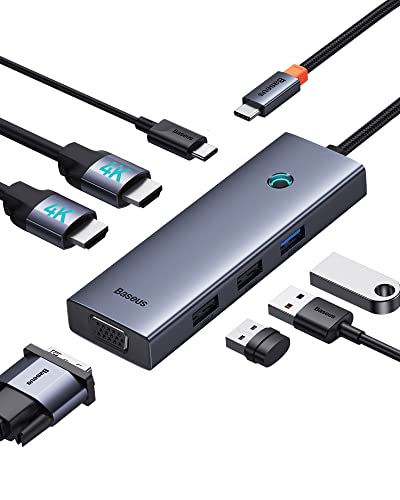
Baseus 7-in-1 USB-C Dock with VGA & Dual HDMI
Best for: Windows users needing triple displays and fast charging
- Host Interface
- USB-C
- Display Support
- Triple
- Max Resolution
- 4K@60Hz
- Power Delivery
- 100W
- Port Count
- 7
- Video Ports
- HDMI, VGA
View on Amazon: Baseus 7-in-1 USB-C Dock with VGA & Dual HDMI Affiliate link
This Baseus dock expands your laptop via USB-C with seven ports. It supports triple displays using two HDMI and one VGA output. One HDMI port reaches 4K at 60Hz. The unit includes USB 3.0 and 2.0 data ports. It also provides 100W power delivery to charge your computer. The aluminum alloy body is compact for travel. It suits users needing multiple screens and fast charging.
Pros
- Supports triple monitor setups with HDMI and VGA
- 4K@60Hz output on primary HDMI port
- 100W USB-C power delivery for laptops
- USB 3.0 port for fast data transfer
- Compact aluminum alloy construction
Cons
- macOS users are limited to mirrored displays only
- VGA port does not support 4K resolution
- Requires host device to support video output via USB-C
Good fit if
- You need three external screens for productivity
- You require 100W charging for your laptop
- You use Windows or Linux for extended desktops
Skip if
- You use a Mac and need extended desktops
- You need wireless connectivity like Bluetooth
- Your laptop USB-C port lacks video support
Verdict: Baseus 7-in-1 USB-C Dock VGA offers triple display support and 100W charging for Windows users who need multiple screens. It is a solid choice for desktop expansion but fails for Mac extended desktop workflows.
Specifications side by side
| Spec | Baseus 7-in-1 USB-C Hub with 3 USB-A Ports | Baseus 7-in-1 USB-C Dock with VGA & Dual HDMI |
|---|---|---|
| Host Interface | USB-C | USB-C |
| Display Support | not stated | Triple |
| Max Resolution | 4K@60Hz | 4K@60Hz |
| Power Delivery | 100W | 100W |
| Port Count | 7 | 7 |
| Video Ports | HDMI | HDMI, VGA |
| Max Data Speed | 5Gbps | not stated |
| Resolution | 4K UHD | 4K UHD |
| Connectivity | USB-C, HDMI, USB-A | USB-C, HDMI, VGA |
| Refresh Rate | 60Hz | not stated |
| Features | Card Reader | not stated |
| Dimensions | 5.31 × 1.93 × 0.63 inches | 4.33 × 1.46 × 0.55 inches |
| Weight | not stated | 2.26 ounces |
| Size | 7 in 1 | 6 in 1 |
| Color | Black | not stated |
| Model | 7 in 1 | not stated |
Frequently asked questions
Can the Baseus 7-in-1 USB-C Hub 3 support dual monitors?
No, this model does not support dual monitors. It provides a single HDMI output, allowing you to connect only one external display. This setup is ideal if you need one high-resolution screen for extended desktop use. It does not have the additional video ports required for a multi-monitor workspace.
Does the Baseus 7-in-1 USB-C Dock VGA support Mac extended displays?
No, this dock is not suitable for Mac extended desktop workflows. While it supports triple displays for Windows users, it fails to provide the necessary functionality for macOS extended modes. If you use a Mac and need extended displays, this specific dock configuration will not meet your requirements.
Which hub includes SD and TF card readers?
The Baseus 7-in-1 USB-C Hub with 3 USB-A Ports includes dedicated SD and TF card slots. This allows you to transfer photos and videos directly from memory cards without extra adapters. The other model, the USB-C Dock with VGA, lacks these card reader slots entirely.
What is the maximum video resolution for both hubs?
Both devices support 4K UHD video resolution at a 60Hz refresh rate. This specification ensures clear and smooth image quality for standard 4K monitors. You can connect a single 4K display to either hub and expect consistent performance for professional tasks or media consumption.
Do both hubs support 100W power delivery?
Yes, both hubs support 100W power delivery. This feature allows you to charge your laptop while using the hub. You can pass through sufficient power to keep your device running during intensive tasks. This shared specification ensures you do not lose charging capability regardless of which model you choose.
Which hub is larger in physical dimensions?
The Baseus 7-in-1 USB-C Hub with 3 USB-A Ports is larger. It measures 5.31 inches in length and 1.93 inches in width. The USB-C Dock with VGA is more compact, measuring 4.33 inches in length and 1.46 inches in width. The dock also weighs 2.26 ounces.
Can I connect a VGA monitor to the Baseus 7-in-1 USB-C Hub 3?
No, the Baseus 7-in-1 USB-C Hub 3 does not have a VGA port. It only features HDMI output for digital displays. If you need to connect an older VGA monitor, you must use the USB-C Dock with VGA model, which includes the necessary analog video port.