ASUS ZenScreen 16-Inch Portable Monitor vs ASUS ZenScreen 15.6-Inch USB-C Monitor (2026): Key Differences
As an Amazon Associate we earn from qualifying purchases. Links on this page are affiliate links.
You are comparing the asus zenscreen 16 inch portable monitor vs zenscreen 15 6 inch USB c. Both units offer a 15.6-inch Full HD IPS display with Eye Care technology. The main difference lies in their physical design and power approach. One model includes a foldable smart case that acts as a stand. The other is significantly lighter and features a tripod mount. These distinctions affect how you carry and position the screen.
Key differences
| Aspect | ASUS ZenScreen 16-Inch Portable Monitor | ASUS ZenScreen 15.6-Inch USB-C Monitor |
|---|---|---|
| Weight | 3.2 lbs | 1.72 lbs |
| Stand/Case | Foldable lite smart case with stand | Foldable sleeve with tripod socket |
| Auto-Rotation | Hardware sensor | Software (Windows only) |
| Power | Hybrid-signal (USB-C or A) | USB Type-C (DP Alt mode) |
Which one should you choose?
Choose ASUS ZenScreen 16-Inch Portable Monitor if
- You want a built-in case that props the screen up in portrait or landscape mode without extra software.
- You need compatibility with older laptops that only have USB Type-A ports.
Choose ASUS ZenScreen 15.6-Inch USB-C Monitor if
- You prioritize lightweight portability and need a monitor under two pounds.
- You plan to mount the screen on a tripod or arm using the rear socket.
Verdict: Choose the MB16ACE if you prefer a complete package with a protective case that doubles as a stand and need broader port compatibility. Select the MB166C if your priority is minimal weight and you intend to use a tripod mount for your setup.
ZenScreen 16 vs 15.6 Key Differences
Weight and portability
The ASUS ZenScreen 16-Inch Portable Monitor weighs 3.2 pounds, while the ASUS ZenScreen 15.6-Inch USB-C Monitor is significantly lighter at 1.72 pounds. This difference matters if you carry your setup in a backpack or shoulder bag daily. The lighter model reduces strain on your shoulders during commutes or travel. Both units are thin, with the 16-inch model at 0.31 inches and the 15.6-inch model at 0.46 inches thick. The 15.6-inch version offers a more compact profile for tight spaces. If minimal weight is your priority, the 15.6-inch model has the clear advantage here.
Stand and case design
The ASUS ZenScreen 16-Inch Portable Monitor comes with a foldable lite smart case that doubles as a stand. It props the screen up in both portrait and landscape modes without needing separate accessories. The ASUS ZenScreen 15.6-Inch USB-C Monitor includes a foldable sleeve and an embedded tripod socket on the rear. This tripod mount allows for flexible positioning on desks or tables. The 16-inch model’s integrated case is convenient for quick setup. The 15.6-inch model offers versatility through its tripod socket for different mounting options. Each design serves a different preference for stability and portability.
Auto-rotation support
Both monitors feature auto-rotation, but the implementation differs. The ASUS ZenScreen 16-Inch Portable Monitor senses orientation and switches between landscape and portrait modes automatically. It does not require additional software for this basic function. The ASUS ZenScreen 15.6-Inch USB-C Monitor also auto-rotates but relies on DisplayWidget software. This feature only works with Windows operating systems. If you use macOS or other systems, the 15.6-inch model may not offer automatic rotation without driver installation. The 16-inch model provides a simpler, hardware-level experience for orientation changes.
Power and connectivity
The ASUS ZenScreen 16-Inch Portable Monitor uses a hybrid-signal solution. It supports power and video transmission through a single USB Type-C or Type A port. This allows compatibility with a wider range of older laptops. The ASUS ZenScreen 15.6-Inch USB-C Monitor connects via USB Type-C with DP Alt mode. It is USB-powered for convenience. The 16-inch model’s hybrid approach ensures you can use it with devices that have limited USB-C power delivery. The 15.6-inch model requires a compatible USB-C port for both video and power. The 16-inch model offers broader compatibility for varied laptop setups.
Dimensions and footprint
The ASUS ZenScreen 16-Inch Portable Monitor measures 14.2 inches in length and 8.91 inches in width. The ASUS ZenScreen 15.6-Inch USB-C Monitor measures 14.2 inches in length and 8.88 inches in width. Both screens share the same diagonal size and resolution. The width difference is minimal, affecting desk space only slightly. The 15.6-inch model is marginally narrower. Both fit standard laptop bags. The height of the 16-inch model is 0.31 inches, while the 15.6-inch model is 0.46 inches. The 16-inch model is slimmer. For most users, the footprint is nearly identical, making this a tie in practical terms.
Eye Care technology
Both monitors include ASUS Eye Care Technology. They are TÜV Rheinland-certified for Flicker-free and Low Blue Light performance. This ensures a comfortable viewing experience during long work sessions. The specifications for eye care are identical for both models. Neither model has additional screen protection features listed in the data. The viewing quality and eye comfort are equivalent. You get the same protection against screen flicker and blue light emission on either device. This aspect does not differentiate the two products.
Which portable monitor suits your needs
Travelers prioritizing minimal weight
The ASUS ZenScreen 15.6-Inch USB-C Monitor weighs only 1.72 pounds. This makes it significantly easier to carry in a bag compared to the heavier alternative. Its slim profile and light mass reduce fatigue during commutes. If your main goal is to add a screen without adding bulk to your load, this lighter model is the practical choice for daily transport.
Users needing a sturdy stand
The ASUS ZenScreen 16-Inch Portable Monitor includes a foldable smart case that doubles as a stand. This allows you to prop the monitor up in portrait or landscape modes without needing external supports. The integrated design keeps your setup organized. If you want a self-contained solution that handles both protection and viewing angles, this model offers superior structural versatility.
Those wanting automatic rotation
The ASUS ZenScreen 16-Inch Portable Monitor features auto-rotation display technology that senses orientation and switches between landscape and portrait modes. This hardware-level automation works without requiring additional software drivers. You get immediate flexibility when changing screen direction. If you prefer a seamless experience that adapts to your physical positioning without software configuration, this model provides that convenience.
The products compared

ASUS ZenScreen 16-Inch Portable Monitor
Best for: Users prioritizing 1080p clarity and portability
- Screen Size
- 15.6"
- Resolution
- 1920 x 1080
- Panel Type
- IPS
- Connectivity
- USB-C
- Weight
- 3.2 lbs
- Size
- 16 Inch
View on Amazon: ASUS ZenScreen 16-Inch Portable Monitor Affiliate link
This ASUS ZenScreen features a 15.6-inch Full HD (1920 x 1080) IPS display. It uses a single USB-C connection for both power and video. The panel supports auto-rotation between landscape and portrait modes. A foldable case acts as a stand. It weighs 3.2 lbs. This setup suits users needing a compact, high-resolution secondary screen for travel or office use.
Pros
- 1920 x 1080 Full HD IPS panel
- Single USB-C cable for power and video
- Auto-rotation for portrait or landscape viewing
- Foldable case doubles as a stand
Cons
- 15.6-inch size is smaller than the 16-inch alternative
- 3.2 lbs weight is heavier than some ultralight options
- Only one USB-C port limits direct hub connections
Good fit if
- You need a high-resolution 1080p portable screen
- You prefer a single USB-C cable for simplicity
- You want a monitor that rotates for portrait work
Skip if
- You require a larger 16-inch display area
- You need multiple input ports like HDMI or DisplayPort
- You prioritize the lightest possible weight under 3 lbs
Verdict: ASUS ZenScreen 15.6-Inch Portable Monitor delivers sharp 1080p visuals in a compact form. It fits buyers who value screen clarity and flexible orientation over maximum size.
ASUS ZenScreen 15.6-Inch USB-C Monitor
Best for: Travelers needing a lightweight secondary display
- Screen Size
- 15.6"
- Resolution
- 1080P
- Panel Type
- IPS
- Connectivity
- USB Type-C
- Weight
- 1.72 pounds
- Dimensions
- 8.88 × 14.2 × 0.46 inches
View on Amazon: ASUS ZenScreen 15.6-Inch USB-C Monitor Affiliate link
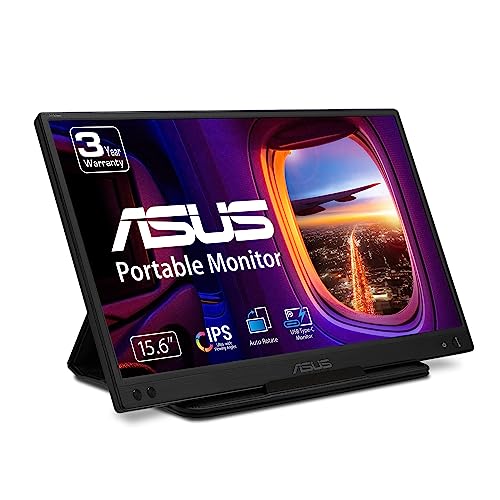
The ASUS ZenScreen 15.6-Inch USB-C Monitor (MB166C) is a portable display designed for mobile productivity. It features a 15.6-inch Full HD IPS panel with an anti-glare finish. The device connects via a single USB Type-C cable, which handles both data and power. It weighs 1.72 pounds and includes a foldable sleeve. Eye Care technology reduces flicker and blue light for comfortable viewing.
Pros
- 15.6-inch Full HD IPS display for clear visuals
- Single USB-C connection simplifies setup
- Lightweight 1.72-pound design for portability
- TÜV Rheinland-certified Eye Care reduces eye strain
Cons
- 15.6-inch screen is smaller than the 16-inch alternative
- Requires compatible USB-C devices for power and signal
- Auto-rotate function is limited to Windows operating systems
Good fit if
- You need a compact second screen for travel
- You want a lightweight display under 2 pounds
- You prefer a simple single-cable connection
Skip if
- You require a larger 16-inch viewing area
- You use a non-USB-C device without an adapter
- You need auto-rotation on macOS or Linux
Verdict: The ASUS ZenScreen 15.6-Inch USB-C Monitor is a practical pick for users who prioritize portability and a straightforward USB-C connection over a larger screen size.
Specifications side by side
| Spec | ASUS ZenScreen 16-Inch Portable Monitor | ASUS ZenScreen 15.6-Inch USB-C Monitor |
|---|---|---|
| Screen Size | 15.6" | 15.6" |
| Resolution | 1920 x 1080 | 1080P |
| Panel Type | IPS | IPS |
| Connectivity | USB-C | USB Type-C |
| Weight | 3.2 lbs | 1.72 pounds |
| Size | 16 Inch | 8.9"x14.2"x0.5" |
| Dimensions | 14.2 × 8.91 × 0.31 inches | 8.88 × 14.2 × 0.46 inches |
| Color | Dark Gray | BLACK |
| Model | MB16ACE | MB166C |
Frequently asked questions
Does the 16-inch ZenScreen support portrait mode?
Yes, the ASUS ZenScreen 16-Inch Portable Monitor supports flexible orientation. Its 1080p FHD IPS panel allows you to rotate the screen for vertical content. This feature is useful for reading documents or browsing social media. The compact 16-inch form factor maintains stability during rotation.
Is the 15.6-inch model better for travel?
The ASUS ZenScreen 15.6-Inch USB-C Monitor is lighter for travel. It weighs 1.72 pounds, compared to the 3.2-pound 16-inch model. Its compact dimensions of 8.88 by 14.2 inches fit easily into bags. You will notice less strain when carrying it daily.
Do both monitors use USB-C connectivity?
Both monitors rely on USB-C connectivity. This single cable handles video input and power delivery. You can connect them directly to compatible laptops. The 16-inch model uses the MB16ACE model, while the 15.6-inch version uses the MB166C model. Both ensure a clean setup.
What is the resolution difference between them?
There is no resolution difference. Both units offer 1080p FHD clarity. The 16-inch screen provides slightly more viewing area, while the 15.6-inch model offers a standard aspect ratio. Both use IPS panels for consistent color and wide viewing angles. Text remains sharp on both.
Which one has a thicker profile?
The 16-inch model has a thicker profile. It measures 0.31 inches in height. The 15.6-inch USB-C variant is slightly thicker at 0.46 inches. Despite this, both remain slim enough for portable use. The 16-inch unit weighs more due to its larger chassis.
Can I use the 16-inch monitor for gaming?
You can use the 16-inch monitor for casual gaming. Its 1080p FHD IPS panel delivers clear visuals. The USB-C connection ensures low latency with compatible devices. However, it is not designed for high-refresh-rate competitive gaming. It works best for single-player games or media consumption.
Does the 15.6-inch monitor come in black?
Yes, the ASUS ZenScreen 15.6-Inch USB-C Monitor is available in black. Its dark gray counterpart is the 16-inch model. The black finish on the 15.6-inch unit helps hide fingerprints. It maintains a professional look in office or travel environments.