ASUS ZenScreen 15.6-Inch USB-C Monitor Review: Specs, Pros and Cons
As an Amazon Associate we earn from qualifying purchases. Links on this page are affiliate links.
This asus zenscreen 15 6 inch USB c monitor review covers the MB166C. It is a portable display built for mobile workflows. The screen measures 15.6 inches with a 1080p Full HD resolution. It uses an IPS panel for consistent color and viewing angles. The device connects via a single USB Type-C port. This single-cable setup delivers both video signals and power. The monitor weighs 1.72 pounds and fits in a foldable sleeve. It is designed to be thin and light for travel.
What stands out
- 15.6-inch IPS panel with 1080p Full HD resolution
- Single USB Type-C connection for video and power
- TÜV Rheinland-certified Flicker-free and Low Blue Light technologies
- Embedded tripod socket on the rear for versatile mounting
- Auto-rotate feature via DisplayWidget software for portrait or landscape use
Who it fits
Good fit for
This monitor suits professionals who need a secondary screen while traveling. The USB-C connectivity works well with modern laptops and tablets that support DisplayPort Alt mode. The IPS panel provides good color accuracy for general work. The eye care features help reduce strain during long hours. The tripod mount allows for stable placement on desks or tables. It is ideal for users who want a lightweight, plug-and-play solution without complex cable management.
Who should skip it
You should look elsewhere if you need high refresh rates for gaming. The data does not list a refresh rate above 60Hz. If you require built-in speakers, this model lacks them in the specifications. Users needing HDMI inputs will find the USB-C only connection limiting. Those who prefer a built-in battery for wireless operation should choose a different variant. The auto-rotate feature also requires Windows OS and specific software.
Verdict: The ASUS ZenScreen MB166C offers a solid 1080p IPS experience in a portable form factor. It is a practical choice for mobile workers who prioritize connectivity and screen quality.
ASUS ZenScreen 15.6 Specs Explained
Screen Size: 15.6"
This diagonal measurement gives you a desktop-like workspace in a portable form. A 15.6-inch display offers ample room for spreadsheets, code, or video editing timelines without feeling cramped. You can comfortably split two windows side by side. This size balances portability with productivity, making it larger than typical 13-inch laptop screens but still thin enough for travel.
Resolution: 1080P
Full HD resolution provides 1920 by 1080 pixels of clarity. Text remains sharp and readable for documents or web browsing. Images appear detailed enough for casual media consumption. This standard resolution is common in portable monitors, ensuring compatibility with most laptops and consoles. It offers a good balance between visual quality and performance demands on your host device.
Panel Type: IPS
In-Plane Switching technology delivers consistent color reproduction and wide viewing angles. You can view the screen from the side without colors washing out or contrast dropping. This makes the monitor suitable for collaborative work or casual use where you might not sit directly in front of it. IPS panels are preferred for tasks requiring color accuracy.
Connectivity: USB Type-C
This single cable handles both video signal and power delivery for compatible devices. You avoid carrying multiple power bricks and adapters. Simply plug into a USB-C port on your laptop or dock to activate the display. This streamlined connection reduces cable clutter on your desk or while traveling. It is the modern standard for portable displays.
Weight: 1.72 pounds
Weighing just over a pound, this monitor is lightweight enough for daily transport. You can easily slip it into a laptop bag or backpack without adding significant bulk. This low weight supports true mobility, allowing you to set up a dual-screen workspace in cafes, hotels, or offices. It is lighter than most traditional monitors and many competing portable units.
Design and Build Quality
The ASUS ZenScreen MB166C prioritizes portability through its physical dimensions and weight. According to the listing, the unit measures 14.2 inches wide, 8.88 inches long, and 0.46 inches thick. It weighs just 1.72 pounds. This slim profile allows you to slide the monitor into a backpack or briefcase without adding significant bulk. The compact size ensures it fits easily on small desks or cramped airplane trays.
The display features an anti-glare finish, which helps reduce reflections in bright environments. This matte coating is practical for use near windows or under harsh office lighting. The black color scheme offers a neutral look that blends into most setups. The rear of the unit includes an embedded tripod socket. This feature lets you mount the screen on a stand for a stable, hands-free viewing angle.
A foldable sleeve is included for versatility. You can use the sleeve as a stand to prop the monitor up at an ergonomic height. The design supports landscape and portrait orientations. The monitor automatically detects orientation changes via DisplayWidget software on Windows. This flexibility lets you adjust the layout to match your task, whether you are reading documents or watching video content. The build focuses on utility rather than premium materials.
Setup and Everyday Use
You connect the ASUS ZenScreen MB166C using a single USB Type-C cable. This connector supports DisplayPort Alternate Mode, which handles both video signals and power delivery. You do not need a separate power adapter for standard operation. This simplifies your desk setup by reducing cable clutter. The display relies on your host device to provide the necessary energy. If your laptop or tablet supports USB-C power output, the monitor turns on immediately upon connection. The physical design includes a foldable sleeve that doubles as a stand. You can prop the screen on a flat surface for immediate use. The listing also notes an embedded tripod socket on the rear. This allows you to mount the display on a stand for fixed positions. Software plays a role in your daily workflow. The included DisplayWidget software enables automatic orientation switching. You can rotate the screen between landscape and portrait modes without adjusting physical mounts. This feature works specifically with Windows operating systems. The IPS panel ensures that colors remain consistent even if you view the screen from an angle. This is useful when sharing your display with colleagues. The anti-glare coating helps maintain visibility in bright environments. You can use the monitor for extended periods thanks to the TÜV Rheinland-certified flicker-free technology. This reduces eye strain during long work sessions. The compact 15.6-inch size fits easily into most laptop bags. You can take this portable monitor to coffee shops or client meetings without significant bulk. The setup process is straightforward and requires no complex drivers for basic functionality.
Before You Buy This Monitor
Before you buy, verify your device supports USB-C DisplayPort Alt Mode. This monitor draws power and video through that single connection. If your laptop only has USB-A, you will need a compatible adapter to get it working. Check your operating system if you want to use the auto-rotate feature. The DisplayWidget software for landscape-to-portrait switching is limited to Windows. You should also confirm that your port provides enough power. Some older ports may not supply sufficient current for stable display output. Keep the included sleeve handy to protect the screen when traveling. This model fits well into setups where you need a second screen without adding bulk. It complements the other options by offering a simple, plug-and-play experience. Just ensure your workflow relies on basic connectivity rather than advanced software features. This approach keeps your gear minimal and ready for mobile use.
Check before you buy
- Confirm your device has a USB-C port with DisplayPort Alt Mode support
- Check if your laptop port provides enough power for stable operation
- Verify you are using Windows if you need the auto-rotate feature
- Ensure you have a compatible adapter if your laptop only has USB-A
The product at a glance
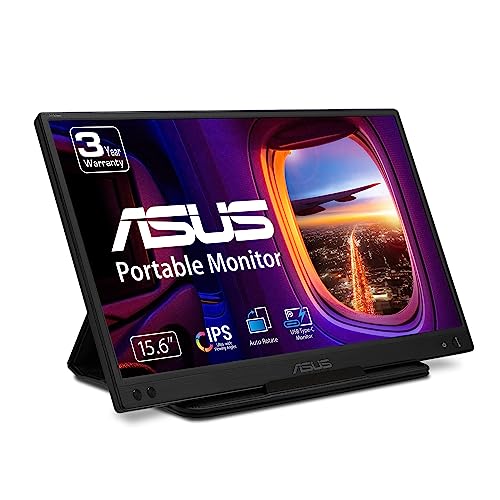
ASUS ZenScreen 15.6-Inch USB-C Monitor
Best for: mobile Windows setups using single-cable USB-C
- Screen Size
- 15.6"
- Resolution
- 1080P
- Panel Type
- IPS
- Connectivity
- USB Type-C
- Weight
- 1.72 pounds
- Dimensions
- 8.88 × 14.2 × 0.46 inches
View on Amazon: ASUS ZenScreen 15.6-Inch USB-C Monitor Affiliate link
The ASUS ZenScreen offers a 15.6-inch 1080p IPS anti-glare display for portable dual-screen setups. Weighing 1.72 pounds, it runs power and video through a single USB-C DP Alt Mode connection. It includes an embedded tripod socket and a foldable sleeve. This monitor suits you if you need a lightweight mobile workstation display that easily slips into a laptop bag.
Pros
- Lightweight build at 1.72 pounds and 0.46 inches thick
- Single USB-C connection handles power and video via DP Alt mode
- Full HD 1080p IPS panel with anti-glare coating
- Built-in tripod socket on the rear for mounting
Cons
- Automatic screen rotation requires drivers and works only on Windows
- Lacks an HDMI port for devices without USB-C DP Alt mode
Good fit if
- You use a laptop with a USB-C port supporting DisplayPort Alternate Mode
- You want a lightweight 1.72-pound secondary screen with a standard tripod mount
Skip if
- You need native HDMI connectivity for your video source
- You require automatic display rotation on non-Windows operating systems
Verdict: ASUS ZenScreen 15.6-Inch USB-C Monitor delivers dependable 1080p screen expansion for Windows laptop users who travel light and connect exclusively via USB-C.
Specifications side by side
| Spec | ASUS ZenScreen 15.6-Inch USB-C Monitor |
|---|---|
| Screen Size | 15.6" |
| Resolution | 1080P |
| Panel Type | IPS |
| Connectivity | USB Type-C |
| Weight | 1.72 pounds |
| Dimensions | 8.88 × 14.2 × 0.46 inches |
| Size | 8.9"x14.2"x0.5" |
| Color | BLACK |
| Model | MB166C |
Frequently asked questions
Is this portable monitor good for Mac users?
The ASUS ZenScreen MB166C works with Mac devices that support USB-C DisplayPort Alt Mode. It delivers Full HD visuals on an IPS panel. However, the listing identifies it as ideal for Windows users. You should verify your Mac’s port compatibility before purchasing to ensure seamless connectivity and power delivery.
Does the ASUS ZenScreen have built-in speakers?
The provided specifications do not mention built-in speakers for the MB166C model. You should plan to use external audio sources or headphones for sound. The monitor focuses on visual output through its 15.6-inch IPS display. This design choice keeps the unit lightweight and thin for easier transport.
What is the maximum resolution of this display?
This monitor offers a maximum resolution of 1080p Full HD. The 15.6-inch IPS panel provides sharp text and clear images. This resolution is suitable for productivity tasks like spreadsheets or web browsing. It ensures you have enough screen real estate for multitasking without needing a larger desktop setup.
Can I use this monitor with a PlayStation or Xbox?
You can connect this portable monitor to consoles that output video via USB-C. The MB166C accepts video signals through its USB-C port. Check your console’s specifications to confirm USB-C video support. This setup allows you to enjoy games on a larger, portable screen while traveling or in different rooms.
How thick is the ASUS ZenScreen MB166C?
The device measures 0.46 inches in height. This slim profile contributes to its overall portability. Combined with its 1.72-pound weight, it is easy to carry in a laptop bag. The compact dimensions make it less obtrusive when setting up a temporary workspace in various locations.
Does this monitor require a separate power brick?
No, it does not require a separate power brick for standard operation. The single USB-C cable handles both video transmission and power delivery. This simplifies your setup by reducing cable clutter. You only need a host device with sufficient USB-C power output to run the display effectively.