Anker vs Tobenone Docking Stations: Which Brand Fits You?
As an Amazon Associate we earn from qualifying purchases. Links on this page are affiliate links.
Choosing between an anker vs tobenone docking station depends on your port and display needs. Both devices expand a single USB-C connection into a full workstation. They both support 4K video output and pass-through charging. The main difference lies in capacity. The Anker model offers eight ports with dual monitor support. The Tobenone model provides eighteen ports with triple display capability. Your choice hinges on how many screens and peripherals you must connect simultaneously.
Key differences
| Aspect | Anker PowerExpand 8-in-1 Dual HDMI USB-C Hub | TobenONE 18-in-1 Triple Display Dock |
|---|---|---|
| Port Count | 8 ports | 18 ports |
| Display Support | Dual monitors | Triple monitors |
| Power Delivery | 85W | 100W |
| Ethernet | Included | Included |
| Mac Compatibility | Supported (mirrored) | Not recommended |
Which one should you choose?
Choose Anker PowerExpand 8-in-1 Dual HDMI USB-C Hub if
- You need a compact hub for dual monitors and macOS compatibility.
- You prefer a lighter device that fits easily in a bag.
- You want a brand with an 18-month warranty included.
Choose TobenONE 18-in-1 Triple Display Dock if
- You require three external displays for complex workflows.
- You need to connect nine USB devices to your laptop.
- You want maximum 100W power delivery for high-power laptops.
Verdict: The Anker dock suits users who need reliable dual-monitor support and macOS compatibility in a small form factor. The Tobenone dock is better for power users who need to drive three screens and connect numerous peripherals. Select the Anker for portability and Mac users, or the Tobenone for maximum expansion and triple displays.
Port Count and Display Support
Port Count
The TobenONE offers significantly more expansion options with 18 total ports. This includes nine USB connections, three HDMI outputs, an Ethernet port, and card readers. The Anker model provides eight ports in total. It features two HDMI outputs, two USB-A data ports, an Ethernet port, and a card reader. If you need to connect many peripherals like multiple drives, keyboards, and mice simultaneously, the TobenONE gives you more physical connections. The Anker is sufficient for a standard dual-monitor setup with a few accessories.
Display Support
Display configuration is the primary differentiator between these two docks. The TobenONE supports triple monitors, allowing you to run three 4K displays at 60Hz. This is ideal for video editing or complex spreadsheet work. The Anker supports dual monitors. It can output 4K at 60Hz on a single screen or 4K at 30Hz on two screens. For macOS users, the Anker mirrors the display on both external monitors. If you require three distinct workspaces, the TobenONE is the only choice here.
Power Delivery
Both docks support pass-through charging, but the maximum wattage differs. The TobenONE handles up to 100W of power delivery. This ensures your laptop stays charged during heavy use. The Anker supports up to 85W of pass-through charging. This is still high enough for most ultrabooks and many larger laptops. You will need a compatible 100W charger for the TobenONE and a 100W charger for the Anker to reach its maximum potential. The TobenONE offers slightly more headroom for power-hungry devices.
Compatibility
Operating system support varies between the two brands. The Anker dock is compatible with Windows 10 and 11, ChromeOS, and Linux systems. It also works with Thunderbolt and USB4 connections. The TobenONE is explicitly designed for Windows and ChromeOS laptops. The manufacturer does not recommend it for Mac users. If you use a Linux machine or a Thunderbolt-enabled laptop, the Anker is the safer choice. Mac users should verify compatibility carefully with the TobenONE.
Build and Size
The physical dimensions and weight differ notably. The Anker is compact, measuring 4.65 inches in length, 2.01 inches in width, and 0.69 inches in height. It weighs just 3.2 ounces. The TobenONE is larger and heavier, measuring 4.9 inches long, 3.5 inches wide, and 1.6 inches high. It weighs 10.9 ounces. The Anker is easier to carry in a laptop bag. The TobenONE is more substantial, likely due to the additional ports and triple display circuitry.
Which Docking Station Fits Your Needs
Users needing triple display setups
The TobenONE supports triple 4K@60Hz monitors. This allows you to spread your workflow across three screens. The Anker model caps out at dual displays. If your work requires extensive screen real estate for video editing or complex spreadsheets, the extra monitor capability is a clear advantage. You get more visual space for multitasking.
Buyers wanting Ethernet connectivity
The Anker hub includes a dedicated Ethernet port. This provides a stable wired internet connection without needing an adapter. The TobenONE listing does not mention an Ethernet port in its key specs or features. If you prefer a direct network cable connection for reliability, the Anker model offers this specific hardware integration directly on the device.
Users prioritizing portability and weight
The Anker unit weighs only 3.2 ounces and measures 4.65 inches long. The TobenONE is significantly heavier at 10.9 ounces and larger in footprint. If you carry your docking station in a laptop bag frequently, the Anker’s compact size and lighter weight make it easier to transport. It takes up less space in your gear.
Those needing maximum USB ports
The TobenONE provides nine USB ports. This allows you to connect many peripherals like keyboards, mice, and drives simultaneously. The Anker model offers only two USB-A data ports. If you have numerous USB devices to manage, the TobenONE’s higher port count reduces the need for additional USB hubs or adapters.
The products compared

Anker PowerExpand 8-in-1 Dual HDMI USB-C Hub
Best for: Dual 4K display setups with Ethernet needs
- Host Interface
- USB-C
- Display Support
- Dual
- Max Resolution
- 4K @ 60Hz
- Power Delivery
- 85W
- Port Count
- 8
- Video Ports
- HDMI
View on Amazon: Anker PowerExpand 8-in-1 Dual HDMI USB-C Hub Affiliate link
This Anker 8-in-1 hub expands a single USB-C port into dual HDMI outputs and essential connectivity. It supports 4K@60Hz on one screen or 4K@30Hz on two. The device passes up to 85W of power through its PD-IN port. It includes Ethernet and card readers for added utility. This setup suits users who need reliable dual displays without complex docking stations.
Pros
- Supports 4K@60Hz resolution on a single HDMI display
- Passes up to 85W of power delivery through the USB-C port
- Includes dual HDMI, Ethernet, and SD card reader ports
- Compatible with Windows 10/11, ChromeOS, and Thunderbolt connections
Cons
- Dual monitor output is limited to 4K@30Hz per display
- Not compatible with Linux operating systems
- Requires a 100W PD wall charger for full pass-through charging
Good fit if
- You need a compact hub for dual 4K displays
- You use Windows or ChromeOS laptops with USB-C
- You require built-in Ethernet and SD card slots
Skip if
- You need triple monitor support for three separate screens
- You use a Linux-based laptop
- You require 4K@60Hz on both monitors simultaneously
Verdict: Anker 8-in-1 USB-C Hub Dual 4K fits users who prioritize a simple, reliable dual-display setup with Ethernet access. It is ideal for standard Windows or ChromeOS laptops that do not need triple-screen expansion.
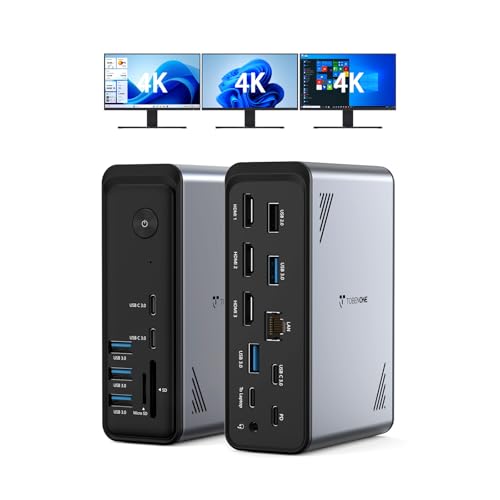
TobenONE 18-in-1 Triple Display Dock
Best for: Windows users needing triple 4K displays
- Host Interface
- USB-C
- Display Support
- Triple
- Max Resolution
- 4K@60Hz
- Power Delivery
- 100W
- Port Count
- 18
- Video Ports
- HDMI
View on Amazon: TobenONE 18-in-1 Triple Display Dock Affiliate link
The TobenONE 18-in-1 docking station expands your laptop into a triple monitor setup. It supports three 4K displays at 60Hz and includes nine USB ports. The unit provides 100W power delivery to keep your device charged. It is designed for Windows and Chrome OS laptops with full-featured USB-C ports. This hub helps reduce cable clutter on your desk.
Pros
- Supports triple 4K@60Hz displays
- Includes 18 total ports
- Provides 100W power delivery
- Features nine USB connections
Cons
- Not compatible with Mac users
- Power adapter is not included
- Requires a power supply over 65W
Good fit if
- You need three external monitors
- You use a Windows laptop
- You want to reduce desk cables
Skip if
- You own a Mac computer
- You need a included power adapter
- You require macOS compatibility
Verdict: TobenONE 18-in-1 Triple 4K Dock suits Windows users who need a triple monitor setup and extensive connectivity. It is a solid choice for those who already have a sufficient power supply.
Specifications side by side
| Spec | Anker PowerExpand 8-in-1 Dual HDMI USB-C Hub | TobenONE 18-in-1 Triple Display Dock |
|---|---|---|
| Host Interface | USB-C | USB-C |
| Display Support | Dual | Triple |
| Max Resolution | 4K @ 60Hz | 4K@60Hz |
| Power Delivery | 85W | 100W |
| Port Count | 8 | 18 |
| Video Ports | HDMI | HDMI |
| Ethernet Speed | 1Gbps | not stated |
| Resolution | 4K UHD | 4K UHD |
| Connectivity | USB-C, HDMI, Ethernet | USB-C, HDMI, Ethernet |
| Features | Card Reader | not stated |
| Use | not stated | Office |
| Dimensions | 4.65 × 2.01 × 0.69 inches | 4.9 × 3.5 × 1.6 inches |
| Weight | 3.2 ounces | 10.9 ounces |
| Size | 8-in-1 USB C Hub | Without power supply |
| Color | Gray | Grey-docking station for Windows |
| Model | A83800A1 | not stated |
Frequently asked questions
Does the Anker hub support three monitors?
No, it supports only dual monitors. This model provides two HDMI outputs for a dual display setup. It is designed for users who need two screens rather than three. If you require triple-screen expansion, this device will not meet that specific need.
Can the TobenONE dock run three 4K screens?
Yes, it supports triple 4K displays. The device is built for Windows users needing extensive screen real estate. It connects to three monitors simultaneously. This makes it suitable for workflows that require spreading tasks across multiple high-resolution windows.
Is the Anker docking station heavy?
It is lightweight and portable. The unit weighs just 3.2 ounces. Its compact dimensions allow it to fit easily into a laptop bag. This makes it a practical choice for users who travel frequently or need a mobile workstation setup.
Does the TobenONE require a separate power source?
Yes, it requires an external power supply. The specifications note the device size is listed without the power supply. You must connect it to a power source for full functionality. Ensure your workspace has an available outlet near your desk.
Which brand offers more USB ports?
The TobenONE offers significantly more ports. It provides 18 total connections, including nine USB ports. The Anker model provides eight ports in total. If you need to connect many peripherals, the TobenONE provides greater expansion capacity for your devices.
Can I use the Anker hub with ChromeOS?
Yes, it works with standard ChromeOS laptops. The device is compatible with Windows and ChromeOS systems. It expands a single USB-C connection into multiple outputs. You can connect displays and Ethernet cables to enhance your laptop's capabilities on these platforms.