Anker vs Acer Docking Stations: Which Brand Fits You?
As an Amazon Associate we earn from qualifying purchases. Links on this page are affiliate links.
When comparing an anker vs acer docking station, you are looking at two distinct approaches to expanding your laptop. Both devices connect via USB-C and deliver 4K video output. The main difference lies in their port selection and power delivery. Anker offers a wider array of connectivity options, including Ethernet and dual HDMI ports. Acer focuses on a simpler, five-port design with higher power output. Your choice depends on whether you need more ports or faster charging.
Key differences
| Aspect | Anker PowerExpand 8-in-1 Dual HDMI USB-C Hub | Acer 5-in-1 4K 60Hz USB-C Hub |
|---|---|---|
| Port Count | 8 ports | 5 ports |
| Power Delivery | 85W pass-through | 90W pass-through |
| Display Support | Dual monitors | Single monitor |
| Ethernet | Yes | Not listed |
| Data Speed | Not listed | 5Gbps |
Which one should you choose?
Choose Anker PowerExpand 8-in-1 Dual HDMI USB-C Hub if
- You need to connect two external displays simultaneously.
- You require an Ethernet port for wired internet.
- You want to use SD card readers and multiple USB-A devices.
Choose Acer 5-in-1 4K 60Hz USB-C Hub if
- You prioritize higher pass-through charging for your laptop.
- You prefer a simpler setup with fewer cables.
- You need fast 5Gbps data transfer speeds for external drives.
Verdict: The Anker hub is the better choice if you need a versatile workstation with dual monitors and Ethernet. The Acer hub suits users who want a compact solution with stronger charging capabilities. Choose based on whether your workflow demands more ports or more power.
Anker vs Acer Hub Comparison
Display Support
The Anker PowerExpand 8-in-1 supports dual monitor setups, allowing you to connect two HDMI displays. You can mirror content on both screens at 4K resolution, though macOS users will see identical images on both. The Acer 5-in-1 hub provides a single HDMI port, limiting you to one external display. If you need a second screen for multitasking or extended desktop space, the Anker option is the only choice here. The Acer device is sufficient for single-monitor productivity but lacks the expansion capabilities for a dual-display workflow.
Power Delivery
Both hubs support high-wattage pass-through charging, but the Acer model offers slightly more power. The Acer 5-in-1 hub supports up to 100W input and delivers 90W output to your laptop. The Anker hub provides up to 85W of pass-through charging. For laptops that require higher wattage for performance or fast charging, the Acer device gives you a 5W advantage. Both require a compatible 100W wall charger and cable to achieve their maximum output. This difference is minor for most ultrabooks, but matters for power-hungry workstations.
Connectivity
Anker provides a more comprehensive set of ports for various peripherals. It includes two USB-A data ports, an Ethernet port for wired internet, and both microSD and SD card readers. The Acer hub offers one USB-C 3.0 port and one USB-A 3.0/2.0 port, with no Ethernet or card reader options. If you rely on wired networking or frequently transfer photos from cameras, the Anker hub is more versatile. The Acer design is minimal, focusing on video and basic data transfer while keeping the device smaller and simpler.
Data Speed
The Acer hub specifies a maximum data transfer speed of 5Gbps for its USB-C and USB-A 3.0 ports. The Anker hub lists its ports as USB-A data ports but does not explicitly state the transfer speed in the provided specifications. Without explicit data speed ratings for the Anker device, we cannot confirm if it matches or exceeds the Acer's 5Gbps performance. Both support standard data transfer for peripherals like mice and keyboards, but the Acer provides clearer specifications for high-speed file movement.
Compatibility
Both hubs support Windows, macOS, and ChromeOS, and require USB-C ports with DisplayPort Alt Mode and Power Delivery. However, the Anker hub explicitly states it is not compatible with Linux. The Acer hub does not mention Linux support, nor does it list any operating system exclusions. If you use a Linux-based laptop, the Acer device may be the safer choice since its compatibility is not restricted in the published data. Both devices work well with standard Windows and Mac laptops that support full-featured USB-C connections.
Which docking station fits your needs
You need two external monitors
The Anker unit supports dual HDMI connections, letting you attach two displays simultaneously. While macOS mirrors the screens, Windows users can extend their desktop. This dual-monitor capability makes it the practical choice for workflows requiring expanded screen real estate without additional adapters.
You want faster charging speed
The Acer hub delivers up to 90W of pass-through charging, which is higher than the Anker's 85W limit. This extra power headroom ensures your laptop stays charged during intensive tasks like 3D rendering or long meetings, reducing battery anxiety while you work.
You require Ethernet and card slots
Anker includes an Ethernet port and a combined SD/microSD card reader. These ports are absent on the Acer model. If you rely on wired internet connections or frequently transfer photos from cameras, the Anker’s expanded port count provides necessary connectivity options.
You prefer a simpler setup
The Acer device offers five essential ports in a compact aluminum shell. It eliminates clutter by combining HDMI, USB-C, and USB-A ports into one lightweight unit. This streamlined design is ideal for users who want basic expansion without managing extra cables or unused ports.
The products compared

Anker PowerExpand 8-in-1 Dual HDMI USB-C Hub
Best for: Dual 4K setups with wired Ethernet needs
- Host Interface
- USB-C
- Display Support
- Dual
- Max Resolution
- 4K @ 60Hz
- Power Delivery
- 85W
- Port Count
- 8
- Video Ports
- HDMI
View on Amazon: Anker PowerExpand 8-in-1 Dual HDMI USB-C Hub Affiliate link
This Anker docking station expands a single USB-C port into eight connections. It supports dual 4K displays at 30Hz or a single 4K@60Hz output. The hub delivers 85W pass-through charging and includes an Ethernet port. It works with Windows, ChromeOS, and macOS, though Linux is not supported. The compact gray unit weighs just 3.2 ounces. It suits users needing multiple ports without a large footprint.
Pros
- Supports dual 4K@30Hz displays or single 4K@60Hz output
- Provides 85W USB-C Power Delivery pass-through charging
- Includes built-in Ethernet port for wired internet
- Compact design weighs only 3.2 ounces
Cons
- Dual monitor setup limits resolution to 4K@30Hz
- Not compatible with Linux operating systems
- macOS users can only mirror displays, not extend
Good fit if
- You need an Ethernet port for stable internet
- You want to drive two 4K monitors simultaneously
- You require 85W charging for your laptop
Skip if
- You use a Linux-based operating system
- You need native display extension on macOS
- You require 4K@60Hz on both screens at once
Verdict: Anker 8-in-1 USB-C Hub with Dual HDMI delivers solid expansion for Windows and macOS users who need wired networking. It fits professionals who prioritize dual display support and fast charging over Linux compatibility or higher refresh rates on secondary screens.
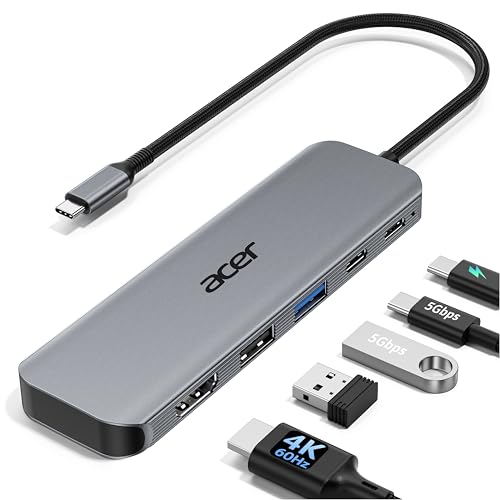
Acer 5-in-1 4K 60Hz USB-C Hub
Best for: 4K@60Hz display and 90W charging needs
- Host Interface
- USB-C
- Max Resolution
- 4K@60Hz
- Power Delivery
- 90W
- Port Count
- 5
- Video Ports
- HDMI 2.0
- Max Data Speed
- 5Gbps
View on Amazon: Acer 5-in-1 4K 60Hz USB-C Hub Affiliate link
The Acer ODK5U0 is a 5-in-1 USB-C hub with an HDMI port supporting 4K@60Hz output. It includes USB-C 3.0 and USB-A 3.0 ports for 5Gbps data transfer, plus a USB 2.0 port. Power delivery provides up to 90W output from a 100W input. The aluminum shell aids cooling. It suits users needing smooth 4K video and fast file transfers.
Pros
- HDMI port supports 4K resolution at 60Hz refresh rate
- USB-C and USB-A 3.0 ports offer 5Gbps data speeds
- Pass-through charging delivers up to 90W to connected laptops
- Aluminum shell design improves heat dissipation during use
Cons
- Does not support ultrawide monitors
- Requires a 100W power adapter for optimal 90W charging
- Only includes one USB-A 2.0 port for peripherals
Good fit if
- You need 4K video output at 60Hz for smooth playback
- You want to charge your laptop while using the hub
- You prefer an aluminum build for better heat management
Skip if
- You require support for ultrawide monitor resolutions
- You need more than one high-speed USB-A port
- You cannot use a 100W power adapter for charging
Verdict: Acer 5-in-1 USB-C Hub delivers reliable 4K@60Hz video and 90W charging for users who prioritize display smoothness and power delivery over extra peripheral ports.
Specifications side by side
| Spec | Anker PowerExpand 8-in-1 Dual HDMI USB-C Hub | Acer 5-in-1 4K 60Hz USB-C Hub |
|---|---|---|
| Host Interface | USB-C | USB-C |
| Display Support | Dual | not stated |
| Max Resolution | 4K @ 60Hz | 4K@60Hz |
| Power Delivery | 85W | 90W |
| Port Count | 8 | 5 |
| Video Ports | HDMI | HDMI 2.0 |
| Max Data Speed | not stated | 5Gbps |
| Ethernet Speed | 1Gbps | not stated |
| Resolution | 4K UHD | 4K UHD |
| Connectivity | USB-C, HDMI, Ethernet | USB-C, HDMI, USB-A |
| Refresh Rate | not stated | 60Hz |
| Features | Card Reader | not stated |
| Dimensions | 4.65 × 2.01 × 0.69 inches | not stated |
| Weight | 3.2 ounces | not stated |
| Size | 8-in-1 USB C Hub | not stated |
| Color | Gray | Grey |
| Model | A83800A1 | ODK5U0 |
Frequently asked questions
Does the Anker hub support dual monitors?
Yes, the Anker PowerExpand 8-in-1 supports dual monitor setups. It features two HDMI ports that allow you to connect two displays simultaneously. This makes it suitable for users who need extended desktop space on Windows systems, though macOS users will mirror the same image on both screens.
What is the maximum resolution for the Acer hub?
The Acer 5-in-1 USB-C Hub supports 4K UHD resolution. It delivers video at a 60Hz refresh rate, ensuring smooth visual performance. This specification is ideal for users who prioritize display clarity and fluid motion over connecting multiple screens at once.
Which docking station offers faster charging speeds?
The Acer 5-in-1 hub provides 90W charging capability. This higher power delivery suits laptops that require more energy for heavy tasks. The Anker unit focuses on port expansion rather than maximum power output, making the Acer choice better for power-intensive workflows.
Is there an Ethernet port on the Anker hub?
Yes, the Anker PowerExpand 8-in-1 includes a wired Ethernet port. This feature is essential for professionals who need stable, high-speed internet connections without relying on Wi-Fi. The Acer model does not list Ethernet connectivity in its specifications, focusing instead on video and data ports.
How many ports does the Anker hub have?
The Anker PowerExpand is an 8-in-1 USB-C hub. It combines video, data, and networking ports into a single compact device. This high port count allows you to connect peripherals like drives and monitors without needing additional adapters or dongles.
Can I use the Acer hub with a laptop?
Yes, the Acer 5-in-1 connects via USB-C, making it compatible with most modern laptops. It delivers 4K video and 90W power delivery through a single cable. This simple setup reduces desk clutter while providing essential display and charging functions for your computer.
Does the Anker hub work with macOS?
Yes, the Anker hub is compatible with macOS. However, you should note that macOS mirrors the display on both HDMI outputs rather than extending the desktop. Windows users can extend their screens for a true dual-monitor experience.
Which hub is better for a single large screen?
The Acer 5-in-1 hub is better for a single large screen. It supports 4K at 60Hz, which offers smoother visuals than lower refresh rates. If you do not need dual monitors or wired Ethernet, this model provides cleaner performance for primary display tasks.