6 Best Alternatives to the Anker 13-in-1 Triple Display USB-C (2026)
As an Amazon Associate we earn from qualifying purchases. Links on this page are affiliate links.
Finding the right anker laptop docking station alternatives depends on your specific port and display needs. The Anker 13-in-1 Triple Display USB-C Dock excels by offering 13 ports, including dual HDMI and DisplayPort outputs, alongside 85W power delivery. It supports triple 1080p displays on Windows or a single 4K@60Hz screen. However, you might prefer a different form factor, higher wattage, or native 4K support across all three monitors.
We selected these alternatives because their core specifications overlap with the Anker model. Each option provides triple monitor expansion and USB-C connectivity. Some include 100W power delivery for faster charging. Others offer 2.5Gbps Ethernet or DisplayLink technology for enhanced compatibility. You can compare port counts, resolution limits, and physical dimensions to find the best fit for your workspace. This list covers various sizes, from compact designs to larger enterprise-grade units, ensuring you have options that match your technical requirements.
How alternatives compare to Anker
Plugable 13-in-1 Triple HDMI Dock
The Plugable 13-in-1 Triple HDMI Dock offers 100W power delivery, which is 15W more than the Anker’s 85W output. This higher wattage supports larger laptops that require more charging power. It also includes enterprise-grade security features like TPM support, which the Anker does not list. The Plugable uses three HDMI ports instead of mixing HDMI and DisplayPort. This simplifies cable management if your monitors only have HDMI inputs. It is slightly larger and heavier than the Anker. You should choose this if you need stronger charging or specific enterprise compliance features for your workplace setup.
MOKiN 13-in-1 Triple HDMI USB-C Dock
The MOKiN dock provides 2.5Gbps Ethernet, which is faster than the Anker’s standard Gigabit connection. This speed is useful for large file transfers or high-bandwidth tasks. It also includes physical status indicator lights, allowing you to see power and connection states without checking software. The MOKiN lacks Thunderbolt certification, relying on standard USB-C. This means it may not support all high-speed peripherals that Thunderbolt devices do. It is a solid choice if you prioritize faster networking and visual status feedback over Thunderbolt compatibility. The triple HDMI setup matches the Anker’s display count but uses a different port configuration.
Plugable 13-in-1 Triple 4K USB-C Dock
The Plugable UD-ULTC4K supports three 4K displays at 60Hz, whereas the Anker limits triple displays to 1080p. This makes it ideal for users needing high resolution across all three screens. It also offers 100W power delivery, providing 15W more charging power than the Anker. The unit is larger and heavier, weighing over a pound. It is designed for stationary desk use rather than portability. If you require three 4K monitors for detailed work like video editing or data analysis, this dock is the better option. You give up some compactness for significant resolution and charging gains.
Selore 13-in-1 USB-C Triple HDMI Dock
The Selore dock is designed for portability, featuring a compact form factor similar to the Anker. It supports triple HDMI outputs, matching the Anker’s display capability. However, it does not list Thunderbolt or USB4 support, relying on standard USB-C connectivity. This may limit compatibility with certain high-end peripherals. It lacks the Anker’s DisplayPort output, using only HDMI for video. This is fine if all your monitors have HDMI inputs. The Selore is a good alternative if you need a smaller footprint and do not require Thunderbolt speeds or DisplayPort connectivity. It focuses on essential triple-monitor expansion for Windows users.
Acer 13-in-1 Triple HDMI USB-C Dock
The Acer dock supports triple 4K displays, offering higher resolution than the Anker’s 1080p triple setup. It includes Gigabit Ethernet, similar to the Anker. The Acer model is larger and designed for desktop use. It does not list Thunderbolt support, using standard USB-C instead. This may affect compatibility with some high-speed devices. The Acer is best for users who need three 4K screens and a stable wired connection. It sacrifices the Anker’s compact vertical design and Thunderbolt compatibility for higher display resolution. If your monitors support 4K and you prioritize screen real estate over portability, this is a strong alternative.
WAVLINK Triple 4K DisplayLink USB-C Dock
The WAVLINK dock supports three 4K displays at 60Hz using DisplayLink technology. This allows high-resolution triple monitoring on laptops that may not natively support it. It includes Gigabit Ethernet for stable internet. The dock is larger and relies on DisplayLink drivers, which the Anker does not need for its native triple display support. This adds software complexity. The WAVLINK is ideal for professionals who need three 4K screens for coding or trading. It gives up the Anker’s plug-and-play simplicity and Thunderbolt support. If you require high-resolution triple displays and can manage DisplayLink drivers, this dock provides superior screen capacity.
Quick picks
Our 7 picks

Anker 13-in-1 Triple Display USB-C Dock
Best for: Windows users needing triple monitor expansion
- Host Interface
- USB-C
- Display Support
- Triple
- Max Resolution
- 4K @ 60Hz
- Power Delivery
- 85W
- Port Count
- 13
- Video Ports
- HDMI, DisplayPort
View on Amazon: Anker 13-in-1 Triple Display USB-C Dock Affiliate link
This Anker docking station expands your laptop into a desktop workstation with 13 ports. It supports triple monitors at 1080p or a single 4K display. You get 85W power delivery for your laptop and 18W for a phone. The compact vertical design saves desk space. It works with Windows, ChromeOS, and Mac, though macOS limits you to mirror mode. It includes an 18-month warranty.
Pros
- 13 ports including 2 HDMI, DisplayPort, and Gigabit Ethernet
- 85W host charging plus 18W PD for accessories
- Supports triple 1080p displays or one 4K@60Hz screen
- Includes 135W power adapter in the box
- Compact vertical design measures 4.9 x 3.5 x 1.6 inches
Cons
- macOS only supports mirror mode, not extended triple displays
- 85W power delivery may be insufficient for high-power laptops
- Ethernet is limited to Gigabit speeds
Good fit if
- You need a single cable to connect three monitors
- You want 85W charging for your laptop
- You use Windows or ChromeOS for extended desktops
Skip if
- You use a Mac and need extended triple displays
- Your laptop requires more than 85W of power
- You need Thunderbolt 5 speeds for data transfer
Verdict: Anker 13-in-1 Triple Display Dock offers a complete port solution for Windows users needing three screens. It is ideal for those who want a clean desk setup with strong charging capabilities.
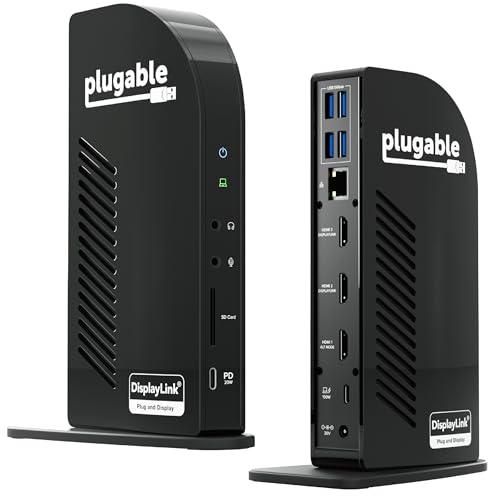
Plugable 13-in-1 Triple HDMI Dock
Best for: Enterprise deployments and Mac triple-monitor setups
- Host Interface
- USB-C
- Display Support
- Triple
- Max Resolution
- 4K @ 30Hz
- Power Delivery
- 100W
- Port Count
- 13
- Video Ports
- HDMI
View on Amazon: Plugable 13-in-1 Triple HDMI Dock Affiliate link
The Plugable UD-ULTCDL is a 13-in-1 docking station designed for triple monitor setups. It supports up to 4K 30Hz on one port and 1920x1200 60Hz on two others. You get 100W laptop charging and 20W device charging. It works with Windows, macOS, and ChromeOS. The unit includes Gigabit Ethernet and an SD card reader. It is built for enterprise and home office use.
Pros
- Supports three extended HDMI displays for productivity
- 100W Power Delivery for laptop charging
- Compatible with Apple Silicon Macs via DisplayLink
- Includes Gigabit Ethernet and SD card reader
- TAA and NDAA compliant for government use
Cons
- HDMI 1 is limited to 4K at 30Hz
- Requires DisplayLink driver installation on Mac
- Does not support protected content playback like Netflix
Good fit if
- You need three monitors on a Windows or Mac laptop
- You require 100W charging for your primary device
- You need Gigabit Ethernet and SD card access
Skip if
- You want 4K 60Hz on all three screens
- You need to watch protected streaming content
- You prefer a plug-and-play Mac experience without drivers
Verdict: Plugable 13-in-1 USB-C Triple Dock delivers reliable triple-monitor expansion for professionals who need robust port selection and enterprise compliance. It fits users who prioritize connectivity and multi-display productivity over high refresh rates on all outputs.

MOKiN 13-in-1 Triple HDMI USB-C Dock
Best for: Users wanting physical status feedback and 2.5Gbps Ethernet
- Host Interface
- USB-C
- Display Support
- Triple
- Max Resolution
- 8K@30Hz
- Power Delivery
- 87W
- Port Count
- 13
- Video Ports
- HDMI
View on Amazon: MOKiN 13-in-1 Triple HDMI USB-C Dock Affiliate link
The MOKiN 13-in-1 dock connects three monitors via HDMI, supporting 8K@30Hz single or 4K@60Hz triple displays. It includes 2.5Gbps Ethernet, 100W PD charging, and 10Gbps data ports. A built-in LCD screen shows connection status. This unit suits users needing high-speed connectivity and visual feedback without external apps.
Pros
- Supports triple 4K@60Hz displays on macOS or Windows
- Built-in LCD display shows port status and firmware
- 2.5Gbps Ethernet port for faster wired networking
- 10Gbps data transfer speeds on USB-C and USB-A ports
- 100W Power Delivery input for laptop charging
Cons
- Single display limit is capped at 8K@30Hz, not 8K@60Hz
- No Thunderbolt certification listed in specifications
- Does not mention DisplayLink support for advanced multi-monitor setups
Good fit if
- You need real-time connection status without third-party software
- You require 2.5Gbps Ethernet speeds for large file transfers
- You use macOS and want stable triple 4K@60Hz output
Skip if
- You need 8K@60Hz resolution for a single monitor
- You rely on Thunderbolt 4 certified hardware exclusively
- You require DisplayLink drivers for specific OS compatibility
Verdict: MOKiN 13-in-1 Triple Display USB-C Dock fits users who value physical status indicators and 2.5Gbps networking over Thunderbolt certification. It delivers solid triple-monitor performance for creators and professionals needing reliable wired connectivity.

Plugable 13-in-1 Triple 4K USB-C Dock
Best for: Users needing three 4K monitors and 100W charging
- Host Interface
- USB-C
- Display Support
- Triple
- Max Resolution
- 4K @ 60Hz
- Power Delivery
- 100W
- Port Count
- 13
- Video Ports
- HDMI, DisplayPort
View on Amazon: Plugable 13-in-1 Triple 4K USB-C Dock Affiliate link
The Plugable UD-ULTC4K is a 13-in-1 USB-C docking station that supports three 4K displays at 60Hz. It delivers 100W of power delivery to your laptop through a single host connection. You get three HDMI and three DisplayPort outputs for flexible monitor setups. The device also includes a front USB-C port for accessories. It requires DisplayLink drivers on macOS systems.
Pros
- Supports three 4K monitors at 60Hz
- Provides 100W laptop charging via USB-C
- Includes three HDMI and three DisplayPort outputs
- Features 10Gbps data transfer speeds
- Offers 13 total ports for peripherals
Cons
- Requires DisplayLink drivers on macOS
- Does not support HDCP for protected content
- Front USB-C port is for accessories only
Good fit if
- You need three 4K displays for your workflow
- You require 100W charging for your laptop
- You use Windows or ChromeOS primarily
Skip if
- You need to play protected streaming content
- You want a plug-and-play macOS experience
- You only need a single monitor setup
Verdict: Plugable UD-ULTC4K 13-in-1 Triple 4K Dock is a robust solution for users who need three 4K monitors and fast laptop charging. It suits developers and analysts who need serious screen space and wired connectivity.

Selore 13-in-1 USB-C Triple HDMI Dock
Best for: Windows users needing portable triple displays
- Host Interface
- USB-C
- Display Support
- Triple
- Max Resolution
- 4K@60Hz
- Power Delivery
- 100W
- Port Count
- 13
- Video Ports
- HDMI
View on Amazon: Selore 13-in-1 USB-C Triple HDMI Dock Affiliate link
The Selore 13-in-1 USB-C dock transforms your laptop into a triple monitor workstation. It features three HDMI ports supporting 4K@60Hz resolution and includes a dedicated one-touch button for switching between mirror and extend modes. You get 100W PD 3.0 charging and 10Gbps data transfer speeds. This setup suits Windows users needing a compact, portable hub for multi-display productivity.
Pros
- Supports triple 4K@60Hz displays via three HDMI ports
- Includes a dedicated one-touch screen control button
- Delivers 100W PD 3.0 pass-through charging
- Offers 10Gbps data transfer on USB 3.1 ports
Cons
- macOS users are limited to two displays
- Requires DisplayPort Alt Mode or Thunderbolt 3/4
- No driver installation needed but requires specific port support
Good fit if
- You use a Windows laptop with DisplayPort Alt Mode
- You need a portable triple monitor setup
- You want a dedicated button for display switching
Skip if
- You use a Mac needing three extended displays
- Your laptop USB-C port lacks DP Alt Mode
- You require Thunderbolt 4 certified performance
Verdict: The Selore 13-in-1 USB-C Triple Monitor Dock offers a practical way to expand your Windows laptop into a three-screen workspace. It is best for users who need portable triple displays and specific port control.

Acer 13-in-1 Triple HDMI USB-C Dock
Best for: Windows users needing triple 4K displays and Ethernet
- Host Interface
- USB-C
- Display Support
- Triple
- Max Resolution
- 4K@60Hz
- Power Delivery
- 85W
- Port Count
- 13
- Video Ports
- HDMI
View on Amazon: Acer 13-in-1 Triple HDMI USB-C Dock Affiliate link
This Acer docking station connects up to three external monitors via HDMI. It supports dual 4K@60Hz displays or a single 4K@60Hz output, depending on bandwidth allocation. The hub includes two 10Gbps USB-C ports, a 1Gbps Ethernet jack, and SD card slots for fast data access. It delivers up to 85W of Power Delivery to keep your laptop charged during intensive tasks. You get a stable wired connection and high-speed file transfers in one compact unit.
Pros
- Supports triple monitor setups with dual 4K@60Hz capability
- Provides 85W Power Delivery for laptop charging
- Includes 1Gbps Ethernet for stable wired networking
- Features two 10Gbps USB-C ports for fast data transfer
Cons
- MacOS users can only mirror the same content across all external monitors
- USB ports are data-only and do not charge external devices
- Requires a 100W+ USB-C charger and cable (not included)
Good fit if
- You need a stable wired Ethernet connection for work
- You use Windows devices with DisplayPort Alt Mode support
- You require high-speed data transfer for large files
Skip if
- You use a Mac and need independent extended desktops
- You need to charge peripherals like phones or drives through the hub
- Your laptop USB-C port lacks video output or PD support
Verdict: Acer 13-in-1 Triple Display USB-C Hub offers robust triple-monitor support and reliable networking for Windows users who need a stable, high-bandwidth docking solution.

WAVLINK Triple 4K DisplayLink USB-C Dock
Best for: Triple 4K setups for coding and trading
- Host Interface
- USB-C, USB4, Thunderbolt 3/4
- Display Support
- Triple Display
- Max Resolution
- 4K@60Hz
- Power Delivery
- 100W
- Video Ports
- HDMI, DisplayPort
- Max Data Speed
- 10Gbps
View on Amazon: WAVLINK Triple 4K DisplayLink USB-C Dock Affiliate link
This WAVLINK docking station supports three 4K displays at 60Hz via HDMI and DisplayPort. It delivers 100W Power Delivery over a single USB-C cable to power your laptop. The unit includes six USB ports with 10Gbps transfer speeds and a Gigabit Ethernet port. It works with most USB-C laptops, including MacBooks, but requires DisplayLink drivers for Apple Silicon models. It is designed for stable home-office setups.
Pros
- Supports three 4K monitors at 60Hz refresh rate
- 100W Power Delivery charges laptops through the dock
- Six USB ports support 10Gbps data transfer
- Includes Gigabit Ethernet for stable wired internet
- Compatible with Thunderbolt 3/4 and USB-C laptops
Cons
- Requires DisplayLink drivers for MacBook M1 through M5 models
- Does not support USB-A laptops or gaming consoles
- Not recommended for gaming or HDCP-protected 4K streaming
Good fit if
- You need three 4K displays for coding or trading
- You want a single-cable setup for your laptop
- You require stable Gigabit Ethernet for remote work
Skip if
- You use a USB-A only laptop
- You want to play games on the external displays
- You need HDCP-protected 4K streaming support
Verdict: WAVLINK 3x 4K@60Hz USB-C Dock fits professionals who need three high-resolution screens and stable wired internet without managing multiple cables. It is a solid choice for home offices using USB-C laptops that can run DisplayLink drivers.
Specifications side by side
| Spec | Anker 13-in-1 Triple Display USB-C Dock | Plugable 13-in-1 Triple HDMI Dock | MOKiN 13-in-1 Triple HDMI USB-C Dock | Plugable 13-in-1 Triple 4K USB-C Dock | Selore 13-in-1 USB-C Triple HDMI Dock | Acer 13-in-1 Triple HDMI USB-C Dock | WAVLINK Triple 4K DisplayLink USB-C Dock |
|---|---|---|---|---|---|---|---|
| Host Interface | USB-C | USB-C | USB-C | USB-C | USB-C | USB-C | USB-C, USB4, Thunderbolt 3/4 |
| Display Support | Triple | Triple | Triple | Triple | Triple | Triple | Triple Display |
| Max Resolution | 4K @ 60Hz | 4K @ 30Hz | 8K@30Hz | 4K @ 60Hz | 4K@60Hz | 4K@60Hz | 4K@60Hz |
| Power Delivery | 85W | 100W | 87W | 100W | 100W | 85W | 100W |
| Port Count | 13 | 13 | 13 | 13 | 13 | 13 | not stated |
| Video Ports | HDMI, DisplayPort | HDMI | HDMI | HDMI, DisplayPort | HDMI | HDMI | HDMI, DisplayPort |
| Max Data Speed | 10Gbps | 5Gbps | 10Gbps | 10Gbps | 10Gbps | 10Gbps | 10Gbps |
| Ethernet Speed | Gigabit Ethernet | Gigabit Ethernet | 2.5Gbps | not stated | Gigabit | 1Gbps | Gigabit Ethernet |
| Resolution | not stated | not stated | 4K UHD | 4K UHD | not stated | 4K UHD | 4K UHD |
| Connectivity | USB-C, HDMI, DisplayPort, Ethernet, USB-A | USB-C, HDMI, Ethernet | USB-C, HDMI, Ethernet | USB-C, HDMI, DisplayPort | USB-C, HDMI, Ethernet, USB-A | USB-C, HDMI, Ethernet | USB-C, HDMI, DisplayPort |
| Refresh Rate | not stated | not stated | not stated | not stated | not stated | 60Hz | 60Hz |
| Features | not stated | DisplayLink | not stated | not stated | not stated | not stated | DisplayLink |
| Recommended Use | not stated | not stated | not stated | not stated | not stated | not stated | Home |
| Dimensions | 4.95 × 3.49 × 1.64 inches | 4.7 × 2.6 × 6.9 inches | not stated | 4.72 × 2.64 × 6.89 inches | not stated | not stated | 8.78 × 3.58 × 1.14 inches |
| Weight | 13.1 ounces | 14.1 ounces | not stated | 1.07 pounds | not stated | not stated | 13.3 ounces |
| Size | Small | 6.9" | not stated | not stated | Portable | 13-in-1 | 3 Displays (3 4K) |
| Color | Gray | Black | not stated | not stated | Space Grey | Grey | Gray |
| Model | A83921A1 | UD-ULTCDL | not stated | UD-ULTC4K | not stated | ODK5B0 | WL-UG63PD25 |
Readers of this guide also look at anker laptop power bank alternatives.
Frequently asked questions
Can I use these docks with a Mac computer?
Yes, several options support Mac triple-monitor setups. The Plugable 13-in-1 Triple HDMI Dock is explicitly noted as ideal for Mac users needing robust connectivity. While the Anker dock focuses on Windows users, other USB-C docks often provide broader compatibility. You should verify your specific laptop model supports DisplayLink or native multi-display output for the best experience.
Which dock supports 4K resolution on all three screens?
The Plugable 13-in-1 Triple 4K USB-C Dock and the WAVLINK Triple 4K DisplayLink USB-C Dock both support 4K UHD resolution across three monitors. The WAVLINK model also ensures a stable 60Hz refresh rate, which is beneficial for coding and trading. These models are designed for users who require high-resolution displays for detailed work without compromising on screen real estate.
Do these docking stations include Ethernet ports?
Yes, wired networking is available on most models. The MOKiN dock features a 2.5Gbps Ethernet port for faster wired internet speeds. The Acer 13-in-1 Triple Display USB-C Hub also offers reliable networking for stable connections. If you need consistent bandwidth for large file transfers, these docks provide the necessary wired connectivity alongside their USB-C interfaces.
How much power delivery do these docks provide?
Power delivery varies by model. The Plugable 13-in-1 Triple HDMI Dock and the Plugable UD-ULTC4K both offer 100W power delivery. This higher wattage supports larger laptops that require more charging power than the Anker dock’s 85W output. Higher wattage ensures your laptop charges efficiently even while running multiple external displays and peripherals simultaneously.
Are these docks portable for travel?
Portability depends on the specific model. The Selore 13-in-1 USB-C Triple HDMI Dock is described as portable, making it suitable for users who need to expand their workspace on the go. The Anker dock is also compact, measuring 3.49 inches in width. If you travel frequently, choosing a smaller, lighter dock helps reduce the bulk in your laptop bag.
What is the difference between DisplayLink and native docking?
DisplayLink uses software drivers to enable additional displays over USB, while native docking relies on your laptop’s hardware. The WAVLINK dock uses DisplayLink technology, allowing triple 4K outputs on compatible USB-C laptops. This method offers flexibility but requires driver installation. Native docks may offer lower latency but depend heavily on your laptop’s specific USB-C port capabilities.
Can I connect two HDMI monitors and one DisplayPort?
Yes, several docks offer mixed display outputs. The Anker 13-in-1 Triple Display USB-C Dock includes dual HDMI and DisplayPort outputs. This configuration allows you to connect two HDMI monitors and one DisplayPort monitor simultaneously. This flexibility is useful if you have older monitors that only accept HDMI or newer ones that require DisplayPort for optimal resolution.