Anker 13-in-1 Triple Display USB-C or Anker 10-in-1 Triple Display USB-C? Which Anker Model to Buy
As an Amazon Associate we earn from qualifying purchases. Links on this page are affiliate links.
This anker 13 in 1 triple display USB c vs 10 in 1 triple display USB c comparison helps you pick the right dock. Both models support triple monitors and offer robust connectivity. The main difference lies in their power delivery and data speeds. The 13-in-1 model provides higher bandwidth and faster charging for Windows users. The 10-in-1 version offers greater laptop charging power and DisplayLink support for Mac compatibility. Choose based on your host interface and charging needs.
Key differences
| Aspect | Anker 13-in-1 Triple Display USB-C Dock | Anker 10-in-1 Triple Display USB-C Dock |
|---|---|---|
| Port Count | 13 | 10 |
| Power Delivery | 85W | 100W |
| Max Data Speed | 10Gbps | 5 Gbps |
| Max Resolution | 4K@60Hz | 4K@30Hz |
| Host Interface | USB-C, USB4, Thunderbolt 3/4/5 | USB-C |
| Display Technology | MST (Windows) | DisplayLink |
Which one should you choose?
Choose Anker 13-in-1 Triple Display USB-C Dock if
- You need 10Gbps data transfer speeds for large files.
- You want 4K@60Hz resolution on your main display.
- You use a Thunderbolt or USB4 laptop on Windows.
Choose Anker 10-in-1 Triple Display USB-C Dock if
- You require up to 100W charging for your laptop.
- You use a MacBook and need true triple display support.
- You want a thinner profile for your desk setup.
Verdict: The 13-in-1 dock is better for Windows users who need high-speed data and 4K@60Hz performance. The 10-in-1 dock is the right choice for Mac users or those who need higher laptop charging power. Your decision depends on your computer's interface and charging requirements.
Power, Speed, and Display Specs
Power Delivery
The Anker 10-in-1 model provides 100W of Power Delivery to your laptop, while the 13-in-1 dock offers 85W. Both units include their own power adapters in the box, so you do not need to buy extras. The 10-in-1 also features a separate 30W USB-C port for charging a phone simultaneously. The 13-in-1 uses an 18W USB-C port for secondary charging. If your laptop requires high wattage for fast charging, the 10-in-1 gives you more headroom.
Data Speed
Data transfer speeds differ significantly between these two docks. The 13-in-1 dock includes a USB-C port that supports 10Gbps speeds, allowing for faster file transfers. The 10-in-1 dock tops out at 5Gbps on its USB-C and USB-A 3.2 Gen 1 ports. If you frequently move large files or work with high-speed external drives, the 13-in-1 model handles data more efficiently. The 10-in-1 is sufficient for standard peripherals and moderate file sizes.
Display Resolution
Both docks support triple displays, but their maximum resolution capabilities vary. The 13-in-1 dock can drive a single 4K display at 60Hz via HDMI or DisplayPort. It also supports 1080p at 60Hz across three monitors. The 10-in-1 dock supports 4K at 30Hz on the main display and 1080p at 60Hz on the other two. For smooth 4K video or gaming on a primary screen, the 13-in-1 offers a higher refresh rate.
Connectivity
Port count and variety set these docks apart. The 13-in-1 dock offers 13 ports, including an SD and microSD card reader, Gigabit Ethernet, and a DisplayPort. The 10-in-1 dock has 10 ports, including two HDMI ports and a DisplayPort, but lacks card readers. The 13-in-1 also supports USB4 and Thunderbolt 3/4/5 connections. The 10-in-1 relies on DisplayLink technology for Mac compatibility. Choose the 13-in-1 for more native ports and card access.
Compatibility
Windows and ChromeOS users get full triple-display support on both docks. The 13-in-1 dock uses MST for extended displays on Windows. The 10-in-1 dock uses DisplayLink technology, which allows triple displays on MacBooks but requires screen recording permissions. macOS users on the 13-in-1 dock are limited to mirror mode. If you use a Mac and need true extended desktops, the 10-in-1 is the better choice due to its DisplayLink implementation.
Which Anker Dock Should You Buy
Mac users needing true triple displays
This 10-in-1 model uses DisplayLink technology, which allows macOS to run three separate screens. The other dock mirrors displays on Mac. You also get 100W charging for your laptop and 30W for your phone, ensuring fast power delivery for your devices.
Windows users wanting faster data speeds
The 13-in-1 dock offers 10Gbps data transfer via USB-C, which is twice as fast as the 5Gbps on the 10-in-1 model. It also supports 4K@60Hz on a single display. You get a compact vertical design and a 135W adapter for stable power.
Users prioritizing port variety and speed
You get 13 ports, including dual USB-C data ports and SD card slots. The 10Gbps speed helps with large file transfers. It supports up to 4K@60Hz on one monitor. The included 135W adapter provides desktop-grade power without needing extra purchases for your setup.
The products compared

Anker 13-in-1 Triple Display USB-C Dock
Best for: Windows users needing maximum port variety
- Host Interface
- USB-C
- Display Support
- Triple
- Max Resolution
- 4K @ 60Hz
- Power Delivery
- 85W
- Port Count
- 13
- Video Ports
- HDMI, DisplayPort
View on Amazon: Anker 13-in-1 Triple Display USB-C Dock Affiliate link
This Anker docking station connects three external monitors via USB-C, USB4, or Thunderbolt. It includes 13 ports, such as HDMI, DisplayPort, and Gigabit Ethernet. You can charge your laptop at 85W while transferring data at 10Gbps. The compact vertical design saves desk space. It supports Windows and ChromeOS for extended triple displays. macOS users are limited to mirror mode. This model offers more ports than the 10-in-1 alternative.
Pros
- 13 ports including HDMI, DisplayPort, and Gigabit Ethernet
- Supports triple displays at 1080p@60Hz on Windows
- 85W laptop charging and 18W phone charging
- 10Gbps data transfer speeds via USB-C
- Includes 135W power adapter and 18-month warranty
Cons
- macOS limits monitors to mirror mode only
- Heavier and bulkier than the 10-in-1 version
- Requires Windows or ChromeOS for extended triple displays
Good fit if
- You need maximum port variety for a desktop setup
- You use Windows or ChromeOS for extended triple displays
- You want 85W charging and 10Gbps data speeds
Skip if
- You use a Mac and need extended triple displays
- You prefer a lighter and more compact dock
- You do not need the extra ports of a 13-in-1 design
Verdict: Anker 13-in-1 Triple Display Dock is ideal for Windows users who need extensive connectivity and triple monitor support. It provides more ports than the 10-in-1 model but is heavier and less suitable for Mac users seeking extended displays.
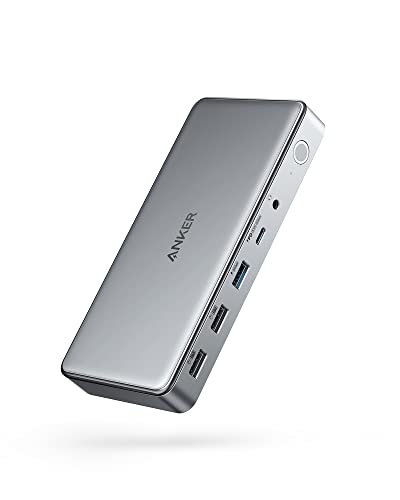
Anker 10-in-1 Triple Display USB-C Dock
Best for: Users needing triple displays and 100W charging
- Host Interface
- USB-C
- Display Support
- Triple
- Max Resolution
- 4K@30Hz
- Power Delivery
- 100W
- Port Count
- 10
- Video Ports
- HDMI, DisplayPort
View on Amazon: Anker 10-in-1 Triple Display USB-C Dock Affiliate link
The Anker DL6350 is a 10-port USB-C docking station that supports triple displays via DisplayLink technology. It delivers up to 4K@30Hz on the primary screen and 1080p@60Hz on the additional two monitors. You get 100W power delivery for your laptop and a separate 30W port for devices. This setup suits users needing multiple screens and extensive connectivity from a single USB-C host port.
Pros
- Supports triple monitor displays for expanded workspace.
- Provides 100W Power Delivery to charge your laptop.
- Includes 10 ports for peripherals and data transfer.
- Features DisplayLink technology for Mac and Windows compatibility.
Cons
- Primary display resolution is limited to 4K@30Hz.
- Requires DisplayLink drivers and screen recording permissions.
- Host interface is restricted to a single USB-C connection.
Good fit if
- You need three screens from one laptop port.
- You require 100W charging for your host device.
- You use macOS and need DisplayLink support.
Skip if
- You need 4K@60Hz on your main display.
- You prefer a plug-and-play solution without drivers.
- You need more than 10 total ports.
Verdict: Anker DL6350 10-in-1 Triple Display Dock fits professionals who need three monitors and high-speed charging from a single USB-C connection. It is ideal for users who do not require 4K@60Hz on the primary screen.
Specifications side by side
| Spec | Anker 13-in-1 Triple Display USB-C Dock | Anker 10-in-1 Triple Display USB-C Dock |
|---|---|---|
| Host Interface | USB-C | USB-C |
| Display Support | Triple | Triple |
| Max Resolution | 4K @ 60Hz | 4K@30Hz |
| Power Delivery | 85W | 100W |
| Port Count | 13 | 10 |
| Video Ports | HDMI, DisplayPort | HDMI, DisplayPort |
| Max Data Speed | 10Gbps | 5Gbps |
| Ethernet Speed | Gigabit Ethernet | not stated |
| Resolution | not stated | 4K UHD |
| Connectivity | USB-C, HDMI, DisplayPort, Ethernet, USB-A | HDMI, DisplayPort |
| Features | not stated | DisplayLink |
| Dimensions | 4.95 × 3.49 × 1.64 inches | 6.7 × 3.15 × 0.96 inches |
| Weight | 13.1 ounces | 1.6 ounces |
| Size | Small | not stated |
| Color | Gray | Gray |
| Model | A83921A1 | A83951A1 |
Frequently asked questions
Does the Anker 13-in-1 dock support three separate monitors on Windows?
Yes, it supports triple monitor output for Windows users. This model provides extensive connectivity options, making it ideal for those who need maximum port variety. You get three display outputs along with additional USB ports for peripherals, all managed through a single USB-C connection.
Can I use the Anker 10-in-1 dock for three displays on a Mac?
Yes, this model uses DisplayLink technology to enable true triple displays on macOS. The 13-in-1 alternative mirrors screens on Mac instead. If you need three distinct workspaces on an Apple computer, the 10-in-1 dock is the correct choice for your setup.
Which Anker dock is lighter and more portable?
The 10-in-1 dock is significantly lighter and more compact. It weighs just 1.6 ounces and measures 6.7 inches in length. In contrast, the 13-in-1 dock weighs 13.1 ounces and is bulkier. If you travel frequently, the smaller form factor of the 10-in-1 model is easier to carry.
Does the 10-in-1 dock provide enough power for my laptop?
Yes, it delivers 100W of Power Delivery through its USB-C port. This high wattage allows you to charge your laptop while running three external monitors. You also get 30W for other devices. This makes it suitable for professionals who need high-speed charging from a single connection.
Is the 13-in-1 dock better for users who need many ports?
Yes, it offers more total ports than the 10-in-1 model. With 13 connections, it provides greater variety for connecting various peripherals. This makes it ideal for Windows users who need extensive connectivity options. You can connect more devices simultaneously without needing additional hubs.
Do I need to buy a power adapter for these docks?
No, both units include their own power adapters in the box. You do not need to purchase extras separately. The docks are designed to plug directly into your laptop via USB-C while receiving power from the included adapter to support multiple displays and charging.
Which dock is better for users who do not need 4K at 60Hz?
The 10-in-1 dock is ideal for users who do not require 4K at 60Hz on the primary screen. It focuses on delivering triple display support with high-speed charging. If your workflow does not demand the highest refresh rates, this model provides a balanced solution for productivity.