60Hz or 144Hz Docking Stations? Compared by Specs
As an Amazon Associate we earn from qualifying purchases. Links on this page are affiliate links.
This 60Hz vs 144Hz docking station guide compares the Acer 5-in-1 hub and the Plugable Thunderbolt 5 dock. Both expand your laptop’s connectivity, but they target different workflows. The Acer unit focuses on basic 4K video and charging for standard USB-C devices. The Plugable dock offers dual high-refresh displays and extensive port options for power users. You need to choose based on your display needs and host interface.
Key differences
| Aspect | Acer 5-in-1 4K 60Hz USB-C Hub | Plugable Thunderbolt 5 Dual HDMI Dock |
|---|---|---|
| Refresh Rate | 60Hz | 144Hz |
| Max Resolution | 4K@60Hz | 8K@60Hz, 4K@144Hz |
| Host Interface | USB-C | Thunderbolt 5, Thunderbolt 4, USB4 |
| Power Delivery | 90W | 140W |
| Port Count | 5 | 16 |
Which one should you choose?
Choose Acer 5-in-1 4K 60Hz USB-C Hub if
- You only need a single 4K display at 60Hz for standard office work
- Your laptop has a standard USB-C port without Thunderbolt support
- You want a compact, lightweight adapter for travel
Choose Plugable Thunderbolt 5 Dual HDMI Dock if
- You require dual high-refresh displays or 8K resolution support
- Your laptop supports Thunderbolt 5 or Thunderbolt 4
- You need extensive connectivity with 16 ports and 140W charging
Verdict: The Acer hub is sufficient for users who only need basic 4K output and standard USB-C connectivity. The Plugable dock is the better choice for professionals requiring high refresh rates, dual displays, and robust Thunderbolt 5 performance. Select the Acer for simplicity and portability, and the Plugable for maximum power and display flexibility.
60Hz vs 144Hz Dock Specs
refresh rate
The Acer hub supports a maximum refresh rate of 60Hz. This is standard for most office tasks and general media consumption. It delivers 4K video without motion blur for typical use. The Plugable dock offers a significantly higher refresh rate of 144Hz. It achieves this when connected to a compatible host. This allows for smoother motion in fast-paced content. You get 4K at 144Hz with Thunderbolt 5. The 144Hz option provides better fluidity for gaming or high-frame-rate video editing. For pure smoothness, the Plugable dock is the clear winner.
max resolution
Resolution defines the clarity of the displayed image. The Acer hub outputs 4K UHD resolution. This is sufficient for most standard monitors and laptops. The Plugable dock supports higher resolutions up to 8K. It can drive dual 8K displays at 60Hz. It also handles 4K at 144Hz. This makes it suitable for high-density displays. If you need ultra-high clarity or multiple 4K screens, the Plugable dock offers superior resolution capabilities. The Acer hub is limited to a single 4K output.
power delivery
Power delivery charges your laptop through the dock. The Acer hub provides up to 90W of output. It requires a 100W input adapter for optimal performance. This is adequate for many ultrabooks and mid-range laptops. The Plugable dock delivers 140W of power. This higher wattage supports more demanding workstations and larger laptops. It ensures stable charging during intensive tasks. The Plugable dock offers more power headroom for high-performance devices. You get better charging capability with the Plugable unit.
connectivity
Connectivity determines how many devices you can attach. The Acer hub is a 5-in-1 unit. It includes one HDMI port, one USB-C data port, one USB-A port, and one USB 2.0 port. It is simple and compact. The Plugable dock is a 16-in-1 powerhouse. It features six USB-C ports, dual HDMI, and 2.5Gbps Ethernet. It also includes UHS-II card readers. The Plugable dock supports far more peripherals simultaneously. If you need extensive expansion, the Plugable dock is superior.
compatibility
Compatibility affects which laptops can use the dock. The Acer hub works with any laptop having a full-featured USB-C port. It supports Windows, macOS, and ChromeOS. It is broadly compatible with standard devices. The Plugable dock requires Thunderbolt 5, Thunderbolt 4, or USB4 hosts. It does not support standard USB-C or Thunderbolt 3. It is limited to newer Windows and macOS systems. The Acer hub is easier to use with older or basic laptops. For broad compatibility, the Acer hub has the edge.
Choose the right dock for your needs
Users needing simple 4K video and charging
The Acer hub delivers 4K at 60Hz via HDMI, which is sufficient for standard office work and media. It includes 100W pass-through charging and 5Gbps data ports. This compact 5-in-1 design fits easily into bags for remote work without requiring complex setup or high-end host ports.
Professionals requiring dual high-resolution displays
The Plugable dock supports dual HDMI 2.1 outputs, enabling 8K at 60Hz or 4K at 144Hz. This makes it ideal for creative workflows needing high refresh rates. It connects via Thunderbolt 5 or 4, offering superior bandwidth and stability for demanding dual-monitor setups that standard USB-C hubs cannot handle.
Users with many USB-C peripherals
This dock provides six USB-C ports, including two front-facing ports with 30W charging each. This allows you to connect multiple devices like SSDs or phones directly. The high port count and fast charging capabilities make it a central hub for complex workstations with many connected accessories.
Those seeking a basic single-display setup
If you only need one 4K display at 60Hz, the Acer hub is a straightforward solution. It offers essential connectivity with HDMI, USB 3.0, and PD charging in a slim aluminum shell. It works with standard USB-C laptops and requires no special drivers, making it a practical choice for simple setups.
Quick picks
| # | Product | Best for | Price |
|---|---|---|---|
| 1 | Acer 5-in-1 4K 60Hz USB-C Hub | Single 4K@60Hz display and laptop charging | Check price of Acer 5-in-1 4K 60Hz USB-C Hub on Amazon |
| 2 | Plugable Thunderbolt 5 Dual HDMI Dock | Thunderbolt hosts needing 4K 144Hz dual displays | Check price of Plugable Thunderbolt 5 Dual HDMI Dock on Amazon |
The products compared
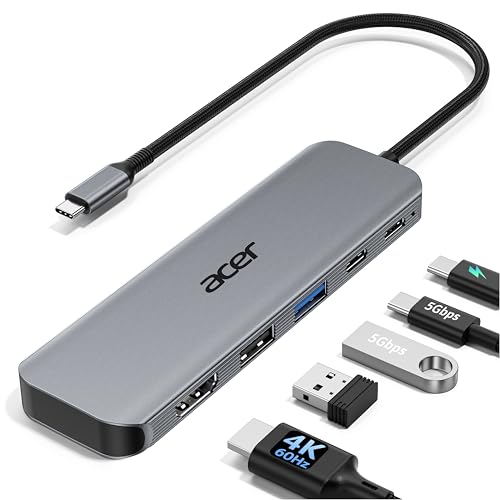
Acer 5-in-1 4K 60Hz USB-C Hub
Best for: Single 4K@60Hz display and laptop charging
- Refresh Rate
- 60Hz (what this guide is about)
- Host Interface
- USB-C
- Max Resolution
- 4K@60Hz
- Power Delivery
- 90W
- Port Count
- 5
- Video Ports
- HDMI 2.0
View on Amazon: Acer 5-in-1 4K 60Hz USB-C Hub Affiliate link
This Acer adapter expands a single USB-C port into a five-port workstation. It supports 4K resolution at 60Hz refresh rate, which doubles the smoothness of standard 30Hz displays. The unit includes a 90W power delivery output for laptop charging and 5Gbps data ports. Its aluminum shell aids heat dissipation. It suits users needing reliable video output and power delivery without complex docking station setups.
Pros
- Supports 4K@60Hz HDMI output for smooth visuals
- Provides 90W pass-through charging for laptops
- Includes 5Gbps USB-C and USB-A data ports
- Aluminum shell improves heat dissipation
Cons
- Max resolution is limited to 4K@60Hz
- Does not support ultrawide monitors
- Only one video output port available
Good fit if
- You need 4K@60Hz video output for presentations
- You want to charge your laptop through the hub
- You prefer a compact aluminum design for travel
Skip if
- You require 144Hz refresh rates for gaming
- You need to connect multiple monitors simultaneously
- You want to use an ultrawide monitor
Verdict: Acer 5-in-1 USB-C Hub 4K@60Hz fits professionals who need stable 4K@60Hz video and 90W charging in a small form factor. It is not suitable for users needing higher refresh rates or multiple displays.

Plugable Thunderbolt 5 Dual HDMI Dock
Best for: Thunderbolt hosts needing 4K 144Hz dual displays
- Refresh Rate
- 144Hz (what this guide is about)
- Host Interface
- Thunderbolt 5, Thunderbolt 4, USB4
- Display Support
- Dual
- Max Resolution
- 8K@60Hz, 4K@144Hz
- Power Delivery
- 140W
- Port Count
- 16
View on Amazon: Plugable Thunderbolt 5 Dual HDMI Dock Affiliate link
This Thunderbolt 5 docking station supports dual displays up to 8K at 60Hz or 4K at 144Hz. It provides 140W of power delivery for your laptop and includes six USB-C ports. The unit connects via Thunderbolt 5, Thunderbolt 4, or USB4. It suits users who need high refresh rates and extensive connectivity for modern workstations.
Pros
- Supports dual displays up to 8K@60Hz or 4K@144Hz
- 140W power delivery for laptop charging
- Six USB-C ports including two front-facing 30W ports
- 2.5Gbps Ethernet connectivity
Cons
- Requires Thunderbolt 5, 4, or USB4 host systems
- Base M1, M2, and M3 Macs support only one external display
- Does not support Thunderbolt 3 or Windows ARM hosts
Good fit if
- You need 4K 144Hz or 8K 60Hz display output
- You require 140W power delivery for your laptop
- You use a Thunderbolt 5 or Thunderbolt 4 computer
Skip if
- You use a Thunderbolt 3 or standard USB-C host
- You have a base M1, M2, or M3 Mac
- You need support for Windows ARM systems
Verdict: Plugable TBT-UDH2 140W Thunderbolt 5 Dock delivers high refresh rates and extensive ports for compatible hosts. It fits users with Thunderbolt 5 or 4 systems who need dual 4K 144Hz displays and 140W charging.
Specifications side by side
| Spec | Acer 5-in-1 4K 60Hz USB-C Hub | Plugable Thunderbolt 5 Dual HDMI Dock |
|---|---|---|
| Host Interface | USB-C | Thunderbolt 5, Thunderbolt 4, USB4 |
| Display Support | not stated | Dual |
| Max Resolution | 4K@60Hz | 8K@60Hz, 4K@144Hz |
| Power Delivery | 90W | 140W |
| Port Count | 5 | 16 |
| Video Ports | HDMI 2.0 | HDMI |
| Max Data Speed | 5Gbps | not stated |
| Ethernet Speed | not stated | 2.5Gbps |
| Resolution | 4K UHD | 4K UHD |
| Connectivity | USB-C, HDMI, USB-A | HDMI |
| Refresh Rate | 60Hz | 144Hz |
| Dimensions | not stated | 1.97 × 2.95 × 5.91 inches |
| Weight | not stated | 8.92 ounces |
| Color | Grey | Space Gray |
| Model | ODK5U0 | TBT-UDH2 |
Frequently asked questions
Can a 60Hz docking station handle 4K video?
Yes, a 60Hz docking station can handle 4K video. The Acer 5-in-1 hub supports 4K UHD resolution at 60Hz. This refresh rate is standard for office work and general media. It provides stable video without motion blur for typical daily tasks.
Is 144Hz necessary for professional work?
No, 144Hz is not necessary for standard professional work. Most office tasks and media consumption run smoothly at 60Hz. The Acer hub delivers 4K at 60Hz, which is sufficient for spreadsheets and documents. Higher refresh rates are mainly for gaming or fast-paced visual content.
What connection does the Acer hub use?
The Acer hub uses USB-C and HDMI connections. It connects to your laptop via a USB-C port for data and power. The HDMI port outputs video to your display. This setup supports a single 4K display at 60Hz.
Does the Plugable dock support dual displays?
Yes, the Plugable dock supports dual displays. It is designed for users needing two 4K monitors at 144Hz. This dock requires a Thunderbolt 5 or Thunderbolt 4 host system to function. It delivers high refresh rates across both connected screens.
Can I charge my laptop with the Acer hub?
Yes, you can charge your laptop with the Acer hub. It provides 90W of pass-through charging power. This allows you to power your device while using the hub. It is ideal for professionals who need stable charging alongside their 4K video output.
What is the model number for the Plugable dock?
The model number for the Plugable dock is TBT-UDH2. It is a Thunderbolt 5 dual HDMI dock. The device weighs 8.92 ounces and features a Space Gray finish. Its compact dimensions are 2.95 inches wide and 5.91 inches tall.
Which dock is better for Thunderbolt hosts?
The Plugable dock is better for Thunderbolt hosts. It is built specifically for Thunderbolt 5 or 4 systems. It delivers high refresh rates and extensive ports for compatible devices. The Acer hub is designed for standard USB-C devices and does not require Thunderbolt.
How many ports does the Acer hub have?
The Acer hub has five ports in total. It is marketed as a 5-in-1 USB-C hub. This includes connections for video output and data transfer. It also provides charging capabilities for your laptop. This compact design fits users needing basic connectivity.