Best 60Hz Docking Stations in 2026: 15 Picks Ranked by Specs
As an Amazon Associate we earn from qualifying purchases. Links on this page are affiliate links.
Connecting your laptop to a high-resolution display requires a reliable connection. A dedicated 60Hz docking station delivers smooth 4K UHD video output without the screen stutter common on lower-refresh adapters. We compared 15 models based strictly on the specifications published on their official product listings.
The Acer 5-in-1 4K 60Hz USB-C Hub leads this guide because it combines 4K 60Hz HDMI video with 90W power pass-through across a compact five-port layout. This comparison helps you choose the right port layout, power delivery wattage, and display connectivity for your workstation setup.
Quick picks
The best fit for you
- You need a compact single 4K 60Hz setup Acer 5-in-1 4K 60Hz USB-C Hub This 5-in-1 hub delivers 4K 60Hz HDMI video output alongside 90W power pass-through in an aluminum housing.
- You want wired Ethernet with your 4K display Anker 8-in-1 USB-C Hub with Ethernet The 8-in-1 layout combines a dedicated Ethernet port, 4K 60Hz HDMI output, and 85W pass-through charging.
- You want to run three 4K 60Hz monitors WAVLINK Triple 4K DisplayLink USB-C Dock DisplayLink architecture provides triple 4K 60Hz video support and 100W charging for expanded desktop setups.
- You need maximum port selection for Thunderbolt laptops CalDigit TS4 Thunderbolt 4 Dock It offers 18 ports, Thunderbolt 4 connectivity, and 98W charging capacity for high-bandwidth workstations.
Our 15 picks

Acer 5-in-1 4K 60Hz USB-C Hub
Best for: compact single 4K 60Hz display setups
- Refresh Rate
- 60Hz (what this guide is about)
- Host Interface
- USB-C
- Max Resolution
- 4K@60Hz
- Power Delivery
- 90W
- Port Count
- 5
- Video Ports
- HDMI
This 5-in-1 USB-C hub gives you a single HDMI port running at 4K resolution with a 60Hz refresh rate. It delivers up to 90W of pass-through power to your laptop from a 100W input. For peripherals, you get one 5Gbps USB-C port, one 5Gbps USB-A port, and one USB 2.0 port. It suits you if you need a compact aluminum travel adapter for a single external 4K 60Hz screen.
Pros
- Supports 4K video output at 60Hz via HDMI
- Pass-through charging delivers up to 90W output from a 100W input
- Features 5Gbps transfer speeds on both USB-C 3.0 and USB-A 3.0 ports
- Aluminum shell construction for heat dissipation
Cons
- Does not support ultrawide monitors
- Power adapter and charging cable are not included
- Secondary USB-A port uses slower USB 2.0 transfer speeds
Good fit if
- You need 4K resolution at 60Hz on a single display.
- You want up to 90W pass-through charging from a 100W PD charger.
- You connect peripherals across both USB-C and USB-A 3.0 ports.
Skip if
- You use an ultrawide monitor.
- You need multiple external displays or a wired Ethernet connection.
Verdict: Acer 5-in-1 USB-C Hub with 4K 60Hz HDMI provides essential 4K 60Hz video output and 90W power pass-through in an aluminum housing. It delivers a streamlined connection setup for single-screen laptop workstations.

HODO 5-in-1 Dual 4K 60Hz USB-C Hub
Best for: Thunderbolt 4 laptops needing portable 4K 60Hz video
- Refresh Rate
- 60Hz (what this guide is about)
- Host Interface
- Thunderbolt 4, USB4, USB-C
- Display Support
- Dual
- Max Resolution
- 8K@30Hz
- Power Delivery
- 87W
- Video Ports
- USB-C
The HODO 5-in-1 Dual 4K 60Hz USB-C Hub expands your workstation with dual video capabilities and high-speed data transfer. It supports 4K resolution at 60Hz, alongside 100W Power Delivery input that provides up to 87W of charging power to your laptop. Dedicated 10Gbps USB-C data ports handle rapid file syncing. It suits you if you need a compact, lightweight 5-in-1 adapter for a Thunderbolt 4 or USB4 laptop setup.
Pros
- Supports 4K video output at 60Hz
- 100W Power Delivery input with 87W laptop charging output
- 10Gbps USB-C data transfer speed
- Compact profile measuring 0.47 inches thick and weighing 0.15 pounds
Cons
- Dual-function USB-C port cannot output video and transfer data simultaneously
- Requires a host laptop with USB4 or Thunderbolt 4
- Power adapter and power cable are not included
Good fit if
- You have a laptop with a Thunderbolt 4 or USB4 port.
- You need 4K 60Hz display output combined with up to 87W laptop charging.
- You want 10Gbps USB-C transfer speeds in a compact 5-in-1 form factor.
Skip if
- You need to transmit video and transfer data simultaneously through the primary USB-C port.
- You do not own a separate 65W or higher USB-C power adapter.
- Your laptop lacks Thunderbolt 4 or USB4 support.
Verdict: HODO 5-in-1 Dual 4K 60Hz USB-C Hub provides 4K at 60Hz video and 87W pass-through charging for compatible USB4 and Thunderbolt 4 laptops. Its slim design offers 10Gbps data rates when video output is not in use on the shared port.

Selore Dual 4K HDMI USB-C Dock
Best for: dual 4K 60Hz Windows laptop setups
- Refresh Rate
- 60Hz (what this guide is about)
- Host Interface
- USB-C
- Display Support
- Dual
- Max Resolution
- 4K@60Hz
- Power Delivery
- 100W
- Port Count
- 8
This Selore 9-in-1 USB-C docking station connects dual external displays at 4K resolution with a 60Hz refresh rate through two HDMI outputs. It supplies 100W Power Delivery pass-through charging and integrates three 5Gbps USB data ports alongside SD and microSD slots. You get a dedicated button to switch display modes or blank the screens. It suits Windows laptop setups that require dual 60Hz video alongside card readers.
Pros
- Dual HDMI ports support simultaneous 4K video at 60Hz
- 100W Power Delivery pass-through charging
- Dedicated hardware button toggles display modes and privacy blackout
- Includes one USB-C and two USB-A data ports running at 5Gbps
- Built-in SD and microSD card slots supporting 104Mbps
Cons
- macOS supports only one external monitor in extend mode
- No Ethernet port included
- Requires initial system authorization in OS settings
Good fit if
- You need to run two 4K 60Hz monitors from a compatible Windows laptop.
- You want physical button controls to toggle display modes or instantly blank your monitors.
- You frequently offload photos or video from SD and microSD cards.
Skip if
- You use macOS and want two independent extended external screens.
- You need a wired Ethernet connection for network access.
- Your host laptop lacks a Thunderbolt or full-featured USB-C port.
Verdict: Selore 9-in-1 Dual 4K 60Hz HDMI Dock delivers dual 4K 60Hz video output and 100W pass-through charging in a compact hub. It gives Windows multi-monitor users dedicated hardware display controls alongside everyday peripheral ports.

MOKiN 6-in-1 USB-C Hub with 4K 60Hz HDMI
Best for: budget single-monitor 4K 60Hz laptop setups
- Refresh Rate
- 60Hz (what this guide is about)
- Host Interface
- USB-C
- Max Resolution
- 4K@60Hz
- Port Count
- 6
- Video Ports
- HDMI
- Connectivity
- USB-C, HDMI
The MOKiN 6-in-1 USB-C Hub gives you external display connectivity with a 4K UHD output running at a 60Hz refresh rate over HDMI. Designed with six total ports in a compact silver housing, it links directly to your USB-C setup. This adapter suits you if you need smooth 60Hz video on a single 4K monitor from a compatible MacBook or USB-C laptop without extra bulk on your desk.
Pros
- Supports 4K UHD resolution
- 60Hz refresh rate over HDMI
- 6-in-1 port expansion layout
- Direct USB-C host connectivity
Cons
- Single HDMI output limits multi-monitor setups
- No DisplayPort connectivity listed
Good fit if
- You need 4K video output capped at 60Hz over HDMI.
- You want a compact 6-in-1 hub for a USB-C laptop.
Skip if
- You need dual monitor outputs from a single hub.
- You require a DisplayPort connection.
Verdict: MOKiN 6-in-1 4K 60Hz USB-C Hub delivers standard 4K output at 60Hz in a simple six-port layout. It provides essential video expansion for your USB-C laptop without unnecessary complexity.
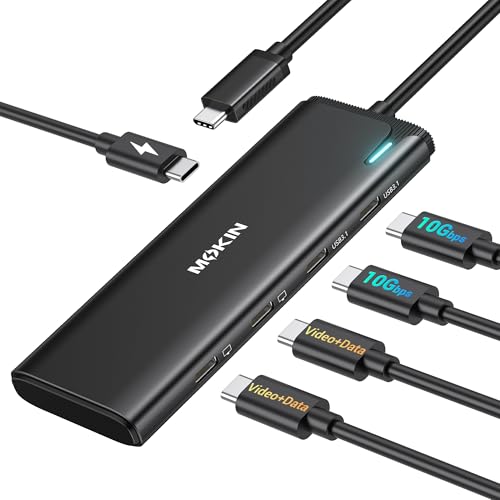
MOKiN 5-in-1 Dual USB-C Monitor Hub
Best for: dual USB-C monitor Windows setups
- Refresh Rate
- 60Hz (what this guide is about)
- Host Interface
- USB4, Thunderbolt 4
- Display Support
- Dual
- Max Resolution
- 4K@60Hz
- Power Delivery
- 87W
- Port Count
- 5
This 5-in-1 hub gives you dual 4K display output at 60Hz using USB-C DP Alt Mode 1.4. Designed for USB 4 and Thunderbolt 4 systems, it connects directly to Type-C monitors while providing two 10Gbps USB-C 3.1 data ports and up to 87W pass-through charging from a 100W power delivery input. It suits you if you run dual USB-C screens from a compatible Windows laptop or handheld.
Pros
- Dual 4K video output at 60Hz via DP Alt Mode 1.4
- Two 10Gbps USB-C 3.1 data ports
- 100W Power Delivery input supporting up to 87W pass-through charging
Cons
- Dual-monitor MST is not supported on macOS
- No USB-A or dedicated HDMI ports
- Requires a host system with DP Alt Mode and USB 4 or Thunderbolt 4
Good fit if
- You use a Windows laptop with USB 4 or Thunderbolt 4 to drive two USB-C monitors at 4K 60Hz.
- You need 10Gbps USB-C data ports alongside your display connections.
- You want up to 87W pass-through charging over a single connection.
Skip if
- You need extended dual-monitor output on macOS.
- You connect to displays using standard HDMI or full-size DisplayPort cables.
Verdict: MOKiN 5-in-1 Dual USB-C Monitor Hub provides 60Hz dual 4K video strictly over USB-C for compatible Windows systems. It delivers fast 10Gbps peripheral speeds and 87W charging, but macOS limits it to single-monitor or mirrored setups.

Anker 8-in-1 USB-C Hub with Ethernet
Best for: wired networking with 4K 60Hz displays
- Refresh Rate
- 60Hz (what this guide is about)
- Host Interface
- USB-C, USB4, Thunderbolt
- Display Support
- Triple
- Max Resolution
- 4K@60Hz
- Power Delivery
- 85W
- Port Count
- 8
The Anker 8-in-1 USB-C Hub with Ethernet provides wired connectivity and multi-display output in a compact 0.22-pound footprint. You get 4K resolution at 60Hz over HDMI, a 1080p VGA port, Ethernet, and 5Gbps USB data connections. It also delivers up to 85W pass-through charging to your laptop. This hub suits you if you need a stable wired network connection alongside a 60Hz desktop monitor setup.
Pros
- HDMI output supports 4K resolution at 60Hz
- Dedicated Ethernet port alongside HDMI and VGA video outputs
- Pass-through charging delivers up to 85W with Power Delivery
- USB-A and USB-C data ports support 5Gbps file transfers
Cons
- Not compatible with Linux operating systems
- macOS displays only mirror mode across external monitors
- VGA port output resolution is capped at 1080p
Good fit if
- You need a wired Ethernet port paired with a 4K 60Hz external display
- You want up to 85W pass-through charging for your laptop
- You use Windows or ChromeOS and require multi-monitor output
Skip if
- You use a Linux operating system
- You use macOS and need extended desktop mode across multiple external monitors
Verdict: Anker 8-in-1 USB-C Hub with Ethernet combines 4K 60Hz HDMI video, reliable wired networking, and 85W pass-through charging in a compact travel-ready enclosure. It provides a dependable connection hub for Windows and ChromeOS setups.

Plugable Dual 4K USB-C Docking Station
Best for: dual 4K 60Hz setups on MacBooks
- Refresh Rate
- 60Hz (what this guide is about)
- Host Interface
- USB-C
- Display Support
- Dual
- Max Resolution
- 4K@60Hz
- Power Delivery
- 100W
- Port Count
- 14
This 14-in-1 docking station from Plugable provides dual 4K display output at 60Hz over HDMI or DisplayPort connections. It uses DisplayLink drivers to route two independent screens from laptops that natively support only one monitor, including base Apple Silicon systems. You also get 100W host charging, Ethernet, SD readers, and audio. It suits you if you need two 4K 60Hz desktop displays from a single USB-C connection.
Pros
- Drives dual 4K displays at 60Hz via HDMI or DisplayPort
- Provides up to 100W power delivery to your host laptop
- DisplayLink technology enables dual external monitors on base Apple Silicon Macs
- Offers 14 ports including Ethernet, audio, SD, and microSD slots
Cons
- Requires DisplayLink driver installation for full display functionality
- Does not support HDCP playback for protected content
Good fit if
- You need dual 4K 60Hz external monitors on a base M1 through M5 Mac.
- You want 100W power delivery alongside DisplayPort and HDMI options.
- You require integrated SD card slots and an Ethernet connection at your desk.
Skip if
- You need HDCP support to stream copy-protected video content.
- You cannot install third-party DisplayLink drivers on your system.
Verdict: Plugable Dual 4K 60Hz DisplayLink Dock delivers dual 4K video at 60Hz and 100W charging to systems restricted to a single native monitor. Its DisplayLink architecture and 14-port layout make it a capable desktop workstation hub.

CalDigit TS4 Thunderbolt 4 Dock
Best for: High-end multi-display Thunderbolt 4 laptop setups
- Refresh Rate
- 60Hz (what this guide is about)
- Host Interface
- Thunderbolt 4
- Display Support
- Dual
- Max Resolution
- 8K@30Hz
- Power Delivery
- 98W
- Port Count
- 18
The CalDigit TS4 Thunderbolt 4 Dock provides 18 ports to expand your workstation through a single cable. It supports dual 4K 60Hz monitors on Windows, dual 6K 60Hz displays on compatible Apple Pro, Max, or Ultra chips, and up to 8K resolution on a single screen. With 98W host charging, 2.5GbE Ethernet, and eight 10Gb/s USB ports, it suits users who need extensive peripheral connectivity and multi-display 60Hz video output.
Pros
- Supports dual displays up to 4K 60Hz on Windows and 6K 60Hz on select Mac chips
- Delivers 98W host charging over a single connection
- Includes 18 total ports including 2.5GbE and eight 10Gb/s USB connections
- Features three 40Gb/s Thunderbolt 4 ports
Cons
- Base M1, M2, and M3 Mac systems are limited to a single external display
- Requires a Thunderbolt 4 or USB4 host connection for maximum performance
- Lacks native HDMI ports, offering a single DisplayPort 1.4 connection for standard video out
Good fit if
- You need dual 60Hz monitor output alongside 40Gb/s Thunderbolt 4 speeds.
- You require up to 98W of power delivery to charge your laptop while driving peripherals.
- You want high-speed 2.5GbE networking and multiple 10Gb/s USB connections.
Skip if
- You use a base M1, M2, or M3 Mac laptop and need native dual external displays.
- You require dedicated HDMI ports without using DisplayPort or USB-C adapters.
- You connect to legacy USB-C ports that cap bandwidth and resolution capabilities.
Verdict: CalDigit TS4 Thunderbolt 4 Dock delivers robust desktop expansion with 18 ports, 98W charging, and dual 60Hz monitor support on compatible systems. It functions as a complete connectivity hub for high-bandwidth workstations.

Plugable Dual 4K HDMI USB-C Docking Station
Best for: Windows users wanting dual 4K 60Hz HDMI
- Refresh Rate
- 60Hz (what this guide is about)
- Host Interface
- USB-C
- Display Support
- Dual
- Max Resolution
- 4K@60Hz
- Port Count
- 10
- Video Ports
- HDMI
This 10-in-1 USB-C docking station provides dual 4K HDMI video output at 60Hz for Windows and ChromeOS laptops. It requires host DisplayPort Alt Mode and Multi-Stream Transport support for dual extended monitors. Connectivity includes three 5Gbps USB ports, one USB 2.0 port, Gigabit Ethernet, and audio in/out. You get an included 110W power adapter and host cable, making it a practical desk hub for dual-screen productivity.
Pros
- Dual 4K video output at 60Hz over HDMI
- Driverless plug-and-play setup on supported systems
- Includes 110W power supply and 1m host cable
- 10-in-1 hub with Gigabit Ethernet and 5Gbps USB
Cons
- Limits macOS systems to one external monitor
- Requires host DP Alt Mode and MST for dual displays
- No DisplayPort video outputs
Good fit if
- You use a Windows or ChromeOS laptop with DP Alt Mode and MST support.
- You need dual 4K monitors running at 60Hz via HDMI.
- You want a dock that includes a dedicated 110W power adapter.
Skip if
- You use a Mac and require dual extended displays.
- You need native DisplayPort monitor connections.
Verdict: Plugable Dual 4K HDMI USB-C Docking Station delivers driver-free dual 4K 60Hz HDMI video for Windows and ChromeOS setups with its bundled 110W power adapter. It handles everyday peripheral connectivity, though it will not provide dual extended screens on macOS.

Selore 8-in-1 USB-C Hub
Best for: single 4K 60Hz monitor setups
- Refresh Rate
- 60Hz (what this guide is about)
- Host Interface
- USB-C
- Max Resolution
- 4K@60Hz
- Power Delivery
- 87W
- Port Count
- 8
- Video Ports
- HDMI, USB-C
This 8-in-1 USB-C hub delivers a 4K video feed at a 60Hz refresh rate over HDMI. You get two 5Gbps USB 3.0 ports, a USB-C data port, and a micro SD or TF card slot for file transfers. It accepts up to 100W power input and supplies up to 87W to your laptop. It suits you if you need a compact single-display dock for everyday productivity and media work.
Pros
- HDMI output supports 4K resolution at 60Hz
- Pass-through charging accepts 100W input and supplies up to 87W
- Includes dedicated USB-C data port and two 5Gbps USB 3.0 ports
- Integrated micro SD and TF card reader slot
Cons
- Supports only one connected HDD or SSD at a time
- Does not support Apple USB SuperDrive
- No Ethernet port included
Good fit if
- You need 4K 60Hz HDMI output alongside a dedicated USB-C data port.
- You want pass-through laptop charging up to 87W from a 100W power adapter.
- You frequently transfer files using micro SD or TF cards.
Skip if
- You need to run multiple external hard drives simultaneously.
- You require a wired Ethernet network connection.
- You rely on an Apple USB SuperDrive.
Verdict: Selore 8-in-1 4K 60Hz USB-C Hub provides 4K video at 60Hz alongside 87W power delivery and card reader support. It offers balanced connectivity for single-screen USB-C workstations without extra bulk.

WAVLINK Dual 4K DisplayLink Docking Station
Best for: dual 4K productivity across multiple laptop platforms
- Refresh Rate
- 60Hz (what this guide is about)
- Host Interface
- USB-A, USB-C, Thunderbolt
- Display Support
- Dual
- Max Resolution
- 4K@60Hz
- Video Ports
- HDMI, DisplayPort
- Ethernet Speed
- Gigabit Ethernet
The WAVLINK Dual 4K DisplayLink Docking Station expands your setup through a single USB-A or USB-C connection. It drives two 4K screens at 60Hz using either HDMI or DisplayPort connections. You get six USB 3.0 Type-A ports, Gigabit Ethernet, and an audio jack for daily accessories. It requires DisplayLink drivers and does not charge your laptop, making it ideal if you need dual 4K output across Windows, macOS, or ChromeOS machines.
Pros
- Supports dual 4K displays at 60Hz over HDMI or DisplayPort
- Provides six USB 3.0 Type-A ports and Gigabit Ethernet
- Works across USB-A, USB-C, USB4, and Thunderbolt host ports
- Compatible with Windows, ChromeOS, and Apple Silicon macOS
Cons
- Does not supply laptop charging power
- Requires DisplayLink driver installation and lacks Linux support
- Not designed for DRM-protected streaming or gaming
Good fit if
- You need dual 4K 60Hz displays via DisplayPort or HDMI on Mac or Windows.
- You connect peripherals primarily through standard USB-A ports.
- You switch between laptops with USB-A and USB-C connectors.
Skip if
- You need a single cable to power and charge your laptop.
- You run a Linux operating system.
- You stream DRM-protected video content on external monitors.
Verdict: WAVLINK Dual 4K DisplayLink Docking Station delivers dual 4K 60Hz display flexibility and abundant USB-A connectivity across multiple operating systems. Its utility is limited to standard productivity tasks due to driver requirements and lack of host charging.

Baseus 7-in-1 USB-C Hub with 3 USB-A Ports
Best for: single-display setups requiring memory card slots
- Refresh Rate
- 60Hz (what this guide is about)
- Host Interface
- USB-C
- Max Resolution
- 4K@60Hz
- Power Delivery
- 100W
- Port Count
- 7
- Video Ports
- HDMI
The Baseus 7-in-1 USB-C Hub expands your laptop with a single HDMI port capable of 4K at 60Hz, alongside 100W USB-C Power Delivery input. It features integrated SD and TF card slots, plus three 5Gbps USB-A ports for legacy peripherals. This setup suits you if you need to offload photos or media files directly to an external 60Hz display without juggling multiple adapters.
Pros
- HDMI output supports 4K at 60Hz and 1080p at 120Hz
- Integrated SD and TF card reader slots
- 100W USB-C Power Delivery pass-through input
- Three USB 3.0 Type-A ports with 5Gbps data speeds
Cons
- Single video output limits setup to one external monitor
- No Ethernet port included
Good fit if
- You need integrated SD and TF card slots for transferring media.
- You want 4K video output at 60Hz from a single HDMI port.
- You use standard USB-A accessories requiring up to 5Gbps data rates.
Skip if
- You require dual or triple external monitor connections.
- You need a wired Ethernet network port.
Verdict: Baseus 7-in-1 USB-C Hub with Card Reader delivers dependable 4K at 60Hz video output alongside dedicated memory card slots and three USB-A ports. It provides balanced single-display connectivity for workflows centered on media transfers.

WAVLINK Triple 4K DisplayLink USB-C Dock
Best for: triple 4K 60Hz productivity setups
- Refresh Rate
- 60Hz (what this guide is about)
- Host Interface
- USB-C
- Display Support
- Triple
- Max Resolution
- 4K@60Hz
- Power Delivery
- 100W
- Video Ports
- HDMI, DisplayPort
This WAVLINK docking station drives up to three 4K displays at 60Hz using HDMI and DisplayPort connections. It delivers 100W Power Delivery to your laptop using an included 130W adapter, offers six 10Gbps USB data ports, and provides Gigabit Ethernet. Because it relies on DisplayLink technology, you can run multiple extended displays on platforms like Apple silicon MacBooks, making it suitable for multi-screen productivity setups.
Pros
- Supports up to three 4K displays at 60Hz
- 100W laptop Power Delivery via included 130W adapter
- Six 10Gbps USB ports across two USB-C and four USB-A connections
- DisplayLink support allows multi-monitor output on M1 through M5 MacBooks
- Integrated Gigabit Ethernet port
Cons
- Requires DisplayLink driver installation to function
- Not recommended for gaming or HDCP-protected 4K streaming
- Incompatible with USB-A host laptops and gaming consoles
Good fit if
- You need to run up to three external 4K monitors at 60Hz.
- You use an Apple silicon MacBook and require multi-display support.
- You need 100W laptop charging and 10Gbps data transfer speeds.
Skip if
- You intend to stream HDCP-protected 4K video or play games.
- You have a laptop that relies strictly on USB-A ports.
- You cannot install DisplayLink drivers on your system.
Verdict: WAVLINK Triple 4K 60Hz USB-C Dock provides extensive triple-screen 60Hz video output and 100W charging, making it a capable workstation centerpiece for DisplayLink-supported setups.

Selore&S-Global 5-in-1 Dual 4K 60Hz USB-C Hub
Best for: dual 4K 60Hz USB-C monitor setups
- Refresh Rate
- 60Hz (what this guide is about)
- Host Interface
- USB-C
- Display Support
- Dual
- Max Resolution
- 4K@60Hz
- Power Delivery
- 87W
- Port Count
- 5
View on Amazon: Selore&S-Global 5-in-1 Dual 4K 60Hz USB-C Hub
The Selore&S-Global 5-in-1 Dual 4K 60Hz USB-C Hub expands a single USB4 or Thunderbolt 4 port into dual USB-C video outputs supporting 4K resolution at 60Hz. It also provides two 10Gbps USB-C data ports and 87W pass-through power delivery. You will find this hub practical if you use modern USB-C monitors and need high-speed data transfer alongside crisp dual-screen output without standard HDMI cables.
Pros
- Dual 4K video output at 60Hz via USB-C DisplayPort Alt Mode 1.4
- Up to 87W pass-through charging support via 100W PD port
- Two USB-C data transfer ports operating at 10Gbps
Cons
- Requires connected external PD power to output video to monitors
- Lacks dedicated HDMI and DisplayPort output ports
- Requires a host computer with USB4 or Thunderbolt 4
Good fit if
- You have a Thunderbolt 4 or USB4 laptop paired with USB-C displays.
- You need dual 4K monitors running at a full 60Hz refresh rate.
- You want 10Gbps USB-C peripheral ports alongside dual display output.
Skip if
- You need traditional HDMI or dedicated DisplayPort monitor connections.
- You use macOS and require extended desktop support across dual external screens.
- You plan to drive dual displays on battery power without an external charger connected.
Verdict: Selore&S-Global 5-in-1 Dual 4K 60Hz USB-C Hub delivers smooth dual 4K 60Hz video and 10Gbps data for USB-C display setups. It requires host USB4 or Thunderbolt 4 support and constant PD power to run external monitors.

UANTIN 6-in-1 Dual 4K 60Hz HDMI Hub
Best for: Dual 4K 60Hz setups on Windows laptops
- Refresh Rate
- 60Hz (what this guide is about)
- Host Interface
- USB-C
- Display Support
- Dual
- Max Resolution
- 4K@60Hz
- Power Delivery
- 90W
- Port Count
- 6
The UANTIN Dual HDMI 60Hz USB-C Hub is a portable 6-in-1 adapter built for multi-display workstations. You get two HDMI 2.0 ports capable of driving dual 4K displays at 60Hz, a 100W Power Delivery input that provides up to 90W of laptop charging, and three 480Mbps USB-A ports. It suits you if you need a lightweight docking solution for dual monitors on a DP Alt Mode laptop without installing drivers.
Pros
- Dual HDMI ports outputting up to 4K resolution at 60Hz
- 100W USB-C Power Delivery pass-through delivering 90W to the host
- Three USB-A ports for external peripherals
- Compact dimensions measuring 2.7 by 1.57 by 0.39 inches
Cons
- USB-A ports operate at USB 2.0 speeds limited to 480Mbps
- macOS does not support extended desktop across both HDMI screens
- Requires a separate 65W or higher power adapter that is not included
Good fit if
- You need dual 4K monitors running at 60Hz from a Windows laptop with DP Alt Mode.
- You want 90W pass-through charging alongside basic peripheral connections.
Skip if
- You use macOS and require two independent extended external displays.
- You need high-speed USB 3.0 data transfer rates for external storage drives.
Verdict: UANTIN Dual HDMI 60Hz USB-C Hub delivers dual 4K displays at 60Hz and 90W power pass-through in an ultra-compact form factor. It gives Windows users a simple dual-monitor workstation solution without requiring extra drivers.
Specifications side by side
| Spec | Acer 5-in-1 4K 60Hz USB-C Hub | HODO 5-in-1 Dual 4K 60Hz USB-C Hub | Selore Dual 4K HDMI USB-C Dock | MOKiN 6-in-1 USB-C Hub with 4K 60Hz HDMI | MOKiN 5-in-1 Dual USB-C Monitor Hub | Anker 8-in-1 USB-C Hub with Ethernet | Plugable Dual 4K USB-C Docking Station | CalDigit TS4 Thunderbolt 4 Dock | Plugable Dual 4K HDMI USB-C Docking Station | Selore 8-in-1 USB-C Hub | WAVLINK Dual 4K DisplayLink Docking Station | Baseus 7-in-1 USB-C Hub with 3 USB-A Ports | WAVLINK Triple 4K DisplayLink USB-C Dock | Selore&S-Global 5-in-1 Dual 4K 60Hz USB-C Hub | UANTIN 6-in-1 Dual 4K 60Hz HDMI Hub |
|---|---|---|---|---|---|---|---|---|---|---|---|---|---|---|---|
| Host Interface | USB-C | Thunderbolt 4, USB4, USB-C | USB-C | USB-C | USB4, Thunderbolt 4 | USB-C, USB4, Thunderbolt | USB-C | Thunderbolt 4 | USB-C | USB-C | USB-A, USB-C, Thunderbolt | USB-C | USB-C | USB-C | USB-C |
| Display Support | not specified | Dual | Dual | not specified | Dual | Triple | Dual | Dual | Dual | not specified | Dual | not specified | Triple | Dual | Dual |
| Max Resolution | 4K@60Hz | 8K@30Hz | 4K@60Hz | 4K@60Hz | 4K@60Hz | 4K@60Hz | 4K@60Hz | 8K@30Hz | 4K@60Hz | 4K@60Hz | 4K@60Hz | 4K@60Hz | 4K@60Hz | 4K@60Hz | 4K@60Hz |
| Power Delivery | 90W | 87W | 100W | not specified | 87W | 85W | 100W | 98W | not specified | 87W | not specified | 100W | 100W | 87W | 90W |
| Port Count | 5 | not specified | 8 | 6 | 5 | 8 | 14 | 18 | 10 | 8 | not specified | 7 | not specified | 5 | 6 |
| Video Ports | HDMI | USB-C | HDMI | HDMI | USB-C | HDMI, VGA | HDMI, DisplayPort | DisplayPort | HDMI | HDMI, USB-C | HDMI, DisplayPort | HDMI | HDMI, DisplayPort | USB-C | HDMI |
| Max Data Speed | 5Gbps | 10Gbps | 5Gbps | not specified | 10Gbps | 5Gbps | not specified | 40Gb/s | 5Gbps | 5Gbps | not specified | 5Gbps | 10Gbps | 10Gbps | 480Mbps |
| Ethernet Speed | not specified | not specified | not specified | not specified | not specified | not specified | not specified | 2.5GbE | Gigabit | not specified | Gigabit Ethernet | not specified | Gigabit | not specified | not specified |
| Resolution | 4K UHD | 4K UHD | 4K UHD | 4K UHD | 4K UHD | 4K UHD | 4K UHD | not specified | 4K UHD | 4K UHD | 4K UHD | 4K UHD | 4K UHD | 4K UHD | 4K UHD |
| Connectivity | USB-C, HDMI | USB-C | USB-C, HDMI, USB-A | USB-C, HDMI | USB-C, DisplayPort | USB-C, HDMI, Ethernet, VGA | USB-C, HDMI, DisplayPort | USB-C, USB-A, Thunderbolt 4 | USB-C, HDMI | USB-C, HDMI | not specified | USB-C, HDMI, USB-A | USB-C | USB-C, DisplayPort | USB-C, HDMI |
| Refresh Rate | 60Hz | 60Hz | 60Hz | 60Hz | 60Hz | 60Hz | 60Hz | 60Hz | 60Hz | 60Hz | 60Hz | 60Hz | 60Hz | 60Hz | 60Hz |
| Features | not specified | not specified | not specified | not specified | not specified | not specified | not specified | not specified | not specified | not specified | DisplayLink | Card Reader | DisplayLink | not specified | not specified |
| Dimensions | not specified | 5.7 × 2.32 × 0.47 inches | 4.5 × 2.1 × 0.7 inches | not specified | not specified | 4.5 × 2.1 × 0.7 inches | 9.4 × 3.1 × 1.2 inches | 4.46 × 1.65 × 5.55 inches | 9.25 × 5.71 × 3 inches | not specified | 12.6 × 6.1 × 2.36 inches | 5.31 × 1.93 × 0.63 inches | 8.78 × 3.58 × 1.14 inches | not specified | 2.7 × 1.57 × 0.39 inches |
| Weight | not specified | 2.47 ounces | 3.39 ounces | not specified | 1.92 ounces | 3.56 ounces | 11.7 ounces | 1.41 pounds | 8.1 ounces | not specified | 8.8 ounces | not specified | 13.3 ounces | not specified | not specified |
| Model | ODK5U0 | not specified | SEUC0425 | not specified | UC2208 | A8379 | UD-6950PDH | TS4-US 500971 | UD-MSTH2 | USB C Hub HDMI Adapter | 8541562306 | 7 in 1 | WL-UG63PD25 | USB C 4K@60Hz DP Alt Mode | USB C to Dual HDMI Adapter |
| Size | not specified | not specified | 9-in-1 | 6-in-1 USB C Hub | 5-in-1-Black | 8-in-1 USB-C Hub | 1.0" × 8.9" × 3.3" | compact | Dual Display | Portable | not specified | 7 in 1 | 3 Displays (3 4K) | Alt Mode 5-in-1 | 11.8INCH |
| Color | not specified | not specified | Grey | 6 in 1 USB C Hub - Silver | Grey | Gray | Silver | Space Gray | Black | Dark Grey | 69DK1 | Black | 69PD25 | Silvery | Gray |
How to Choose a 60Hz Dock
-
Check Host Interface Bandwidth
You need to match the dock to your laptop host port. Standard USB-C ports share video and data bandwidth, which can limit port speeds or display performance. Thunderbolt 4 and USB4 interfaces provide significantly higher bandwidth for demanding setups. For example, the CalDigit TS4 uses Thunderbolt 4 to run dual 60Hz displays alongside 18 total connectivity ports and 98W host charging. If your laptop only has basic USB-C, high-end Thunderbolt features will not function at their full technical specifications. Check your laptop port type first.
-
Verify Power Delivery Specifications
Check how each dock manages power delivery to your laptop. Many compact hubs use pass-through charging, where a 100W power input routes roughly 85W to 90W directly to your computer while reserving power for internal hardware. However, not every dock powers your computer. The WAVLINK Dual 4K DisplayLink Docking Station provides dual display output and USB expansion, but its published specifications state it lacks host charging entirely. If you want a single cable to handle video and power simultaneously, verify that the dock explicitly lists host power output.
-
Match Video Output Connectors
Examine the physical video ports on the dock before buying. Many portable monitors and desktop screens use HDMI or DisplayPort, while modern displays often connect directly over USB-C video. Models like the MOKiN 5-in-1 Dual USB-C Monitor Hub transmit dual 4K 60Hz video strictly across USB-C ports rather than HDMI jacks. If your monitor relies on HDMI cables, picking a USB-C video hub will require extra adapters or replacement cables. Review your monitor input ports and select a dock that provides matching native video outputs for your workstation.
-
Evaluate DisplayLink Driver Requirements
Determine whether you want native video transmission or driver-based graphics. Hardware using DisplayLink architecture allows laptops with display limitations to drive multiple 4K 60Hz monitors. For example, the WAVLINK Triple 4K DisplayLink USB-C Dock enables up to three 4K 60Hz screens. However, DisplayLink relies on installed software drivers and your computer CPU to process screen data. If you use a locked work laptop that prevents software installation, or run tasks that avoid driver-based compression, choose a dock that relies purely on native DisplayPort Alt Mode instead.
-
Check Peripheral Port Selection
Count the accessories you need to plug in alongside your displays. Compact hubs focus primarily on display output and essential connectivity, while multi-port hubs provide legacy USB-A ports and media slots. The Baseus 7-in-1 USB-C Hub features three USB-A ports alongside a dedicated memory card reader. If your everyday workflow involves transferring media files or connecting standard wired keyboards and mice, choose a dock with built-in card readers and extra USB-A ports so you avoid carrying extra dongles.
-
Balance Portability Against Desktop Size
Physical dimensions and weight matter if you carry your equipment between workstations. Compact travel hubs measure under five inches long and weigh mere ounces. In contrast, large desktop stations remain stationary due to substantial enclosures and heavy footprints. The Plugable Dual 4K USB-C Docking Station measures over nine inches long and weighs 0.73 pounds, making it suitable as a permanent fixture on your desk. If you need portable monitor connectivity on the go, choose a lightweight hub under five inches to minimize pack weight and save space in your laptop bag.
Frequently asked questions
Can a 60Hz docking station run three 4K monitors simultaneously?
Yes, but you need a docking station specifically built for triple displays, like the WAVLINK Triple 4K USB-C Dock. This unit relies on DisplayLink technology to drive three 4K screens at 60Hz simultaneously. It also supplies up to 100W of power charging to your laptop, allowing you to run an expansive workstation layout from a single host connection.
Do all 60Hz docking stations charge your connected laptop?
No, power delivery capabilities vary across different docks. While options like the CalDigit TS4 supply 98W and the Selore Dual 4K dock provides 100W pass-through charging, some models do not charge your system. For instance, the WAVLINK Dual 4K DisplayLink Docking Station powers display outputs and peripheral accessories but lacks host charging, requiring you to connect your laptop's original power supply separately.
What is the difference between native USB-C and DisplayLink 60Hz docks?
Native USB-C docks use your computer's built-in graphics hardware directly, requiring no background software. In contrast, DisplayLink docks, such as the Plugable UD-6950PDH, use graphic drivers to send video over standard USB connections. DisplayLink lets you bypass native external display limits on single-monitor restricted laptops, delivering dual 4K 60Hz video via dedicated HDMI and DisplayPort connections.
Can you connect USB-C monitors directly to a 60Hz docking station?
Yes, but you must choose a dock featuring dedicated USB-C video output ports. Hubs like the MOKiN 5-in-1 Dual USB-C Monitor Hub and the Selore&S-Global 5-in-1 hub send dual 4K 60Hz video strictly over USB-C connections. These hubs require a host computer supporting USB4 or Thunderbolt 4 along with continuous power delivery to maintain stable video signals.
Can a 60Hz dock handle legacy video connections like VGA?
Yes, certain multi-port hubs incorporate legacy video connections alongside modern 4K digital outputs. For example, the Anker 8-in-1 USB-C Hub features a traditional VGA port next to its 4K 60Hz HDMI port. This configuration allows you to connect newer 60Hz ultra-high-definition displays while maintaining hardware compatibility with older conference room projectors or legacy desktop monitors without carrying separate video converters.
How much pass-through power do portable 60Hz hubs typically support?
Portable 60Hz hubs generally support between 85W and 100W of power pass-through charging. The Anker 8-in-1 provides 85W, the Selore 8-in-1 and HODO 5-in-1 hub deliver 87W, and the Acer 5-in-1 supports 90W. Higher-capacity portable models, such as the Baseus 7-in-1 hub, support up to 100W Power Delivery, ensuring your laptop maintains adequate battery levels during demanding desktop workflows.
Does a 4K 60Hz dock restrict external data transfer speeds?
Video bandwidth demands can impact data speeds on shared buses, but docks manage this through specific port allocation. Compact units like the HODO 5-in-1 and Selore&S-Global 5-in-1 provide 10Gbps data transfer rates when the secondary video output is idle. For uncompromising performance, high-bandwidth hubs like the 18-port CalDigit TS4 utilize dedicated Thunderbolt 4 channels to run dual 60Hz displays and peripherals together.