Urmust 360° Rotating Metal Laptop Review: Who It Fits and Who Should Skip It
As an Amazon Associate we earn from qualifying purchases. Links on this page are affiliate links.
In this urmust 360 rotating laptop stand review, we look at a metal stand designed for desks. It supports laptops from 10 to 17 inches. The base holds up to 22 pounds with minimal wobble. You get full 360-degree rotation for easy screen sharing. The unit weighs 1.87 pounds and measures 10.2 inches in length. It features dual pivot joints for added stability. This setup helps keep your screen at eye level. You can adjust the height and angle to reduce neck fatigue. The all-metal build also aids in heat dissipation.
What stands out
- 360° swivel rotation for effortless screen sharing
- Supports 10 to 17-inch laptops up to 22 lbs
- All-metal construction with dual pivot joints
- Adjustable height and angle settings
- Ventilated design for improved cooling
Who it fits
Good fit for
This stand suits professionals who share screens during meetings. The 360-degree rotation lets you turn your laptop without moving the whole device. It works well for users who want to alternate between sitting and standing. The adjustable height helps keep your neck comfortable. It fits various brands like MacBook, Dell, and HP. The sturdy metal base provides stability for daily desk use.
Who should skip it
You should look elsewhere if you need a portable stand for travel. This unit is heavy at 1.87 pounds and measures 10.2 inches long. It is designed for desk use, not for carrying around. If you need a stand for a tablet smaller than 10 inches, this will not fit. You also cannot adjust the height while the laptop is on the stand. Remove your device first to change settings.
Verdict: The Urmust X7 is a stable, metal stand ideal for desk-bound users who value screen rotation and ergonomic height adjustments. It offers solid support for most standard laptops.
Key specs explained
Material: Metal
The stand uses an all-metal build for durability and heat management. Metal conducts heat away from your laptop better than plastic, helping keep components cool during long work sessions. This construction also adds weight to the base, reducing wobble when you type or rotate the screen. If you prioritize stability and thermal performance over portability, this material choice supports that need for a steady desk setup.
Supported Screen Size: 10-17"
This range covers most standard laptops, ultrabooks, and large tablets. You can place a 10-inch device or a 17-inch gaming laptop on it without issue. This versatility means you do not need multiple stands for different devices in a shared office. When comparing to portable monitors, note that this stand supports the primary computer screen, not an external display, so it fits your main workflow needs.
Swivel Rotation: 360°
Full rotation allows you to turn the laptop horizontally or vertically with ease. This feature is useful for sharing your screen with colleagues or presenting content to a group. You can adjust the viewing angle without moving the entire base or your laptop. This flexibility helps in collaborative environments where quick perspective changes are necessary for effective communication and efficient meetings during your daily tasks.
Product Weight: 1.87 pounds
At under two pounds, the stand is light enough to move between desks but heavy enough to stay stable. The metal construction provides a solid base that resists tipping when you rotate the device. This weight balance ensures your laptop remains secure during use. For users who occasionally rearrange their workspace, this mass offers a good compromise between portability and the stability required for safe, wobble-free operation.
Design and Build Quality
The Urmust stand features an all-metal construction, which the listing notes provides excellent heat dissipation. This material choice helps reduce laptop temperatures by promoting airflow through multiple vents. The base is described as large and heavy, utilizing dual pivot joints that are twice as strong as single pivots. This design supports devices up to 22 pounds with minimal wobble, even when fully extended. You should expect a sturdy feel that resists shaking during use.
Dimensions are listed as 10.2 inches in length, 8.66 inches in width, and 5.51 inches in height for the A-Silver model. The unit weighs 1.87 pounds, making it portable enough for desk shifts but stable enough for stationary work. The finish comes in several colors, including silver, black, rose gold, and variations labeled D and E. These options allow you to match your existing desk setup or personal preference without compromising the metal build.
The layout includes a kickstand and 360-degree rotation capability. You can rotate the screen alone without moving the entire laptop, which simplifies screen sharing with colleagues. Height and angle adjustments are available, but the listing advises removing your device before changing settings to ensure safety. This design suits users who need ergonomic flexibility and thermal management in a compact, metal frame.
Setup And Daily Use Guide
Setting up the Urmust stand is straightforward. You simply place your laptop on the metal platform. The dual pivot joints allow you to adjust the height and angle. The listing advises removing your device before making these adjustments. This ensures the safety of your screen and the stand’s mechanism. Once positioned, the stand holds devices securely. It supports laptops ranging from 10 to 17 inches. This includes most standard notebooks and larger models. The base is wide, measuring 10.2 inches in length and 8.66 inches in width. This footprint provides stability for devices up to 22 pounds. You do not need to shift the entire laptop to change the viewing angle. The 360-degree swivel feature lets you rotate the screen alone. This is useful for sharing your display with colleagues. You can turn the screen to face different directions without moving the base. The all-metal construction helps dissipate heat. Multiple vents promote airflow around your device. This keeps your laptop cool during long work sessions. The stand is designed for desk use. It fits well in home offices or corporate workspaces. The silver color blends with most desk setups. You can choose from several color options if needed. The stand keeps your screen at eye level. This reduces neck strain during extended use. Dual screens can stay aligned at the same height. This makes multi-monitor setups more comfortable. The stand is lightweight at 1.87 pounds. You can move it easily between desks. It does not take up much space. The design is practical for daily tasks. You can share content quickly. You can adjust the height for comfort. The stand supports your workflow efficiently.
Before You Buy This Stand
You already have a laptop, so verify it fits the 10 to 17-inch range. This stand supports devices up to 22 pounds, which covers most standard notebooks. However, check your specific model’s weight before placing it on the dual pivot joints. The metal construction helps dissipate heat, but you may still need a cooling pad if you run heavy applications for long periods. Since this is a desk accessory, ensure you have enough surface area for the 10.2-inch base width. It does not include a screen, so it pairs well with your existing display or a portable monitor you may already own. Keep the vents clear of dust to maintain airflow. This stand is a practical addition to your workspace, offering stability and rotation without adding clutter. It complements other laptop setups by providing an ergonomic alternative to sitting, allowing you to stand while working. It is not a standalone display solution but a sturdy support for your current device.
Check before you buy
- Verify your laptop weighs under 22 pounds.
- Confirm device size is between 10 and 17 inches.
- Ensure your desk has space for the 10.2-inch base.
- Check that you have a display to use with it.
The product at a glance
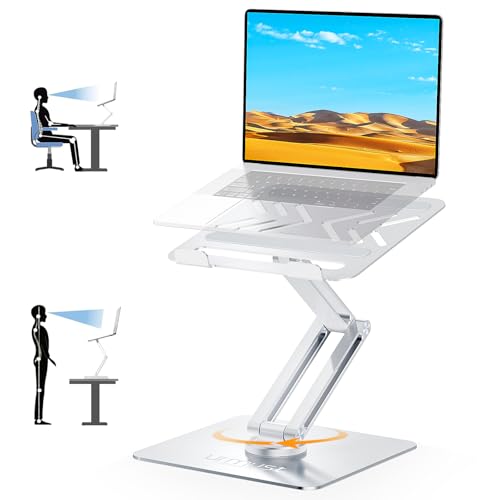
Urmust 360° Rotating Metal Laptop Stand
Best for: Office workers needing screen rotation
- Supported Screen Size
- 10-17 inches
- Material
- Aluminum
- Swivel Rotation
- 360°
- Product Weight
- 1.87 pounds
- Features
- Kickstand, 360° Rotation, Adjustable Height
- Recommended Use
- Desk
View on Amazon: Urmust 360° Rotating Metal Laptop Stand Affiliate link
This Urmust stand offers 360-degree rotation for screen sharing and supports laptops from 10 to 17 inches. The metal construction weighs 1.87 pounds and holds up to 22 pounds. It includes height and angle adjustments to keep your screen at eye level. The design promotes airflow for better cooling. It suits users who need a stable, rotating base for their desk setup.
Pros
- 360-degree swivel rotation for easy screen sharing
- Supports laptops between 10 and 17 inches
- Metal build supports up to 22 pounds
- Adjustable height and angle settings
- Ventilated design aids heat dissipation
Cons
- Heavier base at 1.87 pounds may reduce portability
- Requires manual adjustment for height and angle
- No mention of cable management features
Good fit if
- You share your screen with colleagues frequently
- You want to adjust your laptop height for posture
- You use laptops ranging from 10 to 17 inches
Skip if
- You need a lightweight stand for travel
- You prefer automatic height adjustment
- You want a stand with built-in cable management
Verdict: Urmust 360° Metal Laptop Stand is ideal for office workers who need to rotate their screen for meetings. It provides a sturdy base for larger laptops and helps maintain ergonomic posture.
Specifications side by side
| Spec | Urmust 360° Rotating Metal Laptop Stand |
|---|---|
| Supported Screen Size | 10-17 inches |
| Material | Aluminum |
| Swivel Rotation | 360° |
| Product Weight | 1.87 pounds |
| Features | Kickstand, 360° Rotation, Adjustable Height |
| Recommended Use | Desk |
| Dimensions | 10.2 × 8.66 × 5.51 inches |
| Weight | 1.87 pounds |
| Size | Up to 17" Laptop |
| Color | A-Silver |
| Model | X7 |
Frequently asked questions
Is the Urmust stand compatible with 17-inch laptops?
Yes, it supports devices up to 17 inches. The base measures 10.2 inches in length and 8.66 inches in width, providing a stable platform for larger screens. This size ensures your laptop sits securely without overhanging the edges during rotation or typing.
Does this stand rotate a full 360 degrees?
Yes, the Urmust X7 model features a 360-degree rotation capability. This allows you to switch between portrait and landscape modes instantly. It is particularly useful for sharing your screen with colleagues during meetings or viewing documents in a vertical format.
How much does the Urmust laptop stand weigh?
The stand weighs 1.87 pounds. This metal construction adds enough mass to keep the base steady on your desk. The weight helps minimize wobble when you adjust the angle or rotate the screen, ensuring a stable viewing experience for your laptop.
Can I use this stand on a desk?
Yes, it is recommended for desk use. The flat, heavy metal base is designed to sit securely on a flat surface. You place your laptop directly onto the platform, and the dual pivot joints allow you to adjust the height and angle for better ergonomics.
What color is the Urmust X7 stand?
The stand is available in A-Silver. This metallic finish matches most modern laptop designs and office environments. The all-metal build not only provides a sleek look but also helps dissipate heat from your device during long work sessions.
Is the Urmust stand good for office meetings?
It is ideal for office workers who need screen rotation. The 360-degree feature lets you easily show your screen to others. The sturdy metal base keeps your laptop at an ergonomic height, reducing neck strain while you present or collaborate with team members.