UGREEN Quad Display DisplayLink Dock Alternatives: 6 Similar Picks Compared
As an Amazon Associate we earn from qualifying purchases. Links on this page are affiliate links.
If you are researching ugreen USB c displaylink docking station alternatives, you likely need a specific multi-monitor setup that fits your workflow. The UGREEN U701 supports four displays and offers extensive connectivity through a single USB-C connection. It delivers up to 100W of power delivery and includes a 2.5GbE port for stable networking. This makes it a strong choice for users who prioritize screen count and data speed above all else.
However, you might prefer a different specification or brand for your workspace. Some users need only three screens or require a smaller form factor for travel. Others may want Thunderbolt 4 connectivity or a more compact design without the bulk of a large power adapter. The alternatives listed here were chosen because their specs overlap with the original. They share key features like DisplayLink technology, high-resolution output, and robust charging capabilities. This guide compares these options to help you find the right balance of performance and size.
Our top pick: UGREEN Quad Display DisplayLink Dock.
How each alternative compares
Belkin 16-in-1 Triple 4K DisplayLink Dock
The Belkin INC026ttBK supports three displays instead of four, making it a better fit if you do not need the extra screen. It also provides 100W power delivery, similar to the UGREEN U701, but lacks the UGREEN's dedicated 27W PD-Out port for secondary devices. You get a 16-in-1 expansion hub with a focus on stability. This choice suits users who prefer a triple-monitor workflow and want reliable wired performance without managing multiple power outputs for phones or tablets. The triple setup reduces cable clutter compared to the quad configuration.
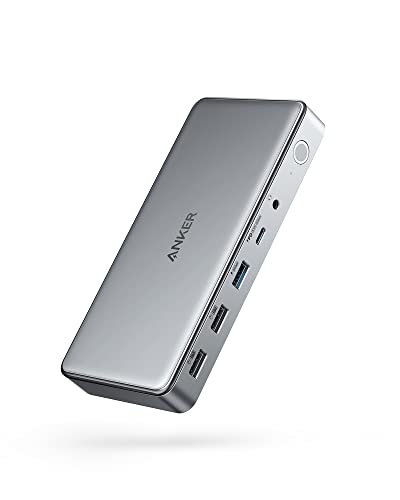
Anker 10-in-1 Triple Display USB-C Dock
The Anker A83951A1 is a compact 10-in-1 dock that supports three displays. It differs from the UGREEN U701 by offering a smaller footprint, which is useful for tight desk spaces. However, it limits the primary display to 4K at 30Hz, whereas the UGREEN supports higher refresh rates on its screens. You sacrifice some resolution smoothness for a more portable form factor. This dock is ideal if you prioritize physical size over high refresh rates. The reduced port count means fewer built-in connections, so you may need additional adapters for storage or networking compared to the extensive UGREEN array.
Plugable 13-in-1 Triple 4K USB-C Dock
The Plugable UD-ULTC4K is a 13-in-1 dock that supports three 4K displays. It matches the UGREEN U701 in providing 100W power delivery for your laptop. The main difference is the display count; you get three screens instead of four. This dock is a solid alternative if you do not need the fourth monitor. It offers a good balance of connectivity and charging power. The physical dimensions differ, so check your desk space. This option suits professionals who need high-resolution triple displays and fast charging without the complexity of managing four simultaneous video outputs.
Giq DisplayLink Triple 4K USB-C Dock
The Giq USB-C dock supports three 4K displays and delivers 100W charging. It is smaller than the UGREEN U701, making it suitable for mobile workers who need multiple screens in a compact package. You give up the fourth display and the extensive port variety of the UGREEN. The Giq focuses on essential triple-monitor functionality. This pick is best if you travel frequently and need a lightweight solution. The reduced port count means fewer built-in options for Ethernet or card readers, so you may rely more on wireless connections or dongles for peripheral devices.
Koncept Thunderbolt 4 Modular Dock 130W
The Koncept SD25TB4 uses Thunderbolt 4 instead of DisplayLink, which changes how you connect displays. It supports dual 4K monitors, offering fewer screens than the UGREEN U701. The key advantage is native bandwidth, which can reduce latency compared to DisplayLink processing. You get 130W power delivery, which is higher than the UGREEN's 100W. This dock is ideal for Thunderbolt-equipped laptops where you prioritize speed and simplicity over screen count. The lack of a fourth display is a trade-off for the efficiency of Thunderbolt connectivity and streamlined hardware design.
Tobenone Quad 4K 20-in-1 DisplayLink Dock
The TobenONE 20-port dock supports four 4K displays at 60Hz, matching the UGREEN U701 in screen count and refresh rate. It offers more total ports, which is useful if you need extensive connectivity for many peripherals. The physical size is larger, so it requires more desk space. This option suits users who prioritize port variety and high-resolution quad displays. The trade-off is a bulkier design compared to the UGREEN. You get similar display performance with a focus on maximizing the number of available connections for storage, networking, and other devices.
Quick picks
Our 7 picks

UGREEN Quad Display DisplayLink Dock
Best for: Quad monitor setups and heavy connectivity
- Host Interface
- USB-C
- Display Support
- Quad
- Max Resolution
- 8K@60Hz
- Power Delivery
- 100W
- Port Count
- 15
- Video Ports
- HDMI, DisplayPort
View on Amazon: UGREEN Quad Display DisplayLink Dock Affiliate link
This UGREEN docking station supports four 4K@60Hz displays from a single USB-C connection. It includes two HDMI and two DisplayPort outputs, plus a 2.5GbE port and 10Gbps data transfer. The unit provides 100W of power delivery to your laptop. You need a DisplayLink driver for full functionality. This setup suits users who need extensive screen real estate and connectivity from one cable.
Pros
- Supports quad 4K@60Hz displays via DisplayLink
- Includes 2.5GbE Ethernet for fast networking
- Offers 100W PD charging for laptops
- Features 15 ports for total expansion
Cons
- Requires separate DisplayLink driver installation
- Host charging drops to 85W when PD-Out is active
- Not compatible with phones, tablets, or Nintendo Switch
Good fit if
- You need four external monitors for productivity
- You want a single cable for video and data
- You use a Windows or macOS laptop with USB-C
Skip if
- You prefer plug-and-play without driver installation
- You want to connect a tablet or phone as a host
- You need native USB-C video output without DisplayLink
Verdict: UGREEN U701 Quad DisplayLink Dock is the best overall choice for users who need four screens and extensive connectivity from one port. It fits professionals who prioritize screen count and data speed over native plug-and-play simplicity.

Belkin 16-in-1 Triple 4K DisplayLink Dock
Best for: Triple 4K monitor setups with 100W charging
- Host Interface
- USB-C
- Display Support
- Triple
- Max Resolution
- 4K@60Hz
- Power Delivery
- 100W
- Port Count
- 16
- Video Ports
- HDMI, DisplayPort
View on Amazon: Belkin 16-in-1 Triple 4K DisplayLink Dock Affiliate link
The Belkin 16-in-1 dock supports three 4K@60Hz displays via DisplayLink. It delivers 100W power delivery to your laptop and includes 2.5Gb Ethernet for fast wired internet. You get 10Gbps data transfer speeds and a Kensington lock slot for security. This unit suits users who need a stable, multi-monitor workstation with robust connectivity options.
Pros
- Supports triple 4K@60Hz displays via DisplayLink
- 100W Power Delivery for laptop charging
- 2.5Gb Ethernet port for fast networking
- 10Gbps data transfer speeds
- Kensington lock compatible for security
Cons
- Requires DisplayLink drivers for operation
- Only offers USB-C host interface
- No Thunderbolt certification mentioned
Good fit if
- You need three external monitors
- You want 100W laptop charging
- You prefer wired 2.5Gb Ethernet
Skip if
- You require Thunderbolt 4 speeds
- You need a quad display setup
- You want plug-and-play without drivers
Verdict: Belkin 16-in-1 Triple Display Dock provides reliable triple 4K output and 100W charging for users who need a stable, wired workstation setup.
Anker 10-in-1 Triple Display USB-C Dock
Best for: Triple monitor setups with 4K@30Hz primary display
- Host Interface
- USB-C
- Display Support
- Triple
- Max Resolution
- 4K@30Hz
- Power Delivery
- 100W
- Port Count
- 10
- Video Ports
- HDMI, DisplayPort
View on Amazon: Anker 10-in-1 Triple Display USB-C Dock Affiliate link
The Anker DL6350 is a 10-port USB-C docking station that supports triple displays via DisplayLink technology. It delivers up to 4K resolution at 30Hz on the primary screen, while secondary monitors can run at 1080p and 60Hz. The unit includes a 100W Power Delivery port for your laptop and a separate 30W port for devices. It weighs 1.6 ounces and measures 6.7 inches in length.
Pros
- Supports triple monitor setups using DisplayLink drivers
- Provides 100W Power Delivery for host laptops
- Includes dedicated 30W USB-C port for secondary charging
- Compact physical footprint with 1.6-ounce weight
Cons
- Primary display is limited to 4K at 30Hz
- Requires specific DisplayLink drivers for functionality
- No Thunderbolt 4 or Thunderbolt 5 support
Good fit if
- You need three screens from a single USB-C port
- You want fast charging for your laptop
- You have a laptop with limited USB-C ports
Skip if
- You require 4K resolution at 60Hz
- You prefer Thunderbolt connectivity over USB-C
- You need more than three display outputs
Verdict: Anker DL6350 10-in-1 Triple Display Dock fits users who need a compact, high-power solution for triple monitors but can accept 30Hz refresh rates on their main screen.

Plugable 13-in-1 Triple 4K USB-C Dock
Best for: Triple monitor setups with charging needs
- Host Interface
- USB-C
- Display Support
- Triple
- Max Resolution
- 4K @ 60Hz
- Power Delivery
- 100W
- Port Count
- 13
- Video Ports
- HDMI, DisplayPort
View on Amazon: Plugable 13-in-1 Triple 4K USB-C Dock Affiliate link
The Plugable UD-ULTC4K is a 13-in-1 USB-C docking station that supports triple 4K displays at 60Hz. It delivers up to 100W of power delivery to charge your laptop while providing 10Gbps data speeds. This dock is designed for users needing serious screen real estate through mixed HDMI and DisplayPort outputs. It requires DisplayLink drivers on macOS and works with Windows 10 or later.
Pros
- Supports triple 4K monitors at 60Hz
- Provides 100W laptop charging via USB-C
- Features 13 ports including Ethernet and SD card slots
- Offers 10Gbps data transfer speeds
Cons
- Requires DisplayLink drivers for setup
- Does not support HDCP for protected streaming content
- Front USB-C port limited to 20W charging
Good fit if
- You need three external displays for productivity
- You want a single cable for laptop charging and data
- You use Windows or macOS with Thunderbolt or USB4
Skip if
- You need to play protected streaming content on external screens
- You require a plug-and-play solution without driver installation
- You need more than three display outputs
Verdict: Plugable 13-in-1 Triple 4K Dock fits professionals who need three high-resolution screens and fast charging through one connection. It is ideal for setups where driver installation is acceptable for expanded connectivity.

Giq DisplayLink Triple 4K USB-C Dock
Best for: mobile workers needing triple 4K displays
- Host Interface
- Thunderbolt 4/3, USB4, USB-C
- Display Support
- Triple
- Max Resolution
- 4K@60Hz
- Power Delivery
- 100W
- Video Ports
- HDMI, DisplayPort
- Max Data Speed
- 5Gbps
View on Amazon: Giq DisplayLink Triple 4K USB-C Dock Affiliate link
This Giq docking station supports three external 4K displays at 60Hz via DisplayLink, adding to your laptop screen. It delivers 100W power delivery and includes a gigabit Ethernet port. The compact design fits in a laptop sleeve. It works with Mac M-series chips and Windows laptops. You need to install DisplayLink drivers to use it.
Pros
- Supports triple 4K@60Hz external displays
- 100W Power Delivery pass-through
- Gigabit Ethernet for stable connectivity
- Compact dimensions for travel
Cons
- Requires separate DisplayLink driver installation
- Wall charger not included
- HDMI 2 port fails with USB 3.0 Type-C to A adapters
Good fit if
- You need three external monitors on a Mac M-series laptop
- You want a compact dock for travel
- You require wired Ethernet for video calls
Skip if
- You need a plug-and-play setup without drivers
- You prefer a dock with an included power adapter
- You only need dual monitor support
Verdict: Giq USB-C DisplayLink Triple 4K Dock provides triple 4K output and 100W charging in a small package, making it a solid choice for mobile professionals needing multiple screens on Mac or Windows.

Koncept Thunderbolt 4 Modular Dock 130W
Best for: dual 4K setups with Thunderbolt laptops
- Host Interface
- Thunderbolt 4
- Display Support
- Dual
- Max Resolution
- 4K
- Power Delivery
- 130W
- Video Ports
- Thunderbolt 4, DisplayPort, HDMI, USB-C
- Max Data Speed
- 40Gbps
View on Amazon: Koncept Thunderbolt 4 Modular Dock 130W Affiliate link
The Dell SD25TB4 is a Thunderbolt 4 docking station designed for dual 4K display setups. It delivers 130W of power delivery to your laptop while managing data speeds up to 40 GB/s. The unit includes an integrated 180W power supply, eliminating the need for a separate brick. It supports Windows, macOS, and Ubuntu, making it a solid choice for users needing reliable dual-monitor connectivity via Thunderbolt.
Pros
- Thunderbolt 4 host interface with 40 GB/s data speed
- Dual 4K display support via HDMI and DisplayPort
- 130W power delivery included with 180W internal power supply
- Integrated 180W power supply removes need for external brick
Cons
- Supports only dual monitors, not triple or quad setups
- No DisplayLink support for additional displays beyond native ports
- Requires Thunderbolt 4 compatible laptop for full functionality
Good fit if
- You need a clean dual 4K setup with one cable
- You want a dock with an integrated power supply
- You use a Thunderbolt 4 compatible laptop
Skip if
- You require triple or quad monitor support
- Your laptop lacks Thunderbolt 4 connectivity
- You need DisplayLink technology for extra screens
Verdict: The Dell SD25TB4 Thunderbolt 4 Smart Dock is a focused solution for users who need dual 4K displays and high-speed data transfer without the clutter of external power bricks. It fits professionals who prioritize a streamlined, single-cable workstation setup.

Tobenone Quad 4K 20-in-1 DisplayLink Dock
Best for: Users needing four 4K displays and many ports
- Host Interface
- Thunderbolt 5/4/3, USB4, USB-C
- Display Support
- Quad
- Max Resolution
- 4K@60Hz
- Power Delivery
- 100W
- Port Count
- 20
- Video Ports
- HDMI, DisplayPort
View on Amazon: Tobenone Quad 4K 20-in-1 DisplayLink Dock Affiliate link
This TobenONE docking station supports four 4K@60Hz displays via DisplayLink technology. It features 20 ports, including four HDMI and four DP outputs, making it ideal for heavy multitasking. The unit includes a 150W power adapter delivering 100W PD to your laptop. It connects through a Thunderbolt 4 host interface and weighs 2.27 pounds. You need to install the DisplayLink driver before use.
Pros
- Supports four simultaneous 4K@60Hz monitors
- 20 ports with four HDMI and four DP outputs
- 100W Power Delivery for laptop charging
- Thunderbolt 4 host interface for high bandwidth
- Includes dedicated power button for all connected devices
Cons
- Requires installation of the DisplayLink driver
- M1 chip MacBooks are limited to three displays
- Does not support HDCP for protected content
Good fit if
- You need four external monitors for professional workflows
- You want a single dock with 20 connection ports
- You use a Windows laptop or Intel-based Mac
Skip if
- You require HDCP support for media playback
- You use an M1 MacBook and need four screens
- You want a plug-and-play setup without driver installation
Verdict: TobenONE 20-Port Quad DisplayLink Dock offers extensive display expansion for users who need four screens. It suits those prioritizing port variety and high resolution over immediate plug-and-play simplicity.
Specifications side by side
| Spec | UGREEN Quad Display DisplayLink Dock | Belkin 16-in-1 Triple 4K DisplayLink Dock | Anker 10-in-1 Triple Display USB-C Dock | Plugable 13-in-1 Triple 4K USB-C Dock | Giq DisplayLink Triple 4K USB-C Dock | Koncept Thunderbolt 4 Modular Dock 130W | Tobenone Quad 4K 20-in-1 DisplayLink Dock |
|---|---|---|---|---|---|---|---|
| Host Interface | USB-C | USB-C | USB-C | USB-C | Thunderbolt 4/3, USB4, USB-C | Thunderbolt 4 | Thunderbolt 5/4/3, USB4, USB-C |
| Display Support | Quad | Triple | Triple | Triple | Triple | Dual | Quad |
| Max Resolution | 8K@60Hz | 4K@60Hz | 4K@30Hz | 4K @ 60Hz | 4K@60Hz | 4K | 4K@60Hz |
| Power Delivery | 100W | 100W | 100W | 100W | 100W | 130W | 100W |
| Port Count | 15 | 16 | 10 | 13 | not stated | not stated | 20 |
| Video Ports | HDMI, DisplayPort | HDMI, DisplayPort | HDMI, DisplayPort | HDMI, DisplayPort | HDMI, DisplayPort | Thunderbolt 4, DisplayPort, HDMI, USB-C | HDMI, DisplayPort |
| Max Data Speed | 10Gbps | 10Gbps | 5Gbps | 10Gbps | 5Gbps | 40Gbps | not stated |
| Ethernet Speed | 2.5GbE | 2.5GbE | not stated | not stated | 1000 Mbps | Gigabit Ethernet | not stated |
| Resolution | 4K UHD | 4K UHD | 4K UHD | 4K UHD | 4K UHD | 4K UHD | 4K UHD |
| Connectivity | USB-C | USB-C, HDMI, Ethernet | HDMI, DisplayPort | USB-C, HDMI, DisplayPort | USB-C, HDMI, DisplayPort, Ethernet | USB-C, HDMI, DisplayPort, Thunderbolt 4 | USB-C, Ethernet |
| Refresh Rate | 60Hz | 60Hz | not stated | not stated | not stated | not stated | 60Hz |
| Features | DisplayLink | DisplayLink | DisplayLink | not stated | DisplayLink | not stated | DisplayLink |
| Dimensions | not stated | not stated | 6.7 × 3.15 × 0.96 inches | 4.72 × 2.64 × 6.89 inches | 5.91 × 3.94 × 1.38 inches | 8.07 × 3.54 × 1.39 inches | 11.8 × 3.14 × 0.86 inches |
| Weight | not stated | not stated | 1.6 ounces | 1.07 pounds | not stated | 1.28 pounds | 2.27 pounds |
| Color | Dark Gray | Black | Gray | not stated | Classic Gray | Black | Grey |
| Model | U701 | INC026ttBK | A83951A1 | UD-ULTC4K | not stated | SD25TB4 | not stated |
| Size | not stated | not stated | not stated | not stated | not stated | not stated | small |
If you need internal drive storage alongside extra ports, review the best USB-C SSD docking stations for their slot speeds.
Frequently asked questions
Can these docks support four monitors?
Yes, but only specific models handle four displays. The UGREEN U701 and TobenONE 20-Port Dock both support quad setups. Most other options on this list, including the Belkin and Anker docks, are limited to triple monitor configurations. You must check the display support attributes carefully before purchasing.
Do all these docks use DisplayLink?
No, not all of them rely on DisplayLink technology. The UGREEN U701, Belkin INC026ttBK, Anker A83951A1, Plugable UD-ULTC4K, and Giq dock all use DisplayLink. The Koncept SD25TB4 uses Thunderbolt 4 instead. DisplayLink requires driver installation, while Thunderbolt docks often work more directly with compatible laptops.
Which dock offers the highest charging power?
The Koncept SD25TB4 offers the highest power delivery at 130W. Several other docks, including the Belkin, Plugable, and Giq models, provide 100W charging. The Anker and UGREEN docks also support significant power output, but you should verify the exact wattage in the specifications to ensure it meets your laptop requirements.
Are these docks compatible with Mac and Windows?
Yes, most of these docks work with both operating systems. The Giq dock explicitly mentions support for Mac and Windows. DisplayLink docks generally require drivers on both platforms. Thunderbolt docks like the Koncept model require compatible Mac or Windows hardware with Thunderbolt ports to function correctly.
What is the refresh rate on these displays?
Refresh rates vary by model and connection. The TobenONE dock supports 60Hz refresh rates on its displays. The Anker dock lists a 30Hz refresh rate for its primary screen. Other models like the Belkin and Plugable docks support 4K UHD resolution, but you should check specific port limitations for refresh rate details.
Do these docks include Thunderbolt 4 connectivity?
Only the Koncept SD25TB4 dock features Thunderbolt 4 connectivity. The other models on this list use standard USB-C connections. Thunderbolt 4 offers higher data transfer speeds and video bandwidth. If your laptop has a Thunderbolt port, this dock provides a streamlined single-cable solution without external power bricks.
Which dock is best for mobile workers?
The Giq dock is designed for mobile professionals needing multiple screens. It offers triple 4K output and 100W charging in a compact package. The Anker dock is also small, measuring 6.7 inches in length. The Plugable dock is lightweight at 1.07 pounds, making it easy to transport.