Looking Beyond the UGREEN 13-in-1 Thunderbolt 4 Dock? 6 Alternatives Worth a Look
As an Amazon Associate we earn from qualifying purchases. Links on this page are affiliate links.
The UGREEN 13-in-1 Thunderbolt 4 Dock offers robust connectivity with three Thunderbolt 4 ports and dual 4K@60Hz display support. If you are considering ugreen 13 in 1 thunderbolt 4 docking alternatives, you might want a different size, fewer ports, or a specific interface like 2.5GbE. This dock provides 180W power delivery and fanless cooling, which suits many professionals. However, its dimensions and port layout may not fit every desk or travel setup.
We selected 6 alternatives whose specifications overlap with the original UGREEN model. These options include other Thunderbolt 4 docks and USB-C hubs that support 4K@60Hz or 8K displays. Some choices prioritize a smaller form factor for travelers, while others focus on specific connectivity needs like additional USB-A ports or HDMI outputs. This list helps you compare port counts, resolution limits, and power delivery capabilities. You can find a solution that matches your exact hardware requirements without unnecessary extras.
Comparing Ugreen Alternatives by Spec
UGREEN 13-in-1 Thunderbolt 4 Dock
This UGREEN model keeps the 13-in-1 port count and dual 4K@60Hz display support but upgrades the network interface to 2.5GbE. You gain faster local network speeds compared to the standard Gigabit Ethernet found in the original U707. The physical dimensions are larger, measuring 7.6 inches in length, which may affect desk space. It retains Thunderbolt 4 connectivity for high-bandwidth data transfer. If you require faster LAN speeds for large file transfers or NAS access, this version offers a clear advantage. It is best for power users who need both extensive USB connectivity and enhanced networking without sacrificing display performance.
Amazon Basics Thunderbolt 4 Compact Dock
The Amazon Basics dock significantly reduces size and port count while maintaining dual 4K@60Hz support via Thunderbolt 4. It measures 4.76 inches in length and weighs 1.76 pounds, making it much more portable than the bulkier UGREEN options. You give up the extensive 13-in-1 connectivity and multiple Thunderbolt 4 ports in favor of a compact form factor. It lacks the extra USB-A and card reader ports found in the original. This dock is ideal for travelers with Windows laptops who need reliable dual-monitor support without carrying a large, heavy docking station. It simplifies your setup by focusing on essential video and Thunderbolt connectivity.
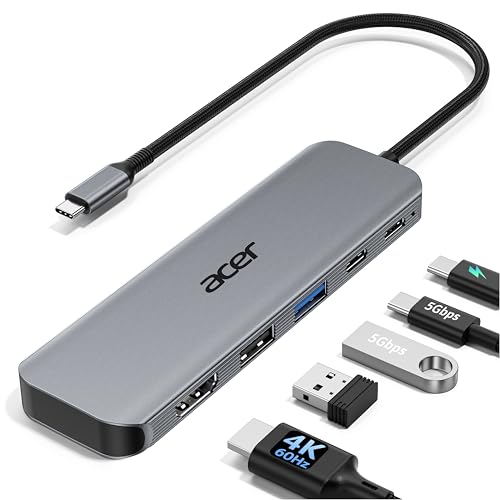
Acer 5-in-1 4K 60Hz USB-C Hub
The Acer 5-in-1 hub is a budget-friendly alternative that supports only a single 4K@60Hz display, unlike the dual-monitor capability of the UGREEN dock. It connects via USB-C and HDMI, dropping Thunderbolt 4 entirely. You sacrifice high-speed data transfer rates and multiple port options for a simpler, more affordable solution. It is best for users who primarily need one external monitor and fast charging. The lack of Thunderbolt certification means lower bandwidth for peripherals and storage. If your workflow relies on a single screen and you do not need extensive connectivity, this hub provides a clean, cost-effective desk setup without the complexity of a full docking station.
Selore Dual 4K HDMI USB-C Dock
The Selore 9-in-1 dock prioritizes USB-A connectivity and dual HDMI outputs over Thunderbolt 4 speed. It supports dual 4K@60Hz displays but uses HDMI rather than Thunderbolt or DisplayPort for video. You gain multiple USB-A ports for legacy devices, which the original UGREEN dock also offers, but you lose the 40Gbps Thunderbolt bandwidth. The 100W Power Delivery is slightly higher than the UGREEN's 96W. This option suits users who need straightforward button-controlled operation and multiple USB-A connections for mice and drives. It is a practical choice for those who do not require Thunderbolt 4 peripherals or the highest data transfer speeds.
HODO 5-in-1 Dual 4K 60Hz USB-C Hub
The HODO 5-in-1 hub supports dual displays up to 8K@30Hz, exceeding the UGREEN dock's 4K@60Hz resolution limit. However, it connects via USB-C, not Thunderbolt 4, which limits data transfer speeds and peripheral compatibility. You gain higher resolution support but lose the high-bandwidth Thunderbolt ecosystem and the extensive port selection of the 13-in-1 dock. It is best for Thunderbolt 4 laptops that can utilize USB-C for video output. This hub is ideal for professionals who prioritize high-resolution dual monitors over fast data transfer and extensive connectivity. It offers a compact solution for high-resolution workflows without the bulk of a full-sized docking station.
MOKiN 6-in-1 USB-C Hub with 4K 60Hz HDMI
The MOKiN 6-in-1 hub is a focused adapter for a single 4K@60Hz display, contrasting with the dual-monitor support of the UGREEN dock. It connects via USB-C and HDMI, lacking Thunderbolt 4 connectivity. You sacrifice dual displays and high-speed data transfer for a smaller, simpler device. It is best for users who need a single external monitor and portability. The lack of Thunderbolt means you cannot daisy-chain high-speed peripherals or achieve the 40Gbps bandwidth of the original dock. This hub is a practical choice for those who prioritize simplicity and a single high-resolution display over the extensive connectivity of a full docking station.
Quick picks
Our 7 picks

UGREEN 13-in-1 Thunderbolt 4 Dock
Best for: multi-monitor setups needing three Thunderbolt 4 ports
- Host Interface
- Thunderbolt 4
- Display Support
- Dual
- Max Resolution
- 8K@30Hz
- Power Delivery
- 96W
- Port Count
- 13
- Video Ports
- Thunderbolt 4, DisplayPort
View on Amazon: UGREEN 13-in-1 Thunderbolt 4 Dock Affiliate link
This UGREEN dock offers 13 ports, including three Thunderbolt 4 connections with 40Gbps bandwidth. It supports dual 4K@60Hz displays or a single 8K@30Hz output. The unit delivers up to 96W of Power Delivery for your laptop. Its fanless design ensures silent operation. You get gigabit Ethernet and dual card readers. This setup suits users needing high-speed data and multiple monitors.
Pros
- Three Thunderbolt 4 ports with 40Gbps data transfer speeds
- Dual 4K@60Hz display support for multitasking
- 96W Power Delivery for laptop charging
- Fanless passive cooling for silent operation
Cons
- DisplayPort does not support DP++
- Requires active adapter for HDMI monitors
- Gigabit Ethernet limits network speed to 1Gbps
Good fit if
- You need three Thunderbolt 4 ports for peripherals
- You require dual 4K monitors at 60Hz
- You want silent operation for a quiet workspace
Skip if
- You need 2.5G Ethernet speeds
- You prefer passive HDMI connections without adapters
- You only need a single monitor connection
Verdict: UGREEN 13-in-1 Thunderbolt 4 Dock provides extensive connectivity with three Thunderbolt 4 ports and dual 4K@60Hz support. It fits professionals who need high bandwidth and silent performance for multi-monitor setups.

UGREEN 13-in-1 Thunderbolt 4 Dock
Best for: Power users needing dual 4K displays and 2.5GbE
- Host Interface
- Thunderbolt 4
- Display Support
- Dual
- Max Resolution
- 8K@30Hz
- Power Delivery
- 90W
- Port Count
- 13
- Video Ports
- Thunderbolt 4, DisplayPort
View on Amazon: UGREEN 13-in-1 Thunderbolt 4 Dock Affiliate link
This UGREEN dock expands your laptop with 13 ports, including dual Thunderbolt 4 connections at 40Gbps. It supports dual 4K@60Hz displays on Windows or select Macs, or a single 8K@30Hz output. The unit delivers 90W of power delivery to keep your laptop charged. It also features 2.5Gb Ethernet and SD/TF card readers. This setup suits users needing high-speed data transfer and robust multi-monitor support for complex workstations.
Pros
- Thunderbolt 4 host interface with 40Gbps data speeds
- Supports dual 4K@60Hz or single 8K@30Hz displays
- Includes 2.5Gb Ethernet for fast wired networking
- Provides 90W power delivery for laptop charging
- Features SD and TF 4.0 card readers
Cons
- DisplayPort does not support DP++
- Passive DP-to-HDMI adapters will not work
- Base M1/M2/M3 Macs support only single 4K@60Hz
Good fit if
- You need dual 4K monitors for Windows or Pro/Max Macs
- You require 2.5Gb Ethernet connectivity
- You want 90W charging for your laptop
Skip if
- You use a base M1/M2/M3 Mac and need dual displays
- You prefer passive HDMI adapters for your second monitor
- You only have a single-function USB-C port
Verdict: UGREEN 13-in-1 Thunderbolt 4 Dock delivers high-bandwidth connectivity and robust display options for power users. It fits professionals who need fast data transfer, 2.5Gb networking, and reliable dual-monitor support on compatible systems.

Amazon Basics Thunderbolt 4 Compact Dock
Best for: Travelers with Windows laptops needing dual 4K
- Host Interface
- Thunderbolt 4
- Display Support
- Dual
- Max Resolution
- 4K@60Hz
- Power Delivery
- 85W
- Video Ports
- Thunderbolt 4
- Dimensions
- 4.76 × 2.84 × 0.86 inches
View on Amazon: Amazon Basics Thunderbolt 4 Compact Dock Affiliate link
This compact dock supports dual 4K@60Hz displays via Thunderbolt 4. It delivers up to 85W of power delivery to charge your laptop while connected. The unit measures 4.76 x 2.84 x 0.86 inches and weighs 1.76 pounds. It fits easily into a laptop bag for travel. You need a Thunderbolt 4 port on your laptop to use its full features. It works with Windows 10 and non-M1/M2 MacBooks.
Pros
- Supports dual 4K@60Hz displays
- 85W Power Delivery charging
- Compact 0.86-inch height
- Three downstream Thunderbolt 4 ports
Cons
- Limited to 85W power delivery
- Incompatible with M1/M2 MacBooks
- Does not support Linux or Chrome OS
Good fit if
- You need a small dock for travel
- You use a Windows laptop with Thunderbolt 4
- You require dual 4K monitors
Skip if
- You use an M1 or M2 MacBook
- Your laptop needs more than 85W of power
- You run Linux or Chrome OS
Verdict: Amazon Basics Thunderbolt 4 Dock offers reliable dual 4K support in a small form factor. It is a solid option for Windows users who travel with two monitors.
Acer 5-in-1 4K 60Hz USB-C Hub
Best for: Single 4K@60Hz monitor setups
- Host Interface
- USB-C
- Max Resolution
- 4K@60Hz
- Power Delivery
- 90W
- Port Count
- 5
- Video Ports
- HDMI 2.0
- Max Data Speed
- 5Gbps
View on Amazon: Acer 5-in-1 4K 60Hz USB-C Hub Affiliate link
This Acer USB-C hub expands a single port into five, including a 4K@60Hz HDMI output. It delivers 90W pass-through charging and 5Gbps data transfer speeds. The aluminum shell aids heat dissipation. It suits users who need a single external monitor with reliable power delivery. It does not support dual monitors or ultra-wide displays.
Pros
- Supports 4K@60Hz HDMI output
- Provides 90W PD pass-through charging
- Features 5Gbps USB-C and USB-A 3.0 ports
- Aluminum shell for improved heat dissipation
Cons
- Single HDMI port limits dual monitor setups
- Does not support ultra-wide monitors
- Only includes one USB-A 2.0 port
Good fit if
- You need a single 4K@60Hz display
- You require 90W power delivery for your laptop
- You want a compact aluminum hub for travel
Skip if
- You need to connect two external monitors
- You require an ultra-wide monitor connection
- You need more than one USB-A 3.0 port
Verdict: Acer 5-in-1 USB-C Hub is a solid choice for users who need a single 4K@60Hz display and fast charging. It fits your desk if you prioritize a clean, single-monitor setup.

Selore Dual 4K HDMI USB-C Dock
Best for: Users needing dual HDMI and multiple USB-A ports
- Host Interface
- USB-C
- Display Support
- Dual
- Max Resolution
- 4K@60Hz
- Power Delivery
- 100W
- Port Count
- 8
- Video Ports
- HDMI
View on Amazon: Selore Dual 4K HDMI USB-C Dock Affiliate link
The Selore 8-in-1 USB-C dock provides dual HDMI outputs for 4K@60Hz displays. It includes two USB-A ports and one USB-C port, all running at 5Gbps speeds. A 100W Power Delivery port charges your laptop while connected. The unit features dedicated buttons to toggle between mirror and extend modes or black out the screen for privacy. It is a compact, grey hub suitable for users needing multiple peripheral connections alongside dual video outputs.
Pros
- Dual HDMI ports support 4K@60Hz resolution for extended or mirrored displays
- Includes two USB-A ports and one USB-C port for 5Gbps data transfer
- 100W Power Delivery charging keeps your laptop powered during use
- Hardware buttons allow quick switching between mirror, extend, or privacy modes
Cons
- Mac users are limited to one external monitor in extend mode
- Data speeds are capped at 5Gbps, which is slower than Thunderbolt docks
- Requires one-time system authorization on Windows and Mac before first use
Good fit if
- You need dual 4K monitors connected via a single cable
- You require multiple USB-A ports for legacy peripherals
- You want physical buttons to control display modes easily
Skip if
- You require Thunderbolt 4 speeds for high-bandwidth devices
- You use macOS and need dual external monitors simultaneously
- You prefer a setup that works without initial system configuration
Verdict: Selore 8-in-1 USB-C Dock with USB-A Ports is a solid choice for users who prioritize multiple USB-A connections and dual video outputs over high-speed data transfer. It fits those who need a straightforward, button-controlled hub for their daily workflow.

HODO 5-in-1 Dual 4K 60Hz USB-C Hub
Best for: Thunderbolt 4 laptops needing 8K dual displays
- Host Interface
- USB-C
- Display Support
- Dual
- Max Resolution
- 4K@60Hz
- Power Delivery
- 87W
- Video Ports
- USB-C
- Max Data Speed
- 10Gbps
View on Amazon: HODO 5-in-1 Dual 4K 60Hz USB-C Hub Affiliate link
The HODO USB-C Hub connects to Thunderbolt 4 or USB4 hosts for dual video output. It supports 8K at 30Hz or 4K at 60Hz resolution. The device delivers up to 87W of power delivery to your laptop. Data transfer speeds reach 10Gbps. It is a compact adapter for users who need high-resolution displays and fast data sync on compatible systems.
Pros
- Supports 8K@30Hz or 4K@60Hz dual video output
- 10Gbps high-speed data transfer capability
- Up to 87W power delivery for laptops
- Compact dimensions of 5.7 by 2.32 inches
Cons
- Video and data transfer cannot run simultaneously on the main port
- Requires a USB4 or Thunderbolt 4 host port for full functionality
- Power adapter and cable are not included
Good fit if
- You need 8K resolution at 30Hz for detailed work
- Your laptop supports USB4 or Thunderbolt 4 protocols
- You require 10Gbps data speeds for large files
Skip if
- You need simultaneous 4K@60Hz video and 10Gbps data transfer
- Your laptop only supports USB 3.2 or older standards
- You want a complete kit with included power cables
Verdict: HODO USB-C Hub 8K@30Hz Dual Display suits professionals using Thunderbolt 4 or USB4 laptops who prioritize high-resolution dual monitors and fast data transfer over simultaneous multi-tasking on a single port.

MOKiN 6-in-1 USB-C Hub with 4K 60Hz HDMI
Best for: single 4K@60Hz display upgrades
- Host Interface
- USB-C
- Max Resolution
- 4K@60Hz
- Port Count
- 6
- Video Ports
- HDMI
- Connectivity
- USB-C, HDMI
View on Amazon: MOKiN 6-in-1 USB-C Hub with 4K 60Hz HDMI Affiliate link
The MOKiN 6-in-1 USB-C Hub offers a compact silver adapter for MacBook Pro and Air models. It supports 4K UHD resolution at a 60Hz refresh rate via its HDMI port. This device connects through a single USB-C host interface. It suits users who need a simple, single-display upgrade for their laptop without the bulk of a full docking station.
Pros
- Supports 4K UHD resolution
- 60Hz refresh rate output
- 6-in-1 port configuration
- USB-C host interface
Cons
- Single HDMI video output
- No Thunderbolt 4 support
- Limited to one external display
Good fit if
- You need a simple 4K@60Hz display upgrade
- You use a MacBook Pro or Air
- You prefer a compact silver hub
Skip if
- You require dual monitor support
- You need Thunderbolt 4 connectivity
- You want a 13-in-1 docking station
Verdict: The MOKiN 6-in-1 USB-C Hub is a focused adapter for users who need a single 4K@60Hz display connection. It fits those who prioritize simplicity and portability over the extensive port selection of larger docks.
Specifications side by side
| Spec | UGREEN 13-in-1 Thunderbolt 4 Dock | UGREEN 13-in-1 Thunderbolt 4 Dock | Amazon Basics Thunderbolt 4 Compact Dock | Acer 5-in-1 4K 60Hz USB-C Hub | Selore Dual 4K HDMI USB-C Dock | HODO 5-in-1 Dual 4K 60Hz USB-C Hub | MOKiN 6-in-1 USB-C Hub with 4K 60Hz HDMI |
|---|---|---|---|---|---|---|---|
| Host Interface | Thunderbolt 4 | Thunderbolt 4 | Thunderbolt 4 | USB-C | USB-C | USB-C | USB-C |
| Display Support | Dual | Dual | Dual | not stated | Dual | Dual | not stated |
| Max Resolution | 8K@30Hz | 8K@30Hz | 4K@60Hz | 4K@60Hz | 4K@60Hz | 4K@60Hz | 4K@60Hz |
| Power Delivery | 96W | 90W | 85W | 90W | 100W | 87W | not stated |
| Port Count | 13 | 13 | not stated | 5 | 8 | not stated | 6 |
| Video Ports | Thunderbolt 4, DisplayPort | Thunderbolt 4, DisplayPort | Thunderbolt 4 | HDMI 2.0 | HDMI | USB-C | HDMI |
| Max Data Speed | 40Gbps | 40Gbps | not stated | 5Gbps | 5Gbps | 10Gbps | not stated |
| Ethernet Speed | Gigabit Ethernet | 2.5Gbps | not stated | not stated | not stated | not stated | not stated |
| Resolution | 4K UHD | 4K UHD | 4K UHD | 4K UHD | 4K UHD | 4K UHD | 4K UHD |
| Connectivity | Ethernet, Thunderbolt 4 | Ethernet, Thunderbolt 4 | Thunderbolt 4 | USB-C, HDMI, USB-A | USB-C, HDMI, USB-A | USB-C, DisplayPort | USB-C, HDMI |
| Refresh Rate | 60Hz | 60Hz | 60Hz | 60Hz | 60Hz | 60Hz | 60Hz |
| Slot Count | not stated | 1 Slot | not stated | not stated | not stated | not stated | not stated |
| Dimensions | 3.7 × 1.96 × 5.78 inches | 7.6 × 4.06 × 0.94 inches | 4.76 × 2.84 × 0.86 inches | not stated | 4.5 × 2.1 × 0.7 inches | 5.7 × 2.32 × 0.47 inches | not stated |
| Weight | not stated | not stated | 1.76 pounds | not stated | 3.39 ounces | 2.47 ounces | not stated |
| Size | 13-in-1 | 13-in-1 | 4.76 x 2.84 x 0.86 inches | not stated | 9-in-1 | not stated | 6-in-1 USB C Hub |
| Model | U707 | 25054A | DBD1010 | ODK5U0 | SEUC0425 | not stated | not stated |
| Color | not stated | Gray | Black | Grey | Grey | not stated | 6 in 1 USB C Hub - Silver |
If you also outfit a workshop, compare eneacro 1 1 4 inch sds plus 13 alternatives by their published specifications.
Frequently asked questions
Which UGREEN dock is best for dual 4K monitors?
The UGREEN 13-in-1 Thunderbolt 4 Dock (model 25054A) supports dual 4K@60Hz displays. It also includes 2.5GbE networking for faster local connections. This model is designed for power users who need high bandwidth and reliable multi-monitor performance without compromising on data transfer speeds.
Is there a compact Thunderbolt 4 dock for travel?
The Amazon Basics Thunderbolt 4 Compact Dock is a small option for travelers. It measures 4.76 x 2.84 x 0.86 inches and weighs 1.76 pounds. It supports dual 4K@60Hz outputs, making it a solid choice for Windows laptops that need portability without sacrificing display quality.
What is the best budget USB-C hub for a single monitor?
The Acer 5-in-1 4K 60Hz USB-C Hub is a strong budget choice. It supports a single 4K@60Hz display via HDMI. This hub is ideal if you want a clean, simple setup for one monitor while still benefiting from fast charging and essential connectivity options.
Does any alternative offer more USB-A ports than UGREEN?
The Selore Dual 4K HDMI USB-C Dock provides multiple USB-A connections. It features a 9-in-1 design with dual HDMI outputs. This dock is suitable if you prioritize connecting several USB-A peripherals and need dual video outputs over high-speed Thunderbolt data transfer capabilities.
Can I get 8K support with a Thunderbolt 4 hub?
The HODO 5-in-1 Dual 4K 60Hz USB-C Hub supports 8K@30Hz dual displays. It is designed for Thunderbolt 4 or USB4 laptops. This option suits professionals who need high-resolution monitors and fast data transfer, though it focuses on dual display performance rather than single-port multitasking.
Which dock is best for users who need 100W charging?
The Selore Dual 4K HDMI USB-C Dock offers 100W Power Delivery. It also includes dual HDMI ports for video output. This makes it a practical choice for users who need to charge their laptop at high speeds while connecting to two external displays simultaneously.
Is there a simple hub for just one 4K display?
The MOKiN 6-in-1 USB-C Hub is a focused adapter for single displays. It supports 4K@60Hz output via HDMI. This hub is best for users who want simplicity and portability, avoiding the bulk of larger docks while still getting a clear, high-refresh-rate connection for one monitor.