Tobenone vs Baseus: Docking Stations Compared by Specs
As an Amazon Associate we earn from qualifying purchases. Links on this page are affiliate links.
When comparing tobenone vs baseus docking station options, you face a choice between port volume and display speed. Both hubs connect via USB-C and support 4K video output for Windows laptops. They also provide Ethernet and card readers for data transfer. The main difference lies in their display capabilities and port counts. Tobenone offers triple 4K@60Hz support with 18 ports. Baseus delivers single 4K@120Hz output with 9 ports. Your choice depends on whether you prioritize screen count or refresh rate.
Key differences
| Aspect | TobenONE 18-in-1 Triple Display Dock | Baseus 9-in-1 USB-C Dock with 4K 120Hz HDMI |
|---|---|---|
| Display Support | Triple | Dual |
| Max Resolution | 4K@60Hz | 4K@120Hz |
| Port Count | 18 | 9 |
| Power Delivery | 100W | 85W |
| Weight | 10.9 ounces | 5.3 ounces |
Which one should you choose?
Choose TobenONE 18-in-1 Triple Display Dock if
- You need to drive three monitors simultaneously for complex workflows.
- You require the highest number of USB ports for multiple peripherals.
- You want maximum power delivery to keep your laptop charged.
Choose Baseus 9-in-1 USB-C Dock with 4K 120Hz HDMI if
- You prioritize a higher refresh rate for smoother motion on a single screen.
- You prefer a lighter, more compact device for travel.
- You mainly use two displays and need stable 120Hz output.
Verdict: Choose Tobenone if your workflow demands three screens and extensive connectivity. Pick Baseus if you value a lighter design and higher refresh rates for dual displays. Both hubs serve Windows users well, but they target different workspace needs.
Tobenone vs Baseus Dock Specs
Display Support
The TobenONE 18-in-1 Triple Display Dock supports three monitors at 4K resolution. This allows for a triple setup, which is ideal for heavy multitasking or design work where screen real estate is critical. The Baseus 9-in-1 USB-C Dock supports dual monitors. It connects two HDMI displays for extended or mirror modes. While it handles two screens well, it cannot drive three simultaneous outputs. If you need a third screen for spreadsheets or reference material, the TobenONE offers more flexibility. The Baseus is sufficient for standard dual-monitor workflows.
Refresh Rate
The Baseus dock supports a refresh rate of up to 120Hz on a single display. This provides smoother motion for video playback or gaming on that specific screen. The TobenONE dock supports 4K resolution at 60Hz. While 60Hz is standard for most office tasks and productivity work, the Baseus offers a higher frame rate capability. If you are using a high-refresh-rate monitor and only plan to use one display for media or gaming, the Baseus provides better fluidity. For general productivity, both speeds are adequate, but the Baseus spec is technically superior here.
Port Count
The TobenONE provides 18 ports in total. This includes nine USB ports (Type-A and Type-C), three HDMI ports, an RJ45 Ethernet port, SD and microSD card readers, and audio jacks. This extensive array allows you to connect many peripherals without needing additional hubs. The Baseus offers nine ports. It includes two USB 3.0 ports, one USB 2.0 port, two HDMI ports, an Ethernet port, and SD/TF card slots. The TobenONE is the clear winner if you have many devices like external drives, mice, and keyboards that need simultaneous connection.
Power Delivery
The TobenONE supports 100W Power Delivery. This allows your laptop to receive the full charging capacity from your power adapter, assuming you use a charger over 65W. The Baseus supports 85W Power Delivery to the laptop. The hub itself consumes 15W of power from a 100W charger, leaving 85W for the device. If your laptop requires 100W for optimal performance under load, the TobenONE is better suited. The Baseus is sufficient for most laptops that charge efficiently at 85W.
Compatibility
The TobenONE is explicitly designed for Windows and Chrome OS laptops with full-featured USB-C ports. It is not recommended for Mac users. The Baseus supports Windows laptops for dual-monitor extended mode. For MacOS devices, it only supports mirror mode, meaning both screens show the same content. Neither product offers dual extended display support for Mac. If you use a Mac, neither is ideal for extended workspaces. For Windows users, both are compatible, but the TobenONE is tailored specifically for that ecosystem.
Choose the Right Dock for Your Setup
Users needing three screens for heavy multitasking
You need maximum screen real estate for complex workflows. The TobenONE 18-in-1 dock supports triple 4K@60Hz displays, allowing you to run three monitors simultaneously. This triple display capability is essential for design work or extensive data analysis where separating windows across three distinct panels improves efficiency and organization.
Users prioritizing high refresh rates for smooth video
Visual smoothness is your priority. The Baseus dock supports a single display at 4K@120Hz, doubling the refresh rate of standard 60Hz options. This higher frame rate reduces motion blur and provides a more responsive experience for video editing or fast-paced tasks, provided you are using a dual-monitor setup rather than three.
Users wanting maximum port variety and connectivity
You require a wide array of connections without dongles. The TobenONE offers 18 ports, including nine USB/PD ports, dual SD/microSD slots, and RJ45 Ethernet. This high port count consolidates all peripherals into one hub, keeping your desk clutter-free while providing dedicated ports for keyboards, mice, and external drives.
Users preferring a lighter, more compact hub
Portability and low profile matter to you. The Baseus dock weighs only 5.3 ounces and measures 0.63 inches in height, making it significantly lighter and thinner than the TobenONE. Its compact form factor fits easily into laptop bags or small workspaces, offering essential dual-monitor support and 1000Mbps Ethernet in a small package.
The products compared
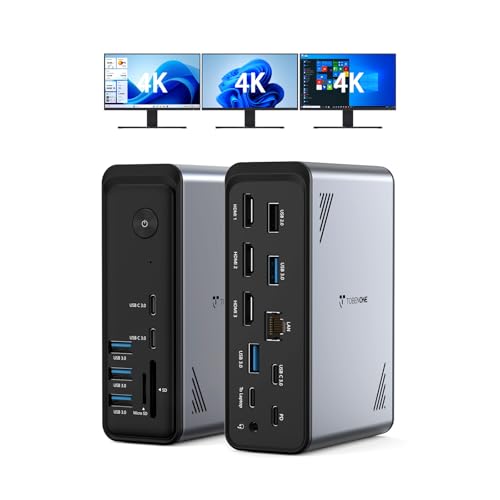
TobenONE 18-in-1 Triple Display Dock
Best for: Windows users needing triple 4K displays
- Host Interface
- USB-C
- Display Support
- Triple
- Max Resolution
- 4K@60Hz
- Power Delivery
- 100W
- Port Count
- 18
- Video Ports
- HDMI
View on Amazon: TobenONE 18-in-1 Triple Display Dock Affiliate link
This TobenONE docking station offers 18 ports via a single USB-C host connection. It supports triple 4K@60Hz displays, allowing you to run three monitors simultaneously. The unit includes 9 USB ports, an RJ45 Ethernet jack, and card readers. It delivers 100W Power Delivery to charge your laptop while connected. It is designed for Windows and Chrome OS laptops with full-featured USB-C ports. It is not recommended for Mac users.
Pros
- Supports triple 4K@60Hz displays
- 18 total ports including 9 USB
- 100W Power Delivery charging
- Includes RJ45 Ethernet port
Cons
- Not compatible with Mac users
- Power adapter is not included
- Heavier and bulkier than 9-in-1 hubs
Good fit if
- You need to drive three monitors at once
- You use a Windows or Chrome OS laptop
- You want a single cable for most peripherals
Skip if
- You own a Mac laptop
- You prefer a compact 9-in-1 form factor
- You need a power adapter included in the box
Verdict: TobenONE 18-in-1 Triple 4K Dock is a high-capacity hub for Windows users who need three screens and many USB ports. It suits those who prioritize display count and port variety over compact size.

Baseus 9-in-1 USB-C Dock with 4K 120Hz HDMI
Best for: Windows users needing dual 4K@120Hz displays
- Host Interface
- USB-C
- Display Support
- Dual
- Max Resolution
- 4K@120Hz
- Power Delivery
- 85W
- Port Count
- 9
- Video Ports
- HDMI
View on Amazon: Baseus 9-in-1 USB-C Dock with 4K 120Hz HDMI Affiliate link
This Baseus hub connects two monitors via dual HDMI ports, supporting up to 4K resolution at 120Hz on a single display. It includes a Gigabit Ethernet port for stable wired networking and USB 3.0 ports for fast data transfer. The unit delivers up to 85W of power to your laptop while in use. It is a compact, grey docking station designed for users needing multiple video outputs and reliable connectivity from a single USB-C host interface.
Pros
- Dual HDMI ports support dual monitor setups
- Single display supports 4K resolution at 120Hz refresh rate
- Gigabit Ethernet port ensures stable wired internet connection
- USB 3.0 ports provide 5Gbps data transfer speeds
- Delivers up to 85W power delivery to host laptop
Cons
- MacOS devices only support mirror mode, not dual extended displays
- Hub itself consumes 15W, reducing max power delivery to 85W from a 100W charger
- Only includes one USB 2.0 port alongside two USB 3.0 ports
Good fit if
- You need dual monitor support on a Windows laptop
- You require a stable wired Ethernet connection over Wi-Fi
- You want to charge your laptop while using high-refresh-rate displays
Skip if
- You use a MacOS device and need dual extended displays
- You require more than two HDMI video outputs
- You need a dock with more than nine ports
Verdict: Baseus 9-in-1 USB-C Docking Station is a solid choice for Windows users who need dual 4K@120Hz displays and reliable Ethernet connectivity. It fits those who prioritize video performance and stable networking over having a wide array of peripheral ports.
Specifications side by side
| Spec | TobenONE 18-in-1 Triple Display Dock | Baseus 9-in-1 USB-C Dock with 4K 120Hz HDMI |
|---|---|---|
| Host Interface | USB-C | USB-C |
| Display Support | Triple | Dual |
| Max Resolution | 4K@60Hz | 4K@120Hz |
| Power Delivery | 100W | 85W |
| Port Count | 18 | 9 |
| Video Ports | HDMI | HDMI |
| Max Data Speed | not stated | 5Gbps |
| Ethernet Speed | not stated | 1Gbps |
| Resolution | 4K UHD | 4K UHD |
| Connectivity | USB-C, HDMI, Ethernet | USB-C, HDMI |
| Refresh Rate | not stated | 120Hz |
| Features | not stated | Card Reader |
| Use | Office | not stated |
| Dimensions | 4.9 × 3.5 × 1.6 inches | 5.31 × 1.93 × 0.63 inches |
| Weight | 10.9 ounces | 5.3 ounces |
| Size | Without power supply | 9 in 1 |
| Color | Grey-docking station for Windows | Grey |
Frequently asked questions
Which docking station supports more monitors?
The TobenONE 18-in-1 dock supports three monitors simultaneously. This triple display capability is ideal for users who need extensive screen real estate for complex workflows. In contrast, the Baseus 9-in-1 dock is limited to dual monitor support. You should choose the TobenONE option if your primary requirement is managing three separate 4K displays at once.
Does the Baseus dock support high refresh rates?
Yes, the Baseus 9-in-1 dock supports a 120Hz refresh rate on its HDMI output. This is beneficial for Windows users who prioritize smooth video performance. The TobenONE dock supports 4K resolution but does not specify a refresh rate in its published data. If you need high frame rates for dual screens, the Baseus model is the better technical fit.
Which dock is more compact and lightweight?
The Baseus 9-in-1 dock is significantly more portable. It measures 1.93 inches in width and weighs only 5.3 ounces. The TobenONE 18-in-1 dock is larger, with a width of 3.5 inches and a weight of 10.9 ounces. If you travel frequently or have limited desk space, the Baseus unit offers a smaller footprint and lighter weight for easier transport.
Are both docks compatible with Windows laptops?
Yes, both docking stations are designed for Windows users. The TobenONE dock is explicitly described as a docking station for Windows. Similarly, the Baseus dock is recommended for Windows users needing dual displays. Both units connect via USB-C and provide the necessary connectivity for Windows operating systems without requiring additional drivers for basic functionality.
What is the difference in port count between the two?
The TobenONE dock offers 18 ports, providing a wide variety of connection options. The Baseus dock provides nine ports, focusing on essential connectivity like HDMI and Ethernet. If you need to connect many peripherals simultaneously, the TobenONE model offers greater port volume. The Baseus model is sufficient if you only need a few key connections for your laptop setup.
Which dock is better for triple monitor setups?
The TobenONE 18-in-1 dock is the only option that supports triple monitors. It allows you to run three 4K displays simultaneously, which is essential for heavy multitasking or design work. The Baseus dock cannot drive three screens. If your workflow requires three separate displays, the TobenONE dock is the necessary choice to achieve your desired visual configuration.