Tobenone 17-in-2 MacBook Dual 4K Review: Specs, Pros and Cons
As an Amazon Associate we earn from qualifying purchases. Links on this page are affiliate links.
This tobenone macbook pro docking station review covers the Tobenone 17-in-2 MacBook Dual 4K Docking Station Stand. It is a grey hub designed specifically for Apple laptops. The two defining specs are dual 4K@60Hz display support and a 150W power adapter. You get seven USB ports and a 2.5G Ethernet connection. It aims to replace multiple adapters with one sleek unit. The design focuses on reducing cable clutter. You can connect monitors, SSDs, and peripherals simultaneously. This setup helps you stay organized. It is built for productivity-focused workspaces. The compact dimensions help fit on most desks. It brings order to busy workstations.
What stands out
- Dual HDMI ports support 4K@60Hz displays via DP1.4
- Includes a 150W power adapter with 100W PD output
- Two front 30W PD ports for fast device charging
- 2.5Gbps Ethernet for stable network connectivity
- SD and TF 4.0 readers with 312MB/s transfer speeds
Who it fits
Good fit for
This dock suits MacBook Pro users with M1 Pro/Max through M5 Pro/Max chips who need dual monitors. It is ideal for video editors and photographers who benefit from the SD card reader and 2.5G Ethernet. Remote workers who want to reduce desk clutter will appreciate the single-cable solution. The 100W power delivery keeps your laptop charged during long sessions. It is also good for those who need multiple USB devices connected at once. The dual 4K support helps with spreadsheet editing and color grading tasks.
Who should skip it
You should look elsewhere if you use a Windows or Chrome OS laptop. This dock is not compatible with Studio Display, Mac Studio, Mac mini, Mac Pro, or iMac. MacBook M1, M2, M3, and Neo models only support single monitor extension. If your MacBook has a protective case, it may not fit the middle slot. The slot is only about 0.8 inches wide. You might need to remove your case for proper installation. Consider a universal dock if you need broader compatibility.
Verdict: This dock offers a tidy solution for compatible MacBook Pro models needing dual 4K displays and high-speed connectivity. It simplifies your setup but requires careful consideration of your specific laptop model and case.
Key specs explained
Display Support: Dual 4K@60Hz
This dock connects two external monitors at 4K resolution with a 60Hz refresh rate. You get smooth, high-detail visuals for editing photos or managing spreadsheets. This setup replaces the small laptop screen, reducing eye strain during long work sessions. It is ideal for professionals who need extra screen real estate for multitasking without lag or blur.
Power Delivery: 100W
The included 150W adapter delivers up to 100W of power to your MacBook. This keeps your laptop charged while you use other ports. You avoid battery anxiety during heavy workloads. This power level supports most MacBook Pro models. It simplifies your desk by removing the need for a separate laptop charger, keeping your workspace tidy and organized.
Ethernet Speed: 2.5Gbps
This port offers wired internet speeds up to 2.5 gigabits per second. You get a stable connection for video calls and large file transfers. This is faster and more reliable than standard Wi-Fi. It is essential for remote workers who need consistent uptime. You can upload 4K video files quickly without buffering or connection drops during critical tasks.
Max Data Speed: 10Gbps
USB ports on this dock transfer data at speeds up to 10Gbps. You can connect external SSDs and move large video projects rapidly. This speed is crucial for editors and designers handling raw footage. It ensures smooth performance when accessing files directly from the dock. You avoid bottlenecks when working with high-resolution media files on your laptop.
Physical Stand Design and Port Layout
The Tobenone model DC1501A docking station features a grey finish and measures 9.09 inches long, 3.15 inches wide, and 2.56 inches high. The physical design functions directly as an upright desktop stand for your laptop. According to the listing, the central slot measures roughly 0.8 inches wide. The manufacturer sized this slot specifically around a bare MacBook to keep the machine upright without wobbling. Because of these precise physical dimensions, your laptop might not slide into the dock if you use an external protective case.
Placing your computer vertically inside the dock reduces the desk space your setup requires. For everyday convenience, two 30W Power Delivery ports sit directly on the front panel. This layout lets you quickly plug in mobile devices, tablets, or wireless earbuds without reaching around to the back of the stand.
The unit integrates the rest of its 17 ports across the chassis, including dual HDMI outputs, seven USB connections, a 2.5Gbps Ethernet jack, and SD/TF 4.0 card slots. According to the listing, the dock links to your laptop through a dual-cable host setup. This arrangement channels your stationary peripheral cords into a single consolidated base, keeping your working area neat and structured.
Setup and everyday use
Setting up this dock is straightforward. You connect it to your MacBook via the USB-C host interface. The listing describes it as plug-and-play, meaning you do not need to install drivers. This saves time when you are starting your workday. The device is designed exclusively for Intel and M-series MacBook laptops. It supports M1, M2, M3, M4, and M5 chips in Pro, Max, and base configurations. It does not work with Windows, Chrome OS, or other Apple desktops like the Mac Studio or iMac. Note that base M1, M2, and M3 MacBooks only support a single monitor extension. You must ensure your laptop fits the central slot, which is approximately 0.8 inches wide. External cases may prevent it from seating correctly. Once connected, you can attach two 4K monitors at 60Hz. This allows you to edit spreadsheets side-by-side or grade video colors without strain. The included 150W adapter powers your laptop with up to 100W of charging. Two front ports provide 30W PD charging for phones or tablets. You also get 2.5G Ethernet for stable internet and SD 4.0 slots for fast photo transfers. Data moves at up to 10Gbps through the seven USB ports. This setup keeps your desk tidy and your devices powered throughout the day.
Compatibility And Setup Checks
Before you buy this Tobenone 17-in-2 MacBook Dual 4K Docking Station Stand, check your device compatibility carefully. The listing states it works with Intel, M1 through M5 series MacBook Pro and Max models. It is not compatible with Windows, Chrome OS, or other Apple devices like Mac Mini or iMac. Note that M1/M2/M3 Neo models support only single monitor extension. Verify your specific chip version to avoid connection issues. You also need two HDMI cables for the dual 4K@60Hz displays. The central slot is narrow, so remove any protective cases from your MacBook to ensure a secure fit. This dock replaces multiple adapters, reducing cable clutter on your desk. It fits well in setups where you need high-speed data transfer via the 2.5Gbps Ethernet port. Unlike portable monitors, this unit expands your existing screens rather than providing a new display. Ensure your workspace has enough depth for the 9.09-inch length. Regularly dust the USB ports to maintain reliable connections. This solution suits professionals who prioritize a tidy, organized workstation over mobile portability.
Check before you buy
- Confirm your MacBook chip supports dual 4K@60Hz output.
- Remove protective cases to fit the narrow central slot.
- Ensure you have two HDMI cables for both monitors.
- Verify the dock is not for Windows or Mac Mini.
The product at a glance
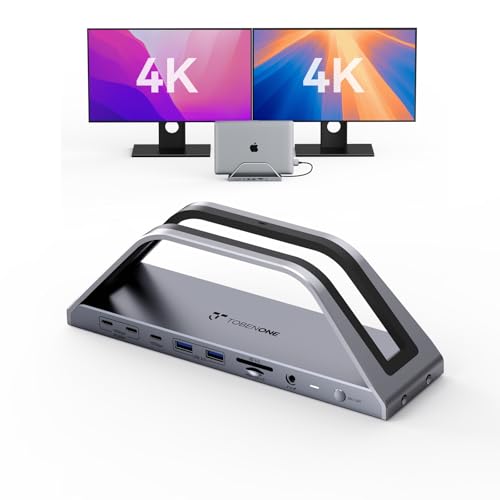
Tobenone 17-in-2 MacBook Dual 4K Docking Station Stand
Best for: MacBook Pro users needing dual 4K displays
- Host Interface
- USB-C
- Display Support
- Dual
- Max Resolution
- 4K@60Hz
- Power Delivery
- 100W
- Port Count
- 17
- Video Ports
- HDMI
View on Amazon: Tobenone 17-in-2 MacBook Dual 4K Docking Station Stand Affiliate link
This Tobenone hub expands your MacBook Pro into a dual 4K@60Hz setup via HDMI. It includes a 150W charger delivering 100W to your laptop, plus two 30W PD ports for accessories. You get 2.5G Ethernet, SD/TF readers, and seven USB ports for peripherals. It is designed strictly for Intel and M-series MacBook Pros, offering a tidy desk solution for productivity-focused users.
Pros
- Dual 4K@60Hz display support via HDMI
- 150W power adapter with 100W PD output
- Two 30W PD ports for fast accessory charging
- 2.5Gbps Ethernet for stable network connectivity
- SD and TF 4.0 card readers
Cons
- Incompatible with Windows, Chrome OS, and other Mac models like Mac Mini
- M1/M2/M3 base MacBook models support single monitor only
- Narrow middle slot may not fit cases thicker than 0.8 inches
Good fit if
- You use a MacBook Pro with Pro or Max chips
- You need dual 4K monitors for multitasking
- You want a single dock for charging and peripherals
Skip if
- You use a Windows laptop or Chromebook
- You own a Mac Mini, iMac, or Mac Studio
- You need to run two monitors on a base M-series MacBook
Verdict: Tobenone 17-in-2 MacBook Docking Station is a specialized hub for MacBook Pro users needing dual 4K displays and high-power charging. It fits those who prioritize a clutter-free desk and stable wired connectivity over universal compatibility.
Specifications side by side
| Spec | Tobenone 17-in-2 MacBook Dual 4K Docking Station Stand |
|---|---|
| Host Interface | USB-C |
| Display Support | Dual |
| Max Resolution | 4K@60Hz |
| Power Delivery | 100W |
| Port Count | 17 |
| Video Ports | HDMI |
| Max Data Speed | 10Gbps |
| Ethernet Speed | 2.5Gbps |
| Resolution | 4K UHD |
| Connectivity | Ethernet |
| Features | Kickstand |
| Use | Office |
| Recommended Use | Home |
| Dimensions | 9.09 × 3.15 × 2.56 inches |
| Color | Grey |
| Model | DC1501A |
Frequently asked questions
Does this dock support dual 4K displays simultaneously?
Yes, it supports dual 4K UHD resolutions. You can connect two external monitors to your MacBook Pro at 4K@60Hz. This setup provides smooth, high-detail visuals for tasks like photo editing or managing complex spreadsheets. The dual display capability is a core feature of this specific Tobenone model.
What is the maximum power output for charging my laptop?
The dock includes a 150W power adapter. This high wattage allows you to charge your MacBook Pro while it is connected to the hub. It ensures your laptop stays powered during intensive tasks, such as video rendering or running multiple applications, without draining the battery.
Is this docking station compatible with Windows laptops?
No, it is not compatible with Windows devices. The listing specifies that it works only with Intel, M1 through M5 series MacBook Pro and Max models. It is not suitable for Windows, Chrome OS, or other Apple devices like MacBooks Air or iPads.
Do I need to install drivers to use this hub?
No, you do not need to install drivers. The listing describes the unit as plug-and-play. You simply connect it to your MacBook via the USB-C host interface. This allows for immediate use without additional software configuration, saving time when you start your workday.
What are the physical dimensions of the Tobenone DC1501A?
The unit measures 9.09 inches in length, 3.15 inches in width, and 2.56 inches in height. It features a grey housing finish. These dimensions allow it to fit neatly on most desks without taking up excessive space, though the exact weight is not provided in the data.
Who is the best user for this specific docking station?
This dock is best for MacBook Pro users who need dual 4K displays and high-power charging. It fits those who prioritize a clutter-free desk and stable wired connectivity. It is ideal for professionals who rely on Apple laptops and need to connect multiple high-resolution monitors simultaneously.
Does this model support universal compatibility with all laptops?
No, it does not support universal compatibility. It is designed specifically for Apple laptops, particularly MacBook Pro models with Intel or M1 through M5 chips. You cannot use it with Windows PCs, Chromebooks, or other non-compatible devices, so check your laptop model before purchasing.