Tobenone 18-in-1 Triple Display Dock or Tobenone Dual 4K HDMI Vertical? Which Tobenone Model to Buy
As an Amazon Associate we earn from qualifying purchases. Links on this page are affiliate links.
The tobenone 18 in 1 laptop vs laptop docking station dual comparison helps you pick the right hub. Both docks support 4K displays and connect via USB-C. They serve Windows and Chrome OS users. The main difference is port count and physical design. One model offers triple screen support and eighteen ports. The other provides a vertical stand and eleven ports. You need to decide which layout fits your desk.
Key differences
| Aspect | TobenONE 18-in-1 Triple Display Dock | Tobenone Dual 4K HDMI Vertical Docking Station |
|---|---|---|
| Display Support | Triple (3 monitors) | Dual (2 monitors) |
| Port Count | 18 ports | 11 ports |
| Power Delivery | 100W | 65W adapter included |
| Data Speed | not listed | 10Gbps |
| Physical Design | Horizontal (4.9 x 3.5 x 1.6 inches) | Vertical stand |
Which one should you choose?
Choose TobenONE 18-in-1 Triple Display Dock if
- You need to connect three external monitors for heavy multitasking.
- You want a high port count with eighteen expansion options.
- Your laptop requires up to 100W of charging power.
Choose Tobenone Dual 4K HDMI Vertical Docking Station if
- You want to save desk space with a vertical stand design.
- You prefer a package that includes a 65W power adapter.
- You need fast 10Gbps data transfer speeds for peripherals.
Verdict: Choose the 18-in-1 dock if you require triple displays and maximum port variety. Pick the Dual 4K Vertical dock if you value a compact vertical footprint and included power supply. Both models deliver 4K@60Hz resolution for compatible Windows or Chrome OS laptops.
18-in-1 vs Dual 4K Dock
Display Support
The TobenONE 18-in-1 Triple Display Dock supports three monitors simultaneously, while the Tobenone Dual 4K HDMI Vertical Docking Station supports two. Both models output 4K resolution at 60Hz on their respective HDMI ports. If you need a triple-screen setup for complex workflows, the 18-in-1 model provides the extra screen real estate. The dual model is sufficient for standard dual-monitor setups. Both docks allow you to expand your workspace significantly beyond your laptop's native display, but the triple option offers more flexibility for heavy multitasking.
Port Count
Port availability differs significantly between these two docks. The TobenONE 18-in-1 model offers 18 total ports, including 9 USB ports, HDMI, RJ45, SD, microSD, and audio jacks. The Tobenone Dual 4K HDMI Vertical Docking Station provides 11 ports, focusing on USB-C and USB-A connectivity with 10Gbps transfer speeds. The 18-in-1 dock includes dedicated card readers and Ethernet, which the dual model lacks. If you require extensive peripheral connections without a hub, the 18-in-1 model is the better choice for connectivity density.
Power Delivery
Charging capabilities vary between the two products. The TobenONE 18-in-1 Triple Display Dock supports up to 100W Power Delivery to charge your laptop. The Tobenone Dual 4K HDMI Vertical Docking Station includes a 65W power adapter in the box, implying a 65W output limit. The 18-in-1 dock can power higher-demand laptops more effectively. Note that the 18-in-1 dock does not include a power adapter, requiring a separate supply over 65W. The dual model offers a complete package with its included adapter.
Build and Design
Physical form factors are distinct. The Tobenone Dual 4K HDMI Vertical Docking Station features a vertical stand design that saves desk space and holds your laptop upright. It measures 7.64 inches in length and 2.95 inches in height. The TobenONE 18-in-1 model is a traditional horizontal dock measuring 4.9 inches in length and 1.6 inches in height. The vertical design is ideal for compact desks where floor space is limited. The horizontal dock sits flat and may be easier to connect cables to without bending.
Data Speeds
Data transfer rates are specified for the Tobenone Dual 4K HDMI Vertical Docking Station, which offers 10Gbps speeds on its USB-C 3.2 and USB-A 3.2 ports. The specifications for the TobenONE 18-in-1 Triple Display Dock do not list specific data transfer speeds for its USB ports. For users prioritizing fast file transfers, the dual dock provides verified high-speed performance. The 18-in-1 dock likely supports standard USB speeds, but without explicit data, the dual dock has the advantage in known transfer capabilities.
Choose your Tobenone dock by needs
You need three screens for heavy multitasking
The 18-in-1 dock supports triple 4K@60Hz displays. This allows you to run three monitors simultaneously. The other model only supports two screens. If your workflow requires a third display for spreadsheets, video editing, or conferencing, this triple-display capability is essential for your productivity setup.
You want a tidy vertical desk setup
This vertical dock features a space-saving stand design. It holds your laptop upright to clear desk surface area. The 18-in-1 model is a flat horizontal block. If you prefer a compact, vertical footprint that keeps papers and peripherals organized, this vertical orientation suits your workspace style.
You need maximum port variety and expansion
The 18-in-1 dock offers 18 total ports, including nine USB ports, SD slots, and an RJ45 Ethernet jack. The dual dock provides 11 ports. If you connect many peripherals like external drives, mice, and cards, the higher port count and broader variety on the 18-in-1 model reduce cable clutter.
You prefer a complete kit with power adapter
The dual dock includes a 65W power adapter and a USB-C cable in the box. The 18-in-1 dock does not include a power supply. You must provide a power source over 65W separately for stable usage. If you want a ready-to-use package without buying extra power components, this inclusion is practical.
The products compared
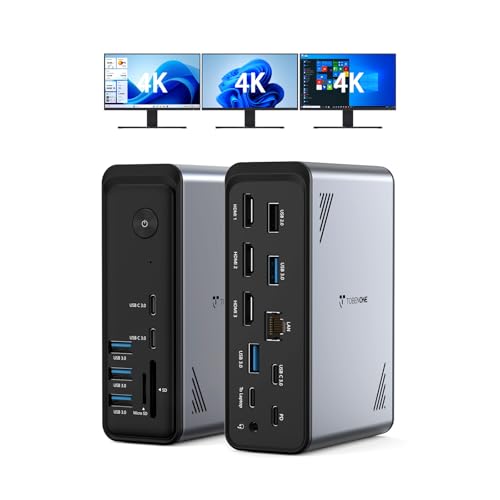
TobenONE 18-in-1 Triple Display Dock
Best for: Windows users needing triple 4K displays
- Host Interface
- USB-C
- Display Support
- Triple
- Max Resolution
- 4K@60Hz
- Power Delivery
- 100W
- Port Count
- 18
- Video Ports
- HDMI
View on Amazon: TobenONE 18-in-1 Triple Display Dock Affiliate link
This Tobenone docking station offers 18 ports, including three HDMI outputs for triple 4K@60Hz displays. It connects via USB-C and supports 100W Power Delivery. The unit weighs 10.9 ounces and measures 4.9 by 3.5 by 1.6 inches. It is designed for Windows and Chrome OS laptops with full-featured USB-C ports. This setup helps reduce cable clutter while supporting multiple monitors for productivity tasks.
Pros
- Supports triple 4K@60Hz displays via HDMI
- 18 ports including 9 USB and audio
- 100W Power Delivery for laptop charging
- Compact 10.9 ounce build size
Cons
- Not compatible with Mac users
- Power adapter is not included
- Requires a power supply over 65W
Good fit if
- You need three external monitors
- You use a Windows or Chrome OS laptop
- You want to reduce desk cable clutter
Skip if
- You own a MacBook
- You need a included power adapter
- You require Thunderbolt 4 connectivity
Verdict: Tobenone 18-in-1 Triple 4K Dock provides a high-port count and triple display support for Windows users. It suits those who need extensive connectivity and multiple screens without a Mac-compatible solution.

Tobenone Dual 4K HDMI Vertical Docking Station
Best for: Windows users needing dual 4K displays on a vertical stand
- Host Interface
- Thunderbolt 4/3, USB4, USB-C
- Display Support
- Dual
- Max Resolution
- 4K@60Hz
- Port Count
- 11
- Video Ports
- HDMI
- Max Data Speed
- 10Gbps
View on Amazon: Tobenone Dual 4K HDMI Vertical Docking Station Affiliate link
This vertical docking station expands your view with two HDMI ports supporting 4K@60Hz resolution. It connects via USB-C and offers 10Gbps data transfer speeds. The compact design clears desk space by holding your laptop upright. It works with Windows 10, ChromeOS, Thunderbolt 4, and USB4. This setup suits users who need dual displays without cluttering their workspace.
Pros
- Supports dual 4K@60Hz monitors via HDMI
- Vertical stand saves desk space
- 10Gbps data transfer on USB-C and USB-A ports
- Compatible with Thunderbolt 3/4 and USB4
Cons
- Not compatible with macOS
- Includes only a 65W power adapter
- No Thunderbolt certification mentioned for data speeds
Good fit if
- You need two external displays for multitasking
- You want to keep your desk surface clear
- You use Windows or ChromeOS with USB-C
Skip if
- You use a Mac computer
- You require Thunderbolt 4 certified data speeds
- You need more than two video outputs
Verdict: Tobenone Dual 4K Vertical Dock provides a sturdy, space-saving solution for Windows and ChromeOS users needing dual 4K displays. It is ideal for those prioritizing desk clearance and reliable HDMI connectivity over macOS support.
Specifications side by side
| Spec | TobenONE 18-in-1 Triple Display Dock | Tobenone Dual 4K HDMI Vertical Docking Station |
|---|---|---|
| Host Interface | USB-C | Thunderbolt 4/3, USB4, USB-C |
| Display Support | Triple | Dual |
| Max Resolution | 4K@60Hz | 4K@60Hz |
| Power Delivery | 100W | not stated |
| Port Count | 18 | 11 |
| Video Ports | HDMI | HDMI |
| Max Data Speed | not stated | 10Gbps |
| Resolution | 4K UHD | 4K UHD |
| Connectivity | USB-C, HDMI, Ethernet | HDMI, USB-A |
| Use | Office | not stated |
| Dimensions | 4.9 × 3.5 × 1.6 inches | 7.64 × 3.15 × 2.95 inches |
| Weight | 10.9 ounces | not stated |
| Size | Without power supply | not stated |
| Color | Grey-docking station for Windows | Grey |
Frequently asked questions
Does the Tobenone 18-in-1 dock support Mac computers?
No, this model is designed for Windows users. The product data specifies it is a docking station for Windows. It does not mention compatibility with macOS. If you use a Mac, this specific unit may not function as intended for your setup.
How much space does the vertical dock take on my desk?
The vertical dock measures 3.15 inches wide, 2.95 inches high, and 7.64 inches long. Its vertical orientation helps save desk space. This design is ideal if you want to prioritize desk clearance while maintaining dual 4K display support.
Can I connect three monitors to the Tobenone Dual 4K HDMI dock?
No, that model supports only dual monitors. It provides two HDMI outputs for two screens. If you need to run three displays simultaneously, you must choose the 18-in-1 model instead. The dual dock is limited to two 4K screens.
What is the weight of the 18-in-1 docking station?
The 18-in-1 dock weighs 10.9 ounces. This measurement excludes the power supply. The unit itself is compact, measuring 4.9 inches in length and 3.5 inches in width. Its light weight makes it easy to move between locations.
Does the vertical dock work with Chromebooks?
Yes, the vertical dock supports Chrome OS. The product verdict notes it is ideal for Windows and ChromeOS users. You can connect dual 4K displays to your Chromebook using this HDMI-based docking station for a stable connection.
What connection types does the 18-in-1 dock use?
It uses USB-C and HDMI connections. The dock provides extensive connectivity options for Windows laptops. You connect your laptop via USB-C and attach monitors via HDMI. This setup allows for triple display support with high-resolution output.
Is the 18-in-1 dock compatible with macOS?
The data does not list macOS support. It is explicitly described as a docking station for Windows. The verdict states it suits those who do not need a Mac-compatible solution. You should verify your Mac compatibility before purchasing this specific unit.
What color is the Tobenone vertical docking station?
The vertical dock is grey. The product specifications list the color as grey. This neutral finish helps it blend into most office environments. The 18-in-1 model also comes in grey for a consistent look if you use multiple docks.