Tobenone 18-in-1 Triple Display Dock or Tobenone 15-in-2 Dual 4K MacBook? Which Tobenone Model to Buy
As an Amazon Associate we earn from qualifying purchases. Links on this page are affiliate links.
When comparing the tobenone 18 in 1 laptop vs 15 in 2 macbook pro docking, you face a choice between two specialized hubs. Both devices offer 4K video output and USB-C connectivity to expand your workspace. They also both support power delivery to keep your laptop charged. The main difference lies in their target operating systems and port configurations. One model is built for Windows and Chrome OS with triple display support, while the other is designed exclusively for MacBook users with dual monitors.
Key differences
| Aspect | TobenONE 18-in-1 Triple Display Dock | Tobenone 15-in-2 Dual 4K MacBook Docking Station |
|---|---|---|
| Compatible Systems | Windows and Chrome OS | MacBook Pro and Air only |
| Display Support | Triple monitors | Dual external monitors |
| Port Count | 18 ports | 15 ports |
| Video Outputs | 3 HDMI ports | 2 HDMI and 1 VGA port |
| Power Delivery Output | 100W | 85W |
| Ethernet | RJ45 included | Gigabit Ethernet included |
Which one should you choose?
Choose TobenONE 18-in-1 Triple Display Dock if
- You use a Windows or Chrome OS laptop
- You need to connect three external displays
- You want more USB ports for peripherals
Choose Tobenone 15-in-2 Dual 4K MacBook Docking Station if
- You use a MacBook with an Intel or M-series chip
- You need a VGA port for older projectors
- You want a dedicated Gigabit Ethernet connection
Verdict: Choose the 18-in-1 dock if you run Windows or Chrome OS and need to drive three screens. Pick the 15-in-2 dock if you are a MacBook user who needs dual external displays and legacy VGA connectivity. Each model is optimized for its specific ecosystem.
Tobenone 18-in-1 vs 15-in-2 Comparison
Display Support
The TobenONE 18-in-1 Triple Display Dock supports three external monitors at 4K resolution and 60Hz refresh rate. This setup transforms your laptop into a professional-grade workstation for video editing or spreadsheet processing. In contrast, the TobenONE 15-in-2 Dual 4K MacBook Docking Station connects two external displays. When using two HDMI monitors, it outputs at 4K@30Hz. If you use one HDMI and one VGA port, you can achieve 4K@60Hz on the primary screen. The 18-in-1 model offers higher refresh rates for dual or triple setups, making it better for smooth motion. The 15-in-2 model limits refresh rates when driving two 4K screens simultaneously.
Compatibility
These docks target completely different operating systems. The TobenONE 18-in-1 is designed specifically for Windows and Chrome OS laptops from brands like Dell, Lenovo, HP, and ThinkPad. It is not recommended for Mac users. The TobenONE 15-in-2 is built exclusively for MacBook Pro and MacBook Air models with Thunderbolt 3, 4, or 5 ports. It supports Intel, M1, M2, M3, M4, and M5 chips. Note that base M1, M2, or M3 Macs only support one external monitor due to chip limitations. This dock is not compatible with Windows laptops, Mac mini, iMac, or Mac Studio. You must choose the model that matches your computer's system.
Power Delivery
Both docking stations support 100W Power Delivery input, but their output capabilities differ. The TobenONE 18-in-1 provides continuous 100W PD charging to your laptop, ensuring it stays fully charged throughout the day. The TobenONE 15-in-2 provides up to 85W charging output to your MacBook when connected to a separate USB-C power adapter. Both models require you to supply your own power adapter, which is not included. The 18-in-1 model offers higher charging power, which may be necessary for power-hungry Windows laptops. The 15-in-2 model delivers sufficient power for most MacBook Pro and Air configurations.
Connectivity
The TobenONE 18-in-1 features 18 ports, including nine USB ports, three HDMI ports, an RJ45 Ethernet port, SD and microSD card readers, and a 3.5mm audio jack. It lacks VGA support. The TobenONE 15-in-2 offers 15 ports, including two HDMI ports, one VGA port, four USB 3.0 ports, two USB 2.0 ports, a 5Gbps USB-C port, Gigabit Ethernet, and audio/mic jacks. The 15-in-2 model includes legacy VGA support, which is useful for older projectors or monitors. The 18-in-1 model provides more USB ports and triple HDMI outputs. Choose the 15-in-2 if you need VGA connectivity, or the 18-in-1 for more USB expansion.
Build
The TobenONE 18-in-1 Triple Display Dock measures 4.9 inches in length, 3.5 inches in width, and 1.6 inches in height. It weighs 10.9 ounces. The TobenONE 15-in-2 Dual 4K MacBook Docking Station is slightly smaller, measuring 2.8 inches in length, 2.4 inches in width, and 4.7 inches in height. It weighs 1.06 pounds. The 18-in-1 model is lighter and more compact in footprint, making it easier to move between desks. The 15-in-2 model is heavier and taller, potentially offering more stability on a desk. Both are grey in color. The 18-in-1 model is more portable, while the 15-in-2 model has a more substantial build.
Which Tobenone Docking Station Fits You
Windows users needing three screens
This 18-in-1 dock supports triple 4K@60Hz displays, giving you three external monitors plus your laptop screen. It features nine USB ports for peripherals and 100W power delivery. The design is specific to Windows and Chrome OS laptops, ensuring compatibility without driver issues for your daily multitasking workflow.
MacBook Pro users wanting dual displays
This 15-in-2 dock supports dual 4K@60Hz external monitors for Intel and M-series MacBook Pro models. It includes an HDMI port, VGA port, and Gigabit Ethernet. The dock provides up to 85W charging output via PD 3.0. It is explicitly designed for MacBooks with Thunderbolt 3, 4, or 5 ports.
Users requiring legacy VGA connectivity
The 15-in-2 model includes a VGA video port alongside two HDMI outputs. This allows connection to older projectors or monitors that lack HDMI inputs. The 18-in-1 alternative only offers HDMI video outputs. If you need to connect to VGA equipment, this specific port presence makes the second option necessary.
MacBook Air M1/M2/M3 base users
If you own a base M1, M2, or M3 MacBook Air, Apple hardware limits you to one external display. This dock supports that single expansion. The 18-in-1 dock is not recommended for Mac users. Choosing the 15-in-2 model ensures compatibility with your specific chip limitations while providing other necessary ports like Ethernet.
The products compared
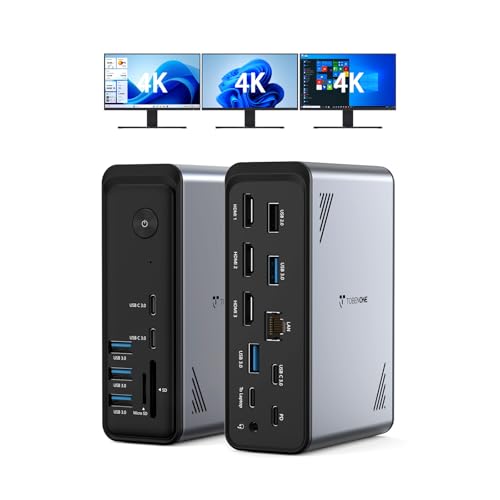
TobenONE 18-in-1 Triple Display Dock
Best for: Windows users needing triple 4K displays
- Host Interface
- USB-C
- Display Support
- Triple
- Max Resolution
- 4K@60Hz
- Power Delivery
- 100W
- Port Count
- 18
- Video Ports
- HDMI
View on Amazon: TobenONE 18-in-1 Triple Display Dock Affiliate link
This Tobenone dock expands your laptop into a triple 4K@60Hz workspace. It features 18 ports, including three HDMI outputs and nine USB connections. The 100W Power Delivery port keeps your device charged. It is designed for Windows and Chrome OS laptops with full-featured USB-C ports. You get a clutter-free desk setup for multitasking, video editing, or remote work without needing extra cables.
Pros
- Supports triple 4K@60Hz displays via HDMI
- 18 ports including 9 USB and SD readers
- 100W Power Delivery for laptop charging
- Compact 3.5-inch width for desk space
Cons
- Not compatible with macOS or MacBook Pro
- Power adapter is not included
- Requires a power supply over 65W
Good fit if
- You use a Windows or Chrome OS laptop
- You need three external monitors for work
- You want a single cable for data and power
Skip if
- You own a MacBook Pro or iPad
- You prefer a plug-and-play solution without extra power
- You only need dual monitor support
Verdict: Tobenone 18-in-1 Triple 4K Dock delivers high-density connectivity for Windows users who need three screens. It is the right choice for desktop setups requiring extensive ports and triple display output.

Tobenone 15-in-2 Dual 4K MacBook Docking Station
Best for: MacBook Pro users needing dual 4K displays
- Host Interface
- Dual USB-C
- Display Support
- Dual
- Max Resolution
- 4K@60Hz
- Power Delivery
- 85W
- Port Count
- 15
- Video Ports
- HDMI, VGA
View on Amazon: Tobenone 15-in-2 Dual 4K MacBook Docking Station Affiliate link
The Tobenone UDS009 is a 15-in-2 docking station designed for MacBook Pro and Air models with Thunderbolt 3, 4, or 5 ports. It supports dual 4K displays at 60Hz via HDMI or 30Hz with two HDMI connections. The hub provides 85W Power Delivery pass-through charging and includes Gigabit Ethernet, VGA, and multiple USB ports. It allows you to expand your workspace while keeping your laptop screen active.
Pros
- Supports dual 4K@60Hz single display or dual 4K@30Hz dual displays
- 85W PD pass-through charging for connected MacBooks
- Includes Gigabit Ethernet and VGA ports alongside USB 3.0
- Plug-and-play operation with no drivers required
Cons
- Only supports dual external monitors on Pro/Max chips; base M1-M5 chips support only one
- Not compatible with Windows laptops or non-Apple desktops
- Power adapter is not included with the unit
Good fit if
- You use a MacBook Pro or Air with M1 Pro/Max through M5 chips
- You need a single cable solution for monitors, data, and charging
- You require Gigabit Ethernet and VGA connectivity for legacy setups
Skip if
- You use a Windows laptop or Mac mini
- You have a base M1, M2, or M3 MacBook without Pro or Max chips
- You want a triple monitor setup for your laptop
Verdict: The Tobenone UDS009 MacBook Pro Dock is a practical expansion hub for Apple users needing dual 4K displays and stable wired connectivity. It fits professionals who want to consolidate ports without adding clutter to their desk.
Specifications side by side
| Spec | TobenONE 18-in-1 Triple Display Dock | Tobenone 15-in-2 Dual 4K MacBook Docking Station |
|---|---|---|
| Host Interface | USB-C | Dual USB-C |
| Display Support | Triple | Dual |
| Max Resolution | 4K@60Hz | 4K@60Hz |
| Power Delivery | 100W | 85W |
| Port Count | 18 | 15 |
| Video Ports | HDMI | HDMI, VGA |
| Max Data Speed | not stated | 5Gbps |
| Ethernet Speed | not stated | Gigabit Ethernet |
| Resolution | 4K UHD | 4K UHD |
| Connectivity | USB-C, HDMI, Ethernet | HDMI, Ethernet, VGA |
| Use | Office | Office |
| Recommended Use | not stated | Home |
| Dimensions | 4.9 × 3.5 × 1.6 inches | 2.8 × 2.4 × 4.7 inches |
| Weight | 10.9 ounces | 1.06 pounds |
| Size | Without power supply | 2.8 x 2.4 x 4.7 inches |
| Color | Grey-docking station for Windows | Grey UDS009 |
| Model | not stated | UDS009 |
Frequently asked questions
Can the Tobenone 18-in-1 dock connect to a MacBook?
The 18-in-1 dock is explicitly designed for Windows users. Its specifications and marketing focus on Windows compatibility. While it may physically connect via USB-C, optimal performance and driver support are not guaranteed for macOS. If you use a Mac, the dedicated 15-in-2 model is the safer choice for stable operation.
Does the 15-in-2 dock support triple monitors?
No, the Tobenone 15-in-2 Dual 4K MacBook Dock supports only two external displays. Its model name and specifications indicate dual 4K output capability. If you require a third screen, this hub will not meet your needs. You would need to select the 18-in-1 model, which is built to handle three simultaneous 4K monitors.
What is the size difference between the two docks?
The 18-in-1 dock measures 4.9 inches in length, 3.5 inches in width, and 1.6 inches in height. It weighs 10.9 ounces. The 15-in-2 dock is slightly longer at 2.8 inches in length but wider at 2.4 inches and taller at 4.7 inches. It weighs 1.06 pounds, making it heavier and bulkier than the Windows-focused unit.
Are both docks grey in color?
Yes, both docking stations are grey. The 18-in-1 dock is described as a grey docking station for Windows. The 15-in-2 model, specifically the UDS009, is also listed as grey. This neutral color scheme helps them blend into most desk setups without drawing attention to the hardware itself.
Which dock is better for video editing on Windows?
The Tobenone 18-in-1 Triple Display Dock is the better option for Windows video editors. It supports three 4K monitors, allowing you to spread your timeline, preview window, and toolbars across multiple screens. This high-density connectivity reduces the need to toggle between windows, streamlining your workflow compared to the dual-monitor limitation of the MacBook-specific hub.
Does the 18-in-1 dock include a power supply?
The specifications note the size is measured without the power supply. This indicates the power adapter is sold separately or is an external component not included in the base unit dimensions. You should check the packaging contents or product listing to confirm if the power brick is included with the dock when you purchase it.