SOUNDANCE Aluminum Laptop Cooling Stand Review: Who It Fits and Who Should Skip It
As an Amazon Associate we earn from qualifying purchases. Links on this page are affiliate links.
This soundance laptop cooling pad USB review covers the Soundance Aluminum Laptop Cooling Stand with USB Hub. It is a passive riser with an active cooling fan. The stand uses a 140 mm fan to move air efficiently. It is built from aluminum with a polished finish. The unit supports laptops from 10 to 17.3 inches. It also includes four USB 3.0 ports for peripherals. The design allows for height and angle adjustments. This setup helps improve posture by raising the screen. The blue LED indicator shows when the fan is running.
What stands out
- 140 mm fan diameter for efficient air circulation
- Aluminum surface material with smooth, polished edges
- Four USB 3.0 ports for connecting accessories
- Adjustable height and angle for ergonomic viewing
- Supports laptops up to 17.3 inches in size
Who it fits
Good fit for
You should consider this stand if you use a laptop between 10 and 17.3 inches and want better airflow. The aluminum surface helps with heat dissipation. The adjustable angles allow you to raise the screen to eye level, which can reduce neck strain. The four USB 3.0 ports let you connect a mouse or keyboard directly to the stand. The rubber mats keep your device stable on the desk. It suits office, home, or school users who need a sturdy, elevated workspace.
Who should skip it
Skip this option if you need a portable, lightweight solution. This stand weighs 3.64 pounds and measures 11.8 inches wide. It is not designed for travel. If you do not have a desk space for a 17-inch laptop, it may be too large. The fan requires power via a separate USB connection. You must use the provided USB-to-USB cord. If you prefer a completely silent, passive-only cooler, the fan noise may not suit you.
Verdict: The Soundance stand offers solid build quality and useful USB expansion for desk users. It is a practical choice for stabilizing larger laptops and improving ergonomics.
Key specs explained for this stand
Fan Diameter: 140 mm
This size indicates a large cooling surface area. A 140 mm fan moves more air volume than smaller fans found in basic stands. You benefit from better heat dissipation for larger laptops. When comparing portable monitor setups, ensure your laptop does not block this airflow. Larger fans often run quieter at the same speed, improving your focus during long work sessions.
Surface Material: Aluminum
Aluminum is a metal that conducts heat away from your laptop base. This passive cooling helps complement the active fan. It provides a rigid, stable platform for your device. When shopping for laptop setups, metal stands generally feel more durable than plastic ones. This material choice supports heavier laptops up to 17.3 inches without bending or flexing under load.
Compatible Laptop Size: 10–17.3 in
This range covers most standard notebooks, from small ultrabooks to large gaming machines. You can place various devices on this single stand. It ensures the structure supports the weight and dimensions of your screen. When setting up a portable monitor station, check that your primary laptop fits within these physical limits for proper balance and ventilation access.
Lighting: Blue LED
A blue LED light indicates when the cooling fan is active. This visual cue helps you verify the device is powered on. It is useful in dark environments where you cannot see small switches. This feature does not affect cooling performance but aids in quick status checks. Compare this with stands that lack indicators, which require you to touch the device to confirm operation.
Design and Build Quality
The Soundance stand features an aluminum surface that provides a rigid base for your laptop. According to the listing, this material choice helps with heat dissipation while keeping the unit sleek. The polished smooth edges and silicone pads protect your device from scratches. This finish ensures the stand looks neat in office or home settings without risking damage to your screen or chassis.
Dimensions listed are 11.8 by 11.8 inches with a height of 2.17 inches. It weighs 3.64 pounds, making it portable enough for travel but stable enough for daily use. The adjustable kickstand allows you to change the screen angle. Elevating the display to eye level helps fix your posture and reduces neck strain during long work sessions.
Layout includes four USB 3.0 ports along the back for accessories like a mouse or keyboard. A separate port powers the internal 140 mm fan. A blue LED light indicates when the fan is running. Rubber mats and feet prevent sliding on your desk. This design suits users who need a stable, elevated workspace with added connectivity options for larger laptops up to 17.3 inches.
Setup and Everyday Use Guide
Setting up the Soundance stand is straightforward. You connect the included USB-to-USB cord to your laptop’s USB port. This cable powers the internal fan and the blue LED indicator. The LED lights up when the fan is running, giving you a clear visual signal that cooling is active. No external power adapters are needed.
The stand fits laptops ranging from 10 to 17.3 inches. This wide compatibility means it works with most standard notebooks, including MacBook models, Surface devices, and business laptops like Lenovo ThinkPads or HP models. The aluminum surface provides a stable, rigid base. Rubber mats on the bottom prevent sliding on your desk, while silicone pads protect your laptop’s underside from scratches.
For daily use, you can adjust the screen angle and height. This ergonomic adjustment helps align the screen with your eye level, which supports better posture during long work sessions. The stand includes four USB 3.0 ports along the back. You can plug in peripherals like a mouse, keyboard, or charging cables directly into the stand. This reduces cable clutter on your desk. The large 140 mm fan circulates air efficiently to prevent overheating. The design is neat and suitable for office, home, or school environments. It is a practical tool for keeping your device cool and organized.
Before You Buy This Stand
You should verify your laptop size falls within the 10 to 17.3-inch range. The stand supports heavier devices well, but check that your specific model fits the aluminum surface. You will need to connect the included USB-to-USB cord to power the fan. This setup requires a free USB port on your computer. Keep the aluminum surface clean to maintain its sleek look. Dust can accumulate in the fan over time, so wipe it down occasionally. This stand fits well in a Portable Monitors & Laptop Setups guide as a practical cooling solution. It complements other ergonomic accessories by raising your screen to eye level. You get better airflow and a stable base. It works alongside external monitors without taking up extra desk space. The design is neat for office or home use. Just ensure your laptop does not exceed the weight limit for the shaft design. This is a simple, functional addition to your workspace.
Check before you buy
- Check if your laptop is between 10 and 17.3 inches wide.
- Ensure you have a free USB port for the power cord.
- Verify the stand fits your desk space and weight needs.
- Confirm the aluminum surface is clean before first use.
The product at a glance
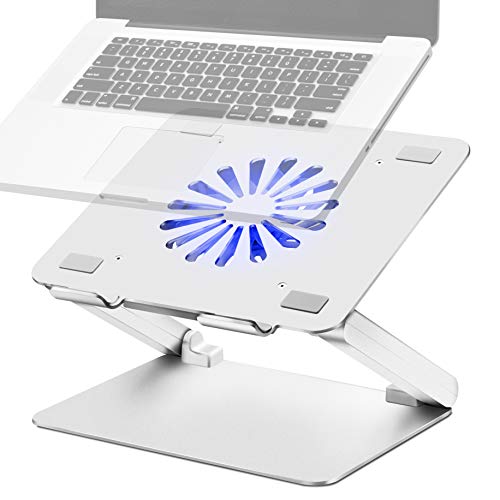
Soundance Aluminum Laptop Cooling Stand with USB Hub
Best for: desk setups needing USB ports and cooling
- Compatible Laptop Size
- 10–17.3 in
- Fan Diameter
- 140 mm
- Lighting
- Blue LED
- Surface Material
- Aluminum
- Features
- Kickstand
- Use
- Gaming
View on Amazon: Soundance Aluminum Laptop Cooling Stand with USB Hub Affiliate link
This SOUNDANCE stand uses a 140 mm fan to circulate air and keep your laptop cool. The aluminum surface supports devices from 10 to 17.3 inches. You can adjust the angle to improve your posture. It includes four USB 3.0 ports for your accessories. The build is sturdy with rubber mats to prevent sliding. It is a practical option for users who need extra connectivity and cooling.
Pros
- 140 mm fan for efficient air circulation
- Four USB 3.0 ports for peripherals
- Adjustable angle for better ergonomics
- Aluminum surface with rubber mats
Cons
- Blue LED light may be distracting in dark rooms
- Only one fan for large 17.3-inch laptops
- No built-in battery for portable use
Good fit if
- You need extra USB ports for your devices
- You want to raise your screen for better posture
- You use a laptop up to 17.3 inches
Skip if
- You prefer silent operation without any lights
- You need multiple fans for heavy cooling
- You require a battery-powered portable stand
Verdict: SOUNDANCE Aluminum Laptop Cooling Stand offers solid cooling and connectivity for desk users. It fits those who value posture and USB expansion over portability.
Specifications side by side
| Spec | Soundance Aluminum Laptop Cooling Stand with USB Hub |
|---|---|
| Compatible Laptop Size | 10–17.3 in |
| Fan Diameter | 140 mm |
| Lighting | Blue LED |
| Surface Material | Aluminum |
| Features | Kickstand |
| Use | Gaming |
| Material | Aluminum |
| Dimensions | 11.8 × 11.8 × 2.17 inches |
| Weight | 3.64 pounds |
| Color | Adjustable_Sliver |
| Model | LS2 |
Frequently asked questions
Does the Soundance stand include a USB hub?
Yes, the model LS2 includes a USB hub. This feature allows you to connect peripherals directly to the stand. It helps reduce cable clutter on your desk. You get additional connectivity while elevating your laptop. This is useful for users who need extra ports for mice or drives.
What is the weight of the Soundance cooling stand?
The stand weighs 3.64 pounds. This weight provides stability for your laptop. It prevents the device from sliding during use. The aluminum construction contributes to this solid feel. It is heavier than plastic alternatives, which helps keep it in place.
How wide is the Soundance laptop stand?
The stand is 11.8 inches wide. This dimension accommodates most standard laptop sizes. It fits devices ranging from 10 to 17.3 inches. The width ensures your laptop sits securely on the surface. It matches the length for a square footprint.
Is the Soundance stand adjustable?
Yes, it features an adjustable kickstand. You can change the viewing angle to improve your posture. The aluminum frame supports these adjustments. This helps reduce neck strain during long work sessions. You can set it to the height that feels most comfortable.
Does the fan require external power?
No, it draws power from your laptop. You connect the included USB-to-USB cord to your computer. This cable powers both the fan and the LED indicator. You do not need a separate wall adapter. The setup relies entirely on your laptop's USB port.
What material is the Soundance stand made of?
It is constructed from aluminum. This material helps dissipate heat from your laptop. It also provides a rigid and durable base. The surface is smooth with polished edges. Aluminum offers a sleek look that fits modern desk setups.