6 Best Alternatives to the Selore&S-Global USB C Docking Station (2026)
As an Amazon Associate we earn from qualifying purchases. Links on this page are affiliate links.
You might be looking for selore s global USB c docking station alternatives if the original model does not fit your specific needs. The Selore 12-in-1 Triple HDMI Dock offers triple 4K@60Hz outputs and 100W Power Delivery passthrough. It is compact and supports Windows extend modes well. However, macOS users face limitations with extended displays on this device. Some buyers prefer different port configurations or brands for better compatibility.
The alternatives listed here were chosen because their specifications overlap with the original product. Each option provides triple monitor support and USB-C connectivity. You can find docks with higher power delivery, legacy VGA ports, or integrated kickstands. This list includes options for Windows and Mac users who need reliable data transfer and stable networking. These picks cover various port counts and resolutions. You can compare their sizes and features to find the best fit for your workflow.
How each alternative compares
Plugable USB-C Triple HDMI Docking Station
The Plugable UD-3900PDZ is significantly larger than the Selore, measuring 7.9 inches long compared to 5.67 inches. It weighs 11.7 ounces versus 3.53 ounces. This dock supports 100W Power Delivery, matching the Selore’s charging capability. It offers triple HDMI outputs for Windows and Mac users. However, it requires driver installation, unlike the Selore’s plug-and-play design. The Plugable is better for users who prioritize stable networking and do not mind a bulkier footprint. It is a solid choice for professionals needing triple displays on both operating systems, provided you can accommodate the size difference.
Selore 8-in-1 Triple Display USB-C Dock
The Selore 8-in-1 dock is smaller and lighter than the original 12-in-1 model. It measures 4.5 inches long and weighs 3.17 ounces. It includes VGA ports, which the original lacks. This makes it suitable for older monitors. It also supports 100W Power Delivery. The main trade-off is the reduced port count and the lack of USB-C data ports found in the original. It is ideal for Windows users who need legacy VGA support. Mac users should avoid it due to limited extended display functionality. If you need fewer ports but require VGA connectivity, this budget option fits your needs.
TobenONE 18-in-1 Triple Display Dock
The TobenONE 18-in-1 dock offers higher port density than the Selore 12-in-1. It measures 4.9 inches long and weighs 10.9 ounces. It supports triple 4K displays, similar to the original. The TobenONE provides more USB ports for connecting peripherals simultaneously. It is heavier and slightly longer than the Selore. This dock is best for Windows users who need to connect many devices. It sacrifices portability for expanded connectivity. If you require more than 12 ports and do not mind the extra weight, this is a strong alternative. It maintains triple display support while adding significant data port options.
MOKiN 8-in-1 Triple Display Docking Station
The MOKiN 8-in-1 dock includes VGA and DisplayPort outputs, which the original Selore does not have. It measures 5.47 inches long. It supports 100W Power Delivery. The MOKiN is suitable for users with mixed monitor ports, including older VGA displays. It has slower USB speeds compared to the Selore’s 10Gbps ports. macOS support is limited to mirror mode. This dock is a good choice for Windows users needing versatile video connections. It gives up some data speed for added video port variety. If you need VGA or DP outputs and do not require high-speed data transfer, this model works well.
Mukiya 10-in-1 Triple Display Laptop Stand Dock
The Mukiya 10-in-1 dock includes a built-in kickstand, which the Selore lacks. This feature elevates your laptop for better ergonomics. It measures 3.19 inches wide and supports 100W Power Delivery. It offers triple 4K displays via HDMI and DisplayPort. The Mukiya is slightly wider than the Selore. It is ideal for Windows users who want an all-in-one solution for displays and laptop elevation. It provides fewer USB ports than the original 12-in-1 dock. If you value ergonomic design and need triple displays, this compact unit is a practical choice. It combines docking functions with a stand.
Anker 14-in-1 USB-C Triple Display Dock
The Anker 14-in-1 dock supports two 4K displays and one VGA output. It measures 5.91 inches long and weighs 9.45 ounces. It is larger than the Selore. The Anker provides strong charging and connectivity for Windows and ChromeOS laptops. It lacks the triple 4K support of the original. Instead, it offers one VGA port for legacy compatibility. This dock is best for users needing dual 4K screens and a VGA monitor. It sacrifices one 4K output for added versatility. If you do not require three 4K displays, this model offers robust performance and legacy support.
Quick picks
Our 7 picks

Selore 12-in-1 Triple HDMI Dock
Best for: Windows users needing three 4K displays
- Host Interface
- USB-C, Thunderbolt
- Display Support
- Triple
- Max Resolution
- 4K@60Hz
- Power Delivery
- 85W
- Port Count
- 12
- Video Ports
- HDMI
View on Amazon: Selore 12-in-1 Triple HDMI Dock Affiliate link
The Selore 12-in-1 dock connects three 4K displays via HDMI. It offers 10Gbps data transfer and 85W power delivery to your laptop. You get gigabit Ethernet and SD card slots for workflow. This setup suits users who need extensive connectivity and multi-screen productivity from a single USB-C port.
Pros
- Supports triple 4K@60Hz monitors
- 10Gbps USB-C and USB-A ports
- 85W power delivery passthrough
- Gigabit Ethernet port included
- Compact 3.53-ounce build
Cons
- macOS supports only two extended displays
- Requires host DP Alt Mode for video
- No Thunderbolt certification listed
Good fit if
- You need three independent screens on Windows
- You require gigabit wired internet
- You want 10Gbps data speeds
Skip if
- You use macOS for triple extended displays
- You need Thunderbolt 4 certification
- You require more than 85W charging
Verdict: Selore 12-in-1 USB-C Triple Monitor Dock fits Windows users who need three 4K screens and fast data ports. It is less suitable for Mac users needing three extended monitors.

Plugable USB-C Triple HDMI Docking Station
Best for: Windows and Mac users needing triple monitors
- Host Interface
- USB-C
- Display Support
- Triple
- Max Resolution
- 4K @ 30Hz
- Power Delivery
- 100W
- Port Count
- 12
- Video Ports
- HDMI
View on Amazon: Plugable USB-C Triple HDMI Docking Station Affiliate link
This Plugable dock supports three HDMI displays, combining native USB-C Alt Mode with DisplayLink technology. It delivers 100W power delivery to keep your laptop charged while you work. The unit includes Gigabit Ethernet and six USB 3.0 ports for peripherals. It fits Windows, macOS, and ChromeOS systems, though it does not support Linux. You get reliable triple-monitor expansion for hybrid workspaces.
Pros
- Supports three HDMI monitors simultaneously
- 100W USB-C Power Delivery
- Gigabit Ethernet port included
- Compatible with USB-C, USB4, and Thunderbolt hosts
Cons
- One HDMI output is limited to 4K at 30Hz
- Requires DisplayLink driver installation on macOS
- Not compatible with Linux operating systems
Good fit if
- You need three screens on a single laptop
- You use Windows or macOS for work
- You require Gigabit Ethernet connectivity
Skip if
- You use a Linux-based computer
- You need 4K refresh rates higher than 30Hz on all displays
- You want a plug-and-play macOS setup without drivers
Verdict: Plugable UD-3900PDZ USB-C Dock is a solid choice for professionals needing triple displays on Windows or Mac laptops who can install drivers. It suits users who value stable networking and high-power charging over native plug-and-play simplicity.
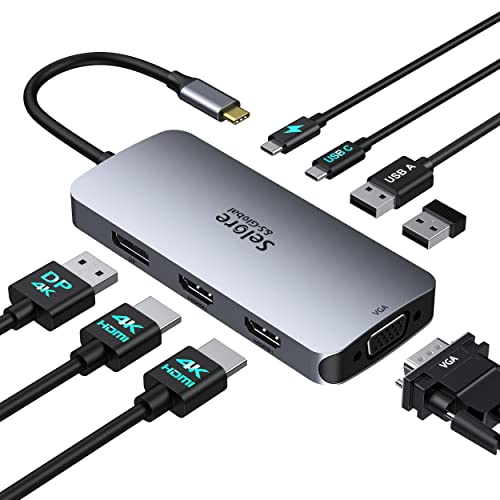
Selore 8-in-1 Triple Display USB-C Dock
Best for: Windows users needing VGA and 100W PD
- Host Interface
- USB-C
- Display Support
- Quad
- Max Resolution
- 4K@60Hz
- Power Delivery
- 100W
- Video Ports
- HDMI, DisplayPort, VGA
- Connectivity
- USB-C, HDMI, DisplayPort, VGA
View on Amazon: Selore 8-in-1 Triple Display USB-C Dock Affiliate link
This Selore docking station connects three displays via dual HDMI and DisplayPort outputs. It supports a 4K@60Hz primary screen and includes a VGA port for legacy hardware. The unit features a 100W Power Delivery port for laptop charging. It measures 4.5 inches in length and weighs 3.17 ounces. You get an 18-month warranty with this gray USB-C hub.
Pros
- Triple display support with HDMI, DisplayPort, and VGA
- 100W Power Delivery for fast laptop charging
- Compact 3.17-ounce build with 8-in-1 connectivity
Cons
- One HDMI port is limited to 30Hz refresh rate
- MacBooks are restricted to mirroring mode only
- VGA connection caps all screens at 1080p on macOS
Good fit if
- You need a VGA port for older projectors
- You want a single cable for video and charging
- You use Windows laptops with full-featured USB-C ports
Skip if
- You require 60Hz on all three connected monitors
- You use a MacBook for extended desktop mode
- You need Thunderbolt 4 speeds for data transfer
Verdict: Selore 8-in-1 USB-C Docking Station works well for Windows users who need legacy VGA support and fast charging. It is not suitable for Mac users who require extended desktop functionality.
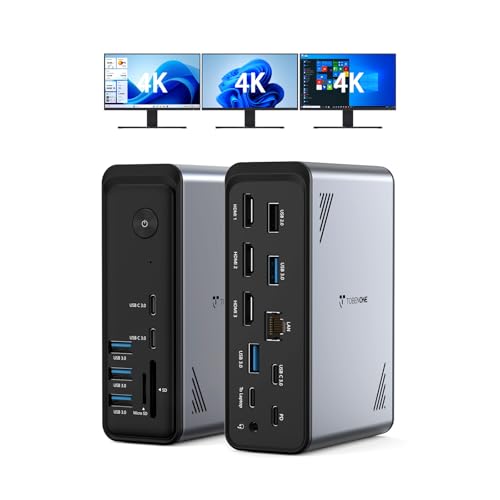
TobenONE 18-in-1 Triple Display Dock
Best for: Windows users needing triple 4K displays and many ports
- Host Interface
- USB-C
- Display Support
- Triple
- Max Resolution
- 4K@60Hz
- Power Delivery
- 100W
- Port Count
- 18
- Video Ports
- HDMI
View on Amazon: TobenONE 18-in-1 Triple Display Dock Affiliate link
This TobenONE hub expands your laptop with 18 ports, including nine USB connections and three HDMI outputs. It supports triple 4K@60Hz displays, making it suitable for video editing or heavy multitasking. The unit delivers 100W Power Delivery to keep your device charged. It is designed specifically for Windows and Chrome OS laptops with full-featured USB-C ports. It is not recommended for Mac users.
Pros
- 18 total ports for extensive connectivity
- Triple 4K@60Hz display support
- 100W Power Delivery charging
- Nine USB ports for peripherals
Cons
- Not compatible with Mac users
- Power adapter is not included
- Heavy build at 10.9 ounces
Good fit if
- You need three external monitors
- You use a Windows or Chrome OS laptop
- You require nine USB ports for peripherals
Skip if
- You own a Mac laptop
- You want a power adapter included
- You prefer a lighter dock under 10 ounces
Verdict: TobenONE 18-in-1 USB-C Docking Station offers high port density and triple 4K support for Windows users who need to connect many devices and displays simultaneously.

MOKiN 8-in-1 Triple Display Docking Station
Best for: Windows users with mixed monitor ports
- Host Interface
- USB-C
- Display Support
- Triple
- Power Delivery
- 100W
- Port Count
- 8
- Video Ports
- HDMI, DisplayPort, VGA
- Max Data Speed
- 480Mbps
View on Amazon: MOKiN 8-in-1 Triple Display Docking Station Affiliate link
The MOKiN USB-C docking station supports three external displays via two HDMI ports, one DisplayPort, and one VGA port. It delivers 100W of pass-through power delivery to keep your laptop charged. The unit includes two USB-A 2.0 ports and one USB-C 2.0 port for peripheral connections. It measures 5.47 by 3.19 by 0.75 inches. You should verify your laptop has a Thunderbolt or full-function USB-C port for compatibility.
Pros
- Supports triple monitor setups with HDMI, DisplayPort, and VGA
- Provides 100W USB-C Power Delivery for fast charging
- Includes legacy VGA port for older displays
- Compact footprint at 0.75 inches in height
Cons
- USB data ports limited to 480Mbps transfer speeds
- macOS systems only support mirrored display mode
- No Thunderbolt certification listed for the host interface
Good fit if
- You need to connect older monitors using VGA cables
- You require a single cable solution for power and video
- You want a compact dock that fits tight desk spaces
Skip if
- You need high-speed USB 3.0 data transfer capabilities
- You use a Mac and require extended desktop mode
- Your laptop only has standard USB-A ports
Verdict: MOKiN USB-C Triple Monitor Dock offers versatile connectivity for mixed monitor setups, though its slower USB speeds and macOS limitations make it less ideal for Mac users or data-heavy workflows.

Mukiya 10-in-1 Triple Display Laptop Stand Dock
Best for: Windows users needing triple displays and ergonomic elevation
- Host Interface
- USB-C, Thunderbolt 3/4
- Display Support
- Triple
- Max Resolution
- 4K@60Hz
- Power Delivery
- 100W
- Port Count
- 10
- Video Ports
- HDMI, DisplayPort
View on Amazon: Mukiya 10-in-1 Triple Display Laptop Stand Dock Affiliate link
The Mukiya 10-in-1 USB-C docking station combines a laptop stand with triple display support. It features two HDMI and one DisplayPort for 4K@60Hz output. A 100W Power Delivery port charges your laptop while up to 85W reaches the device. The aluminum stand offers nine height adjustments and includes SD and TF card slots. You get ten ports in a foldable, lightweight design suitable for organized workspaces.
Pros
- Supports triple monitors at 4K@60Hz via two HDMI and one DisplayPort
- 100W Power Delivery input with 85W output for laptop charging
- Nine-level adjustable kickstand with non-slip silicone pads
- Includes SD and TF card slots for direct file access
- Foldable aluminum alloy construction weighs only 0.7 lbs
Cons
- macOS users are limited to mirror mode only due to system restrictions
- Requires Windows DP1.4 support for full triple display expansion
- Only one USB-C data port included alongside two USB-A ports
Good fit if
- You need a sturdy stand that elevates your laptop for better ergonomics
- You want to connect three external displays to a Windows laptop
- You require SD and TF card readers without extra adapters
Skip if
- You primarily use macOS and need independent extended displays
- You need more than two USB-A ports for peripherals
- You prefer a stationary dock over a portable, foldable design
Verdict: Mukiya 10-in-1 USB-C Docking Station with Kickstand is a practical solution for Windows users who need triple displays and an ergonomic laptop stand in one compact unit.

Anker 14-in-1 USB-C Triple Display Dock
Best for: Users needing dual 4K and one VGA display
- Host Interface
- USB-C, USB4, Thunderbolt
- Display Support
- Triple
- Max Resolution
- 4K
- Power Delivery
- 80W
- Port Count
- 14
- Video Ports
- HDMI, VGA
View on Amazon: Anker 14-in-1 USB-C Triple Display Dock Affiliate link
This Anker docking station offers 14 connectivity options, including two 4K HDMI ports and one 1080p VGA port. It supports triple displays for multitasking and delivers 80W pass-through charging. The hub features five USB-A ports, a 5 Gbps USB-C port, and 1 Gbps Ethernet. It is designed for laptops with USB-C, USB4, or Thunderbolt connections. You get reliable expansion for macOS, Windows, and ChromeOS devices.
Pros
- Two 4K HDMI ports for high-resolution external displays
- 1080p VGA port for legacy monitor compatibility
- 80W USB-C PD-IN port for device charging
- 1 Gbps Ethernet port for stable wired internet
- Five USB-A ports for multiple peripherals
Cons
- Only one 1080p VGA port instead of higher resolution
- Not compatible with Linux operating systems
- External monitors mirror on macOS rather than extending
Good fit if
- You need two 4K displays alongside a legacy VGA monitor
- You require 80W pass-through charging for your laptop
- You use Windows 10/11 or ChromeOS laptops
Skip if
- You need native macOS extended desktop support
- You use a Linux-based computer
- You require three 4K HDMI outputs
Verdict: Anker 14-in-1 USB C Hub 4K Triple Display suits users who need two 4K screens and a VGA port. It provides strong charging and connectivity for Windows and ChromeOS laptops.
Specifications side by side
| Spec | Selore 12-in-1 Triple HDMI Dock | Plugable USB-C Triple HDMI Docking Station | Selore 8-in-1 Triple Display USB-C Dock | TobenONE 18-in-1 Triple Display Dock | MOKiN 8-in-1 Triple Display Docking Station | Mukiya 10-in-1 Triple Display Laptop Stand Dock | Anker 14-in-1 USB-C Triple Display Dock |
|---|---|---|---|---|---|---|---|
| Host Interface | USB-C, Thunderbolt | USB-C | USB-C | USB-C | USB-C | USB-C, Thunderbolt 3/4 | USB-C, USB4, Thunderbolt |
| Display Support | Triple | Triple | Quad | Triple | Triple | Triple | Triple |
| Max Resolution | 4K@60Hz | 4K @ 30Hz | 4K@60Hz | 4K@60Hz | not stated | 4K@60Hz | 4K |
| Power Delivery | 85W | 100W | 100W | 100W | 100W | 100W | 80W |
| Port Count | 12 | 12 | not stated | 18 | 8 | 10 | 14 |
| Video Ports | HDMI | HDMI | HDMI, DisplayPort, VGA | HDMI | HDMI, DisplayPort, VGA | HDMI, DisplayPort | HDMI, VGA |
| Max Data Speed | 10Gbps | 5Gbps | not stated | not stated | 480Mbps | 5Gbps | 5 Gbps |
| Ethernet Speed | Gigabit Ethernet | Gigabit Ethernet | not stated | not stated | not stated | not stated | 1 Gbps |
| Resolution | not stated | 1080p FHD | 4K UHD | 4K UHD | not stated | 4K UHD | 1080p FHD |
| Connectivity | USB-C, HDMI, Ethernet, USB-A | USB-C, HDMI | USB-C, HDMI, DisplayPort, VGA | USB-C, HDMI, Ethernet | USB-C, HDMI, DisplayPort, VGA | USB-C, HDMI, DisplayPort, USB-A | USB-C, HDMI, USB-A, VGA |
| Refresh Rate | not stated | 60Hz | not stated | not stated | not stated | 60Hz | not stated |
| Features | not stated | not stated | not stated | not stated | not stated | Kickstand | not stated |
| Use | not stated | not stated | not stated | Office | not stated | not stated | not stated |
| Dimensions | 5.67 × 2.23 × 0.57 inches | 7.87 × 3.54 × 1.18 inches | 4.5 × 2 × 0.62 inches | 4.9 × 3.5 × 1.6 inches | 5.47 × 3.19 × 0.75 inches | not stated | 5.91 × 2.13 × 0.67 inches |
| Weight | 3.53 ounces | 11.7 ounces | 3.17 ounces | 10.9 ounces | not stated | not stated | 9.45 ounces |
| Size | Portable | 7.9 x 3.3 x 1.2 inches | not stated | Without power supply | 2 HDMI+DP+VGA | not stated | 14 in 1 USB C Hub (Pack of 2) |
| Color | Grey | Black | Gray | Grey-docking station for Windows | 8 in 1 | Silver | Grey |
| Model | UE106+ | UD-3900PDZ | Docking Station Dual HDMI Monitor | not stated | not stated | HUB-M94 | A8389 |
Another guide worth a look: best USB-C SSD docking stations.
Frequently asked questions
Can these docks work with Mac computers?
Most listed docks, including the Plugable UD-3900PDZ and Anker A8389, support Mac laptops. However, the Selore models and TobenONE dock are noted as less suitable for Mac users needing extended desktop functionality. You should verify driver requirements for Plugable, as it may need installation for full stability on macOS.
Do these docking stations support triple monitors?
Yes, all seven products listed here support triple monitor setups. They connect via USB-C and offer multiple video outputs like HDMI, DisplayPort, and VGA. This allows you to run three screens simultaneously, which is useful for productivity workflows requiring multiple windows or applications open at once.
Which dock is the most portable?
The Selore 12-in-1 Triple HDMI Dock is the most portable option. It weighs just 3.53 ounces and measures 5.67 inches in length. The Selore 8-in-1 is also very compact, weighing 3.17 ounces. These slim profiles make them easier to carry in a laptop bag compared to heavier alternatives.
What is the highest power delivery these docks offer?
Several docks provide 100W Power Delivery for fast laptop charging. The Plugable UD-3900PDZ, Selore 8-in-1, MOKiN 8-in-1, and Mukiya 10-in-1 all support this level of power passthrough. This allows you to charge your laptop while connecting multiple peripherals and displays through a single cable connection.
Are there docks with legacy VGA ports?
Yes, if you need to connect older monitors. The Selore 8-in-1, MOKiN 8-in-1, and Anker A8389 include VGA outputs. The Anker dock also supports dual 4K displays alongside the VGA port. This is helpful if you have existing monitors that do not have HDMI or DisplayPort inputs.
Does any dock include a laptop stand?
The Mukiya 10-in-1 Triple Display Laptop Stand Dock features a built-in kickstand. This design elevates your laptop for better ergonomics while providing connectivity. It combines the function of a display dock with a stand, saving desk space by merging two devices into one compact unit for Windows users.
Which dock has the most ports?
The TobenONE 18-in-1 and Anker 14-in-1 docks offer the highest port density. The TobenONE model provides 18 connection points, while the Anker offers 14. These are ideal if you need to connect many peripherals like mice, keyboards, and external drives simultaneously alongside your triple monitor setup.