6 Best Alternatives to the Satechi Pro Slim 7-in-1 USB-C (2026)
As an Amazon Associate we earn from qualifying purchases. Links on this page are affiliate links.
The Satechi Pro Slim 7-in-1 USB-C Hub offers a compact, aluminum design with 4K HDMI output and 100W power delivery. Its slim profile attaches directly to MacBook ports, reducing desk clutter. However, you might seek satechi 7 in 1 USB C hub pro alternatives for different needs. Some users require dual monitors, while others need wired Ethernet or legacy VGA connections. The original model focuses on a single 4K display and fast data transfers, but it lacks certain ports found in other hubs.
This list highlights 6 options that share core specifications with the Satechi hub. All selected products support 4K video output and 100W charging pass-through. They also utilize USB-C connectivity for host devices. We chose these alternatives because their specs overlap with the original, ensuring you get comparable performance. You can find options with more ports, different sizes, or specialized features like DisplayLink or Gigabit Ethernet. Each product listed here meets the fundamental requirements of a modern USB-C hub while offering distinct advantages for specific workflows.
How alternatives compare to Satechi
Baseus 7-in-1 USB-C Hub with 3 USB-A Ports
The Baseus 7-in-1 Hub offers a slightly larger footprint than the Satechi Pro Slim, measuring 5.31 inches in length compared to 4.92 inches. It shares the same 100W power delivery and 4K UHD resolution capabilities. However, it adds three USB-A ports, providing more traditional connectivity options that the Satechi lacks. This makes it a practical choice if you need to connect older peripherals without adapters. The Baseus unit is heavier and thicker, so it does not match the ultra-slim aesthetic of the Satechi. You should pick this alternative if you prioritize extra USB-A ports and SD card access over a minimal, cable-free profile that attaches directly to your MacBook.
Plugable 7-in-1 Dual 4K HDMI USB-C Dock
The Plugable 7-in-1 Dock differs significantly by supporting dual 4K displays, whereas the Satechi Pro Slim is limited to a single HDMI output. This dock uses DisplayLink technology to enable multi-monitor setups on laptops that do not natively support them. It is considerably larger and heavier, weighing 8.82 ounces compared to the Satechi’s 1.45 ounces. While it also provides 100W power delivery, the increased size makes it less portable. You should choose this alternative if your workflow requires two external monitors. The Satechi is better for single-display users who value a lightweight, slim design that connects directly to the laptop port without a separate base.
NOVOO 7-in-1 USB-C Hub with Gigabit Ethernet
The NOVOO 7-in-1 Hub includes a Gigabit Ethernet port, a feature absent from the Satechi Pro Slim. This provides a stable wired network connection, which is useful for travel or environments with unreliable Wi-Fi. Like the Satechi, it supports 4K UHD video and 100W power delivery. The NOVOO unit is taller and narrower, with a different form factor that may not sit as flush against a MacBook. It also includes USB-A ports for added versatility. You should pick this alternative if you need a dedicated Ethernet connection without carrying a separate adapter. The Satechi remains the better choice for users who prefer a purely wireless setup and a sleeker, more compact profile.
Baseus 7-in-1 USB-C Dock with VGA & Dual HDMI
The Baseus 7-in-1 Dock with VGA adds legacy VGA connectivity, which the Satechi Pro Slim does not offer. This is essential for connecting to older projectors or monitors that lack HDMI inputs. It also supports dual HDMI outputs, allowing for two displays, unlike the single HDMI port on the Satechi. Both units provide 100W power delivery and 4K UHD resolution. The Baseus VGA model is slightly smaller in width but lacks the ultra-slim, direct-attach design of the Satechi. You should choose this alternative if you must interface with VGA equipment or need dual monitor support. The Satechi is preferable for modern setups requiring a minimalist, single-cable connection to a MacBook.
UGREEN 5-in-1 USB-C Hub with 100W PD
The UGREEN 5-in-1 Hub is a more compact option with fewer ports than the Satechi Pro Slim. It reduces the port count to five, removing the SD card reader and extra USB ports found on the Satechi. However, it maintains 4K UHD video output and 100W power delivery. The UGREEN unit is slightly wider and thicker than the Satechi, but its reduced port count makes it lighter and potentially more durable for travel. You should pick this alternative if you only need basic video and charging without card readers or multiple USB ports. The Satechi is better for users who need a comprehensive set of ports in a slim, aluminum package that attaches directly to the laptop.
Selore Dual 4K HDMI USB-C Dock
The Selore 9-in-1 Dock offers a higher port count with nine connections, including dual HDMI outputs for 4K displays. This exceeds the Satechi’s single HDMI and seven-port configuration. It also provides 100W power delivery and supports 60Hz refresh rates. The Selore unit is larger and heavier, weighing 3.39 ounces compared to the Satechi’s 1.45 ounces. It is designed for desktop use rather than direct laptop attachment. You should choose this alternative if you need multiple displays and extra USB ports for a stationary setup. The Satechi remains the superior choice for portability and a clean, cable-free look when connected directly to a MacBook.
Quick picks
Our 7 picks

Satechi Pro Slim 7-in-1 USB-C Hub
Best for: MacBook users needing a slim, single-cable 4K setup
- Host Interface
- USB-C
- Max Resolution
- 4K
- Power Delivery
- 100W
- Port Count
- 7
- Video Ports
- HDMI
- Max Data Speed
- 10Gbps
View on Amazon: Satechi Pro Slim 7-in-1 USB-C Hub Affiliate link
This Satechi hub adds 4K HDMI output, 100W power delivery, and two USB 3.2 ports to your MacBook via a single USB-C connection. Its slim aluminum body attaches directly to the laptop, eliminating loose cables. It includes an SD card reader and a USB-C data port. The design dissipates heat and shuts off automatically if temperatures exceed 40°C. You get a compact, clutter-free setup for everyday productivity or creative workflows.
Pros
- Supports 4K HDMI video output
- Provides 100W charging pass-through
- Includes two USB 3.2 Gen 2 ports with 10Gbps speed
- Slim aluminum design attaches directly to the laptop
- Features automatic safety shutdown above 40°C
Cons
- Only one HDMI port for video output
- No Ethernet or additional USB-A ports listed
- Single USB-C host connection limits simultaneous high-bandwidth use
Good fit if
- You use a MacBook Air or MacBook Pro with USB-C
- You need a single cable to connect a 4K display
- You want a slim profile that stays attached to your laptop
Skip if
- You require dual monitor support from a single hub
- You need built-in Ethernet connectivity
- You prefer a docking station with more than seven ports
Verdict: Satechi 7-in-1 USB-C Hub Pro Slim offers a clean, secure connection for MacBook users who need 4K video and fast data transfers without desk clutter.

Baseus 7-in-1 USB-C Hub with 3 USB-A Ports
Best for: Single 4K display and SD card access
- Host Interface
- USB-C
- Max Resolution
- 4K@60Hz
- Power Delivery
- 100W
- Port Count
- 7
- Video Ports
- HDMI
- Max Data Speed
- 5Gbps
View on Amazon: Baseus 7-in-1 USB-C Hub with 3 USB-A Ports Affiliate link
This Baseus hub adds a 4K@60Hz HDMI port, three USB 3.0 data ports, and SD/TF card slots to your laptop. It supports 100W Power Delivery pass-through charging. The unit measures 5.31 by 1.93 by 0.63 inches. You get plug-and-play compatibility with Windows, macOS, and Linux. It suits users who need reliable video output and card access without extra drivers.
Pros
- HDMI port outputs 4K resolution at 60Hz
- Three USB 3.0 ports support 5Gbps transfer speeds
- 100W Power Delivery pass-through charging capability
- Integrated SD and TF card reader slots
Cons
- Only one HDMI video port, limiting single-monitor setups to one external display
- No built-in Ethernet port for wired network connections
- Lacks USB4 or Thunderbolt support for higher bandwidth data transfer
Good fit if
- You need a single 4K display with fast card reader access
- You use a laptop with limited USB-C ports for daily tasks
- You prefer a compact, non-gaming desktop setup
Skip if
- You require dual external monitor support from one hub
- You need wired Ethernet connectivity for stable internet
- You require Thunderbolt speeds for large file transfers
Verdict: Baseus 7-in-1 USB-C Hub 4K@60Hz delivers solid 4K video and data speeds for users who prioritize card reading and single-display expansion over multi-monitor or high-bandwidth needs.
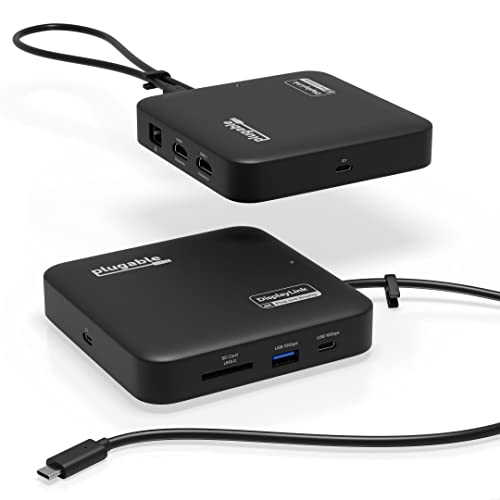
Plugable 7-in-1 Dual 4K HDMI USB-C Dock
Best for: Dual 4K setups on laptops without native support
- Host Interface
- USB-C
- Display Support
- Dual
- Max Resolution
- 4K@60Hz
- Power Delivery
- 82W
- Port Count
- 7
- Video Ports
- HDMI
View on Amazon: Plugable 7-in-1 Dual 4K HDMI USB-C Dock Affiliate link
This Plugable dock adds two HDMI ports and four USB ports to your laptop. It uses DisplayLink technology to drive dual 4K 60Hz monitors on most systems. You get Gigabit Ethernet, SD card access, and up to 82W of pass-through charging. The compact black unit weighs 8.82 ounces. It suits users who need reliable dual-screen setups on Windows or macOS without native dual-video support.
Pros
- Dual 4K 60Hz HDMI outputs via DisplayLink
- Up to 82W pass-through charging
- Gigabit Ethernet and SD card slot
- Compact travel-ready design
Cons
- Requires DisplayLink driver installation on macOS
- Charging cable sold separately
- Lower pass-through power than some competitors
Good fit if
- You need dual 4K monitors on a laptop without native dual-video support
- You use macOS and are willing to install DisplayLink software
- You want a compact dock with SD card access
Skip if
- You need plug-and-play dual displays on macOS without driver installation
- You require more than 82W of pass-through charging
- You want a dock with built-in charging cable
Verdict: Plugable 7-in-1 USB-C DisplayLink Dock delivers reliable dual 4K support for laptops lacking native multi-display outputs, making it ideal for productivity-focused users on macOS or Windows who need a compact, feature-rich hub.

NOVOO 7-in-1 USB-C Hub with Gigabit Ethernet
Best for: Users needing wired Ethernet and screen privacy
- Host Interface
- USB-C
- Max Resolution
- 4K@60Hz
- Power Delivery
- 88W
- Port Count
- 7
- Video Ports
- HDMI
- Max Data Speed
- 5Gbps
View on Amazon: NOVOO 7-in-1 USB-C Hub with Gigabit Ethernet Affiliate link
This 7-in-1 USB-C hub adds a 1Gbps Ethernet port and an HDMI output supporting 4K@60Hz video. It includes three USB-A ports and one USB-C data port, all running at 5Gbps. The unit passes through 100W of power delivery, delivering up to 88W to your laptop. A dedicated screen-off button lets you hide your display instantly. It measures 1.57 by 3.94 by 0.39 inches and weighs 2.79 ounces.
Pros
- 1Gbps Ethernet port for stable wired internet
- HDMI output supports 4K@60Hz resolution
- 100W Power Delivery with 88W output
- One-click screen-off privacy button
- 5Gbps data transfer speeds
Cons
- No USB4 or Thunderbolt support
- Single HDMI port limits dual monitor setups
- 5Gbps speed is slower than USB4 alternatives
Good fit if
- You need reliable wired Ethernet on the go
- You want a simple screen-off privacy feature
- You require a single 4K@60Hz display connection
Skip if
- You need dual monitor support
- You require USB4 or Thunderbolt speeds
- You prefer a compact 5-in-1 form factor
Verdict: NOVOO 7-in-1 USB-C Hub with Ethernet suits users who prioritize a stable wired connection and instant screen privacy over high-speed data transfer. It is a practical tool for travelers who need Ethernet without carrying a separate adapter.
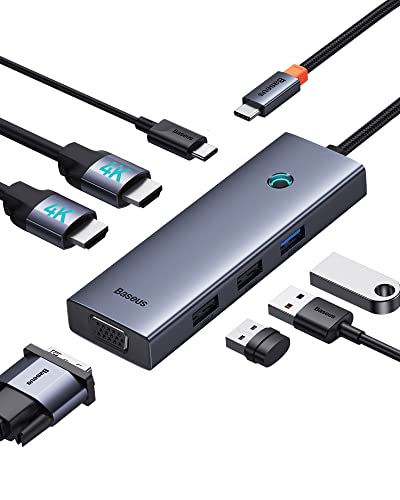
Baseus 7-in-1 USB-C Dock with VGA & Dual HDMI
Best for: legacy VGA monitor connections
- Host Interface
- USB-C
- Display Support
- Triple
- Max Resolution
- 4K@60Hz
- Power Delivery
- 100W
- Port Count
- 7
- Video Ports
- HDMI, VGA
View on Amazon: Baseus 7-in-1 USB-C Dock with VGA & Dual HDMI Affiliate link
This Baseus docking station adds VGA and dual HDMI ports to your laptop. It supports triple displays, with one HDMI output reaching 4K at 60Hz. The aluminum alloy body includes USB 3.0 and 2.0 ports for peripherals. It also delivers 100W of power delivery to charge your device. This compact hub is ideal for users who need legacy VGA connectivity alongside modern video standards.
Pros
- Supports triple monitor setups with 2 HDMI and 1 VGA port
- Includes a VGA port for older displays
- Delivers 100W power delivery for laptop charging
- Compact aluminum alloy design for portability
Cons
- macOS users are limited to extended screen mirroring only
- HDMI 1 requires a DP 1.4 source for 4K 60Hz output
- Some USB-C ports may not support video output
Good fit if
- You need to connect a VGA monitor
- You want to run three displays simultaneously
- You require 100W fast charging for your laptop
Skip if
- You use macOS and need true extended desktop functionality
- Your laptop USB-C port lacks DisplayPort alt mode
- You prefer a simpler 4-in-1 or 5-in-1 hub
Verdict: Baseus 7-in-1 USB-C Dock with VGA is the right fit for professionals who must connect legacy VGA displays while maintaining high-resolution HDMI outputs and fast laptop charging.

UGREEN 5-in-1 USB-C Hub with 100W PD
Best for: Single 4K monitor setups
- Host Interface
- USB-C
- Max Resolution
- 4K
- Power Delivery
- 100W
- Port Count
- 5
- Video Ports
- HDMI
- Max Data Speed
- 5Gbps
View on Amazon: UGREEN 5-in-1 USB-C Hub with 100W PD Affiliate link
The UGREEN 5-in-1 hub offers a compact 4K HDMI output and 100W Power Delivery. It includes one 5 Gbps USB-A port and two 480 Mbps USB-A ports. This 3.21-ounce adapter fits in a bag easily. It suits users who need basic video and charging without extra ports. It is a simple solution for single-monitor setups.
Pros
- 4K HDMI video output
- 100W Power Delivery support
- One 5 Gbps USB-A data port
- Lightweight 3.21-ounce design
Cons
- Only one HDMI port limits dual-monitor setups
- Two USB-A ports are limited to 480 Mbps
- No Ethernet or SD card slots included
Good fit if
- You need a single 4K display connection
- You want a lightweight hub under 4 ounces
- You require 100W charging for your laptop
Skip if
- You need to connect two monitors simultaneously
- You require high-speed 5 Gbps USB-A ports
- You need built-in Ethernet connectivity
Verdict: UGREEN 5-in-1 USB-C Hub 100W PD provides essential 4K video and fast charging in a small package. It is ideal for travelers who prioritize portability and basic connectivity over extra ports.

Selore Dual 4K HDMI USB-C Dock
Best for: Dual 4K display setups with fast charging
- Host Interface
- USB-C
- Display Support
- Dual
- Max Resolution
- 4K@60Hz
- Power Delivery
- 100W
- Port Count
- 8
- Video Ports
- HDMI
View on Amazon: Selore Dual 4K HDMI USB-C Dock Affiliate link
This Selore docking station offers dual HDMI outputs for 4K@60Hz displays, making it a strong alternative to single-screen hubs. It includes a 100W Power Delivery port for laptop charging and three USB ports for peripherals. The compact grey unit weighs 3.39 ounces. You will need a full-featured USB-C port on your host device to enable these features. It supports both Windows and macOS, though macOS limits output to one external monitor.
Pros
- Dual HDMI ports support 4K@60Hz resolution
- 100W Power Delivery charging capability
- Dedicated button for mirror/extend mode toggling
- Includes SD and MicroSD card readers
Cons
- macOS users can only use one external monitor
- Requires one-time system authorization on first use
- USB ports limited to 5Gbps data speeds
Good fit if
- You need two external displays at 4K resolution
- You want a single cable for charging and connectivity
- You frequently transfer files from SD cards
Skip if
- You use a MacBook and need dual external monitors
- You require Thunderbolt 4 speeds for data transfer
- You prefer a plug-and-play setup without configuration
Verdict: Selore 9-in-1 USB-C Dock fits users who need dual 4K displays and fast charging in one compact unit, provided they use Windows or a single-monitor Mac setup.
Specifications side by side
| Spec | Satechi Pro Slim 7-in-1 USB-C Hub | Baseus 7-in-1 USB-C Hub with 3 USB-A Ports | Plugable 7-in-1 Dual 4K HDMI USB-C Dock | NOVOO 7-in-1 USB-C Hub with Gigabit Ethernet | Baseus 7-in-1 USB-C Dock with VGA & Dual HDMI | UGREEN 5-in-1 USB-C Hub with 100W PD | Selore Dual 4K HDMI USB-C Dock |
|---|---|---|---|---|---|---|---|
| Host Interface | USB-C | USB-C | USB-C | USB-C | USB-C | USB-C | USB-C |
| Display Support | not stated | not stated | Dual | not stated | Triple | not stated | Dual |
| Max Resolution | 4K | 4K@60Hz | 4K@60Hz | 4K@60Hz | 4K@60Hz | 4K | 4K@60Hz |
| Power Delivery | 100W | 100W | 82W | 88W | 100W | 100W | 100W |
| Port Count | 7 | 7 | 7 | 7 | 7 | 5 | 8 |
| Video Ports | HDMI | HDMI | HDMI | HDMI | HDMI, VGA | HDMI | HDMI |
| Max Data Speed | 10Gbps | 5Gbps | 10Gbps | 5Gbps | not stated | 5Gbps | 5Gbps |
| Ethernet Speed | not stated | not stated | 1Gbps | 1Gbps | not stated | not stated | not stated |
| Resolution | 4K UHD | 4K UHD | 4K UHD | 4K UHD | 4K UHD | 4K UHD | 4K UHD |
| Connectivity | USB-C, HDMI | USB-C, HDMI, USB-A | USB-C, HDMI, Ethernet, USB-A | USB-C, HDMI, Ethernet, USB-A | USB-C, HDMI, VGA | USB-C, HDMI, USB-A | USB-C, HDMI, USB-A |
| Refresh Rate | not stated | 60Hz | 60Hz | not stated | not stated | not stated | 60Hz |
| Features | Card Reader | Card Reader | DisplayLink | not stated | not stated | not stated | not stated |
| Dimensions | 4.92 × 1.18 × 0.31 inches | 5.31 × 1.93 × 0.63 inches | 4.72 × 4.72 × 1.02 inches | 1.57 × 0.39 × 3.94 inches | 4.33 × 1.46 × 0.55 inches | 4.79 × 1.09 × 0.47 inches | 4.5 × 2.1 × 0.7 inches |
| Weight | 1.45 ounces | not stated | 8.82 ounces | 2.79 ounces | 2.26 ounces | 3.21 ounces | 3.39 ounces |
| Color | Midnight | Black | Black | Champagne | not stated | grey | Grey |
| Model | ST-HUCPHSD | 7 in 1 | USBC-6950PDZ | NH07D-168D | not stated | CM478 | SEUC0425 |
| Size | not stated | 7 in 1 | not stated | 7-in-1 | 6 in 1 | 0.65 feet | 9-in-1 |
If you need an integrated display instead, compare dell 32 4k USB c hub alternatives for your setup.
Frequently asked questions
Does the Baseus 7-in-1 hub support dual monitors?
No, the Baseus 7-in-1 USB-C Hub supports only a single 4K UHD display at 60Hz. If you need dual monitor capability, consider the Plugable 7-in-1 Dock or the Selore 9-in-1 Dock, both of which offer dual HDMI outputs for expanded screen real estate.
Which alternative includes a built-in Ethernet port?
The NOVOO 7-in-1 USB-C Hub is the best choice for wired connectivity. It features a dedicated Gigabit Ethernet port alongside HDMI and USB-A outputs. This allows you to maintain a stable internet connection without needing a separate adapter, which is ideal for travel or office use.
Can I connect a legacy VGA monitor to these hubs?
Yes, the Baseus 7-in-1 USB-C Dock with VGA supports legacy connections. It includes a VGA port alongside dual HDMI outputs, making it suitable for older monitors. Other alternatives like the Satechi Pro Slim and Plugable Dock do not include VGA ports in their specifications.
Do all these hubs support 100W power delivery?
Most listed alternatives support 100W power delivery, including the Satechi Pro Slim, Baseus 7-in-1, Plugable Dock, NOVOO Hub, and Selore 9-in-1. The UGREEN 5-in-1 Hub also supports 100W PD. This allows you to charge your laptop while connected to the hub without a separate charger.
Which hub is best for users with MacBooks needing dual displays?
The Plugable 7-in-1 USB-C DisplayLink Dock is designed for reliable dual 4K support, even on laptops lacking native multi-display outputs. The Selore 9-in-1 Dock also offers dual HDMI outputs. Note that the Selore dock is optimized for Windows or single-monitor Mac setups, so check compatibility.
Is there a more compact option than the Satechi Pro Slim?
The Satechi Pro Slim measures 4.92 inches in length and 0.31 inches in height. The UGREEN 5-in-1 Hub is slightly longer at 4.79 inches but taller at 0.47 inches. The NOVOO Hub is very thin at 0.39 inches but longer at 3.94 inches. The Satechi remains one of the slimmest options for direct attachment.