RIWUCT 360° Rotatable Laptop Stand Review: Who It Fits and Who Should Skip It
As an Amazon Associate we earn from qualifying purchases. Links on this page are affiliate links.
This riwuct 360 rotatable laptop stand review covers a desk riser built for flexibility and comfort. The unit offers a 360° swivel rotation on its base, allowing you to reposition your screen for meetings or shared viewing. It also features adjustable height settings ranging from 1.88 inches to 9.88 inches. These two specs define its core utility: vertical alignment for ergonomics and horizontal freedom for collaboration. The stand supports laptops between 10 and 16 inches and weighs 1.94 pounds. It is designed for users who need to adjust their viewing angle frequently without moving the entire device.
What stands out
- 360° base rotation for infinite positioning options
- Height adjusts from 1.88" to 9.88" for eye-level alignment
- Supports devices weighing up to 8.8 lbs
- Folds to 2.3 inches thick for easy transport
Who it fits
Good fit for
This stand suits remote professionals, students, and designers who share screens during group projects or cooking. The 360° rotation is ideal for presentations or collaborative work where others need to view the display. The height adjustment helps maintain a neutral spine, reducing neck strain during long typing sessions. It also works well for travelers who need a compact riser that fits in a bag. The hollowed-out design aids ventilation during intense work or gaming.
Who should skip it
Skip this option if you prefer a static, fixed-angle setup. The rotating base adds moving parts that may not appeal to users seeking maximum simplicity. It also lacks a built-in keyboard tray, so you must use an external keyboard for comfortable typing. If your laptop exceeds 8.8 lbs, the stand may not provide stable support. Additionally, the single silver color option limits aesthetic customization for those wanting specific desk matches.
Verdict: The RIWUCT stand delivers solid ergonomic height adjustment and unique rotational flexibility for collaborative setups. It is a practical choice for users who value screen positioning versatility over fixed stability.
Key specs explained
Swivel Rotation: 360°
The base rotates fully around its axis, letting you shift your screen from portrait to landscape or share it with others. This is useful for collaborative work or viewing content with a group. When shopping for portable monitors, note that most fixed screens lack this flexibility, making this stand better for dynamic desk setups.
Height Adjustment: 1.88"-9.88"
You can raise or lower the laptop to align the top of the screen with your eye level. This range helps reduce neck strain during long work sessions. Compare this to low-profile risers that offer minimal lift. The wide span allows you to customize your posture regardless of your chair height or desk dimensions.
Supported Screen Size: 10"-16"
The stand accommodates devices ranging from small tablets to large 16-inch laptops. This versatility means you can use it for a MacBook Air or a heavier gaming laptop. Check your device dimensions before buying. It ensures compatibility with most modern ultrabooks and tablets, making it a flexible choice for users who switch between devices.
Product Weight: 1.94 pounds
The stand weighs just under two pounds, making it light enough to carry in a bag. This portability suits remote workers who need a stable setup in different locations. Heavier stands offer more stability but limit mobility. This weight balances ease of transport with enough mass to keep your laptop secure on the desk.
Design and Build Quality
The listing describes the RIWUCT stand as a silver unit with a minimalist aesthetic. It weighs 1.94 pounds and folds to a thickness of 2.3 inches. This compact profile allows it to slip into a bag or suitcase, making it suitable for travel. According to the listing, the design prioritizes portability without sacrificing desk functionality.
The structure uses a dual rod support system with industrial-grade bearings. This engineering aims for stability through 10,000 adjustments and supports laptops up to 8.8 lbs. A non-slip silicone pad protects your device from scratches while holding it in place. The base allows 360° rotation, letting you shift the screen for meetings or shared viewing. Height adjusts from 1.88 to 9.88 inches, helping align the display with your eye level to reduce neck strain.
Ventilation is handled by a large hollowed-out area in the stand. This design choice helps dissipate heat during long work sessions or gaming. The stand fits screens between 10 and 16 inches, covering most laptops and tablets. You can choose between a rotatable or non-rotatable version. The layout is simple, with no complex controls, relying on manual height and angle adjustments. This practical approach suits remote professionals and students who need a flexible, sturdy desk riser.
Setup and Everyday Use Guide
Setting up the RIWUCT stand requires no tools or assembly. You simply unfold the dual-rod structure and place your device on the non-slip silicone pads. The base rotates 360°, allowing you to position the screen for optimal viewing angles immediately. The height adjusts from 1.88 inches to 9.88 inches, letting you align the display with eye level to reduce neck strain. The stand supports laptops and tablets between 10 and 16 inches, including MacBook, Surface, and Dell models. It holds devices up to 8.8 pounds securely. The hollowed-out design promotes airflow, helping your laptop dissipate heat during long work sessions or intensive tasks. For daily use, the 360° rotation is practical for sharing screens in meetings or viewing content while cooking. The adjustable height and angle help maintain a neutral spine position. The stand folds to 2.3 inches thick, fitting easily into bags for travel. The listing recommends using an external keyboard for intense typing to maximize ergonomic benefits. The silver finish and minimalist look suit various desk setups. The industrial-grade bearings support 10,000 adjustments, ensuring consistent stability. This riser works well for remote professionals, students, and designers who need flexible positioning. It is designed for desk use, providing a stable platform for your device. The silicone pads protect your laptop from scratches while keeping it in place. You can switch between portrait and landscape modes quickly by rotating the base. This setup supports efficient workflows without requiring complex configuration.
Before You Buy This Stand
This stand is a solid choice for shared viewing or ergonomic adjustments, but it has limits. It supports devices up to 8.8 lbs and fits screens between 10 and 16 inches. You must check your laptop’s weight before ordering. If your device is heavier, the dual-rod support may struggle over time. The listing recommends using an external keyboard for intense typing. This is practical advice, as the stand only holds the screen, not your input device. You will need to buy a separate keyboard and mouse for a full portable workstation. This stand fits best in setups where you already have input tools. It complements portable monitors by providing a stable, angled base. If you need a single unit for everything, look elsewhere. For those who value flexibility and eye-level viewing, this model offers good value. Just ensure your device fits the size and weight constraints.
Check before you buy
- Verify your laptop weighs less than 8.8 lbs.
- Check that your screen size is between 10 and 16 inches.
- Plan to use an external keyboard for comfortable typing.
- Confirm you need a stand separate from your input devices.
The product at a glance
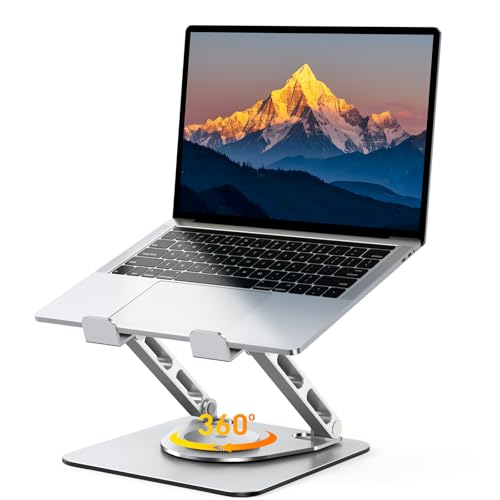
RIWUCT 360° Rotatable Laptop Stand
Best for: sharing screens and adjusting angles
- Supported Screen Size
- 10"-16"
- Height Adjustment
- 1.88"-9.88"
- Swivel Rotation
- 360°
- Product Weight
- 1.94 pounds
- Features
- Kickstand, 360° Rotation, Adjustable Height
- Recommended Use
- Desk
View on Amazon: RIWUCT 360° Rotatable Laptop Stand Affiliate link
This stand offers 360-degree rotation and adjustable height from 1.88 to 9.88 inches. It supports laptops between 10 and 16 inches. The unit weighs 1.94 pounds and folds to 2.3 inches thick. You get military-grade stability with dual rod support. It fits desks and travel needs. The design helps align your screen for better posture.
Pros
- 360° base rotation for flexible positioning
- Height adjusts from 1.88 to 9.88 inches
- Supports 10 to 16 inch screens
- Folds to 2.3 inches for portability
Cons
- Maximum load capacity is only 8.8 lbs
- No mention of cable management features
- Weight limit restricts use with heavy gaming laptops
Good fit if
- You need to share your screen with others
- You want to adjust your viewing angle frequently
- You travel with a light laptop under 8.8 lbs
Skip if
- You use a laptop heavier than 8.8 lbs
- You need a stand for very large screens
- You require built-in cable routing
Verdict: RIWUCT 360° Rotatable Laptop Stand is ideal for users who need frequent screen sharing or angle changes. It fits light laptops under 8.8 lbs that need ergonomic height adjustments.
Specifications side by side
| Spec | RIWUCT 360° Rotatable Laptop Stand |
|---|---|
| Supported Screen Size | 10"-16" |
| Height Adjustment | 1.88"-9.88" |
| Swivel Rotation | 360° |
| Product Weight | 1.94 pounds |
| Features | Kickstand, 360° Rotation, Adjustable Height |
| Recommended Use | Desk |
| Weight | 1.94 pounds |
| Color | Silver |
| Model | B25 |
Frequently asked questions
Does the RIWUCT stand work with tablets?
Yes, the stand supports devices between 10 and 16 inches. This range includes most tablets and smaller laptops. The non-slip silicone pads hold devices securely in place. You do not need to worry about your tablet sliding during the 360-degree rotation. It is a versatile option for mixed device use.
Is the RIWUCT stand heavy to carry?
No, it weighs only 1.94 pounds. This light weight makes it easy to transport in a backpack or laptop bag. The compact design folds down to 2.3 inches thick. You can take it to coffee shops or libraries without adding significant bulk to your load.
Can I rotate the screen while typing?
The base allows full 360-degree rotation. You can shift from landscape to portrait mode easily. However, rotating the device while typing is difficult. The stand is best used for viewing or presenting. You should pause typing when changing the angle to avoid strain or instability.
What is the maximum weight this stand holds?
The stand supports devices up to 8.8 pounds. You must check your laptop’s weight before using it. Heavier gaming laptops may exceed this limit and cause the stand to tip. It is designed for light laptops and ultrabooks that stay within this specific weight range.
Does it help with neck strain?
Yes, the adjustable height settings help improve your posture. You can raise the screen to eye level. This reduces the need to look down at your keyboard. Proper ergonomic positioning can lessen neck and shoulder tension during long work sessions or study periods.
Is assembly required for this laptop stand?
No assembly is needed. The unit arrives ready to use. You simply unfold the dual-rod structure and place your device on the pads. There are no tools or screws required. This makes setup quick and straightforward for any user at home or in the office.
Is the stand stable on a desk?
The design includes non-slip silicone pads for stability. These pads grip your device and the desk surface. The wide base provides a solid foundation for the 360-degree rotation. It remains steady during normal use, provided you do not exceed the 8.8-pound weight limit.