Refresh Rate in Portable Monitors: What It Is and Is It Worth It?
As an Amazon Associate we earn from qualifying purchases. Links on this page are affiliate links.
Refresh Rate Explained for Buyers
Refresh rate explains how many times per second a screen updates its image. You see this number as Hertz, or Hz. A 60Hz panel redraws the display sixty times every second. Higher numbers mean smoother motion. This spec matters most when you move the cursor, scroll through long documents, or watch video content on your portable monitor.
Most standard portable monitors feature a 60Hz refresh rate. This is the baseline for office work and general media consumption. It provides a stable image for spreadsheets, coding, and reading. If your laptop also outputs at 60Hz, matching this rate ensures consistent performance without unnecessary bandwidth usage.
Some models offer a 100Hz refresh rate. This slight increase provides a modest improvement in smoothness. It helps when dragging windows across the desktop or scrolling through web pages. The difference is noticeable but not dramatic. It suits users who want a step up from the standard without jumping to high-end gaming specs.
The 120Hz refresh rate is common in mid-range portable displays. It delivers noticeably fluid motion. Animations feel more responsive. Video playback appears smoother, especially with high-frame-rate content. This setting is ideal for users who switch between work and entertainment. It balances performance and power consumption effectively for most laptop setups.
A 144Hz refresh rate targets gamers and creative professionals. It reduces motion blur significantly. Fast-paced games benefit from the extra frames. Video editors appreciate the smooth timeline scrubbing. However, you must ensure your laptop can output this high frame rate. Many older laptops cap output at 60Hz, making the higher monitor spec useless in those cases.
When shopping, check your laptop’s output capabilities first. Match the monitor’s refresh rate to your source device. If your laptop supports 120Hz, a 120Hz portable monitor will perform better than a 60Hz model. Understanding refresh rate explained helps you choose the right tool for your workflow. It is not just a number; it is a measure of visual fluidity. Choose based on your actual usage needs, not just the highest spec available.
Which Refresh Rate Fits You
60Hz
A 60Hz refresh rate updates the image sixty times per second. This is the standard for most productivity tasks. You get smooth scrolling and clear text without motion blur during normal use. It suits travelers and office workers who prioritize portability and battery life. The MNN 15.6-Inch Portable Monitor offers this rate in a lightweight package. The InnoView 15.6-Inch Touchscreen model also uses 60Hz, adding touch input for easier navigation. The trade-off is less fluid motion in fast-paced games. If you do not play competitive shooters, 60Hz is sufficient for daily work and media consumption.
100Hz
A 100Hz refresh rate updates the screen one hundred times per second. This provides a noticeable step up from 60Hz. You see smoother cursor movement and faster page scrolling. It is ideal for casual gaming and general desktop use. The Sceptre 24-Inch Gaming Monitor delivers this rate with built-in speakers. It fits buyers who want smoother motion than standard displays but do not need top-tier speeds. The trade-off is a moderate increase in power consumption. You gain fluidity without the high cost or power draw of the fastest panels. It is a balanced choice for mixed use.
120Hz
A 120Hz refresh rate updates the image one hundred twenty times per second. You experience significantly smoother motion in games and interface animations. This rate suits users who want a premium feel without jumping to the highest tier. The SANSUI 27-Inch Curved Monitor provides this speed with a curved display for immersion. It also includes USB-C connectivity and integrated audio. The trade-off is a larger, heavier form factor. You get better fluidity than 60Hz or 100Hz, but it requires more graphical power to maintain high frame rates. It is a solid middle ground for performance-focused setups.
144Hz
A 144Hz refresh rate updates the screen one hundred forty-four times per second. You get the smoothest motion available in this list. This spec is essential for competitive gaming where every frame counts. The Acer 27-Inch Monitor and Sceptre 22-Inch Monitor both offer this high speed. They suit gamers who prioritize reaction time and visual clarity. The trade-off is higher power usage and potential screen tearing without adaptive sync. You may also notice increased heat generation. If you play fast-paced titles, this rate reduces motion blur. For non-gaming tasks, the benefit is less noticeable than for gaming.
Is High Refresh Rate Worth It
Who needs it
You should prioritize higher refresh rates if your workflow involves fast-paced visual content. Gamers benefit significantly from 144Hz or 120Hz panels. These specs reduce motion blur and input lag, making competitive titles feel more responsive. Video editors and animators also gain value from smoother playback when scrubbing through timelines or previewing high-frame-rate footage. If you frequently switch between windows or drag icons rapidly, the fluidity of a 100Hz or 120Hz display reduces eye strain. The difference is noticeable in real-time interactions. For these users, the extra cost for higher Hz is justified by the improved daily experience. You get better visual feedback for every mouse movement.
Who can skip it
You can skip higher refresh rates if your primary tasks are static. Most productivity work, including writing, coding, and spreadsheet management, looks identical on 60Hz and 144Hz screens. The human eye struggles to distinguish the difference in static images. If you buy a portable monitor for travel or office use, 60Hz is sufficient. Prioritize panel type, color accuracy, and connectivity options instead. A higher refresh rate does not improve text clarity or image quality for documents. You save money and battery life by sticking with standard panels. Focus on resolution and port selection for a better overall experience in non-gaming scenarios.
Refresh Rate Glossary
Hertz (Hz)
The unit measuring refresh rate. It indicates how many times the screen updates each second. Higher numbers generally mean smoother motion for video and gaming.
60Hz Standard
The baseline refresh rate for most portable monitors. It provides smooth scrolling and clear text for productivity tasks, office work, and general media consumption.
120Hz Panel
A mid-tier option that doubles the update speed. It offers noticeably smoother motion than 60Hz, ideal for fast-paced gaming or fluid desktop interactions.
144Hz High Refresh
A premium spec often found in gaming-focused portable displays. It reduces motion blur and input lag, making competitive titles feel more responsive and precise.
Motion Blur
Visual smearing that occurs when objects move quickly across the screen. Higher refresh rates minimize this effect, keeping fast-moving images sharp and distinct.
Input Lag
The delay between your action and the screen's response. High refresh rates often lower this delay, improving responsiveness for gaming and precise cursor control.
Fluid Scrolling
Smooth movement of text and images while browsing or editing. A higher refresh rate ensures these actions feel natural without stuttering or jarring jumps.
Competitive Gaming
Fast-paced multiplayer games where reaction time matters. These titles benefit most from 120Hz or 144Hz panels due to reduced blur and faster updates.
Quick picks
| # | Product | Best for | Price |
|---|---|---|---|
| 1 | MNN 15.6-Inch 1080p Portable Monitor | Travelers needing a lightweight 1080p secondary display | Check price of MNN 15.6-Inch 1080p Portable Monitor on Amazon |
| 2 | Acer 27-Inch 144Hz IPS Monitor | Gaming and office work on a large screen | Check price of Acer 27-Inch 144Hz IPS Monitor on Amazon |
| 3 | InnoView 15.6" Touchscreen Portable Monitor | touchscreen portability and travel setups | Check price of InnoView 15.6" Touchscreen Portable Monitor on Amazon |
| 4 | Sceptre 22-Inch 144Hz Gaming Monitor | stationary high-refresh desk gaming setups | Check price of Sceptre 22-Inch 144Hz Gaming Monitor on Amazon |
| 5 | SANSUI 27-Inch Curved 120Hz USB-C Monitor | Users wanting a 27-inch 120Hz curved screen with speakers | Check price of SANSUI 27-Inch Curved 120Hz USB-C Monitor on Amazon |
| 6 | Sceptre 24-Inch 100Hz Gaming Monitor | fixed desk setups wanting 100Hz refresh rates | Check price of Sceptre 24-Inch 100Hz Gaming Monitor on Amazon |
Our 6 picks

MNN 15.6-Inch 1080p Portable Monitor
Best for: Travelers needing a lightweight 1080p secondary display
- Refresh Rate
- 60Hz (what this guide is about)
- Screen Size
- 15.6"
- Resolution
- 1920*1080
- Panel Type
- IPS
- Connectivity
- USB-C, HDMI
- Weight
- 1.53 lbs
View on Amazon: MNN 15.6-Inch 1080p Portable Monitor Affiliate link
This MNN portable monitor features a 15.6-inch IPS panel with a 60Hz refresh rate and 1920x1080 resolution. It uses dual USB-C ports for single-cable power and signal transmission, provided your device supports DisplayPort Alt Mode. The lightweight 1.53-pound design includes a smart cover that doubles as a stand. It supports HDR and multiple display modes for extended work or gaming setups.
Pros
- 15.6-inch IPS panel with 1920x1080 resolution
- Dual full-feature USB-C ports for single-cable connection
- Lightweight 1.53-pound build for easy travel
- Smart cover functions as a protective stand
Cons
- 60Hz refresh rate limits motion smoothness for fast gaming
- No built-in speakers or headphone jack listed
- Requires specific USB-C DP Alt Mode support for direct connection
Good fit if
- You need a lightweight second screen for travel
- You connect via devices with full-featured USB-C ports
- You prioritize color accuracy and viewing angles over high refresh rates
Skip if
- You require a refresh rate higher than 60Hz for competitive gaming
- Your laptop lacks USB-C DisplayPort Alt Mode support
- You need built-in audio output from the monitor
Verdict: MNN 15.6" 60Hz Portable Monitor is a practical second screen for travelers who value portability and single-cable connectivity over high-speed motion handling.
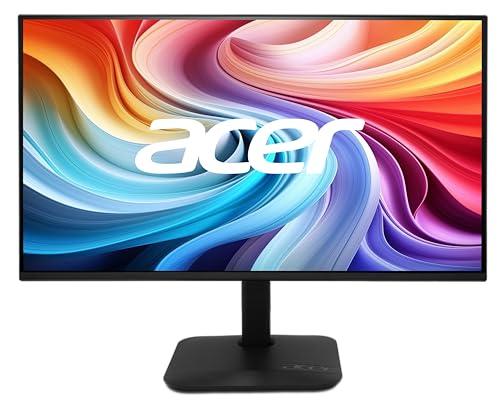
Acer 27-Inch 144Hz IPS Monitor
Best for: Gaming and office work on a large screen
- Refresh Rate
- 144Hz (what this guide is about)
- Screen Size
- 27"
- Resolution
- 1920x1080
- Panel Type
- IPS
- Connectivity
- HDMI, VGA
- Color Gamut
- 99% sRGB
View on Amazon: Acer 27-Inch 144Hz IPS Monitor Affiliate link
This Acer monitor offers a 27-inch IPS panel with 144Hz refresh rate and 1ms response time. It delivers smooth motion for gaming and office work. The 1080p resolution ensures clear text and images. AMD FreeSync reduces screen tearing. The zero-frame design allows for seamless multi-monitor setups. It is a solid choice for users wanting high refresh rates on a larger screen.
Pros
- 144Hz refresh rate for smooth motion
- 1ms response time reduces ghosting
- IPS panel with 178-degree viewing angles
- AMD FreeSync eliminates screen tearing
- Zero-frame design for multi-monitor setups
Cons
- 1080p resolution on a 27-inch screen
- Heavier build at 8.38 lbs
- No USB-C connectivity listed
Good fit if
- You need a high refresh rate for gaming
- You want a larger 27-inch display
- You use multiple monitors side-by-side
Skip if
- You prefer 4K resolution clarity
- You need a lightweight portable setup
- You require USB-C power delivery
Verdict: Acer 27-inch 144Hz IPS Monitor suits gamers and office workers who prioritize smooth motion and a large screen. It fits users who value high refresh rates over pixel density.

InnoView 15.6" Touchscreen Portable Monitor
Best for: touchscreen portability and travel setups
- Refresh Rate
- 60Hz (what this guide is about)
- Screen Size
- 15.6"
- Resolution
- 1080P
- Panel Type
- IPS
- Connectivity
- USB-C, HDMI
- Weight
- 3.02 pounds
View on Amazon: InnoView 15.6" Touchscreen Portable Monitor Affiliate link
This 15.6-inch portable display features a 1080p IPS panel with a 60Hz refresh rate and 10-point touch capability. It includes two full-function USB-C ports and one HDMI port for versatile connectivity. The package provides a protective sleeve with a built-in adjustable stand, making it suitable for travel or daily commuting. You get vivid colors thanks to a 1200:1 contrast ratio and HDR support. Low blue light and flicker-free technology help reduce eye strain during extended use.
Pros
- 10-point touchscreen support via USB-C
- 15.6-inch 1080p IPS panel with 178-degree viewing angles
- Includes protective sleeve with adjustable stand
- Dual full-function USB-C ports and HDMI
- 1200:1 contrast ratio with HDR technology
Cons
- 60Hz refresh rate is lower than the 120Hz and 144Hz options on this list
- Touch functionality requires specific USB-C DP Alt-Mode or Thunderbolt ports
- Power adapter is not included for devices requiring higher wattage
Good fit if
- You need touch input for navigation on the go
- You want a compact 15.6-inch screen for travel
- You prefer a monitor with a protective case included
Skip if
- You require a refresh rate above 60Hz for gaming
- Your laptop lacks USB-C DisplayPort Alt-Mode or Thunderbolt
- You need a large 27-inch display for office work
Verdict: InnoView 15.6" Touch Portable Monitor 60Hz suits travelers who value touch interaction and portability over high refresh rates. It is a practical secondary display for productivity tasks where 60Hz is sufficient.

Sceptre 22-Inch 144Hz Gaming Monitor
Best for: stationary high-refresh desk gaming setups
- Refresh Rate
- 144Hz (what this guide is about)
- Screen Size
- 22"
- Resolution
- 1080p
- Connectivity
- HDMI, DisplayPort
- Weight
- 7 pounds
- Features
- Built-in Speakers
View on Amazon: Sceptre 22-Inch 144Hz Gaming Monitor Affiliate link
This Sceptre 22-inch monitor provides a 1080p resolution and a 144Hz refresh rate for smoother motion in gaming setups. It connects via HDMI and DisplayPort, while integrating built-in speakers and Blue-Light Shift technology to reduce eye strain. Its 7-pound desktop footprint suits you if you want high-refresh visuals at a stationary desk rather than a mobile bag.
Pros
- 144Hz refresh rate provides smooth motion
- Built-in speakers deliver audio without external hardware
- Dual HDMI and DisplayPort inputs support standard video connections
- Blue-Light Shift technology reduces blue light emissions
Cons
- Weighs 7 pounds, making it heavier than compact mobile displays
- Overall dimensions of 19.9 by 15.5 by 7 inches require dedicated desk space
Good fit if
- You want a 144Hz refresh rate via HDMI or DisplayPort for smooth visuals.
- You keep your secondary display at a fixed desk setup.
Skip if
- You need a lightweight monitor to carry inside a laptop bag.
- You want higher than 1080p resolution on a 22-inch display.
Verdict: Sceptre 22-Inch 144Hz Gaming Monitor provides fast 144Hz output and integrated audio for users needing a stationary secondary display. Its bulk and 7-pound weight suit permanent desktop workstations instead of travel kits.
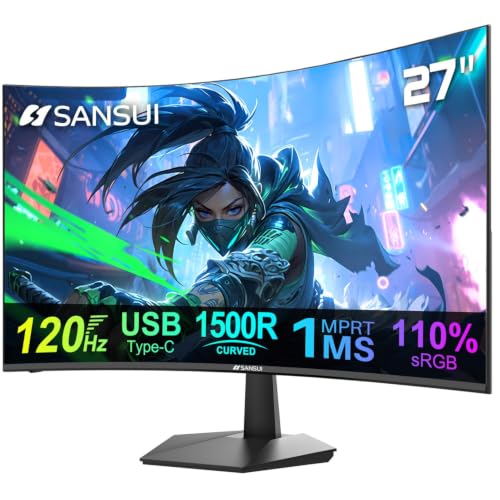
SANSUI 27-Inch Curved 120Hz USB-C Monitor
Best for: Users wanting a 27-inch 120Hz curved screen with speakers
- Refresh Rate
- 120Hz (what this guide is about)
- Screen Size
- 27"
- Connectivity
- 1x USB Type-C, 1x HDMI 1.4
- Color Gamut
- 110% sRGB
- Weight
- 10 lbs
- Features
- Built-in Speakers
View on Amazon: SANSUI 27-Inch Curved 120Hz USB-C Monitor Affiliate link
This 27-inch curved display offers a 120Hz refresh rate and 1ms response time for smoother visuals. It covers 110% of the sRGB color gamut with 300 nits of brightness. The panel includes built-in 2W speakers and supports VESA mounting. You get USB-C and HDMI connectivity. This setup suits users who want a larger, curved screen with higher refresh rates for gaming or multitasking.
Pros
- 120Hz refresh rate with 1ms MPRT response time
- 27-inch curved IPS panel with 110% sRGB coverage
- Built-in 2W stereo speakers for audio
- USB Type-C and HDMI 1.4 connectivity
- 100 x 100mm VESA mount compatibility
Cons
- HDMI port is version 1.4, limiting bandwidth
- Brightness is 300 nits, lower than many gaming monitors
- Built-in speakers are only 2W, providing limited volume
Good fit if
- You want a 120Hz refresh rate on a larger 27-inch screen
- You need built-in speakers to reduce cable clutter
- You prefer a curved display for immersive viewing
Skip if
- You require HDMI 2.0 or higher for maximum bandwidth
- You need high brightness levels above 300 nits
- You prefer a flat panel over a curved design
Verdict: SANSUI 27-inch 120Hz Curved Monitor is a solid option for users seeking a larger screen with a 120Hz refresh rate and integrated audio. It fits those who value curved immersion and VESA mounting flexibility over peak brightness or high-bandwidth video ports.

Sceptre 24-Inch 100Hz Gaming Monitor
Best for: fixed desk setups wanting 100Hz refresh rates
- Refresh Rate
- 100Hz (what this guide is about)
- Screen Size
- 24"
- Resolution
- 1920 x 1080
- Connectivity
- DisplayPort, HDMI 2.0
- Color Gamut
- 100% sRGB
- Weight
- 5.8 lbs
View on Amazon: Sceptre 24-Inch 100Hz Gaming Monitor Affiliate link
The Sceptre 24-inch display provides a 1080p resolution with a 100Hz refresh rate, delivering smoother motion than standard 60Hz panels. It features DisplayPort and dual HDMI connections, 100% sRGB color coverage, AMD FreeSync, and integrated speakers. At 5.8 pounds, it suits your stationary desk setup if you want moderate high-refresh performance for gaming and office tasks.
Pros
- 100Hz refresh rate with AMD FreeSync support
- 100% sRGB color gamut coverage
- DisplayPort and dual HDMI video connections
- Built-in speakers and VESA mount capability
Cons
- 100Hz maximum refresh rate is lower than 120Hz and 144Hz models
- 5.8-pound weight is heavier than compact portable displays
- Data does not list USB-C video input
Good fit if
- You want a 100Hz desk monitor with DisplayPort and HDMI ports.
- You plan to mount your screen using a standard VESA pattern.
Skip if
- You need a lightweight portable monitor for travel.
- You require a higher 120Hz or 144Hz refresh rate.
Verdict: Sceptre 24-Inch 100Hz Gaming Monitor serves desktop users who want fluid 100Hz output and HDMI connectivity at a fixed workstation.
Specifications side by side
| Spec | MNN 15.6-Inch 1080p Portable Monitor | Acer 27-Inch 144Hz IPS Monitor | InnoView 15.6" Touchscreen Portable Monitor | Sceptre 22-Inch 144Hz Gaming Monitor | SANSUI 27-Inch Curved 120Hz USB-C Monitor | Sceptre 24-Inch 100Hz Gaming Monitor |
|---|---|---|---|---|---|---|
| Screen Size | 15.6" | 27" | 15.6" | 22" | 27" | 24" |
| Resolution | 1920*1080 | 1920x1080 | 1080P | 1080p | not stated | 1920 x 1080 |
| Refresh Rate | 60Hz | 144Hz | 60Hz | Up to 144Hz | 120Hz | 100Hz |
| Panel Type | IPS | IPS | IPS | not stated | not stated | not stated |
| Connectivity | USB-C, HDMI | HDMI, VGA | USB-C, HDMI | HDMI, DisplayPort | 1x USB Type-C, 1x HDMI 1.4 | DisplayPort, HDMI 2.0 |
| Color Gamut | not stated | 99% sRGB | not stated | not stated | 110% sRGB | 100% sRGB |
| Aspect Ratio | not stated | 16:9 | not stated | not stated | not stated | not stated |
| Weight | 1.53 lbs | 8.38 pounds | 3.02 pounds | 7 pounds | 10 lbs | 5.8 lbs |
| Features | HDR | VESA Mountable | Kickstand, Touchscreen | Built-in Speakers | Built-in Speakers | Built-in Speakers |
| Use | Gaming | Gaming, Office | Travel | Gaming | Gaming | Gaming |
| Size | 15.6" 1080P | 27-Inch | 15.6 Inches | 22 inches | 27 Inch Curved | not stated |
| Dimensions | 14.5 × 8.85 × 0.3 inches | 8.26 × 27.4 × 18.3 inches | 1 × 1 × 1 inches | 7 × 19.9 × 15.5 inches | 8.31 × 24.1 × 17.9 inches | 7.66 × 21.3 × 17.2 inches |
| Color | Matte black | Black | Black | Machine Black | Black | Machine Black |
| Model | 15 | KB272 P6bi | INVPM001 | E225W-FW144G | ES-27C1 | E248W-FW100T |
Frequently asked questions
Does a higher refresh rate improve video playback?
It depends on the source content. Most movies and standard web videos are encoded at 24, 30, or 60 frames per second. A 144Hz panel will not display more frames than the source provides. It simply updates the screen more frequently if the signal allows. For general media consumption, 60Hz is sufficient.
Can I use a 144Hz monitor for office work?
Yes, higher refresh rates benefit productivity tasks. The Acer 27-inch 144Hz IPS Monitor is listed as suitable for office work. You experience smoother scrolling through documents and web pages. The cursor movement also feels more responsive. This reduces eye strain during long hours of text-heavy work.
Is 100Hz better than 60Hz for casual gaming?
It offers a noticeable improvement in motion smoothness. The Sceptre 24-inch 100Hz Gaming Monitor provides a mid-range option for casual players. You get smoother motion than the standard 60Hz baseline without the premium cost of 144Hz. It is a practical choice for single-player games or slower-paced titles.
Do portable monitors support 120Hz or 144Hz?
Most portable monitors are limited to 60Hz. The products in this guide include larger desktop-style units like the Acer and Sceptre 144Hz models. The SANSUI 27-inch option offers 120Hz. True portable screens, like the MNN and InnoView, stick to 60Hz to balance power consumption and portability.
Does refresh rate affect battery life on laptops?
Higher refresh rates generally consume more power. Driving a panel at 144Hz requires more processing and signal updates than 60Hz. If you are using a laptop to drive a portable monitor, a 60Hz connection is more energy-efficient. This helps preserve your laptop battery during travel or remote work sessions.
Is 120Hz curved screen good for gaming?
It provides immersive visuals with smooth motion. The SANSUI 27-inch Curved Monitor offers 120Hz refresh rate. The curved design enhances immersion for gaming. You get smoother frame updates compared to standard 60Hz panels. This combination suits users who want a larger screen experience without sacrificing motion clarity.
Can I connect a 144Hz monitor via USB-C?
Connectivity depends on the specific model. The Acer 27-inch 144Hz monitor uses HDMI and DisplayPort. The Sceptre 22-inch 144Hz model also relies on HDMI and DisplayPort. Some portable monitors use USB-C for both video and power. Check the ports listed in the specifications to ensure your device supports the connection.
Is 60Hz enough for travel setups?
Yes, 60Hz is standard for most portable travel monitors. The MNN 15.6-inch and InnoView 15.6-inch models both operate at 60Hz. This rate is sufficient for checking emails, browsing the web, and light productivity tasks. It balances performance with weight and power efficiency, making it ideal for on-the-go use.