Redalf 15.6-Inch Detachable Dual Screen Review: Who It Fits and Who Should Skip It
As an Amazon Associate we earn from qualifying purchases. Links on this page are affiliate links.
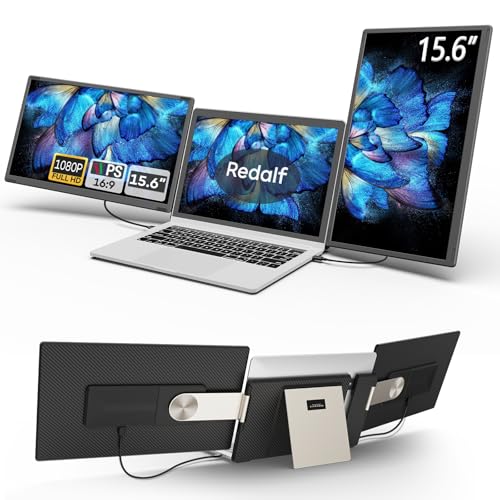
This redalf laptop screen extender review covers a 15.6-inch detachable dual monitor system designed for flexible multi-screen workflows. The unit features 1080P FHD IPS panels that deliver clear visuals and vivid colors for daily tasks. Its standout design allows the screens to rotate 235 degrees horizontally and 90 degrees vertically, supporting landscape, portrait, or stacked configurations. You can also detach the units for travel, with each side weighing just 2.1 pounds. This setup connects via USB-C, USB-A, or HDMI, offering broad compatibility with various laptops and operating systems without requiring additional drivers.
What stands out
- Detachable design allows single-screen use for travel
- 235-degree horizontal and 90-degree vertical rotation
- 1080P FHD IPS panel with anti-glare coating
- Plug-and-play connectivity via USB-C, USB-A, or HDMI
- Compatible with Windows, Mac, and Linux systems
Who it fits
Good fit for
This extender suits professionals who need flexible workspace configurations, such as programmers or designers who benefit from multiple visible windows. The detachable feature is ideal for travelers who want portable display options without carrying a heavy single large unit. Users who frequently switch between landscape and portrait modes for coding or document review will appreciate the rotation capabilities. It also works well for presenters who may want to share content on separate screens during meetings or collaborations.
Who should skip it
You should look elsewhere if you require support for Apple M1, M2, or M3 base chips, as the data explicitly states these are not supported. Buyers needing 4K resolution or higher refresh rates for competitive gaming will find the 1080P FHD IPS panel insufficient. If you prefer a non-detachable, integrated dual-monitor solution for a permanent desk setup, the modular nature of this device may feel less stable. Additionally, users who need built-in battery power will find this model requires external power via USB connections.
Verdict: The Redalf 15.6-inch detachable dual screen offers versatile connectivity and flexible positioning for users needing adaptable multi-monitor setups. It is a practical choice for mobile professionals and those who value customizable screen arrangements over fixed high-resolution displays.
Key specs explained for you
Screen Size: 15.6"
You get a display that matches the standard size of most laptop screens. This consistency makes it easier to align windows across devices. You can use it as a primary or secondary monitor without adjusting your eye focus too much. It fits well on desks and lap desks alike. This size is common for portable setups, ensuring you have enough space for spreadsheets or code without taking up your entire workspace.
Resolution: 1080P FHD
Full High Definition provides sharp text and clear images. You will see fine details in documents and media without pixelation. This resolution is the standard for modern portable monitors. It ensures that small fonts remain readable during long work sessions. When shopping, look for this baseline to avoid blurry visuals. It offers a good balance between clarity and performance for everyday productivity tasks.
Panel Type: IPS
In-Plane Switching technology offers wide viewing angles and accurate colors. You can view the screen from the side without the image washing out. This is crucial when sharing your display with colleagues or clients. IPS panels also maintain color consistency better than cheaper alternatives. For graphic work or media consumption, this panel type ensures what you see is true to life.
Weight: 2.1 pounds
Each side weighs just over two pounds, making it easy to carry. You can move this setup between rooms or take it on trips without heavy strain. The detachable design means you can use one screen alone if needed. This lightness is a key factor for digital nomads and remote workers who prioritize portability. Compare this to heavier units to find the best balance between durability and ease of transport.
Connectivity: USB-C, USB-A, HDMI
Multiple connection options ensure compatibility with various laptops and devices. You can use USB-C for a single-cable solution or HDMI for older computers. USB-A support adds flexibility for legacy hardware. This variety reduces the need for extra adapters. When choosing a portable monitor, check which ports your device offers to ensure a seamless plug-and-play experience without complex setup.
Design and Build Details
The listing describes the Redalf S6 in Charcoal Gray. The unit measures 13.9 inches in length, 8.15 inches in width, and 1.5 inches in height. According to the listing, the total weight is 2.1 pounds. This figure likely applies to each side when the dual screen is detached. The design allows you to separate the screens for independent use. This split configuration makes the system easier to carry when you travel. You can set up a single extender without the bulk of the full dual setup.
The stand supports 235 degrees of horizontal rotation and 90 degrees of vertical rotation. You can adjust the angle to find a comfortable view for landscape or portrait modes. The system also allows for stacked folding configurations. This flexibility helps you manage workspace constraints. You can position the screens to match your desk layout or share them with colleagues during presentations.
The display features an IPS panel with 1080P FHD resolution. The listing notes an anti-glare and flicker-free design to reduce eye strain. Built-in speakers are included for audio output. You do not need external drivers to connect the device. It supports USB-C, USB-A, and HDMI inputs. This plug-and-play approach simplifies setup for Windows, Mac, and Linux systems.
Setup And Daily Use Guide
Setup involves simple plug-and-play connectivity. The listing states no drivers are required for Windows, Mac, Chrome, Android, Linux, or Dex devices. You connect via USB-C, USB-A, or HDMI. Note that HDMI connections require an additional USB-A to USB-C cable for power. The system supports laptops from 13 to 17.3 inches. It is compatible with M1 Pro/Max, M2 Pro/Max, and M3 Pro/Max chips, but does not support base M1, M2, or M3 chips. Always check the instructions for specific compatibility.
Daily use benefits from the 235-degree horizontal and 90-degree vertical rotation. You can adjust the screens for landscape, portrait, or stacked folding configurations. The detachable design allows you to separate the dual monitor into two independent 15.6-inch single screens. Each side weighs 2.1 pounds, making it easier to share or transport. The IPS panel provides 1080P FHD resolution for clear visuals. Built-in speakers offer audio without external devices. Low-blue light and anti-glare features are included for eye protection during long work sessions. You can run multiple applications simultaneously, such as debugging code or managing spreadsheets. The flexible stand lets you view content from various angles, whether for collaboration or entertainment. This setup supports efficient multitasking without complex configuration.
What To Check Before Buying
Before you commit to this Redalf extender, verify your laptop’s port situation. You need available USB-C, USB-A, or HDMI outputs. If you plan to use HDMI, remember that the listing requires an extra USB-A to USB-C cable for power. This adds a minor setup step you should account for. Check your Mac chip carefully. The data states it supports M1 Pro/Max, M2 Pro/Max, and M3 Pro/Max, but explicitly excludes base M1, M2, and M3 chips. Using an unsupported chip will result in no display. Consider your travel needs. While the screens detach for solo use, you still carry two 15.6-inch panels. This is bulkier than a single portable monitor. If you prioritize minimal weight, a single 13-inch or 14-inch screen might suit you better. For desk-bound productivity, however, the dual configuration offers significant screen real estate. Keep the screens clean with a microfiber cloth. Avoid harsh chemicals. The IPS panels are durable, but proper care extends their life. This device fits best for users who need extensive horizontal or vertical workspace and do not mind the extra weight.
Check before you buy
- Confirm your laptop has HDMI, USB-C, or USB-A ports.
- Verify your Mac chip is not base M1, M2, or M3.
- Ensure you have space for two 15.6-inch screens on your desk.
- Buy an extra USB-A to USB-C cable if using HDMI.
- Check if you need a single lighter screen for travel.
The product at a glance
Redalf 15.6-Inch Detachable Dual Screen Extender
Best for: flexible dual-screen collaboration and sharing
- Screen Size
- 15.6"
- Resolution
- 1080P FHD
- Panel Type
- IPS
- Connectivity
- USB-C, USB-A, HDMI
- Weight
- 2.1 pounds
- Display Support
- Dual Monitor
View on Amazon: Redalf 15.6-Inch Detachable Dual Screen Extender Affiliate link
This Redalf S6 extender adds two 15.6-inch 1080P FHD IPS displays to your laptop. The detachable design lets you use them as a dual setup or split them into two single screens for sharing. It supports 235° horizontal and 90° vertical rotation. You get plug-and-play connectivity via USB-C, USB-A, or HDMI. Built-in speakers and low-blue light protection are included.
Pros
- 15.6-inch 1080P FHD IPS panels for clear visuals
- Detachable dual screens shareable with colleagues
- 235° horizontal and 90° vertical rotation for flexible viewing
- Plug-and-play via USB-C, USB-A, or HDMI
Cons
- Only 1080P resolution, not 4K
- Does not support M1/M2/M3 base chips
- Requires separate USB-A to USB-C cable for HDMI power
Good fit if
- You need to share screens with a colleague
- You want flexible rotation for different angles
- You use Windows, Linux, or Mac Pro/Max chips
Skip if
- You require 4K resolution displays
- You use base M1/M2/M3 Mac chips
- You prefer a single integrated screen
Verdict: Redalf 15.6" Detachable Dual Screen fits users who need flexible, shareable displays with standard rotation. It is a practical tool for collaboration or multi-tasking on compatible systems.
Specifications side by side
| Spec | Redalf 15.6-Inch Detachable Dual Screen Extender |
|---|---|
| Screen Size | 15.6" |
| Resolution | 1080P FHD |
| Panel Type | IPS |
| Connectivity | USB-C, USB-A, HDMI |
| Weight | 2.1 pounds |
| Display Support | Dual Monitor |
| Size | 17.3 Inch |
| Dimensions | 13.9 × 8.15 × 1.5 inches |
| Color | Charcoal Gray |
| Model | S6 |
Frequently asked questions
Is the Redalf 15.6-inch screen a triple display?
No, this product is a dual screen extender. The listing describes it as a detachable dual monitor system with two 15.6-inch panels. While the size attribute mentions triple screen, the core function is providing two additional displays for compatible laptops to boost productivity.
Does the Redalf S6 support rotation for different viewing angles?
Yes, the screens rotate 235 degrees. This flexibility allows you to adjust the angle for comfortable viewing or easy collaboration with others nearby. The detachable design supports this rotation, making it suitable for various workspace setups and sharing sessions.
What resolution does the Redalf dual monitor provide?
It provides 1080p FHD resolution on both panels. This standard full HD clarity ensures sharp text and clear images for daily tasks. The IPS panels deliver vivid colors and consistent visuals, making it suitable for both work and media consumption.
How heavy is the Redalf 15.6-inch portable monitor?
The unit weighs 2.1 pounds. This weight likely applies to each individual screen panel. The compact dimensions of 13.9 by 8.15 inches make it relatively portable, allowing you to move it between desks or take it on short trips with ease.
Can I use this monitor with Mac or Linux systems?
Yes, the listing states it works with Mac, Linux, Chrome, Android, and Dex devices. It uses simple plug-and-play connectivity without requiring additional drivers for Windows. You can connect via USB-C, USB-A, or HDMI, depending on your computer's available ports.
What color is the Redalf S6 portable display?
The Redalf S6 comes in Charcoal Gray. This neutral color helps it blend into most office or home environments. The matte finish typical of such devices reduces glare, ensuring your focus remains on the content rather than reflections on the screen surface.
Does the HDMI connection require extra power for the Redalf screen?
Yes, HDMI connections require an additional USB-A to USB-C cable for power. The monitor needs external power to function correctly. You must ensure you have this extra cable available if you choose to connect via HDMI instead of USB-C.