QUUGE Dual HDMI Docking Station Review: Who It Fits and Who Should Skip It
As an Amazon Associate we earn from qualifying purchases. Links on this page are affiliate links.
This quuge laptop docking station stand review covers the QUUGE QS601, a 2-in-1 device that functions as both a vertical stand and a USB-C dock. It connects via Thunderbolt 3 or 4 to expand your setup. The two defining specs are its dual HDMI ports supporting up to 4K resolution at 120Hz, and its 85W Power Delivery charging capability. This metal unit measures 7.1 inches in length and includes a 1Gbps Ethernet port. It is designed for users who want to add multiple displays and stable connectivity to a thin laptop without cluttering their desk space.
What stands out
- Dual HDMI ports support dual 4K@60Hz displays or a single 4K@120Hz output
- 85W PD charging allows fast power delivery when using a 100W adapter
- 1Gbps Ethernet port provides a stable wired network connection
- 5Gbps data transfer speed for connected USB 3.0 devices
- Vertical stand design saves desktop space for laptops under 2 cm thick
Who it fits
Good fit for
This dock suits professionals who need a stable, multi-monitor setup for productivity. If you rely on dual screens for coding, design, or data analysis, the dual HDMI outputs are essential. The 1Gbps Ethernet port is ideal for users who prefer a wired connection for online meetings or large file transfers. It also fits those who want to keep their desk tidy by using the vertical stand feature. The 85W charging is sufficient for most thin and light laptops, keeping your power supply minimal.
Who should skip it
You should look elsewhere if your laptop lacks a Thunderbolt 3 or 4 port, as this dock requires that specific host interface. It is not suitable for users needing more than two external monitors, as it only supports dual display output. If you require USB 4 speeds or higher data transfer rates, the 5Gbps limit may be too slow for your large files. Additionally, if your laptop is thicker than 2 cm, the vertical stand feature will not work correctly when the lid is closed.
Verdict: The QUUGE QS601 is a practical choice for users needing dual 4K displays and a wired Ethernet connection on a single dock. It works best for laptops with Thunderbolt 3 or 4 ports that benefit from a space-saving vertical stand.
Key specs explained
Max Resolution: 4K@120Hz
This spec indicates the docking station can drive a single monitor at 4K resolution with a 120Hz refresh rate. A higher refresh rate reduces motion blur and screen tearing, making scrolling and gaming smoother. You should compare this against standard 60Hz panels. If you plan to use a high-refresh-rate portable monitor, this output ensures you get the full visual performance rather than being capped at a lower frame rate.
Display Support: Dual
The device supports dual monitor output via its two HDMI ports. This allows you to connect two external displays simultaneously to your laptop. This setup is useful for creating a triple-monitor workspace when you include your laptop screen. You should check if your portable monitors support HDMI input. This feature helps you expand your screen real estate for multitasking without needing additional docking hardware.
Power Delivery: 85W
The dock provides up to 85W of power delivery to charge your laptop while in use. This value accounts for a 15W loss within the device itself. You should ensure your laptop charger supports at least 100W to achieve this output. This feature allows you to charge your computer and connect peripherals through a single cable, reducing cable clutter on your desk and keeping your device powered during heavy workloads.
Ethernet Speed: 1000Mbps
This specification refers to the built-in Ethernet port, which supports speeds up to 1000Mbps. A wired connection is generally more stable and faster than Wi-Fi for large file transfers or online meetings. You should compare this to USB 2.0 speeds, which are significantly slower. If your portable monitor setup requires a reliable internet connection for streaming or video calls, this port provides a consistent network link without signal interference.
Host Interface: Thunderbolt 3/4
The docking station connects to your laptop using a Thunderbolt 3 or Thunderbolt 4 port. This high-bandwidth interface is necessary to support dual 4K displays and fast data transfer. You should verify that your laptop has a compatible Thunderbolt port. Using a standard USB-C port may limit performance or prevent the dock from functioning correctly. This connection type ensures you get the maximum speed and stability the device offers.
Design and Build Quality
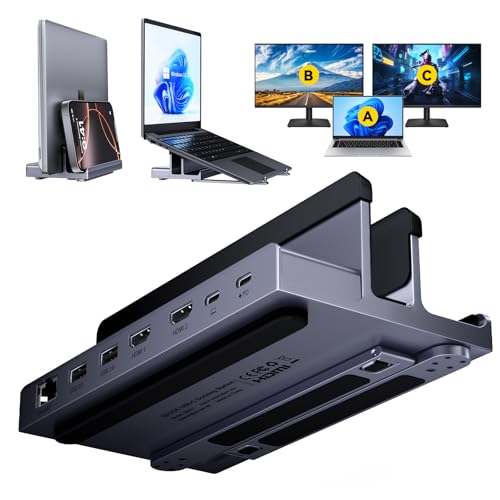
The QUUGE QS601 combines a laptop stand with a docking station in a single unit. According to the listing, the body is constructed primarily from metal. This material choice aims to provide structural rigidity and a premium texture. Silicone pads are placed at contact points to prevent scratches on your device. You should place your laptop vertically to save desk space, provided it is 2 cm or less thick. Horizontal placement raises the screen for better ergonomics.
The physical dimensions are 7.1 inches in length, 3.8 inches in width, and 2.3 inches in height. The finish is described as space grey. The layout includes six ports on the side for easy access. You connect your laptop to the upstream Thunderbolt 3 or 4 interface. The downstream ports include two HDMI outputs, two USB 3.0 ports, an Ethernet jack, and a PD charging port. This arrangement keeps cables organized and reduces clutter on your workspace.
The design prioritizes stability and connectivity. The metal construction helps dissipate heat generated by the dock components. The silicone grips ensure the laptop remains secure during use. You can use this setup for both vertical and horizontal configurations. The compact size fits well on most desks. The port placement allows for straightforward cable management without requiring awkward angles or additional adapters.
Setup and Daily Use Guide
You connect this docking station to your laptop using a Thunderbolt 3 or 4 cable. The listing advises using the included 10 Gbps cable or another standard Thunderbolt cable for best results. This host interface allows the device to act as a bridge for your peripherals. You can place the unit vertically to save desk space or horizontally to raise your laptop screen. The stand supports laptops up to 2 cm thick when closed. Silicone pads protect your device from scratches during placement.
For daily use, the dual HDMI ports let you attach two external monitors. You can achieve a triple-monitor setup by using your laptop screen alongside the two external displays. One HDMI port supports 4K at 120Hz, while the other supports 4K at 60Hz. This configuration helps reduce visual stuttering during fast-moving content. The Ethernet port provides a stable 1000Mbps connection, which is useful for online meetings or gaming without signal interference. You also get two USB 3.0 ports for data transfer at 5Gbps speeds.
Power delivery is handled through the USB-C connection. The dock supports PD 3.0 fast charging. When paired with a 100W charger, it delivers up to 85W to your laptop. This accounts for a 15W loss within the device. The metal construction aims to keep the laptop secure and stable during these tasks. The compact dimensions of 7.1 by 3.8 by 2.3 inches fit neatly on most desks. You simply plug in your devices and let the dock manage the connections.
Before You Buy This Dock
Before you commit, verify your laptop has a Thunderbolt 3 or 4 port. This dock relies on that specific host interface for power and data. You must also check your laptop thickness. The listing notes it supports vertical placement only for devices under 2 cm thick when closed. If your machine is bulkier, this stand may not fit securely. You will need a 100W PD charger to maximize the 85W output delivered to your device. The dock handles 15W for its own operation. Consider your cable length. The package includes a 10 Gbps cable, but ensure it reaches your desk layout comfortably. This unit suits users who want a clean, dual-monitor setup without cluttering their desk. It complements portable monitors by providing a stable, fixed anchor point for your workflow. Unlike standalone docks, this combines elevation with expansion, saving space for those who value a minimalist desktop environment.
Check before you buy
- Confirm your laptop has a Thunderbolt 3 or 4 port.
- Check that your laptop is under 2 cm thick for vertical use.
- Ensure you have a 100W PD charger for full speed.
- Verify your desk space allows for the 7.1-inch length.
- Check if your HDMI monitors support 4K@120Hz for best results.
The product at a glance
QUUGE Dual HDMI Docking Station Stand
Best for: Dual 4K displays and stable Ethernet
- Host Interface
- Thunderbolt 3/4
- Display Support
- Dual
- Max Resolution
- 4K@120Hz
- Power Delivery
- 85W
- Port Count
- 6
- Video Ports
- HDMI
View on Amazon: QUUGE Dual HDMI Docking Station Stand Affiliate link
This QUUGE QS601 combines a laptop stand with a dual monitor docking station. It connects via Thunderbolt 3 or 4 to provide two HDMI outputs for 4K displays. One port supports 120Hz refresh rates for smoother visuals. It delivers 85W of power delivery to your laptop and includes a 1000Mbps Ethernet port. The metal build saves desk space while keeping your screen at eye level.
Pros
- Dual HDMI ports support 4K resolution
- One HDMI 2.1 port enables 120Hz refresh rate
- 85W power delivery charges your laptop
- 1000Mbps Ethernet port for stable networking
- Metal stand design saves desk space
Cons
- Data transfer speed is limited to 5Gbps
- Vertical placement requires a laptop under 2 cm thick
- Requires a Thunderbolt 3 or 4 cable for best performance
Good fit if
- You need a dual monitor setup for your laptop
- You want a 120Hz refresh rate for one screen
- You need a stable wired Ethernet connection
Skip if
- You require more than 5Gbps data transfer speeds
- Your laptop is thicker than 2 cm for vertical use
- You only have USB-C ports without Thunderbolt support
Verdict: QUUGE QS601 Dual HDMI Laptop Dock fits users who need a sturdy stand and dual 4K displays with high refresh rates. It is ideal for those who value a clean desk setup and reliable wired networking over high-speed data transfers.
Specifications side by side
| Spec | QUUGE Dual HDMI Docking Station Stand |
|---|---|
| Host Interface | Thunderbolt 3/4 |
| Display Support | Dual |
| Max Resolution | 4K@120Hz |
| Power Delivery | 85W |
| Port Count | 6 |
| Video Ports | HDMI |
| Max Data Speed | 5Gbps |
| Ethernet Speed | 1000Mbps |
| Resolution | 4K UHD |
| Connectivity | USB-C, HDMI, Ethernet |
| Refresh Rate | 120Hz |
| Features | Kickstand |
| Slot Count | 1 Slot |
| Dimensions | 7.1 × 3.8 × 2.3 inches |
| Size | QS601 for Windows【2 × HDMI】 |
| Color | space grey |
| Model | QS601 |
Frequently asked questions
Does the QUUGE QS601 support dual 4K displays?
Yes, this docking station supports dual monitor output. It features two HDMI ports that allow you to connect two separate displays simultaneously. This setup is ideal for users who need to expand their workspace with multiple screens without requiring additional adapters.
What is the maximum refresh rate for the displays?
The device supports a maximum refresh rate of 120Hz. This specification allows for smoother motion on compatible monitors, which is beneficial for scrolling through documents or gaming. You should verify that your connected monitors also support this high refresh rate to utilize the full capability.
Can I charge my laptop while using the dock?
Yes, the QUUGE QS601 includes 100W Power Delivery. This feature allows you to charge your laptop through the docking station while using the connected peripherals. Ensure your laptop charger and the dock are connected to power sources to maintain optimal charging speeds during use.
Does this dock have an Ethernet port for internet?
Yes, the unit includes a built-in Ethernet port. This provides a stable wired network connection, which is often more reliable than Wi-Fi for large file transfers or video calls. You can connect an Ethernet cable directly to the dock to access your local network.
What kind of stand does this docking station have?
It features a built-in kickstand design that holds your laptop vertically. This space-saving approach keeps your desk clear and reduces clutter. The metal construction aims to provide structural rigidity, ensuring your device remains stable in the upright position during daily operations.
Is this dock compatible with Thunderbolt 3 or 4?
Yes, the QUUGE QS601 connects via Thunderbolt 3 or 4 interfaces. You must use a compatible cable to ensure proper data transfer and power delivery. This host interface requirement means the dock will not function correctly with standard USB-C ports that lack Thunderbolt support.