What Is Power Delivery? A Guide for Portable Monitors Buyers (2026)
As an Amazon Associate we earn from qualifying purchases. Links on this page are affiliate links.
Power Delivery Explained for Buyers
Power Delivery is a charging standard that sends electricity and video data through a single USB-C cable. This spec matters because it simplifies your desk setup. You connect your laptop, the portable monitor, and sometimes other devices to one port. The system negotiates how much power to send. This process ensures your gear receives the right amount of energy without damage.
When you see power delivery explained on a product listing, look for the wattage number. Common values in this niche include 60W, 90W, 100W, 130W, 135W, and 180W. These numbers indicate the maximum power the port can supply. A higher number means the port can charge a more powerful laptop while driving the screen. It also allows you to pass power through to other devices if the monitor supports daisy-chaining.
You should check the wattage before buying. A 60W port might charge a small ultrabook but struggle with a heavy gaming laptop. If your laptop requires more power than the monitor provides, the laptop battery will drain over time. Conversely, a 100W or 130W port can handle most modern laptops. The 180W spec is reserved for high-performance machines that need significant energy.
This spec also affects your cable choice. To get the full benefit, you need a cable rated for the wattage you want. A low-rated cable will limit the power flow, even if the monitor supports higher numbers. Always match your cable to the highest wattage your setup requires. This ensures stable video output and reliable charging. Understanding this spec helps you avoid connection issues and keeps your workspace clean and efficient.
Power Delivery Levels Compared
180W
This is the highest tier available in the current selection. It provides ample power to charge high-performance laptops while driving a display. You get fast charging speeds for devices that support high-wattage input. The trade-off is that fewer portable monitors support this level. You may need a specific charger and cable to utilize the full capacity. It is best for users with power-hungry workstations who want a single-cable solution for maximum performance and minimal desk clutter.
135W
This level supports charging most modern high-end laptops. It allows you to run your computer and monitor from one port without draining the laptop battery quickly. You benefit from stable power delivery during intensive tasks. The main trade-off is that you must ensure your laptop supports this specific wattage. Not all USB-C ports on laptops can handle this output. It is a strong choice for professionals who need reliable power for heavy computing tasks while on the move.
130W
This spec offers robust charging for many ultrabooks and gaming laptops. It ensures your device stays powered during extended use. You can often charge while using the monitor for video or design work. The trade-off is that it requires a compatible power adapter and cable. If your laptop accepts less power, the monitor will not force more. It is suitable for users who want a balance of high performance and convenience in a portable setup.
100W
This is a common standard for many USB-C devices. It can charge most laptops and tablets while displaying video. You get a reliable connection for daily office or creative work. The trade-off is that it may not charge very large laptops fast enough. Some high-performance machines might still drain battery under heavy load. It is a versatile option for users who want a straightforward, single-cable setup without needing specialized high-wattage equipment.
90W
This level provides solid charging for many mid-range laptops. It balances power delivery with the energy needed to run the display. You can use this setup for general productivity and media consumption. The trade-off is that it may not support the fastest charging speeds for larger devices. Some laptops might charge slowly or not at all if they require more power. The ASUS ZenScreen 27-Inch 4K Smart Monitor uses this spec, fitting users who value integrated smart features and 4K clarity.
60W
This is the standard for many entry-level and lightweight monitors. It is sufficient for charging smaller laptops and tablets. You get a simple connection for basic tasks. The trade-off is that it may not charge larger laptops while they are under load. High-performance machines might drain battery even while connected. The ViewSonic 15.6-Inch 1080p USB-C Portable Monitor offers this spec, ideal for travelers prioritizing weight and included accessories over high resolution or high-power charging capabilities.
Who Needs High Power Delivery?
Who needs it
You need high wattage if you use a powerful laptop. Models offering 130W, 135W, or 180W handle demanding workstations. These units charge your computer and drive the display simultaneously. This setup reduces cable clutter on your desk. If your laptop requires significant power for video editing or coding, lower wattage options will struggle. A 60W or 90W connection might charge your device too slowly while the screen is active. The 100W tier offers a solid middle ground for most ultrabooks. However, if you rely on a thin-and-light laptop that draws heavy current, you should look for the 135W or 180W specs. This ensures your battery stays full during long sessions. It also prevents the laptop from throttling performance due to insufficient power input. Choose higher numbers if your workflow involves intensive tasks.
Who can skip it
You can ignore high wattage if you use a basic laptop. Many entry-level notebooks consume very little power. A 60W connection is often sufficient for these devices. You save money and find more compatible monitors. Focus on display quality instead of raw power. Look for sharp resolution and accurate color reproduction. If you only browse the web or write documents, high wattage is unnecessary. The 90W tier is also adequate for most standard ultrabooks. You do not need 180W unless you have a specific high-performance machine. Prioritize portability and screen size over charging speed. A lighter monitor is easier to carry in your bag. Check your laptop’s actual power requirements before buying. Most users will find 60W or 90W perfectly fine for daily tasks. Do not pay for extra watts you will not use.
Power Delivery Glossary
USB-C
A reversible connector that carries video, data, and power. It is the standard interface for modern portable monitors and laptops.
PD Standard
The USB Power Delivery protocol. It allows devices to negotiate voltage and current levels for safe and efficient charging over USB-C.
Wattage
The unit of power. Common monitor PD ratings range from 65W to 180W, indicating how much energy the screen can pass through.
Daisy Chain
A setup where power flows from the laptop to the first monitor, then to a second. This reduces the number of wall adapters needed.
Pass-Through
The ability of the monitor to route power from the wall charger to your laptop. It keeps your computer charged while displaying video.
Negotiation
The digital handshake between devices. Your laptop and monitor communicate to agree on the highest safe power level for charging and display.
Quick picks
| # | Product | Best for | Price |
|---|---|---|---|
| 1 | ASUS ZenScreen 27-Inch 4K Smart Monitor | 4K resolution and built-in smart TV features | Check price of ASUS ZenScreen 27-Inch 4K Smart Monitor on Amazon |
| 2 | ViewSonic 15.6-Inch 1080p USB-C Portable Monitor | Lightweight mobile setups | Check price of ViewSonic 15.6-Inch 1080p USB-C Portable Monitor on Amazon |
| 3 | INNOCN 32-Inch 120Hz 90W USB-C Monitor | Large screen setups needing 90W charging | Check price of INNOCN 32-Inch 120Hz 90W USB-C Monitor on Amazon |
| 4 | ViewSonic 16-Inch 1200p Wireless Portable Monitor | Wireless mobile work setups | Check price of ViewSonic 16-Inch 1200p Wireless Portable Monitor on Amazon |
Our 4 picks

ASUS ZenScreen 27-Inch 4K Smart Monitor
Best for: 4K resolution and built-in smart TV features
- Power Delivery
- 90W (what this guide is about)
- Screen Size
- 27 Inch
- Resolution
- 3840 x 2160
- Panel Type
- IPS
- Connectivity
- USB-C, HDMI, DisplayPort, USB hub
- Color Gamut
- 99% sRGB
View on Amazon: ASUS ZenScreen 27-Inch 4K Smart Monitor Affiliate link
This 27-inch portable monitor features a 4K UHD IPS panel with 99% sRGB coverage. It includes USB-C with 90W Power Delivery for single-cable connectivity. The unit integrates Google TV for direct streaming. It weighs 13.2 pounds and includes built-in Harman Kardon speakers. This setup suits users who need high resolution and smart features in a mobile form factor.
Pros
- 27-inch 4K UHD (3840 x 2160) IPS display
- USB-C port with 90W Power Delivery
- Built-in Google TV with 10,000+ apps
- Harman Kardon certified 5W front speakers
Cons
- 13.2-pound weight is heavy for travel
- 90W PD is lower than 100W or 130W options
- No mention of wireless screen mirroring beyond Miracast/Chromecast
Good fit if
- You need 4K resolution for detailed work
- You want built-in smart TV capabilities
- You prefer 90W charging over higher wattage
Skip if
- You prioritize ultra-lightweight portability under 10 pounds
- You require 130W or 180W Power Delivery
- You need a screen smaller than 27 inches
Verdict: ASUS ZenScreen MS27UC 27-Inch 4K Smart Monitor delivers 4K clarity and 90W charging for users who value integrated smart features. It fits those who accept the 13.2-pound weight for superior display quality.
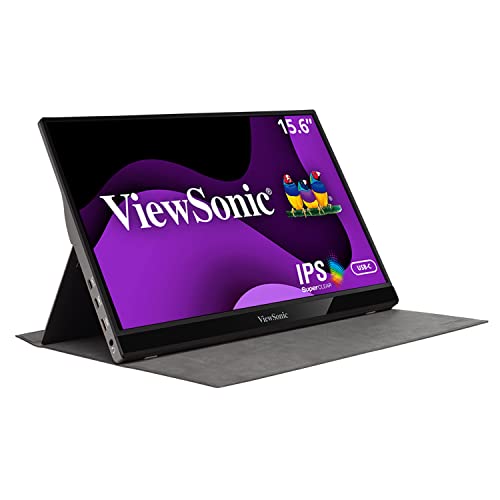
ViewSonic 15.6-Inch 1080p USB-C Portable Monitor
Best for: Lightweight mobile setups
- Power Delivery
- 60W (what this guide is about)
- Screen Size
- 15.6"
- Resolution
- 1920x1080p
- Refresh Rate
- 60Hz
- Panel Type
- IPS
- Connectivity
- USB-C, Mini-HDMI
View on Amazon: ViewSonic 15.6-Inch 1080p USB-C Portable Monitor Affiliate link
The ViewSonic VG1655 is a 15.6-inch 1080p portable monitor with a 60Hz refresh rate and 60W Power Delivery. It weighs 1.8 lbs and features an IPS panel. The unit includes built-in speakers and a magnetic stand cover. You get flexible connectivity via USB-C and Mini-HDMI. This setup suits users needing a lightweight secondary screen for travel or office use.
Pros
- 15.6-inch 1080p IPS display
- 60W USB-C Power Delivery
- Built-in dual speakers
- Magnetic stand cover included
- Lightweight 1.8 lbs design
Cons
- 60W PD limits laptop charging power
- Mini-HDMI port instead of full-size
- 1080p resolution on 15.6-inch screen
Good fit if
- You need a lightweight travel monitor
- You want built-in audio
- You prefer a magnetic cover
Skip if
- You require 4K resolution
- You need high refresh rates
- You want full-size HDMI ports
Verdict: ViewSonic VG1655 15.6" 60W Portable Monitor offers a balanced spec set for travelers. It fits buyers prioritizing weight and included accessories over high resolution.

INNOCN 32-Inch 120Hz 90W USB-C Monitor
Best for: Large screen setups needing 90W charging
- Power Delivery
- 90W (what this guide is about)
- Screen Size
- 32"
- Resolution
- 4K
- Refresh Rate
- 120Hz
- Panel Type
- IPS
- Connectivity
- USB-C, DP 1.4, HDMI 2.1
View on Amazon: INNOCN 32-Inch 120Hz 90W USB-C Monitor Affiliate link
The INNOCN CB32U1 is a 32-inch IPS display offering 4K resolution at 120Hz. It delivers 90W Power Delivery via USB-C, which charges your laptop while transmitting video. The panel covers 98% DCI-P3 color space with factory calibration. It includes HDMI 2.1 and DisplayPort 1.4 for versatile connectivity. This monitor suits users who need a large, high-refresh workspace that powers their device through a single cable.
Pros
- 90W USB-C Power Delivery for single-cable laptop charging
- 4K resolution at 120Hz refresh rate
- 98% DCI-P3 color gamut coverage
- HDMI 2.1 and DP 1.4 connectivity
- Factory-calibrated Delta E < 1 color accuracy
Cons
- 90W Power Delivery is lower than the 130W and 135W options on this list
- 32-inch size is significantly larger than the 15.6-inch and 16-inch portable monitors
- HDMI 2.1 port may not be available on all laptop USB-C ports without adapters
Good fit if
- You need a large 32-inch screen for detailed creative work
- You want 90W charging to power a MacBook or laptop
- You prefer a 120Hz refresh rate for smoother cursor movement
Skip if
- You require maximum 135W or 180W charging speeds
- You need a compact 15.6-inch or 16-inch portable display
- You only need standard 60Hz performance for basic tasks
Verdict: The INNOCN 32" 4K 90W USB-C Monitor fits users who prioritize a large 32-inch canvas and 90W charging over portability. It delivers high resolution and smooth refresh rates for creative tasks.

ViewSonic 16-Inch 1200p Wireless Portable Monitor
Best for: Wireless mobile work setups
- Power Delivery
- 60W (what this guide is about)
- Screen Size
- 16 Inch
- Resolution
- 1200p
- Panel Type
- IPS
- Connectivity
- 60W USB C, WiFi Dongle Inputs
- Aspect Ratio
- 16:10
View on Amazon: ViewSonic 16-Inch 1200p Wireless Portable Monitor Affiliate link
The ViewSonic VG1656N is a 16-inch IPS portable monitor with a 1920 x 1200 resolution. It features a built-in 4,000 mAh battery for up to 3 hours of wireless use. The display supports 60W Power Delivery via USB-C. This setup suits users who need a lightweight, second screen that operates without a constant power outlet connection.
Pros
- Built-in 4,000 mAh battery for wireless operation
- 16-inch 1920 x 1200 IPS display
- 60W two-way Power Delivery via USB-C
- Lightweight 3.1-pound design with smart cover stand
Cons
- Lower 60W Power Delivery limit compared to 90W and 180W options
- 1920 x 1200 resolution is below 4K standards
- Battery life limited to 3 hours
Good fit if
- You need a wireless second screen for travel
- You prioritize portability over high resolution
- You want a monitor with a built-in battery
Skip if
- You require 4K resolution for detailed work
- You need high-power pass-through charging above 60W
- You prefer a wired-only setup without battery constraints
Verdict: ViewSonic VG1656N 16 Inch Portable Monitor is ideal for remote workers who value wireless freedom and a lightweight profile over high resolution or high-power charging capabilities.
Specifications side by side
| Spec | ASUS ZenScreen 27-Inch 4K Smart Monitor | ViewSonic 15.6-Inch 1080p USB-C Portable Monitor | INNOCN 32-Inch 120Hz 90W USB-C Monitor | ViewSonic 16-Inch 1200p Wireless Portable Monitor |
|---|---|---|---|---|
| Screen Size | 27 Inch | 15.6" | 32" | 16 Inch |
| Resolution | 3840 x 2160 | 1920x1080p | 4K | 1200p |
| Refresh Rate | not stated | 60Hz | 120Hz | not stated |
| Panel Type | IPS | IPS | IPS | IPS |
| Connectivity | USB-C, HDMI, DisplayPort, USB hub | USB-C, Mini-HDMI | USB-C, DP 1.4, HDMI 2.1 | 60W USB C, WiFi Dongle Inputs |
| Color Gamut | 99% sRGB | not stated | 100% sRGB, 98% DCI-P3 | not stated |
| Aspect Ratio | not stated | not stated | not stated | 16:10 |
| Weight | 13.2 pounds | 1.8 lbs | not stated | 3.1 pounds |
| Features | Built-in Speakers, VESA Mountable | Built-in Speakers, Kickstand | Kickstand | Kickstand, Built-in Battery |
| Power Delivery | 90W | 60W | 90W | 60W |
| Size | 27-Inch | not stated | 32 Inch | 9.3" x 14.1" x 0.4" |
| Dimensions | 24.2 × 1.8 × 20 inches | 0.6 × 8.8 × 14 inches | 10 × 2 × 50 inches | 0.38 × 14 × 9.25 inches |
| Color | BLACK | Silver | White | Black |
| Model | MS27UC | VG1655-CR | CB32U1 | VG1656N |
Frequently asked questions
Can a 60W portable monitor charge my laptop?
Yes, if your laptop supports USB-C charging. The ViewSonic VG1655 and VG1656 models offer 60W Power Delivery. This wattage handles most ultrabooks and tablets. It charges your device while displaying video. Heavier workstations may not charge fully at this level.
Does 90W Power Delivery work for 4K displays?
Yes, 90W provides enough power for 4K resolution and laptop charging. The ASUS ZenScreen MS27UC uses 90W PD to drive its 4K panel. The INNOCN CB32U1 also offers 90W for its large screen. This wattage balances performance and charging needs for high-res setups.
What is the difference between 60W and 90W PD?
The difference is charging speed and supported device power. 60W suits lightweight laptops and tablets. 90W supports more power-hungry devices and higher resolution displays. Both levels send video and power through one cable. Choose 90W if you need faster charging or drive a larger screen.
Do I need a special cable for Power Delivery?
You need a USB-C cable rated for the wattage you use. Standard USB-C cables often support up to 60W. For 90W or higher, ensure your cable handles the current. The ASUS ZenScreen and INNOCN models rely on USB-C connectivity. Use a certified cable to avoid charging issues.
Can I use a portable monitor without a laptop?
Yes, if you have a power source. Some models like the ViewSonic VG1656N include a built-in battery. This allows wireless use without a laptop. Other units, such as the ASUS ZenScreen, require connection to a power source. They can display content from phones or tablets via USB-C.
Does Power Delivery affect video quality?
No, Power Delivery only handles charging and data transport. Video quality depends on resolution and panel type. The ASUS ZenScreen delivers 4K UHD clarity. The ViewSonic VG1655 offers 1080p FHD. Both use USB-C for data. The wattage level does not change the image resolution or color accuracy.