6 Best Alternatives to the NOVOO 6-in-1 USB-C Hub (2026)
As an Amazon Associate we earn from qualifying purchases. Links on this page are affiliate links.
The NOVOO 6-in-1 USB-C Hub provides a compact solution for users who need a single 4K HDMI display and SD card access. It features 100W power delivery and weighs just 1.9 ounces. This makes it a strong contender for travelers seeking portability. However, you might look for novoo USB c hub alternatives if your workflow requires more ports or different connectivity options. Some users need dual monitors, wired Ethernet, or additional USB-A ports for peripherals. The original design does not include these features, which may limit its usefulness for desktop setups.
The 6 alternatives listed here were chosen because their specifications overlap with the original hub’s core functions. Each option supports 4K video output and USB-C connectivity. You will find models with higher port counts, such as 9-in-1 or 13-in-1 docks, for expanded connectivity. Others offer triple display support or dual HDMI outputs for multi-screen environments. All listed products maintain 100W power delivery to keep your laptop charged. This selection covers various needs, from basic 4K display needs to complex office configurations. You can compare the specs to find the right fit for your specific requirements.
How alternatives compare to NOVOO
Baseus 7-in-1 USB-C Hub with 3 USB-A Ports
The Baseus 7-in-1 USB-C Hub adds an extra USB-A port to the NOVOO configuration, giving you more flexibility for peripherals. It supports 4K video at 60Hz, which ensures smoother motion compared to the NOVOO’s standard 4K output. The device is slightly larger, measuring 1.93 inches wide and 0.63 inches high, but it maintains a similar 100W power delivery rating. You gain an additional data port without sacrificing charging speed. This model suits professionals who need card reading and extra USB connectivity. It is a practical upgrade if you require one more USB-A connection for your workflow.
MOKiN 13-in-1 USB-C Docking Station
The MOKiN 13-in-1 USB-C Docking Station offers significantly more expansion than the NOVOO hub. It supports triple displays via HDMI and DisplayPort, whereas the NOVOO is limited to a single HDMI output. This dock includes Ethernet for wired networking, which the NOVOO lacks. It weighs 4.66 ounces, making it heavier and less portable than the 1.9-ounce NOVOO. The port count increases to thirteen, providing ample connectivity for desktop setups. You should choose this if you need multiple monitors and stable internet access. It is ideal for stationary workstations where portability is less critical than extensive port availability.
UGREEN 5-in-1 USB-C Hub with 100W PD
The UGREEN 5-in-1 USB-C Hub is a more compact option than the NOVOO, with fewer ports. It removes the SD and TF card readers, focusing on HDMI video and charging. It still delivers 100W power delivery and 4K UHD resolution. The unit weighs 3.21 ounces, which is heavier than the NOVOO despite having fewer features. Its dimensions are 1.09 inches wide and 4.79 inches long. This model fits users who prioritize basic display and charging needs over card access. It is a simpler choice if you do not need to transfer files directly from memory cards. The trade-off is reduced connectivity for a potentially streamlined setup.
Selore Dual 4K HDMI USB-C Dock
The Selore Dual 4K HDMI USB-C Dock supports two 4K displays at 60Hz, doubling the video output of the NOVOO. It includes USB-A ports for additional peripherals, which the NOVOO also has. The dock measures 2.1 inches wide and 0.7 inches high, making it larger and heavier at 3.39 ounces. It maintains the 100W power delivery rating. You gain dual monitor support, which is essential for productivity tasks requiring split screens. This model is best for users who need more than one external display. It sacrifices the compact size of the NOVOO for enhanced visual workspace capabilities.
MOKiN 6-in-1 USB-C Hub with 4K 60Hz HDMI
The MOKiN 6-in-1 USB-C Hub matches the NOVOO in port count but specifies 4K@60Hz HDMI support. This higher refresh rate provides smoother video compared to the NOVOO’s general 4K specification. It is designed specifically for MacBook users who need a single external display. The color option is silver, differing from the NOVOO’s grey finish. It lacks the explicit card reader mention in its attributes, so verify if it includes SD/TF slots. You should pick this if you prioritize display smoothness on Apple devices. It is a focused alternative for users who value high refresh rates in their primary external monitor setup.
MOKiN 6-in-1 Dual HDMI USB-C Hub
The MOKiN 6-in-1 Dual HDMI USB-C Hub supports dual external monitors, offering more visual flexibility than the NOVOO. It includes 100W power delivery, matching the NOVOO’s charging capability. The device weighs 2.72 ounces, slightly heavier than the NOVOO’s 1.9 ounces. It is designed for Windows laptops needing dual 4K monitors. The port count remains six, but the video outputs are split across two HDMI ports. You gain the ability to run two displays simultaneously. This model is ideal for users who need expanded screen real estate without moving to a larger docking station. It trades the NOVOO’s simplicity for multi-monitor functionality.
Quick picks
Our 7 picks

NOVOO 6-in-1 USB-C Hub
Best for: Single 4K display and card access
- Host Interface
- USB-C
- Max Resolution
- 4K
- Power Delivery
- 100W
- Port Count
- 6
- Video Ports
- HDMI
- Connectivity
- USB-C, HDMI
View on Amazon: NOVOO 6-in-1 USB-C Hub Affiliate link
This NOVOO adapter connects a USB-C device to an HDMI display at 4K resolution. It includes two USB 3.0 ports and SD/TF card readers for media transfer. The unit supports 100W Power Delivery pass-through to keep your laptop charged. At 1.9 ounces, it is a lightweight option for users who need a simple, single-screen setup with data and storage access.
Pros
- 4K HDMI video output
- 100W Power Delivery pass-through
- SD and TF card readers
- Two USB 3.0 ports
- Compact 1.9-ounce weight
Cons
- Single HDMI port limits dual-monitor setups
- No Ethernet or additional USB-A ports
- Lacks built-in display scaling controls
Good fit if
- You need 4K video on one external screen
- You require SD card access for photos
- You want a lightweight, portable adapter
Skip if
- You need dual monitor support
- You require Ethernet connectivity
- You need more than two USB ports
Verdict: NOVOO 6-in-1 USB-C Hub 4K HDMI fits users who need a single 4K display and card readers without bulk. It is ideal for travelers who prioritize portability and basic connectivity over extensive port expansion.

Baseus 7-in-1 USB-C Hub with 3 USB-A Ports
Best for: Single 4K display and SD card access
- Host Interface
- USB-C
- Max Resolution
- 4K@60Hz
- Power Delivery
- 100W
- Port Count
- 7
- Video Ports
- HDMI
- Max Data Speed
- 5Gbps
View on Amazon: Baseus 7-in-1 USB-C Hub with 3 USB-A Ports Affiliate link
This Baseus hub expands your laptop with a 4K@60Hz HDMI port, three USB 3.0 ports, and SD/TF card slots. It supports 100W Power Delivery pass-through charging. The compact design fits easily in a bag. It suits users who need reliable video output and fast data transfer without extra drivers. You get plug-and-play compatibility across major operating systems.
Pros
- Supports 4K@60Hz HDMI output for clear display
- 100W Power Delivery pass-through charging
- Three USB 3.0 ports with 5Gbps transfer speeds
- Integrated SD and TF card readers
- Plug-and-play compatibility with Windows and macOS
Cons
- Only one HDMI port for single external display
- No built-in Ethernet or Wi-Fi connectivity
- Requires external power adapter for charging function
Good fit if
- You need a single high-resolution external display
- You frequently transfer photos from SD or TF cards
- You want fast charging while using multiple peripherals
Skip if
- You require dual monitor support without a docking station
- You need wired Ethernet connectivity for stable internet
- You prefer a hub with a longer cable for distance
Verdict: Baseus 7-in-1 USB-C Hub 4K@60Hz is a solid choice for professionals who need a single 4K display and card reading capabilities. It fits users who prioritize data speed and charging power over multiple video outputs.

MOKiN 13-in-1 USB-C Docking Station
Best for: users needing triple displays and wired networking
- Host Interface
- USB-C
- Display Support
- Triple
- Max Resolution
- 4K
- Power Delivery
- 85W
- Port Count
- 13
- Video Ports
- HDMI, DisplayPort
View on Amazon: MOKiN 13-in-1 USB-C Docking Station Affiliate link
The MOKiN 13-in-1 USB-C docking station supports triple displays via two HDMI ports and one DisplayPort. It offers 4K resolution and 10Gbps data transfer speeds. You get a Gigabit Ethernet port for stable internet and 85W power delivery for your laptop. This hub also includes SD card readers and audio jacks, making it a comprehensive station for desktop setups.
Pros
- Supports triple monitor displays with dual HDMI and DisplayPort outputs
- Includes Gigabit Ethernet port for wired network connectivity
- Provides 85W power delivery to charge connected laptops
- Features 10Gbps USB 3.1 ports for fast data transfer
- Built-in SD and microSD card readers for media access
Cons
- macOS laptops are limited to one extended display in docking mode
- Maximum power output is 85W, not 100W
- Weighs 4.66 ounces, making it bulkier than single-port adapters
Good fit if
- You need to connect three monitors to your laptop simultaneously
- You require a wired Gigabit Ethernet connection for stable internet
- You frequently transfer large files using SD cards
Skip if
- You use a macOS laptop and need dual external displays
- You need 100W power delivery for high-power devices
- You prefer a compact single-port adapter for travel
Verdict: The MOKiN 13-in-1 USB-C Docking Station fits users who need triple display support and wired networking. It is ideal for desktop environments where multiple ports and high-speed data transfer are essential.

UGREEN 5-in-1 USB-C Hub with 100W PD
Best for: Basic 4K display and charging needs
- Host Interface
- USB-C
- Max Resolution
- 4K
- Power Delivery
- 100W
- Port Count
- 5
- Video Ports
- HDMI
- Max Data Speed
- 5Gbps
View on Amazon: UGREEN 5-in-1 USB-C Hub with 100W PD Affiliate link
This UGREEN adapter provides five ports via a single USB-C connection. It includes a 4K HDMI output, a 100W Power Delivery port, one 5 Gbps USB-A data port, and two 480 Mbps USB-A ports. The unit weighs 3.21 ounces and measures 4.79 inches long. It suits users who need basic display and charging capabilities without requiring high-speed data transfer on all ports.
Pros
- 4K HDMI video output
- 100W USB-C Power Delivery
- One 5 Gbps USB-A data port
- Compact 3.21 ounce weight
Cons
- Only one USB-A data port
- Two ports limited to 480 Mbps
- No additional USB-C data port
Good fit if
- You need 4K display output
- You require 100W charging
- You want a lightweight adapter
Skip if
- You need multiple high-speed data ports
- You require dual monitor support
- You need USB-C data connectivity
Verdict: UGREEN 5-in-1 USB-C Hub 4K HDMI delivers essential video and charging for users with limited ports. It fits those who prioritize display quality and power delivery over high-speed data transfer speeds.

Selore Dual 4K HDMI USB-C Dock
Best for: dual 4K@60Hz display setups with fast charging
- Host Interface
- USB-C
- Display Support
- Dual
- Max Resolution
- 4K@60Hz
- Power Delivery
- 100W
- Port Count
- 8
- Video Ports
- HDMI
View on Amazon: Selore Dual 4K HDMI USB-C Dock Affiliate link
This Selore docking station offers dual HDMI outputs for 4K@60Hz displays, supporting extended or mirrored modes. It includes 100W Power Delivery, three USB ports, and SD/TF card slots. The unit features a dedicated button for quick display mode toggling and privacy blackouts. It is designed for laptops with full-featured USB-C ports, providing a single-cable solution for charging and connectivity. macOS users are limited to one external display in extend mode.
Pros
- Dual HDMI ports support 4K@60Hz resolution
- 100W Power Delivery for fast charging
- Dedicated button for mirror/extend toggle
- Includes SD and MicroSD card readers
Cons
- macOS supports only one external monitor in extend mode
- Requires one-time system authorization on first use
- Thunderbolt or full-featured USB-C port required
Good fit if
- You need dual 4K displays at 60Hz
- You want a single-cable charging and data solution
- You frequently transfer photos via SD cards
Skip if
- You use a MacBook and need two external monitors
- Your laptop lacks a full-featured USB-C port
- You prefer plug-and-play without initial setup
Verdict: Selore 9-in-1 USB-C Docking Station is a practical hub for users who need dual 4K@60Hz displays and fast charging through a single connection, provided their laptop supports the required interface.

MOKiN 6-in-1 USB-C Hub with 4K 60Hz HDMI
Best for: Single 4K@60Hz display on MacBooks
- Host Interface
- USB-C
- Max Resolution
- 4K@60Hz
- Port Count
- 6
- Video Ports
- HDMI
- Connectivity
- USB-C, HDMI
View on Amazon: MOKiN 6-in-1 USB-C Hub with 4K 60Hz HDMI Affiliate link
This MOKiN adapter provides a 6-in-1 USB-C to HDMI connection. It supports 4K UHD resolution at a 60Hz refresh rate. The silver hub is designed for MacBook Pro and Air models. It connects directly via USB-C. You get a single HDMI output for external displays. This setup is ideal for users needing a simple, high-resolution video link without extra ports.
Pros
- 6-in-1 port configuration
- 4K UHD resolution support
- 60Hz refresh rate
- USB-C host interface
Cons
- Single HDMI video output
- No mention of USB data ports
- No mention of power delivery pass-through
Good fit if
- You need 4K video at 60Hz
- You use a MacBook with USB-C ports
- You want a simple single-display setup
Skip if
- You require dual monitor support
- You need USB data connectivity
- You want power delivery pass-through
Verdict: MOKiN 6-in-1 USB-C Hub delivers clear 4K@60Hz video for MacBook users who only need one external display. It fits users who prioritize resolution over extra ports.
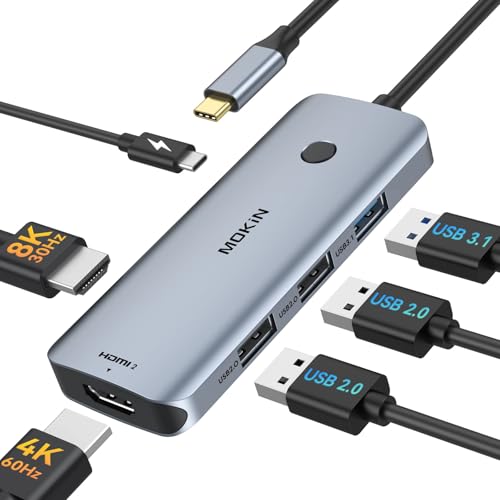
MOKiN 6-in-1 Dual HDMI USB-C Hub
Best for: Windows laptops needing dual 4K monitors
- Host Interface
- USB-C
- Display Support
- Dual
- Max Resolution
- 4K@60Hz
- Power Delivery
- 100W
- Port Count
- 6
- Video Ports
- HDMI
View on Amazon: MOKiN 6-in-1 Dual HDMI USB-C Hub Affiliate link
This MOKiN docking station converts a single USB-C port into six connections, including dual HDMI outputs. It supports 4K@60Hz video and 100W Power Delivery. You get one USB 3.1 port for fast data transfer and two USB 2.0 ports for peripherals. The device enables triple displays on Windows laptops via MST mode. It is designed for users needing expanded connectivity and stable performance without driver installation.
Pros
- Dual HDMI ports support 4K@60Hz resolution
- 100W Power Delivery for laptop charging
- USB 3.1 port offers 10Gbps data transfer
- Enables triple display on Windows systems
- Plug-and-play with no drivers required
Cons
- Triple display mode does not work on macOS
- Only one USB 3.1 port for high-speed data
- Two USB 2.0 ports limit peripheral speed
Good fit if
- You use a Windows laptop and need two external monitors
- You require 100W charging through your docking station
- You need multiple USB ports for keyboard and mouse
Skip if
- You use a MacBook and need true extended desktop mode
- You need more than one high-speed USB 3.0 port
- You prefer a smaller form factor than 2x2 inches
Verdict: MOKiN 6-in-1 USB-C Docking Station is a solid choice for Windows users who need dual external monitors and fast charging. It offers reliable triple display support and ample connectivity for office setups.
Specifications side by side
| Spec | NOVOO 6-in-1 USB-C Hub | Baseus 7-in-1 USB-C Hub with 3 USB-A Ports | MOKiN 13-in-1 USB-C Docking Station | UGREEN 5-in-1 USB-C Hub with 100W PD | Selore Dual 4K HDMI USB-C Dock | MOKiN 6-in-1 USB-C Hub with 4K 60Hz HDMI | MOKiN 6-in-1 Dual HDMI USB-C Hub |
|---|---|---|---|---|---|---|---|
| Host Interface | USB-C | USB-C | USB-C | USB-C | USB-C | USB-C | USB-C |
| Display Support | not stated | not stated | Triple | not stated | Dual | not stated | Dual |
| Max Resolution | 4K | 4K@60Hz | 4K | 4K | 4K@60Hz | 4K@60Hz | 4K@60Hz |
| Power Delivery | 100W | 100W | 85W | 100W | 100W | not stated | 100W |
| Port Count | 6 | 7 | 13 | 5 | 8 | 6 | 6 |
| Video Ports | HDMI | HDMI | HDMI, DisplayPort | HDMI | HDMI | HDMI | HDMI |
| Max Data Speed | not stated | 5Gbps | 10Gbps | 5Gbps | 5Gbps | not stated | 10Gbps |
| Ethernet Speed | not stated | not stated | Gigabit | not stated | not stated | not stated | not stated |
| Resolution | 4K UHD | 4K UHD | 4K UHD | 4K UHD | 4K UHD | 4K UHD | 4K UHD |
| Connectivity | USB-C, HDMI | USB-C, HDMI, USB-A | USB-C, HDMI, DisplayPort, Ethernet | USB-C, HDMI, USB-A | USB-C, HDMI, USB-A | USB-C, HDMI | USB-C, HDMI |
| Refresh Rate | not stated | 60Hz | not stated | not stated | 60Hz | 60Hz | 60Hz |
| Features | Card Reader | Card Reader | Card Reader | not stated | not stated | not stated | not stated |
| Dimensions | 4.42 × 1.17 × 0.45 inches | 5.31 × 1.93 × 0.63 inches | not stated | 4.79 × 1.09 × 0.47 inches | 4.5 × 2.1 × 0.7 inches | not stated | 2 × 1 × 2 inches |
| Weight | 1.9 ounces | not stated | 4.66 ounces | 3.21 ounces | 3.39 ounces | not stated | 2.72 ounces |
| Size | 6 in 1 | 7 in 1 | 13 IN 1 | 0.65 feet | 9-in-1 | 6-in-1 USB C Hub | 6-in-1 |
| Color | Grey | Black | Gray | grey | Grey | 6 in 1 USB C Hub - Silver | Grey |
| Model | NVHUBSG2U6PXL-SJ | 7 in 1 | 0231 | CM478 | SEUC0425 | not stated | not stated |
Another guide worth a look: dell 34 curved USB c hub alternatives.
Frequently asked questions
Can I use a USB-C hub for two monitors at the same time?
Yes, but you need a specific model. The Selore 9-in-1 Dock supports dual 4K displays at 60Hz. The MOKiN 6-in-1 Docking Station also offers dual HDMI outputs for Windows laptops. Standard hubs like the NOVOO only support one external screen.
Which hub is best for MacBook users needing a single 4K display?
The MOKiN 6-in-1 Hub with 4K 60Hz HDMI is a solid choice. It delivers clear video for MacBooks that only require one external display. It prioritizes resolution over having many extra ports. This makes it ideal for users who want simplicity and high-quality output.
Do I need a docking station or a simple hub?
It depends on your port needs. Simple hubs like the UGREEN 5-in-1 offer basic video and charging. Docking stations like the MOKiN 13-in-1 provide triple display support and wired Ethernet. Choose a dock if you need extensive connectivity for a desktop setup.
How many USB-A ports do these alternatives have?
Port counts vary by model. The Baseus 7-in-1 Hub includes three USB-A ports for peripherals. The Selore 9-in-1 Dock also provides USB-A connectivity. Many other options, like the NOVOO and UGREEN models, focus on HDMI and card readers instead of multiple USB-A slots.
What is the maximum power delivery these hubs support?
Most listed hubs support up to 100W Power Delivery. This allows you to charge your laptop while using the hub. The NOVOO, Baseus, MOKiN, UGREEN, and Selore models all offer this level of charging power. Check your laptop’s charging requirements to ensure compatibility.
Can I read SD cards with these USB-C hubs?
Many models include card readers for photo and video transfer. The NOVOO 6-in-1 Hub and the Baseus 7-in-1 Hub both feature card access. The MOKiN 13-in-1 Docking Station also includes this feature. If you need to transfer files directly, look for hubs that list this attribute.
Is the Baseus 7-in-1 Hub better than the NOVOO 6-in-1?
The Baseus model adds an extra USB-A port compared to the NOVOO. It also supports 4K video at 60Hz for smoother motion. The NOVOO is lighter and more compact. Choose the Baseus if you need more data ports and higher refresh rates for your display.
Which hub is the most portable for travel?
The NOVOO 6-in-1 Hub is the lightest option at 1.9 ounces. It is also very compact, measuring 4.42 inches in length. The MOKiN 6-in-1 Dual HDMI Hub is slightly heavier at 2.72 ounces but still small. Both are ideal for users prioritizing portability.