MOKiN 5-in-1 Dual USB-C Monitor vs MOKiN 13-in-1 USB-C Docking Station: Spec Comparison
As an Amazon Associate we earn from qualifying purchases. Links on this page are affiliate links.
You are comparing the mokin USB c splitter dual vs USB c laptop docking options to decide which hub fits your workflow. Both devices expand a single laptop port into multiple connections. The MOKiN 5-in-1 splitter focuses on dual 4K@60Hz video output via USB-C, while the 13-in-1 docking station offers HDMI and DisplayPort outputs for triple displays. They differ significantly in port variety and display configuration capabilities.
Key differences
| Aspect | MOKiN 5-in-1 Dual USB-C Monitor Hub | MOKiN 13-in-1 USB-C Docking Station |
|---|---|---|
| Display Support | Dual monitors | Triple displays |
| Video Ports | USB-C (DP Alt Mode) | 2x HDMI, 1x DisplayPort |
| Ethernet | Not listed | Gigabit Ethernet |
| Power Delivery Output | 87W | 85W |
| Card Reader | Not listed | SD & microSD |
Which one should you choose?
Choose MOKiN 5-in-1 Dual USB-C Monitor Hub if
- You need dual 4K@60Hz monitors connected via USB-C cables.
- You prefer a lighter, more compact device for travel.
- You use Thunderbolt 4 or USB 4 laptops exclusively.
Choose MOKiN 13-in-1 USB-C Docking Station if
- You require a wired Ethernet connection for stable internet.
- You want to connect three monitors simultaneously.
- You need SD card slots and multiple HDMI ports.
Verdict: Choose the 5-in-1 splitter if your setup relies on USB-C monitors and you value portability. Select the 13-in-1 docking station if you need diverse connectivity options like Ethernet, SD cards, and HDMI ports for a stationary desk setup.
5-in-1 Splitter vs 13-in-1 Dock
Display Support
The MOKiN 5-in-1 Splitter is built for dual-monitor setups, providing two USB-C video outputs. It supports 4K@60Hz on both screens when connected to a Thunderbolt 4 or USB 4 laptop running Windows. This setup relies on MST technology for extended displays. In contrast, the MOKiN 13-in-1 Docking Station supports triple displays. It includes two HDMI ports and one DisplayPort. You can run three monitors at 1080p@60Hz or dual 4K@60Hz displays depending on your laptop’s capabilities. If you need three screens for complex workflows, the docking station offers more visual real estate than the splitter’s fixed dual output.
Connectivity
Connectivity options differ significantly between these two hubs. The 5-in-1 Splitter provides a focused set of ports: two USB-C data ports, one USB-C video output, and one PD charging port. It lacks dedicated Ethernet or card readers. The 13-in-1 Docking Station is far more versatile. It includes Gigabit Ethernet, an SD and microSD card reader, a 3.5mm audio jack, three USB 3.1 data ports, and two USB 2.0 ports. This extensive array allows you to connect peripherals like mice, keyboards, and external drives without needing additional adapters. For users with many accessories, the docking station provides comprehensive connectivity.
Power Delivery
Both hubs support power delivery, but the specifications vary slightly. The MOKiN 5-in-1 Splitter handles up to 100W input and delivers 87W to your laptop. This ensures your device stays charged while running dual monitors. The MOKiN 13-in-1 Docking Station also accepts 100W input but outputs 85W to the host laptop. While the difference is minimal, the splitter offers slightly higher pass-through charging. Both are sufficient for most ultrabooks and laptops. You should verify that your laptop charger meets the required wattage to ensure stable performance during heavy use.
Video Interface
The video interfaces determine which monitors you can use. The 5-in-1 Splitter uses USB-C ports for video, requiring monitors with USB-C inputs that support DP Alt Mode. This limits you to compatible USB-C displays. The 13-in-1 Docking Station uses HDMI and DisplayPort outputs. These are standard interfaces compatible with almost all external monitors, including older models. If you already own HDMI monitors, the docking station is the practical choice. The splitter requires you to have USB-C displays or active adapters to achieve dual 4K output.
Mac Compatibility
Compatibility with macOS differs between the two devices. The MOKiN 5-in-1 Splitter explicitly states it does not support dual-monitor MST on macOS systems. You can likely use it in single-display SST mode, but dual 4K@60Hz is not available. The 13-in-1 Docking Station also limits macOS users to a single 4K@60Hz display in docking mode. Both products are primarily optimized for Windows laptops for multi-display functionality. If you use a Mac, you will likely be restricted to one external monitor regardless of which hub you choose, though the docking station offers more ports for other devices.
Which MOKiN hub fits your setup
Windows laptop users wanting dual 4K monitors
This splitter delivers dual 4K@60Hz outputs via USB-C. It requires a Thunderbolt 4 or USB 4 Windows laptop to enable MST functionality. The device weighs only 1.92 ounces, making it highly portable. It supports 100W pass-through charging for your laptop while driving two high-resolution displays efficiently.
Users needing ethernet, audio, and card slots
This docking station includes a gigabit ethernet port, SD and microSD readers, and a 3.5mm audio jack. It offers 13 ports total, including HDMI and DisplayPort outputs. It supports triple displays at 1080p or dual 4K setups. The 85W power delivery keeps your laptop charged during heavy use.
Mac users requiring simple single display expansion
While the splitter does not support dual displays on macOS, this dock works with Mac systems. It allows one 4K@60Hz display in extended mode. The plug-and-play design requires no drivers. It provides essential connectivity like ethernet and card readers without complex compatibility issues for single-screen workflows.
Travelers prioritizing lightweight and compact design
At 1.92 ounces, this splitter is significantly lighter than the 4.66 ounce dock. It fits easily into a laptop bag. It provides dual video outputs and two USB-C data ports. The compact form factor makes it ideal for users who need to expand their display setup while on the move.
The products compared
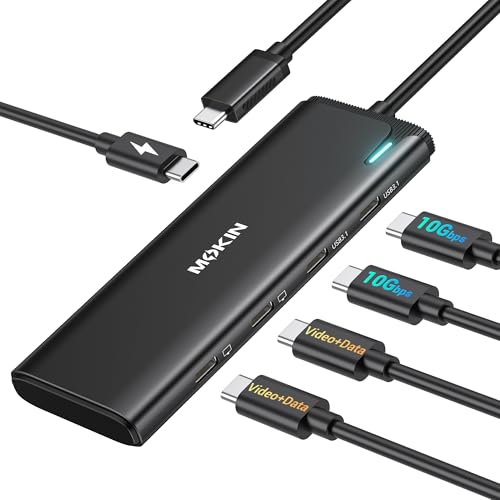
MOKiN 5-in-1 Dual USB-C Monitor Hub
Best for: Windows users needing dual 4K displays
- Host Interface
- USB4, Thunderbolt 4
- Display Support
- Dual
- Max Resolution
- 4K@60Hz
- Power Delivery
- 87W
- Port Count
- 5
- Video Ports
- USB-C
View on Amazon: MOKiN 5-in-1 Dual USB-C Monitor Hub Affiliate link
This MOKiN splitter expands a single USB4 or Thunderbolt 4 port into a dual-monitor workstation. It supports dual 4K@60Hz displays via DP Alt Mode 1.4, ideal for Windows laptops. The hub includes two 10Gbps USB-C data ports and a 100W PD charging input. It weighs 1.92 ounces and fits in your bag. You get a compact way to add screens without a full docking station.
Pros
- Delivers dual 4K@60Hz video output via DP Alt Mode
- Supports 10Gbps data transfer on two USB-C ports
- Provides up to 87W pass-through charging power
- Compact design at 1.92 ounces
Cons
- Dual-monitor MST mode is not supported on macOS
- Requires a laptop with USB4 or Thunderbolt 4
- Charger and cables are not included
Good fit if
- You use a Windows laptop with USB4 or Thunderbolt 4
- You need two 4K monitors from one port
- You want a lightweight hub for travel
Skip if
- You use a macOS system for dual monitors
- Your laptop lacks USB4 or Thunderbolt 4 support
- You need HDMI ports instead of USB-C video
Verdict: MOKiN 5-in-1 USB-C Dual Monitor Hub is a focused splitter for Windows users who need dual 4K screens from a single port. It suits those who prioritize video expansion over extensive connectivity.

MOKiN 13-in-1 USB-C Docking Station
Best for: expanding laptops into triple-display workstations
- Host Interface
- USB-C
- Display Support
- Triple
- Max Resolution
- 4K
- Power Delivery
- 85W
- Port Count
- 13
- Video Ports
- HDMI, DisplayPort
View on Amazon: MOKiN 13-in-1 USB-C Docking Station Affiliate link
This 13-in-1 docking station expands your laptop into a triple-display setup via two HDMI and one DisplayPort. It supports 4K resolution and delivers up to 85W of power delivery to keep your device charged. You get gigabit Ethernet, 10Gbps data ports, and SD card readers in a compact gray unit. It is ideal for users needing extensive connectivity and multiple screens for work or media.
Pros
- Supports triple displays with 2 HDMI and 1 DP ports
- Provides 85W power delivery for fast laptop charging
- Includes gigabit Ethernet and 10Gbps USB data ports
- Features built-in SD and microSD card readers
- Plug-and-play operation without driver installation
Cons
- macOS users are limited to one 4K display in docking mode
- Triple display support requires DP1.4 signal source
- Maximum power output is 85W, not 100W
Good fit if
- You need to connect three monitors to your laptop
- You require gigabit Ethernet and high-speed data transfer
- You want a single hub for video, power, and storage
Skip if
- You use macOS and need dual 4K displays
- You need native 100W power delivery output
- You prefer a simpler dual-monitor splitter setup
Verdict: MOKiN 13-in-1 USB-C Docking Station fits users who need a comprehensive hub for triple displays and high-speed connectivity. It is best for professionals requiring extensive port expansion and multi-screen workflows.
Specifications side by side
| Spec | MOKiN 5-in-1 Dual USB-C Monitor Hub | MOKiN 13-in-1 USB-C Docking Station |
|---|---|---|
| Host Interface | USB4, Thunderbolt 4 | USB-C |
| Display Support | Dual | Triple |
| Max Resolution | 4K@60Hz | 4K |
| Power Delivery | 87W | 85W |
| Port Count | 5 | 13 |
| Video Ports | USB-C | HDMI, DisplayPort |
| Max Data Speed | 10Gbps | 10Gbps |
| Ethernet Speed | not stated | Gigabit |
| Resolution | 4K UHD | 4K UHD |
| Connectivity | USB-C, DisplayPort | USB-C, HDMI, DisplayPort, Ethernet |
| Refresh Rate | 60Hz | not stated |
| Features | not stated | Card Reader |
| Weight | 1.92 ounces | 4.66 ounces |
| Size | 5-in-1-Black | 13 IN 1 |
| Color | Grey | Gray |
| Model | UC2208 | 0231 |
Frequently asked questions
Can the MOKiN 5-in-1 splitter support dual 4K monitors on Mac?
No, this device is designed for Windows users. It relies on MST technology to drive dual 4K displays, which macOS does not support. You need a Windows laptop with Thunderbolt 4 or USB 4 to use both screens simultaneously. Mac users will only see one display from this hub.
Does the 13-in-1 dock provide enough power for most laptops?
Yes, it includes 100W Power Delivery. This allows you to charge your laptop while using the dock. It is suitable for most modern laptops that accept standard USB-C charging. You can connect multiple peripherals without draining your battery quickly during heavy workloads.
What is the weight difference between the two MOKiN hubs?
The 5-in-1 splitter weighs 1.92 ounces, while the 13-in-1 dock weighs 4.66 ounces. The splitter is significantly lighter, making it easier to carry in a small bag. The dock is heavier due to its additional ports and internal components for triple display support.
Can the 13-in-1 dock run three monitors at 4K resolution?
Yes, it supports triple monitor output. You can connect three displays and run them all at 4K UHD resolution. This makes it ideal for professionals who need extensive screen real estate. The splitter only supports dual monitors, so the dock is the better choice for three screens.
Does the 13-in-1 dock include an Ethernet port?
Yes, it features an Ethernet port for wired internet connectivity. This ensures a stable connection for video calls or large file transfers. The 5-in-1 splitter does not include Ethernet, focusing instead on video and basic USB connections. Choose the dock if you need reliable wired networking.
Which hub is better for users who need card reading capabilities?
The 13-in-1 dock includes a card reader feature. It allows you to quickly transfer photos or documents from SD or microSD cards. The 5-in-1 splitter lacks this functionality. If you frequently use memory cards for work, the dock provides necessary convenience without extra adapters.
Do both hubs support USB-C connectivity for video output?
Yes, both devices use USB-C for primary video transmission. The 5-in-1 splitter uses USB-C outputs for its dual monitors. The 13-in-1 dock uses USB-C alongside HDMI and DisplayPort. Both require a compatible USB-C laptop port to function correctly for display expansion.