MOKiN 5-in-1 Dual USB-C Monitor vs MOKiN Dual HDMI MacBook Docking: Spec Comparison
As an Amazon Associate we earn from qualifying purchases. Links on this page are affiliate links.
This comparison examines the mokin USB c splitter dual vs macbook pro docking station to help you choose the right hub. Both devices support dual monitor setups and offer power delivery for your laptop. The primary difference lies in their video output and host compatibility. The MOKiN USB C Splitter uses DisplayPort Alt Mode for Windows systems, while the MOKiN Dual HDMI Docking Station relies on HDMI outputs designed specifically for macOS. You need to check your laptop ports and operating system before deciding.
Key differences
| Aspect | MOKiN 5-in-1 Dual USB-C Monitor Hub | MOKiN Dual HDMI MacBook Docking Station |
|---|---|---|
| Host Interface | USB4, Thunderbolt 4 | Thunderbolt 3 |
| Video Output Type | USB-C (DP Alt Mode) | HDMI |
| OS Compatibility | Windows only for dual monitors | MacBook Pro/Air (macOS) |
| Max Data Speed | 10Gbps | 5Gbps |
| Power Delivery | 87W pass-through | 100W pass-through |
| Additional Ports | 2x USB-C 3.1 | Gigabit Ethernet, SD/TF, 3x USB-A |
Which one should you choose?
Choose MOKiN 5-in-1 Dual USB-C Monitor Hub if
- You use a Windows laptop with USB4 or Thunderbolt 4 ports
- You need higher data transfer speeds of 10Gbps
- You prefer using USB-C monitors with DP Alt Mode
Choose MOKiN Dual HDMI MacBook Docking Station if
- You use a MacBook Pro or Air with Thunderbolt 3
- You need a Gigabit Ethernet port for wired internet
- You require SD and Micro SD card readers
Verdict: Choose the MOKiN USB C Splitter if you are on Windows and need high-speed data transfer via USB-C. Select the MOKiN Dual HDMI Docking Station if you are using a MacBook and need dedicated HDMI outputs along with Ethernet and card readers.
MOKiN USB-C Splitter vs MacBook Dock
Video Output Interface
The MOKiN 5-in-1 Dual USB-C Monitor Hub uses USB-C ports for video output, relying on DisplayPort Alt Mode 1.4 to drive dual 4K@60Hz displays. This requires your laptop to support Thunderbolt 4 or USB 4. In contrast, the MOKiN Dual HDMI MacBook Docking Station provides two HDMI ports. This design is specifically tailored for MacBook Pro and Air models, allowing you to connect standard HDMI monitors without needing specific DP Alt Mode support on the host. If you have monitors with HDMI inputs, the docking station offers a more direct connection path.
OS Compatibility
Operating system support differs significantly between these two devices. The MOKiN 5-in-1 Dual USB-C Monitor Hub explicitly states that dual-monitor MST functionality is not supported on macOS systems. It is designed for Windows laptops with Thunderbolt 4 or USB 4. The MOKiN Dual HDMI MacBook Docking Station is built for MacBooks, supporting both mirror and extend modes on macOS. It works with MacBook Pro and Air models from 2017 through 2021. If you use a Mac, the docking station is the only viable option for dual displays, while the USB-C splitter is limited to Windows environments.
Power Delivery
Both hubs provide power delivery to keep your laptop charged while in use. The MOKiN 5-in-1 Dual USB-C Monitor Hub supports up to 100W PD input, delivering up to 87W pass-through charging to your device. The MOKiN Dual HDMI MacBook Docking Station also supports 100W Power Delivery via its USB-C/Thunderbolt 3 port. Both specifications ensure that your laptop remains powered during heavy workloads. Since both offer identical maximum input power and sufficient output for typical laptop charging needs, neither holds a clear advantage in this category.
Data Transfer Speed
When connecting external storage or peripherals, data speed matters. The MOKiN 5-in-1 Dual USB-C Monitor Hub features two USB-C 3.1 ports with a maximum data speed of 10Gbps. This allows for faster file transfers between high-speed drives and your computer. The MOKiN Dual HDMI MacBook Docking Station provides three USB 3.0 ports with a maximum data speed of 5Gbps. For users who frequently move large files, the 10Gbps capability of the USB-C splitter offers twice the bandwidth of the 5Gbps ports on the docking station.
Additional Connectivity
Each hub offers different expansion ports for your daily workflow. The MOKiN 5-in-1 Dual USB-C Monitor Hub focuses on video and data, providing two USB-C 3.1 ports and two USB-C video ports. The MOKiN Dual HDMI MacBook Docking Station includes a Gigabit Ethernet port for stable wired internet, an SD/TF card reader for photographers, and additional USB ports. The Ethernet and card reader features make the docking station more versatile for content creators and office workers who need wired networking and direct media access without extra adapters.
Which MOKiN Dock Should You Buy
Windows users with USB-C monitors
This hub supports dual 4K@60Hz outputs via USB-C and DisplayPort Alt Mode 1.4 on Windows laptops with Thunderbolt 4 or USB 4. It provides 10Gbps data speeds and 87W pass-through charging. macOS users cannot use dual monitors with this model, so it is best for Windows workstations needing high-speed video and data.
MacBook Pro users needing Ethernet
This docking station connects directly to Thunderbolt 3 ports on MacBook Pro and Air models. It includes a gigabit Ethernet port for stable wired internet and SD card readers for photographers. It supports dual 4K@30Hz displays or single 4K@60Hz output. The 100W power delivery keeps your Mac charged while connected.
Mac users preferring HDMI convenience
If you use HDMI monitors with your MacBook, this dock is the clear choice. It offers two HDMI ports for dual monitor setups without requiring specific display protocols. The aluminum body aids heat dissipation. It expands your laptop into nine ports, including USB 3.0 and card readers, making it a comprehensive Mac accessory.
The products compared
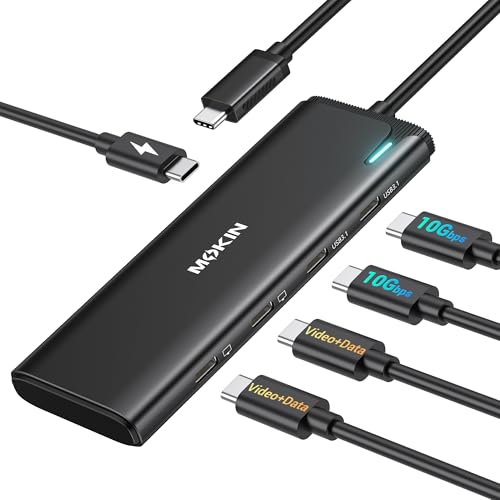
MOKiN 5-in-1 Dual USB-C Monitor Hub
Best for: Windows laptops needing dual 4K@60Hz displays
- Host Interface
- USB4, Thunderbolt 4
- Display Support
- Dual
- Max Resolution
- 4K@60Hz
- Power Delivery
- 87W
- Port Count
- 5
- Video Ports
- USB-C
View on Amazon: MOKiN 5-in-1 Dual USB-C Monitor Hub Affiliate link
This MOKiN hub expands a single USB4 or Thunderbolt 4 port into a dual-monitor workstation. It supports 4K@60Hz output via DP Alt Mode 1.4 on Windows laptops. You get two 10Gbps data ports and 87W pass-through charging. The device weighs 1.92 ounces and fits in a grey casing. It is designed for users who need high-speed data and dual displays on compatible Windows devices.
Pros
- Dual 4K@60Hz video output via DP Alt Mode 1.4
- Two USB-C 3.1 ports with 10Gbps data transfer speed
- 87W pass-through power delivery for laptop charging
- Supports MST mode for extended desktops on Windows
- Compact 1.92-ounce design for portability
Cons
- Dual-monitor functionality does not work on macOS systems
- Requires a laptop with USB4 or Thunderbolt 4 support
- Charger and cables are not included in the package
Good fit if
- You use a Windows laptop with Thunderbolt 4 or USB4
- You need two 4K@60Hz monitors for productivity
- You want high-speed data transfer alongside video output
Skip if
- You use a Mac for dual-monitor setups
- Your laptop lacks USB4 or Thunderbolt 4 ports
- You need HDMI inputs for legacy monitors
Verdict: MOKiN 5-in-1 USB-C Dual 4K@60Hz Hub is a practical solution for Windows users who need dual high-resolution displays and fast data transfer. It delivers reliable performance for compatible Thunderbolt 4 or USB4 laptops.

MOKiN Dual HDMI MacBook Docking Station
Best for: MacBook users needing dual displays and Ethernet
- Host Interface
- Dual USB-C, Thunderbolt 3
- Display Support
- Dual
- Max Resolution
- 4K@60Hz
- Power Delivery
- 100W
- Port Count
- 9
- Video Ports
- HDMI
View on Amazon: MOKiN Dual HDMI MacBook Docking Station Affiliate link
This MOKiN docking station expands your MacBook Pro or Air into nine ports. It supports dual HDMI monitors at 4K resolution. Single HDMI output reaches 60Hz, while dual HDMI runs at 30Hz. It includes three USB 3.0 ports, SD and microSD card readers, and a gigabit Ethernet port. The device features 100W power delivery to keep your laptop charged while you work.
Pros
- Supports dual HDMI monitors for extended display setups
- Includes gigabit Ethernet for stable wired internet
- Provides 100W power delivery to charge your MacBook
- Features SD and microSD card readers for quick file access
- Aluminum body aids in heat dissipation
Cons
- Dual HDMI output is limited to 4K@30Hz
- Requires a MacBook with two Thunderbolt 3 ports on one side
- Does not support Apple USB SuperDrive
Good fit if
- You need a wired Ethernet connection for your MacBook
- You frequently transfer files from SD or microSD cards
- Your MacBook has two Thunderbolt 3 ports on the same side
Skip if
- You require 4K@60Hz on both monitors simultaneously
- Your MacBook only has one Thunderbolt 3 port
- You need to connect an Apple USB SuperDrive
Verdict: MOKiN MacBook Pro Docking Station is a practical hub for users who need dual displays and wired connectivity. It suits those with compatible MacBooks who want to expand their ports without sacrificing charging speed.
Specifications side by side
| Spec | MOKiN 5-in-1 Dual USB-C Monitor Hub | MOKiN Dual HDMI MacBook Docking Station |
|---|---|---|
| Host Interface | USB4, Thunderbolt 4 | Dual USB-C, Thunderbolt 3 |
| Display Support | Dual | Dual |
| Max Resolution | 4K@60Hz | 4K@60Hz |
| Power Delivery | 87W | 100W |
| Port Count | 5 | 9 |
| Video Ports | USB-C | HDMI |
| Max Data Speed | 10Gbps | 5Gbps |
| Ethernet Speed | not stated | Gigabit Ethernet |
| Resolution | 4K UHD | not stated |
| Connectivity | USB-C, DisplayPort | USB-C, HDMI, Ethernet |
| Refresh Rate | 60Hz | not stated |
| Weight | 1.92 ounces | 3.63 ounces |
| Dimensions | not stated | 4.84 × 1.85 × 0.65 inches |
| Size | 5-in-1-Black | not stated |
| Color | Grey | grey |
| Model | UC2208 | MOUC0306 |
Frequently asked questions
Can I use the MOKiN 5-in-1 hub with a MacBook Pro?
The MOKiN 5-in-1 Dual USB-C Monitor Hub is designed primarily for Windows laptops. It requires Thunderbolt 4 or USB4 compatibility to drive dual 4K@60Hz displays. While it may work with some MacBooks, the Dual HDMI Docking Station is the better choice for macOS users who need reliable dual monitor support and Ethernet connectivity.
What is the weight difference between these two MOKiN docks?
The MOKiN 5-in-1 hub weighs 1.92 ounces, making it the lighter option. The MOKiN Dual HDMI MacBook Docking Station weighs 3.63 ounces. The dock is also larger, measuring 4.84 inches in length, 1.85 inches in width, and 0.65 inches in height. You should consider this size difference if portability is a priority for your setup.
Which MOKiN dock supports 4K resolution at 60Hz?
The MOKiN 5-in-1 Dual USB-C Monitor Hub supports dual 4K UHD displays at a 60Hz refresh rate. It achieves this through USB-C and DisplayPort connections. The Dual HDMI Docking Station supports dual monitors, but its specific resolution and refresh rate details are not provided in the available specifications. You should verify the HDMI version on the dock for 4K@60Hz support.
Does the MOKiN 5-in-1 hub have an Ethernet port?
The provided specifications for the MOKiN 5-in-1 hub do not list an Ethernet port. It focuses on USB-C and DisplayPort connectivity for video and data. If you need wired internet access, the MOKiN Dual HDMI MacBook Docking Station is the better choice, as it is specifically noted for users who need Ethernet connectivity alongside their dual display setup.
What model numbers do these MOKiN hubs have?
The MOKiN 5-in-1 Dual USB-C Monitor Hub has the model number UC2208. The MOKiN Dual HDMI MacBook Docking Station is model MOUC0306. Both devices are available in grey. Knowing the exact model numbers helps you find the correct drivers or support documentation for your specific device and operating system.
Is the MOKiN 5-in-1 hub compatible with Thunderbolt 4?
Yes, the MOKiN 5-in-1 hub is designed for laptops with Thunderbolt 4 or USB4. It relies on DisplayPort Alt Mode 1.4 to output video to dual 4K displays. This compatibility ensures you get the best performance and resolution. Make sure your Windows laptop supports these standards to fully utilize the dual monitor capabilities of this hub.
Which dock is better for expanding MacBook ports?
The MOKiN Dual HDMI MacBook Docking Station is the better option for expanding MacBook ports. It is specifically marketed for users who need dual displays and wired Ethernet connectivity. It allows you to add multiple connections without sacrificing charging speed. The 5-in-1 hub is more suited for Windows users needing high-resolution dual displays via USB-C.