Looking Beyond the MOKiN 13-in-1 Triple Display USB-C? 6 Alternatives Worth a Look
As an Amazon Associate we earn from qualifying purchases. Links on this page are affiliate links.
The MOKiN 13-in-1 USB-C dock supports triple displays with 4K@144Hz on Windows and delivers 100W of power delivery. If you need mokin USB c docking station alternatives, you might look for different port counts, smaller sizes, or legacy VGA connectivity. This dock is heavy at 2.03 pounds and lacks macOS extended desktop support across all screens.
The 6 alternatives listed here overlap with the original’s core specs: dual or triple display support, USB-C host interfaces, and Ethernet ports. Some options prioritize lower weight, higher wattage charging, or specific video outputs like VGA. You can compare these choices based on your monitor count, refresh rate needs, and physical space constraints. Each product serves a specific workflow, whether you require a compact hub or a robust workstation dock.
Our top pick: MOKiN 13-in-1 Triple Display USB-C Dock.
How each alternative compares
Plugable Dual 4K HDMI USB-C Dock with Ethernet
The Plugable UD-MSTH2 focuses on stability rather than screen count. It supports dual 4K monitors at 60Hz, which is lower than the MOKiN’s 144Hz single-screen mode. You lose triple-display capability but gain a dedicated Ethernet port and a more compact footprint. This dock weighs 1.52 pounds, making it lighter than the MOKiN’s 2.03 pounds. It is ideal if you prioritize reliable dual 4K visuals and wired networking over high refresh rates or extra screens. The 60Hz refresh rate is sufficient for most office tasks but lacks the smoothness needed for fast-paced gaming.
Vicfluxion 9-in-1 USB-C Hub with DisplayPort
The Vicfluxion 9-in-1 hub is significantly smaller and lighter than the MOKiN. It supports dual 4K displays but does not offer triple-screen expansion. Weighing only 2.56 ounces, it is far more portable. You give up the MOKiN’s 13 ports and 100W charging for a minimalist design. This dock is best for users who need two 4K monitors and Ethernet in a tiny package. It lacks the high-refresh capabilities and extensive connectivity of the MOKiN. If you do not need three screens or massive data transfer speeds, this compact hub offers a simpler, more travel-friendly solution for your workspace.
Lenovo USB-C Universal Business Dock
The Lenovo USB-C Universal Business Dock offers 65W power delivery, which is less than the MOKiN’s 100W. It supports dual 4K displays via HDMI and DisplayPort. This dock is designed for professionals using DisplayPort Alt-Mode laptops. It is lighter and more compact than the MOKiN, weighing just 9.12 ounces. You trade triple-display support and higher charging wattage for a streamlined, business-focused design. This alternative is suitable for users who need reliable dual monitors and moderate charging power without the bulk of a 13-port dock. It lacks the extensive USB and Ethernet options found on the MOKiN.
NOVOO 14-in-1 USB-C Dock with VGA
The NOVOO 14-in-1 dock includes a VGA port, which the MOKiN lacks. This makes it ideal for connecting legacy monitors alongside modern HDMI or DisplayPort screens. It supports dual 4K displays at 60Hz, offering lower refresh rates than the MOKiN’s single-screen mode. You gain backward compatibility but lose the ability to run three high-resolution screens simultaneously. The NOVOO dock is a practical choice for mixed setups requiring older VGA connections. It provides 100W charging, similar to the MOKiN, but focuses on dual displays rather than triple expansion. It is heavier than some competitors but offers essential legacy connectivity.
Lenovo ThinkPad Hybrid Dual 4K Dock
The ANYHDD 135W Dual 4K Dock provides more charging power than the MOKiN’s 100W. It supports dual 4K monitors, which is fewer screens than the MOKiN’s triple setup. This dock is designed for users who prioritize high wattage and display count over other features. It weighs 3.51 pounds, making it heavier than the MOKiN. You gain stronger charging capability but lose triple-screen expansion and the MOKiN’s extensive port variety. This alternative is best for professionals needing to power high-drain laptops while running two 4K monitors. It lacks the high-refresh single-screen mode and Ethernet port found on the MOKiN.
Baseus 12-in-1 Triple Display Laptop Stand Dock
The Baseus 12-in-1 Triple Display Dock supports three 4K monitors, matching the MOKiN’s triple-screen capability. It includes a built-in kickstand, which the MOKiN does not have, offering a more stable elevated setup. This dock provides 100W charging and Gigabit Ethernet, similar to the MOKiN. However, it is taller at 11.2 inches, making it less portable. You gain a dedicated stand for fixed workstations but lose the compact, flat design of the MOKiN. This alternative is ideal for users who want triple 4K support with a stable, integrated stand. It lacks the high-refresh 144Hz mode available on the MOKiN for single displays.
Quick picks
Our 7 picks

MOKiN 13-in-1 Triple Display USB-C Dock
Best for: Windows users needing high-refresh triple displays
- Host Interface
- USB-C
- Display Support
- Triple
- Max Resolution
- 4K@144Hz
- Power Delivery
- 100W
- Port Count
- 13
- Video Ports
- HDMI, DisplayPort
View on Amazon: MOKiN 13-in-1 Triple Display USB-C Dock Affiliate link
This MOKiN docking station supports triple displays via two HDMI and one DisplayPort. It delivers 4K resolution at 144Hz on a single monitor. The unit includes a 150W power adapter, providing 100W for your laptop. You get fast 10Gbps data transfer and 1Gbps Ethernet. This setup suits users needing high refresh rates and extensive connectivity for Windows systems.
Pros
- Supports triple monitor expansion with 2 HDMI and 1 DP ports
- Delivers 4K@144Hz on a single display under Windows
- Includes 100W Power Delivery for laptop charging
- Features 1Gbps Ethernet and 10Gbps USB-C data ports
Cons
- MacOS does not support extending different content across monitors
- Requires a separate 150W DC power supply for operation
- 4K@144Hz resolution is limited to single display mode only
Good fit if
- You need triple screen productivity on a Windows PC
- You require high refresh rates for gaming or design
- You want 100W charging for your laptop
Skip if
- You use MacOS and need unique content on each screen
- You prefer a single-cable solution without extra power bricks
- You need 4K@144Hz on multiple monitors simultaneously
Verdict: MOKiN 13-in-1 USB-C Docking Station fits Windows users who need high-refresh triple displays and robust charging. It is less suitable for MacOS users requiring extended desktops across all screens.

Plugable Dual 4K HDMI USB-C Dock with Ethernet
Best for: Windows users needing dual 4K screens and Ethernet
- Host Interface
- USB-C
- Display Support
- Dual
- Max Resolution
- 4K@60Hz
- Power Delivery
- 65W
- Port Count
- 10
- Video Ports
- HDMI
View on Amazon: Plugable Dual 4K HDMI USB-C Dock with Ethernet Affiliate link
The Plugable UD-MSTH2 is a dual-display docking station designed for Windows and Chromebook systems. It supports two HDMI monitors at 4K resolution and 60Hz refresh rates. The dock provides 65W power delivery to your laptop and includes gigabit Ethernet for stable networking. You get ten ports in total, including USB-C and USB-A options. This setup simplifies your desk by connecting peripherals through a single cable.
Pros
- Supports dual 4K displays at 60Hz
- Includes gigabit Ethernet port
- Provides 65W power delivery
- Ten ports for peripherals
- No drivers required for setup
Cons
- Limited to dual display output
- Not recommended for macOS dual monitors
- Max data speed is 5Gbps
Good fit if
- You need a stable wired internet connection
- You use a Windows or Chromebook laptop
- You want to connect two external monitors
Skip if
- You require triple display support
- You primarily use a Mac for extended desktops
- You need high-speed data transfer above 5Gbps
Verdict: Plugable UD-MSTH2 Dual 4K Dock offers a reliable dual-monitor setup with wired networking for Windows users. It suits professionals who prioritize stable connections and clear 4K visuals over multi-screen expansion.

Vicfluxion 9-in-1 USB-C Hub with DisplayPort
Best for: Dual 4K monitors with wired Ethernet
- Host Interface
- USB-C
- Display Support
- Dual
- Max Resolution
- 4K@60Hz
- Power Delivery
- 85W
- Port Count
- 9
- Video Ports
- HDMI, DisplayPort
View on Amazon: Vicfluxion 9-in-1 USB-C Hub with DisplayPort Affiliate link
This Vicfluxion dock expands one USB-C port into a dual-monitor workstation. It supports 4K@60Hz output via HDMI and DisplayPort. The unit includes a Gigabit Ethernet port for stable wired connections. It delivers 90W of Power Delivery to your laptop while powering the hub itself. The compact design fits easily on a desk or in a travel bag.
Pros
- Dual 4K@60Hz support through HDMI and DisplayPort
- Gigabit Ethernet port for reliable wired networking
- 90W Power Delivery output for laptop charging
- SD and TF card slots for fast data transfer
Cons
- Only supports dual displays, not triple or quad setups
- Requires laptop USB-C port to support DisplayPort Alt Mode
- May trigger slow charger warnings on 65W laptops
Good fit if
- You need a reliable wired Ethernet connection
- You want dual 4K monitors at 60Hz
- You prefer a compact desktop setup
Skip if
- You require three or more external displays
- Your laptop USB-C port lacks DisplayPort Alt Mode
- You need a dock with wireless connectivity
Verdict: Vicfluxion 9-in-1 Dual 4K Docking Station fits users who need dual 4K displays and wired networking in a small form factor. It is not suitable for those requiring triple-screen setups.

Lenovo USB-C Universal Business Dock
Best for: dual 4K setups needing 65W laptop charging
- Host Interface
- USB-C
- Display Support
- Dual
- Max Resolution
- 4K
- Power Delivery
- 65W
- Port Count
- 9
- Video Ports
- DP 1.4, HDMI 2.0
View on Amazon: Lenovo USB-C Universal Business Dock Affiliate link
The Lenovo USB-C Dual 4K Business Dock connects to your laptop via USB-C to drive two 4K displays through its DisplayPort 1.4 and HDMI 2.0 outputs. It includes a 90W power adapter to supply up to 65W of charging to your notebook. With nine total ports, it suits professionals wanting a dual-monitor desk setup.
Pros
- Supports dual 4K video through DisplayPort 1.4 and HDMI 2.0
- Supplies 65W notebook charging with the included 90W adapter
- Provides nine ports across USB-C, HDMI, DisplayPort, and USB-A
- Weighs 9.12 ounces with a compact 6.06-inch profile
Cons
- Caps notebook charging at 65W unless upgraded with a 135W adapter
- Supports a maximum of two external displays
- Offers nine total ports, fewer than larger hubs
Good fit if
- You need dual 4K monitor support via DisplayPort and HDMI.
- You charge a notebook that requires 65W or less.
- You want a compact 9.12-ounce dock for a hybrid workspace.
Skip if
- You require three or more external monitors.
- You need more than 65W charging out of the box.
- You require more than nine expansion ports.
Verdict: Lenovo USB-C Dual 4K Business Dock delivers reliable dual-display video and 65W power for professionals running DisplayPort Alt-Mode laptops.

NOVOO 14-in-1 USB-C Dock with VGA
Best for: Legacy VGA monitor integration
- Host Interface
- USB-C, Thunderbolt 3
- Display Support
- Quad Display
- Max Resolution
- 8K@30Hz
- Power Delivery
- 100W
- Port Count
- 14
- Video Ports
- HDMI, DisplayPort, VGA
View on Amazon: NOVOO 14-in-1 USB-C Dock with VGA Affiliate link
This NOVOO docking station connects up to four displays via dual HDMI, DisplayPort, and VGA outputs. It supports 8K resolution at 30Hz and 4K at 60Hz. The hub includes a Gigabit Ethernet port, 100W power delivery, and SD card readers. It offers 14 ports total for peripherals. This setup suits users needing legacy VGA connectivity alongside modern high-resolution displays.
Pros
- Includes VGA port for older monitors
- Supports up to 8K@30Hz resolution
- Provides 100W power delivery
- Features Gigabit Ethernet connectivity
- Includes SD and TF card readers
Cons
- Maximum refresh rate is 30Hz for 8K displays
- MacOS systems only support single monitor extension
- Only one HDD or SSD can connect at a time
Good fit if
- You need to connect a legacy VGA monitor
- You require a wired Gigabit Ethernet connection
- You want to charge your laptop at 100W
Skip if
- You use a MacBook and need multiple extended displays
- You require 60Hz refresh rates for 8K resolution
- You need to connect multiple external hard drives simultaneously
Verdict: NOVOO 14-in-1 USB-C Dock with VGA provides essential legacy connectivity for mixed display setups. It is a practical solution for users who must integrate older VGA monitors with modern high-resolution screens.
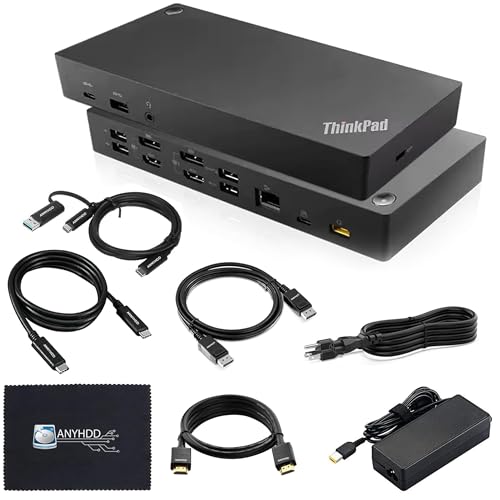
Lenovo ThinkPad Hybrid Dual 4K Dock
Best for: Dual 4K setups with 135W charging
- Host Interface
- USB-C, USB-A
- Display Support
- Dual
- Max Resolution
- 4K
- Video Ports
- DisplayPort 1.2, HDMI
- Ethernet Speed
- 10/100/1000 Mb/s
- Connectivity
- USB-C, HDMI, DisplayPort, USB-A
View on Amazon: Lenovo ThinkPad Hybrid Dual 4K Dock Affiliate link
This hybrid docking station supports dual 4K displays via HDMI and DisplayPort. It includes a 135W power adapter for stable device charging. The unit connects through a USB-C port with a USB-A adapter. You get a 10/100/1000 Mb/s Ethernet port and multiple USB-A ports for peripherals. It is a solid option for users needing reliable dual-screen output and moderate power delivery.
Pros
- Supports dual 4K displays
- Includes 135W AC power adapter
- Features Gigabit Ethernet port
- Includes HDMI and DisplayPort cables
Cons
- Ethernet speed limited to 10/100/1000 Mb/s
- Requires USB-A adapter for connection
- Weighs 3.51 pounds
Good fit if
- You need dual 4K monitors
- You require 135W power delivery
- You use Windows laptops
Skip if
- You need Thunderbolt 4 speeds
- You want 2.5Gb Ethernet
- You prefer a compact build
Verdict: ANYHDD 135W Dual 4K USB-C Dock offers straightforward dual-monitor support and strong charging power. It fits users who prioritize display count and wattage over high-speed data transfer or minimal footprint.
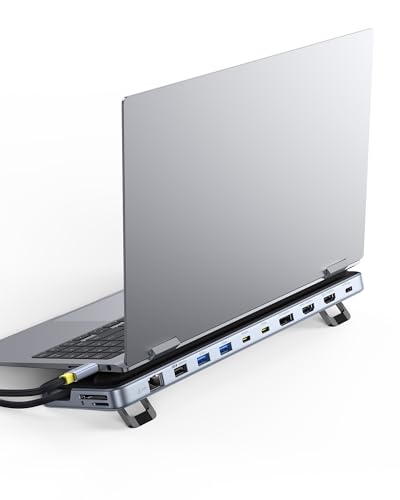
Baseus 12-in-1 Triple Display Laptop Stand Dock
Best for: Users needing a built-in stand and triple 4K support
- Host Interface
- USB-C
- Display Support
- Triple
- Max Resolution
- 4K
- Power Delivery
- 85W
- Port Count
- 12
- Video Ports
- HDMI, DisplayPort
View on Amazon: Baseus 12-in-1 Triple Display Laptop Stand Dock Affiliate link
This Baseus docking station supports triple 4K displays via two HDMI and one DisplayPort. It includes a built-in kickstand for ergonomic viewing and heat dissipation. You get Gigabit Ethernet, 10Gbps data transfer, and 85W PD charging. The silver unit measures 11.2 by 3.15 by 1 inches. It suits users needing a stable wired connection and elevated screen setup for productivity.
Pros
- Supports triple 4K displays simultaneously
- Integrated kickstand improves posture and cooling
- 85W Power Delivery charging capability
- Gigabit Ethernet port for stable connectivity
Cons
- 85W output is lower than the 100W input rating
- Only one DisplayPort limits flexible multi-monitor configurations
- No mention of wireless connectivity options like Bluetooth
Good fit if
- You need a dedicated stand for your laptop
- You require stable wired internet for video calls
- You want to run three 4K monitors
Skip if
- You need more than 85W of charging power
- You prefer wireless display connections
- You want a compact single-port design
Verdict: Baseus 12-in-1 Triple 4K Docking Station fits users who want an elevated, stable setup for triple monitors. The built-in stand and Gigabit Ethernet make it a practical hub for fixed workstations.
Specifications side by side
| Spec | MOKiN 13-in-1 Triple Display USB-C Dock | Plugable Dual 4K HDMI USB-C Dock with Ethernet | Vicfluxion 9-in-1 USB-C Hub with DisplayPort | Lenovo USB-C Universal Business Dock | NOVOO 14-in-1 USB-C Dock with VGA | Lenovo ThinkPad Hybrid Dual 4K Dock | Baseus 12-in-1 Triple Display Laptop Stand Dock |
|---|---|---|---|---|---|---|---|
| Host Interface | USB-C | USB-C | USB-C | USB-C | USB-C, Thunderbolt 3 | USB-C, USB-A | USB-C |
| Display Support | Triple | Dual | Dual | Dual | Quad Display | Dual | Triple |
| Max Resolution | 4K@144Hz | 4K@60Hz | 4K@60Hz | 4K | 8K@30Hz | 4K | 4K |
| Power Delivery | 100W | 65W | 85W | 65W | 100W | not stated | 85W |
| Port Count | 13 | 10 | 9 | 9 | 14 | not stated | 12 |
| Video Ports | HDMI, DisplayPort | HDMI | HDMI, DisplayPort | DP 1.4, HDMI 2.0 | HDMI, DisplayPort, VGA | DisplayPort 1.2, HDMI | HDMI, DisplayPort |
| Max Data Speed | 10Gbps | 5Gbps | not stated | not stated | 5Gbps | not stated | 10Gbps |
| Ethernet Speed | 1Gbps | Gigabit | 1000Mbps | not stated | Gigabit Ethernet | 10/100/1000 Mb/s | Gigabit Ethernet |
| Resolution | not stated | 4K UHD | 4K UHD | not stated | 4K UHD | not stated | 4K UHD |
| Connectivity | USB-C, HDMI, DisplayPort, Ethernet, USB-A | USB-C, HDMI, Ethernet, USB-A | USB-C, HDMI, DisplayPort, Ethernet, USB-A | USB-C, HDMI, DisplayPort, USB-A | USB-C, HDMI, DisplayPort, Ethernet, VGA | USB-C, HDMI, DisplayPort, USB-A | USB-C, HDMI, DisplayPort, Ethernet, USB-A |
| Refresh Rate | not stated | 60Hz | 60Hz | not stated | 60Hz | not stated | not stated |
| Features | not stated | not stated | not stated | not stated | not stated | not stated | Kickstand |
| Weight | 2.03 pounds | 1.52 pounds | 2.56 ounces | 9.12 ounces | 4.8 ounces | 3.51 pounds | not stated |
| Dimensions | not stated | 9.25 × 5.71 × 3 inches | 5.53 × 1.65 × 0.59 inches | 6.06 × 3.15 × 0.94 inches | 2.36 × 0.65 × 5.7 inches | not stated | 3.15 × 1 × 11.2 inches |
| Size | 10 in 1 USB C Hub | Dual Display (Pack of 3) | not stated | not stated | 14 in 1 | not stated | not stated |
| Color | Black | Black | Grey- HDMI&DP | Multicolor | Grey | Black | Silver |
| Model | MODK1407 | UD-MSTH2 | not stated | 40B30090US | NHM14S-632B2 | 40AF0135US | not stated |
Looking beyond this list? See best USB-C SSD docking stations.
Frequently asked questions
Does the MOKiN dock work with Mac?
The MOKiN 13-in-1 dock is less suitable for Mac users who need extended desktops across all screens. It is designed primarily for Windows users needing high-refresh triple displays. If you use a Mac, you should consider alternatives that better support macOS display protocols. Other options in this list focus on stability and reliable connections for Windows professionals instead.
Which alternative offers the best Ethernet connectivity?
The Plugable UD-MSTH2 Dual 4K Dock includes a dedicated Ethernet port for wired networking. It suits professionals who prioritize stable connections over multi-screen expansion. The Vicfluxion 9-in-1 Hub also provides wired Ethernet alongside dual 4K displays. Both options ensure reliable internet access for users who need consistent bandwidth for their workstations.
Can I connect legacy VGA monitors with these docks?
The NOVOO 14-in-1 USB-C Dock with VGA provides essential legacy connectivity for mixed display setups. It allows you to integrate older VGA monitors with modern high-resolution screens. This is a practical solution if you must support older hardware alongside newer 4K displays. Other alternatives in this list focus on HDMI and DisplayPort connections without VGA support.
Which dock provides the highest charging wattage?
The ANYHDD Lenovo ThinkPad Hybrid Dual 4K Dock offers 135W of power delivery. This is the highest wattage among the listed alternatives. The NOVOO 14-in-1 Dock provides 100W, while the Baseus and MOKiN docks also support 100W charging. The Lenovo Business Dock delivers 65W, which is lower than the top options for high-power laptops.
Is there a dock with a built-in stand?
The Baseus 12-in-1 Triple Display Laptop Stand Dock features a built-in kickstand. It fits users who want an elevated, stable setup for triple monitors. The stand helps position your laptop at a comfortable viewing angle. This design makes it a practical hub for fixed workstations where space and ergonomics are important considerations.
What is the smallest form factor available?
The Vicfluxion 9-in-1 USB-C Hub is the most compact option, measuring 5.53 inches in length and weighing only 2.56 ounces. It fits users who need dual 4K displays and wired networking in a small footprint. The Plugable dock is also relatively small but heavier. The Vicfluxion design prioritizes portability without sacrificing dual-screen capability.
Which dock supports triple displays?
The MOKiN 13-in-1 Triple Display USB-C Dock and the Baseus 12-in-1 Triple Display Laptop Stand Dock both support three monitors. The MOKiN dock is optimized for Windows users needing high-refresh rates. The Baseus dock offers triple 4K support with a built-in stand. Most other alternatives in this list are limited to dual-monitor setups.