MOKiN 6-in-1 Dual HDMI USB-C Review: Who It Fits and Who Should Skip It
As an Amazon Associate we earn from qualifying purchases. Links on this page are affiliate links.
This mokin 6 in 1 dual hdmi USB c review focuses on a docking station designed to expand laptop connectivity. It converts a single USB-C port into six additional interfaces. The two defining specs are dual HDMI outputs supporting 4K@60Hz video and 100W Power Delivery for charging your host device. The unit weighs 2.72 ounces and measures 2 by 2 by 1 inches. It includes one USB 3.1 port for fast data transfer and two USB 2.0 ports for peripherals. This hub aims to provide a stable, driver-free connection for Windows laptops seeking extended display capabilities.
What stands out
- Dual HDMI ports support 4K@60Hz resolution for crisp video output
- 100W Power Delivery allows you to charge your laptop while connected
- USB 3.1 port offers 10Gbps data transfer speeds for quick file sync
- Supports triple display mode on Windows laptops via MST technology
- Compact grey design weighs only 2.72 ounces for easy portability
Who it fits
Good fit for
This hub suits Windows laptop users who need to drive multiple monitors. It is ideal for professionals using Dell XPS, Lenovo Yoga, or Microsoft Surface devices who want to connect two external displays and charge their machine simultaneously. The 10Gbps USB 3.1 port benefits those transferring large files frequently. If you rely on a stable, plug-and-play setup without installing drivers, this configuration matches your workflow. It is well-suited for desktop-like setups where you need extra ports without cluttering your workspace.
Who should skip it
MacBook users should look elsewhere because macOS does not support the MST multi-screen function. On Mac systems, this hub only supports mirror mode, meaning you cannot extend your display across three screens. If you require true triple-display extension on a Mac, this product will not meet your needs. Additionally, if you need more than six ports or higher data speeds than 10Gbps, this specific configuration may be limiting. Consider a different dock that explicitly supports Mac display extension if that is your primary requirement.
Verdict: This hub is a practical choice for Windows users needing dual 4K displays and fast charging. It is not suitable for Mac users seeking extended multi-monitor setups.
MOKiN Key Specs Explained
Port Count: 6
This hub provides six distinct connection points from a single USB-C host interface. You gain two HDMI video outputs, one USB 3.1 data port, two USB 2.0 ports, and one USB-C power input. This layout lets you connect multiple peripherals without needing a larger docking station. It is ideal for users who need to expand a limited number of laptop ports while keeping their workspace tidy and organized.
Max Resolution: 4K@60Hz
The dual HDMI ports support video output at 4K resolution with a 60Hz refresh rate. This ensures smooth, high-definition visuals for external monitors, projectors, or TVs. You can run two displays simultaneously in this resolution. This is a significant upgrade over older 30Hz standards, making it suitable for detailed work, video editing, or crisp presentations where fluid motion matters.
Max Data Speed: 10Gbps
The single USB 3.1 port offers a maximum transfer speed of 10Gbps. This allows for rapid file syncing between your laptop and external storage devices like SSDs or hard drives. You can move large media files or project data quickly without long wait times. This speed is essential for professionals who handle large datasets or high-resolution video files regularly.
Power Delivery: 100W
The USB-C input supports up to 100W of Power Delivery. This means you can charge your laptop through the hub while using it. It passes power from your charger to the device, reducing cable clutter on your desk. This feature is particularly useful for thin laptops that require high wattage for optimal performance, keeping your power supply compact and efficient.
Display Support: Triple
This device supports triple display output for Windows laptops using MST mode. You can use the laptop screen plus two external monitors for a three-screen setup. Note that macOS only supports mirror mode, limiting you to one external display. This spec is critical for Windows users seeking an expanded workspace for multitasking, coding, or complex data analysis across multiple windows.
Design and build details
The listing describes the MOKiN hub as a compact 6-in-1 device finished in grey. Its physical dimensions are listed as 1 inch wide, 2 inches high, and 2 inches long. The unit weighs 2.72 ounces. This small footprint means you can carry it easily in a laptop sleeve or bag without adding bulk. The lightweight design also reduces strain on your laptop’s USB-C port during transport.
According to the listing, the hub uses a plug-and-play interface with no drivers required. This simplicity means you do not need to install software before use. The layout includes two HDMI ports for video, one USB 3.1 port for fast data, two USB 2.0 ports for peripherals, and a USB-C input for power. The 100W Power Delivery pass-through allows you to charge your laptop while using the hub. This integrated power handling simplifies your desk setup by reducing the number of cables needed.
The device supports both SST and MST modes for Windows laptops, enabling triple displays. Mac users are limited to mirror mode only. This specification difference is critical for your setup choice. If you use a Mac, you cannot extend your desktop across multiple monitors with this unit. The build focuses on basic connectivity expansion rather than advanced features. It serves users who need reliable video output and charging in a small, portable form factor.
Setup and daily workflow details
Setting up this hub is straightforward because no drivers or software are required. You simply plug the device into a USB-C port on your laptop. The listing notes support for both SST and MST modes, which determines how your displays behave. If you use a Windows laptop, you can activate MST mode to extend your desktop across three screens. This means your laptop display plus two external monitors can all show different content simultaneously. If you connect this hub to a macOS device, the system does not support MST. Your Mac will only mirror the laptop screen onto the external displays. You cannot use the dual HDMI ports to create an extended workspace on Apple hardware.
Daily use involves managing multiple peripherals. The single USB 3.1 port allows data transfer speeds up to 10Gbps. You can connect fast storage devices or sync files quickly. The two USB 2.0 ports are suitable for lower-bandwidth items like a keyboard or mouse. These connections remain stable without lag. The 100W Power Delivery input lets you charge your laptop through the hub while you work. This keeps your desk tidy by using one cable for both power and data. The hub supports resolutions up to 4K@60Hz on the HDMI outputs. You can stream video or display presentations in high definition. The listing confirms compatibility with various Dell, Lenovo, and Microsoft Surface models. You should verify your specific laptop model matches the supported devices before relying on this setup for critical work.
Check Compatibility And Needs First
Before you commit to this MOKiN hub, verify your laptop’s USB-C port supports video output and data transfer. Not all USB-C ports are equal. You must also confirm your operating system. This device supports triple displays on Windows via MST. macOS users are limited to mirror mode only. Do not expect extended desktops on Mac. Check your power needs. The 100W PD pass-through handles most laptops, but heavy gaming rigs may need direct charging. Keep the hub clean and dry to maintain stable connections. This unit fits well in Portable Monitors & Laptop Setups if you need dual external screens. It is less suitable if you rely on Macs or require more than six ports. Consider the 8-in-1 or 13-in-1 variations if you need Ethernet or SD card slots. This hub is a simple, driver-free solution for Windows users seeking expanded connectivity without software complexity.
Check before you buy
- Confirm your laptop USB-C port supports video output
- Verify if you use Windows or macOS for display modes
- Ensure your laptop supports 100W power delivery pass-through
- Check if you need more than six total ports
- Confirm you do not require Ethernet or SD card slots
The product at a glance
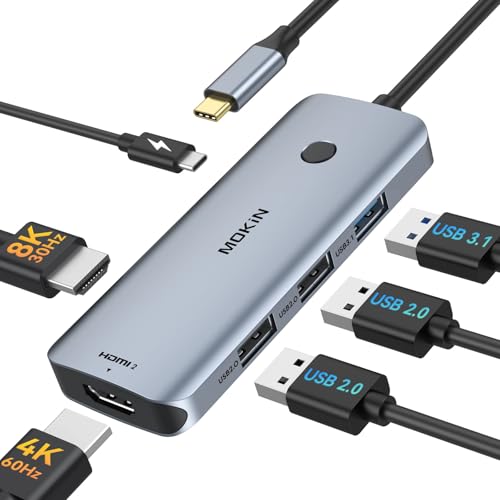
MOKiN 6-in-1 Dual HDMI USB-C Hub
Best for: Windows laptops needing dual 4K monitors
- Host Interface
- USB-C
- Display Support
- Dual
- Max Resolution
- 4K@60Hz
- Power Delivery
- 100W
- Port Count
- 6
- Video Ports
- HDMI
View on Amazon: MOKiN 6-in-1 Dual HDMI USB-C Hub Affiliate link
This MOKiN docking station expands a single USB-C port into six connections. It offers dual HDMI outputs capable of 4K@60Hz video and supports triple displays on Windows laptops. The unit includes a 100W Power Delivery port for charging, one USB 3.1 port for 10Gbps data transfer, and two USB 2.0 ports for peripherals. It is a practical solution for users needing multiple external monitors and high-speed data access from a single laptop connection.
Pros
- Dual HDMI ports support 4K@60Hz resolution
- 100W Power Delivery charges connected laptops
- USB 3.1 port enables 10Gbps data transfer
- Supports triple display setups on Windows
Cons
- macOS devices only support mirror mode, not extended displays
- No mention of DisplayPort or VGA connectivity options
- Limited to USB-C host interface only
Good fit if
- You need to connect two external monitors to a Windows laptop
- You require fast data transfer speeds for large files
- You want to charge your laptop through the docking station
Skip if
- You use a MacBook and need extended display modes
- You need connectivity for older monitors with VGA inputs
- You require more than six total ports for your setup
Verdict: MOKiN 6-in-1 USB-C Docking Station is a solid choice for Windows users needing dual 4K monitors and fast charging. It does not suit Mac users requiring extended desktops or those needing legacy video connections.
Specifications side by side
| Spec | MOKiN 6-in-1 Dual HDMI USB-C Hub |
|---|---|
| Host Interface | USB-C |
| Display Support | Dual |
| Max Resolution | 4K@60Hz |
| Power Delivery | 100W |
| Port Count | 6 |
| Video Ports | HDMI |
| Max Data Speed | 10Gbps |
| Resolution | 4K UHD |
| Connectivity | USB-C, HDMI |
| Refresh Rate | 60Hz |
| Dimensions | 2 × 1 × 2 inches |
| Weight | 2.72 ounces |
| Size | 6-in-1 |
| Color | Grey |
Frequently asked questions
Can I use this MOKiN hub with my MacBook?
This hub is primarily designed for Windows laptops. macOS users cannot use it for extended desktops across multiple displays. You are limited to a single mirrored output on Mac systems. If you need true multi-monitor support on a Mac, this device will not meet your needs. It works best with Windows machines that support MST.
Does the MOKiN 6-in-1 support 4K resolution on both screens?
Yes, the hub features dual HDMI outputs that support 4K video. It handles 4K@60Hz signals for smooth visuals on compatible monitors. This allows you to run two high-resolution displays simultaneously. Ensure your laptop’s USB-C port and your monitors both support these specifications for the best performance.
How much power can this hub deliver to my laptop?
The device supports up to 100W of Power Delivery. This allows you to charge your laptop while using the hub. Connect your charger to the USB-C power input port. This feature helps reduce cable clutter by combining charging and data transfer into one connection point.
What data ports are included on the MOKiN hub?
You get one USB 3.1 port for high-speed data transfer. There are also two USB 2.0 ports for slower peripherals like mice or keyboards. These four data-related interfaces, plus the two HDMI outputs, make up the six connection points. They allow you to connect various accessories simultaneously.
Is this hub plug-and-play or does it need drivers?
No drivers or software are required for setup. You simply plug the device into a USB-C port on your laptop. It works immediately with compatible operating systems. This makes it easy to use in different environments without installing additional programs or managing complex configurations.
How heavy and portable is the MOKiN 6-in-1 hub?
The unit weighs just 2.72 ounces, making it highly portable. Its compact dimensions are 1 inch wide, 2 inches high, and 2 inches long. You can easily slip it into a laptop bag or pocket. The small size ensures it does not add significant bulk to your travel setup.
Can I connect three monitors with this single hub?
This hub provides two HDMI video outputs. It does not include a third video port for a third monitor. You can only drive two external displays simultaneously. If you need a triple-monitor setup, you would require a different docking station with additional video outputs.
What is the best use case for this MOKiN hub?
It is ideal for Windows laptops that need dual 4K monitors. The combination of dual HDMI and 100W charging suits office or home office setups. It is not suitable for Mac users needing extended desktops. It also lacks legacy connections like VGA or DisplayPort for older equipment.