Koncept Hybrid USB-C USB-A Dock Review: Who It Fits and Who Should Skip It
As an Amazon Associate we earn from qualifying purchases. Links on this page are affiliate links.
This koncept hybrid USB c USB a dock review examines the Koncept Hybrid USB-C and USB-A Dock. It bridges older and newer laptops via USB-C and USB-A host interfaces. The device supports dual monitor setups using DisplayPort and HDMI ports. It features a 1Gbps Ethernet port for stable wired networking. High-speed data transfer is handled by USB 3.1 Gen 2 ports with 10Gbps speeds. The black dock measures 8.3 by 3.15 by 1.18 inches. It includes necessary cables for immediate setup. This hub aims to expand connectivity for enterprise and personal use.
What stands out
- Dual monitor support via DisplayPort and HDMI ports
- Hybrid connectivity with USB-C and USB-A host interfaces
- 1Gbps Gigabit Ethernet port for reliable wired internet
- USB 3.1 Gen 2 ports offering 10Gbps data speeds
Who it fits
Good fit for
This dock suits users with laptops that have limited ports or lack modern USB-C video output. It is ideal for office workers who need a stable gigabit Ethernet connection alongside dual screens. Professionals who frequently switch between devices with USB-C and legacy USB-A ports will find the hybrid design practical. The included cables simplify setup for those who want a plug-and-play solution for a multi-monitor workspace without complex configuration.
Who should skip it
Users needing more than two displays should look elsewhere, as this dock only supports dual monitors. If you require Thunderbolt 3 or 4 speeds, this USB 3.1 Gen 2 solution may not meet your bandwidth needs. Those who rely on wireless peripherals exclusively might find the wired focus limiting. Additionally, users needing USB-C power delivery for charging their laptop will not find that feature listed here, as the USB-C port focuses on data and 5V output.
Verdict: The Koncept Hybrid Dock offers solid dual-display and networking capabilities for mixed-port laptops. It is a practical choice for users prioritizing wired connectivity and versatile port options.
Key specs for this dock
Host Interface: USB-C, USB-A
This dock connects to laptops using either a modern USB-C port or a traditional USB-A port. You can plug it into older business laptops that lack USB-C, or newer models that prefer the faster connection. This dual compatibility ensures the device works with a wide range of computers. You do not need to worry about your laptop's specific port type when choosing this setup.
Display Support: Dual
The dock allows you to run two external monitors simultaneously. You can use the DisplayPort and HDMI ports to expand your workspace. This is useful for productivity tasks that require multiple windows open. If you rely on a portable monitor for travel, this dock provides a stable dual-screen solution at your desk. You get more screen real estate without needing a complex video splitter.
Max Data Speed: 10Gbps
The USB 3.1 Gen 2 ports transfer data at up to 10 gigabits per second. This speed is fast enough for external hard drives and high-resolution displays. You can move large files between your laptop and the dock quickly. When comparing docks, this speed is standard for modern setups. It ensures your peripherals do not become a bottleneck during heavy data transfers.
Ethernet Speed: 1Gbps
The built-in Ethernet port supports speeds up to 1 gigabit per second. This provides a stable wired connection for your laptop. You get lower latency and more consistent speeds than Wi-Fi. This is important for video calls and large file uploads. If you need a reliable internet connection for your portable monitor setup, this wired option is a practical choice over wireless adapters.
Physical Design and Build Quality
According to the listing, the Koncept Hybrid USB-C and USB-A Dock measures 8.3 inches in length, 3.15 inches in width, and 1.18 inches in height. It weighs no specific amount in the provided data, but its compact footprint suggests it fits easily on a standard desk. The unit is finished in black, a common choice for office equipment that helps it blend into professional environments without drawing attention. This neutral color and modest size allow you to place it near your laptop without cluttering your workspace.
The layout includes a variety of ports to support different connection needs. You get two DisplayPort 1.2 outputs and two HDMI ports for dual monitor setups. Data connectivity is handled by one USB 3.1 Gen 2 Type-C port and three USB 3.1 Gen 2 Type-A ports, all supporting speeds up to 10Gbps. Additionally, there are two USB 2.0 Type-A ports for peripherals that do not require high bandwidth. A Gigabit Ethernet port ensures stable wired internet, while a stereo/mic combo jack handles audio.
The package includes the dock station, an original Lenovo 135W power adapter, an HDMI cable, a DisplayPort cable, a USB-C to A cable, and a USB-C to C cable. This inclusion of multiple cables means you can connect various devices immediately. The presence of both USB-C and USB-A host interfaces allows compatibility with a wide range of laptops, from older business models to newer ultrabooks. You do not need to buy separate adapters for most standard connections.
Setup and everyday use guide
Setting up this dock requires connecting the included power adapter and choosing your host interface. You can use the USB-C cable for newer laptops or the USB-A cable for older models. The listing includes both cable types, which simplifies the initial connection for diverse hardware. Once connected, the dock activates its various output ports. For display setup, you have two DisplayPort 1.2 outputs and two HDMI ports. This allows you to connect up to two external monitors simultaneously. The dual display support means you can extend your workspace effectively. For networking, the gigabit Ethernet port provides a stable wired connection. This is useful for reducing latency or ensuring consistent speeds in busy environments. The data transfer speeds reach up to 10Gbps via the USB 3.1 Gen 2 Type-C port. This high-speed interface is suitable for fast external drives or high-bandwidth peripherals. The three USB 3.1 Gen 2 Type-A ports and two USB 2.0 Type-A ports offer ample connectivity for keyboards, mice, and other devices. The always-on USB feature allows you to charge phones or tablets even when the laptop is asleep. Audio can be handled through the stereo and mic combo jack. This hybrid design ensures compatibility across a wide range of business laptops. You can switch between USB-C and USB-A hosts depending on the machine you are using. The compact physical dimensions help it fit neatly on a desk without taking up excessive space.
Check Compatibility And Space First
Before purchasing this Koncept Hybrid USB-C and USB-A Dock, verify your laptop’s host port compatibility. The listing confirms support for both USB-C and USB-A connections, making it versatile for older and newer machines. You must check if your laptop’s USB-C port supports video output and data transfer. If it does not, you will need to use the USB-A cable instead. Ensure your workspace has adequate ventilation, as the dock measures 8.3 inches in length and may generate heat during dual-monitor use. Keep the included microfiber cloth handy for cleaning the black casing. This dock serves as a robust stationary hub for desktop setups. It complements portable monitors by providing stable power and connectivity. Unlike mobile displays, this unit anchors your workflow to a single location. It fits well in office environments where users switch between legacy and modern laptops. Always confirm that your Ethernet network supports 1Gbps speeds to maximize the gigabit port’s potential. This device is ideal for users who prioritize connectivity variety over portability.
Check before you buy
- Verify your laptop's USB-C port supports video output and data.
- Confirm your desk has space for the 8.3-inch dock footprint.
- Ensure your network supports 1Gbps Ethernet speeds for optimal performance.
- Check if your monitors have matching DisplayPort or HDMI inputs.
The product at a glance
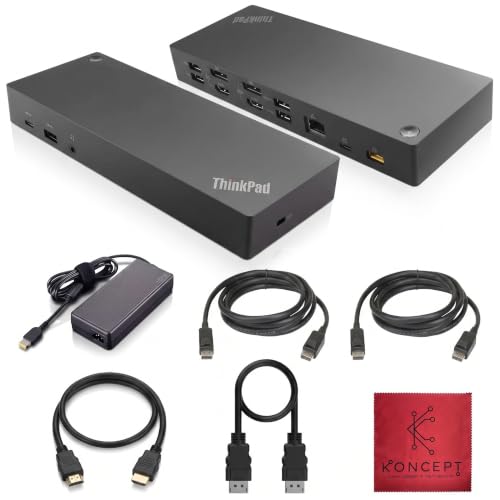
Koncept Hybrid USB-C and USB-A Dock
Best for: Dual monitor setups with wired internet needs
- Host Interface
- USB-C, USB-A
- Display Support
- Dual
- Video Ports
- DisplayPort, HDMI
- Max Data Speed
- 10Gbps
- Ethernet Speed
- 10/100/1000 Mb/s
- Dimensions
- 8.3 × 3.15 × 1.18 inches
View on Amazon: Koncept Hybrid USB-C and USB-A Dock Affiliate link
This Koncept dock supports dual monitors via DisplayPort and HDMI. It connects to your laptop using USB-C or USB-A. The unit includes a 10Gbps USB-C port and three USB-A ports. A gigabit Ethernet port adds wired network stability. It measures 8.3 by 3.15 by 1.18 inches. You get a complete cable set for immediate use.
Pros
- Dual monitor support via DisplayPort and HDMI
- 10Gbps data speed on the USB-C port
- Gigabit Ethernet for stable wired internet
- Includes USB-C to A and C to C cables
Cons
- Ethernet speed limited to 1Gbps
- No Thunderbolt certification listed
- No USB-C video output for daisy-chaining
Good fit if
- You need two external displays for your workflow
- You want a wired gigabit internet connection
- You use a laptop with USB-C or USB-A ports
Skip if
- You require Thunderbolt 3 or 4 speeds
- You need more than two monitors
- You want wireless connectivity options
Verdict: Koncept Lenovo ThinkPad Dock USB-C USB-A provides solid dual-display and wired networking for standard laptops. It fits users who need reliable ports and stable internet without needing high-speed Thunderbolt bandwidth.
Specifications side by side
| Spec | Koncept Hybrid USB-C and USB-A Dock |
|---|---|
| Host Interface | USB-C, USB-A |
| Display Support | Dual |
| Video Ports | DisplayPort, HDMI |
| Max Data Speed | 10Gbps |
| Ethernet Speed | 10/100/1000 Mb/s |
| Connectivity | USB-C, USB-A |
| Dimensions | 8.3 × 3.15 × 1.18 inches |
| Color | Black |
| Model | 40AF0135US |
Frequently asked questions
Does the Koncept Hybrid Dock support dual monitors?
Yes, this dock supports dual monitor setups. It includes both DisplayPort and HDMI outputs to connect two screens simultaneously. This feature is ideal for users who need an expanded workspace without relying on wireless displays or complex adapters. It works well for standard productivity tasks.
Can I use this dock with older laptops?
Yes, you can use this dock with older laptops. It features a USB-A host interface in addition to USB-C. This allows you to connect to business laptops that lack modern USB-C ports. You simply plug the included USB-A cable into your older machine for connectivity.
Does this dock provide wired internet connectivity?
Yes, it provides wired internet connectivity. The device includes a 1Gbps Ethernet port for stable network connections. This is beneficial for users who need reliable internet without relying on Wi-Fi. It ensures consistent bandwidth for video calls and large file transfers.
What is the size of the Koncept dock?
The Koncept Hybrid Dock measures 8.3 inches in length, 3.15 inches in width, and 1.18 inches in height. Its compact footprint fits easily on most desks. The black finish helps it blend in with standard office equipment. It is designed to sit neatly beside your laptop.
Is this dock compatible with Thunderbolt ports?
This dock does not require Thunderbolt bandwidth. It is designed for standard USB-C and USB-A connections. It fits users who need reliable ports and stable internet without needing high-speed Thunderbolt capabilities. You can connect it to any laptop with these standard interfaces.
What model number is this Koncept dock?
The model number for this device is 40AF0135US. This identifier helps you verify compatibility with your specific laptop. You can use this number to find drivers or check technical specifications online. It ensures you are referencing the correct hardware version.