Koncept 13-Port Thunderbolt 4 Dock vs Koncept Hybrid USB-C USB-A Dock (2026): Key Differences
As an Amazon Associate we earn from qualifying purchases. Links on this page are affiliate links.
The koncept 13 port thunderbolt 4 dock vs hybrid USB c USB a dock comparison helps you decide between two distinct docking solutions. Both units provide Gigabit Ethernet and support dual monitor setups for enhanced productivity. The main difference lies in their connection standards. One uses Thunderbolt 4 for high-speed data and power delivery, while the other relies on standard USB-C and USB-A interfaces. This affects the maximum data speed and the number of ports available for your peripherals.
Key differences
| Aspect | Koncept 13-Port Thunderbolt 4 Dock | Koncept Hybrid USB-C and USB-A Dock |
|---|---|---|
| Host Interface | Thunderbolt 4 | USB-C, USB-A |
| Max Data Speed | 40Gbps | 10Gbps |
| Port Count | 13 | not listed |
| Power Delivery | 130W | not listed |
| Display Support | Up to 4 | Dual |
| Video Ports | DP 1.4, HDMI 2.0, TB4, USB-C | DP 1.2, HDMI |
Which one should you choose?
Choose Koncept 13-Port Thunderbolt 4 Dock if
- You need high-speed data transfer for large files.
- You want to connect up to four 4K displays.
- Your laptop requires 130W of power delivery.
Choose Koncept Hybrid USB-C and USB-A Dock if
- You prefer a compact dock with standard USB connections.
- You only need to support dual monitors.
- You do not have a Thunderbolt 4 compatible laptop.
Verdict: Choose the Koncept 13-Port Thunderbolt 4 Dock if you need maximum connectivity, high data speeds, and support for multiple high-resolution displays. The Koncept Hybrid USB-C USB-A Dock is a simpler, space-saving option for users who only need dual monitor support and standard USB connectivity.
Thunderbolt 4 vs USB-C Dock Specs
Connection Speed
The Koncept 13-Port Thunderbolt 4 Dock uses a Thunderbolt 4 host interface with a maximum data speed of 40Gbps. This high bandwidth allows for faster data transfers and supports more demanding peripherals. In contrast, the Koncept Hybrid USB-C USB-A Dock relies on a USB-C host interface with a max data speed of 10Gbps. While 10Gbps is sufficient for most external drives and standard peripherals, it lacks the sheer throughput of Thunderbolt 4. If you need to move large files quickly or connect high-speed storage arrays, the Thunderbolt 4 option offers a clear technical advantage.
Display Support
Display capabilities differ significantly between the two docks. The Koncept 13-Port Thunderbolt 4 Dock supports up to four 4K 60Hz monitors on Windows systems. It includes two DisplayPort 1.4 ports, one HDMI 2.0 port, and additional USB-C video outputs. The Koncept Hybrid USB-C USB-A Dock is limited to dual monitor support. It features two DisplayPort 1.2 ports and two HDMI ports. If your workflow requires a multi-monitor setup with three or four screens, the Thunderbolt 4 dock is the only viable choice. For dual-screen users, both options provide adequate video connectivity.
Power Delivery
Power delivery specifications are critical for laptop charging. The Koncept 13-Port Thunderbolt 4 Dock provides up to 130W of energy delivery through its Thunderbolt 4 host port. This high wattage is suitable for larger laptops and devices with significant power requirements. The Koncept Hybrid USB-C USB-A Dock does not list a specific power delivery wattage for its host connection in the provided data. It does offer a USB-C port with 5V 3A output, which is useful for charging phones or small accessories, but it is not designed to power a laptop. For charging capability, the Thunderbolt 4 dock is superior.
Port Variety
The Koncept 13-Port Thunderbolt 4 Dock offers 13 ports in total, including Thunderbolt 4, DisplayPort, HDMI, USB-C, USB-A, Ethernet, and audio jacks. This extensive variety reduces the need for additional adapters. The Koncept Hybrid USB-C USB-A Dock provides a more focused set of connections, including two DisplayPort 1.2, two HDMI, one USB-C, three USB-A 3.1 Gen 2, and two USB 2.0 ports. It lacks Thunderbolt ports. If you need a wide array of specific connectors without daisy-chaining, the 13-port dock offers more versatility. The hybrid dock is simpler but covers essential video and data needs.
Compatibility
Both docks aim for broad compatibility but differ in underlying technology. The Koncept 13-Port Thunderbolt 4 Dock works with Thunderbolt 4, Thunderbolt 3, USB4, and USB-C devices, including Windows PCs, Intel-based Macs, and M1/M2 Macs. The Koncept Hybrid USB-C USB-A Dock supports USB-C and USB-A host interfaces, making it compatible with a wide range of laptops that may not have Thunderbolt ports. If you use older laptops or devices without Thunderbolt support, the hybrid dock ensures connectivity. However, for modern devices with Thunderbolt capabilities, the 13-port dock unlocks full potential.
Which dock fits your workflow best
Users needing high speed and many ports
The Koncept 13-Port Thunderbolt 4 Dock offers a 40Gbps host interface for fast data transfers. It provides thirteen ports, including Thunderbolt 4, USB-C, and USB-A options. You can connect up to four 4K monitors on Windows systems. The 130W power delivery supports larger laptops. This setup reduces cable clutter while maintaining high bandwidth for demanding peripherals and multiple displays.
Users with dual monitor setups and standard laptops
The Koncept Hybrid USB-C and USB-A Dock supports dual monitor configurations via HDMI and DisplayPort outputs. It features a USB-C host interface with 10Gbps data speeds. The unit includes multiple USB-A ports for peripherals and a Gigabit Ethernet connection. This hybrid approach works well for standard laptops that do not require Thunderbolt speeds, providing essential connectivity without the premium interface requirements.
Mac users with M1 Pro or M1 Max chips
The Koncept 13-Port Thunderbolt 4 Dock supports dual 4K 60Hz displays on M1 Pro and M1 Max Macs. It also works with Intel-based Macs and newer M2 systems. The Thunderbolt 4 connection ensures compatibility with Apple devices while offering high bandwidth. You get reliable Gigabit Ethernet and multiple video outputs. This dock handles macOS constraints better than standard USB-C hubs for professional creative workflows.
The products compared

Koncept 13-Port Thunderbolt 4 Dock
Best for: Windows users needing four 4K displays and 130W power
- Host Interface
- Thunderbolt 4
- Display Support
- Up to 4
- Max Resolution
- 4K@60Hz
- Port Count
- 13
- Video Ports
- DisplayPort 1.4, HDMI 2.0, USB-C, TB4
- Max Data Speed
- 40Gbps
View on Amazon: Koncept 13-Port Thunderbolt 4 Dock Affiliate link
This Koncept dock replicates the Dell WD22TB4 with 13 ports and a Thunderbolt 4 host interface. It delivers 40Gbps data speeds and 130W power delivery. You can connect up to four 4K 60Hz displays on Windows. It includes Gigabit Ethernet and multiple USB options. This setup suits users needing high bandwidth and extensive connectivity for demanding workstations.
Pros
- Thunderbolt 4 host port with 40Gbps data transfer
- 130W power delivery for host laptops
- Supports up to four 4K 60Hz monitors on Windows
- Gigabit Ethernet port for stable wired connections
Cons
- Mac users limited to one 4K display natively
- Heavy and bulky compared to slim USB-C docks
- Requires specific drivers for DisplayLink dual displays on macOS
Good fit if
- You need to drive four monitors simultaneously on Windows
- You require 130W power delivery for your laptop
- You want a single cable solution for data and power
Skip if
- You use an M1 or M2 Mac and need dual 4K displays natively
- You prioritize a compact, travel-friendly form factor
- You only need basic USB-A connectivity without Thunderbolt speeds
Verdict: Koncept WD22TB4 Thunderbolt 4 Dock offers robust multi-monitor support and high-speed connectivity for Windows users. It fits professionals who need extensive port variety and reliable power delivery for their desktop setups.
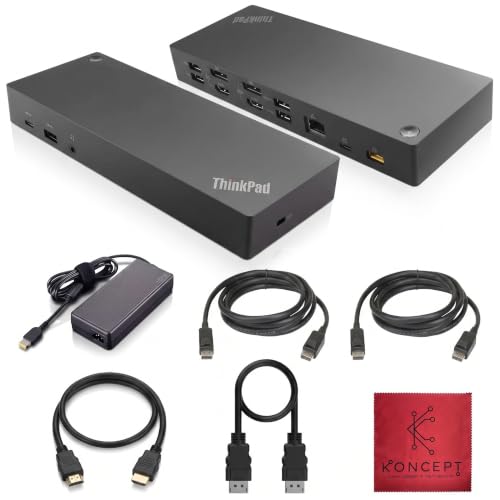
Koncept Hybrid USB-C and USB-A Dock
Best for: Dual monitor setups with standard USB-C laptops
- Host Interface
- USB-C, USB-A
- Display Support
- Dual
- Video Ports
- DisplayPort, HDMI
- Max Data Speed
- 10Gbps
- Ethernet Speed
- 10/100/1000 Mb/s
- Dimensions
- 8.3 × 3.15 × 1.18 inches
View on Amazon: Koncept Hybrid USB-C and USB-A Dock Affiliate link
This Koncept docking station offers dual monitor support via DisplayPort and HDMI. It features a mix of USB-C and USB-A ports, including high-speed 10Gbps connections. The 1Gbps Ethernet port ensures stable wired networking. You get a versatile hub for laptops needing multiple displays and peripherals. It includes necessary cables for immediate setup. This model suits users who require a reliable, multi-port solution without needing Thunderbolt 4 speeds.
Pros
- Supports dual monitors with DisplayPort and HDMI outputs
- Includes 1Gbps Gigabit Ethernet for stable internet
- Features high-speed 10Gbps USB 3.1 Gen 2 ports
- Provides multiple USB-A and USB-C connectivity options
Cons
- Host interface is USB-C and USB-A, not Thunderbolt 4
- Max data speed is 10Gbps, lower than Thunderbolt 4
- Ethernet speed is limited to 1Gbps
Good fit if
- You need dual display outputs for productivity
- You require a wired Gigabit Ethernet connection
- You want multiple USB-A ports for peripherals
Skip if
- You need Thunderbolt 4 data transfer speeds
- You require 2.5GbE or faster Ethernet
- You only use USB-C devices without adapters
Verdict: Koncept 13-Port Thunderbolt 4 Dock provides solid dual-monitor and networking capabilities for standard USB-C laptops. It fits users who prioritize port variety and wired connectivity over maximum data throughput.
Specifications side by side
| Spec | Koncept 13-Port Thunderbolt 4 Dock | Koncept Hybrid USB-C and USB-A Dock |
|---|---|---|
| Host Interface | Thunderbolt 4 | USB-C, USB-A |
| Display Support | Up to 4 | Dual |
| Max Resolution | 4K@60Hz | not stated |
| Port Count | 13 | not stated |
| Video Ports | DisplayPort 1.4, HDMI 2.0, USB-C, TB4 | DisplayPort, HDMI |
| Max Data Speed | 40Gbps | 10Gbps |
| Ethernet Speed | Gigabit | 10/100/1000 Mb/s |
| Resolution | 4K UHD | not stated |
| Connectivity | USB-C, USB-A, Thunderbolt 4 | USB-C, USB-A |
| Dimensions | 10 × 6 × 4 inches | 8.3 × 3.15 × 1.18 inches |
| Weight | 0.63 ounces | not stated |
| Color | Black | Black |
| Model | Docking-WD22TB4-Station New | 40AF0135US |
Frequently asked questions
Can the Koncept 13-Port Thunderbolt 4 Dock support four 4K displays?
Yes, this dock is designed for Windows users needing four 4K displays. It provides robust multi-monitor support to handle demanding visual tasks. The unit includes thirteen ports, offering extensive connectivity options for your desktop setup. This makes it suitable for professionals who require high screen real estate and reliable power delivery.
What is the maximum data transfer speed of the Thunderbolt 4 dock?
The Koncept 13-Port Thunderbolt 4 Dock features a host interface with a maximum data speed of 40Gbps. This high bandwidth supports faster data transfers and connects more demanding peripherals. The hybrid USB-C dock does not list this specific speed, focusing instead on standard USB-C connectivity for general use.
How many ports does the Koncept 13-Port Thunderbolt 4 Dock have?
This unit offers thirteen ports in total. You get a mix of Thunderbolt 4, USB-C, and USB-A options. This variety allows you to connect numerous devices simultaneously. The Koncept Hybrid dock also provides port variety but is optimized for standard USB-C laptops rather than high-throughput connections.
Is the Koncept Hybrid dock suitable for dual monitor setups?
Yes, the Koncept Hybrid USB-C and USB-A Dock supports dual monitor setups. It is ideal for users with standard USB-C laptops who prioritize port variety. The dock provides solid networking capabilities alongside its display support. This makes it a practical choice for enhanced productivity without needing Thunderbolt 4 speeds.
What is the weight of the Koncept 13-Port Thunderbolt 4 Dock?
The Koncept 13-Port Thunderbolt 4 Dock weighs 0.63 ounces. Its dimensions are 10 inches in length, 6 inches in width, and 4 inches in height. The hybrid dock is slightly smaller, measuring 8.3 inches in length and 3.15 inches in width. Both units are compact black devices designed for desk integration.
Does the Hybrid dock support Thunderbolt 4 connections?
No, the Koncept Hybrid USB-C and USB-A Dock does not support Thunderbolt 4. It uses standard USB-C and USB-A connectivity. This model fits users who prioritize port variety and wired connectivity over maximum data throughput. If you need 40Gbps speeds, you should choose the Thunderbolt 4 dock instead.
Which dock is better for Windows users needing high power delivery?
The Koncept 13-Port Thunderbolt 4 Dock is better for these users. It offers 130W power delivery and robust multi-monitor support. This setup fits professionals who need extensive port variety. The hybrid dock focuses on dual monitors and standard connectivity, making it less suitable for high-power or high-bandwidth Windows workstation requirements.