J5create Triple Display Laptop Stand Review: Specs, Pros and Cons
As an Amazon Associate we earn from qualifying purchases. Links on this page are affiliate links.
This j5create USB c docking station review covers the JCD543 model, a multi-port hub designed for users needing expanded connectivity. It connects to your laptop via a single USB-C port and supports up to three displays simultaneously. The device features HDMI, DisplayPort, and VGA outputs for flexible monitor arrangements. It also includes Gigabit Ethernet and USB 3.1 ports for peripherals. The stand design helps with heat dissipation while the flexible cable accommodates various port locations. This spec-based look explains how the hardware handles multiple screens and data transfer for your workspace.
What stands out
- Supports triple display output via HDMI, DisplayPort, and VGA
- Includes Gigabit Ethernet for stable wired internet
- USB-C port supports PD 3.0 for laptop charging
- One USB-A port provides BC1.2 fast charging for phones
Who it fits
Good fit for
You should consider this dock if your laptop has a USB-C port with Display Alt-mode and Power Delivery. It suits users who need to connect three monitors using a mix of HDMI, DisplayPort, or VGA cables. The built-in Gigabit Ethernet is useful for workstations that require stable network connections. It also helps those who want to charge their laptop and phone while using multiple displays. The stand design is practical for desktop setups where heat management matters.
Who should skip it
Skip this option if your computer lacks a USB-C port with Display Alt-mode support. The device requires driver installation and specific USB-C 3.1 5Gbps capabilities to function correctly. It is not suitable for macOS versions earlier than 10.11 or Windows versions prior to 10. If you need wireless connectivity or do not require a third monitor, this hardware adds unnecessary bulk. The fixed cable length may also limit placement flexibility for some desk layouts.
Verdict: This docking station delivers triple display support and essential connectivity for compatible USB-C laptops. It is a practical choice for users who need to expand their screen real estate and network options.
Key specs explained for JCD543
Display Support: Triple
This docking station allows you to connect three monitors at the same time. You can use the HDMI, DisplayPort, and VGA outputs together. This setup creates a wide workspace for coding, editing, or multitasking. It is ideal if you need more screen real estate than a single laptop display provides. You get a true triple-monitor experience without needing multiple adapters.
Video Ports: HDMI, DisplayPort, VGA
The device includes three different video connectors to match various monitor types. HDMI and DisplayPort are standard for modern screens. VGA is included for older displays or projectors. This variety ensures you can connect almost any monitor you own. You do not need to buy extra dongles to match your specific monitor inputs. It simplifies your desk setup significantly.
Host Interface: USB-C
You connect this hub to your laptop using a single USB-C port. This saves your other ports for peripherals like mice or keyboards. The connection carries both data and video signals. It requires a USB-C port that supports Display Alt-mode. This single-cable approach keeps your desk tidy and reduces clutter around your laptop base station.
Max Data Speed: 5Gbps
The USB 3.1 port transfers data at up to 5Gbps. This speed is sufficient for external hard drives and flash storage. It is not designed for extremely fast solid-state drives that require USB 3.2 or Thunderbolt speeds. For general file transfers and peripheral connections, this rate is reliable. It ensures stable performance for everyday tasks without bottlenecks.
Ethernet Speed: Gigabit
The built-in Ethernet port provides a stable wired internet connection. Gigabit speed ensures fast data transfer for streaming or large downloads. Wired connections are more reliable than Wi-Fi in crowded offices. This feature is useful if your laptop lacks a network port. You get consistent latency for video calls and online work without wireless interference.
Design and build quality
According to the listing, the JCD543 model is finished in black. The unit measures 14.1 inches in length, 3.48 inches in width, and 1.1 inches in height. It weighs 11 ounces. These dimensions suggest a compact footprint that fits easily on most desks. The low profile ensures it does not obstruct your view of your laptop screen.
The design includes a stand structure that assists with heat dissipation. This feature helps maintain stable performance during extended use. A flexible USB-C cord connects the dock to your computer. This flexibility accounts for the specific location of the USB-C port on your device. It ensures an easy and secure connection without straining the cable.
The layout prioritizes connectivity expansion. You gain access to HDMI, DisplayPort, and VGA outputs simultaneously. Additional ports include USB 3.1, SD, microSD, and Gigabit Ethernet. One USB Type-A port supports fast charging BC1.2 for mobile devices. The USB-C port supports PD 3.0 for power delivery. This setup allows you to charge your notebook while using the adapter. The build focuses on practical utility for multi-display setups.
Setup and daily operation guide
To begin using this dock, you need a laptop with a USB-C port that supports Display Alt-mode and Power Delivery. The listing specifies compatibility with Windows 10 and macOS 10.11 or later. You must install the appropriate driver for the device to function correctly. The included flexible USB-C cord helps you position the unit near your laptop’s port, which aids in heat dissipation thanks to the stand design.
Once connected, you can attach up to three monitors using the HDMI, DisplayPort, and VGA outputs. This allows you to create an expanded workspace without needing multiple laptop ports. The Gigabit Ethernet port provides a stable wired internet connection, which is useful for tasks requiring consistent bandwidth.
For peripherals, the dock offers a USB 3.1 port, along with SD and microSD card slots. This lets you connect external drives or transfer photos directly. Power management is handled through the USB-C port, which supports PD 3.0. This feature allows you to charge your notebook or smartphone while using the adapter. Additionally, one of the USB Type-A ports supports fast charging via BC1.2, making it convenient for charging mobile devices like tablets or phones. The unit itself is black and weighs 11 ounces, keeping your desk tidy. You simply plug in your devices and start working with extended screen real estate.
Before You Buy This Dock
Before you buy this j5create JCD543 dock, verify your laptop’s USB-C port supports Display Alt-mode and Power Delivery. The listing requires Windows 10 or macOS 10.11 or later. You must install the specific driver for full functionality. This hub connects via a single USB-C interface, so you need a compatible cable. The flexible cord helps manage port placement on your device. It provides Gigabit Ethernet and USB 3.1 ports for peripherals. Check if your current monitors use HDMI, DisplayPort, or VGA inputs, as the dock supports all three. This setup suits users needing triple displays without internal hardware changes. It fits well in setups where you prioritize connectivity expansion over portability. Unlike dedicated portable monitors, this is a stationary docking solution. Ensure your workspace has enough desk space for the 14.1-inch length. The stand aids heat dissipation, so keep vents clear. This option works best for fixed desks rather than travel.
Check before you buy
- Confirm your laptop USB-C supports Display Alt-mode
- Check OS compatibility with Windows 10 or macOS 10.11+
- Verify monitor inputs match HDMI, DP, or VGA
- Ensure you have space for the 14.1-inch length
- Install the required driver for full functionality
The product at a glance
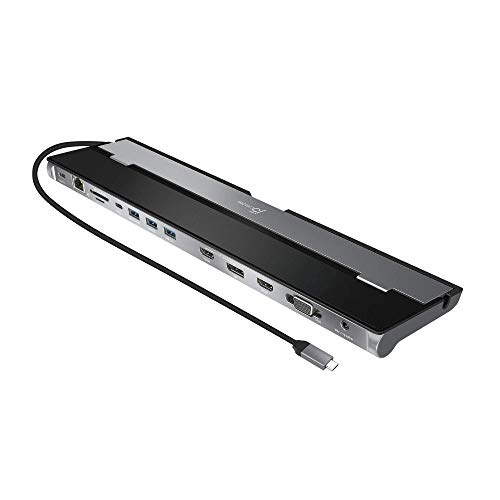
j5create Triple Display Laptop Stand Dock
Best for: Users needing triple displays and wired Ethernet
- Host Interface
- USB-C
- Display Support
- Triple
- Power Delivery
- 100W
- Video Ports
- HDMI, DisplayPort, VGA
- Max Data Speed
- 5Gbps
- Ethernet Speed
- Gigabit Ethernet
View on Amazon: j5create Triple Display Laptop Stand Dock Affiliate link
This J5create docking station connects your laptop to three displays simultaneously using HDMI, DisplayPort, and VGA. It uses a USB-C host interface with 5Gbps data speeds. The unit includes a stand for heat dissipation and flexible cabling. It supports Gigabit Ethernet and fast charging for mobile devices. This setup suits users who need multiple screens and wired connectivity from a single USB-C port on their computer.
Pros
- Supports up to three simultaneous displays via HDMI, DisplayPort, and VGA
- Includes Gigabit Ethernet port for wired internet connection
- USB-C port supports PD 3.0 for notebook charging
- One USB Type-A port supports BC1.2 fast charging for phones
- Integrated stand aids in heat dissipation
Cons
- Max data speed is limited to 5Gbps
- Requires driver installation for operation
- Only compatible with Windows 10 and macOS 10.11 or later
Good fit if
- You need to run three monitors from a single USB-C port
- You require a wired Gigabit Ethernet connection for stability
- You want to charge your laptop and phone through the dock
Skip if
- You need Thunderbolt 3 or 4 speeds exceeding 5Gbps
- You use an operating system older than macOS 10.11 or Windows 10
- You prefer a plug-and-play solution without driver installation
Verdict: J5create Triple USB-C Docking Station provides a practical triple-display solution for users who need extensive wired connectivity. It fits professionals who require stable Ethernet and multi-monitor setups from a single USB-C host port.
Specifications side by side
| Spec | j5create Triple Display Laptop Stand Dock |
|---|---|
| Host Interface | USB-C |
| Display Support | Triple |
| Power Delivery | 100W |
| Video Ports | HDMI, DisplayPort, VGA |
| Max Data Speed | 5Gbps |
| Ethernet Speed | Gigabit Ethernet |
| Connectivity | USB-C, HDMI, DisplayPort, Ethernet, VGA |
| Dimensions | 14.1 × 3.48 × 1.1 inches |
| Weight | 11 ounces |
| Color | Black |
| Model | JCD543 |
Frequently asked questions
Does the j5create JCD543 support three monitors at once?
Yes, this docking station supports triple displays simultaneously. It achieves this by utilizing HDMI, DisplayPort, and VGA outputs together. This configuration creates an expansive workspace for multitasking. You can connect three separate screens to your laptop. This setup is ideal for users who need extensive screen real estate from a single USB-C host port.
What is the physical size of the J5create triple display dock?
The unit measures 14.1 inches in length, 3.48 inches in width, and 1.1 inches in height. These dimensions provide a compact footprint that fits easily on most desks. The device weighs 11 ounces. Its black finish keeps the appearance professional. The size allows for stable placement near your laptop without taking up excessive space.
Is Ethernet connectivity included on this j5create hub?
Yes, this model provides wired Ethernet connectivity. It is designed for users who require stable network connections alongside their multi-monitor setup. The dock connects to your laptop via a single USB-C port. This allows you to maintain a wired internet connection while using three external displays. It fits the needs of professionals who prioritize connection stability.
Which operating systems are compatible with the JCD543?
The listing specifies compatibility with Windows 10 and macOS 10.11 or later. You must install the appropriate driver for full functionality on these systems. The device connects via a USB-C interface. Ensure your laptop runs one of these supported operating systems before purchasing. This ensures the triple display features and other ports work correctly with your hardware.
What connection type does the J5create JCD543 use?
The dock connects to your computer via a single USB-C port. This single interface handles data, video output, and potentially power delivery. Your laptop must support Display Alt-mode and Power Delivery through this port. The USB-C connection simplifies your desk setup by reducing cable clutter. It serves as the central link for all video and peripheral connections.
Does the J5create triple display dock come in other colors?
The available data indicates the JCD543 model is finished in black. No other color options are listed in the provided specifications. The black design offers a neutral look that blends with most workspaces. The unit maintains a consistent aesthetic with typical laptop accessories. You can expect a standard black finish for this specific docking station model.