INNOCN 27-Inch 4K DisplayPort Monitor vs INNOCN 15.6-Inch Battery Touchscreen Monitor (2026): Key Differences
As an Amazon Associate we earn from qualifying purchases. Links on this page are affiliate links.
We compare the innocn 27 4k USB c monitor vs portable monitor touchscreen laptop for your setup needs. Both units use IPS panels for wide viewing angles and 60Hz refresh rates. The main difference is form factor and resolution. One offers a large 27-inch 4K display for stationary desk work. The other provides a 15.6-inch portable screen with touch and battery power. You should choose based on whether you prioritize image detail or mobility.
Key differences
| Aspect | INNOCN 27-Inch 4K DisplayPort Monitor | INNOCN 15.6-Inch Battery Touchscreen Monitor |
|---|---|---|
| Resolution | 3840 x 2160 (4K) | 1920 x 1080 (FHD) |
| Screen Size | 27 inches | 15.6 inches |
| Power Source | Requires external power | Built-in 5000mAh battery |
| Touchscreen | Not listed | Yes, 10-point touch |
| Connectivity | USB-C, DP, HDMI, 3.5mm Audio | USB-C, Mini HDMI, 3.5mm Audio |
Which one should you choose?
Choose INNOCN 27-Inch 4K DisplayPort Monitor if
- You need high pixel density for photo or video editing on a desk.
- You want a larger workspace for multitasking with multiple windows.
- You prefer a standard display port connection for desktop setups.
Choose INNOCN 15.6-Inch Battery Touchscreen Monitor if
- You need a second screen that works without a power outlet.
- You want to interact with your screen using touch gestures.
- You are traveling and need a lightweight display under 3 pounds.
Verdict: Choose the 27-inch model if you want maximum clarity and screen real estate for fixed workstations. Pick the 15.6-inch portable monitor if you require battery power and touch capability for mobile use.
Resolution and Display Quality Comparison
Resolution and clarity
The INNOCN 27-Inch 4K DisplayPort Monitor offers a significant resolution advantage with its 3840 x 2160 pixel count. This real 4K UHD panel delivers sharp text and detailed images, ideal for design work or media consumption. In contrast, the INNOCN 15.6-Inch Battery Touchscreen Monitor provides a standard 1920 x 1080 Full HD resolution. While sufficient for basic tasks, it lacks the pixel density of the larger unit. Both screens utilize IPS technology for consistent color and viewing angles, but the 27-inch model provides a much higher level of visual fidelity due to its superior resolution.
Color performance
Color accuracy varies between the two models. The 27-inch 4K monitor specifies a Delta E value of less than 2, indicating professional-grade color consistency. It also supports 1.07 billion colors via 8-bit+FRC processing and meets DisplayHDR 400 standards for enhanced contrast. The 15.6-inch touchscreen monitor highlights 100% sRGB color gamut coverage, which is excellent for general use and gaming. However, it does not list a Delta E value or HDR certification. If precise color reproduction is critical for your workflow, the 27-inch unit provides more detailed technical specifications to support that need.
Portability and power
The 15.6-inch touchscreen monitor is designed for mobility. It weighs just 2.2 pounds and features a built-in 5000mAh battery that provides up to four hours of independent operation. You can power it via USB-C or an AC adapter, making it suitable for travel or outdoor use. The 27-inch monitor is a stationary desktop unit. It lacks a battery and relies entirely on external power through its USB-C, DisplayPort, or HDMI connections. It is significantly larger and heavier, intended for a fixed desk setup rather than on-the-go use.
Touchscreen capability
Interactive input is a key differentiator. The 15.6-inch model includes a 10-point touchscreen using G+FF technology, allowing you to navigate interfaces directly on the screen without a mouse. This works with most laptops and smartphones via USB. The 27-inch 4K monitor does not list touchscreen functionality. It is a standard non-touch display. If you prefer direct screen interaction for presentations or casual use, the portable touchscreen is the only option. For traditional mouse and keyboard workflows, the lack of touch on the 27-inch unit is irrelevant.
Connectivity options
Both monitors offer versatile connection methods, but the ports differ. The 27-inch monitor includes a DisplayPort, USB-C, HDMI, and a 3.5mm audio jack. It omits older VGA or DVI ports. The 15.6-inch touchscreen monitor provides USB-C and a Mini HDMI port, along with a 3.5mm audio input. The inclusion of DisplayPort on the larger unit may benefit users with specific GPU outputs. The Mini HDMI on the portable model is slightly less common than standard HDMI but remains widely compatible. Both support USB-C for signal and power delivery where applicable.
Which INNOCN Monitor Fits You
Desktop users needing high resolution
Choose the 27-inch 4K model for your desk. Its 3840 x 2160 resolution provides sharp details for design and media. The IPS panel offers 178-degree viewing angles and HDR400 support. You get ergonomic adjustments including height and pivot. The USB-C and DisplayPort connections ensure stable, high-bandwidth performance for your stationary setup.
Travelers wanting portable touchscreen
Pick the 15.6-inch portable monitor if you move often. It features a built-in 5000mAh battery for up to four hours of wireless use. The 10-point touchscreen allows direct interaction without drivers. Weighing just 2.2 pounds, it fits easily in bags. The 100% sRGB color gamut ensures vibrant visuals on the go.
Users needing flexible connectivity
Select the 27-inch unit if you value diverse connection options. It includes DisplayPort, HDMI, and USB-C ports alongside a 3.5mm audio jack. This variety supports laptops, Macs, and mini PCs without adapters. The frameless design and VESA mount compatibility also offer flexibility for wall mounting or multi-monitor arrangements in your workspace.
The products compared

INNOCN 27-Inch 4K DisplayPort Monitor
Best for: stationary 4K creative workstations
- Screen Size
- 27"
- Resolution
- 3840 x 2160
- Refresh Rate
- 60Hz
- Panel Type
- IPS
- Connectivity
- USB-C, DP, HDMI, 3.5mm Audio
- Aspect Ratio
- 16:9
View on Amazon: INNOCN 27-Inch 4K DisplayPort Monitor Affiliate link
This 27-inch 4K monitor features an IPS panel with 3840 x 2160 resolution and HDR400 support. It connects via USB-C, DisplayPort, and HDMI for versatile device compatibility. The stand offers height, swivel, and pivot adjustments. You get accurate colors with Delta E < 2. This setup suits users needing a large, high-resolution display for detailed work rather than a portable screen.
Pros
- 27-inch 4K UHD 3840 x 2160 resolution
- IPS panel with HDR400 and Delta E < 2
- USB-C, DisplayPort, and HDMI connectivity
- Adjustable stand with height, swivel, and pivot options
Cons
- 60Hz refresh rate limits smooth motion for fast gaming
- 27-inch size is not portable or lightweight
- Lacks built-in battery for wireless operation
Good fit if
- You need a large 4K display for photo or video editing
- You want an IPS panel with accurate color reproduction
- You prefer a monitor with ergonomic stand adjustments
Skip if
- You require a portable monitor for travel
- You need a high refresh rate for competitive gaming
- You want a touchscreen display
Verdict: INNOCN 27-Inch 4K USB-C Monitor is a stationary display best for creators who prioritize resolution and color accuracy over portability.
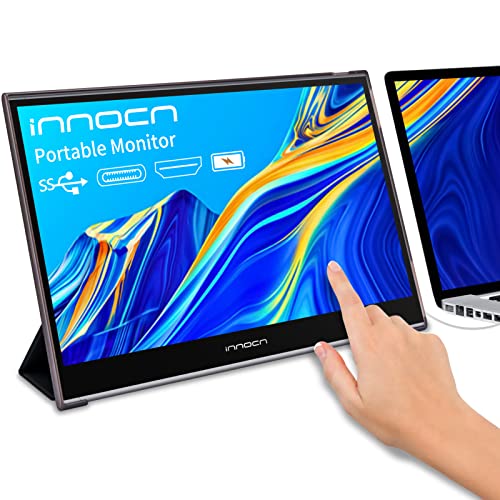
INNOCN 15.6-Inch Battery Touchscreen Monitor
Best for: Travelers needing touch input and battery power
- Screen Size
- 15.6 Inch
- Resolution
- 1920 x 1080
- Refresh Rate
- 60Hz
- Panel Type
- IPS
- Connectivity
- USB C, Mini HDMI
- Color Gamut
- 100% sRGB
View on Amazon: INNOCN 15.6-Inch Battery Touchscreen Monitor Affiliate link
This INNOCN portable monitor offers a 15.6-inch 1080p IPS display with 100% sRGB color coverage. It includes a built-in 5000mAh battery for up to four hours of wireless use. The screen supports 10-point touch input via USB-C. It connects through USB-C or Mini HDMI. This model suits travelers who need a lightweight, secondary display for laptops or gaming consoles on the go.
Pros
- Built-in 5000mAh battery provides up to 4 hours of portable use
- 15.6-inch IPS panel with 100% sRGB color gamut
- 10-point touch screen requires no drivers or apps
- Lightweight at 2.2 pounds for easy travel
Cons
- 1080p resolution is lower than the 4K option in this guide
- Battery life is limited to approximately 4 hours per charge
- Uses Mini HDMI instead of full-size HDMI port
Good fit if
- You need a lightweight screen for travel or coffee shop work
- You want touch input for navigation without a mouse
- You require a secondary display for gaming consoles like Switch or PS
Skip if
- You need 4K resolution for detailed professional work
- You want a full-size HDMI port without adapters
- You need all-day battery life without plugging in
Verdict: INNOCN 15.6" Touchscreen Portable Monitor is a compact option for users who prioritize portability and touch interaction over high resolution. It fits travelers who need a lightweight, battery-powered second screen for laptops or consoles.
Specifications side by side
| Spec | INNOCN 27-Inch 4K DisplayPort Monitor | INNOCN 15.6-Inch Battery Touchscreen Monitor |
|---|---|---|
| Screen Size | 27" | 15.6 Inch |
| Resolution | 3840 x 2160 | 1920 x 1080 |
| Refresh Rate | 60Hz | 60Hz |
| Panel Type | IPS | IPS |
| Connectivity | USB-C, DP, HDMI, 3.5mm Audio | USB C, Mini HDMI |
| Color Gamut | not stated | 100% sRGB |
| Aspect Ratio | 16:9 | 16:9 |
| Weight | not stated | 2.2 pounds |
| Features | Built-in Speakers, Kickstand | Touchscreen, Built-in Battery |
| Use | not stated | Travel |
| Size | 27-Inch | not stated |
| Dimensions | 2.6 × 24 × 14 inches | 14.3 × 9.29 × 0.33 inches |
| Color | Black | not stated |
| Model | 27C1U | PF15-PRO |
Frequently asked questions
Can the INNOCN 27-inch 4K monitor be used as a portable screen?
No, this model is designed for stationary setups. It measures 24 inches wide and weighs significantly more than portable units. The included kickstand supports desk use, but it lacks a built-in battery. You need a constant power source and a stable surface to use this display effectively.
Does the INNOCN 15.6-inch portable monitor have a battery?
Yes, this unit features a built-in battery for wireless operation. This allows you to use it without plugging into a wall outlet or laptop USB port for power. It is ideal for travel or working in locations without easy access to power outlets, enhancing its portability.
Is the INNOCN 15.6-inch screen touch-enabled?
Yes, the 15.6-inch model includes touchscreen functionality. You can interact with your content directly using your fingers. This feature is useful for presentations, gaming, or navigating interfaces without a mouse. The larger 27-inch model does not include touch capabilities in its specifications.
What connectivity options does the INNOCN 27-inch 4K monitor offer?
The 27-inch display provides USB-C, HDMI, and DisplayPort connections. These options allow you to connect to various devices, including laptops, desktops, and consoles. The inclusion of DisplayPort ensures compatibility with high-performance graphics cards, while USB-C can handle video and power delivery simultaneously.
Which INNOCN monitor is better for creative design work?
The 27-inch 4K model is better for design work. Its 4K UHD resolution provides sharper details and more screen real estate for editing photos or videos. The larger size helps you see fine details clearly. The 15.6-inch model has a lower 1080p resolution, which may limit precision for professional tasks.
How much space does the INNOCN 15.6-inch monitor take up?
The portable monitor is compact and lightweight. It measures 14.3 inches in length and 9.29 inches in width. It weighs only 2.2 pounds, making it easy to carry in a bag. The thin profile of 0.33 inches allows it to fit neatly into travel cases or backpacks.
Can the INNOCN 27-inch monitor play audio?
Yes, the 27-inch display comes with built-in speakers. You can hear audio from connected devices without needing external headphones or speakers. This adds convenience for casual media consumption. However, the sound quality is typically basic, so professional audio work may still require external audio equipment.