HYRTA 12-in-1 DisplayLink Dock VGA Alternatives: 6 Similar Picks Compared
As an Amazon Associate we earn from qualifying purchases. Links on this page are affiliate links.
The HYRTA 12-in-1 DisplayLink Dock with VGA helps macOS users overcome single-display limits while providing extensive connectivity. It supports triple monitors and includes a VGA port, which many modern docks omit. You might seek HYRTA USB c docking station alternatives if you need higher power delivery, different video outputs, or a larger port count. This list compares 6 similar picks based on overlapping specifications.
Each alternative shares core traits with the original, such as dual or triple display support and USB-C connectivity. Some options offer higher wattage charging, while others prioritize 4K resolution or specific legacy ports. We selected these models because their published specs address common needs like stable wired networking, multiple USB 3.0 ports, and broad OS compatibility. The rankings reflect which docks best match the original’s feature set for different use cases, from budget-conscious buyers to those requiring premium build quality.
How alternatives differ from HYRTA
Lenovo USB-C Universal Business Dock
The Lenovo Universal Business Dock supports dual 4K displays at higher resolutions than the HYRTA dock’s 2048×1152 limit. It uses HDMI and DisplayPort instead of VGA, offering sharper images for modern screens. It provides 90W power delivery, which is slightly lower than the HYRTA’s 100W. This dock lacks DisplayLink technology, so it does not support triple displays on macOS. It is a better choice for Windows users who prioritize high-resolution dual monitors and simpler connectivity over the HYRTA’s multi-screen flexibility and legacy VGA port.
Anker 14-in-1 USB-C Triple Display Dock
The Anker 14-in-1 dock offers 14 ports compared to the HYRTA’s 12, providing more connectivity for peripherals. It supports triple displays, matching the HYRTA’s multi-monitor capability. However, it caps resolution at 1080p, which is lower than the HYRTA’s 2048×1152. It lacks DisplayLink support, meaning it may not enable extended displays on M-series Macs. It is ideal for Windows users who need many ports and triple screens but do not require the higher resolution or macOS compatibility that the HYRTA provides.
Plugable Dual 4K HDMI USB-C Dock with Ethernet
The Plugable dock supports dual 4K displays at 60Hz, delivering significantly sharper images than the HYRTA’s lower resolution output. It includes a dedicated Ethernet port for stable networking, similar to the HYRTA. It lacks VGA and DisplayLink support, restricting it to dual monitors on Windows only. It is heavier and larger than the HYRTA dock. This option suits Windows users who need crisp 4K visuals and wired internet but do not need the HYRTA’s triple-display expansion or legacy video compatibility.
MOKiN 13-in-1 Triple Display USB-C Dock
The MOKiN dock supports triple displays with high refresh rates, offering smoother motion than the HYRTA’s 60Hz limit. It uses HDMI and DisplayPort, omitting the VGA port found on the HYRTA. It provides extensive connectivity for Windows users but lacks DisplayLink technology for macOS extended displays. It is heavier than the HYRTA dock. This pick is best for Windows professionals who need high-refresh-rate triple monitors and robust port variety, rather than the HYRTA’s macOS-specific features and lower resolution output.
Baseus Quadruple Display 8-in-1 USB-C Dock
The Baseus dock supports quadruple displays, exceeding the HYRTA’s triple-monitor limit. It offers 100W power delivery, matching the HYRTA’s charging speed. It includes both HDMI and DisplayPort outputs, providing flexibility for high-resolution setups. It lacks DisplayLink support, limiting macOS functionality. It is designed for users needing four screens with 8K clarity, provided they do not require 60Hz on all monitors. This is a strong alternative for users who need more screens than the HYRTA allows, without needing its specific macOS extended display features.
Lenovo ThinkPad Hybrid Dual 4K Dock
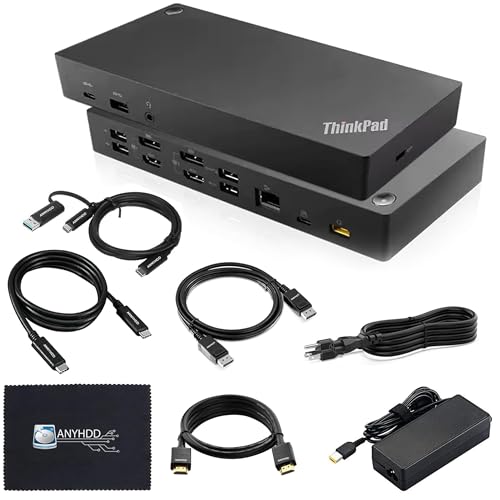
The ANYHDD ThinkPad Hybrid Dock supports dual 4K displays, offering higher resolution than the HYRTA. It provides 135W power delivery, which is higher than the HYRTA’s 100W. It includes legacy connectivity options for older laptops, unlike the HYRTA’s USB-C and USB-A focus. It lacks DisplayLink and VGA ports. It is heavier and larger than the HYRTA dock. This option is suitable for users with older laptops who need dual 4K screens and higher charging speeds, rather than the HYRTA’s multi-screen expansion and portable design.
Quick picks
Our 7 picks

HYRTA 12-in-1 DisplayLink Dock with VGA
Best for: macOS users needing triple displays and ports
- Host Interface
- USB-C, USB-A
- Display Support
- Triple
- Max Resolution
- 2048×1152@60Hz
- Power Delivery
- 100W
- Port Count
- 12
- Video Ports
- 2 HDMI, 1 VGA
View on Amazon: HYRTA 12-in-1 DisplayLink Dock with VGA Affiliate link
This 12-in-1 docking station expands your laptop with dual HDMI and VGA outputs. It uses DisplayLink technology to support triple displays on macOS, bypassing native limitations. The hub offers 100W PD charging and a Gigabit Ethernet port for stable connectivity. It includes three USB 3.0 ports for fast data transfer and SD/TF card readers. This setup suits users needing multiple screens and extensive port expansion for both Windows and Mac systems.
Pros
- DisplayLink chip enables triple display support on macOS M1/M2/M3
- 100W Power Delivery keeps your laptop charged
- Gigabit Ethernet port ensures stable wired internet
- Three USB 3.0 ports provide 5Gbps data transfer
- SD and TF card readers for quick file access
Cons
- Max HDMI resolution is limited to 2048x1152
- Audio output only works through HDMI 2
- Requires installing DisplayLink drivers for full functionality
Good fit if
- You need triple monitors on a Mac laptop
- You require a Gigabit Ethernet connection for work
- You want to expand many ports from one hub
Skip if
- You need 4K resolution on all displays
- You want plug-and-play without driver installation
- You need audio output from all video ports
Verdict: HYRTA 12-in-1 DisplayLink Dock fits users who need multiple screens on Mac and extensive connectivity. It solves macOS display limits and provides robust port expansion for mobile workstations.

Lenovo USB-C Universal Business Dock
Best for: Dual 4K setups with single-cable charging
- Host Interface
- USB-C
- Display Support
- Dual
- Max Resolution
- 4K
- Power Delivery
- 65W
- Port Count
- 9
- Video Ports
- DP 1.4, HDMI 2.0
View on Amazon: Lenovo USB-C Universal Business Dock Affiliate link
This Lenovo dock connects your laptop to dual 4K monitors via DisplayPort 1.4 and HDMI 2.0. It delivers 65W power delivery through a single USB-C cable, reducing desk clutter. The unit measures 6.06 by 3.15 inches and weighs 9.12 ounces. It supports USB-C Alt-Mode or Thunderbolt protocols. This setup suits professionals who need reliable dual displays and fast data transfers in a hybrid workspace.
Pros
- Supports dual 4K displays at high refresh rates
- Provides 65W power delivery for compatible laptops
- Connects via single USB-C cable for plug-and-play use
- Includes 9 expansion ports for peripherals
Cons
- Limited to dual monitor output instead of triple
- Max resolution capped at 4K, not 8K
- Requires specific USB-C Alt-Mode or Thunderbolt support
Good fit if
- You need a reliable dual-monitor setup for work
- You want to connect devices with a single cable
- Your laptop supports USB-C Alt-Mode or Thunderbolt
Skip if
- You require support for three or more monitors
- You need 8K resolution display output
- Your laptop lacks USB-C Alt-Mode or Thunderbolt
Verdict: Lenovo Universal Business Dock is a solid choice for users who need dual 4K displays and 65W charging through one cable. It fits professionals who prioritize simplicity and reliability over multi-monitor expansion.

Anker 14-in-1 USB-C Triple Display Dock
Best for: Windows users needing triple displays and many ports
- Host Interface
- USB-C, USB4, Thunderbolt
- Display Support
- Triple
- Max Resolution
- 4K
- Power Delivery
- 80W
- Port Count
- 14
- Video Ports
- HDMI, VGA
View on Amazon: Anker 14-in-1 USB-C Triple Display Dock Affiliate link
This Anker hub offers 14 ports, including two 4K HDMI outputs and one 1080p VGA port. It supports triple displays for Windows and ChromeOS, though macOS mirrors screens. The 80W power delivery keeps your laptop charged while you work. With a 1 Gbps Ethernet port and 5 Gbps data transfer speeds, it connects peripherals efficiently. It is a solid choice for users needing multiple video outputs and stable connectivity on compatible Windows or ChromeOS systems.
Pros
- Supports triple displays with two 4K HDMI ports and one VGA port
- Includes 14 connectivity options for various peripherals
- Provides 80W pass-through charging for laptops
- Features a 1 Gbps Ethernet port for stable internet
Cons
- macOS users cannot use extended desktop mode; displays are mirrored
- Not compatible with Linux operating systems
- VGA port is limited to 1080p resolution
Good fit if
- You need three external monitors for a Windows or ChromeOS laptop
- You require a single hub to manage multiple USB-A and SD card devices
- You want 80W charging to keep your laptop powered during heavy use
Skip if
- You use a Mac and need extended desktop functionality
- Your laptop runs Linux
- You require 4K resolution on all three connected displays
Verdict: Anker 14-in-1 USB-C Hub Triple Display provides robust multi-monitor support for Windows and ChromeOS users. It fits professionals who need extensive port variety and stable wired connections without macOS extended display features.

Plugable Dual 4K HDMI USB-C Dock with Ethernet
Best for: Windows users needing dual 4K displays
- Host Interface
- USB-C
- Display Support
- Dual
- Max Resolution
- 4K@60Hz
- Power Delivery
- 65W
- Port Count
- 10
- Video Ports
- HDMI
View on Amazon: Plugable Dual 4K HDMI USB-C Dock with Ethernet Affiliate link
This Plugable dock supports dual 4K 60Hz displays over HDMI. It connects via a single USB-C cable and includes a Gigabit Ethernet port for stable networking. The unit delivers 65W of power delivery to charge your laptop while you work. It features three USB-A ports and one USB-C data port. This setup is ideal for Windows or Chromebook users who need a clean, multi-monitor workstation without complex driver installations.
Pros
- Supports dual 4K displays at 60Hz refresh rate
- Includes Gigabit Ethernet for wired internet
- Provides 65W power delivery for laptop charging
- Plug-and-play setup with no drivers needed
Cons
- Not recommended for macOS dual extended displays
- Host laptop must support USB-C DisplayPort Alt Mode
- Limited to HDMI video output only
Good fit if
- You use Windows 10+ or Chromebook systems
- You need a single-cable desk setup
- You require Gigabit Ethernet connectivity
Skip if
- You use a Mac needing dual extended monitors
- Your laptop lacks USB-C video output support
- You need DisplayPort video connections
Verdict: Plugable Dual 4K 60Hz USB-C Dock fits Windows users who want a straightforward dual-monitor setup with wired networking. It is not suitable for Mac users needing two extended screens.

MOKiN 13-in-1 Triple Display USB-C Dock
Best for: Windows users needing triple 4K displays
- Host Interface
- USB-C
- Display Support
- Triple
- Max Resolution
- 4K@144Hz
- Power Delivery
- 100W
- Port Count
- 13
- Video Ports
- HDMI, DisplayPort
View on Amazon: MOKiN 13-in-1 Triple Display USB-C Dock Affiliate link
This MOKiN 13-in-1 USB-C docking station supports triple displays with two HDMI ports and one DisplayPort. It delivers 4K resolution at up to 144Hz on Windows. The unit provides 100W power delivery for your laptop and includes a 1Gbps Ethernet port. It weighs 2.03 pounds and connects via a single USB-C host interface. This setup suits users needing high refresh rates and multiple video outputs.
Pros
- Supports triple monitor expansion via dual HDMI and one DisplayPort
- Delivers single display 4K@144Hz on Windows systems
- Provides 100W power delivery for connected laptops
- Includes 1Gbps Ethernet and 10Gbps data transfer speeds
Cons
- MacOS does not support extending different content across monitors
- Requires a separate 150W DC power supply for operation
- High refresh rates are limited to single display expansion only
Good fit if
- You need to run three monitors simultaneously
- You require high refresh rates for gaming on Windows
- You want a single dock for video, data, and power
Skip if
- You use MacOS and need independent content on each screen
- You prefer a compact hub without an external power brick
- You only need dual display support with lower refresh rates
Verdict: MOKiN 13-in-1 USB-C Dock offers robust triple display support with high refresh rates for Windows users. It is ideal for professionals who need extensive connectivity and power delivery in one unit.

Baseus Quadruple Display 8-in-1 USB-C Dock
Best for: Quadruple 8K display setups
- Host Interface
- USB-C
- Display Support
- Quadruple
- Max Resolution
- 8K@30Hz
- Power Delivery
- 92W
- Video Ports
- DisplayPort, HDMI, VGA
- Max Data Speed
- 5Gbps
View on Amazon: Baseus Quadruple Display 8-in-1 USB-C Dock Affiliate link
This Baseus docking station supports quadruple displays via DisplayPort, HDMI, and VGA. It reaches 8K@30Hz resolution and delivers 92W of power delivery to your laptop. The unit includes USB 3.0 ports for 5Gbps data transfer and a 20W USB-C output for accessories. You get individual display power buttons for privacy. This setup suits users needing multiple screens and high resolution from a single USB-C host connection.
Pros
- Supports quadruple displays with 8K@30Hz output
- Delivers 92W power delivery for laptops
- Includes individual power buttons for each screen
- Features 5Gbps USB 3.0 data transfer speeds
- Offers 20W USB-C fast charging for phones
Cons
- 8K resolution is limited to 30Hz refresh rate
- Only provides one HDMI port for secondary displays
- Max data speed is 5Gbps, not 10Gbps or higher
Good fit if
- You need to drive four monitors from one laptop
- You require 8K resolution for detailed video work
- You want physical buttons to turn off specific screens
Skip if
- You need 4K resolution at 60Hz or higher
- You require more than one HDMI port
- You need data transfer speeds above 5Gbps
Verdict: Baseus 8-in-1 USB-C Dock delivers high-resolution quadruple display support and strong power delivery. It fits professionals who need four screens and 8K clarity, provided they do not require 60Hz refresh rates on all monitors.
Lenovo ThinkPad Hybrid Dual 4K Dock
Best for: Dual 4K setups with legacy laptops
- Host Interface
- USB-C, USB-A
- Display Support
- Dual
- Max Resolution
- 4K
- Video Ports
- DisplayPort 1.2, HDMI
- Ethernet Speed
- 10/100/1000 Mb/s
- Connectivity
- USB-C, HDMI, DisplayPort, USB-A
View on Amazon: Lenovo ThinkPad Hybrid Dual 4K Dock Affiliate link
This ANYHDD dock supports dual 4K displays via HDMI and DisplayPort. It connects to laptops using a hybrid USB-C and USB-A cable. The unit includes a 135W power adapter for stable charging. It also features a Gigabit Ethernet port and multiple USB-A ports for peripherals. This setup suits users needing reliable dual-screen connectivity with flexible cable options.
Pros
- Supports dual 4K displays
- Includes 135W AC power adapter
- Hybrid USB-C and USB-A host interface
- Gigabit Ethernet port included
- Multiple USB-A ports for peripherals
Cons
- Ethernet speed limited to Gigabit
- No Thunderbolt 4 certification listed
- Heavier build at 3.51 pounds
Good fit if
- You need dual 4K monitors
- You use laptops without USB-C
- You require Gigabit Ethernet
Skip if
- You need 4K at 60Hz
- You require Thunderbolt 4 speeds
- You want a lightweight dock
Verdict: ANYHDD ThinkPad Hybrid Dock 135W fits users who need dual 4K displays and flexible connectivity for older laptops lacking USB-C ports.
Specifications side by side
| Spec | HYRTA 12-in-1 DisplayLink Dock with VGA | Lenovo USB-C Universal Business Dock | Anker 14-in-1 USB-C Triple Display Dock | Plugable Dual 4K HDMI USB-C Dock with Ethernet | MOKiN 13-in-1 Triple Display USB-C Dock | Baseus Quadruple Display 8-in-1 USB-C Dock | Lenovo ThinkPad Hybrid Dual 4K Dock |
|---|---|---|---|---|---|---|---|
| Host Interface | USB-C, USB-A | USB-C | USB-C, USB4, Thunderbolt | USB-C | USB-C | USB-C | USB-C, USB-A |
| Display Support | Triple | Dual | Triple | Dual | Triple | Quadruple | Dual |
| Max Resolution | 2048×1152@60Hz | 4K | 4K | 4K@60Hz | 4K@144Hz | 8K@30Hz | 4K |
| Power Delivery | 100W | 65W | 80W | 65W | 100W | 92W | not stated |
| Port Count | 12 | 9 | 14 | 10 | 13 | not stated | not stated |
| Video Ports | 2 HDMI, 1 VGA | DP 1.4, HDMI 2.0 | HDMI, VGA | HDMI | HDMI, DisplayPort | DisplayPort, HDMI, VGA | DisplayPort 1.2, HDMI |
| Max Data Speed | 5Gbps | not stated | 5 Gbps | 5Gbps | 10Gbps | 5Gbps | not stated |
| Ethernet Speed | 10/100/1000Mbps | not stated | 1 Gbps | Gigabit | 1Gbps | not stated | 10/100/1000 Mb/s |
| Resolution | not stated | not stated | 1080p FHD | 4K UHD | not stated | 4K UHD | not stated |
| Connectivity | USB-C, HDMI, USB-A, VGA | USB-C, HDMI, DisplayPort, USB-A | USB-C, HDMI, USB-A, VGA | USB-C, HDMI, Ethernet, USB-A | USB-C, HDMI, DisplayPort, Ethernet, USB-A | USB-C, HDMI, DisplayPort, USB-A, VGA | USB-C, HDMI, DisplayPort, USB-A |
| Refresh Rate | not stated | not stated | not stated | 60Hz | not stated | not stated | not stated |
| Features | DisplayLink | not stated | not stated | not stated | not stated | not stated | not stated |
| Dimensions | 4.7 × 2.2 × 0.59 inches | 6.06 × 3.15 × 0.94 inches | 5.91 × 2.13 × 0.67 inches | 9.25 × 5.71 × 3 inches | not stated | not stated | not stated |
| Weight | not stated | 9.12 ounces | 9.45 ounces | 1.52 pounds | 2.03 pounds | not stated | 3.51 pounds |
| Color | Grey | Multicolor | Grey | Black | Black | black | Black |
| Model | not stated | 40B30090US | A8389 | UD-MSTH2 | MODK1407 | not stated | 40AF0135US |
| Size | not stated | not stated | 14 in 1 USB C Hub (Pack of 2) | Dual Display (Pack of 3) | 10 in 1 USB C Hub | small | not stated |
If you need integrated drive storage, you can compare the best USB-C SSD docking stations by their transfer speeds.
Frequently asked questions
Which HYRTA USB C docking station alternative supports three monitors on Windows?
The Anker 14-in-1 USB-C Triple Display Dock supports three monitors on Windows. It offers extensive port variety and stable wired connections. This dock is designed for professionals who need multiple screens without relying on macOS extended display features. It provides robust multi-monitor support for Windows and ChromeOS users.
Can I use these docks with older laptops that lack USB-C ports?
Yes, the Lenovo ThinkPad Hybrid Dual 4K Dock fits users with older laptops. It provides flexible connectivity for devices lacking USB-C ports. This dock supports dual 4K displays and includes legacy ports. It is ideal for professionals who need high resolution and power delivery from older hardware.
Which dock provides the highest power delivery for charging my laptop?
The Lenovo ThinkPad Hybrid Dual 4K Dock provides 135W power delivery. This is the highest charging capability among the listed alternatives. It supports dual 4K displays while powering your device. This makes it suitable for users needing robust power delivery alongside high-resolution video output.
Do any alternatives support four displays simultaneously?
The Baseus Quadruple Display 8-in-1 USB-C Dock supports four screens. It delivers high-resolution quadruple display support for complex setups. This dock is designed for professionals who need four monitors and 8K clarity. Note that it may not support 60Hz refresh rates on all monitors simultaneously.
Which dock includes an Ethernet port for wired internet?
The Plugable Dual 4K HDMI USB-C Dock includes an Ethernet port. It provides straightforward dual-monitor setup with wired networking. This dock is suitable for Windows users who prioritize stable internet connections. It does not support two extended screens on macOS.
Is there a dock that supports VGA output besides the HYRTA?
Yes, the Baseus Quadruple Display 8-in-1 USB-C Dock includes a VGA port. It also offers HDMI and DisplayPort connections. This dock supports quadruple displays with strong power delivery. It is a good choice if you need legacy video output alongside modern high-resolution capabilities.
Which alternative is best for dual 4K setups with single-cable charging?
The Lenovo USB-C Universal Business Dock is best for dual 4K setups. It supports dual 4K displays and 90W charging through one cable. This dock fits professionals who prioritize simplicity and reliability. It uses HDMI and DisplayPort for sharper images on modern screens.