Hyper HyperDrive USB C Hub Alternatives: 6 Similar Picks Compared
As an Amazon Associate we earn from qualifying purchases. Links on this page are affiliate links.
The HyperDrive USB C Hub 6-in-2 delivers reliable connectivity with 100W power delivery and Gigabit Ethernet for MacBook users. If you need hyper hyperdrive USB c hub alternatives, this list helps you find options with different port layouts or display capabilities. The original model prioritizes a compact form factor and fast charging over multi-monitor setups. Some users may prefer more video outputs or a different brand for their specific laptop configuration. We selected these alternatives because their published specifications overlap with the original product’s key features. Each option offers a unique balance of ports, resolution support, and physical dimensions. You can compare data transfer speeds, power delivery limits, and display support to find the right fit. This guide covers 6 similar picks ranked by their practical utility. We focus on specs like HDMI count, Ethernet presence, and maximum resolution. You will see how each device handles dual or triple monitor setups. The goal is to help you match your hardware requirements without guesswork. All listed products share core USB-C connectivity standards. You can decide based on port variety and size constraints.
Our top pick: Hyper HyperDrive 6-in-2 Dual USB-C Hub.
How each alternative compares
Selore Dual 4K HDMI USB-C Dock
The Selore Dual 4K HDMI USB-C Dock offers nine ports compared to the HyperDrive’s six. It supports dual 4K displays at 60Hz, whereas the HyperDrive handles one 5K or dual 4K at 60Hz via Thunderbolt. This dock uses standard HDMI outputs, which may be simpler for Windows users. It lacks Gigabit Ethernet, a key feature of the HyperDrive. The Selore includes physical control buttons, adding tactile feedback. It weighs 3.39 ounces, making it slightly heavier than the HyperDrive’s 1.66 ounces. Both provide 100W power delivery. You should choose the Selore if you need dual HDMI screens and physical controls, but prefer the HyperDrive for Ethernet connectivity and a lighter, more compact form factor.
MOKiN 6-in-1 Dual HDMI USB-C Hub
The MOKiN 6-in-1 Dual HDMI USB-C Hub provides dual HDMI outputs, unlike the HyperDrive’s single HDMI and one Thunderbolt port. It supports dual 4K displays at 60Hz, offering more straightforward multi-monitor support for Windows laptops. The MOKiN lacks Gigabit Ethernet, which the HyperDrive includes for wired networking. It weighs 2.72 ounces, slightly heavier than the HyperDrive. Both hubs deliver 100W power delivery. The MOKiN is designed for users who prioritize dual screen output over Ethernet connectivity. If you need two HDMI connections without a Thunderbolt port, this is a practical choice. However, you should stick with the HyperDrive if you require Ethernet for stable internet or prefer the smaller, lighter design of the original model.
Vicfluxion 9-in-1 USB-C Hub with DisplayPort
The Vicfluxion 9-in-1 USB-C Hub includes both HDMI and DisplayPort outputs, providing more display flexibility than the HyperDrive’s HDMI and Thunderbolt setup. It supports dual 4K displays and includes Gigabit Ethernet, matching the HyperDrive’s networking capability. The Vicfluxion has nine ports, offering more connectivity options than the HyperDrive’s six. It weighs 2.56 ounces, slightly heavier than the HyperDrive. Both provide 100W power delivery. The Vicfluxion is ideal for users who need a DisplayPort alongside HDMI for specific monitor connections. You should choose this if you require both HDMI and DisplayPort for your setup. However, if you prefer Thunderbolt 3.0 for higher data speeds or a lighter device, the HyperDrive remains the better option.
MOKiN 17-in-1 Triple Display USB-C Dock
The MOKiN 17-in-1 Triple Display USB-C Dock supports three 4K monitors, far exceeding the HyperDrive’s dual display capability. It includes Gigabit Ethernet and multiple USB-A ports, offering extensive connectivity. This dock is a vertical unit, contrasting with the HyperDrive’s compact horizontal design. It weighs significantly more than the HyperDrive, which is just 1.66 ounces. Both provide 100W power delivery. The MOKiN is suited for professionals needing triple screens and high data throughput. You should pick this if you require three monitors and maximum port variety. However, if you need a portable, lightweight solution for travel or a single laptop setup, the HyperDrive’s compact size and simpler port layout are more practical choices.
NOVOO 11-in-1 4K 60Hz USB-C Dock
The NOVOO 11-in-1 4K 60Hz USB-C Dock supports triple 4K displays, unlike the HyperDrive’s dual display limit. It includes Gigabit Ethernet, matching the HyperDrive’s wired networking feature. The NOVOO has 11 ports, providing more connectivity than the HyperDrive’s six. It weighs 0.7 ounces, significantly lighter than the HyperDrive. Both hubs offer 100W power delivery. The NOVOO is ideal for users needing three screens and Ethernet in a compact form. You should choose this if you require triple monitor support and a lightweight design. However, if you prefer Thunderbolt 3.0 connectivity or a more established brand like Hyper, the original model may be more suitable. The NOVOO sacrifices Thunderbolt for triple display support.
MOKiN 13-in-1 USB-C Docking Station
The MOKiN 13-in-1 USB-C Docking Station supports triple 4K displays, exceeding the HyperDrive’s dual display capability. It includes Gigabit Ethernet and a card reader, features the HyperDrive lacks. This dock has 13 ports, offering more connectivity options. It weighs 4.66 ounces, heavier than the HyperDrive’s 1.66 ounces. Both provide 100W power delivery. The MOKiN is designed for professionals needing multiple screens and fast card access. You should choose this if you require triple monitors and SD card support. However, if you need a compact, portable hub with Thunderbolt 3.0, the HyperDrive is better. The MOKiN sacrifices portability and Thunderbolt speed for expanded display and storage connectivity.
Quick picks
Our 7 picks

Hyper HyperDrive 6-in-2 Dual USB-C Hub
Best for: MacBook users needing Ethernet and fast charging
- Host Interface
- Dual USB-C
- Display Support
- Dual
- Max Resolution
- 5K@60Hz
- Power Delivery
- 100W
- Port Count
- 6
- Video Ports
- HDMI, Thunderbolt 3.0 USB-C
View on Amazon: Hyper HyperDrive 6-in-2 Dual USB-C Hub Affiliate link
This HyperDrive hub expands your laptop with six ports, including Gigabit Ethernet and dual USB-C connections. It supports 40Gbps data speeds and up to 100W power delivery. The Thunderbolt 3.0 port handles 5K video, while the HDMI port outputs 4K. It is a compact solution for users who need reliable wired connections and high-speed data transfer without bulky docks.
Pros
- 100W power delivery for fast charging
- 40Gbps data speed via Thunderbolt 3.0
- Gigabit Ethernet for stable internet
- Dual USB-C host interface
Cons
- HDMI port limited to 4K at 30Hz
- Only supports dual display output
- No Thunderbolt 4 certification listed
Good fit if
- You need Gigabit Ethernet for stable work
- You want 100W charging for your laptop
- You prefer a compact dongle over a dock
Skip if
- You require triple monitor support
- You need 4K video at 60Hz on HDMI
- You prefer wireless connectivity options
Verdict: HyperDrive USB C Hub 6-in-2 offers a balanced mix of speed and connectivity for MacBook users who need Ethernet and fast charging. It suits those who prioritize a compact form factor over multi-monitor setups.

Selore Dual 4K HDMI USB-C Dock
Best for: Windows users needing dual 4K displays
- Host Interface
- USB-C
- Display Support
- Dual
- Max Resolution
- 4K@60Hz
- Power Delivery
- 100W
- Port Count
- 8
- Video Ports
- HDMI
View on Amazon: Selore Dual 4K HDMI USB-C Dock Affiliate link
The Selore 8-in-1 USB-C dock offers dual 4K@60Hz HDMI outputs for extended displays. It includes 100W power delivery and high-speed data ports. This hub simplifies connections for laptops with full-featured USB-C ports. You get reliable video extension and fast file transfers. It is ideal for users needing a single-cable solution for work and media.
Pros
- Dual HDMI ports support 4K@60Hz resolution
- 100W Power Delivery charges your laptop
- Dedicated button toggles mirror or extend modes
- SD and MicroSD slots for quick access
- Compact grey design fits on any desk
Cons
- macOS limits you to one external monitor
- Requires one-time system authorization on first use
- No Thunderbolt certification listed in specs
Good fit if
- You need two 4K displays from one cable
- You want a privacy button for meetings
- You use Windows laptops with USB-C ports
Skip if
- You use a Mac and need dual monitors
- You require Thunderbolt 4 speeds
- You want a plug-and-play experience without setup
Verdict: Selore 8-in-1 USB-C Dual HDMI Dock provides solid dual-screen support and fast charging for Windows users who value simple setup and physical control buttons.
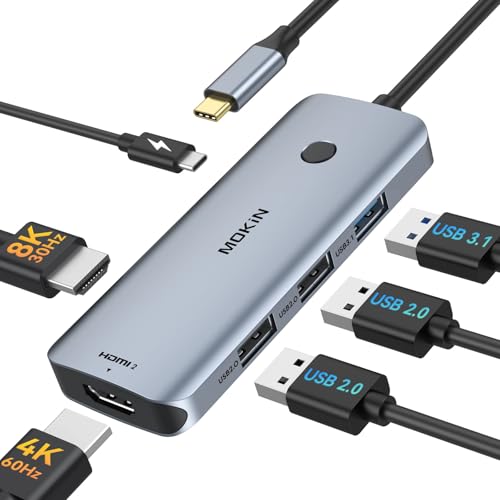
MOKiN 6-in-1 Dual HDMI USB-C Hub
Best for: Windows laptops needing dual 4K displays and charging
- Host Interface
- USB-C
- Display Support
- Dual
- Max Resolution
- 4K@60Hz
- Power Delivery
- 100W
- Port Count
- 6
- Video Ports
- HDMI
View on Amazon: MOKiN 6-in-1 Dual HDMI USB-C Hub Affiliate link
This 6-in-1 USB-C docking station expands your laptop ports with two HDMI outputs and a USB 3.1 interface. It supports 4K@60Hz video and delivers 100W Power Delivery for charging. The unit includes two USB 2.0 ports for peripherals. It is designed for Windows laptops to support triple displays. macOS users are limited to mirror mode only. It offers a stable plug-and-play experience without requiring additional drivers.
Pros
- Two HDMI ports support 4K@60Hz resolution
- 100W Power Delivery passes power to laptop
- USB 3.1 port enables 10Gbps data transfer
- Supports triple display on Windows laptops
- Compact 6-in-1 design weighs 2.72 ounces
Cons
- macOS devices only support mirror mode, not extended displays
- Only includes two USB 2.0 ports for peripherals
- No Ethernet or SD card slots included
Good fit if
- You need dual external monitors for a Windows laptop
- You want to charge your laptop through the hub
- You require fast data transfer speeds for external drives
Skip if
- You use a MacBook and need extended desktop mode
- You need to connect multiple high-speed USB 3.0 devices
- You require Ethernet connectivity for wired internet
Verdict: MOKiN 6-in-1 USB-C Hub with 100W PD is a solid choice for Windows users who need dual 4K displays and charging in one compact device. It is not suitable for MacBook users seeking extended screen real estate.

Vicfluxion 9-in-1 USB-C Hub with DisplayPort
Best for: Dual 4K monitor setups with wired Ethernet
- Host Interface
- USB-C
- Display Support
- Dual
- Max Resolution
- 4K@60Hz
- Power Delivery
- 85W
- Port Count
- 9
- Video Ports
- HDMI, DisplayPort
View on Amazon: Vicfluxion 9-in-1 USB-C Hub with DisplayPort Affiliate link
The Vicfluxion 9-in-1 hub expands a single USB-C port into a dual monitor workstation. It supports 4K@60Hz output via HDMI and DisplayPort, allowing you to connect two external screens simultaneously. The device includes Gigabit Ethernet for stable wired networking and 90W Power Delivery to charge your laptop while in use. It also features SD and TF card readers for fast data transfer. This setup suits users who need multiple displays and reliable connectivity.
Pros
- Supports dual 4K@60Hz displays via HDMI and DisplayPort
- Includes Gigabit Ethernet port for stable wired networking
- Provides 90W Power Delivery for laptop charging
- Features SD and TF card slots for fast data transfer
Cons
- Only supports dual monitors, not triple displays
- Requires laptop USB-C port to support DisplayPort Alt Mode
- Charger and power cable are not included
Good fit if
- You need to connect two external monitors to a single USB-C port
- You require a wired Gigabit Ethernet connection for stable networking
- You want to charge your laptop while using multiple peripherals
Skip if
- You need to connect three or more external monitors
- Your laptop USB-C port does not support DisplayPort Alt Mode
- You prefer a plug-and-play solution without needing external power
Verdict: Vicfluxion 9-in-1 Dual 4K USB-C Hub is a solid choice for users who need dual 4K displays and wired Ethernet connectivity. It fits those who prioritize stable networking and multi-monitor setups over triple display support.

MOKiN 17-in-1 Triple Display USB-C Dock
Best for: Triple monitor setups with high data needs
- Host Interface
- USB-C, USB4, Thunderbolt
- Display Support
- Triple
- Max Resolution
- 4K@60Hz
- Power Delivery
- 85W
- Port Count
- 17
- Video Ports
- HDMI, DisplayPort
View on Amazon: MOKiN 17-in-1 Triple Display USB-C Dock Affiliate link
The MOKiN 17-in-1 docking station supports three 4K@60Hz monitors via HDMI and DisplayPort. It connects through USB-C, USB4, or Thunderbolt. The hub includes 10Gbps data ports, gigabit Ethernet, and an SD card reader. It delivers up to 85W pass-through charging for your laptop. This setup is ideal for users needing extensive screen real estate and high-speed data transfer on a single connection.
Pros
- Supports triple 4K@60Hz displays simultaneously
- Includes 17 ports with 10Gbps data speeds
- Offers 85W pass-through laptop charging
- Features gigabit Ethernet and SD card reader
- Compatible with Windows, macOS, and Linux
Cons
- Requires a separate 100W power adapter
- Driver installation needed for video output
- No built-in screen rotation or tilt
Good fit if
- You need three external monitors for work
- You require high-speed 10Gbps data transfer
- You use a Thunderbolt or USB4 laptop
Skip if
- You want a plug-and-play macOS triple setup
- You prefer a compact single-monitor hub
- You need a built-in power adapter
Verdict: MOKiN 17-in-1 Triple Display Docking Station is the right choice for professionals who need three 4K screens and fast data ports in one vertical unit.

NOVOO 11-in-1 4K 60Hz USB-C Dock
Best for: Multi-monitor setups with wired needs
- Host Interface
- USB-C
- Display Support
- Triple
- Max Resolution
- 4K@60Hz
- Power Delivery
- 100W
- Port Count
- 11
- Video Ports
- HDMI, DP
View on Amazon: NOVOO 11-in-1 4K 60Hz USB-C Dock Affiliate link
The NOVOO 11-in-1 USB-C docking station offers triple display support with two HDMI ports and one DisplayPort. It handles 4K resolution at 60Hz and includes 100W power delivery for your laptop. The unit features an Ethernet port and four USB ports. It is a compact gray hub weighing 0.7 ounces. This setup suits users needing multiple screens and wired connectivity without a large footprint.
Pros
- Supports triple monitor displays
- Delivers 100W power to host device
- Includes Gigabit Ethernet port
- Provides four additional USB ports
Cons
- Only one DisplayPort available for daisy-chaining
- No wireless connectivity options like Bluetooth or Wi-Fi
- Fixed 11-in-1 configuration lacks modular flexibility
Good fit if
- You need three screens for productivity
- You require stable wired Ethernet connections
- You want 100W charging for your laptop
Skip if
- You need wireless connectivity for peripherals
- You prefer a single high-resolution display only
- You need more than four USB ports
Verdict: The NOVOO 11-in-1 USB-C Docking Station fits users who need triple displays and wired Ethernet. It provides a compact solution for multi-monitor setups with fast charging.

MOKiN 13-in-1 USB-C Docking Station
Best for: users needing triple displays and SD card access
- Host Interface
- USB-C
- Display Support
- Triple
- Max Resolution
- 4K
- Power Delivery
- 85W
- Port Count
- 13
- Video Ports
- HDMI, DisplayPort
View on Amazon: MOKiN 13-in-1 USB-C Docking Station Affiliate link
This 13-in-1 USB-C docking station supports triple displays via two HDMI ports and one DisplayPort. It includes a built-in SD and microSD card reader, making it ideal for transferring media files quickly. The hub offers gigabit Ethernet and up to 85W power delivery to your laptop. You get fast 10Gbps data transfer on select USB ports. It is a solid choice for users needing multiple video outputs and dedicated media card access.
Pros
- 13-in-1 port configuration with dual HDMI and DisplayPort
- Built-in SD and microSD card readers
- Supports triple display output
- Gigabit Ethernet port for stable internet
- Up to 85W power delivery pass-through
Cons
- macOS users are limited to one extended display
- Power delivery caps at 85W output, not the full 100W input
- Includes VGA option in variations but base model lacks it
Good fit if
- You need to connect two or three monitors simultaneously
- You frequently transfer photos or videos from SD cards
- You require a stable wired Ethernet connection for work
Skip if
- You use a Mac and need three extended displays
- You need more than 85W of power for your laptop
- You prefer a compact single-port hub over a docking station
Verdict: MOKiN 13-in-1 USB C Docking Station is a practical choice for professionals who need multiple screens and fast card access, though Mac users should note the single-display limitation.
Specifications side by side
| Spec | Hyper HyperDrive 6-in-2 Dual USB-C Hub | Selore Dual 4K HDMI USB-C Dock | MOKiN 6-in-1 Dual HDMI USB-C Hub | Vicfluxion 9-in-1 USB-C Hub with DisplayPort | MOKiN 17-in-1 Triple Display USB-C Dock | NOVOO 11-in-1 4K 60Hz USB-C Dock | MOKiN 13-in-1 USB-C Docking Station |
|---|---|---|---|---|---|---|---|
| Host Interface | Dual USB-C | USB-C | USB-C | USB-C | USB-C, USB4, Thunderbolt | USB-C | USB-C |
| Display Support | Dual | Dual | Dual | Dual | Triple | Triple | Triple |
| Max Resolution | 5K@60Hz | 4K@60Hz | 4K@60Hz | 4K@60Hz | 4K@60Hz | 4K@60Hz | 4K |
| Power Delivery | 100W | 100W | 100W | 85W | 85W | 100W | 85W |
| Port Count | 6 | 8 | 6 | 9 | 17 | 11 | 13 |
| Video Ports | HDMI, Thunderbolt 3.0 USB-C | HDMI | HDMI | HDMI, DisplayPort | HDMI, DisplayPort | HDMI, DP | HDMI, DisplayPort |
| Max Data Speed | 40Gbps | 5Gbps | 10Gbps | not stated | 10Gbps | not stated | 10Gbps |
| Ethernet Speed | Gigabit Ethernet | not stated | not stated | 1000Mbps | 1Gbps | not stated | Gigabit |
| Resolution | not stated | 4K UHD | 4K UHD | 4K UHD | not stated | 4K UHD | 4K UHD |
| Connectivity | USB-C, HDMI, Ethernet | USB-C, HDMI, USB-A | USB-C, HDMI | USB-C, HDMI, DisplayPort, Ethernet, USB-A | USB-C, HDMI, DisplayPort, Ethernet, USB-A | USB-C, HDMI, DisplayPort, Ethernet | USB-C, HDMI, DisplayPort, Ethernet |
| Refresh Rate | not stated | 60Hz | 60Hz | 60Hz | not stated | 60Hz | not stated |
| Features | not stated | not stated | not stated | not stated | not stated | not stated | Card Reader |
| Dimensions | 5.39 × 0.39 × 1.1 inches | 4.5 × 2.1 × 0.7 inches | 2 × 1 × 2 inches | 5.53 × 1.65 × 0.59 inches | not stated | 3.94 × 1.57 × 0.39 inches | not stated |
| Weight | 1.66 ounces | 3.39 ounces | 2.72 ounces | 2.56 ounces | not stated | 0.7 ounces | 4.66 ounces |
| Color | Space Gray | Grey | Grey | Grey- HDMI&DP | not stated | Gray | Gray |
| Model | GN28N-GRAY | SEUC0425 | not stated | not stated | not stated | not stated | 0231 |
| Size | not stated | 9-in-1 | 6-in-1 | not stated | not stated | 11 in 1 DP | 13 IN 1 |
For a related comparison, read dell 34 curved USB c hub alternatives.
Frequently asked questions
Which HyperDrive alternative supports dual 4K monitors?
The Selore Dual 4K HDMI USB-C Dock and the Vicfluxion 9-in-1 USB-C Hub both support dual 4K displays. The Selore model offers 60Hz refresh rates on its HDMI ports. The Vicfluxion unit adds a DisplayPort alongside its HDMI outputs. These options suit users who need two external screens for productivity tasks.
Does the HyperDrive 6-in-2 support Ethernet?
Yes, the Hyper HyperDrive 6-in-2 Dual USB-C Hub includes a Gigabit Ethernet port. This feature is highlighted in its attributes as a key connectivity option. It allows for a stable wired internet connection, which is useful for MacBook users who prioritize reliable networking over wireless signals.
Are there alternatives with a card reader?
The MOKiN 13-in-1 USB-C Docking Station includes a built-in card reader. This model is designed for professionals who need fast access to SD cards. It also supports triple 4K displays and offers 100W power delivery, making it a comprehensive solution for users with high data transfer needs.
Which hub is best for triple monitor setups?
The MOKiN 17-in-1 Triple Display USB-C Dock and the NOVOO 11-in-1 4K 60Hz USB-C Dock both support three monitors. The MOKiN unit is a vertical docking station with extensive port options. The NOVOO dock provides triple displays with 60Hz refresh rates and includes wired Ethernet connectivity for stable networking.
What is the most compact HyperDrive alternative?
The Hyper HyperDrive 6-in-2 is notably compact, measuring 5.39 inches in length and weighing just 1.66 ounces. Its slim profile makes it easy to carry. The MOKiN 6-in-1 Dual HDMI USB-C Hub is also small, weighing 2.72 ounces, offering a balance of portability and dual display support.
Do these hubs support 100W charging?
Most alternatives listed support 100W Power Delivery. This includes the HyperDrive 6-in-2, Selore Dock, MOKiN 6-in-1, and MOKiN 13-in-1 Dock. The Vicfluxion 9-in-1 also provides 100W PD. This feature allows you to charge your laptop while using the hub, reducing cable clutter on your desk.
Is there a budget-friendly option with dual HDMI?
The MOKiN 6-in-1 Dual HDMI USB-C Hub is labeled as the best budget choice. It supports dual 4K displays and includes 100W power delivery. This model is suitable for Windows users who need multiple screens without the higher cost of premium docking stations. It offers essential connectivity in a compact form.
Which alternative is best for Windows users?
The Selore Dual 4K HDMI USB-C Dock is recommended for Windows users needing dual 4K displays. It features physical control buttons for easy operation. The MOKiN 6-in-1 Hub is also noted as a solid choice for Windows laptops, providing dual 4K support and fast charging in a single device.