FOPO 16-Inch Triple Screen Laptop or FOPO 16-Inch 1200p Triple Portable Monitor? Which FOPO Model to Buy
As an Amazon Associate we earn from qualifying purchases. Links on this page are affiliate links.
You are looking at the fopo 16 inch triple screen laptop vs 16 inch 1200p triple portable. Both models offer three 16-inch 1080p IPS screens in a 16:10 aspect ratio. They share the same S11 chassis design. The main difference lies in how they connect to your computer. One uses a single cable driver-based approach. The other relies on standard plug-and-play HDMI and USB-C connections. This affects setup complexity and system compatibility.
Key differences
| Aspect | FOPO 16-Inch Triple Screen Laptop Extender | FOPO 16-Inch 1200p Triple Portable Monitor |
|---|---|---|
| Connectivity | USB-C and USB-A via driver | HDMI and full-featured USB-C, no driver |
| Weight | 3.88 lb | 4.4 lb |
| Refresh Rate | not listed | 60 HZ |
| Screen Rotation | Backrest design | Left screen 360° flip, right 205° |
| MacOS Support | M1, M2, M3 chips | M1/M2/M3 Pro or Max only |
Which one should you choose?
Choose FOPO 16-Inch Triple Screen Laptop Extender if
- You want the lightest portable option at 3.88 lb.
- You prefer a single-cable setup with included driver support.
- You use base M1, M2, or M3 chip Macs.
Choose FOPO 16-Inch 1200p Triple Portable Monitor if
- You need a driver-free plug-and-play experience.
- You require HDMI connectivity for specific laptops.
- You want the left screen to flip 360° for presentations.
Verdict: Choose the first model if you prioritize a lighter weight and simpler single-cable connection for base chip Macs. Select the second model if you need driver-free compatibility, HDMI ports, or flexible screen rotation for sharing your display. Both provide the same triple-screen productivity boost.
FOPO Triple Screen Connectivity Comparison
Connection Setup
The FOPO 16-Inch Triple Screen Laptop Extender relies on a driver-based installation. You must install the included driver from the USB drive to enable the single-cable connection. This setup requires your laptop to have USB-C or two USB-A ports that support data transfer. In contrast, the FOPO 16-Inch 1200p Triple Portable Monitor operates without drivers. It connects via HDMI or full-featured USB-C ports on your laptop. This plug-and-play approach eliminates the need for software installation, allowing you to start working immediately after connecting the cables. This simplifies the process for users who prefer direct hardware connections over software configuration.
System Compatibility
Both monitors support Windows and MacOS, but they handle Apple Silicon differently. The FOPO 16-Inch Triple Screen Laptop Extender works with all M1, M2, and M3 chips. It offers wide compatibility for various laptop sizes from 13.3 to 18.5 inches. The FOPO 16-Inch 1200p Triple Portable Monitor has a more specific requirement. It supports MacOS only with M1/M2/M3 Pro or Max chips, explicitly excluding the standard M1, M2, and M3 chips. If you use a base-model MacBook Air or MacBook Pro with standard chips, the second model will not function. The first model provides broader support for standard consumer Apple laptops.
Screen Flexibility
The FOPO 16-Inch 1200p Triple Portable Monitor offers superior screen positioning. Its left screen can flip 360 degrees and includes an auto-sensing feature for presentations. The right screen rotates up to 205 degrees, and the left screen also supports 245-degree parallel rotation. This allows for face-to-face sharing and flexible viewing angles. The FOPO 16-Inch Triple Screen Laptop Extender mentions a backrest design to protect your laptop screen but does not list specific rotation angles or flip capabilities for its side panels. The second model provides more dynamic options for adjusting the display orientation during use.
Weight and Portability
Portability is a key factor for mobile setups. The FOPO 16-Inch Triple Screen Laptop Extender weighs 3.88 lb and has a thickness of 1.14 inches. It comes with a portable bag for easy transport. The FOPO 16-Inch 1200p Triple Portable Monitor is slightly heavier at 4.4 lb. Its dimensions are 13.3 inches wide, 8.93 inches high, and 1.96 inches long when folded. While both models are designed to be lightweight and foldable into their respective carry bags, the first model is lighter and thinner. This makes the first option marginally easier to carry in a bag for travel or outdoor work sessions.
Included Cables
The cable configurations differ between the two models. The FOPO 16-Inch Triple Screen Laptop Extender includes a dual USB-A to USB-C cable and a 60cm USB-C to USB-C cable. Both support power and video transmission. The FOPO 16-Inch 1200p Triple Portable Monitor provides a more varied set of connections. It includes a USB-C cable with a USB-A connector (90cm), an HDMI to Mini HDMI cable (90cm), and two 60cm USB-C to USB-C cables. The second model offers HDMI connectivity, which is useful for laptops without USB-C video output, providing greater flexibility in connection options.
Choose your FOPO triple monitor
Users wanting simple plug-and-play setup
This model connects via HDMI or full-featured USB-C without needing drivers. It supports Windows and Mac systems with Pro or Max chips. You get a straightforward connection using standard cables. This avoids software installation steps, making it easier for users who prefer direct hardware links.
Those preferring a single cable solution
This extender uses one cable for all three screens after driver installation. It supports USB-C or two USB-A ports for data transfer. The included dual USB-A to USB-C cable simplifies desktop space. You save time on cable management while maintaining a clean and efficient workspace setup.
Presenters needing screen rotation flexibility
This unit features a left screen that flips 360 degrees with auto-sensing. It also supports 245-degree parallel rotation on the left and 205 degrees on the right. This design facilitates face-to-face presentations and screen sharing, offering more physical flexibility for collaborative work or public display scenarios.
The products compared
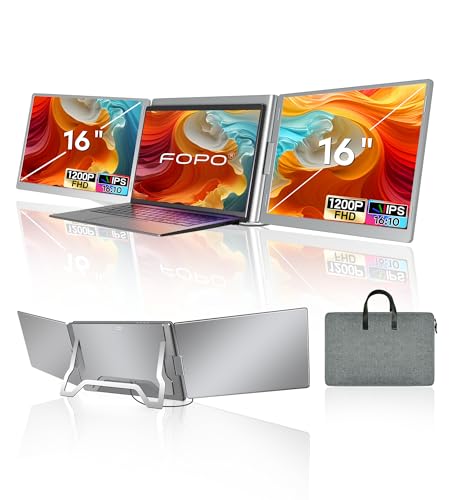
FOPO 16-Inch Triple Screen Laptop Extender
Best for: users needing three screens via one cable
- Screen Size
- 16"
- Resolution
- 1920*1200P
- Panel Type
- IPS
- Connectivity
- USB-C, USB-A
- Color Gamut
- 100% sRGB
- Aspect Ratio
- 16:10
View on Amazon: FOPO 16-Inch Triple Screen Laptop Extender Affiliate link
This FOPO 16-inch triple portable monitor delivers three 1920x1200 screens via a single cable. It uses IPS panels with 100% sRGB coverage and a 16:10 aspect ratio. The unit weighs 3.88 lb and includes USB-C and USB-A connectivity. It supports Windows and macOS, including M1-M3 chips. You get dedicated brightness buttons and low blue light filters for each screen.
Pros
- Three 16-inch FHD screens in one unit
- Single cable connection for simplified setup
- 100% sRGB color gamut for accurate colors
- Lightweight design at 3.88 lb for portability
Cons
- Requires installing a driver for operation
- Heavier than single-screen portable monitors
- Limited to 60Hz refresh rate
Good fit if
- You need three displays on one laptop
- You want a single cable for connection
- You work on Windows or macOS systems
Skip if
- You prefer wireless screen mirroring
- You need high refresh rate gaming
- You want a lightweight single display
Verdict: FOPO 16" Triple Portable Monitor provides a compact triple-screen setup for users who need maximum screen real estate without multiple cables. It fits professionals who value color accuracy and portability in a single package.

FOPO 16-Inch 1200p Triple Portable Monitor
Best for: Users needing three screens for multitasking
- Screen Size
- 16"
- Resolution
- 1920x1200
- Refresh Rate
- 60 HZ
- Panel Type
- IPS
- Connectivity
- USB-C, HDMI, Mini HDMI
- Aspect Ratio
- 16:10
View on Amazon: FOPO 16-Inch 1200p Triple Portable Monitor Affiliate link
The FOPO S11 is a triple-screen extender for 12 to 18.5-inch laptops. It adds two 16-inch 1200p displays via HDMI or USB-C. The left screen flips 360 degrees for sharing. Each panel offers 1920x1200 resolution and 60Hz refresh rate. It weighs 4.4 lb and folds into a carry bag. This setup boosts multitasking for remote work or trading.
Pros
- Triple monitor configuration adds two extra screens
- 1920x1200 resolution with 16:10 aspect ratio
- Left screen features 360-degree flip design
- Plug and play with no driver installation
- Lightweight 4.4 lb build for portability
Cons
- MacOS support limited to Pro or Max chips
- 60Hz refresh rate limits high-motion use
- Includes only one HDMI to Mini HDMI cable
Good fit if
- You need a third screen for heavy multitasking
- You use a laptop with full-featured USB-C or HDMI
- You want to share your screen face-to-face
Skip if
- You use a base model M1, M2, or M3 Mac
- You require a refresh rate higher than 60Hz
- You prefer a single display over a triple setup
Verdict: FOPO 16-Inch Triple 1200P Portable Monitor is a practical triple-screen extender for users needing extra workspace on compatible Windows or high-end Mac laptops.
Specifications side by side
| Spec | FOPO 16-Inch Triple Screen Laptop Extender | FOPO 16-Inch 1200p Triple Portable Monitor |
|---|---|---|
| Screen Size | 16" | 16" |
| Resolution | 1920*1200P | 1920x1200 |
| Refresh Rate | not stated | 60 HZ |
| Panel Type | IPS | IPS |
| Connectivity | USB-C, USB-A | USB-C, HDMI, Mini HDMI |
| Color Gamut | 100% sRGB | not stated |
| Aspect Ratio | 16:10 | 16:10 |
| Weight | 3.88 lb | not stated |
| Display Support | not stated | Triple Monitor |
| Size | 16 Inch | 16" |
| Dimensions | 1.5 × 13.3 × 7.8 inches | 1.96 × 13.3 × 8.93 inches |
| Color | Grey | Gary |
| Model | S11 | S11 |
Frequently asked questions
Does the FOPO 16-inch triple monitor need drivers?
It depends on the model. The Laptop Extender version requires a driver installation from the included USB drive to enable its single-cable connection. The 1200p Triple Portable Monitor does not need drivers. It connects via standard HDMI or full-featured USB-C cables for immediate use.
Is the FOPO 16-inch triple screen laptop extender compatible with Mac?
The Laptop Extender model is designed for Windows systems that support the required driver-based single-cable connection. The 1200p Triple Portable Monitor supports Windows and high-end Mac laptops with Pro or Max chips. You can use standard cables with the 1200p model for Mac compatibility.
What is the difference in thickness between the two FOPO models?
The Laptop Extender is thinner at 1.5 inches. The 1200p Triple Portable Monitor is slightly thicker at 1.96 inches. Both share the same 13.3-inch width. The 1200p model has a height of 8.93 inches, while the Laptop Extender is 7.8 inches tall.
Do both FOPO 16-inch models have the same resolution?
Yes, both models feature a 1080p FHD resolution on each screen. They also share the same 16-inch size and IPS panel type. Despite the different names, the display quality and screen dimensions are identical across both the Laptop Extender and the 1200p Triple Portable Monitor.
Which FOPO model is better for users who want no drivers?
The FOPO 16-Inch 1200p Triple Portable Monitor is the better choice. It connects via HDMI or full-featured USB-C without requiring any driver installation. This allows for a straightforward plug-and-play setup on compatible Windows or high-end Mac laptops, avoiding software configuration entirely.
Can I use the FOPO 16-inch triple monitor with one cable?
Only the Laptop Extender model supports a single-cable connection. You must install the driver to use this feature. The 1200p Triple Portable Monitor requires separate video cables like HDMI or USB-C. It does not offer the single-cable convenience of the Laptop Extender version.