FOPO 16-Inch Triple Screen Laptop vs FOPO 14-Inch Quad Screen Extender (2026): Key Differences
As an Amazon Associate we earn from qualifying purchases. Links on this page are affiliate links.
When you compare the fopo 16 inch triple screen laptop vs 14 inch quad screen extender, you see two distinct multi-display solutions from FOPO. Both devices connect via a single cable to laptops and feature IPS panels for consistent viewing angles. They also share a grey finish and include carry bags for portability. The primary difference lies in their display count and size. One offers three 16-inch screens, while the other provides four 14-inch screens. This choice affects your workspace layout and visual clarity.
Key differences
| Aspect | FOPO 16-Inch Triple Screen Laptop Extender | FOPO 14-Inch Quad Screen Extender |
|---|---|---|
| Screen Count | 3 screens | 4 screens |
| Resolution | 1920*1200 | 1920*1080 |
| Color Gamut | 100% sRGB | 72% NTSC |
| Weight | 3.88 lb | 5.02 lb |
| Special Features | Low blue light | Auto-sensitive top screen, reverse charging |
Which one should you choose?
Choose FOPO 16-Inch Triple Screen Laptop Extender if
- You need a higher vertical resolution for detailed work
- You prefer a lighter device for travel
- You want better color accuracy for design tasks
Choose FOPO 14-Inch Quad Screen Extender if
- You require four separate display areas for multitasking
- You need reverse charging to power your laptop
- You want auto-adjusting screen angles for presentations
Verdict: The 16-inch triple model suits users who prioritize color accuracy and portability. The 14-inch quad model is better for those who need maximum screen real estate and advanced features like reverse charging. Your choice depends on whether you value higher resolution or additional display count.
FOPO 16 vs 14 Inch Extender
screen count and layout
The FOPO 16-Inch Triple Screen Laptop Extender gives you three external displays. It uses a single cable to connect these three screens to your laptop. This setup is designed for users who need a wide horizontal workspace. In contrast, the FOPO 14-Inch Quad Screen Extender adds four external displays. It turns your laptop into a quad monitor workstation. This model offers four screens for multitasking. The quad setup provides more total screen real estate. You get three new 14-inch monitors plus your laptop screen. The triple setup gives you three 16-inch monitors. Choose based on whether you prefer three large screens or four smaller ones.
resolution and color
Both products offer Full HD resolution, but the pixel count differs. The FOPO 16-Inch model uses a 1920x1200 resolution. This 16:10 aspect ratio provides more vertical space. It also covers 100% of the sRGB color gamut. The FOPO 14-Inch Quad model uses a standard 1920x1080 resolution. It covers 72% of the NTSC color gamut. The 16-inch model has a higher pixel density and better color accuracy. The 14-inch model has a standard contrast ratio of 1000:1. The 16-inch model highlights low blue light technology. Both use IPS panels for consistent viewing angles. The 16-inch option is better for color-critical work.
weight and portability
Portability matters for mobile setups. The FOPO 16-Inch Triple Screen Extender weighs 3.88 pounds. It is 1.14 inches thick. It comes with a portable bag. The FOPO 14-Inch Quad Screen Extender weighs 5.02 pounds. It is thicker at 1.96 inches. The quad model is heavier due to the extra screen. The triple model is lighter and thinner. You can carry the 16-inch model more easily. It is better for travel or outdoor activities. The 14-inch quad model is bulkier. It requires more space in your bag. If you move often, the lighter triple screen is the practical choice.
power delivery
Power management differs significantly between the two. The FOPO 14-Inch Quad Screen Extender supports reverse charging. It can charge your laptop when you use a 60W adapter. This feature helps extend your laptop battery life. The FOPO 16-Inch Triple Screen Extender does not list reverse charging. It relies on data and power transmission cables. You must ensure your laptop has enough power. The quad model offers a unique advantage for users with limited ports. The triple model focuses on simple connectivity. Check your laptop's power output if you choose the triple screen. The quad screen is better for power-hungry setups.
unique features
Each product has distinct hardware features. The FOPO 14-Inch Quad Screen Extender includes an auto-sensitive screen. The top screen can rotate 0 to 225 degrees. This allows you to adjust the viewing angle easily. It also has a fixed bracket for secure placement. The FOPO 16-Inch Triple Screen Extender has a backrest design. This prevents damage to your laptop screen. It includes dedicated brightness adjustment buttons on each screen. The quad model lacks mentioned brightness buttons. The triple model lacks rotation features. Choose the quad model for flexible viewing angles. Choose the triple model for screen protection and manual controls.
compatibility
Both extenders support Windows and macOS systems. They work with M1, M2, and M3 chips. The FOPO 16-Inch model supports laptops from 13.3 to 18.5 inches. It requires USB-C or two USB-A ports. The FOPO 14-Inch Quad model supports laptops from 13.6 to 17.3 inches. It requires Windows 10 or later. It excludes Microsoft Surface and Chromebook. The 14-inch model has stricter compatibility limits. The 16-inch model supports a wider range of laptop sizes. Check your laptop model carefully. The triple screen is more versatile for different laptop sizes.
Which FOPO Multi-Screen Setup Fits You
Users needing maximum screen real estate
The FOPO 14-Inch Quad Screen Extender provides four external displays, boosting multitasking efficiency by 400%. It features a 14-inch screen size with 1920x1080 resolution. This model supports auto-sensitive rotation from 0 to 225 degrees. It also includes reverse charging capabilities for your laptop when using a 60W adapter. The weight is 5.02 pounds.
Those prioritizing portability and color accuracy
The FOPO 16-Inch Triple Screen Laptop Extender weighs only 3.88 pounds, making it easier to carry. It offers a 16-inch display with a 16:10 aspect ratio. The panel covers 100% of the sRGB color gamut for vivid visuals. It supports low blue light technology to reduce eye fatigue. The total thickness is just 1.14 inches for compact storage.
Users wanting broader OS compatibility
This model supports Windows and MacOS systems, including M1, M2, and M3 chips. It is suitable for laptops ranging from 13.3 to 18.5 inches. The FOPO 14-Inch Quad version excludes Microsoft Surface series and Chromebooks. This triple screen extender offers wider compatibility for various laptop brands without specific OS version restrictions beyond standard support.
The products compared
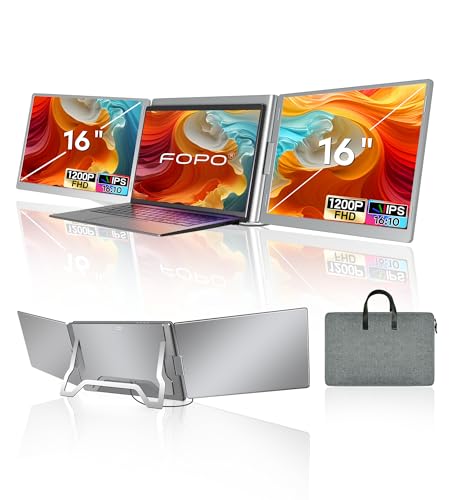
FOPO 16-Inch Triple Screen Laptop Extender
Best for: Users needing three extra screens via one cable
- Screen Size
- 16"
- Resolution
- 1920*1200P
- Panel Type
- IPS
- Connectivity
- USB-C, USB-A
- Color Gamut
- 100% sRGB
- Aspect Ratio
- 16:10
View on Amazon: FOPO 16-Inch Triple Screen Laptop Extender Affiliate link
This FOPO 16-inch extender adds three 1080p IPS screens to your laptop using a single cable. It uses a 16:10 aspect ratio and covers 100% sRGB for clear visuals. The unit weighs 3.88 lb and includes a carry bag. It supports Windows and macOS systems. This setup helps you manage multiple tasks efficiently by expanding your workspace without cluttering your desk with extra cables.
Pros
- Connects three screens with one USB-C or USB-A cable
- FHD 1920x1200 resolution on 16:10 IPS panels
- 100% sRGB color gamut for accurate colors
- Lightweight 3.88 lb build with included carry bag
Cons
- Requires driver installation for the triple-screen function
- Lacks built-in speakers or audio output
- No mention of adjustable stand or height settings
Good fit if
- You need three extra displays for multitasking
- You want a simple one-cable connection setup
- You work with Windows or macOS laptops
Skip if
- You prefer a single large monitor over multiple small ones
- You need built-in speakers for media playback
- You cannot install third-party drivers on your system
Verdict: FOPO 16" Triple Screen Extender is a practical solution for users who need maximum screen real estate from a single connection. It suits professionals who prioritize vertical workspace and color accuracy over standalone monitor features.

FOPO 14-Inch Quad Screen Extender
Best for: mobile quad-monitor multitasking
- Screen Size
- 14"
- Resolution
- 1920*1080
- Panel Type
- IPS
- Connectivity
- USB-C, USB-A
- Color Gamut
- 72% NTSC
- Weight
- 5.02 pounds
View on Amazon: FOPO 14-Inch Quad Screen Extender Affiliate link
This FOPO extender adds three 14-inch 1080p IPS screens to your laptop, creating a quad-monitor setup. It uses a single USB-C or USB-A cable for video and power, with a 60W adapter required for reverse charging. The 72% NTSC color gamut and 1000:1 contrast ratio provide clear visuals. It weighs 5.02 pounds and supports 0-225° rotation, making it a mobile solution for multitasking.
Pros
- Single-cable USB-C or USB-A connection
- Three 14-inch 1080p IPS displays
- 72% NTSC color gamut for vivid colors
- 0-225° rotation with auto-sensitive top screen
Cons
- Heavier at 5.02 pounds compared to single screens
- Requires 60W PD adapter for reverse charging
- Limited to 72% NTSC color gamut
Good fit if
- You need a quad-monitor mobile workstation
- You want a single-cable connection setup
- You require adjustable screen rotation angles
Skip if
- You use Microsoft Surface or Chromebook
- You need more than 72% NTSC coverage
- You prefer a lighter single-screen setup
Verdict: FOPO 14" Quad Screen Extender S680 fits users who need three extra 1080p screens for multitasking without complex cabling, provided they can manage the 5.02-pound weight and 72% NTSC color limits.
Specifications side by side
| Spec | FOPO 16-Inch Triple Screen Laptop Extender | FOPO 14-Inch Quad Screen Extender |
|---|---|---|
| Screen Size | 16" | 14" |
| Resolution | 1920*1200P | 1920*1080 |
| Panel Type | IPS | IPS |
| Connectivity | USB-C, USB-A | USB-C, USB-A |
| Color Gamut | 100% sRGB | 72% NTSC |
| Aspect Ratio | 16:10 | not stated |
| Weight | 3.88 lb | 5.02 pounds |
| Size | 16 Inch | 17.3 Inch |
| Dimensions | 1.5 × 13.3 × 7.8 inches | 1.96 × 13.3 × 8.93 inches |
| Color | Grey | Grey |
| Model | S11 | S680 |
Frequently asked questions
Does the FOPO 16-inch model support vertical screen orientation?
Yes, the FOPO 16-Inch Triple Screen Laptop Extender supports vertical workspace configurations. Its design prioritizes vertical screen real estate for professionals. This layout allows you to view more content vertically. It suits users who need maximum screen space from a single connection. The IPS panel ensures consistent viewing angles in this orientation.
Is the FOPO 14-inch quad extender heavy to carry?
The FOPO 14-Inch Quad Screen Extender weighs 5.02 pounds. This weight requires you to manage portability carefully. It is designed for mobile quad-monitor multitasking. You should ensure your laptop can support this load. The device features a 14-inch screen size with 1920x1080 resolution for clear visuals.
What resolution do both FOPO multi-screen extenders provide?
Both the FOPO 16-inch and 14-inch models provide 1080p FHD resolution. This standard full HD clarity applies to all external displays on each unit. You get consistent image quality across multiple screens. The IPS panel type supports this resolution with good color reproduction. This setup is ideal for detailed work and multitasking.
How many extra screens does the FOPO 14-inch model add?
The FOPO 14-Inch Quad Screen Extender adds four external displays. This boosts multitasking efficiency significantly by providing four extra screens. It connects via a single cable to your laptop. The model S680 supports auto-sensitive rotation from 0 to 360 degrees. You can adjust the layout to fit your workflow needs.
Does the FOPO 16-inch extender use one cable for all screens?
Yes, the FOPO 16-Inch Triple Screen Laptop Extender uses a single cable. It connects three external displays to your laptop through one connection. This simplifies your setup by reducing cable clutter. It is a practical solution for users needing maximum screen real estate. The model S11 features a grey color and compact dimensions.
What is the color of the FOPO multi-screen extenders?
Both the FOPO 16-inch and 14-inch models come in grey. This neutral color matches most laptop and desk setups. The FOPO 16-inch model S11 is grey. The FOPO 14-inch model S680 is also grey. This consistent styling helps them blend into your workspace environment.
Can the FOPO 14-inch extender rotate its screens?
Yes, the FOPO 14-Inch Quad Screen Extender supports auto-sensitive rotation. It allows rotation from 0 to 360 degrees. This feature lets you adjust screen angles for comfort. It is part of the S680 model design. You can optimize your viewing position for better productivity and ergonomics.