Dual Monitor or Triple Monitor Docking Stations? Compared by Specs
As an Amazon Associate we earn from qualifying purchases. Links on this page are affiliate links.
When choosing between a dual monitor vs triple monitor docking station, you face a clear split in capability. Both the Anker 8-in-1 and the VVB 14-in-1 hubs connect via USB-C and support high-resolution displays. They both provide Ethernet connectivity and power delivery for your laptop. The main difference lies in the number of screens you can drive simultaneously. One unit handles two displays, while the other supports three, along with more varied port options like VGA and audio jacks.
Key differences
| Aspect | Anker PowerExpand 8-in-1 Dual HDMI USB-C Hub | VVB 14-in-1 USB-C Triple Display Dock |
|---|---|---|
| Display Support | Dual | Dual, Triple |
| Port Count | 8 | 14 |
| Video Ports | HDMI | HDMI, VGA |
| Power Delivery | 85W | 87W |
| Audio | not listed | 3.5mm Mic/Audio |
Which one should you choose?
Choose Anker PowerExpand 8-in-1 Dual HDMI USB-C Hub if
- You need a simpler setup with just two screens and fewer cables.
- You prefer a compact device with fewer ports to manage.
- You only use HDMI monitors and do not need legacy VGA connections.
Choose VVB 14-in-1 USB-C Triple Display Dock if
- You want to run three displays simultaneously on Windows.
- You need extra connectivity like VGA, SD card readers, or audio jacks.
- You require more USB ports for multiple peripherals at once.
Verdict: The Anker hub suits users who want a clean, dual-display workspace with minimal clutter. The VVB dock is better for those who need to drive three screens or require diverse ports like VGA and audio. Your choice depends on whether you prioritize screen count or port variety.
Dual vs Triple Monitor Dock Specs
Display Support
The VVB 14-in-1 hub offers triple display support, allowing you to extend your workspace across three monitors on Windows. You can use two HDMI ports and one VGA port simultaneously. The Anker 8-in-1 hub is limited to dual monitors. It provides two HDMI ports but does not support a third screen. This makes the VVB option better for users who need three distinct screens for productivity tasks like coding or data analysis. The Anker model suits those who only need two external displays.
Max Resolution
Both hubs support 4K resolution, but the refresh rates differ based on your setup. The Anker hub can push 4K at 60Hz on a single display. When you use both HDMI ports, the resolution drops to 4K at 30Hz. The VVB hub also supports 4K at 60Hz on HDMI 1, but HDMI 2 is limited to 4K at 30Hz. When using dual displays, VVB outputs 4K at 30Hz and 1080p at 60Hz. The Anker model offers a smoother 60Hz experience if you only use one 4K screen.
Port Count
The VVB 14-in-1 dock provides significantly more expansion options with fourteen total ports. It includes two HDMI ports, one VGA port, three USB 3.0 ports, one USB-C data port, two USB 2.0 ports, an SD and microSD card reader, a 3.5mm audio jack, and gigabit Ethernet. The Anker 8-in-1 hub offers eight ports. It has two HDMI ports, two USB-A ports, one USB-C PD port, one Ethernet port, and a combined SD/microSD reader. The VVB model is better if you need many peripherals connected at once.
Power Delivery
Both hubs support USB-C Power Delivery for charging your laptop while connected. The VVB 14-in-1 dock supports up to 100W input power delivery, though it safely charges your laptop at up to 87W. The Anker 8-in-1 hub supports pass-through charging up to 85W. Both require a compatible USB-C PD wall charger and cable to achieve these speeds. The VVB model offers slightly higher potential power throughput for high-performance laptops that require more than 85W for optimal charging.
Compatibility
The Anker hub explicitly lists compatibility with Windows 10 and 11, ChromeOS, and devices with DP Alt Mode. It notes that macOS users will only get mirrored displays on both monitors. It also states it is not compatible with Linux. The VVB hub mentions support for Windows OS for triple display extension and notes that Mac OS only supports mirror mode. It lists broad applicability for Dell, Surface, Lenovo, and HP laptops. The Anker model provides clearer explicit OS support details in its documentation.
Which docking station suits your workflow
Windows users needing three screens
The VVB 14-in-1 hub supports triple displays on Windows. You can connect two HDMI monitors and one VGA display simultaneously. This setup extends your workspace significantly. The Anker model only supports dual monitors, making it less suitable if you require three separate windows for multitasking.
Mac users with dual displays
The Anker hub is compatible with macOS for dual monitor setups. It allows you to mirror content to both external displays. The VVB hub restricts Mac users to mirror mode only. If you need distinct extended desktops on a Mac, neither hub fully supports it, but Anker offers simpler dual mirroring.
Users prioritizing port variety
The VVB dock provides 14 ports, including VGA, audio, and SD card readers. It also features Gigabit Ethernet. The Anker hub offers 8 ports but lacks VGA and audio jacks. If you need legacy connections or built-in audio, the VVB hub provides more connectivity options from a single USB-C host.
Quick picks
| # | Product | Best for | Price |
|---|---|---|---|
| 1 | Anker PowerExpand 8-in-1 Dual HDMI USB-C Hub | Windows users needing 4K@60Hz on one screen | Check price of Anker PowerExpand 8-in-1 Dual HDMI USB-C Hub on Amazon |
| 2 | VVB 14-in-1 USB-C Triple Display Dock | Windows users needing triple displays and 14 ports | Check price of VVB 14-in-1 USB-C Triple Display Dock on Amazon |
The products compared

Anker PowerExpand 8-in-1 Dual HDMI USB-C Hub
Best for: Windows users needing 4K@60Hz on one screen
- Display Support
- Dual Monitor (what this guide is about)
- Host Interface
- USB-C
- Max Resolution
- 4K @ 60Hz
- Power Delivery
- 85W
- Port Count
- 8
- Video Ports
- HDMI
View on Amazon: Anker PowerExpand 8-in-1 Dual HDMI USB-C Hub Affiliate link
This Anker hub connects two external displays to a single USB-C port. It supports 4K resolution at 60Hz on one screen, or 4K at 30Hz on both. You get pass-through charging up to 85W, plus Ethernet and card readers. It fits Windows, ChromeOS, and macOS, though macOS mirrors the displays. It is a compact solution for dual setups.
Pros
- Supports 4K@60Hz on a single HDMI display
- 85W USB-C Power Delivery pass-through charging
- Includes Ethernet port and SD card reader
- Compact design weighing only 3.2 ounces
Cons
- Dual 4K displays are limited to 30Hz
- macOS users get mirrored displays only
- Not compatible with Linux operating systems
Good fit if
- You need a single port to drive two monitors
- You want 4K@60Hz on your primary screen
- You require Ethernet and SD card access
Skip if
- You use a Linux-based computer
- You need independent extended displays on macOS
- You require triple monitor support
Verdict: Anker 8-in-1 USB-C Dual Monitor Hub is a compact choice for users who need high refresh rates on one screen and extra ports. It suits Windows and ChromeOS users who want a clean dual setup without multiple cables.
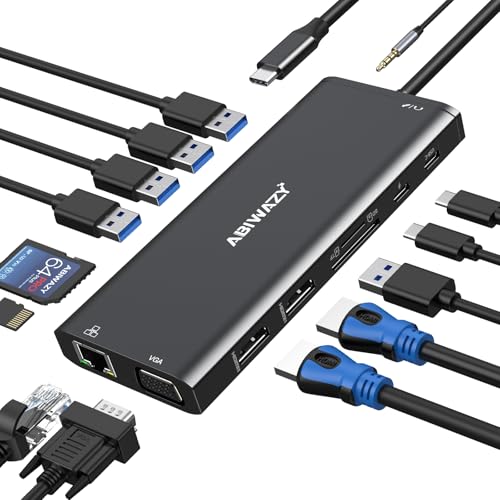
VVB 14-in-1 USB-C Triple Display Dock
Best for: Windows users needing triple displays and 14 ports
- Display Support
- Triple Monitor (what this guide is about)
- Host Interface
- USB-C, Thunderbolt 3
- Max Resolution
- 4K@60Hz
- Power Delivery
- 87W
- Port Count
- 14
- Video Ports
- HDMI, VGA
View on Amazon: VVB 14-in-1 USB-C Triple Display Dock Affiliate link
This VVB docking station expands a single USB-C or Thunderbolt 3 port into 14 connections. It supports dual 4K displays and triple monitor setups on Windows, with one HDMI reaching 4K@60Hz. The dock delivers up to 87W of power delivery to charge your laptop while working. It includes gigabit ethernet, SD card readers, and multiple USB ports for peripherals. This setup suits users needing extensive connectivity and multi-screen productivity from a single host port.
Pros
- Supports dual 4K@60Hz and triple monitor displays on Windows
- 14-in-1 port count including HDMI, VGA, and USB
- 87W power delivery for laptop charging
- Gigabit Ethernet for stable wired internet
- SD and Micro SD card readers
Cons
- Mac OS only supports mirror mode
- Second HDMI port limited to 4K@30Hz
- VGA output restricted to 1080p resolution
Good fit if
- You need to run three monitors on a Windows laptop
- You require a single dock for ethernet, USB, and video
- You want fast SD card transfer speeds up to 104Mb/s
Skip if
- You use a Mac and need extended desktop mode
- You need 8K video output support
- You require more than 87W of power delivery
Verdict: VVB 14-in-1 USB-C Docking Station is a high-port-count solution for Windows users who need triple display support and wired connectivity. It fits professionals who prioritize screen real estate and data transfer over advanced macOS features.
Specifications side by side
| Spec | Anker PowerExpand 8-in-1 Dual HDMI USB-C Hub | VVB 14-in-1 USB-C Triple Display Dock |
|---|---|---|
| Host Interface | USB-C | USB-C, Thunderbolt 3 |
| Display Support | Dual | Triple |
| Max Resolution | 4K @ 60Hz | 4K@60Hz |
| Power Delivery | 85W | 87W |
| Port Count | 8 | 14 |
| Video Ports | HDMI | HDMI, VGA |
| Max Data Speed | not stated | 5Gbps |
| Ethernet Speed | 1Gbps | 1Gbps |
| Resolution | 4K UHD | 4K UHD |
| Connectivity | USB-C, HDMI, Ethernet | USB-C, HDMI, Ethernet, VGA |
| Features | Card Reader | not stated |
| Dimensions | 4.65 × 2.01 × 0.69 inches | 5 × 0.5 × 1 inches |
| Weight | 3.2 ounces | 1 ounces |
| Size | 8-in-1 USB C Hub | not stated |
| Color | Gray | Black |
| Model | A83800A1 | not stated |
Frequently asked questions
Can a dual monitor hub support 4K resolution?
Yes, the Anker 8-in-1 USB-C Hub supports 4K UHD resolution. It delivers this at a 60Hz refresh rate on one screen. This makes it suitable for Windows users who need high clarity on a single display. The dual setup remains clean without requiring multiple cables.
What is the maximum number of displays the VVB dock supports?
The VVB 14-in-1 USB-C Triple Display Dock supports three monitors simultaneously. It allows you to extend your workspace across three screens on Windows. This configuration is ideal for professionals who prioritize maximum screen real estate for multitasking and data-heavy workflows.
Do these docks include Ethernet ports?
Yes, both the Anker and VVB hubs include Ethernet connectivity. The Anker 8-in-1 model provides wired network access alongside its display outputs. The VVB 14-in-1 dock also offers Ethernet, ensuring stable internet connections for your laptop while using multiple external displays.
Is the VVB dock compatible with macOS?
The VVB 14-in-1 dock is primarily designed for Windows users. It fits professionals who prioritize screen real estate and data transfer over advanced macOS features. While it connects via USB-C, its triple display capabilities are optimized for the Windows operating system environment.
How many total ports does the VVB hub have?
The VVB 14-in-1 USB-C Docking Station features 14 ports in total. This high port count allows you to connect numerous peripherals simultaneously. It serves as a comprehensive solution for users who need extensive wired connectivity alongside their triple monitor setup.
What is the weight of the Anker hub?
The Anker PowerExpand 8-in-1 Hub weighs 3.2 ounces. Its compact dimensions are 2.01 inches wide, 0.69 inches high, and 4.65 inches long. This lightweight design makes it easy to carry and fits neatly on a desk without taking up much space.
Can I use the Anker hub for ChromeOS?
Yes, the Anker 8-in-1 USB-C Hub suits ChromeOS users. It provides a clean dual monitor setup without the clutter of multiple cables. Windows users also benefit from its ability to drive one screen at 4K@60Hz while maintaining connectivity for other devices.