Crossery Dell WD19 180W Docking Review: Specs, Pros and Cons
As an Amazon Associate we earn from qualifying purchases. Links on this page are affiliate links.
This crossery dell wd19 docking station review covers the Dell WD19 180W Docking Station Bundle. It is a comprehensive package designed for users needing robust connectivity and high-resolution display support. The unit features dual monitor capabilities with a maximum resolution of 3840 x 2160 at 60 Hz. It also includes a 180W power adapter that delivers up to 130W of power delivery to compatible laptops. This bundle aims to simplify your workspace by consolidating multiple peripherals into a single connection point.
What stands out
- Dual monitor support with 4K resolution at 60 Hz via DisplayPort 1.4
- 130W power delivery for Dell laptops and 90W for non-Dell systems
- Extensive port selection including HDMI, two DisplayPorts, and multiple USB-A and USB-C ports
- Gigabit Ethernet RJ45 port for stable wired network connections
- Includes Thunderbolt 3 cable and 180W power adapter in the box
Who it fits
Good fit for
This docking station suits professionals who need to drive two 4K displays simultaneously without latency. It is ideal for Dell laptop users who benefit from the higher 130W power delivery output. You will appreciate the wide array of ports if you connect multiple peripherals, including headsets, mice, and wired networks. The inclusion of a Thunderbolt 3 cable makes it a strong choice for setups requiring high-speed data transfer alongside video output.
Who should skip it
You should look elsewhere if your laptop does not support USB-C video output or Thunderbolt 3. This dock is less suitable for users who require power delivery to non-Dell systems, as it drops to 90W in those cases. If you need more than two external displays, this dual-monitor setup will not meet your needs. Additionally, users seeking brand-new, unrefurbished hardware may want to check other options, as the dock itself is listed as renewed.
Verdict: This bundle offers a solid, spec-heavy solution for dual 4K setups and high-power laptop charging. It provides excellent value for users who need comprehensive connectivity in a single package.
Dell WD19 Key Specs Explained
Max Resolution: 3840 x 2160 - 60 Hz
This spec indicates the dock supports 4K resolution at a smooth 60 frames per second when using DisplayPort 1.4 over USB-C. You get sharp images and fluid motion for video editing or detailed work. This is superior to 30 Hz modes, which can feel stuttery. When comparing portable monitors, ensure your setup matches this refresh rate for the best visual experience.
Display Support: Dual
The hardware allows you to connect two external screens simultaneously. This creates a wider workspace for multitasking, code writing, or data analysis without overlapping windows. You can arrange these displays side by side for efficient workflow management. This dual setup is essential for users who need more screen real estate than a single laptop display provides.
Power Delivery: 130W
The dock delivers up to 130 watts of power to Dell laptops through a single cable. This high wattage ensures your laptop stays charged even under heavy load while connected to peripherals. Non-Dell systems receive 90 watts, which is still sufficient for most modern ultrabooks. This reduces cable clutter by combining power and data into one connection.
Host Interface: USB-C
This interface connects your laptop to the dock using a reversible USB-C cable. It carries video, data, and power signals simultaneously. You need a laptop port that supports DisplayPort Alternate Mode and Power Delivery for full functionality. This single-cable solution simplifies your desk setup by minimizing the number of cables plugged directly into your computer.
Ethernet Speed: Gigabit
The built-in Gigabit Ethernet port provides a stable wired network connection up to 1 Gbps. Wired connections offer lower latency and higher consistency than Wi-Fi, which is critical for large file transfers or video calls. This ensures your internet connection remains reliable even in areas with poor wireless signal strength.
Design and Build Overview
The Dell WD19 180W Docking Station Bundle arrives in a black finish. According to the listing, the unit is a renewed dock that has been professionally inspected, tested, and cleaned. This process ensures the hardware is fully functional before it reaches you. The bundle includes all new accessories, such as a 180W power adapter, a Thunderbolt 3 cable, an Ethernet cable, and a microfiber cleaning cloth. These components are packaged together to provide a complete, plug-and-play experience right out of the box.
The physical layout centers around a single USB-C host interface. This connection type allows you to link your laptop to the dock with one cable. The rear panel features a comprehensive array of ports to handle various peripherals. You get two DisplayPort 1.4 outputs, one HDMI port, and a USB-C multifunction port that supports DisplayPort. This configuration supports dual monitor setups, enabling you to connect two screens simultaneously for increased productivity.
Additional connectivity options include a Gigabit Ethernet RJ45 port for stable wired networking. The front and side panels offer multiple USB-A ports, including USB 3.1 Gen 1 with PowerShare and standard USB 3.1 Gen 1 ports. There is also a combo audio/headset jack and a separate audio out port. The design prioritizes functional connectivity over aesthetic flair. The sturdy build and port density make it suitable for desk setups where maximizing connection options is a priority.
Setup And Daily Workflow
Setup is straightforward because the bundle includes a Thunderbolt 3 cable and a 180W power adapter. You connect the dock to your laptop using the single USB-C link. This single cable handles data, video output, and power delivery simultaneously. The included Gigabit Ethernet cable ensures a stable wired network connection for your desktop environment. You can attach up to two monitors to the dual DisplayPort 1.4 ports or the HDMI port. The system supports a maximum resolution of 3840 x 2160 at 60 Hz when using DisplayPort 1.4 over USB-C. If you use DisplayPort 1.2, the refresh rate drops to 30 Hz at the same resolution. This 60 Hz capability is ideal for smooth scrolling and video playback. The dock provides 130W of power delivery to Dell laptops and 90W to other systems. This allows your laptop to charge while running multiple peripherals. You can connect keyboards, mice, and headsets to the various USB-A and audio ports. The 180W power adapter supplies enough energy to run the dock and your connected devices without draining your laptop battery. The interface consolidates all your connections into one plug. This reduces desk clutter and simplifies your daily workflow. You simply plug in the cable to activate all ports. The Gigabit Ethernet port offers consistent internet speeds that wireless connections may not match. This setup supports a professional dual-monitor workspace efficiently.
Before You Buy This Dock
You need to verify your laptop supports USB-C DisplayPort Alternate Mode and USB Power Delivery. The dock delivers 130W to Dell systems and 90W to others. Ensure your device can handle this power output. You must also check if your laptop supports dual monitor output over a single USB-C connection. This bundle includes a Thunderbolt 3 cable, so your laptop needs a compatible port. The unit is renewed, meaning it is professionally cleaned and tested. You should inspect the ports for wear upon arrival. Keep the microfiber cloth handy for regular cleaning. This dock fits well in setups requiring high-resolution displays. It complements portable monitors by providing stable, high-bandwidth connections. Unlike smaller docks, it handles 4K at 60Hz. This makes it suitable for detailed work. You should consider it if you need robust connectivity without multiple cables. It serves as a central hub for peripherals and displays.
Check before you buy
- Confirm laptop supports USB-C DisplayPort Alternate Mode for video output.
- Check if your laptop port supports USB Power Delivery.
- Verify laptop can drive two monitors over one USB-C link.
- Ensure laptop has a Thunderbolt 3 or USB-C port for the cable.
- Inspect renewed dock ports for physical wear before use.
The product at a glance
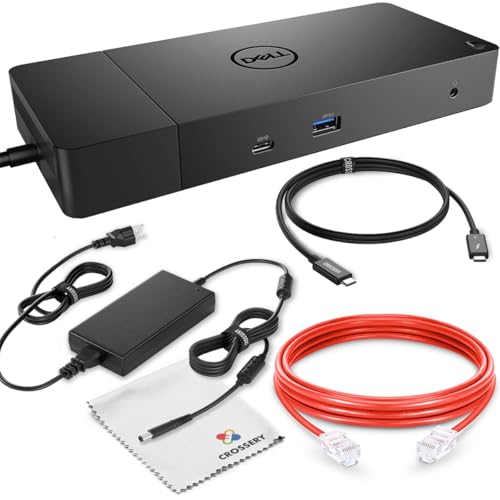
Dell WD19 180W Docking Station Bundle
Best for: Dell laptop users needing dual 4K displays
- Host Interface
- USB-C
- Display Support
- Dual
- Max Resolution
- 3840 x 2160 - 60 Hz
- Power Delivery
- 130W
- Video Ports
- DisplayPort, HDMI, USB-C
- Ethernet Speed
- Gigabit
View on Amazon: Dell WD19 180W Docking Station Bundle Affiliate link
This Crossery bundle includes a refurbished Dell WD19 universal dock with a 180W power adapter and Thunderbolt 3 cable. It supports dual monitors at 4K resolution and 60 Hz via DisplayPort 1.4. The dock delivers up to 130W of power delivery to compatible laptops. It connects peripherals through USB-C, USB-A, HDMI, and Gigabit Ethernet ports. This setup suits users needing a complete, plug-and-play docking solution for enhanced productivity.
Pros
- Supports dual monitors at 3840 x 2160 resolution and 60 Hz
- Includes 180W power adapter for fast laptop charging
- Provides 130W power delivery to Dell laptops
- Features Gigabit Ethernet and multiple USB ports
Cons
- Dock is refurbished rather than brand new
- Power delivery limited to 90W for non-Dell systems
- Requires separate purchase of monitors for dual setup
Good fit if
- You need a complete docking station package with cables
- You use a Dell laptop requiring high power delivery
- You want to connect two 4K displays at 60 Hz
Skip if
- You require a brand new dock with full warranty
- You use a non-Dell laptop needing more than 90W
- You prefer a single monitor setup without extra cables
Verdict: Crossery Dell WD19 180W Dock Bundle offers a comprehensive solution for Dell users seeking dual 4K display support and high power delivery. It is ideal for professionals who want a ready-to-use docking station with all necessary accessories included.
Specifications side by side
| Spec | Dell WD19 180W Docking Station Bundle |
|---|---|
| Host Interface | USB-C |
| Display Support | Dual |
| Max Resolution | 3840 x 2160 - 60 Hz |
| Power Delivery | 130W |
| Video Ports | DisplayPort, HDMI, USB-C |
| Ethernet Speed | Gigabit |
| Connectivity | USB-C, Ethernet, Thunderbolt 3 |
| Color | Black |
Frequently asked questions
Does this dock support dual 4K monitors?
Yes, the Dell WD19 180W Docking Station Bundle supports dual monitor output. It can drive two displays at a maximum resolution of 3840 x 2160. This setup is ideal for professionals who need extended desktop space for multitasking or detailed visual work.
What power delivery does this docking station provide?
The bundle includes a 180W power adapter for the dock itself. It delivers up to 130W of power to compatible Dell laptops and 90W to other USB-C devices. This high power output ensures your laptop stays charged while connected to multiple peripherals.
Is Thunderbolt 3 connectivity included?
Yes, the unit features Thunderbolt 3 connectivity via USB-C. The bundle includes a Thunderbolt 3 cable to establish the link with your laptop. This connection handles high-speed data transfer, video output, and power delivery through a single cable interface.
Can I use this dock with non-Dell laptops?
You can use this dock with other USB-C laptops, but power delivery varies. It provides 90W to non-Dell systems compared to 130W for Dell devices. Ensure your laptop supports USB-C DisplayPort Alternate Mode and USB Power Delivery for full functionality.
Does the package include an Ethernet connection?
Yes, the bundle includes a Gigabit Ethernet cable for stable wired networking. The dock itself provides an Ethernet port to connect to your router. This ensures reliable internet access, which is crucial for video conferencing and large file transfers without Wi-Fi interference.
What is the condition of this renewed dock?
The listing describes the unit as a renewed dock. It has been professionally inspected, tested, and cleaned before shipping. This process ensures the hardware is fully functional. The finish is black, matching standard Dell accessory aesthetics for a clean desk setup.