Connectivity Explained: What It Means for Portable Monitors
As an Amazon Associate we earn from qualifying purchases. Links on this page are affiliate links.
Connectivity Explained for Portable Monitors
Understanding connectivity explained helps you choose the right portable monitor for your laptop setup. The three main ports are DisplayPort, USB-C, and HDMI. Each serves a specific purpose in how your device sends video signals.
USB-C is the most versatile option. Many modern laptops use this single port for power, data, and video. If your portable monitor supports USB-C with DisplayPort Alt Mode, you can often connect with just one cable. This simplifies your desk. You avoid carrying multiple adapters. Check if the port provides power delivery. This feature charges your laptop while displaying video.
HDMI remains the standard for compatibility. Most computers, gaming consoles, and media players include HDMI outputs. This port ensures your monitor works with older devices. It is reliable and widely supported. However, HDMI typically handles only video and audio. It does not transfer data or charge your device. You may need separate cables for power and connectivity.
DisplayPort is common in professional and high-performance setups. It offers high bandwidth for sharp images and fast refresh rates. Some portable monitors use a mini or micro DisplayPort to save space. This port is excellent for connecting to desktops or specialized workstations. It often supports higher resolutions than standard HDMI versions.
When shopping, look at the port types listed in the specifications. Match the monitor inputs to your laptop outputs. If your laptop has only USB-C, ensure the monitor accepts USB-C video. If you use an older PC, an HDMI cable is likely necessary. Correct connectivity means a seamless experience. It reduces clutter and cable management headaches. It allows you to expand your workspace efficiently without technical barriers.
Connectivity Options Compared
DisplayPort
DisplayPort is a standard interface for high-performance video signals. It supports higher refresh rates and resolutions than HDMI in many cases. You will find this port on monitors designed for gaming or professional workstations. The Sceptre 22-Inch 144Hz Gaming Monitor uses DisplayPort to deliver smooth 144Hz performance. This connection is ideal if your desktop PC has a dedicated graphics card. It offers a stable link for extended desktop sessions. You need a compatible cable to connect your source device. This option is less common on ultra-portable screens but essential for stationary setups.
USB-C
USB-C is the modern standard for portable monitors. It carries video, data, and power through a single cable. This simplifies your desk by reducing cable clutter. You can connect directly to laptops, tablets, or phones that support video output. The SANSUI 27-Inch Curved 120Hz USB-C Monitor relies on this connection for its 120Hz refresh rate. It is perfect for travelers who want a clean setup. Check your device specifications to ensure it supports DisplayPort Alt Mode. Without this support, the port may only charge the device. It is the most versatile choice for mobile professionals.
HDMI
HDMI remains the most widely supported video interface. It connects easily to almost any laptop, console, or media player. You do not need special adapters for most devices. The MNN 15.6-Inch Portable Monitor includes HDMI for broad compatibility. It is reliable for connecting to older computers or gaming consoles. The signal quality is sufficient for 1080p and 4K resolutions. You will need a separate power source for most portable monitors using this port. This means carrying an extra charger. It is a practical choice if you prioritize universal connectivity over single-cable convenience.
Who Needs These Ports
Who needs it
You need DisplayPort, USB-C, and HDMI if you switch between multiple devices daily. USB-C allows you to connect a laptop with a single cable for both video and power. This simplifies your desk setup significantly. DisplayPort is essential if you use high-refresh-rate monitors for gaming or fast-paced video editing. It handles higher bandwidths than HDMI in many scenarios. HDMI remains critical for connecting older computers, gaming consoles, or media players that lack modern ports. Having all three ensures you are not limited by your source device. You can plug in a desktop PC via HDMI, a MacBook via USB-C, and a console via HDMI without needing adapters. This versatility saves time and reduces cable clutter on your desk. It also future-proofs your setup as devices continue to evolve.
Who can skip it
You can skip this detailed connectivity guide if you only use one device. If your laptop has only USB-C, you only need a monitor with that port. HDMI is sufficient if you only connect to older desktops or TVs. DisplayPort is unnecessary if your devices do not support it. Focus on resolution and panel type instead. These factors impact image quality more than port variety for single-device users. Avoid buying a monitor with extra ports you will never use. It often costs more and adds unnecessary bulk. Check your current device's output first. Then buy a monitor that matches that specific output. This keeps your setup simple and cost-effective. Extra ports are only useful if you actively switch between different types of hardware frequently. Otherwise, they are just empty slots on the bezel.
Connectivity Glossary
DisplayPort
A digital video interface standard. It supports high resolutions and refresh rates. You will find it on gaming monitors and workstations for stable signal transmission.
USB-C
A reversible connector type. It carries video, data, and power. It simplifies setups by allowing a single cable connection for video and charging your laptop.
HDMI
High-Definition Multimedia Interface. It transmits uncompressed video and audio. Most laptops and consoles use it. It is widely compatible with portable monitors.
Resolution
The number of pixels on the screen. Common values are 1080p or 4K. Higher resolution means sharper text and clearer images for detailed work.
Refresh Rate
How many times the screen updates per second. Measured in Hertz. A 60Hz rate is standard. Higher rates like 144Hz reduce motion blur.
Panel Type
The technology behind the display pixels. IPS offers wide viewing angles. VA provides better contrast. TN panels are faster but have poorer color accuracy.
Power Delivery
A USB standard for charging devices. It sends power through the video cable. This reduces cable clutter by charging your laptop while displaying video.
Display Support
How many external screens the laptop can drive. Some laptops support only one external display. Others support two or more for expanded multitasking setups.
Quick picks
| # | Product | Best for | Price |
|---|---|---|---|
| 1 | MNN 15.6-Inch 1080p Portable Monitor | portable dual-screen setups | Check price of MNN 15.6-Inch 1080p Portable Monitor on Amazon |
| 2 | Sceptre 22-Inch 144Hz Gaming Monitor | stationary desks needing 144Hz DisplayPort video | Check price of Sceptre 22-Inch 144Hz Gaming Monitor on Amazon |
| 3 | SANSUI 27-Inch Curved 120Hz USB-C Monitor | Users needing a large curved screen with USB-C | Check price of SANSUI 27-Inch Curved 120Hz USB-C Monitor on Amazon |
| 4 | Acer 27-Inch 100Hz IPS Monitor | Users needing a large 27-inch display with FreeSync | Check price of Acer 27-Inch 100Hz IPS Monitor on Amazon |
| 5 | InnoView 15.6-Inch 1080p Portable Monitor | compact travel setups and limited desk space | Check price of InnoView 15.6-Inch 1080p Portable Monitor on Amazon |
| 6 | Sceptre 24-Inch 100Hz Gaming Monitor | desktop setups needing DisplayPort and HDMI inputs | Check price of Sceptre 24-Inch 100Hz Gaming Monitor on Amazon |
Our 6 picks

MNN 15.6-Inch 1080p Portable Monitor
Best for: portable dual-screen setups
- Connectivity
- USB-C, HDMI (what this guide is about)
- Screen Size
- 15.6"
- Resolution
- 1920*1080
- Refresh Rate
- 60Hz
- Panel Type
- IPS
- Weight
- 1.53 lbs
View on Amazon: MNN 15.6-Inch 1080p Portable Monitor Affiliate link
This MNN portable monitor offers a 15.6-inch IPS display with 1080p resolution and 60Hz refresh rate. It supports USB-C and HDMI connectivity, allowing you to connect to various devices. The lightweight design at 1.53 pounds makes it easy to carry. It includes HDR support for better image quality. This monitor is suitable for travelers and remote workers needing a secondary screen.
Pros
- 15.6-inch IPS panel with 1920x1080 resolution
- Dual USB-C ports for single-cable connection
- HDMI connectivity for broader device support
- Lightweight at 1.53 pounds for portability
- Includes smart cover that doubles as a stand
Cons
- 60Hz refresh rate limits high-speed gaming performance
- 15.6-inch screen size is smaller than standard desktop monitors
- Glossy screen may cause reflections in bright environments
Good fit if
- You need a lightweight secondary screen for travel
- You want a monitor with both USB-C and HDMI inputs
- You are looking for an affordable portable display for work
Skip if
- You require a high refresh rate for competitive gaming
- You need a screen larger than 15.6 inches
- You prefer a matte finish to reduce glare
Verdict: MNN 15.6" Portable Monitor is a solid choice for users prioritizing portability and versatile connectivity. It fits travelers and remote workers who need a reliable second screen without bulk.

Sceptre 22-Inch 144Hz Gaming Monitor
Best for: stationary desks needing 144Hz DisplayPort video
- Connectivity
- HDMI, DisplayPort (what this guide is about)
- Screen Size
- 22"
- Resolution
- 1080p
- Refresh Rate
- Up to 144Hz
- Weight
- 7 pounds
- Features
- Built-in Speakers
View on Amazon: Sceptre 22-Inch 144Hz Gaming Monitor Affiliate link
This 22-inch monitor provides a 1080p resolution and a refresh rate up to 144Hz. For video input, you get dedicated HDMI and DisplayPort connections to link your laptop or desktop setup. It includes built-in speakers and Blue-Light Shift technology for extended viewing. This display suits you if you need high-refresh connectivity for work and gaming.
Pros
- Up to 144Hz refresh rate
- DisplayPort and HDMI input ports
- Integrated stereo speakers
- Blue-Light Shift eye care feature
Cons
- Weighs 7 pounds, making relocation difficult
- Base requires 7 inches of desk depth
Good fit if
- You want a 144Hz refresh rate through HDMI or DisplayPort.
- You need integrated speakers to save desk space.
- You plan a dual-monitor setup using thin bezels.
Skip if
- You need a lightweight screen under 7 pounds for travel.
- You have a shallow workspace that cannot fit a 7-inch depth.
Verdict: Sceptre 22-Inch 144Hz Gaming Monitor delivers 144Hz video feeds across HDMI and DisplayPort for stationary desks needing multi-monitor support.
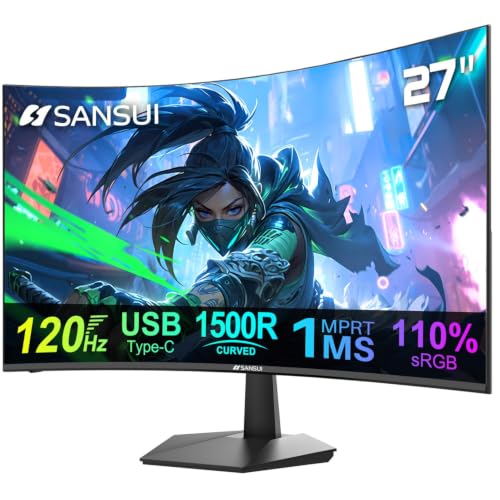
SANSUI 27-Inch Curved 120Hz USB-C Monitor
Best for: Users needing a large curved screen with USB-C
- Connectivity
- USB-C (what this guide is about)
- Screen Size
- 27"
- Refresh Rate
- 120Hz
- Color Gamut
- 110% sRGB
- Weight
- 10 lbs
- Features
- Built-in Speakers
View on Amazon: SANSUI 27-Inch Curved 120Hz USB-C Monitor Affiliate link
This 27-inch curved monitor offers a 120Hz refresh rate and 1ms response time for smooth visuals. It connects via USB-C and HDMI 1.4. The panel covers 110% sRGB with 300 nits brightness. Built-in speakers and VESA mount support add convenience. It suits users who want a larger screen with modern connectivity and high refresh rates for work or gaming.
Pros
- 120Hz refresh rate with 1ms MPRT response time
- USB-C and HDMI 1.4 connectivity options
- 110% sRGB color gamut coverage
- Built-in 2x2W speakers
- 100x100mm VESA mount compatibility
Cons
- HDMI port is version 1.4, limiting bandwidth
- 300 nits brightness is modest for bright rooms
- 10-pound weight is heavier than portable options
Good fit if
- You need a larger 27-inch display for productivity
- You want USB-C connectivity for single-cable setups
- You prefer curved screens for immersive viewing
Skip if
- You require HDMI 2.0 or higher for high bandwidth
- You need a lightweight monitor under 5 pounds
- You prioritize high brightness over color accuracy
Verdict: SANSUI 27" Curved 120Hz USB-C Monitor fits users who value a large, curved display with USB-C connectivity and high refresh rates for smooth performance.
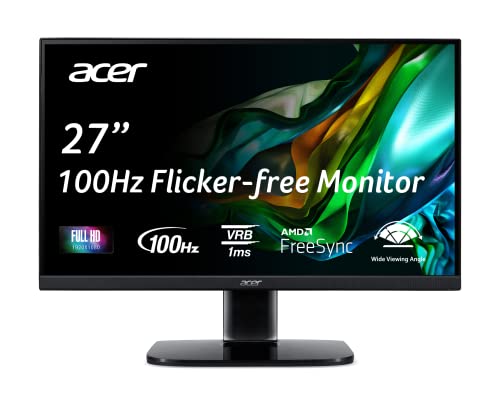
Acer 27-Inch 100Hz IPS Monitor
Best for: Users needing a large 27-inch display with FreeSync
- Connectivity
- HDMI, VGA (what this guide is about)
- Screen Size
- 27"
- Resolution
- 1920 x 1080
- Refresh Rate
- 100Hz
- Panel Type
- IPS
- Weight
- 11.9 pounds
View on Amazon: Acer 27-Inch 100Hz IPS Monitor Affiliate link
This 27-inch IPS monitor offers Full HD resolution and a 100Hz refresh rate via its HDMI 1.4 port. It features AMD FreeSync technology to reduce screen tearing during gaming or office tasks. The panel provides 250 nits of brightness and supports ergonomic tilt adjustments. You get a VESA-mountable design for flexible setup options. It connects using HDMI and VGA inputs, making it suitable for standard desktop or portable secondary displays.
Pros
- 27-inch IPS panel with 1920 x 1080 resolution
- 100Hz refresh rate for smoother motion
- AMD FreeSync technology reduces screen tearing
- VESA 100 x 100mm mounting compliant
- Ergonomic tilt range from -5° to 15°
Cons
- Only includes HDMI 1.4 and VGA ports, lacking USB-C
- 250 nits brightness is lower than many modern displays
- No DisplayPort connectivity for direct PC connections
Good fit if
- You need a larger 27-inch screen for office work
- You want AMD FreeSync for smoother gaming
- You have existing HDMI or VGA cables
Skip if
- You require USB-C connectivity for portable setups
- You need high brightness above 250 nits
- You want a DisplayPort for direct PC connection
Verdict: Acer KB272 EBI 27" 100Hz IPS Monitor fits users who prioritize screen size and FreeSync support over modern port options like USB-C or DisplayPort.

InnoView 15.6-Inch 1080p Portable Monitor
Best for: compact travel setups and limited desk space
- Connectivity
- USB-C, HDMI (what this guide is about)
- Screen Size
- 15.6 Inch
- Resolution
- 1920*1080P
- Panel Type
- IPS
- Weight
- 2.65 pounds
- Features
- Built-in Speakers
View on Amazon: InnoView 15.6-Inch 1080p Portable Monitor Affiliate link
This 15.6-inch portable monitor uses an IPS panel for a 1920x1080 resolution and 178-degree viewing angles. It connects via two USB-C ports and one HDMI port. You need a device with USB-C DisplayPort Alt Mode or Thunderbolt 3.0/4.0 for single-cable use. The package includes a protective cover that doubles as a stand. It supports portrait and landscape modes for flexible desk setups.
Pros
- IPS panel with 178-degree viewing angles
- Two full-function USB-C ports and one HDMI port
- Includes a PU leather cover that acts as a stand
- Supports portrait and landscape orientation
- 1920x1080 FHD resolution
Cons
- 15.6-inch screen is smaller than the 22 to 27-inch options on this list
- HDMI connection requires a separate power cable not included in the package
- No built-in kickstand; relies on the external cover for support
Good fit if
- You need a compact display for travel or limited desk space
- Your laptop supports USB-C DisplayPort Alt Mode or Thunderbolt
- You want a monitor that folds flat for portability
Skip if
- You require a screen larger than 15.6 inches
- Your device lacks USB-C video output and HDMI power delivery
- You prefer a monitor with an integrated adjustable stand
Verdict: InnoView 15.6" FHD Portable Monitor is a compact solution for users prioritizing portability over screen real estate. It fits travelers and those with limited workspace who have compatible USB-C devices.

Sceptre 24-Inch 100Hz Gaming Monitor
Best for: desktop setups needing DisplayPort and HDMI inputs
- Connectivity
- HDMI, DisplayPort (what this guide is about)
- Screen Size
- 24"
- Resolution
- 1920 x 1080
- Refresh Rate
- 100Hz
- Color Gamut
- 100% sRGB
- Weight
- 5.8 lbs
View on Amazon: Sceptre 24-Inch 100Hz Gaming Monitor Affiliate link
This 24-inch desktop display provides both DisplayPort and HDMI 2.0 inputs to connect your laptop or PC. It outputs 1080p resolution at up to a 100Hz refresh rate with 100% sRGB color gamut coverage. If your setup relies on standard HDMI or DisplayPort cables rather than single-cable USB-C video, this monitor serves as a stationary dual-input workstation display.
Pros
- DisplayPort and HDMI 2.0 video ports
- 100Hz refresh rate at 1080p resolution
- 100% sRGB color gamut coverage
- Integrated audio speakers
Cons
- Lacks USB-C video connectivity
- Desktop build weighing 5.8 pounds instead of a slim portable format
Good fit if
- You need dedicated DisplayPort and HDMI connections for your computer.
- You want a 100Hz refresh rate for smoother motion.
- You plan to mount your screen using a VESA bracket.
Skip if
- You require USB-C connectivity to run display signals from a laptop.
- You need a slim, lightweight monitor designed to travel in a backpack.
Verdict: Sceptre 24-Inch 100Hz Gaming Monitor suits stationary desk setups that require dedicated DisplayPort and HDMI video connections rather than USB-C.
Specifications side by side
| Spec | MNN 15.6-Inch 1080p Portable Monitor | Sceptre 22-Inch 144Hz Gaming Monitor | SANSUI 27-Inch Curved 120Hz USB-C Monitor | Acer 27-Inch 100Hz IPS Monitor | InnoView 15.6-Inch 1080p Portable Monitor | Sceptre 24-Inch 100Hz Gaming Monitor |
|---|---|---|---|---|---|---|
| Screen Size | 15.6" | 22" | 27" | 27" | 15.6 Inch | 24" |
| Resolution | 1920*1080 | 1080p | not stated | 1920 x 1080 | 1920*1080P | 1920 x 1080 |
| Refresh Rate | 60Hz | Up to 144Hz | 120Hz | 100Hz | not stated | 100Hz |
| Panel Type | IPS | not stated | not stated | IPS | IPS | not stated |
| Connectivity | USB-C, HDMI | HDMI, DisplayPort | 1x USB Type-C, 1x HDMI 1.4 | 1 x HDMI 1.4, 1 x VGA | Type-C, HDMI | DisplayPort, HDMI 2.0 |
| Color Gamut | not stated | not stated | 110% sRGB | not stated | not stated | 100% sRGB |
| Weight | 1.53 lbs | 7 pounds | 10 lbs | 11.9 pounds | 2.65 pounds | 5.8 lbs |
| Features | HDR | Built-in Speakers | Built-in Speakers | not stated | Built-in Speakers | Built-in Speakers |
| Use | Gaming | Gaming | Gaming | Gaming, Office | not stated | Gaming |
| Size | 15.6" 1080P | 22 inches | 27 Inch Curved | 27-Inch | 15.6 Inches | not stated |
| Recommended Use | not stated | not stated | not stated | not stated | Desk | not stated |
| Dimensions | 14.5 × 8.85 × 0.3 inches | 7 × 19.9 × 15.5 inches | 8.31 × 24.1 × 17.9 inches | 7.9 × 24.5 × 18 inches | 9 × 14.4 × 0.2 inches | 7.66 × 21.3 × 17.2 inches |
| Color | Matte black | Machine Black | Black | Black | Black | Machine Black |
| Model | 15 | E225W-FW144G | ES-27C1 | UM.HK2AA.E02 | INVPM406 | E248W-FW100T |
Frequently asked questions
Can I use HDMI for a portable monitor setup?
Yes, HDMI works for many portable monitors. The MNN 15.6-Inch 1080p Portable Monitor includes an HDMI port alongside USB-C. This allows you to connect to devices that lack USB-C video output. You need a separate power source if the monitor does not receive power over the HDMI cable. It is a reliable option for older laptops or gaming consoles.
Does USB-C carry both video and power?
USB-C often carries video and power through a single cable. The SANSUI 27-Inch Curved 120Hz USB-C Monitor relies on this connection type. You can plug it into a compatible laptop to send the video signal while drawing power. This reduces cable clutter on your desk. Check your laptop specifications to ensure it supports video output and power delivery over USB-C.
Is DisplayPort necessary for gaming monitors?
DisplayPort is common on high-refresh-rate gaming monitors. The Sceptre 22-Inch 144Hz Gaming Monitor features this port to support its 144Hz refresh rate. It provides a stable signal for fast-paced games. If your graphics card has a DisplayPort, use it for the best performance. HDMI may also work, but DisplayPort ensures you get the full speed your monitor offers.
Which connectivity is best for travel?
USB-C is the best choice for travel. The InnoView 15.6-Inch 1080p Portable Monitor uses USB-C for a simple connection. You only need one cable to link it to your laptop. This reduces the number of adapters you must pack. The MNN 15.6-Inch model also supports USB-C. Both options keep your setup lightweight and easy to manage on the go.
Can I connect a desktop PC to a portable monitor?
You can connect a desktop PC using HDMI or DisplayPort. The Sceptre 24-Inch 100Hz Gaming Monitor accepts both inputs. These ports are standard on most desktop graphics cards. You will need a separate power supply for the monitor since desktops do not provide power through these video cables. This setup works well for extended dual-screen workflows at your desk.
Do I need an adapter for USB-C monitors?
You may need an adapter if your device lacks a full-featured USB-C port. The SANSUI 27-Inch monitor requires a compatible USB-C cable. If your laptop only has HDMI or DisplayPort, you cannot connect directly. Use a certified adapter to convert the signal. Always check that the adapter supports video output and power delivery to ensure the monitor functions correctly.