Cocopar 18-inch 2K Portable Monitor Review: Who It Fits and Who Should Skip It
As an Amazon Associate we earn from qualifying purchases. Links on this page are affiliate links.
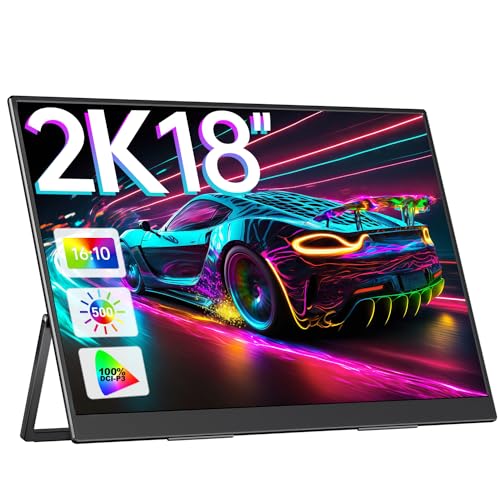
This cocopar 18 inch 2k portable monitor review looks at a large travel screen designed for productivity. It features an 18.0-inch IPS panel with a 2560x1600 resolution. The 16:10 aspect ratio gives you more vertical space than standard 16:9 displays. This extra height helps when editing documents or coding. The monitor also boasts a 100% DCI-P3 color gamut. This ensures accurate colors for design work. We break down how these specs translate to real-world use. You will see if this 2.62-pound device fits your mobile setup.
What stands out
- 18.0-inch IPS panel with 2560x1600 resolution for clear visuals
- 100% DCI-P3 wide color gamut for accurate color reproduction
- 16:10 aspect ratio provides additional vertical workspace
- Includes 180° adjustable kickstand and 75x75mm VESA mount
- Connects via USB-C or Mini-HDMI for broad device compatibility
Who it fits
Good fit for
This monitor suits professionals who need extra screen real estate while traveling. The 2560x1600 resolution and 16:10 ratio make it ideal for multitasking and editing large files. Designers will appreciate the 100% DCI-P3 coverage for accurate color work. Gamers using consoles like PS4 or Xbox can enjoy the larger view. If you want a single-cable connection for Thunderbolt laptops, the USB-C port simplifies your setup. It is a practical choice for remote work and virtual meetings where clarity matters.
Who should skip it
Skip this option if you prefer a standard 16:9 aspect ratio. The 16:10 display may feel unfamiliar for some video content. You might also avoid it if you need a built-in speaker system, as the data does not mention audio outputs. The Mini-HDMI port requires an adapter for some older devices, which adds bulk. If you need a monitor under two pounds, the 2.62-pound weight may be too heavy for light carry. Consider a smaller 15.6-inch model if portability is your top priority.
Verdict: The Cocopar 18-inch 2K Portable Monitor offers a large, color-accurate display for mobile productivity. Its 16:10 ratio and VESA mountability make it a versatile second screen for work and travel.
Key specs explained
Resolution: 2560x1600
This resolution provides sharp text and detailed images on the 18-inch screen. You get more pixels than standard 1080p monitors, which helps when editing photos or viewing spreadsheets. The clarity reduces eye strain during long work sessions. If you need crisp visuals for design or coding, this higher pixel density offers a noticeable improvement over lower-resolution portable displays.
Aspect Ratio: 16:10
The 16:10 ratio gives you more vertical space than the common 16:9 format. This extra height is useful for reading documents, coding, or browsing web pages without scrolling as often. It fits more content on the screen at once. For productivity tasks that rely on vertical space, this aspect ratio offers a more efficient workflow compared to standard widescreen monitors.
Panel Type: IPS
IPS panels offer wide viewing angles and consistent color reproduction from different positions. You can see the screen clearly even if you look at it from the side. This makes the monitor suitable for collaborative work or casual use where you are not always seated directly in front of it. It ensures accurate colors for creative tasks like photo editing.
Connectivity: USB-C, Mini-HDMI
These ports allow you to connect to various devices like laptops, consoles, or tablets. A single USB-C cable can often handle both video and power, simplifying your setup. The mini-HDMI port provides compatibility with older devices or gaming consoles that lack USB-C video output. This flexibility ensures you can use the monitor with most modern and legacy hardware.
Weight: 2.62 pounds
At 2.62 pounds, this monitor is relatively heavy for a portable device. It is still manageable for travel but requires a sturdy bag or case. The weight suggests a robust build quality that may resist minor bumps better than ultra-light models. Consider this when packing for trips, as it adds more bulk to your laptop bag than lighter 15.6-inch alternatives.
Design and Build Quality
The Cocopar 18-inch portable monitor measures 9.85 by 5.91 by 0.79 inches. It weighs 2.62 pounds. The listing describes the finish as black. These dimensions create a large surface area for your workspace. The thin 0.79-inch profile keeps the unit slim for travel. You can slip it into a bag alongside your laptop without adding excessive bulk. The weight is manageable for carrying to coffee shops or client sites. You get a stable base for work on the go.
The design includes a 180-degree adjustable kickstand. This feature allows you to prop the screen up at various angles. You can find a comfortable viewing position for typing or video calls. The listing also notes standard 75x75mm VESA mount compatibility. This lets you attach the monitor to a wall or arm. You gain flexibility if you prefer a fixed setup over a portable one. The kickstand and VESA holes cover most mounting needs.
According to the listing, the unit features an IPS panel. This technology provides a 178-degree viewing angle. You can view the screen from the side without color distortion. The layout includes two USB-C ports and one mini HDMI port. This arrangement supports plug-and-play connections with laptops, Macs, and consoles. The ports are placed for easy access. You can connect devices without reaching behind the monitor. The build focuses on practical connectivity and flexible positioning for your daily tasks.
Setup and Everyday Use
Setting up this portable monitor is straightforward. The device includes two USB-C ports and one mini HDMI port. If your laptop, Mac, or PC has a Thunderbolt 3, 4, or 5 port, or a full-featured USB-C port, you can use a single USB-C to USB-C cable. This single-cable solution handles both video and power. The listing recommends using the original power adapter to ensure sufficient power delivery for stable operation. You can also connect via mini HDMI if your device lacks USB-C video output, though you will need a separate power source.
The monitor features an integrated 180-degree adjustable kickstand. This allows you to set the screen at various angles on a desk or table without additional stands. For a more permanent setup, the unit supports standard 75x75mm VESA mounting. This lets you attach it to a wall or an articulated arm, freeing up desk space.
Daily use benefits from the 16:10 aspect ratio and 18-inch size. The extra vertical space is useful for multitasking, editing large files, or viewing spreadsheets. The 100% DCI-P3 color gamut and 500-nits brightness provide clear, vibrant visuals. The anti-glare coating and blue light reduction help reduce eye fatigue during long work sessions. The IPS panel offers a 178-degree viewing angle, ensuring consistent colors from different positions. This makes it suitable for remote work, business trips, and virtual meetings. The compact design and included kickstand make it a flexible companion for travel.
Before You Buy This Monitor
You should verify your device’s port capabilities before purchasing. This monitor requires a full-featured USB-C or Thunderbolt port for single-cable video and power transfer. If your laptop lacks these, you will need an HDMI connection and a separate power source. The listing recommends using the original power adapter to ensure stable performance. Keep the screen clean with a dry microfiber cloth. Avoid harsh chemicals that could damage the anti-glare coating. This 18-inch model offers a larger workspace than smaller 15.6-inch options in the Portable Monitors & Laptop Setups category. It suits users who prioritize vertical screen real estate for multitasking. However, it is heavier than compact alternatives. Check your bag size to ensure it fits. The VESA mount allows for flexible desk setups, but you must purchase compatible arms separately. This screen is ideal for stationary travel setups rather than frequent carry-on use.
Check before you buy
- Confirm your device has a full-featured USB-C or Thunderbolt port.
- Check if your laptop supports video output over USB-C.
- Ensure your travel bag fits the 9.85-inch width.
- Verify you have space for the power adapter.
The product at a glance
Cocopar 18-inch 2K Portable Monitor
Best for: Color-critical work and multitasking
- Screen Size
- 18.0"
- Resolution
- 2560x1600
- Panel Type
- IPS
- Connectivity
- USB-C, Mini-HDMI
- Color Gamut
- 100% DCI-P3
- Aspect Ratio
- 16:10
View on Amazon: Cocopar 18-inch 2K Portable Monitor Affiliate link
This 18-inch portable monitor offers a 2560x1600 resolution on an IPS panel with a 16:10 aspect ratio. It covers 100% DCI-P3 color gamut and reaches 500 nits brightness. You get two USB-C ports and one mini HDMI port for connectivity. The unit weighs 2.62 pounds and includes a VESA mount and adjustable kickstand. It suits users needing extra vertical screen space for multitasking.
Pros
- 18-inch screen with 2560x1600 resolution
- 100% DCI-P3 wide color gamut
- 500 nits brightness level
- 16:10 aspect ratio for more vertical space
- Standard 75x75mm VESA mount support
Cons
- Uses mini HDMI instead of full-size HDMI
- Heavier at 2.62 pounds than smaller models
- No Thunderbolt 3/4/5 certification listed for ports
Good fit if
- You need extra vertical screen real estate for editing
- You work with color-critical graphics or design files
- You want VESA mounting flexibility for desk setups
Skip if
- You prefer a lighter travel companion under 2 pounds
- You only have devices with standard HDMI ports
- You need a compact display under 16 inches
Verdict: Cocopar 18-inch 2K Portable Monitor provides a large, color-accurate display for professionals who prioritize screen real estate over portability. It fits users who need a dedicated second screen for detailed work and have access to USB-C or mini HDMI connections.
Specifications side by side
| Spec | Cocopar 18-inch 2K Portable Monitor |
|---|---|
| Screen Size | 18.0" |
| Resolution | 2560x1600 |
| Panel Type | IPS |
| Connectivity | USB-C, Mini-HDMI |
| Color Gamut | 100% DCI-P3 |
| Aspect Ratio | 16:10 |
| Weight | 2.62 pounds |
| Features | VESA Mountable, Kickstand |
| Use | Travel |
| Dimensions | 0.79 × 9.85 × 5.91 inches |
| Size | 18.0 Inch |
| Color | Black |
| Model | US-182K |
Frequently asked questions
Is the Cocopar 18-inch monitor good for color work?
Yes, it is built for color-critical tasks. The 18.0-inch IPS panel delivers sharp visuals at 2560x1600 resolution. This high pixel density ensures accurate details for photo editing or design. The 16:10 aspect ratio also provides extra vertical space, which helps when reviewing long documents or timelines.
Can I mount this portable screen on an arm?
Yes, the unit supports VESA mounting. This feature allows you to attach the monitor to a standard arm or stand instead of using the built-in kickstand. It offers flexibility for desk setups where you need to adjust the viewing angle or height precisely.
Does this monitor work with MacBooks?
Yes, it works with MacBooks via USB-C. You can connect it using a single cable if your MacBook has a full-featured USB-C or Thunderbolt port. This setup provides both video and power. If your port lacks these capabilities, you will need an HDMI connection and separate power.
How heavy is the Cocopar 18-inch portable display?
The monitor weighs 2.62 pounds. This weight is manageable for travel but heavier than smaller 15-inch models. The dimensions are 9.85 by 5.91 by 0.79 inches. The slim profile helps it fit in most laptop bags, though you should check your bag size carefully.
What is the best use case for this screen?
It is best for multitasking and detailed work. The large 18-inch screen serves as an excellent secondary display for spreadsheets or code. Users who prioritize screen real estate over extreme portability will find it ideal. It is less suitable for frequent travel due to its size.
Does it have a built-in battery?
The product data does not list a built-in battery. You must connect it to a power source for operation. Use a full-featured USB-C port for power and video, or use HDMI with a separate power adapter. Always verify your laptop’s port capabilities before relying on single-cable setups.
Is the screen size suitable for gaming?
The 18-inch IPS panel offers a large viewing area. While the 2560x1600 resolution provides clear images, the product data does not specify refresh rates. This monitor is primarily designed for productivity and color-accurate work. Gamers should check their device’s output capabilities to ensure smooth performance.