Cocopar 15.6-Inch 1080P Portable Monitor vs Cocopar 15.6-Inch 1080p IPS Portable Monitor: Spec Comparison
As an Amazon Associate we earn from qualifying purchases. Links on this page are affiliate links.
This comparison of the cocopar 15 6 inch 1080p portable monitor vs 15 6 inch 1080p ips looks at two similar 15.6-inch displays from the same brand. Both units offer 1080p resolution and IPS panels for clear visuals. The main difference lies in their physical design and connectivity ports. One model includes a built-in kickstand and full-size HDMI, while the other relies on a magnetic case and uses a mini-HDMI port. You need to check these details to pick the right setup.
Key differences
| Aspect | Cocopar 15.6-Inch 1080P Portable Monitor | Cocopar 15.6-Inch 1080p IPS Portable Monitor |
|---|---|---|
| Connectivity | USB-C, Full-size HDMI | Dual USB-C, mini-HDMI |
| Stand Type | Integrated 90° adjustable kickstand | Magnetic smart case cover |
| Color Gamut | 85% | 65% sRGB |
| Thickness | 0.23 inches | 0.16 inches |
| Weight | 1.5 pounds | 1.59 pounds |
| Special Features | VESA mountable | FreeSync, Portrait mode |
Which one should you choose?
Choose Cocopar 15.6-Inch 1080P Portable Monitor if
- You need a built-in kickstand for quick setup without extra accessories.
- You prefer a full-size HDMI port for easier cable management.
- You want a wider color gamut for better image accuracy.
Choose Cocopar 15.6-Inch 1080p IPS Portable Monitor if
- You want the thinnest possible profile for maximum portability.
- You need a magnetic case that doubles as a protective cover.
- You require FreeSync support for smoother gaming visuals.
Verdict: Choose the first model if you value the convenience of an integrated stand and a standard HDMI port. Pick the second model if you prioritize the slimmest profile and the versatility of a magnetic smart case. Both screens deliver solid 1080p performance for travel work.
Specs: Color, Ports, and Build
Color gamut coverage
Product A lists an 85% color gamut rating on its screen specifications. This figure suggests a broader range of visible colors compared to standard displays. Product B specifies a 65% sRGB color gamut. The sRGB standard is common for general computing and web content. An 85% rating typically indicates better vibrancy for creative tasks like photo editing or video work. If you prioritize accurate and rich color reproduction for professional or hobbyist projects, the higher percentage in Product A offers a clear advantage. Product B remains suitable for basic office work and media consumption where standard color accuracy is sufficient.
Connectivity ports
Product A includes two full-featured USB-C ports and one full-size HDMI port. This setup allows for flexible cable management and easy connection to older devices using standard HDMI cables. Product B provides two full-featured Type-C ports but uses a mini HDMI port instead of the standard size. Mini HDMI requires an adapter for many modern laptops and gaming consoles. If you want to plug in a standard HDMI cable directly without carrying extra adapters, Product A is the more convenient choice. The full-size HDMI port simplifies connections for users who frequently switch between different types of devices.
Integrated stand features
Product A comes with a 90-degree adjustable integrated kickstand. This built-in mechanism allows you to change the viewing angle quickly without needing external accessories. It also includes VESA mounting holes for attaching to compatible arms or stands. Product B relies on a magnetic smart case to provide standing angles. While the case offers protection, it does not have the same rigid, adjustable mechanical stand structure. If you prefer a sturdy, integrated stand that stays attached to the monitor, Product A provides better immediate usability. The VESA holes on Product A also offer more mounting flexibility for desk setups.
Physical thickness
Product A measures 0.23 inches at its thinnest point, which is approximately 6mm. Product B is slightly thinner at 0.16 inches at its slimmest point. This difference is small but noticeable when carrying the monitor in a bag. A thinner profile can make the device easier to slide into slim sleeves or laptop bags. If you prioritize the absolute slimmest profile for travel, Product B holds a slight edge. However, both monitors are designed to be lightweight and portable, with weights around 1.5 to 1.6 pounds, making them easy to carry anywhere.
Gaming features
Product B explicitly lists FreeSync support in its feature set. FreeSync helps reduce screen tearing and stuttering during fast-moving scenes in games. Product A does not mention FreeSync or similar variable refresh rate technology in its specifications. Both monitors share a 60Hz refresh rate, which is standard for portable displays. If you plan to use this monitor for gaming, especially with consoles or PCs that support FreeSync, Product B offers a smoother visual experience. For general office work, this difference may not matter, but it is a distinct advantage for gamers.
Which Cocopar portable monitor suits you
Users needing built-in stand and VESA mount
Product A includes a 90-degree adjustable kickstand and two VESA mounting holes. This allows for stable desk setups without extra accessories. Product B relies on a magnetic case for support. If you want a fixed, hardware-based solution for your workspace, Product A provides the necessary structural features directly on the monitor frame.
Travelers prioritizing thinness and included accessories
Product B is slimmer at 0.16 inches and includes a magnetic smart cover, wall charger, and cables. Product A lacks these bundled items and is thicker at 0.23 inches. Product B offers a complete travel kit out of the box, making it easier to set up quickly without searching for additional power or support gear.
Viewers wanting wider color range
Product A specifies an 85% color gamut, which generally covers more colors than Product B's 65% sRGB rating. If accurate color reproduction is important for your work, Product A offers a broader spectrum. Product B focuses on standard sRGB coverage. Choose Product A if you need that extra color depth for creative tasks.
The products compared

Cocopar 15.6-Inch 1080P Portable Monitor
Best for: travelers and remote workers needing a lightweight display
- Screen Size
- 15.6 Inch
- Resolution
- 1080P
- Refresh Rate
- 60HZ
- Panel Type
- IPS
- Connectivity
- USB-C, HDMI
- Color Gamut
- 85%
View on Amazon: Cocopar 15.6-Inch 1080P Portable Monitor Affiliate link
This 15.6-inch portable monitor features a 1080P IPS panel with an 85% color gamut and 60Hz refresh rate. It weighs 1.5 pounds and measures 0.24 inches thick. You get two full-featured USB-C ports and one HDMI port for connection. The integrated kickstand adjusts to 90 degrees, and VESA holes allow for mounting. This setup suits travelers and remote workers needing a lightweight second screen for laptops or consoles.
Pros
- 1080P IPS display with 85% color gamut
- Lightweight at 1.5 pounds and 0.24 inches thick
- Dual full-featured USB-C ports with power pass-through
- Integrated 90-degree adjustable kickstand
- VESA mountable for flexible desk setups
Cons
- 60Hz refresh rate limits high-end gaming performance
- 85% color gamut is lower than professional-grade 100% sRGB panels
- Requires specific USB-C DP Alt-MODE or Thunderbolt 3/4 support for video
Good fit if
- You need a lightweight secondary screen for travel
- You want a monitor with VESA mounting options
- You connect devices via USB-C or HDMI
Skip if
- You require a refresh rate higher than 60Hz
- You need professional color accuracy exceeding 85% gamut
- Your laptop lacks USB-C video output or Thunderbolt
Verdict: Cocopar 15.6 Inch 1080P IPS Portable Monitor is a practical choice for users prioritizing portability and versatile connectivity over high refresh rates or professional color grading.
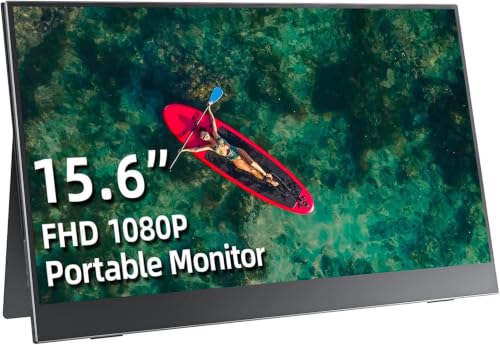
Cocopar 15.6-Inch 1080p IPS Portable Monitor
Best for: Travelers needing a lightweight secondary display
- Screen Size
- 15.6 Inch
- Resolution
- 1920*1080
- Panel Type
- IPS
- Connectivity
- Dual Type-C, mini HDMI
- Color Gamut
- 65% sRGB
- Weight
- 1.59 pounds
View on Amazon: Cocopar 15.6-Inch 1080p IPS Portable Monitor Affiliate link
This Cocopar portable monitor offers a 15.6-inch 1080p IPS display with 65% sRGB color coverage. It features dual USB-C ports and one mini HDMI input for versatile connectivity. The unit weighs 1.59 pounds and includes a magnetic smart case for protection and stand support. It supports landscape and portrait orientations, making it suitable for travel or extending your laptop screen for work or gaming.
Pros
- 15.6-inch 1920x1080 IPS panel with 178-degree viewing angles
- Dual full-featured USB-C ports for power and video via one cable
- Lightweight 1.59-pound design with included magnetic smart cover
- Supports landscape and portrait modes for flexible setup
Cons
- 65% sRGB color gamut is lower than professional standards
- Uses mini HDMI instead of standard full-size HDMI port
- No built-in speakers or audio output mentioned in specs
Good fit if
- You need a lightweight second screen for travel or remote work
- You want a simple plug-and-play setup using a single USB-C cable
- You prefer a display that supports both landscape and portrait orientations
Skip if
- You require professional-grade color accuracy above 65% sRGB
- You need a standard HDMI port without an adapter
- You want a monitor with built-in speakers for audio playback
Verdict: Cocopar 15.6-inch 1080p Portable Monitor is a practical travel companion for users who prioritize portability and simple USB-C connectivity over high-end color accuracy or integrated audio features.
Specifications side by side
| Spec | Cocopar 15.6-Inch 1080P Portable Monitor | Cocopar 15.6-Inch 1080p IPS Portable Monitor |
|---|---|---|
| Screen Size | 15.6 Inch | 15.6 Inch |
| Resolution | 1080P | 1920*1080 |
| Refresh Rate | 60HZ | not stated |
| Panel Type | IPS | IPS |
| Connectivity | USB-C, HDMI | Dual Type-C, mini HDMI |
| Color Gamut | 85% | 65% sRGB |
| Weight | 1.5 pounds | 1.59 pounds |
| Features | VESA Mountable, Kickstand | VESA Mountable, Kickstand |
| Use | Travel | Travel |
| Size | 15.6 Inches | 15.6 Inches |
| Dimensions | 0.23 × 14 × 8.74 inches | 14 × 8.9 × 0.23 inches |
| Color | Black | Black |
| Model | Y156FH7LH | Y156FH7S |
Frequently asked questions
Which Cocopar model is lighter for travel?
The Cocopar 15.6-Inch 1080p IPS Portable Monitor is lighter. It weighs 1.59 pounds. The other model, the Cocopar 15.6-Inch 1080P Portable Monitor, weighs 1.8 pounds. Both units share similar dimensions, but the IPS version is slightly more compact. This makes it easier to carry in a backpack. You get a lighter load when traveling.
Do both monitors support USB-C connectivity?
Yes, both models support USB-C connectivity. Each unit also includes an HDMI port. This dual connectivity allows you to connect to various devices. You can power and display video through a single USB-C cable if your device supports it. HDMI provides a reliable backup connection for older laptops or gaming consoles.
Are both displays IPS panels?
Yes, both monitors use IPS panel technology. The first model lists an IPS panel in its attributes. The second model explicitly names itself as an IPS monitor. IPS panels provide wider viewing angles and consistent color reproduction. This ensures the image remains clear even if you view the screen from the side.
Can I mount these monitors on a VESA arm?
Yes, both monitors are VESA mountable. Each unit features VESA mounting holes. This allows you to attach them to standard monitor arms or wall mounts. You are not limited to using the built-in kickstand. This flexibility helps you create a more ergonomic desk setup or save space on your travel gear.
What is the difference in model numbers?
The models differ by their specific part numbers. The first monitor uses model Y156FH7LH. The second monitor uses model Y156FH7S. These codes help identify the exact version you are purchasing. Both share the same 15.6-inch size and 1080p resolution. The model number helps you track specs and support for your specific unit.
Do these monitors have built-in speakers?
The provided data does not mention built-in speakers for either model. You should assume they rely on external audio. You can connect headphones to your laptop or use external speakers. Check the manual for your specific model to confirm audio capabilities. Relying on external audio is common for portable monitors in this category.