Cocopar 15.6-Inch 1080p IPS Portable Monitor Review (2026): A Spec-Based Look
As an Amazon Associate we earn from qualifying purchases. Links on this page are affiliate links.
This cocopar 15 6 inch 1080p ips portable monitor review examines a screen built for mobility. It features a 15.6-inch IPS panel with 1920x1080 resolution. The display offers 65% sRGB color coverage and 178-degree viewing angles. Weighing just 1.59 pounds, it is designed to travel easily. You get dual USB-C ports and one mini HDMI input. This setup allows you to extend your laptop or connect to consoles. The magnetic case doubles as a stand. We look at how these specs fit your daily workflow.
What stands out
- 15.6-inch FHD 1080p IPS panel with 178-degree viewing angles
- Dual full-featured USB-C ports for single-cable power and video
- Lightweight design at 1.59 pounds and 0.16-inch thickness
- Supports landscape and portrait modes for flexible positioning
- Includes magnetic smart case that functions as a kickstand
Who it fits
Good fit for
This monitor suits travelers and remote workers who need a lightweight second screen. The dual USB-C ports make it easy to connect to modern laptops and tablets with a single cable. If you use a Nintendo Switch, PS4, or PS5, the HDMI and USB-C connectivity provides straightforward setup. The 15.6-inch size offers enough workspace for spreadsheets or coding without taking up much room in a bag. The included magnetic case protects the screen while serving as a stand.
Who should skip it
You should look elsewhere if you need wide color accuracy for professional photo or video editing. This panel covers only 65% sRGB, which limits color fidelity compared to higher-end displays. If your devices only have standard HDMI ports, you will need an adapter since the monitor lacks a full-size HDMI input. It is also not ideal for high-refresh-rate gaming, as it is designed for general use rather than competitive play. The mini HDMI port may require extra cables.
Verdict: The Cocopar 15.6-inch portable monitor is a practical, lightweight option for extending your workspace on the go. Its dual USB-C connectivity and included case make it ready to use for travel and basic multi-tasking.
Key specs explained
15.6 Inch Screen Size
This diagonal measurement provides a workspace similar to a standard laptop. You get enough horizontal space for side-by-side windows without the bulk of a 17-inch model. It balances readability with portability, making it a practical choice for travelers who need a substantial second screen that fits easily into a bag.
1920*1080 Resolution
Known as 1080p Full HD, this resolution offers 2,073,600 pixels. You will see sharp text and clear images, which is essential for reading spreadsheets or editing documents. Compared to 720p screens, this level of detail prevents pixelation, ensuring your extended display remains a productive tool rather than a distraction for daily tasks.
IPS Panel Type
In-Plane Switching technology ensures consistent colors and sharp images even when you view the screen from an angle. You can place the monitor on a desk or lap without the colors washing out. This feature is crucial for collaborative work or casual viewing, allowing multiple people to see the content clearly from different positions.
65% sRGB Color Gamut
This metric indicates the range of colors the monitor can display. While 65% sRGB is sufficient for general office work and web browsing, it falls short of professional standards for photo or video editing. You should expect accurate enough colors for everyday use, but professional designers may need a wider gamut for precise color grading.
1.59 pounds Weight
This lightweight design makes the monitor easy to carry in a backpack or messenger bag. You can transport it to coffee shops, offices, or hotels without significant strain. Compared to heavier desktop monitors, this portability allows you to maintain a dual-screen setup anywhere, enhancing your productivity while on the move or traveling for work.
Design and Build Quality
The Cocopar 15.6-inch portable monitor is built for mobility. According to the listing, it measures 14 inches in length and 8.9 inches in width. The thickness is listed as 0.23 inches, with the slimmest point at 0.16 inches. This slim profile allows it to slide easily into bags. The unit weighs 1.59 pounds. This light weight makes it feel similar to carrying a large tablet. You can transport it without adding significant burden to your travel gear.
The device features a black finish and includes a magnetic smart cover. This cover serves as a protective case and a stand. It adjusts to different standing angles, allowing you to set up the screen on desks or tables. The listing notes that the monitor supports landscape and portrait modes. This flexibility lets you rotate the display for different tasks, such as coding or reading documents. The magnetic attachment ensures the cover stays secure when closed.
Connectivity ports are positioned for practical use. The monitor has dual USB-C ports and one mini HDMI port. This layout provides universal convenience. You can connect to laptops, tablets, or gaming consoles using a single USB-C cable for both power and video. The inclusion of a kickstand and VESA mountable design adds to its versatility. You can attach it to various setups for work or travel.
Setup And Everyday Use
Setting up the Cocopar portable monitor is straightforward. The listing includes all necessary cables, so you can begin using it immediately. You have two connection options. The dual USB-C ports allow you to connect with a single cable for both video and power. This works with laptops, tablets, and PCs that support USB-C video output. Alternatively, you can use the mini HDMI port. You will need the included mini-HDMI to HDMI cable for this connection. The package also provides a wall charger, which ensures the monitor receives sufficient power even when connected to devices with limited USB output. This setup supports PS4, PS5, Xbox One, and Switch consoles for gaming or media consumption.
In daily use, the monitor offers flexibility. You can switch between landscape and portrait modes to suit your workflow. The listing notes three display modes: duplicate, extend, and second screen. This allows you to mirror your main display or expand your desktop for multitasking. The 178-degree viewing angle of the IPS panel means you can view the screen from various positions without significant color shift. The magnetic smart case acts as a stand. You can adjust it to different angles for comfortable viewing while traveling or working at a desk. The 1.59-pound weight and slim profile make it easy to pack. It fits well in bags alongside other travel essentials. The 65% sRGB color gamut provides adequate color reproduction for general tasks, though it is not intended for professional color-critical work. This monitor is practical for users who need a reliable secondary screen that connects quickly and adapts to different environments.
Before You Buy This Monitor
You should verify your device’s USB-C capabilities before purchasing. The listing states that one USB-C cable handles both video and power. Your laptop or tablet must support DisplayPort Alt Mode over USB-C to work with just that single cable. If your device lacks this feature, you will need to use the included mini-HDMI cable for video and a separate power source. The unit weighs 1.59 pounds, making it easy to carry, but you should check if your bag has enough room for the magnetic smart case. Keep the screen clean with a microfiber cloth. Avoid using harsh chemicals. This model fits well in a setup focused on travel and mobile productivity. It complements larger desktop monitors by providing a lightweight secondary display. Ensure your workflow benefits from the 1920x1080 resolution and 65% sRGB color gamut for daily tasks.
Check before you buy
- Confirm your device supports DisplayPort Alt Mode over USB-C.
- Check if your bag fits the 14-inch monitor and case.
- Verify you have a power source if HDMI is used.
- Ensure your software supports extended display modes.
The product at a glance
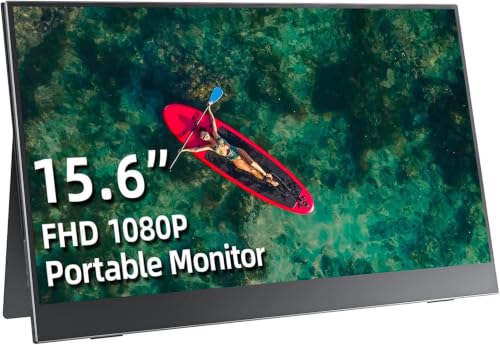
Cocopar 15.6-Inch 1080p IPS Portable Monitor
Best for: travelers needing a lightweight secondary display
- Screen Size
- 15.6 Inch
- Resolution
- 1920*1080
- Panel Type
- IPS
- Connectivity
- Dual Type-C, mini HDMI
- Color Gamut
- 65% sRGB
- Weight
- 1.59 pounds
View on Amazon: Cocopar 15.6-Inch 1080p IPS Portable Monitor Affiliate link
This Cocopar portable monitor offers a 15.6-inch 1080p IPS display with a 65% sRGB color gamut. It features dual USB-C ports and a mini HDMI input for versatile connectivity. The unit weighs 1.59 pounds and includes a magnetic smart case. You can use it in landscape or portrait mode for work or travel. It supports FreeSync and low blue light modes.
Pros
- 15.6-inch 1920x1080 IPS panel
- Dual full-featured USB-C ports
- 1.59 pounds lightweight design
- Includes magnetic smart case
- Supports portrait and landscape modes
Cons
- 65% sRGB color gamut limits color accuracy
- Uses mini HDMI instead of standard HDMI
- No built-in speakers or audio jack
Good fit if
- You need a lightweight second screen for travel
- You want a display that supports portrait orientation
- You prefer a single USB-C cable for power and video
Skip if
- You require professional color grading accuracy
- You need standard HDMI connectivity without adapters
- You want a monitor with built-in speakers
Verdict: Cocopar 15.6" 1080p IPS Portable Monitor provides a compact, lightweight screen for travelers who prioritize portability over color precision. It fits users who need a reliable secondary display for basic work or gaming tasks.
Specifications side by side
| Spec | Cocopar 15.6-Inch 1080p IPS Portable Monitor |
|---|---|
| Screen Size | 15.6 Inch |
| Resolution | 1920*1080 |
| Panel Type | IPS |
| Connectivity | Dual Type-C, mini HDMI |
| Color Gamut | 65% sRGB |
| Weight | 1.59 pounds |
| Features | VESA Mountable, Kickstand |
| Use | Travel |
| Size | 15.6 Inches |
| Dimensions | 14 × 8.9 × 0.23 inches |
| Color | Black |
| Model | Y156FH7S |
Frequently asked questions
Does the Cocopar 15.6-inch monitor support VESA mounting?
Yes, the listing confirms it is VESA mountable. This feature allows you to attach the display to an arm or wall bracket for flexible positioning. It also includes a built-in kickstand for standalone use on desks or tables. This dual setup option makes it adaptable for both stationary workspaces and travel setups.
What are the exact dimensions of this portable monitor?
The monitor measures 14 inches in length and 8.9 inches in width. Its thickness is listed at 0.23 inches, with the slimmest point at 0.16 inches. These compact dimensions help it fit easily into laptop bags. The small footprint ensures it does not take up much space when you are working in tight areas.
Is this monitor suitable for gaming on the go?
It is suitable for basic gaming tasks due to its 1080p IPS panel. The 178-degree viewing angles ensure consistent colors from different positions. While it prioritizes portability over color precision, the 15.6-inch screen provides enough workspace for side-by-side windows. It works well for travelers who need a reliable secondary display for casual play.
How heavy is the Cocopar portable monitor?
The device weighs 1.59 pounds. This lightweight design makes it easy to carry in a backpack or sleeve. The low weight reduces fatigue during long travel sessions. It is significantly lighter than most standard laptop screens, making it a practical choice for users who prioritize mobility and need to minimize their gear.
What panel type does this monitor use?
It uses an IPS panel type. IPS technology provides wide viewing angles of up to 178 degrees. This means the image remains clear even when viewed from the side. The panel also offers 65% sRGB color coverage, which is adequate for general productivity and basic media consumption tasks.
Can I use this monitor with older laptops?
You can connect it via HDMI or USB-C. If your device lacks USB-C with DisplayPort Alt Mode, you can use the HDMI port along with a separate power source. The listing includes necessary cables to facilitate these connections. This flexibility allows you to pair the monitor with a wider range of older computers and tablets.
What is the model number for this Cocopar monitor?
The model number is Y156FH7S. You can use this identifier to verify compatibility with accessories or drivers. It helps distinguish this specific 15.6-inch 1080p IPS version from other Cocopar models. Keeping track of the model number is useful for troubleshooting or checking for firmware updates from the manufacturer.