Brocoon Adjustable Aluminum Laptop Stand Review: Specs, Pros and Cons
As an Amazon Associate we earn from qualifying purchases. Links on this page are affiliate links.
This brocoon adjustable macbook laptop stand review covers the BLSG-100 model. It is an aluminum alloy riser designed for laptops between 10 and 17.3 inches. The stand features a Z-type frame that adjusts from 1.1 to 10.2 inches in height. You can also tilt the angle from 0 to 180 degrees. These two specs define its core utility. The unit measures 11.6 inches long and 8.94 inches wide. It supports up to 20 pounds on its surface. The design aims to improve your viewing angle while keeping your device cool through natural airflow.
What stands out
- Adjustable height ranges from 1.1 to 10.2 inches for eye-level positioning.
- Angle tilts from 0 to 180 degrees to suit different workflows.
- Aluminum alloy construction absorbs heat and supports up to 20 lbs.
- Folds flat for easy transport in bags or cases.
- Non-slip rubber and protective hooks keep devices secure during use.
Who it fits
Good fit for
This stand suits users who need a stable, adjustable workspace for laptops ranging from 10 to 17.3 inches. It is ideal for MacBook Air and Pro owners who want to raise their screen to eye level. The adjustable angle helps reduce neck strain during long work sessions. You will appreciate the foldable design if you move between offices, coffee shops, or libraries. The sturdy aluminum build ensures your device stays secure while benefiting from improved ventilation.
Who should skip it
You should look elsewhere if you require a monitor arm or a stand that integrates with a docking station. This product is a simple riser and does not include built-in USB ports or hubs. It also lacks height adjustment beyond the mechanical hinge, so you cannot fine-tune the angle in small increments. If you need a stand that tilts only slightly, the 0 to 180-degree range may feel too broad for your precise needs.
Verdict: The Brocoon stand offers solid height and angle adjustability in a durable aluminum frame. It is a practical choice for users seeking ergonomic improvements and portability for standard laptops.
Brocoon Stand Key Specs Explained
Material: Aluminum alloy
The stand uses aluminum alloy for its construction. This material provides a rigid structure that resists bending under weight. You get a durable surface that dissipates heat from your laptop. It feels solid on your desk without wobbling. This build quality suits users who need a stable base for heavy devices. It is a practical choice for long-term daily use.
Supported Screen Size: 10-17.3''
This stand accommodates laptops ranging from ten to seventeen point three inches. You can use it with small tablets or large gaming laptops. The wide range ensures compatibility with most modern devices. You do not need to worry about size mismatches. This flexibility makes it suitable for mixed workspaces with different computers.
Height: 1.1~10.2 inches
The stand adjusts from 1.1 to 10.2 inches high. You can raise your screen to eye level to reduce neck strain. This range allows for precise ergonomic positioning. You can find a comfortable viewing angle for any task. This adjustability is key for maintaining good posture during long work sessions.
Angle: 0~180°
The tilt angle adjusts from zero to 180 degrees. You can lay the laptop flat or prop it up steeply. This range supports various usage modes like typing or viewing. You can optimize the screen position for better visibility. This feature adds versatility to your desk setup for different tasks.
Weight Capacity: 20 lbs
The stand supports up to twenty pounds of weight. You can place heavier laptops on it without risk of collapse. This capacity ensures stability for robust machine models. You get peace of mind knowing the structure is secure. This limit covers most standard and high-performance laptop configurations.
Design And Build Quality
The Brocoon stand uses an aluminum alloy frame for its main structure. According to the listing, this material choice helps dissipate heat from your laptop base. The Z-type layout provides a rigid foundation. Non-slip rubber pads on the contact points keep your device secure. Protective hooks also prevent sliding. This design supports devices up to twenty pounds. You can rely on this stability for heavier 17-inch models without worrying about tipping.
The unit folds for portability. Its folded dimensions are eight point nine four inches wide, eleven point six inches long, and one point eight eight inches high. This compact profile allows you to slip it into a laptop bag or case easily. You can take it to offices, coffee shops, or libraries. The adjustable mechanism lets you set the height between one point one and ten point two inches. You can also tilt the angle from zero to one hundred eighty degrees. These controls let you position the screen at eye level to reduce neck strain.
The listing notes a ventilated design that increases natural airflow. This helps keep your laptop running at optimal performance. The stand is recommended for desk use. It works with laptops ranging from ten to seventeen point three inches. The finish is described as having a modern feel. This aesthetic fits well in professional or home office environments. You get a single stand with adhesive tape for extra security. The build focuses on practical ergonomics and thermal management rather than flashy features.
Setup and everyday use
Setting up the Brocoon stand requires no tools. You simply unfold the Z-type aluminum frame to your preferred angle. The listing states you can adjust the height from 1.1 to 10.2 inches and the tilt from 0 to 180 degrees. This range lets you position the top of your screen at eye level. You can customize the workspace to fit your desk height and viewing preferences. The stand supports laptops between 10 and 17.3 inches wide. It works with most major brands, including MacBook, Dell, HP, and Lenovo models. The base includes non-slip rubber pads to keep your device secure. Protective hooks on the sides prevent the laptop from sliding forward. The aluminum alloy top helps dissipate heat. Ventilation gaps increase natural airflow around your computer. This design helps maintain optimal performance during long work sessions. The unit folds flat for storage. Its dimensions are 11.6 inches long, 8.94 inches wide, and 1.88 inches high when folded. You can fit it into a laptop bag or case easily. The stand holds up to 20 pounds. It is suitable for use in offices, meeting rooms, or at home. You get adhesive tape for extra stability if needed. The product comes with a one-year warranty. Customer service is available around the clock for any issues. This setup is straightforward for daily desk use.
Before You Buy This Stand
You should verify that your laptop fits within the 10 to 17.3-inch range. The listing confirms compatibility with most major brands, including MacBook, Dell, and HP models. Check your device weight against the 20-pound limit to ensure stability. You may need a separate mouse pad if you plan to use a mouse on the same surface, as the stand only elevates the computer. Regular cleaning with a dry cloth will maintain the aluminum finish. Avoid abrasive cleaners that could scratch the metal. This stand works well alongside portable monitors, creating a dual-screen setup by raising the laptop to eye level. It does not include a carrying case, so you might want to purchase one separately for travel. The foldable design makes it easy to store in a laptop bag. Consider your desk space, as the base requires about 11.6 inches of length. This option suits users who prioritize adjustability and sturdy construction over built-in cooling fans.
Check before you buy
- Check if your laptop width is between 10 and 17.3 inches.
- Ensure your device weighs less than 20 pounds for safety.
- Measure your desk space to fit the 11.6-inch base length.
- Verify the stand height reaches your preferred eye level.
- Confirm you have a separate mouse for comfortable daily use.
The product at a glance
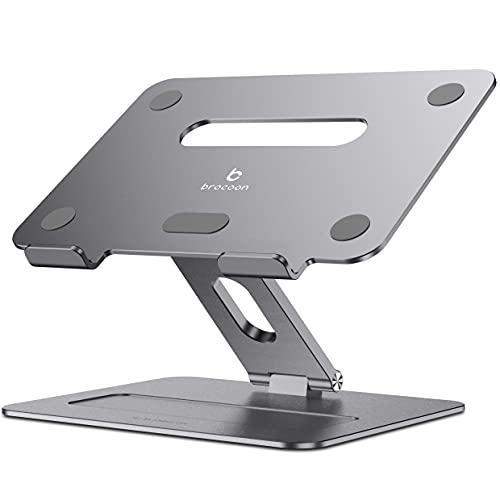
Brocoon Adjustable Aluminum Laptop Stand
Best for: Ergonomic desk setups with large laptops
- Supported Screen Size
- 10-17.3"
- Material
- Aluminum alloy
- Height Adjustment
- Adjustable
- Features
- Kickstand, Foldable
- Use
- Office
- Recommended Use
- Desk, Home
View on Amazon: Brocoon Adjustable Aluminum Laptop Stand Affiliate link
This Brocoon stand uses an aluminum alloy Z-type design to elevate laptops from 1.1 to 10.2 inches. It supports screens between 10 and 17.3 inches, fitting most devices. The adjustable angle reaches 180 degrees for ergonomic viewing. You get a sturdy base that holds up to 20 pounds. The unit folds for portability and includes non-slip rubber pads to keep your device secure on your desk.
Pros
- Adjustable height from 1.1 to 10.2 inches
- Angle adjusts from 0 to 180 degrees
- Supports laptops up to 20 pounds
- Fits screens from 10 to 17.3 inches
- Folds flat for easy transport
Cons
- Fixed width of 8.94 inches limits ultra-wide compatibility
- No included power adapter or cable management
- Basic kickstand design lacks digital controls
Good fit if
- You need a wide height range for eye-level viewing
- You use a large laptop up to 17.3 inches
- You want a foldable stand for travel
Skip if
- You require a stand with built-in USB hubs
- You need a monitor arm for heavy displays
- You prefer a stationary stand with no moving parts
Verdict: Brocoon Adjustable Aluminum Laptop Stand offers a wide range of motion for ergonomic desk setups. It fits you if you prioritize adjustability and portability for laptops up to 17.3 inches.
Specifications side by side
| Spec | Brocoon Adjustable Aluminum Laptop Stand |
|---|---|
| Supported Screen Size | 10-17.3" |
| Material | Aluminum alloy |
| Height Adjustment | Adjustable |
| Features | Kickstand, Foldable |
| Use | Office |
| Recommended Use | Desk, Home |
| Dimensions | 11.6 × 8.94 × 1.88 inches |
| Color | BLSG-100 |
| Model | BLSG-100 |
Frequently asked questions
Is the Brocoon stand compatible with MacBooks?
Yes, the Brocoon Adjustable Aluminum Laptop Stand is designed for MacBooks. The listing confirms compatibility with most major brands, including Apple MacBook models. It supports laptops ranging from 10 to 17.3 inches in screen size. This range ensures that most standard and larger MacBook Pro or Air models will fit securely on the stand.
What is the maximum weight capacity for this laptop stand?
The stand supports laptops up to 20 pounds. You should check your device weight against this limit to ensure stability. The aluminum alloy construction provides a rigid structure that resists bending. This weight capacity allows you to place heavier gaming laptops or large workstations on the riser without worrying about the stand tipping over.
How does the aluminum material help with laptop cooling?
The aluminum alloy frame helps dissipate heat from your laptop base. This material choice allows heat to transfer away from the device more effectively. You get a durable surface that aids in thermal management. This passive cooling feature is useful for keeping your computer running cooler during intensive tasks or long work sessions.
Does this stand require any tools for assembly?
No, setting up the Brocoon stand requires no tools. You simply unfold the Z-type aluminum frame to your preferred angle. The design allows for quick deployment and adjustment. You can change the height and tilt settings easily to find the most comfortable viewing position for your workspace without needing any additional hardware.
What are the physical dimensions of the stand?
The stand measures 11.6 inches in length, 8.94 inches in width, and 1.88 inches in height. These compact dimensions make it suitable for various desk setups. The Z-type layout provides a stable foundation while remaining portable. You can easily store it in a backpack or laptop bag when you need to work away from your main desk.
Can I adjust the viewing angle on this stand?
Yes, you can adjust both the height and the tilt angle. The listing states you can adjust the height from 1.1 to 10.2 inches and the tilt from 0 to 180 degrees. This wide range of motion allows you to customize the ergonomic position. You can find the perfect angle to reduce neck strain during long periods of use.