4 Best Docking Stations for Travel, Compared
As an Amazon Associate we earn from qualifying purchases. Links on this page are affiliate links.
Finding the best docking stations for travel requires balancing portability with necessary ports. We compared 4 options using only the specifications published on their listings. Our top pick is the Lenovo Dual Display USB-C Travel Dock. It leads because it supports dual 4K displays and offers 100W power delivery. This combination provides robust performance for travelers needing wired networking and high-resolution output. The guide helps you decide which station fits your specific carry-on weight and connectivity needs.
Quick picks
| # | Product | Best for | Price |
|---|---|---|---|
| 1 | Lenovo Dual Display USB-C Travel Dock Best overall | Travelers needing dual 4K displays and wired networking | Check price of Lenovo Dual Display USB-C Travel Dock on Amazon |
| 2 | Dell 4-in-1 USB-C Travel Hub Best budget | Lightweight single-monitor travel setups | Check price of Dell 4-in-1 USB-C Travel Hub on Amazon |
| 3 | Lenovo USB-C Slim Travel Dock Also great | single-cable travel setups under 65W | Check price of Lenovo USB-C Slim Travel Dock on Amazon |
| 4 | Microsoft Surface USB-C Travel Hub Best premium | Legacy VGA display connections | Check price of Microsoft Surface USB-C Travel Hub on Amazon |
The best fit for you
- You need dual 4K displays and wired networking Lenovo Dual Display USB-C Travel Dock It supports dual 4K resolution and includes Ethernet for stable internet.
- You want the most compact model on the list Dell 4-in-1 USB-C Travel Hub It weighs only 1.6 ounces and fits easily in a bag.
- You need a single-cable setup under 65W Lenovo USB-C Slim Travel Dock It provides 4K support and fits laptops drawing less than 65W.
- You must connect to older VGA projectors Microsoft Surface USB-C Travel Hub It includes a VGA port for legacy display connections.
Our 4 picks
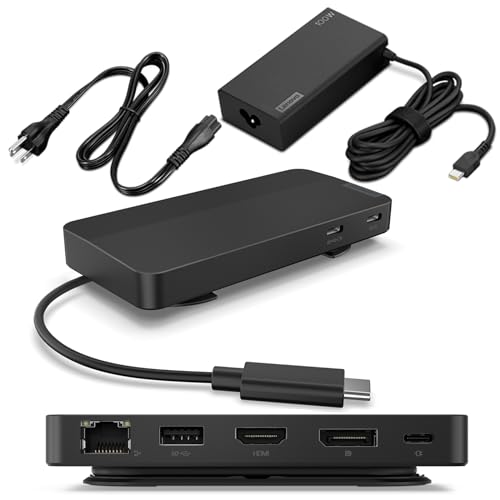
Lenovo Dual Display USB-C Travel Dock
Best for: Travelers needing dual 4K displays and wired networking
- Use
- Travel (what this guide is about)
- Host Interface
- USB-C
- Display Support
- Dual
- Max Resolution
- 4K
- Power Delivery
- 65W (up to 100W)
- Port Count
- 7
View on Amazon: Lenovo Dual Display USB-C Travel Dock Affiliate link
This dock expands your laptop into a dual 4K setup via DisplayPort and HDMI. It connects through a single USB-C host interface with an integrated cable. The unit includes a 100W power adapter, delivering 65W pass-through to your computer. It features seven ports, including Gigabit Ethernet and high-speed USB data connections. This setup suits travelers who need a stable, multi-monitor workspace on the road.
Pros
- Supports dual 4K displays via DP 1.4 and HDMI 2.0
- Includes 100W power adapter for up to 100W PD output
- Features integrated USB-C cable for easy connectivity
- Provides Gigabit Ethernet and USB 3.2 10 Gbps ports
- Constructs chassis with 66% post-consumer recycled content
Cons
- Heavier at 1.44 pounds than slim travel hubs
- Ethernet speed limited to 1000M, not 2.5G
- Requires separate 135W adapter for full 100W PD pass-through
Good fit if
- You need dual external monitors for productivity while traveling
- You require a wired Gigabit Ethernet connection for stable internet
- You want a dock with an integrated cable to reduce clutter
Skip if
- You prioritize ultra-lightweight gear under 1 pound
- You only need a single external display
- You require 2.5Gbps network speeds for faster file transfers
Verdict: Lenovo USB-C Dual Display Travel Dock delivers robust dual 4K support and high-speed data for travelers who prioritize performance over minimal weight. It fits professionals who need a reliable, multi-port station with wired networking.
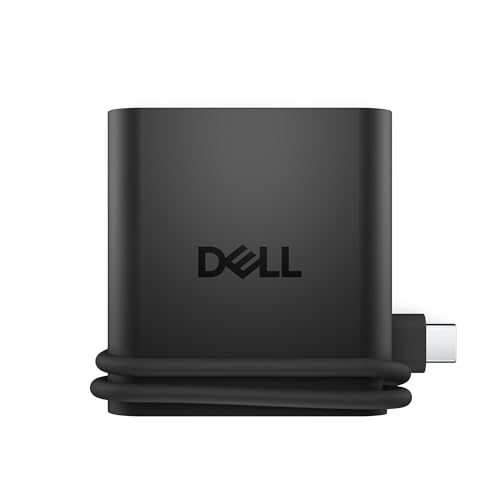
Dell 4-in-1 USB-C Travel Hub
Best for: Lightweight single-monitor travel setups
- Use
- Travel (what this guide is about)
- Host Interface
- USB-C
- Max Resolution
- 4K
- Port Count
- 4
- Video Ports
- HDMI
- Connectivity
- USB-C, HDMI, USB-A
View on Amazon: Dell 4-in-1 USB-C Travel Hub Affiliate link
The Dell DA225 is a compact travel hub designed for portability. It features a single HDMI port supporting 4K resolution and connects via USB-C. The device includes two USB-C ports and one USB-A port for peripheral connections. Its slim profile, measuring 2.24 by 0.6 inches and weighing 1.6 ounces, fits easily into a laptop sleeve. Smart Power Management adjusts power distribution based on real-time device consumption to prevent overconsumption.
Pros
- Ultra-slim design at 0.6 inches thick
- Lightweight build weighing only 1.6 ounces
- Supports 4K UHD video output
- Smart Power Management rebalances power usage
- Includes two USB-C and one USB-A port
Cons
- Only four total ports available
- Single HDMI video output limits multi-monitor setups
- No display for real-time status monitoring
Good fit if
- You need a lightweight hub for occasional travel
- You primarily use a single external monitor
- You want to manage power consumption efficiently
Skip if
- You require more than four connection ports
- You need dual monitor support via the hub
- You prefer a larger hub with more features
Verdict: Dell DA225 Slim Travel Hub is a minimal, lightweight option for travelers who only need one video output and basic peripheral connectivity. It suits those who prioritize portability over expansion capabilities.

Lenovo USB-C Slim Travel Dock
Best for: single-cable travel setups under 65W
- Use
- Travel (what this guide is about)
- Host Interface
- USB-C
- Max Resolution
- 4K @ 60 Hz
- Power Delivery
- Up to 65W
- Port Count
- 8
- Video Ports
- HDMI
View on Amazon: Lenovo USB-C Slim Travel Dock Affiliate link
The Lenovo USB-C Slim Travel Dock offers eight ports in a compact 4.72-inch chassis. It supports 4K @ 60 Hz video and delivers up to 65W of pass-through power to your laptop. The integrated USB-C cable simplifies packing. You get three USB-C data ports and two USB-A ports for peripherals. This dock suits travelers who need a single-cable solution for video and power without carrying extra bricks.
Pros
- 8 total ports including HDMI and USB-C
- Integrated USB-C cable for easy packing
- Supports 4K @ 60 Hz resolution
- Up to 65W power delivery pass-through
- Compact 4.8-ounce weight
Cons
- Only one HDMI video port
- No DisplayPort or VGA connectivity
- Lower 65W power limit compared to 100W docks
Good fit if
- You need a single cable for video and power
- You travel with a USB-C laptop under 65W
- You want a compact dock with integrated cabling
Skip if
- You require dual monitor support via HDMI
- Your laptop needs more than 65W of power
- You need Thunderbolt speeds for high bandwidth
Verdict: The Lenovo Slim Travel Dock 8-Port fits professionals who prioritize a tidy, single-cable setup for travel. It works best for users with USB-C laptops that draw less than 65W.

Microsoft Surface USB-C Travel Hub
Best for: Legacy VGA display connections
- Use
- Travel (what this guide is about)
- Host Interface
- USB-C
- Video Ports
- VGA, HDMI
- Dimensions
- 3.5 × 1.89 × 0.59 inches
- Weight
- 3.52 ounces
View on Amazon: Microsoft Surface USB-C Travel Hub Affiliate link
This Microsoft hub connects to a laptop via USB-C. It includes HDMI and VGA ports for video output. The unit measures 3.5 by 1.89 by 0.59 inches. It weighs 3.52 ounces. The compact size suits travel. You can use it to extend your display to older VGA monitors or modern HDMI screens. It is a simple plug-and-play solution for business travelers.
Pros
- Includes both HDMI and VGA video ports
- Compact dimensions of 3.5 x 1.89 x 0.59 inches
- Lightweight at 3.52 ounces
- USB-C host interface
Cons
- Lacks USB-A data ports
- No power delivery pass-through
- Only two video output options
Good fit if
- You need to connect to legacy VGA displays
- You prioritize a minimal footprint in your bag
- You only require video extension
Skip if
- You need to charge your laptop through the hub
- You require multiple USB-A ports for peripherals
- You want a single HDMI output with data transfer
Verdict: Microsoft Surface USB-C Travel Hub offers basic video connectivity for those who need VGA support. It fits travelers who carry older projectors or monitors.
Specifications side by side
| Spec | Lenovo Dual Display USB-C Travel Dock | Dell 4-in-1 USB-C Travel Hub | Lenovo USB-C Slim Travel Dock | Microsoft Surface USB-C Travel Hub |
|---|---|---|---|---|
| Host Interface | USB-C | USB-C | USB-C | USB-C |
| Display Support | Dual | not stated | not stated | not stated |
| Max Resolution | 4K | 4K | 4K @ 60 Hz | not stated |
| Power Delivery | 65W (up to 100W) | not stated | Up to 65W | not stated |
| Port Count | 7 | 4 | 8 | not stated |
| Video Ports | DP 1.4, HDMI 2.0 | HDMI | HDMI | VGA, HDMI |
| Max Data Speed | 10Gbps | not stated | 10 Gbps | not stated |
| Ethernet Speed | 1000M | not stated | not stated | not stated |
| Resolution | 4K UHD | 4K UHD | 4K UHD | not stated |
| Connectivity | USB-C | USB-C, HDMI, USB-A | USB-C | USB-C |
| Use | Travel | Travel | Travel | Travel |
| Dimensions | 4.72 × 2.6 × 0.79 inches | 2.36 × 2.24 × 0.6 inches | 4.72 × 2.17 × 0.79 inches | 3.5 × 1.89 × 0.59 inches |
| Weight | 1.44 pounds | 1.6 ounces | 4.8 ounces | 3.52 ounces |
| Size | 0.79" x 2.17" | DA225 | 0.43" x 2.17" | 0.59" x 1.89" x 3.50" |
| Color | Black | Black | Black | Black |
| Model | 40B9 | DA225 | 4X11N40213 | 1E4-00001 |
Key Specs for Travel Docks
-
Check Display Support
Decide if you need one or two screens. The Lenovo Dual Display dock supports dual 4K monitors, ideal for productivity. If you only need one external screen, the Dell 4-in-1 hub is sufficient. This choice affects the size and weight of the device. Dual setups require more bandwidth and often heavier hardware. Single-monitor hubs are often smaller and lighter. Match your daily workflow to the correct display count.
-
Verify Connectivity Ports
Look at the available ports on the device. The Dell hub includes USB-C, HDMI, and USB-A ports. This provides basic connectivity for peripherals and displays. The Microsoft hub offers VGA support for older projectors. If you need legacy connections, this is a key feature. Newer laptops often lack VGA ports. Ensure the hub has the specific video outputs you require for your travel gear.
-
Compare Physical Dimensions
Size matters when packing light. The Dell hub measures 2.24 inches wide and weighs only 1.6 ounces. It is the most compact option listed. The Lenovo Slim Travel Dock is also small but weighs 4.8 ounces. The Dual Display model is larger at 4.72 inches long. Measure your bag space carefully. Smaller hubs fit in pockets or small sleeves. Larger docks may require dedicated compartments in your travel bag.
-
Assess Weight Limits
Weight impacts how easy the dock is to carry. The Dell hub is the lightest at 1.6 ounces. The Microsoft hub weighs 3.52 ounces. The Lenovo Slim dock weighs 4.8 ounces. The Dual Display model is the heaviest at 1.44 pounds. If you travel frequently by foot, lighter is better. Heavy docks add significant bulk. Choose the lightest option that meets your other technical requirements.
-
Review Power Delivery
Check if the dock charges your laptop. The Lenovo Dual Display dock supports 100W power delivery. This handles high-performance machines. The Lenovo Slim dock supports up to 65W. This suits lighter laptops. The Dell and Microsoft hubs do not list power delivery specs. If you need charging, choose a model that lists wattage. Ensure the wattage meets your laptop’s minimum requirements for stable operation.
Frequently asked questions
Which travel dock supports dual monitors?
The Lenovo Dual Display USB-C Travel Dock supports dual 4K displays. It is the only option on this list designed for two screens. This makes it ideal for users who need extended workspace while traveling. Other models listed here are limited to single monitor output.
What is the lightest travel dock available?
The Dell 4-in-1 USB-C Travel Hub is the lightest option at 1.6 ounces. Its compact size makes it easy to carry in a bag. The Lenovo Slim Travel Dock is also very light at 4.8 ounces. These are better choices than heavier stations if weight is your main concern.
Does any travel dock include an Ethernet port?
The Lenovo Dual Display USB-C Travel Dock includes a wired Ethernet port. This provides a stable internet connection when Wi-Fi is unavailable. The other docks on this list do not list Ethernet connectivity in their specifications. You will need a separate adapter if you require wired networking with other models.
Which dock is best for legacy VGA displays?
The Microsoft Surface USB-C Travel Hub supports VGA connections. This is useful if you need to connect to older projectors or monitors. Most modern travel docks rely on HDMI or USB-C for video. This model is the specific choice for users who still use VGA cables.
Can I charge my laptop through the Dell hub?
The specifications for the Dell 4-in-1 USB-C Travel Hub do not list power delivery capabilities. It is designed primarily for data and video connectivity. You will likely need to charge your laptop separately. Check your laptop’s power requirements before relying on this hub for charging.
What is the maximum resolution supported by these docks?
The Lenovo Dual Display, Dell 4-in-1, and Lenovo Slim Travel Docks all support 4K UHD resolution. This ensures crisp images on high-definition external monitors. The Microsoft hub does not specify a resolution limit in its listed attributes. It is best suited for standard definition VGA connections.