Acer 15.6-Inch Slim FHD IPS Portable Monitor Review: Who It Fits and Who Should Skip It
As an Amazon Associate we earn from qualifying purchases. Links on this page are affiliate links.
This acer portable monitor pm161q abmiuuzx review covers the Acer PM161Q, a 15.6-inch display designed for mobility. It features a Full HD 1920 x 1080 IPS panel for clear visuals. The unit maintains an ultra-slim profile, measuring just 0.4 inches thick. This compact form factor makes it easy to carry in a laptop bag. The screen size offers ample workspace without taking up too much desk space. You get a reliable secondary display for productivity tasks on the go.
What stands out
- 15.6-inch Full HD (1920 x 1080) IPS display
- Ultra-slim design at 0.4 inches thick
- Dual USB 3.1 Type-C ports for data and power
- Includes Mini HDMI and Micro USB cables
- 5ms response time (G to G)
Who it fits
Good fit for
This monitor suits professionals who need a second screen for travel or hybrid work. The single USB-C port allows connection to modern laptops that support DisplayPort over USB-C. You can use the included Mini HDMI cable for older devices. The 15.6-inch size provides enough real estate for spreadsheets or documents. Its slim build fits easily into most laptop sleeves. It is ideal for users who prioritize portability and basic connectivity.
Who should skip it
You should look elsewhere if you require high refresh rates for gaming, as this panel has a 5ms response time and standard refresh rate. Users needing multiple high-bandwidth connections may find the single USB-C port limiting. Those who prefer a larger 17-inch or 24-inch screen will find the 15.6-inch size too small. If your device only has standard USB-A ports and no USB-C, you will need additional adapters. This model is not for users demanding 4K resolution.
Verdict: The Acer PM161Q is a practical, slim portable monitor for users needing a reliable 1080p secondary display. It offers straightforward connectivity for most modern laptops.
Acer PM161Q Key Specs Explained
15.6" Screen Size
This diagonal measurement provides a substantial viewing area for productivity tasks. You gain enough screen real estate to comfortably split windows or view detailed spreadsheets. The 15.6-inch format matches standard laptop screens, making it easy to align your workflow. This size balances portability with usability, offering more space than smaller 13-inch options without the bulk of larger desktop replacements.
1920 x 1080 Resolution
Known as Full HD, this resolution delivers sharp text and clear images. You will see distinct pixels at normal viewing distances, ensuring readability for documents and code. This standard is ideal for general office work and media consumption. It provides a crisp visual experience that is sufficient for most users, avoiding the higher cost of 4K panels while maintaining excellent clarity for everyday computing tasks.
IPS Panel Type
In-Plane Switching technology ensures accurate colors and wide viewing angles. You can view the screen from the side without significant color shift or contrast loss. This is crucial when sharing your display with colleagues or using it in different positions. IPS panels generally offer better color reproduction than TN panels, making them suitable for creative work and general multimedia use where visual fidelity matters.
2 x USB 3.1 Type-C Ports
These modern ports handle data, power, and video signals simultaneously. You can connect to newer laptops and tablets using a single cable for power and display output. The specification notes support for DisplayPort over USB-C, which simplifies your setup by reducing cable clutter. This connectivity is essential for users with modern devices, offering a streamlined connection method compared to older multi-cable setups.
1 x Mini HDMI Port
This legacy port provides compatibility with older computers and gaming consoles. You can connect devices that lack USB-C video output using a standard HDMI cable. This ensures the monitor works with a wider range of equipment, including older laptops and media players. It serves as a reliable backup connection method, guaranteeing functionality even if your primary device does not support USB-C video transmission.
Design and Build Quality
The Acer PM161Q features an ultra-slim design that prioritizes portability. According to the listing, the display measures 14.1 inches wide, 8.86 inches high, and just 0.4 inches thick. This compact footprint allows you to slip the monitor into a standard laptop bag without adding significant bulk. The black finish provides a neutral look that blends with most workspaces. You can carry it easily between meetings or to a home office setup.
Connectivity is handled through a mix of ports to ensure compatibility with various devices. You get two USB 3.1 Type-C ports that support data, power delivery up to 15W, and DisplayPort over USB-C. A Mini HDMI port and a Micro USB port are also included. An audio-out jack is available via the USB Type-C connection. The listing notes that cables for USB-C, Mini HDMI, and Micro USB are included in the box. This variety helps you connect to older laptops or devices that lack modern USB-C outputs.
The build focuses on practical mobility rather than premium materials. The slim profile is its main physical advantage. You will find the 0.4-inch thickness convenient for travel. The inclusion of multiple cable types means you do not need to buy extra adapters for most connections. The design supports a straightforward plug-and-play experience for users who need a secondary screen on the go.
Setup And Everyday Use Guide
Setting up the Acer PM161Q is straightforward due to its versatile connectivity options. The listing includes a Micro USB cable, a Mini HDMI cable, and a USB Type-C cable. You can connect the monitor to most laptops, tablets, or gaming consoles using these included cables. The two USB 3.1 Type-C ports support DisplayPort over USB-C, data transfer, and power delivery up to 15W. This means you can often power the display and send video signals through a single cable if your device supports it. Alternatively, you can use the Mini HDMI port for video and the Micro USB port for power. The 5ms response time (G to G) ensures that moving images remain clear. This specification is practical for general office work, web browsing, and light media consumption. It prevents noticeable ghosting during standard tasks. The 1920 x 1080 IPS panel provides consistent color and wide viewing angles. You can position the screen at various angles without significant color shift. This makes it suitable for sharing content with colleagues or viewing in different seating positions. The ultra-slim design and included premium cover allow you to protect the screen when transporting it. You can easily pack the monitor into a laptop bag alongside your computer. This setup supports a dual-screen workflow wherever you work. You gain additional vertical space for documents or code without cluttering your desk. The compact 14.1-inch width fits on most standard workspaces. You can quickly deploy the monitor for presentations or extended editing sessions. The simplicity of the connection options reduces setup friction. You spend less time troubleshooting cables and more time working. The included accessories ensure you have the necessary tools for immediate use right out of the box.
Compatibility And Setup Checks
Before you buy, verify your laptop’s USB-C port supports DisplayPort Alt Mode. The Acer PM161Q uses USB-C for both video and power. If your device lacks this feature, you must use the included Mini HDMI for video and the Micro USB cable for separate power. This dual-cable setup is less convenient than a single USB-C connection. The 15W power draw via USB-C is modest, but ensure your laptop can supply it. Keep the premium cover handy to protect the IPS panel from scratches when traveling. This monitor fits well in setups where you need a secondary screen without heavy bulk. It complements other options by offering a balance of size and slimness. Check your ports first to avoid connectivity issues. The 5ms response time is adequate for general work, though not for competitive gaming. Plan your cable management around the three included cables.
Check before you buy
- Confirm your laptop USB-C supports video output
- Check if you need separate power for HDMI use
- Ensure your case fits the 0.4-inch thickness
- Verify port availability for Mini HDMI connection
The product at a glance
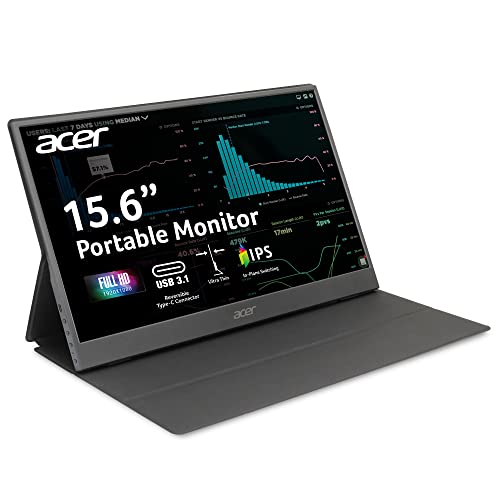
Acer 15.6-Inch Slim FHD IPS Portable Monitor
Best for: travelers needing a lightweight second screen
- Screen Size
- 15.6"
- Resolution
- 1920 x 1080
- Panel Type
- IPS
- Connectivity
- USB-C, Mini HDMI, Micro USB
- Dimensions
- 0.4 × 14.1 × 8.86 inches
View on Amazon: Acer 15.6-Inch Slim FHD IPS Portable Monitor Affiliate link
The Acer PM161Q is a 15.6-inch Full HD portable monitor featuring an IPS panel for wide viewing angles. It connects via two USB-C ports and one Mini HDMI port. The slim design fits easily into bags for travel or office use. You get a 1920 x 1080 resolution display with a 5ms response time. It includes a premium cover and necessary cables for immediate setup.
Pros
- 15.6-inch IPS panel with 1920 x 1080 resolution
- Dual USB-C ports support data, power, and video
- Includes Mini HDMI and Micro USB cables
- Ultra-slim design at 0.4 inches thick
Cons
- Uses Mini HDMI instead of standard HDMI
- No built-in speakers listed in specifications
- Only one USB-C port for power delivery
Good fit if
- You need a second screen for travel or remote work
- You want an IPS display for accurate colors
- You prefer a slim profile that fits in a bag
Skip if
- You require built-in speakers for audio
- You only have standard HDMI cables available
- You need a larger screen than 15.6 inches
Verdict: Acer 15.6" FHD IPS Portable Monitor offers a reliable FHD IPS display with versatile USB-C connectivity. It fits professionals who need a lightweight secondary screen for work on the go.
Specifications side by side
| Spec | Acer 15.6-Inch Slim FHD IPS Portable Monitor |
|---|---|
| Screen Size | 15.6" |
| Resolution | 1920 x 1080 |
| Panel Type | IPS |
| Connectivity | USB-C, Mini HDMI, Micro USB |
| Dimensions | 0.4 × 14.1 × 8.86 inches |
| Size | 15.6-inch USB-c / micro USB / mini HDMI |
| Color | Black |
| Model | UM.ZP1AA.A01 |
Frequently asked questions
Does the Acer PM161Q support 4K resolution?
No, this monitor does not support 4K resolution. It features a Full HD 1080p IPS display. This resolution provides clear visuals for everyday tasks. It is suitable for productivity work and media consumption. You will not get the extra pixel density of 4K screens. This is standard for many portable monitors in this size category.
Can I use this monitor with a Nintendo Switch?
Yes, you can use this portable monitor with a Nintendo Switch. The device supports Mini HDMI connectivity. This allows you to connect the console directly. You get a larger screen for gaming on the go. The 15.6-inch display offers a comfortable viewing area. It is a practical option for portable gaming sessions.
How thick is the Acer 15.6-inch portable monitor?
The Acer PM161Q is extremely thin at 0.4 inches. This slim profile makes it easy to carry. You can fit it into most laptop bags. The compact design prioritizes mobility and convenience. It does not add significant bulk to your travel gear. This thickness is ideal for users who value portability.
What colors is this portable monitor available in?
This specific model is available in black. The color choice matches many standard laptop designs. It provides a professional and neutral appearance. You will not find other color options for this unit. The black finish helps it blend seamlessly with your existing tech setup.
Is the screen size suitable for split-screen multitasking?
Yes, the 15.6-inch screen is suitable for split-screen multitasking. You have enough real estate to view two windows side by side. This setup improves productivity for office work. You can reference documents while typing or coding. The size balances portability with useful viewing space. It is a practical choice for mobile professionals.
Does the monitor come with a protective case?
The provided data does not mention a protective case. You should check the full package contents before purchasing. Portable monitors often require separate protection for travel. You may need to buy a sleeve or case separately. This ensures your device stays safe during transit. Always verify included accessories with the retailer.