90W vs 60W Portable Monitors in 2026: Key Differences
As an Amazon Associate we earn from qualifying purchases. Links on this page are affiliate links.
Choosing between a 90W vs 60W portable monitor involves balancing power delivery against display size and resolution. Both the ASUS ZenScreen and ViewSonic VG1655 use USB-C connectivity and IPS panels. The main difference lies in their power output and screen dimensions. The ASUS model offers 90W charging and a 27-inch 4K display, while the ViewSonic provides 60W charging with a compact 15.6-inch 1080p screen. Your choice depends on whether you prioritize desktop replacement capability or travel convenience.
Key differences
| Aspect | ASUS ZenScreen 27-Inch 4K Smart Monitor | ViewSonic 15.6-Inch 1080p USB-C Portable Monitor |
|---|---|---|
| Power Delivery | 90W | 60W |
| Screen Size | 27 Inch | 15.6 Inch |
| Resolution | 3840 x 2160 (4K UHD) | 1920 x 1080 (1080p FHD) |
| Operating System | Google TV Integration | Not listed |
| Weight | 13.2 pounds | 1.8 pounds |
Which one should you choose?
Choose ASUS ZenScreen 27-Inch 4K Smart Monitor if
- You need a large 27-inch 4K display for detailed work or media consumption.
- You want a monitor that can deliver 90W of power to charge high-power laptops.
- You prefer a built-in smart TV interface with Google TV for streaming apps.
Choose ViewSonic 15.6-Inch 1080p USB-C Portable Monitor if
- You prioritize extreme portability with a lightweight 1.8-pound design.
- You need a compact 15.6-inch screen that fits easily in a laptop bag.
- You want a simple plug-and-play experience with a detachable magnetic stand.
Verdict: The ASUS ZenScreen suits users who want a desktop replacement with high resolution and strong charging power. The ViewSonic VG1655 is better for travelers who need a lightweight, compact secondary screen. Choose based on whether size and power or portability is your priority.
90W vs 60W Monitor Comparison
Power Delivery
Power delivery defines how much energy a monitor pushes back to your laptop through the USB-C cable. The ASUS ZenScreen MS27UC supports 90W output. This high wattage can charge power-hungry laptops while driving a large 4K screen. The ViewSonic VG1655 provides 60W output. This is sufficient for most ultrabooks and tablets but offers less headroom for heavy workloads. If you need to charge a high-performance device while using the monitor as a primary display, the 90W option reduces battery drain significantly. The 60W model is adequate for standard use cases.
Resolution
Resolution determines the clarity and detail of your image. The ASUS ZenScreen features a 4K UHD resolution of 3840 x 2160 pixels. This provides four times the pixel count of standard HD, ideal for detailed work or media consumption. The ViewSonic VG1655 uses a Full HD resolution of 1920 x 1080 pixels. While sharp for its size, it lacks the fine detail of 4K. The difference is noticeable when viewing text or high-resolution images. You will see more screen real estate and sharper graphics on the ASUS model due to its higher pixel density.
Screen Size
Screen size affects your workspace and portability. The ASUS ZenScreen has a 27-inch display. This large surface area allows for multiple windows and detailed editing tasks but requires more desk space. The ViewSonic VG1655 has a 15.6-inch display. This compact size fits easily on small desks or laps, making it highly portable. The 27-inch screen is better for immersive experiences and productivity. The 15.6-inch screen is better for travel and limited spaces. Choose based on whether you prioritize workspace or mobility.
Connectivity
Connectivity options determine which devices you can use. The ASUS ZenScreen includes USB-C, HDMI, DisplayPort, and a USB hub. This variety allows you to connect older monitors, modern laptops, and peripherals simultaneously. The ViewSonic VG1655 offers USB-C and Mini-HDMI inputs. While functional, it lacks DisplayPort and has a less common Mini-HDMI port. The ASUS model provides more flexibility for different setups. You can connect more devices to the ASUS without needing extra adapters.
Weight
Weight impacts how easy the monitor is to carry. The ASUS ZenScreen weighs 13.2 pounds. This substantial weight makes it less suitable for frequent travel. It is better suited for a fixed desk setup. The ViewSonic VG1655 weighs only 1.8 pounds. This lightweight design is easy to pack in a bag and take anywhere. If you move your monitor between locations daily, the ViewSonic is much more convenient. The ASUS is better for stationary use.
Smart Features
Smart features add functionality without a connected computer. The ASUS ZenScreen runs Google TV, offering access to over 10,000 apps and wireless streaming via Miracast and Chromecast. It also supports live broadcasting. The ViewSonic VG1655 has no built-in operating system or apps. It requires a connected device to function. The ASUS model works as a standalone entertainment screen. The ViewSonic is purely a display extension for your computer.
Which portable monitor fits your workflow
Users needing a large 4K smart display
The ASUS ZenScreen MS27UC offers a 27-inch 4K UHD IPS panel with 99% sRGB coverage for precise color work. It includes Google TV, Harman Kardon speakers, and 90W power delivery. This setup replaces a desktop monitor while charging your laptop through a single USB-C connection.
Travelers prioritizing lightweight portability
The ViewSonic VG1655 weighs just 1.8 pounds and measures 0.6 inches thick. Its compact 15.6-inch 1080p screen fits easily in bags. The magnetic cover doubles as a stand, and 60W USB-C power delivery keeps your device charged without adding bulk to your daily carry.
Creators wanting built-in streaming features
Only the ASUS ZenScreen MS27UC includes multi-platform streaming capabilities and Google TV integration. You can access thousands of apps directly on the monitor. The 90W output ensures your host device stays powered during long broadcasts, while the 4K resolution provides sharp visual quality for your audience.
Quick picks
| # | Product | Best for | Price |
|---|---|---|---|
| 1 | ASUS ZenScreen 27-Inch 4K Smart Monitor | Users needing 90W charging and 4K resolution | Check price of ASUS ZenScreen 27-Inch 4K Smart Monitor on Amazon |
| 2 | ViewSonic 15.6-Inch 1080p USB-C Portable Monitor | Lightweight laptop expansion with USB-C charging | Check price of ViewSonic 15.6-Inch 1080p USB-C Portable Monitor on Amazon |
The products compared

ASUS ZenScreen 27-Inch 4K Smart Monitor
Best for: Users needing 90W charging and 4K resolution
- Power Delivery
- 90W (what this guide is about)
- Screen Size
- 27 Inch
- Resolution
- 3840 x 2160
- Panel Type
- IPS
- Connectivity
- USB-C, HDMI, DisplayPort, USB hub
- Color Gamut
- 99% sRGB
View on Amazon: ASUS ZenScreen 27-Inch 4K Smart Monitor Affiliate link
This 27-inch 4K monitor features a 90W USB-C connection that powers your laptop while displaying video. The IPS panel covers 99% of the sRGB gamut for accurate colors. It includes built-in Harman Kardon speakers and Google TV for standalone streaming. You get a versatile hub with HDMI and DisplayPort inputs. It suits users who want a large, high-resolution display that also functions as a smart TV.
Pros
- 90W USB-C Power Delivery for laptop charging
- 27-inch 4K UHD IPS panel with 99% sRGB
- Built-in Harman Kardon certified speakers
- Google TV with over 10,000 apps
- Supports Miracast and Chromecast
Cons
- 13.2-pound weight makes it less portable
- 1.8-inch depth is bulky for travel
- No mention of a remote control
Good fit if
- You need 90W power delivery to charge a laptop
- You want a large 27-inch 4K display
- You prefer a standalone smart TV experience
Skip if
- You prioritize lightweight portability under 10 pounds
- You only need a 1080p resolution screen
- You require a compact form factor for frequent travel
Verdict: ASUS 27-inch 4K Smart Monitor delivers high-resolution visuals and strong charging power, making it ideal for users who value screen real estate and smart features over portability.
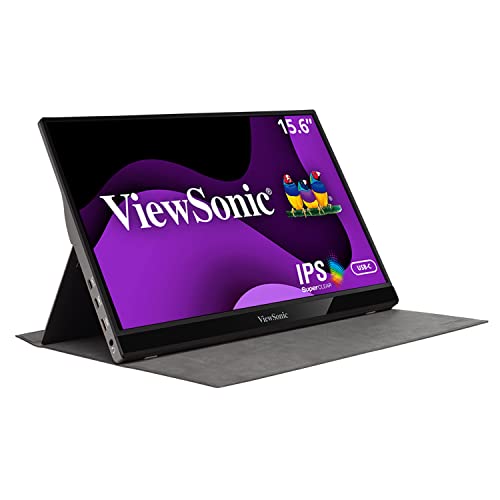
ViewSonic 15.6-Inch 1080p USB-C Portable Monitor
Best for: Lightweight laptop expansion with USB-C charging
- Power Delivery
- 60W (what this guide is about)
- Screen Size
- 15.6"
- Resolution
- 1920x1080p
- Refresh Rate
- 60Hz
- Panel Type
- IPS
- Connectivity
- USB-C, Mini-HDMI
View on Amazon: ViewSonic 15.6-Inch 1080p USB-C Portable Monitor Affiliate link
This ViewSonic portable monitor offers a 15.6-inch IPS display with 1080p resolution and a 60Hz refresh rate. It weighs 1.8 lbs and connects via USB-C with 60W power delivery or Mini-HDMI. The aluminum build includes dual speakers and a built-in stand. It suits users needing a lightweight secondary screen for laptops or Macs with limited cable clutter.
Pros
- 15.6-inch IPS panel with 1080p resolution
- 60W USB-C power delivery for single-cable use
- Lightweight 1.8 lbs aluminum design
- Built-in dual speakers and kickstand
Cons
- 60Hz refresh rate limits motion smoothness
- 1080p resolution is lower than 4K competitors
- Uses Mini-HDMI instead of standard HDMI
Good fit if
- You want a lightweight screen under 2 lbs
- You need 60W charging through the display cable
- You prefer a compact 15.6-inch size
Skip if
- You require 4K resolution for detailed work
- You need a standard HDMI port
- You want a higher refresh rate than 60Hz
Verdict: ViewSonic VG1655 15.6-inch 1080p Portable Monitor fits travelers who prioritize portability and simple USB-C connectivity over high resolution or refresh speed.
Specifications side by side
| Spec | ASUS ZenScreen 27-Inch 4K Smart Monitor | ViewSonic 15.6-Inch 1080p USB-C Portable Monitor |
|---|---|---|
| Screen Size | 27 Inch | 15.6" |
| Resolution | 3840 x 2160 | 1920x1080p |
| Refresh Rate | not stated | 60Hz |
| Panel Type | IPS | IPS |
| Connectivity | USB-C, HDMI, DisplayPort, USB hub | USB-C, Mini-HDMI |
| Color Gamut | 99% sRGB | not stated |
| Weight | 13.2 pounds | 1.8 lbs |
| Features | Built-in Speakers, VESA Mountable | Built-in Speakers, Kickstand |
| Power Delivery | 90W | 60W |
| Size | 27-Inch | not stated |
| Dimensions | 24.2 × 1.8 × 20 inches | 0.6 × 8.8 × 14 inches |
| Color | BLACK | Silver |
| Model | MS27UC | VG1655-CR |
Frequently asked questions
Can a 60W portable monitor charge a MacBook Pro?
A 60W monitor like the ViewSonic VG1655 can charge a MacBook Pro, but it may charge slowly during heavy use. The 60W output provides enough power for maintenance charging or light tasks. For faster charging, you would need a higher wattage source or a direct laptop charger.
Is 90W power delivery enough to run a 4K monitor?
Yes, the ASUS ZenScreen MS27UC demonstrates that 90W power delivery can support a 27-inch 4K display. This wattage allows the monitor to draw power from your laptop while still providing 90W back to it. This setup simplifies your desk by reducing the number of cables needed for power.
What is the size difference between 60W and 90W monitors?
The 60W ViewSonic VG1655 is a compact 15.6-inch device weighing 1.8 pounds. In contrast, the 90W ASUS ZenScreen MS27UC is a larger 27-inch unit weighing 13.2 pounds. The higher wattage model prioritizes screen real estate and smart features, while the lower wattage option focuses on portability.
Do both monitors use the same connection type?
Both the ASUS ZenScreen and ViewSonic VG1655 utilize USB-C connectivity for video and power. The ASUS model also includes an HDMI port for additional flexibility. This shared connection type allows you to use a single cable for data, video, and charging in most modern setups.
Can I use a 90W monitor with a standard laptop?
You can use the 90W ASUS ZenScreen with any laptop that supports USB-C video output and Power Delivery. The monitor will draw the power it needs and provide up to 90W back to the host device. Ensure your laptop’s USB-C port supports the required video and power specifications.
Does higher wattage mean better screen quality?
Not necessarily. The 90W ASUS model offers 4K UHD resolution, while the 60W ViewSonic offers 1080p FHD. The wattage determines charging capability, not pixel density. Both use IPS panels for good viewing angles, but the resolution and size differ based on the specific design goals of each device.