15 Best Docking Stations Under $150, Compared
As an Amazon Associate we earn from qualifying purchases. Links on this page are affiliate links.
Finding the best docking stations under $150 requires matching connectivity to your specific desk setup. We compared 15 models based directly on the specifications published on their listings. The Lenovo ThinkPad Hybrid USB-C and USB-A Dock takes the top spot because its pairing of 10Gbps USB ports and dual video outputs provides flexible connectivity across both USB-C and USB-A laptops.
This guide helps you decide on the right dock for your workspace by comparing monitor support, charging wattage, and port selection.
Quick picks
The best fit for you
- You use both USB-C and USB-A laptops Lenovo ThinkPad Hybrid USB-C and USB-A Dock It provides hybrid USB-C and USB-A connectivity with 10Gbps ports and dual video outputs.
- You want a modular dock for desk and travel Anker Nano 13-in-1 Dock with Detachable Hub It features a detachable hub, 13-in-1 port selection, and 100W power delivery.
- You run three 4K displays on Apple Silicon Giq DisplayLink Triple 4K USB-C Dock It uses DisplayLink technology to support up to three 4K monitors at 60Hz.
- You need high-wattage 180W power delivery for workstations ANYHDD Thunderbolt Dock with 180W Power It supplies 180W host power delivery and supports dual 4K displays over Thunderbolt.
Our 15 picks
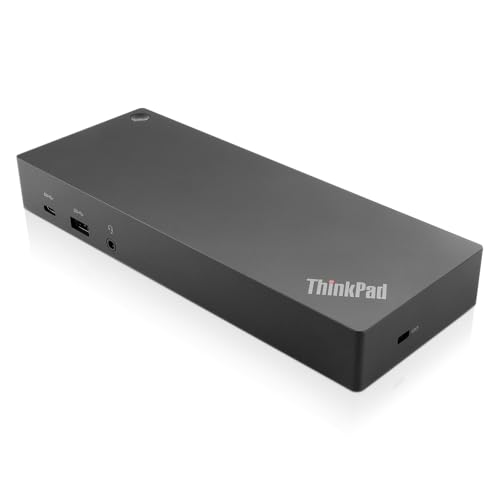
Lenovo ThinkPad Hybrid USB-C and USB-A Dock
Best for: Mixed USB-C and USB-A laptop setups
- Host Interface
- USB-C, USB-A
- Video Ports
- DisplayPort, HDMI
- Max Data Speed
- 10Gbps
- Ethernet Speed
- Gigabit Ethernet
- Dimensions
- 8.3 × 3.1 × 1.2 inches
- Weight
- 1.05 pounds
The Lenovo ThinkPad Hybrid USB-C and USB-A Dock connects to your laptop via USB-C or legacy USB-A ports. It features two DisplayPort and two HDMI outputs, a Gigabit Ethernet jack, and three 10Gbps USB 3.1 Gen 2 ports. You also get a 15W front USB-C port for mobile charging. It suits work setups where you need dual video outputs and broad host compatibility across older and newer laptops.
Pros
- Dual DisplayPort and dual HDMI video connections
- Works with both USB-C and USB-A host laptops
- Three 10Gbps USB 3.1 Gen 2 ports
- Gigabit Ethernet and combo audio port built in
- 15W USB-C and 10.5W USB-A mobile device charging
Cons
- Front USB-C port caps charging output at 15W
- Includes two slower USB 2.0 ports
Good fit if
- You need to dock laptops using either USB-C or legacy USB-A connections.
- You run monitors that require DisplayPort or HDMI cables.
- You use compatible ThinkPad models supporting RapidCharge.
Skip if
- You require high-wattage power output directly from the front USB-C port.
- You need every USB-A port to operate at 10Gbps speed.
Verdict: Lenovo ThinkPad Hybrid USB-C and USB-A Dock provides flexible host connectivity and dual video outputs for mixed laptop fleets. Its pairing of 10Gbps USB ports and dual display options delivers solid enterprise utility.

Anker Nano 13-in-1 Dock with Detachable Hub
Best for: hybrid workers needing portable and desktop connectivity
- Host Interface
- USB-C
- Display Support
- Triple
- Max Resolution
- 4K@60Hz
- Power Delivery
- Up to 100W
- Port Count
- 13
- Video Ports
- HDMI, DisplayPort
This 13-in-1 USB-C docking station combines a desktop base with a detachable 6-in-1 portable hub. You get up to 100W Power Delivery powered by an included 140W adapter, alongside three video connections: two HDMI and one DisplayPort. It delivers 4K at 60Hz on a single screen or 1080p across three monitors on Windows. It suits you if you frequently transition between stationary desk tasks and travel.
Pros
- Detachable 6-in-1 travel hub snaps off the base unit
- 100W laptop charging with an included 140W power adapter
- Triple monitor support via two HDMI and one DisplayPort
- Includes SD and microSD card reader slots
Cons
- macOS displays only support mirrored mode across external monitors
- Resolution caps at 1080p at 60Hz when running three displays
- Ports remain powered off until a host laptop is plugged in
Good fit if
- You need a desktop dock with a detachable hub for travel.
- You use a Windows laptop that supports up to 100W Power Delivery.
- You want driver-free connections for up to three external screens.
Skip if
- You use macOS and need multiple extended external screens.
- You require 4K output across dual or triple monitors.
Verdict: Anker Nano 13-in-1 Detachable USB-C Dock provides flexible connectivity with its modular travel hub and 100W power delivery. It is a practical multi-display workstation for Windows users who need desktop versatility without separate accessories.

Anker 13-in-1 Triple Display USB-C Dock
Best for: Windows users wanting triple-monitor desk setups
- Host Interface
- USB-C, USB4, Thunderbolt 3/4/5
- Display Support
- Triple
- Max Resolution
- 4K@60Hz
- Power Delivery
- 85W
- Port Count
- 13
- Video Ports
- HDMI, DisplayPort
The Anker 13-in-1 Triple Display USB-C Dock turns your compatible Windows or ChromeOS laptop into a multi-screen workstation through one cable. You get 13 ports, including dual HDMI, DisplayPort, Gigabit Ethernet, and 10Gbps USB-C data transfers. It supplies 85W charging to your laptop via an included 135W power brick and runs three 1080p displays at 60Hz. It suits Windows users needing multi-monitor expansion and dedicated power.
Pros
- Includes 135W power adapter supplying 85W host charging
- Supports triple 1080p@60Hz or single 4K@60Hz displays
- Fast 10Gbps USB-C data port plus 18W PD charging port
- Integrated SD and microSD card slots supporting 104 MB/s
Cons
- macOS restricts external displays to mirror mode
- Triple display output capped at 1080p resolution
Good fit if
- You use a Windows or ChromeOS laptop with DP Alt Mode support.
- You need three external 1080p monitors driven from one hub.
- You want an included 135W desktop power adapter for 85W charging.
Skip if
- You use a Mac and require multiple extended monitors.
- You need dual or triple displays running at 4K resolution.
Verdict: Anker 13-in-1 Triple Display USB-C Dock provides comprehensive desktop connectivity and 85W host power for Windows productivity setups. Its triple-display capability is capped at 1080p, and macOS users are restricted to mirrored external screens.

Lenovo ThinkPad Universal USB-C Dock
Best for: enterprise workstations needing network pass-through management
- Host Interface
- USB-C
- Dimensions
- 8.27 × 6.22 × 2.95 inches
- Weight
- 1.98 pounds
This black USB-C docking station connects your laptop via a single cable to handle peripherals, display output, and notebook charging. Measuring 8.27 by 6.22 inches and weighing 1.98 pounds, it sits flat on your desk to clear cable clutter. It supports network management protocols including PXE boot, Wake-on-LAN, and MAC address pass-through. It suits you if you need a reliable desk setup with remote IT management features.
Pros
- Supports enterprise IT tools including PXE boot, WOL, and MAC Address Pass Through
- Single USB-C cable connection handles data, peripheral expansion, and notebook charging
- Installs critical firmware updates automatically
Cons
- Exact video port types and display resolutions are not specified in the data
- Charging wattage output is not specified in the technical specifications
- Weighs nearly two pounds, making it less suitable for portable travel setups
Good fit if
- You need network management tools like PXE boot and Wake-on-LAN.
- You want a single-cable USB-C connection for charging and peripheral access.
- You prefer automated firmware updates to maintain your docking setup.
Skip if
- You require detailed video output specs like HDMI or DisplayPort counts before buying.
- You need a compact, lightweight adapter for mobile travel use.
Verdict: Lenovo ThinkPad Universal USB-C Dock provides essential enterprise network pass-through features and single-cable charging for your desk setup.

Lenovo ThinkPad Universal USB-C Dock
Best for: Windows setups requiring enterprise network tools
- Host Interface
- USB-C
- Power Delivery
- 65W (Max 100W)
- Port Count
- 11+
- Video Ports
- 2 DisplayPort 1.4, 1 HDMI 2.0
- Max Data Speed
- 10 Gbps
- Ethernet Speed
- Gigabit
The Lenovo ThinkPad Universal USB-C Dock connects to your laptop via a single USB-C cable to expand your workstation with 11 ports. It delivers two DisplayPort 1.4 outputs, one HDMI 2.0 port, and 10 Gbps USB transfer rates across USB-A and USB-C connectors. You receive 65W power delivery using the included 90W power adapter. It suits Windows users seeking standard triple video connectivity and enterprise management features.
Pros
- Three video outputs: two DisplayPort 1.4 and one HDMI 2.0
- 10 Gbps transfer speeds on USB-C and three USB-A ports
- Enterprise IT support for PXE boot, WOL, and MAC Address Pass Through
- Gigabit Ethernet port and 3.5mm combo audio jack included
Cons
- Requires a separate 135W adapter to reach 100W charging
- Includes two older USB-A 2.0 ports alongside high-speed ports
Good fit if
- You need multiple DisplayPort 1.4 and HDMI display connections
- You require enterprise network features like PXE boot and MAC pass-through
- You want 10 Gbps transfer speeds for external USB accessories
Skip if
- You need more than 65W laptop charging without buying an optional power brick
- You require built-in SD or microSD memory card slots
Verdict: Lenovo ThinkPad Universal USB-C Dock provides reliable multi-monitor support and fast 10 Gbps peripheral connections for desktop setups. It delivers essential business networking tools and 65W power delivery through a single cable.

Lenovo ThinkPad Thunderbolt 3 Dock Gen 2
Best for: ThinkPad users wanting dual 4K Thunderbolt connectivity
- Host Interface
- Thunderbolt 3
- Display Support
- Dual
- Max Resolution
- 4K
- Video Ports
- HDMI, DisplayPort
- Ethernet Speed
- 10Base-T/100Base-TX/1000Base-T
- Connectivity
- USB-C, HDMI, DisplayPort, Thunderbolt 3
This Lenovo docking station links to your laptop over Thunderbolt 3 to power dual 4K monitors using its two HDMI and two DisplayPort outputs. You get five USB 3.1 Gen 2 ports, gigabit Ethernet, and an included 135W power adapter. It suits you if you run a compatible ThinkPad on Windows 10 or Windows 7 and want high-speed data transfer alongside multi-monitor desk connectivity.
Pros
- Supports dual 4K displays across two HDMI and two DisplayPort connections
- Offers five USB 3.1 Gen 2 ports, including one always-on port
- Includes 135W power adapter and Thunderbolt 3 host cable
- Provides gigabit RJ-45 Ethernet and a 3.5mm audio jack
Cons
- Only lists official OS support for Windows 7 and Windows 10
- Lacks integrated SD or microSD card slots
- Weighs two pounds, making it bulkier than compact travel docks
Good fit if
- You connect up to two 4K displays using HDMI or DisplayPort.
- You need high-bandwidth Thunderbolt 3 connectivity with multiple USB 3.1 Gen 2 ports.
- You use a compatible Lenovo ThinkPad running Windows 10 or Windows 7.
Skip if
- You use macOS or ChromeOS, which are not listed as supported operating systems.
- You need built-in memory card readers for photo transfers.
- You need a lightweight portable hub rather than a two-pound desktop unit.
Verdict: Lenovo ThinkPad Thunderbolt 3 Dual 4K Dock delivers dual 4K display output and high-speed data expansion for compatible Windows ThinkPad setups. Its 135W power supply and array of video ports make it a capable desk hub.

Giq DisplayLink Triple 4K USB-C Dock
Best for: triple 4K setups on Apple Silicon laptops
- Host Interface
- USB-C
- Display Support
- Triple
- Max Resolution
- 4K@60Hz
- Power Delivery
- 100W
- Video Ports
- HDMI
- Max Data Speed
- 5Gbps
The Giq Triple 4K DisplayLink USB-C Dock expands your laptop into a multi-screen workstation using DisplayLink DL-6950 technology. It outputs to up to three 4K displays at 60Hz over HDMI, includes gigabit Ethernet, and supports 100W power delivery pass-through. If you run an Apple Silicon or Windows laptop and need three independent external monitors alongside SD card slots and wired networking, this compact hub fits your setup.
Pros
- Supports up to three external 4K displays at 60Hz via HDMI
- DisplayLink DL-6950 chip enables extended monitors on Apple Silicon
- 100W USB-C Power Delivery pass-through support
- Built-in 1000 Mbps Ethernet, audio jack, and SD/microSD slots
Cons
- External wall charger is not included
- Requires DisplayLink driver installation to output video
- USB data ports top out at 5 Gbps
Good fit if
- You need to drive up to three independent 4K 60Hz displays from a MacBook or Windows laptop.
- You want integrated gigabit Ethernet and memory card slots in a compact footprint.
- You already have a USB-C power delivery charger to power the pass-through port.
Skip if
- You cannot or prefer not to install DisplayLink software drivers.
- You want an all-in-one docking station that includes its own AC power supply.
- You need DisplayPort connections or USB transfer speeds above 5 Gbps.
Verdict: Giq Triple 4K DisplayLink USB-C Dock gives multi-monitor capability up to three 4K screens at 60Hz for Apple Silicon and Windows machines. It handles comprehensive desk connectivity in a travel-sized unit, provided you supply your own power brick.

WAVLINK Dual 4K DisplayLink Docking Station
Best for: dual 4K setups using separate laptop power
- Host Interface
- USB-A, USB-C, Thunderbolt
- Display Support
- Dual
- Max Resolution
- 4K@60Hz
- Video Ports
- HDMI, DisplayPort
- Ethernet Speed
- Gigabit Ethernet
- Features
- DisplayLink
This WAVLINK docking station uses DisplayLink technology to run dual 4K monitors at 60Hz over a single USB-A or USB-C connection. It includes two HDMI ports, two DisplayPort ports, six USB 3.0 Type-A ports, and Gigabit Ethernet. It suits you if you need a flexible dual-display desktop setup across Windows, macOS, or ChromeOS laptops, provided you do not need host charging from the dock.
Pros
- Supports dual 4K displays at 60Hz via HDMI or DisplayPort
- Provides six USB 3.0 Type-A ports for accessories
- Connects to USB-A, USB-C, USB4, and Thunderbolt host laptops
- Includes Gigabit Ethernet and a 3.5mm audio jack
Cons
- Does not supply charging power to the host laptop
- Requires DisplayLink driver installation for video output
- Does not support Linux operating systems
Good fit if
- You need dual 4K 60Hz displays on macOS, Windows, or ChromeOS.
- You switch between laptops with USB-A and USB-C host ports.
- You connect multiple standard USB-A desktop accessories.
Skip if
- You require single-cable docking that charges your laptop.
- You run a Linux-based operating system.
- You need hardware acceleration for gaming or DRM-protected streaming.
Verdict: WAVLINK Dual 4K DisplayLink Docking Station delivers dual 4K display output and extensive USB-A peripheral expansion. It works well for office productivity if you use a standalone power adapter for your laptop.

ANYHDD Thunderbolt Dock with 180W Power
Best for: Thunderbolt laptops needing high-wattage 180W charging
- Host Interface
- Thunderbolt
- Max Resolution
- 5K
- Connectivity
- HDMI, DisplayPort
- Display Support
- Dual Monitor
- Power Delivery
- 180W
The Dell WD19TBS Thunderbolt Dock connects to your laptop via Thunderbolt and delivers up to 180W of power. It supports dual 4K displays or a single 5K monitor using its HDMI and DisplayPort connections. A built-in 0.8-meter cable links directly to your machine. This dock suits you if you need high-power delivery and multi-monitor display outputs for Thunderbolt-compatible commercial laptops from Dell, HP, or Lenovo.
Pros
- Delivers up to 180W power output
- Supports single 5K or dual 4K monitor setups
- Includes HDMI and DisplayPort video connections
- Equipped with a built-in 0.8-meter host cable
Cons
- Host connection cable is fixed at 0.8 meters
- VESA mounting hardware is optional rather than included
Good fit if
- You need up to 180W of power delivery for your laptop
- You run a single 5K or dual 4K display setup via HDMI or DisplayPort
- You use a commercial laptop adhering to Thunderbolt industry standards
Skip if
- You require a detachable or longer host cable than 0.8 meters
- You want an included VESA mounting bracket in the box
Verdict: Dell WD19TBS Thunderbolt Dock provides 180W power delivery and handles up to dual 4K or single 5K displays over Thunderbolt. It functions as a dedicated workstation hub for compatible commercial laptops requiring high-wattage charging.

Plugable 15-in-1 Triple HDMI USB-C Dock
Best for: Windows triple-monitor setups using 1080p displays
- Host Interface
- USB-C
- Display Support
- Triple
- Max Resolution
- 4K@60Hz
- Power Delivery
- 100W
- Port Count
- 15
- Video Ports
- HDMI
The Plugable 15-in-1 Triple HDMI Dock connects your Windows or ChromeOS laptop to a complete multi-display desktop workstation using one cable. You get three HDMI outputs driving dual 4K 60Hz screens or a triple setup at 4K and 1080p, backed by 100W laptop charging. With 2.5Gbps Ethernet and six USB ports, it suits you if you need multiple FHD monitors and fast wired networking.
Pros
- Supports triple displays via three HDMI ports with driverless MST
- Delivers 100W laptop charging plus a dedicated 30W USB-C charge port
- Provides high-speed wired networking with a 2.5Gbps Ethernet port
- Includes six USB ports with transfer speeds up to 10Gbps
Cons
- Not recommended for macOS or ARM-based computers
- Lacks DisplayPort video outputs
- Triple-display mode drops two screens to 1080p resolution
Good fit if
- You use a Windows 11 or ChromeOS laptop with USB-C video support.
- You run up to three HDMI displays without third-party display drivers.
- You need 2.5Gbps wired Ethernet alongside high-speed 10Gbps USB ports.
Skip if
- You work on a Mac or ARM-powered laptop.
- You need native DisplayPort connections for your monitors.
- You require three simultaneous displays running at 4K resolution.
Verdict: Plugable 15-in-1 Triple HDMI Dock delivers balanced multi-display utility with reliable 100W power delivery and fast 2.5Gbps Ethernet. It provides an efficient plug-and-play workspace for compatible Windows and ChromeOS machines.

WAVLINK Triple DisplayLink Docking Station
Best for: triple-monitor office and productivity laptop setups
- Host Interface
- USB-C
- Display Support
- Triple
- Max Resolution
- 4K@60Hz
- Power Delivery
- 100W
- Video Ports
- HDMI, DisplayPort
- Max Data Speed
- 10Gbps
This WAVLINK docking station expands your workspace with support for up to three external displays using DisplayLink technology. It provides one 4K at 60Hz HDMI port alongside two 2K at 60Hz video outputs across HDMI or DisplayPort connections. With 100W laptop power delivery and six 10Gbps USB ports, it suits office and productivity setups on Windows, ChromeOS, or Mac systems needing multi-monitor expansion.
Pros
- Supports three external displays via DisplayLink
- Up to 100W power delivery to host laptops
- Six 10Gbps USB data ports across Type-A and Type-C
- Gigabit Ethernet and 3.5mm combo audio port included
Cons
- Does not support HDCP playback for copy-protected content
- Requires manual driver installation before operation
- Incompatible with Linux systems
Good fit if
- You need to drive three external monitors from a Mac or Windows laptop.
- You want 100W power delivery alongside high-speed 10Gbps USB connections.
- You focus strictly on general productivity, office tasks, and web applications.
Skip if
- You stream HDCP-encrypted or copy-protected video media.
- You run a Linux operating system.
- You require a plug-and-play setup without third-party driver software.
Verdict: WAVLINK Triple Display DisplayLink Dock delivers reliable triple-screen expansion and 100W charging for compatible workstations. It requires driver installation and lacks HDCP support, making it designed strictly for business productivity.

WAVLINK Triple Display DisplayLink Dock
Best for: wired Gigabit networking and triple monitor setups
- Host Interface
- USB-C
- Display Support
- Triple
- Max Resolution
- 4K@60Hz
- Power Delivery
- 100W
- Video Ports
- HDMI, DisplayPort
- Max Data Speed
- 10Gbps
This WAVLINK USB-C docking station provides triple monitor output, 100W laptop charging, and a dedicated Gigabit Ethernet port. You get video support for two 4K displays at 60Hz plus one 2K display using HDMI and DisplayPort connections. Six 10Gbps USB ports handle your peripherals, while the included 130W power supply keeps your workspace running through a single host cable. It suits you if you need multi-monitor expansion and wired networking for home office tasks.
Pros
- 100W Power Delivery to the host laptop via an included 130W adapter
- Supports triple displays at up to two 4K 60Hz and one 2K 60Hz outputs
- Six 10Gbps USB ports across two USB-C and four USB-A connections
- Gigabit Ethernet port for reliable wired local network access
Cons
- Requires DisplayLink driver installation for video output
- Not recommended for gaming or HDCP-protected 4K streaming
- Does not support host laptops using USB-A connections
Good fit if
- You need to connect up to three external screens over HDMI and DisplayPort.
- You want a stable Gigabit Ethernet connection alongside 100W host charging.
- You use multiple external drives that benefit from 10Gbps transfer speeds.
Skip if
- You plan to watch HDCP-protected 4K streaming content or play games.
- You have a laptop that relies strictly on USB-A ports.
- You prefer plug-and-play docks that do not require third-party DisplayLink drivers.
Verdict: WAVLINK Triple Display DisplayLink Dock delivers reliable Gigabit Ethernet, six 10Gbps ports, and triple-monitor expansion through a single 100W-charging USB-C connection.

Koncept 180W Dual Monitor USB-C Dock
Best for: Dell laptops needing high wattage and VGA
- Host Interface
- USB-C
- Display Support
- Dual
- Video Ports
- VGA, HDMI, mini-DisplayPort
- Connectivity
- USB-C, HDMI
- Power Delivery
- 180W
This USB-C docking station expands your laptop setup with dual display support and 180W power delivery. You connect external screens using its VGA, HDMI, and mini-DisplayPort outputs. It includes an RJ-45 ethernet jack, a headphone-microphone combo audio port, two USB 2.0 ports, and three USB 3.0 ports for your accessories. It suits you if you run a compatible Dell laptop and need legacy video ports alongside reliable wired networking.
Pros
- Supplied with a high-capacity 180W power supply
- Provides VGA, HDMI, and mini-DisplayPort video connections
- Offers five USB ports consisting of three USB 3.0 and two USB 2.0
- Includes wired RJ-45 ethernet and an integrated audio combo port
Cons
- Supports a maximum of two displays instead of three
- Lacks a full-size standard DisplayPort connector
- Listed compatibility focuses on select Dell laptop series
Good fit if
- You use a compatible Dell Latitude, Precision, XPS, Inspiron, or Venue laptop.
- You need legacy VGA or mini-DisplayPort video connections for dual monitors.
- You want high-wattage power delivery paired with wired ethernet connectivity.
Skip if
- You require simultaneous output to three external displays.
- You need a standard full-size DisplayPort output without using adapters.
Verdict: Dell WD19 USB-C Dock provides robust 180W power and dual-screen connectivity with VGA, HDMI, and mini-DisplayPort outputs. It is a dependable choice for compatible Dell workstations that require wired ethernet and extensive USB connectivity.

Koncept Dual Monitor 130W USB-C Dock
Best for: Dell laptop users needing 130W charging
- Host Interface
- USB-C
- Display Support
- Dual
- Video Ports
- HDMI, mini-DisplayPort
- Connectivity
- USB-C, HDMI
- Power Delivery
- 130W
- Dimensions
- 7 × 6.5 × 1 inches
The Koncept WD19S 130W USB-C Dock connects your laptop to dual displays and desktop accessories through a single cable. It delivers up to 130W of power, making it suitable for demanding setups. You get an HDMI port, a mini-DisplayPort, two USB-C ports, three USB-A 3.0 ports, and wired Ethernet. This dock suits you if you use a compatible Dell laptop and need robust desktop connectivity.
Pros
- Delivers up to 130W of power
- Dual display output via HDMI and mini-DisplayPort
- Five total USB ports with two USB-C and three USB-A 3.0
- Integrated RJ-45 Ethernet port
Cons
- Requires mini-DisplayPort rather than standard DisplayPort
- Limits external monitor support to dual displays
- Sold as a renewed unit
Good fit if
- You need up to 130W power delivery for a compatible Dell laptop.
- You connect dual monitors using HDMI and mini-DisplayPort.
- You require a balance of USB-C and USB-A peripheral ports.
Skip if
- You need full-size DisplayPort connections without adapters.
- You want to run three or more external monitors.
- You prefer brand-new hardware over renewed equipment.
Verdict: Koncept WD19S 130W USB-C Dock delivers high-wattage charging and dual video outputs for compatible laptops. It provides solid port variety for multi-device desktop workstations.

UGREEN DisplayLink Dual 4K Docking Station
Best for: dual 4K setups needing fast data speeds
- Host Interface
- USB-C
- Display Support
- Dual
- Max Resolution
- 4K@60Hz
- Power Delivery
- 100W
- Port Count
- 9
- Video Ports
- HDMI, DP
You get a 9-in-1 USB-C docking station that drives dual 4K monitors at 60Hz across macOS and Windows using DisplayLink technology. It pairs two HDMI and two DisplayPort outputs with three 10Gbps USB 3.2 ports and Gigabit Ethernet. The dock supports 100W USB Power Delivery pass-through charging. It suits you if you need high-resolution dual extended displays on a Mac or Windows laptop without sacrificing high-speed USB data transfers.
Pros
- Supports dual 4K displays at 60Hz over HDMI and DisplayPort
- Three USB 3.2 Gen 2 ports with transfer speeds up to 10Gbps
- Supports up to 100W USB Power Delivery charging
- Includes a Gigabit Ethernet network port
Cons
- Power adapter and HDMI cables are not included
- Requires driver installation for display and network functions
Good fit if
- You need dual 4K extended monitors at 60Hz on macOS or Windows.
- You transfer files frequently and need 10Gbps USB-C and USB-A ports.
- You already have a USB-C power adapter for pass-through charging.
Skip if
- You want a docking station that includes its own power supply.
- You cannot install third-party DisplayLink drivers on your system.
Verdict: UGREEN 9-in-1 DisplayLink Dual 4K Dock delivers dual 4K 60Hz output and 10Gbps data connectivity in a compact footprint. It serves multi-monitor workstations well if you provide your own USB-C power source.
Specifications side by side
| Spec | Lenovo ThinkPad Hybrid USB-C and USB-A Dock | Anker Nano 13-in-1 Dock with Detachable Hub | Anker 13-in-1 Triple Display USB-C Dock | Lenovo ThinkPad Universal USB-C Dock | Lenovo ThinkPad Universal USB-C Dock | Lenovo ThinkPad Thunderbolt 3 Dock Gen 2 | Giq DisplayLink Triple 4K USB-C Dock | WAVLINK Dual 4K DisplayLink Docking Station | ANYHDD Thunderbolt Dock with 180W Power | Plugable 15-in-1 Triple HDMI USB-C Dock | WAVLINK Triple DisplayLink Docking Station | WAVLINK Triple Display DisplayLink Dock | Koncept 180W Dual Monitor USB-C Dock | Koncept Dual Monitor 130W USB-C Dock | UGREEN DisplayLink Dual 4K Docking Station |
|---|---|---|---|---|---|---|---|---|---|---|---|---|---|---|---|
| Host Interface | USB-C, USB-A | USB-C | USB-C, USB4, Thunderbolt 3/4/5 | USB-C | USB-C | Thunderbolt 3 | USB-C | USB-A, USB-C, Thunderbolt | Thunderbolt | USB-C | USB-C | USB-C | USB-C | USB-C | USB-C |
| Display Support | not specified | Triple | Triple | not specified | not specified | Dual | Triple | Dual | not specified | Triple | Triple | Triple | Dual | Dual | Dual |
| Max Resolution | not specified | 4K@60Hz | 4K@60Hz | not specified | not specified | 4K | 4K@60Hz | 4K@60Hz | 5K | 4K@60Hz | 4K@60Hz | 4K@60Hz | not specified | not specified | 4K@60Hz |
| Power Delivery | not specified | Up to 100W | 85W | not specified | 65W (Max 100W) | not specified | 100W | not specified | not specified | 100W | 100W | 100W | not specified | not specified | 100W |
| Port Count | not specified | 13 | 13 | not specified | 11+ | not specified | not specified | not specified | not specified | 15 | not specified | not specified | not specified | not specified | 9 |
| Video Ports | DisplayPort, HDMI | HDMI, DisplayPort | HDMI, DisplayPort | not specified | 2 DisplayPort 1.4, 1 HDMI 2.0 | HDMI, DisplayPort | HDMI | HDMI, DisplayPort | not specified | HDMI | HDMI, DisplayPort | HDMI, DisplayPort | VGA, HDMI, mini-DisplayPort | HDMI, mini-DisplayPort | HDMI, DP |
| Max Data Speed | 10Gbps | 10Gbps | 10Gbps | not specified | 10 Gbps | not specified | 5Gbps | not specified | not specified | 10Gbps | 10Gbps | 10Gbps | not specified | not specified | 10Gbps |
| Ethernet Speed | Gigabit Ethernet | Gigabit Ethernet | Gigabit | not specified | Gigabit | 10Base-T/100Base-TX/1000Base-T | 1000 Mbps | Gigabit Ethernet | not specified | 2.5Gbps | 1Gbps | Gigabit | not specified | not specified | Gigabit Ethernet |
| Resolution | not specified | not specified | not specified | not specified | not specified | 4K UHD | 4K UHD | 4K UHD | 4K UHD | 1080p FHD | not specified | not specified | not specified | not specified | 4K UHD |
| Connectivity | USB-C, USB-A | USB-C | USB-C | USB-C | USB-C | USB-C, HDMI, DisplayPort, Thunderbolt 3 | USB-C, HDMI | not specified | HDMI, DisplayPort | USB-C, HDMI | not specified | HDMI, DisplayPort, Ethernet | USB-C, HDMI | USB-C, HDMI | USB-C |
| Refresh Rate | not specified | not specified | not specified | not specified | not specified | not specified | not specified | 60Hz | not specified | not specified | not specified | not specified | not specified | not specified | 60Hz |
| Features | not specified | not specified | not specified | not specified | not specified | not specified | DisplayLink | DisplayLink | not specified | not specified | DisplayLink | DisplayLink | not specified | not specified | DisplayLink |
| Use | not specified | not specified | not specified | not specified | not specified | not specified | not specified | not specified | not specified | not specified | not specified | Office | not specified | not specified | not specified |
| Recommended Use | not specified | not specified | not specified | not specified | not specified | not specified | not specified | not specified | not specified | not specified | not specified | Home | not specified | not specified | not specified |
| Dimensions | 8.3 × 3.1 × 1.2 inches | 3.15 × 1.65 × 0.51 inches | 4.95 × 3.49 × 1.64 inches | 8.27 × 6.22 × 2.95 inches | 3 × 6.2 × 8.2 inches | 8.66 × 3.15 × 1.18 inches | 5.91 × 3.94 × 1.38 inches | 12.6 × 6.1 × 2.36 inches | not specified | 3.39 × 1.65 × 4.8 inches | 3.6 × 8.7 × 1 inches | 3.6 × 8.7 × 1 inches | not specified | 7 × 6.5 × 1 inches | 6 × 3 × 0.9 inches |
| Weight | 1.05 pounds | not specified | 13.1 ounces | 1.98 pounds | 11.5 ounces | 2 pounds | not specified | 8.8 ounces | not specified | 1.02 pounds | 15 ounces | 15 ounces | not specified | 2.5 pounds | 1.12 pounds |
| Color | Black | Black | Gray | Black | Black | Black | Classic Gray | 69DK1 | Black | Space Gray | 63PD25 | not specified | Black | Black | Black |
| Model | 40AF0135US | A83C3 | A83921A1 | 40AY0090 | 40AY0090US | 40AN0135US | not specified | 8541562306 | DOCK-WD19TBS180W | UD-MSTH3 | WL-UG63PD25 | WL-UG63PD25(4K) | WD19 180W RENEWED DOCKING | WD19S 130W RENEWED DOCKING | 90912 |
| Size | not specified | not specified | Small | not specified | 1.21" x 3.15" | 1.2" x 8.7" x 3.1" | not specified | not specified | not specified | not specified | not specified | not specified | WD19 180W RENEWED DOCKING | WD19S 130W RENEWED DOCKING | not specified |
If you also want appliance specifications, the list of best juicers under 150 outlines motor wattage and extraction speeds.
How to Choose Your Docking Station
-
Check Resolution and Refresh Rate
Check the maximum resolution and refresh rate specs before connecting monitors. If you work with text and general productivity, 1080p resolution provides standard clarity across your screens. For sharper image detail and creative editing, choose a dock rated for 4K UHD. Verify whether the 4K output runs at 60Hz to prevent sluggish cursor movement and choppy window scrolling. The UGREEN DisplayLink Dual 4K Docking Station lists dual 4K output at 60Hz for smooth visual performance across compatible displays.
-
Count External Monitor Outputs
Count how many independent external displays you need at your desk. Dual-monitor docks support two screens side by side, which suits basic spreadsheets and document comparison. If you run multiple dashboards, communication channels, and reference documents simultaneously, select a model specified for triple-monitor setups. Pay attention to platform restrictions, as some multi-display units mirror displays on macOS while extending them on Windows. The Anker 13-in-1 Triple Display USB-C Dock provides triple-display support specifically tailored for multi-screen Windows workspaces.
-
Match Video Connector Types
Examine the video ports on your monitors before selecting a dock. Many monitors accept HDMI connections, while dedicated office displays often use DisplayPort inputs. Choosing a dock with matching video ports prevents the need for extra video adapters and specialized conversion cables. Some units include only HDMI outputs, while others provide a combination of HDMI and DisplayPort sockets. The WAVLINK Triple Display DisplayLink Dock includes both HDMI and DisplayPort connections, allowing you to attach different monitor cables directly into your workstation.
-
Verify Wired Network Speeds
Check the Ethernet network speed specifications if your setup relies on a wired connection instead of Wi-Fi. Standard Gigabit Ethernet ports handle everyday office browsing, video calls, and standard cloud file synchronization. If you transfer large media files across local storage servers or maintain high-bandwidth network pipelines, look for multi-gigabit capability. The Plugable 15-in-1 Triple HDMI USB-C Dock features a fast 2.5Gbps Ethernet port, delivering higher wired transfer bandwidth than typical standard Gigabit ports when connected to compatible local network switches.
-
Evaluate Peripheral Port Selection
Inventory the external gear you plug in daily before picking a dock. Basic desk setups with just a mouse, keyboard, and single drive can use compact 9-in-1 units without cluttering workspace real estate. If you juggle external drives, webcams, audio interfaces, and memory cards, prioritize higher port counts such as 13-in-1 or 15-in-1. Check USB data transfer specs alongside port numbers. The Lenovo ThinkPad Universal USB-C Dock provides 10 Gbps peripheral connections, enabling rapid data movement for connected storage devices.
-
Confirm Thunderbolt Host Support
Match the dock interface to your laptop port to avoid connectivity bottlenecks. Standard USB-C docks operate on shared bandwidth for video, audio, and USB accessories. If your laptop supports Thunderbolt 3, choosing a dedicated Thunderbolt dock unlocks dedicated high-speed channels capable of driving dual 4K monitors alongside high-speed data expansion. Non-Thunderbolt laptops cannot use these proprietary features. The Lenovo ThinkPad Thunderbolt 3 Dock Gen 2 uses Thunderbolt 3 connectivity to provide high-speed data expansion and dual 4K display output for compatible machines.
Frequently asked questions
Can you connect multiple external monitors to an Apple Silicon Mac?
Yes, you can run multiple extended monitors on Apple Silicon laptops by selecting a dock with DisplayLink technology. For example, the Giq Triple 4K USB-C Dock supports up to three 4K displays at 60Hz on Apple Silicon hardware. Without DisplayLink, standard multi-display USB-C docks like the Anker 13-in-1 Triple Display Dock restrict macOS systems to mirroring your external screens.
Do all USB-C docking stations charge your laptop while connected?
No, docking stations handle host power differently depending on their internal hardware design. Models like the Plugable 15-in-1 Triple HDMI Dock provide integrated 100W power delivery to charge your notebook through the host cable. Other options, including the UGREEN 9-in-1 and Giq Triple 4K docks, do not supply built-in laptop charging and require you to connect your machine's standalone power adapter directly.
Can you use a docking station with older USB-A laptops?
Yes, you can connect older laptops if you choose a dock designed with hybrid host support. The Lenovo ThinkPad Hybrid USB-C and USB-A Dock offers dedicated connectivity for legacy USB-A systems alongside modern USB-C ports. It also includes 10Gbps USB peripheral ports and dual video outputs to support mixed laptop setups across older and newer hardware.
What is the difference between Thunderbolt and standard USB-C docking stations?
Thunderbolt docks utilize high-bandwidth protocols to support higher display resolutions and power profiles than basic USB-C connections. For instance, the ANYHDD Thunderbolt Dock supports up to dual 4K or single 5K monitors alongside 180W power delivery. The Lenovo ThinkPad Thunderbolt 3 Dock Gen 2 supplies 135W of power and dual 4K video outputs specifically for compatible Thunderbolt workstations.
Does DisplayLink require special software to output video?
Yes, DisplayLink docking stations require you to install specific display drivers on your operating system before sending video to connected monitors. The WAVLINK Triple DisplayLink Docking Station relies on these software drivers to manage its triple-monitor output. Because of this software translation layer, the dock does not support HDCP playback, making it tailored specifically for office productivity rather than protected media streaming.
Can a USB-C dock output to three monitors simultaneously?
Yes, several USB-C docks support three simultaneous external monitors, though maximum resolutions depend on the model. The Plugable 15-in-1 Triple HDMI Dock and Anker 13-in-1 Triple Display Dock support triple screens capped at 1080p resolution on Windows. If your workflow requires higher fidelity, the Giq Triple 4K dock drives three external screens at 4K resolution running at 60Hz.
What wired network speeds can you expect from docking stations?
Wired network speeds vary by model between standard Gigabit and multi-gigabit connections. The WAVLINK Triple Display DisplayLink Dock includes a standard Gigabit Ethernet port alongside six 10Gbps data ports. For environments requiring higher bandwidth, the Plugable 15-in-1 Triple HDMI Dock features a 2.5Gbps Ethernet port to accelerate local file transfers and high-speed office network connectivity.