15 Best 4K UHD Docking Stations, Compared
As an Amazon Associate we earn from qualifying purchases. Links on this page are affiliate links.
Adding a 4K UHD docking station to your setup gives you sharp display output and extra ports for your laptop accessories. This guide compares 15 models based on the specifications published on the listings.
The Anker 332 5-in-1 USB-C Hub takes the top spot because its 0.09-pound frame delivers 4K HDMI video and 5-in-1 connectivity for lightweight single-display setups needing pass-through charging. This comparison helps you decide which port layout, refresh rate, and power delivery specs fit your desktop.
Quick picks
The best fit for you
- You want a very lightweight single-monitor hub. Anker 332 5-in-1 USB-C Hub This 5-in-1 hub weighs only 0.09 pounds and supports 4K UHD HDMI output.
- You need high power delivery and Thunderbolt 4 speed. Dell Pro Thunderbolt 4 Dock with 130W Charging The dock features Thunderbolt 4 connectivity and supplies 130W power delivery.
- You need to run three external displays. Selore 8-in-1 Triple Display USB-C Dock It features triple monitor support through HDMI, DisplayPort, and VGA connections.
- You want a single 4K monitor at 60Hz. Acer 5-in-1 4K 60Hz USB-C Hub This 5-in-1 hub delivers 4K UHD resolution at a 60Hz refresh rate.
Our 15 picks

Anker 332 5-in-1 USB-C Hub
Best for: lightweight single-display setups needing pass-through charging
- Resolution
- 4K UHD (what this guide is about)
- Host Interface
- USB-C
- Max Resolution
- 4K@30Hz
- Power Delivery
- 85W
- Port Count
- 5
- Video Ports
- HDMI
This compact Anker 5-in-1 USB-C Hub expands your laptop with a dedicated 4K HDMI port, two 5 Gbps USB-A ports, a 5 Gbps USB-C data port, and an 85W pass-through charging input. It delivers 4K video at 30Hz to an external screen while handling standard peripherals. It suits you if you need a lightweight hub for basic single-display setups, everyday data transfers, and USB Power Delivery on the move.
Pros
- Supports up to 85W pass-through charging via 100W PD-IN port
- HDMI output supports 4K resolution at 30Hz
- Three 5 Gbps data ports including one USB-C and two USB-A
- Weighs 0.09 pounds for mobile setups
Cons
- HDMI refresh rate capped at 30Hz in 4K resolution
- Not compatible with Linux operating systems
- USB-C ports do not support monitor video output
Good fit if
- You need an ultralight hub that supports up to 85W laptop pass-through charging.
- You connect to a single 4K external display at 30Hz.
- You run Windows, macOS, or ChromeOS with DP Alt Mode support.
Skip if
- You require 4K video output at 60Hz.
- You run a Linux operating system.
- You need dual external display connections.
Verdict: Anker 5-in-1 USB-C Hub with 4K HDMI provides reliable single-monitor video output and fast peripheral connectivity in a 0.09-pound footprint. It gives you essential desktop expansion and pass-through power without excess bulk.

UGREEN 5-in-1 USB-C Hub with 100W PD
Best for: compact single-screen mobile setups
- Resolution
- 4K UHD (what this guide is about)
- Host Interface
- USB-C
- Max Resolution
- 4K
- Power Delivery
- 100W
- Port Count
- 5
- Video Ports
- HDMI
The UGREEN 5-in-1 4K USB-C Hub is a compact dock designed for portable workstations. It delivers single-display 4K UHD video via HDMI alongside 100W USB-C Power Delivery passthrough. You also get three USB-A ports, including one 5 Gbps port and two 480 Mbps ports. Weighing about 0.2 pounds with an attached 0.65-foot cable, it suits you if you need essential connectivity and charging on the road.
Pros
- 4K UHD video output via HDMI
- 100W USB-C Power Delivery passthrough
- One 5 Gbps USB-A data port
- Lightweight 0.20-pound build
Cons
- Two USB-A ports limited to 480 Mbps speeds
- No wired Ethernet port
- Short 0.65-foot attached cable
Good fit if
- You need a compact dock with 4K HDMI output.
- You want 100W Power Delivery passthrough charging.
- You carry lightweight peripherals like mice and flash drives.
Skip if
- You require multiple external display connections.
- You need high-speed 5 Gbps transfer on every USB port.
- You need a wired Ethernet connection.
Verdict: UGREEN 5-in-1 4K USB-C Hub delivers single-display 4K output and 100W charging in a lightweight package. It gives you the necessary ports for a streamlined portable monitor setup.

Acer 5-in-1 4K 60Hz USB-C Hub
Best for: single 4K 60Hz monitor laptop setups
- Resolution
- 4K UHD (what this guide is about)
- Host Interface
- USB-C
- Max Resolution
- 4K@60Hz
- Power Delivery
- 90W
- Port Count
- 5
- Video Ports
- HDMI
The Acer 5-in-1 4K 60Hz USB-C Hub expands a single USB-C port into a compact display and data setup. You get an HDMI output running 4K UHD at 60Hz, alongside 100W pass-through charging that provides up to 90W to your laptop. It also adds 5Gbps USB-C and USB-A ports, plus a USB 2.0 port. This makes it a practical match if you need smooth 60Hz video without extra bulk.
Pros
- Supports 4K UHD video output at 60Hz over HDMI
- Pass-through charging accepts 100W input and supplies up to 90W output
- 5Gbps transfer speeds across USB-C 3.0 and USB-A 3.0 ports
- Aluminum shell provides passive heat dissipation
Cons
- Does not support ultrawide monitors
- Includes only a single display output
- Power adapter and charging cable are not included
Good fit if
- You need 4K output at a smooth 60Hz refresh rate.
- You want up to 90W laptop charging pass-through from a compact adapter.
- You connect to a standard 4K display rather than an ultrawide screen.
Skip if
- You use an ultrawide monitor.
- You need dual video outputs or a wired Ethernet port.
Verdict: Acer 5-in-1 4K 60Hz USB-C Hub delivers 4K video at 60Hz and 90W power pass-through in a lightweight aluminum enclosure. It provides the essential ports for a single-display workstation without unnecessary complexity.

Anker PowerExpand 8-in-1 Dual HDMI USB-C Hub
Best for: dual 4K displays on Windows laptops
- Resolution
- 4K UHD (what this guide is about)
- Host Interface
- USB-C
- Display Support
- Dual
- Max Resolution
- 4K@60Hz
- Power Delivery
- 85W
- Port Count
- 8
View on Amazon: Anker PowerExpand 8-in-1 Dual HDMI USB-C Hub
This Anker 8-in-1 hub expands your laptop with dual HDMI outputs, Ethernet, two USB-A data ports, SD and microSD slots, and USB-C pass-through. You drive a single 4K display at 60Hz or dual displays at 4K 30Hz. Pass-through charging supports up to 85W Power Delivery to your host machine. It suits Windows and ChromeOS users who want multi-display connectivity in a compact dock.
Pros
- Supports single 4K at 60Hz or dual 4K at 30Hz output
- Provides up to 85W pass-through charging via USB-C PD
- Integrates dual HDMI, Ethernet, and SD/microSD card slots
- Compact 0.2-pound body fits portable workstation setups
Cons
- MacOS only mirrors displays across external monitors
- Dual 4K output caps refresh rates at 30Hz
- Incompatible with Linux systems
Good fit if
- You need dual HDMI ports for a Windows 10, Windows 11, or ChromeOS laptop.
- You want built-in Ethernet and SD card slots alongside display outputs.
- You have a 100W USB-C charger for 85W pass-through power.
Skip if
- You use macOS and need two independent extended external monitors.
- You run Linux on your primary workstation.
- You need 60Hz refresh rates across two simultaneous 4K displays.
Verdict: Anker PowerExpand 8-in-1 Dual HDMI Hub delivers dual 4K video output and 85W power pass-through in a lightweight portable frame. It gives Windows and ChromeOS setups reliable port expansion, though dual displays drop to 30Hz.

HODO 8-in-1 Triple Display USB-C Dock
Best for: Windows multi-monitor setups needing fast data transfer
- Resolution
- 4K UHD (what this guide is about)
- Host Interface
- USB-C
- Display Support
- Triple
- Max Resolution
- 8K@30Hz
- Power Delivery
- 87W
- Port Count
- 8
The HODO 8-in-1 Triple Display USB-C Dock expands your laptop with two HDMI ports, one multi-function USB-C video port, three 10Gbps USB-A ports, and Gigabit Ethernet. It drives three independent 4K monitors simultaneously or single displays up to 8K resolution. It supports 100W power input with 87W pass-through charging. This dock suits Windows users needing multi-screen setups and high-speed data transfers without carrying a bulky desktop enclosure.
Pros
- Drives three independent 4K displays simultaneously using two HDMI ports and one USB-C port
- Provides three 10Gbps USB-A 3.1 ports for fast external storage
- Delivers 87W safe pass-through power to your laptop from 100W input
- Includes Gigabit Ethernet for wired network connectivity
Cons
- Does not support extended multi-display mode on macOS systems
- Requires a separate power adapter and power cord not included in the box
- Requires at least a 65W charger to prevent system warnings
Good fit if
- You run a Windows laptop and require up to three independent 4K displays.
- You need 10Gbps transfer speeds across multiple USB peripherals.
- You want Gigabit Ethernet and 87W laptop charging in a compact hub.
Skip if
- You use macOS and require extended independent multi-monitor desktops.
- You need an all-in-one docking station that includes a bundled power supply.
Verdict: HODO 8-in-1 Triple Display USB-C Dock delivers triple 4K monitor support and fast 10Gbps data ports in a compact, portable chassis. It serves Windows multi-display workflows well if you supply your own USB-C charger.

Selore Dual 4K HDMI USB-C Dock
Best for: dual 4K displays with USB-A peripherals
- Resolution
- 4K UHD (what this guide is about)
- Host Interface
- USB-C
- Display Support
- Dual
- Max Resolution
- 4K@60Hz
- Power Delivery
- 100W
- Port Count
- 8
This USB-C hub provides two HDMI outputs capable of running dual displays at 4K resolution with a 60Hz refresh rate. It includes two 5Gbps USB-A ports for legacy desktop accessories, alongside a 5Gbps USB-C data port and an integrated SD/TF card reader. With 100W Power Delivery input, it suits you if you need dual 4K screens and standard USB-A ports.
Pros
- Dual HDMI ports supporting 4K resolution at 60Hz
- Two 5Gbps USB-A ports for peripheral connectivity
- Supports 100W Power Delivery pass-through charging
- Hardware button for display mode switching and privacy blackout
- Integrated SD and TF card slots operating at up to 104Mbps
Cons
- macOS limits external displays to only one extended screen
- No built-in Ethernet port listed
- Requires one-time initial system authorization in OS settings
Good fit if
- You need dual 4K displays at 60Hz from a single USB-C port.
- You connect desktop accessories using standard 5Gbps USB-A ports.
- You want a dedicated physical button to control display output and privacy.
Skip if
- You use macOS and require two distinct extended external displays.
- You need a wired Ethernet network port on your dock.
Verdict: Selore Dual 4K HDMI USB-C Dock pairs dual 4K 60Hz video outputs with two 5Gbps USB-A connections for peripheral-heavy desks. It delivers multi-display expansion provided your laptop USB-C port supports full video passthrough.

VVB 15-in-1 Triple 4K USB-C Dock
Best for: triple-4K laptop workstations needing fast data ports
- Resolution
- 4K UHD (what this guide is about)
- Host Interface
- USB-C
- Display Support
- Triple
- Max Resolution
- 8K@30Hz
- Power Delivery
- 87W
- Port Count
- 15
This 15-in-1 USB-C docking station from VVB expands your laptop connectivity through dual HDMI ports and a DisplayPort connection. It drives up to three external 4K displays at 60Hz when connected to a DP 1.4 host system. You also receive 10Gbps USB-C and USB 3.1 ports, Gigabit Ethernet, and 87W power delivery to your laptop. It suits users needing multi-display 4K desktop expansion.
Pros
- Supports triple 4K displays at 60Hz via dual HDMI and DisplayPort on DP 1.4 systems
- Provides fast 10Gbps file transfers on one USB-C and two USB 3.1 ports
- Delivers up to 87W pass-through charging to the connected host laptop
- Features a physical button to instantly turn off external displays
Cons
- Does not include a power adapter and requires at least a 65W charger
- macOS systems mirror external displays instead of extending to separate desktops
Good fit if
- You need to connect two or three 4K monitors at 60Hz to a DP 1.4 PC laptop
- You require 10Gbps ports for external storage alongside gigabit wired networking
- You want a physical privacy button to disable external monitors immediately
Skip if
- You use a Mac and need extended desktop mode across multiple external monitors
- You do not own a separate USB-C power brick rated at 65W or higher
Verdict: VVB 15-in-1 Triple 4K USB-C Dock provides extensive peripheral options and triple 4K display capability for DP 1.4 laptops. It delivers capable workstation performance if your host machine supports full-featured USB-C video.

Anker 5-in-1 USB-C Hub with 4K HDMI
Best for: minimal travel setups needing pass-through laptop charging
- Resolution
- 4K UHD (what this guide is about)
- Host Interface
- USB-C
- Max Resolution
- 4K at 30Hz
- Power Delivery
- 90W
- Port Count
- 5
- Video Ports
- HDMI
This compact hub gives you a single HDMI port capable of 4K output at 30Hz, making it an option for connecting an external display. It features 90W pass-through charging from a 100W input, one 5Gbps USB-A 3.0 port, and two 480Mbps USB-A 2.0 ports. Weighing roughly 0.13 pounds, it suits you if you need basic peripheral connectivity and display expansion on macOS, Windows, or ChromeOS without carrying extra bulk.
Pros
- Supports up to 90W pass-through laptop charging from a 100W input
- Single 4K HDMI port supporting mirror and extend modes
- Lightweight aluminum build weighing approximately 0.13 pounds
- Provides three USB-A ports including one 5Gbps connection
Cons
- 4K video output is capped at a 30Hz refresh rate
- USB-C connection only accepts power input and does not pass data
- Not compatible with Linux systems
Good fit if
- You need 90W laptop charging while running external USB-A peripherals.
- You want a lightweight dock under 0.13 pounds for basic desktop tasks.
- You use Windows 10/11, macOS 12+, or ChromeOS hardware with DP Alt Mode.
Skip if
- You need 4K resolution at 60Hz for fluid video motion.
- You operate on a Linux laptop.
- You require USB-C data transfer ports for fast storage drives.
Verdict: Anker 5-in-1 USB-C Hub with 4K HDMI delivers essential legacy USB ports and 90W laptop pass-through charging in a travel-ready shell. Its display output caps at 4K at 30Hz, making it better suited for static desktop tasks than high-frame-rate setups.

MOKiN 6-in-1 USB-C Hub with 4K 60Hz HDMI
Best for: single 4K 60Hz display setups
- Resolution
- 4K UHD (what this guide is about)
- Host Interface
- USB-C
- Max Resolution
- 4K@60Hz
- Port Count
- 6
- Video Ports
- HDMI
- Connectivity
- USB-C, HDMI
The MOKiN 6-in-1 USB-C Hub is a multiport adapter designed for your workstation. It delivers 4K UHD resolution through HDMI with a 60Hz refresh rate, ensuring smooth external display output. The hub provides six connection ports using USB-C and HDMI connectivity. This unit suits you if you need a dock for a single high-resolution monitor and basic accessories.
Pros
- Supports 4K UHD output
- 60Hz refresh rate
- Six integrated ports
- USB-C and HDMI connectivity
Cons
- Single display output only
- Limited to six ports
Good fit if
- You need 4K resolution at 60Hz.
- You want a 6-in-1 USB-C hub design.
- You connect via USB-C and HDMI.
Skip if
- You need dual or triple external monitor support.
- You require more than six connectivity ports.
Verdict: MOKiN 6-in-1 4K 60Hz USB-C Hub provides 4K UHD output at 60Hz in a six-port layout. It handles essential HDMI and USB-C connections for a single-screen setup.
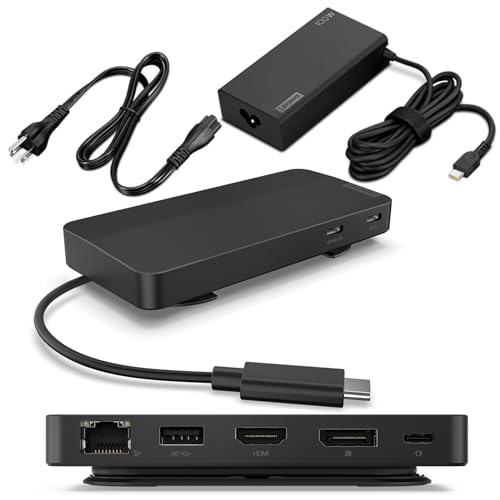
Lenovo Dual Display USB-C Travel Dock
Best for: mobile dual-4K laptop setups
- Resolution
- 4K UHD (what this guide is about)
- Host Interface
- USB-C
- Display Support
- Dual
- Max Resolution
- 4K
- Power Delivery
- 65W (up to 100W)
- Port Count
- 7
The Lenovo Dual Display USB-C Travel Dock expands your laptop setup with seven ports in a compact frame. It outputs to dual 4K displays using one DisplayPort 1.4 port and one HDMI 2.0 port. Data transfers run up to 10 Gbps across USB-C and USB-A connections. The included 100W power adapter delivers 65W of charging to your laptop, making it a functional portable hub when working away from a permanent desk.
Pros
- Supports dual 4K displays via DisplayPort 1.4 and HDMI 2.0
- 10 Gbps transfer speeds on USB-C and USB-A 3.2 ports
- Includes 100W power adapter providing 65W laptop charging
- One always-on USB port with 5V/2.4A charging capability
- Integrated Gigabit Ethernet network port
Cons
- Requires optional 135W adapter to reach 100W power delivery
- Includes only one USB-A port
- Uses a fixed integrated host cable
Good fit if
- You need dual 4K video outputs using DisplayPort and HDMI while traveling.
- You require 10 Gbps data ports alongside wired Gigabit Ethernet.
- Your laptop charges at 65W or lower over USB-C.
Skip if
- You require multiple USB-A ports for legacy peripherals.
- Your laptop requires 100W power delivery without buying an extra power adapter.
Verdict: Lenovo Dual Display USB-C Travel Dock delivers dual 4K display support and fast 10 Gbps connectivity in a compact, portable chassis. It serves mobile dual-monitor setups well with its included 65W power delivery.

Dell Pro Thunderbolt 4 Dock with 130W Charging
Best for: quad 4K setups and Dell laptops
- Resolution
- 4K UHD (what this guide is about)
- Host Interface
- Thunderbolt 4
- Display Support
- Up to 4
- Max Resolution
- 4K
- Power Delivery
- Up to 130W
- Video Ports
- HDMI 2.1, DP 1.4, USB-C, Thunderbolt 4
View on Amazon: Dell Pro Thunderbolt 4 Dock with 130W Charging
This Thunderbolt 4 docking station drives up to four 4K displays using HDMI 2.1, DisplayPort 1.4, USB-C, and Thunderbolt ports. You get up to 130W power delivery for Dell laptops and 96W for other brands. It supports daisy-chaining up to six devices alongside Intel AMT and Wi-Fi remote management, making it suitable if you need multi-monitor desk setups with advanced management.
Pros
- Supports up to four 4K displays simultaneously
- Delivers up to 130W power delivery to Dell laptops
- Thunderbolt 4 connectivity daisy chains up to six devices
- Includes HDMI 2.1, dual DisplayPort 1.4, and dual Thunderbolt 4 ports
Cons
- Charging output drops to 96W for non-Dell laptops
- Weighs 1.28 pounds, making it bulkier than compact travel hubs
Good fit if
- You need to connect up to four 4K monitors to a single dock.
- You use a compatible Dell laptop that supports 130W USB-C charging.
- You manage workstations remotely using Wi-Fi and Intel AMT.
Skip if
- You need a lightweight, ultra-portable hub for travel.
- You use a non-Dell laptop that requires more than 96W of power.
Verdict: Dell Thunderbolt 4 Docking Station provides high-bandwidth connectivity for up to four 4K screens alongside fast 130W power delivery. It serves high-demand workstations requiring multi-display output and remote manageability.

Selore 8-in-1 Triple Display USB-C Dock
Best for: Windows users needing three external 4K monitors
- Resolution
- 4K UHD (what this guide is about)
- Host Interface
- USB-C
- Display Support
- Triple
- Max Resolution
- 4K@60Hz
- Power Delivery
- 100W
- Video Ports
- HDMI, DP, VGA
This compact 8-in-1 hub expands your laptop with two HDMI ports, one DisplayPort, and a VGA port for multi-monitor setups. It delivers up to 4K video resolution alongside 100W Power Delivery pass-through charging. If you run a Windows laptop and need to drive up to three external displays while keeping accessories connected, this portable adapter gives you versatile video outputs in a lightweight frame.
Pros
- Triple display output via two HDMI ports and one DisplayPort
- Supports up to 100W Power Delivery pass-through charging
- Four total video outputs including dual HDMI, DisplayPort, and VGA
- Compact footprint measuring 4.5 by 2 by 0.62 inches
Cons
- USB data ports transfer at USB 2.0 speeds up to 480Mbps
- One HDMI port is limited to 4K at 30Hz
- macOS does not support extended desktop mode across external screens
Good fit if
- You use a Windows laptop and want to connect up to three external monitors.
- You need 100W Power Delivery pass-through charging for your device.
- You require legacy VGA output alongside modern 4K DisplayPort and HDMI.
Skip if
- You use a Mac and require independently extended external displays.
- You transfer large files regularly and require USB 3.0 or faster data speeds.
Verdict: Selore 8-in-1 Triple Display USB-C Dock delivers multi-display flexibility and 100W charging for Windows users. Its video selection excels for triple-screen setups, though data transfer is restricted to USB 2.0 speeds.
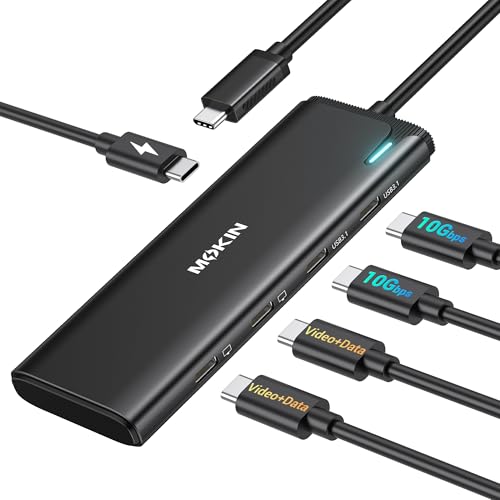
MOKiN 5-in-1 Dual USB-C Monitor Hub
Best for: dual USB-C monitor setups on Windows
- Resolution
- 4K UHD (what this guide is about)
- Host Interface
- USB4, Thunderbolt 4
- Display Support
- Dual
- Max Resolution
- 4K@60Hz
- Power Delivery
- 87W
- Port Count
- 5
This 5-in-1 USB-C hub routes dual 4K video at 60Hz through DisplayPort Alt Mode 1.4 to native USB-C monitors. You get two 10Gbps USB-C data ports alongside 100W Power Delivery that supplies up to 87W pass-through charging to your host laptop. It suits Windows users operating Thunderbolt 4 or USB 4 systems who need dual external USB-C screens without HDMI ports.
Pros
- Dual 4K video output at 60Hz via DP Alt Mode 1.4
- Two USB-C 3.1 data ports rated for 10Gbps transfers
- Supports up to 87W pass-through charging via 100W PD port
- MST and SST support on Thunderbolt 4 and USB 4 Windows laptops
Cons
- No dual-monitor or MST support on macOS
- No HDMI or standard DisplayPort video jacks
- Power adapter and charging cable not included
Good fit if
- You connect dual 4K screens that take native USB-C video input.
- You run a Windows PC with Thunderbolt 4 or USB 4.
- You require 10Gbps USB-C peripheral transfer speeds.
Skip if
- You use a Mac laptop and need extended dual external monitors.
- You rely on legacy HDMI or DisplayPort cables.
Verdict: MOKiN 5-in-1 Dual 4K USB-C Hub delivers dual 4K 60Hz output and 10Gbps transfer rates directly to USB-C displays on Windows. It drops legacy HDMI ports and lacks macOS dual-display functionality.

Anker 565 11-in-1 Dual Display USB-C Hub
Best for: dual-display productivity setups requiring extensive port expansion
- Resolution
- 4K UHD (what this guide is about)
- Host Interface
- USB-C
- Display Support
- Dual
- Max Resolution
- 4K
- Power Delivery
- 85W
- Port Count
- 11
This Anker 11-in-1 USB-C hub expands your laptop with a 4K HDMI port and a 4K DisplayPort alongside Ethernet, audio, and card readers. It supports dual displays up to 2K at 60Hz on DP 1.4 systems. With 85W pass-through charging and 10 Gbps data ports, it suits you if you need fast file transfers and multi-port connectivity for external monitors.
Pros
- Includes both 4K HDMI and 4K DisplayPort video outputs
- Provides up to 85W pass-through laptop charging
- Equipped with 10 Gbps USB-C and USB-A high-speed data ports
- Features dedicated Ethernet, 3.5 mm AUX, and SD/microSD slots
Cons
- Dual external displays max out at 2K@60Hz on DP 1.4 and 1080p@60Hz on DP 1.2
- macOS mirrors identical content across both external monitors
- USB-C ports do not support video display output
Good fit if
- You need both DisplayPort and HDMI connections for your monitors.
- You transfer large files using 10 Gbps USB ports and memory cards.
- You want 85W pass-through laptop power alongside wired Ethernet.
Skip if
- You use macOS and require extended desktop across two external screens.
- You need dual monitors running simultaneously at native 4K resolution.
- You use a laptop running a Linux operating system.
Verdict: Anker 11-in-1 Dual Monitor USB-C Hub offers broad connectivity with 10 Gbps transfer speeds and 85W charging. Dual display resolutions drop below 4K, making it better suited for general multi-monitor productivity.

Anker 8-in-1 USB-C Hub with Ethernet
Best for: Windows setups needing 4K and legacy VGA
- Resolution
- 4K UHD (what this guide is about)
- Host Interface
- USB-C, USB4, Thunderbolt
- Display Support
- Triple
- Max Resolution
- 4K@60Hz
- Power Delivery
- 85W
- Port Count
- 8
This compact 8-in-1 hub expands your laptop with a 4K 60Hz HDMI port, a 1080p VGA connection, Ethernet, and 5Gbps USB ports. It delivers up to 85W of pass-through power when paired with a 100W Power Delivery charger. If you use a Windows or ChromeOS machine with DP Alt Mode, you can drive multiple displays, while macOS systems remain limited to mirrored displays.
Pros
- HDMI output supports 4K resolution at 60Hz
- Provides up to 85W USB-C Power Delivery pass-through
- Includes legacy 1080p VGA alongside HDMI video output
- Equipped with both USB-A and USB-C ports rated for 5Gbps
Cons
- External monitors are restricted to Mirror mode on macOS
- Not compatible with Linux operating systems
- VGA video output is capped at 1080p
Good fit if
- You need a 4K 60Hz HDMI output alongside a legacy VGA display port.
- You use a Windows or ChromeOS laptop with DisplayPort Alt Mode support.
- You want up to 85W pass-through charging with your own 100W charger.
Skip if
- You use Linux on your primary machine.
- You require extended dual or triple desktop screens on macOS.
Verdict: Anker 8-in-1 Triple Display USB-C Hub delivers 4K 60Hz video alongside legacy VGA and wired Ethernet in a compact form. It gives Windows users versatile multi-monitor support with reliable 85W pass-through charging.
Specifications side by side
| Spec | Anker 332 5-in-1 USB-C Hub | UGREEN 5-in-1 USB-C Hub with 100W PD | Acer 5-in-1 4K 60Hz USB-C Hub | Anker PowerExpand 8-in-1 Dual HDMI USB-C Hub | HODO 8-in-1 Triple Display USB-C Dock | Selore Dual 4K HDMI USB-C Dock | VVB 15-in-1 Triple 4K USB-C Dock | Anker 5-in-1 USB-C Hub with 4K HDMI | MOKiN 6-in-1 USB-C Hub with 4K 60Hz HDMI | Lenovo Dual Display USB-C Travel Dock | Dell Pro Thunderbolt 4 Dock with 130W Charging | Selore 8-in-1 Triple Display USB-C Dock | MOKiN 5-in-1 Dual USB-C Monitor Hub | Anker 565 11-in-1 Dual Display USB-C Hub | Anker 8-in-1 USB-C Hub with Ethernet |
|---|---|---|---|---|---|---|---|---|---|---|---|---|---|---|---|
| Host Interface | USB-C | USB-C | USB-C | USB-C | USB-C | USB-C | USB-C | USB-C | USB-C | USB-C | Thunderbolt 4 | USB-C | USB4, Thunderbolt 4 | USB-C | USB-C, USB4, Thunderbolt |
| Display Support | not specified | not specified | not specified | Dual | Triple | Dual | Triple | not specified | not specified | Dual | Up to 4 | Triple | Dual | Dual | Triple |
| Max Resolution | 4K@30Hz | 4K | 4K@60Hz | 4K@60Hz | 8K@30Hz | 4K@60Hz | 8K@30Hz | 4K at 30Hz | 4K@60Hz | 4K | 4K | 4K@60Hz | 4K@60Hz | 4K | 4K@60Hz |
| Power Delivery | 85W | 100W | 90W | 85W | 87W | 100W | 87W | 90W | not specified | 65W (up to 100W) | Up to 130W | 100W | 87W | 85W | 85W |
| Port Count | 5 | 5 | 5 | 8 | 8 | 8 | 15 | 5 | 6 | 7 | not specified | not specified | 5 | 11 | 8 |
| Video Ports | HDMI | HDMI | HDMI | HDMI | HDMI, USB-C | HDMI | HDMI, DisplayPort | HDMI | HDMI | DP 1.4, HDMI 2.0 | HDMI 2.1, DP 1.4, USB-C, Thunderbolt 4 | HDMI, DP, VGA | USB-C | HDMI, DisplayPort | HDMI, VGA |
| Max Data Speed | 5Gbps | 5Gbps | 5Gbps | not specified | 10Gbps | 5Gbps | 10Gbps | 5Gbps | not specified | 10Gbps | not specified | not specified | 10Gbps | 10 Gbps | 5Gbps |
| Ethernet Speed | not specified | not specified | not specified | not specified | Gigabit | not specified | Gigabit | not specified | not specified | 1000M | 2.5GbE | not specified | not specified | not specified | not specified |
| Resolution | 4K UHD | 4K UHD | 4K UHD | 4K UHD | 4K UHD | 4K UHD | 4K UHD | 4K UHD | 4K UHD | 4K UHD | 4K UHD | 4K UHD | 4K UHD | 4K UHD | 4K UHD |
| Connectivity | USB-C, HDMI | USB-C, HDMI | USB-C, HDMI | USB-C, HDMI, Ethernet | USB-C, HDMI | USB-C, HDMI, USB-A | USB-C, HDMI | USB-C, HDMI | USB-C, HDMI | USB-C | USB-C, HDMI, DisplayPort, Thunderbolt 4 | USB-C, HDMI, DisplayPort, VGA | USB-C, DisplayPort | USB-C, HDMI, DisplayPort | USB-C, HDMI, Ethernet, VGA |
| Refresh Rate | not specified | not specified | 60Hz | not specified | not specified | 60Hz | not specified | not specified | 60Hz | not specified | not specified | not specified | 60Hz | not specified | 60Hz |
| Use | not specified | not specified | not specified | not specified | not specified | not specified | not specified | not specified | not specified | Travel | not specified | not specified | not specified | not specified | not specified |
| Dimensions | 4.78 × 1.59 × 0.45 inches | 4.79 × 1.09 × 0.47 inches | not specified | 4.65 × 2.01 × 0.69 inches | 4.5 × 2.5 × 0.6 inches | 4.5 × 2.1 × 0.7 inches | 5 × 0.5 × 1 inches | 4.8 × 1.2 × 0.46 inches | not specified | 4.72 × 2.6 × 0.79 inches | 8.07 × 3.54 × 1.39 inches | 4.5 × 2 × 0.62 inches | not specified | 5.39 × 2.24 × 0.55 inches | 4.5 × 2.1 × 0.7 inches |
| Weight | 1.44 ounces | 3.21 ounces | not specified | 3.2 ounces | 2.82 ounces | 3.39 ounces | 1 ounces | 2.03 ounces | not specified | 1.44 pounds | 1.28 pounds | 3.17 ounces | 1.92 ounces | 4.8 ounces | 3.56 ounces |
| Color | Black | grey | not specified | Gray | Space Gray | Grey | not specified | Gray | 6 in 1 USB C Hub - Silver | Black | Black/White | Gray | Grey | Gray | Gray |
| Model | A8355011 | CM478 | ODK5U0 | A83800A1 | not specified | SEUC0425 | not specified | A8357 | not specified | 40B9 | SD25TB4 | Docking Station Dual HDMI Monitor | UC2208 | A8388 | A8379 |
| Size | not specified | 0.65 feet | not specified | 8-in-1 USB C Hub | 8-in-1 | 9-in-1 | not specified | not specified | 6-in-1 USB C Hub | 0.79" x 2.17" | Talla única | not specified | 5-in-1-Black | 11-in-1 | 8-in-1 USB-C Hub |
Choosing the Right 4K Docking Station
-
Verify Power Delivery Wattage
Check the power delivery rating before you pick a dock. Laptops require different wattage levels to charge while operating under heavy loads. If your setup relies on pass-through charging, you need a hub that matches or exceeds your laptop charger rating. A hub with 100W Power Delivery, like the UGREEN 5-in-1 USB-C Hub with 100W PD, passes sufficient power to run the connected computer and peripheral devices simultaneously. Lower ratings can cause battery drain during intense use. Always confirm your laptop power requirements first.
-
Count Needed Peripheral Ports
Review the total number and type of accessory ports you use daily. Minimalist 5-in-1 designs provide basic monitor and power connections for mobile desks. Workstations with dedicated keyboards, mice, flash drives, and webcams require more connections. The Selore Dual 4K HDMI USB-C Dock offers a 9-in-1 port layout that includes USB-A connections for standard desktop peripherals. Selecting a dock with enough built-in ports eliminates the need to daisy-chain separate adapters. Count your external hardware before deciding on a hub size.
-
Check Legacy Video Connections
Examine the video input ports available on your external monitors. Modern hubs typically feature HDMI or DisplayPort outputs, but older monitors and meeting room projectors might require analog connections. The Anker 8-in-1 USB-C Hub with Ethernet includes a legacy VGA port alongside its standard HDMI output. If your workflow involves older display panels, choosing a dock with native VGA avoids carrying extra video dongles. Match the physical ports on the docking station directly to your display cables before buying.
-
Assess Data Transfer Speeds
Look at the data transfer speeds of the integrated USB ports. If you routinely move large files to external solid-state drives, you need high-bandwidth USB connections. The HODO 8-in-1 Triple Display USB-C Dock features 10Gbps data ports to maintain rapid file transfers without bottlenecking your workflow. In contrast, docks limited to standard 5Gbps or USB 2.0 speeds work fine for basic mice and keyboards, but slow down storage tasks. Choose higher data transfer ratings if you transfer media frequently.
-
Confirm Wired Ethernet Requirements
Determine whether you need a dedicated wired network connection for your computer. Wi-Fi connections can fluctuate, but a physical Ethernet jack delivers steady bandwidth for video calls, downloading large project files, and secure office tasks. Compact travel hubs often skip networking hardware to save space. The Anker PowerExpand 8-in-1 Dual HDMI USB-C Hub integrates an Ethernet port alongside standard video and data connections. If your desk requires stable local network access, verify that the docking station includes a dedicated network port.
-
Evaluate Travel Weight and Dimensions
Consider physical dimensions and overall weight if you commute or travel between workspaces. Full desktop stations can exceed one pound and take up substantial room inside a laptop bag. The Lenovo Dual Display USB-C Travel Dock balances multi-display capability with a compact body designed for portability, though it weighs 1.44 pounds. When portability is your main priority, check the published dimensions and weight specifications carefully. Compact form factors prevent clutter on smaller tables and fit easily into travel cases.
Frequently asked questions
Can a USB-C dock output 4K resolution at 60Hz?
Yes, several USB-C docks output 4K resolution at 60Hz if your host laptop supports the required DisplayPort bandwidth. Models such as the Acer 5-in-1 USB-C Hub and the MOKiN 6-in-1 USB-C Hub explicitly provide 4K output at 60Hz over HDMI. Other multi-display docks like the Selore Dual 4K HDMI Dock also support 60Hz 4K feeds. Always confirm your laptop port transmits DisplayPort 1.4 video.
Do all docking stations support dual 4K monitors?
No, multi-display support varies significantly depending on the dock specifications and internal video controllers. While units like the Lenovo Dual Display Travel Dock and Anker PowerExpand 8-in-1 support dual 4K monitors, simple 5-in-1 hubs only provide a single video output. In addition, some hubs drop dual displays to 30Hz or reduce resolution below 4K when you attach multiple external screens simultaneously.
Can you run multiple monitors on macOS using these docks?
Most standard USB-C multi-display docks only mirror displays on macOS rather than extending them. For instance, the MOKiN 5-in-1 Dual USB-C Monitor Hub does not support extended dual displays on Mac operating systems. macOS lacks native Multi-Stream Transport (MST) support over standard USB-C. To achieve independent multi-screen setups on Mac hardware, you typically require a native Thunderbolt dock or software-driven display technology.
What is the difference between Thunderbolt 4 and standard USB-C docks?
Thunderbolt 4 docks offer substantially higher bandwidth than standard USB-C hubs, allowing more simultaneous high-resolution displays. The Dell Pro Thunderbolt 4 Dock delivers enough bandwidth to run up to four 4K displays alongside fast data channels and 130W power delivery. Standard USB-C docks share a narrower data pipeline, which often restricts dual or triple 4K monitors to lower refresh rates or USB 2.0 peripheral speeds.
Why does video refresh rate drop when connecting multiple 4K displays?
Video refresh rates drop when total video bandwidth exceeds the capacity of the dock or host connection. A single 4K 60Hz video stream consumes significant DisplayPort bandwidth. On docks like the Anker PowerExpand 8-in-1, routing two 4K signals over a standard USB-C connection cuts the refresh rate down to 30Hz. Using docks with DisplayPort 1.4 support or Thunderbolt 4 preserves higher refresh rates across screens.
Can a 4K docking station connect to older VGA monitors?
Yes, select multi-port docking stations include legacy VGA ports alongside modern digital connections. The Anker 8-in-1 USB-C Hub and the Selore 8-in-1 Triple Display Dock both feature built-in VGA connectivity next to HDMI and DisplayPort outputs. This lets you connect older office projectors or legacy secondary displays without needing dedicated standalone video adapters. Note that VGA output does not support 4K resolutions.
Do portable 4K USB-C hubs require an external power supply?
Most compact 4K hubs can operate using bus power drawn directly from your laptop. Portable models like the Anker 332 5-in-1 Hub draw operational power straight from the host USB-C port for video and peripheral connections. However, if you want pass-through power delivery to charge your laptop battery while working, you must connect a compatible USB-C wall charger to the dock's dedicated power input port.