Best Docking Stations with USB-C in 2026: 15 Picks Ranked by Specs
As an Amazon Associate we earn from qualifying purchases. Links on this page are affiliate links.
Finding the right docking station with USB-C depends on your display needs, port requirements, and charging capacity. We compared 15 options strictly by the specifications published on their listings to help you configure your workstation.
The Anker 332 5-in-1 USB-C Hub takes the top spot by providing 4K UHD output and 85W pass-through charging in a compact 0.09-pound build. This guide helps you decide which model matches your display count, data speed, and power delivery requirements.
Quick picks
The best fit for you
- You need a lightweight hub for single display setups Anker 332 5-in-1 USB-C Hub It weighs 0.09 pounds and provides 4K UHD video output with 85W pass-through charging.
- You require wired Ethernet alongside dual HDMI displays Anker PowerExpand 8-in-1 Dual HDMI USB-C Hub The 8-in-1 design features built-in Ethernet connectivity and dual monitor 4K HDMI support.
- You need to connect three external HDMI displays Plugable USB-C Triple HDMI Docking Station It includes triple monitor display support via HDMI and delivers 100W power delivery.
- You want high wattage charging and Thunderbolt 4 Dell Pro Thunderbolt 4 Dock with 130W Charging It supplies 130W power delivery and features Thunderbolt 4 connectivity with DisplayPort.
Our 15 picks

Anker 332 5-in-1 USB-C Hub
Best for: portable single-monitor USB-C laptop setups
- Connectivity
- USB-C, HDMI (what this guide is about)
- Host Interface
- USB-C
- Max Resolution
- 4K@30Hz
- Power Delivery
- 85W
- Port Count
- 5
- Video Ports
- HDMI
This compact Anker 5-in-1 hub gives you essential desktop connections through a single USB-C cable. It features an HDMI output supporting up to 4K at 30Hz, two 5 Gbps USB-A ports, and a dedicated 5 Gbps USB-C data port. With up to 85W pass-through charging via a 100W PD-IN connection, you can power your laptop while working. It suits you if you need a lightweight adapter for single-display workstations.
Pros
- Up to 85W pass-through charging via 100W PD-IN port
- Three 5 Gbps USB data ports across USB-A and USB-C
- Lightweight build weighing 0.09 pounds
- HDMI output supports 4K resolution at 30Hz
Cons
- HDMI output is limited to 30Hz at 4K resolution
- USB-C ports do not support video display output
- Not compatible with Linux operating systems
Good fit if
- You need up to 85W pass-through power for your laptop.
- You connect to a single external 4K monitor via HDMI.
- You want 5 Gbps USB-A and USB-C ports in a pocket-sized hub.
Skip if
- You require 4K video output at a 60Hz refresh rate.
- You use a Linux-based operating system.
- You want to route video through USB-C ports.
Verdict: Anker 332 5-in-1 USB-C Hub delivers reliable 85W pass-through charging and essential 5 Gbps ports in a compact build. It provides a practical solution for single-display desktop setups.

UGREEN 5-in-1 USB-C Hub with 100W PD
Best for: single-display travel setups needing 100W charging
- Connectivity
- USB-C, HDMI (what this guide is about)
- Host Interface
- USB-C
- Max Resolution
- 4K
- Power Delivery
- 100W
- Port Count
- 5
- Video Ports
- HDMI
This compact UGREEN hub expands your laptop with five essential ports using a single USB-C connection. It delivers up to 100W USB-C Power Delivery to keep your machine charged while driving an external display at up to 4K UHD resolution through HDMI. For accessories, you get one 5 Gbps USB-A port alongside two 480 Mbps USB-A ports. It suits you if you need a lightweight, portable connection for one screen and basic peripherals.
Pros
- Supports up to 100W USB-C Power Delivery pass-through
- Provides 4K UHD video output via HDMI
- Lightweight build weighing approximately 0.20 pounds
- Includes a 5 Gbps USB-A port alongside two standard USB-A ports
Cons
- Two of the three USB-A ports are limited to 480 Mbps transfer speeds
- No Ethernet jack or SD card slots included
- Limited to a single external display output
Good fit if
- You need 100W pass-through charging while using external accessories.
- You connect to only one 4K HDMI display.
- You want a lightweight adapter under a quarter of a pound for travel.
Skip if
- You require dual-monitor video output.
- You need Gigabit Ethernet or fast 5 Gbps speeds across all USB ports.
Verdict: UGREEN 5-in-1 USB-C Hub with 100W PD provides essential 4K video and high-wattage power pass-through in an ultra-portable profile. It delivers reliable single-display expansion without unnecessary bulk.

Acer 5-in-1 4K 60Hz USB-C Hub
Best for: single 4K 60Hz display travel setups
- Connectivity
- USB-C, HDMI (what this guide is about)
- Host Interface
- USB-C
- Max Resolution
- 4K@60Hz
- Power Delivery
- 90W
- Port Count
- 5
- Video Ports
- HDMI
This compact dock expands your laptop with five dedicated connections. You get a single HDMI port capable of 4K output at 60Hz, 100W Power Delivery pass-through delivering up to 90W to your machine, one 5Gbps USB-C data port, one 5Gbps USB-A port, and a USB 2.0 port. Encased in aluminum, it suits anyone needing smooth video output and basic peripheral connectivity on Windows, macOS, or ChromeOS systems without carrying bulky gear.
Pros
- HDMI port supports 4K resolution at 60Hz refresh rate
- Supports up to 100W input with 90W pass-through charging
- Includes both USB-C and USB-A 5Gbps data ports
- Aluminum shell aids heat dissipation
Cons
- Does not support ultrawide monitors
- 100W power adapter and charging cable are not included
- Limited to a single external display
Good fit if
- You need a compact travel hub that outputs 4K video at 60Hz.
- You want up to 90W pass-through charging for your laptop.
- You connect standard 5Gbps USB accessories alongside basic peripherals.
Skip if
- You use an ultrawide external display.
- You need dual-monitor display outputs.
- You require an included wall charger and power cable.
Verdict: Acer 5-in-1 USB-C Hub with 4K 60Hz HDMI gives you reliable 60Hz 4K video and 90W pass-through charging in a portable aluminum chassis. It handles standard single-screen setups and everyday data peripherals efficiently.

Anker PowerExpand 8-in-1 Dual HDMI USB-C Hub
Best for: wired Ethernet and dual HDMI desktop setups
- Connectivity
- USB-C, HDMI, Ethernet (what this guide is about)
- Host Interface
- USB-C
- Display Support
- Dual
- Max Resolution
- 4K@60Hz
- Power Delivery
- 85W
- Port Count
- 8
View on Amazon: Anker PowerExpand 8-in-1 Dual HDMI USB-C Hub
This Anker 8-in-1 USB-C hub expands a single laptop port into dedicated connections for wired internet, power, displays, and storage. You get an Ethernet jack, pass-through charging up to 85W, SD/microSD card slots, and dual HDMI ports that output single 4K at 60Hz or dual 4K at 30Hz. Weighing 0.2 pounds, it suits mobile setups needing stable Ethernet alongside two external screens on compatible Windows or ChromeOS laptops.
Pros
- Dedicated Ethernet port for wired network connectivity
- Up to 85W pass-through charging with Power Delivery
- Dual HDMI ports supporting single 4K@60Hz or dual 4K@30Hz
- Integrated SD and microSD card readers
- Lightweight 0.2-pound portable housing
Cons
- Dual external monitors mirror identically on macOS
- Incompatible with Linux operating systems
- Requires a separate 100W PD charger to achieve 85W laptop charging
Good fit if
- You need a dedicated wired Ethernet port alongside dual HDMI video outputs.
- You use a Windows or ChromeOS laptop with DP Alt Mode and USB-C Power Delivery.
- You transfer media using SD or microSD cards while charging your laptop.
Skip if
- You use a Linux operating system.
- You require two independent extended desktop screens on macOS.
- You need dual 4K displays to refresh at 60Hz rather than 30Hz.
Verdict: Anker 8-in-1 USB-C Dual HDMI Hub delivers wired Ethernet, card readers, and dual 4K video support in a compact 0.2-pound form factor. It provides practical desktop connectivity and 85W pass-through charging for compatible Windows and ChromeOS setups.

HODO 8-in-2 MacBook USB-C Hub
Best for: MacBook setups needing Thunderbolt 3 pass-through
- Connectivity
- USB-C, HDMI, Thunderbolt 3 (what this guide is about)
- Host Interface
- USB-C
- Max Resolution
- 5K
- Power Delivery
- 100W
- Port Count
- 8
- Video Ports
- HDMI, Thunderbolt 3
The HODO 8-in-2 USB-C Hub attaches directly to two side-by-side USB-C ports on your MacBook Pro or MacBook Air. It adds eight connections, including a Thunderbolt 3 pass-through port supporting 40Gbps data, 100W charging, and 5K displays, alongside a 4K HDMI port. With additional 10Gbps USB 3.1 ports and SD card slots, it suits you if you want high-speed Thunderbolt 3 connectivity without dangling cables on an uncased MacBook.
Pros
- Thunderbolt 3 port supports 40Gbps data, 100W power delivery, and 5K displays
- Dual USB 3.1 ports provide transfer speeds up to 10Gbps
- HDMI output supports resolutions up to 4K UHD
- Integrated SD and microSD slots support transfers up to 104MB/s
Cons
- Does not fit MacBooks wearing a protective case
- Not compatible with Logitech mice and keyboards
- Supports only one connected HDD or SSD at a time
Good fit if
- You use a compatible dual-port MacBook without a protective case.
- You need 40Gbps Thunderbolt 3 throughput and up to 100W power pass-through.
- You want 10Gbps USB-A connections alongside SD card access.
Skip if
- You keep a protective case or cover on your MacBook.
- You rely on Logitech mice or keyboards for your workflow.
- You need to run multiple external hard drives or SSDs simultaneously.
Verdict: HODO 8-in-2 USB-C Hub with Thunderbolt 3 delivers 40Gbps speeds and 5K display pass-through straight to your uncased MacBook. It provides convenient port variety, though peripheral compatibility is restricted for Logitech accessories.

Dell Pro USB-C 100W Docking Station
Best for: quad-display desktop setups needing 100W power delivery
- Connectivity
- USB-C, HDMI, DisplayPort (what this guide is about)
- Host Interface
- USB-C
- Power Delivery
- 100W
- Video Ports
- DisplayPort, HDMI
- Dimensions
- 8.07 × 3.54 × 1.39 inches
- Weight
- 1.21 pounds
This Dell Pro desktop docking station connects via USB-C to provide up to 100W of power delivery to your laptop. It offers native display support for up to four high-resolution monitors using HDMI and DisplayPort connections. The reversible USB-C host cable routes to the left or right side of your desk. It suits power users who require an expansive multi-display workstation and reliable charging over a single USB-C cable connection.
Pros
- Supplies up to 100W power delivery to connected laptops
- Supports up to four external high-resolution displays
- Includes both HDMI and DisplayPort video connectivity
- Reversible USB-C host cable routes left or right
Cons
- Weighs 1.21 pounds with an 8.07-inch desktop footprint
- Exact counts for individual USB peripheral ports are not specified in the data
Good fit if
- You need to drive up to four external monitors from a single dock.
- You want 100W USB-C power delivery to charge your laptop during use.
- You prefer flexible desk placement with a reversible left-or-right host cable.
Skip if
- You want a compact, pocket-sized hub for mobile travel.
- You need an integrated SD or microSD card slot listed on the unit.
Verdict: Dell Pro 100W USB-C Docking Station delivers serious workstation capability with 100W charging and support for up to four external displays. It provides dedicated desk-bound connectivity for complex multi-monitor setups.

Selore 6-in-2 MacBook USB-C Hub
Best for: MacBook users needing high-speed Thunderbolt expansion
- Connectivity
- USB-C (what this guide is about)
- Host Interface
- Thunderbolt 3
- Display Support
- Dual
- Max Resolution
- 5K
- Power Delivery
- 100W
- Port Count
- 6
This 6-in-2 USB-C hub attaches to compatible MacBook laptops to expand connectivity without loose cables. It features a 100W Thunderbolt 3 port with 40Gbps data transfer and video output up to 5K. You also get three 5Gbps USB 3.0 ports alongside simultaneous SD and microSD card slots. It suits you if you need fast power delivery and peripheral access, provided you do not require a dedicated HDMI port.
Pros
- Thunderbolt 3 port supports 100W power delivery and 40Gbps data
- Supports video output up to 5K or dual 4K at 60Hz
- MicroSD and SD cards can work simultaneously up to 104Mbps
- Three USB 3.0 ports with transfer speeds up to 5Gbps
Cons
- No HDMI port included
- Incompatible with MacBook protective cases
- Supports a maximum of one external hard drive
Good fit if
- You use a compatible MacBook without a protective case.
- You want 100W power delivery and 40Gbps transfer through Thunderbolt 3.
- You need to read SD and microSD cards at the same time.
Skip if
- You need a dedicated HDMI port for an external monitor.
- You keep a protective case on your MacBook.
- You plan to connect multiple hard drives or an Apple SuperDrive.
Verdict: Selore&S-Global 6-in-2 MacBook USB-C Hub delivers 100W power and 40Gbps transfer speeds directly to compatible laptops. It adds essential USB-A and card slots, provided you do not need an HDMI port.

Acer 9-in-1 Dual HDMI USB-C Dock
Best for: dual 4K HDMI setups on Windows laptops
- Connectivity
- USB-C, HDMI (what this guide is about)
- Host Interface
- USB-C
- Display Support
- Dual
- Max Resolution
- 4K@60Hz
- Power Delivery
- 90W
- Port Count
- 9
The Acer 9-in-1 Dual HDMI USB-C Dock expands your laptop ports using a built-in 0.65-foot cable. It features dual HDMI outputs running at up to 4K at 60Hz, four 5Gbps USB ports, and SD card readers. It accepts up to 100W Power Delivery to pass 90W to your system. This dock suits Windows users who want dual 4K monitors alongside standard data and memory card connectivity.
Pros
- Dual HDMI ports supporting up to 4K resolution at 60Hz
- Pass-through Power Delivery delivers up to 90W to host laptop
- Four 5Gbps USB data ports across USB-A and USB-C
- Dedicated SD and MicroSD slots with speeds up to 104Mbps
Cons
- Lacks an RJ45 Ethernet port for wired networking
- macOS does not support extended independent dual monitors
- External power supply is not included
Good fit if
- You use a Windows laptop that supports DisplayPort Alt Mode over USB-C.
- You need dual 4K displays at 60Hz alongside SD card access.
- You already have a 100W USB-C charger ready for pass-through power.
Skip if
- You use macOS and need two independent extended external displays.
- You require a wired Gigabit Ethernet connection.
- Your laptop USB-C port cannot carry both video output and power delivery.
Verdict: Acer 9-in-1 Dual HDMI USB-C Dock provides dual 4K at 60Hz video output and port expansion for compatible laptops. It delivers solid display performance and card access without bulky external housing.

VVB 14-in-1 Dual HDMI DisplayPort Dock
Best for: Windows multi-monitor setups needing extensive port variety
- Connectivity
- USB-C, HDMI (what this guide is about)
- Host Interface
- USB-C, Thunderbolt 3/4
- Display Support
- Triple
- Max Resolution
- 4K@60Hz
- Power Delivery
- 87W
- Port Count
- 14
The VVB 14-in-1 USB-C Docking Station expands your laptop connection into fourteen ports, including two HDMI ports, one DisplayPort, and a Gigabit Ethernet jack. It delivers up to 87W pass-through charging via a 100W Power Delivery input and transfers data at up to 10Gbps across three USB 3.1 ports. This dock suits you if you need multi-display output and high-speed peripheral expansion for a Windows workspace from a single USB-C cable.
Pros
- Three 10Gbps data ports including one USB-C and two USB-A 3.1
- Triple video output options with two HDMI ports and one DisplayPort
- Supports 100W Power Delivery input with up to 87W charging output
- Includes Gigabit Ethernet, SD and TF card readers, and 3.5mm audio
Cons
- Power adapter and charging cable are not included
- MacBooks only support mirrored display output across external screens
- Multi-monitor setups drop resolutions below 4K at 60Hz
Good fit if
- You use a Windows laptop and want dual or triple external display support.
- You need 10Gbps data transfer speeds alongside wired Ethernet and card readers.
- You already have a dedicated USB-C Power Delivery power supply.
Skip if
- You use a MacBook and require independent extended desktop displays.
- You need dual 4K monitors running simultaneously at 60Hz.
- You prefer an all-in-one dock that includes a bundled power brick.
Verdict: VVB 14-in-1 USB-C Docking Station provides extensive connectivity and triple-display capabilities for Windows setups requiring 10Gbps data transfers. Keep in mind that external displays mirror on macOS and a separate power adapter is required for laptop charging.

Anker 5-in-1 USB-C Hub with 4K HDMI
Best for: basic setups requiring high pass-through laptop charging
- Connectivity
- USB-C, HDMI (what this guide is about)
- Host Interface
- USB-C
- Max Resolution
- 4K at 30Hz
- Power Delivery
- 90W
- Port Count
- 5
- Video Ports
- HDMI
This Anker 5-in-1 USB-C Hub expands a single USB-C port into an HDMI output, one 5Gbps USB-A 3.0 port, two 480Mbps USB-A 2.0 ports, and a USB-C Power Delivery pass-through port. It delivers up to 90W of charging to your laptop from a 100W input. It suits you if you need a lightweight hub for an external 4K 30Hz display and standard desktop peripherals.
Pros
- Supports up to 90W pass-through charging with a 100W input
- Provides 4K video output over HDMI in mirror or extend mode
- Includes one 5Gbps USB-A 3.0 port and two USB-A 2.0 ports
- Weighs 0.13 pounds for easy portability
Cons
- HDMI output caps at 30Hz when running at 4K resolution
- USB-C port functions only for power input, not data or peripheral power
- Incompatible with Linux operating systems
Good fit if
- You need up to 90W pass-through laptop charging from a 100W source
- You connect standard USB-A accessories alongside a single 4K display
- You run Windows 10/11, macOS 12 or newer, or ChromeOS
Skip if
- You require 4K video output at 60Hz
- You run a Linux operating system
- You need downstream USB-C ports for data or accessories
Verdict: Anker 5-in-1 USB-C Hub provides essential peripheral ports and 90W pass-through power in a compact design. It handles basic single-screen output well but limits 4K video to 30Hz.

Plugable USB-C Triple HDMI Docking Station
Best for: triple HDMI monitors on Apple Silicon laptops
- Connectivity
- USB-C, HDMI (what this guide is about)
- Host Interface
- USB-C, USB4, Thunderbolt
- Display Support
- Triple
- Max Resolution
- 4K @ 30Hz
- Power Delivery
- 100W
- Port Count
- 12
The Plugable USB-C Triple HDMI Docking Station expands your laptop using a single USB-C connection. It provides three HDMI ports, driving one 4K display at 30Hz through Alt Mode and two 1080p displays at 60Hz using DisplayLink. The dock delivers 100W Power Delivery to charge your machine while offering six USB 3.0 ports and Gigabit Ethernet. It suits you if you need a multi-monitor workstation across Windows, macOS, or ChromeOS.
Pros
- Drives three external HDMI displays simultaneously
- Delivers 100W USB-C Power Delivery charging
- Includes six USB 3.0 ports and Gigabit Ethernet
- Bypasses native single-display limits on Apple Silicon via DisplayLink
Cons
- Native 4K video output is limited to 30Hz
- Lacks HDCP support and Linux compatibility
- Requires DisplayLink driver installation on macOS
Good fit if
- You need three HDMI displays connected to an Apple Silicon or Windows laptop.
- You need 100W power delivery to charge your laptop over one cable.
- You use multiple peripherals requiring six USB 3.0 ports.
Skip if
- You run a Linux operating system.
- You need 4K resolution at 60Hz.
- You require HDCP support to view copy-protected video.
Verdict: Plugable USB-C Triple HDMI Docking Station provides triple-display output and 100W charging for mixed-platform workspaces. It solves multi-display limits on Apple Silicon laptops, provided you do not need HDCP playback or 4K above 30Hz.

MOKiN 6-in-1 USB-C Hub with 4K 60Hz HDMI
Best for: single 4K 60Hz monitor laptop setups
- Connectivity
- USB-C, HDMI (what this guide is about)
- Host Interface
- USB-C
- Max Resolution
- 4K@60Hz
- Port Count
- 6
- Video Ports
- HDMI
The MOKiN 6-in-1 USB-C Hub provides a compact port expansion setup for your laptop using a single USB-C connection. It features an HDMI port that outputs 4K UHD video at a 60Hz refresh rate to an external display. With six total ports consolidated into a silver adapter, this hub suits you if you want smooth 60Hz video output on an external display without a bulky desktop docking station.
Pros
- HDMI output supports 4K UHD resolution
- 60Hz refresh rate enables smoother external video
- 6-in-1 port expansion across a single USB-C interface
Cons
- Only one HDMI video output port
- No DisplayPort connectivity included
Good fit if
- You need 4K video output running at 60Hz over HDMI.
- You want a compact 6-in-1 hub designed for USB-C laptops.
Skip if
- You need to drive dual external monitors simultaneously.
- You require a native DisplayPort monitor connection.
Verdict: MOKiN 6-in-1 USB-C Hub 4K 60Hz delivers clean 4K UHD video at 60Hz in a compact six-port layout. It is a solid match if you need high-refresh single-display connectivity without a bulky station.
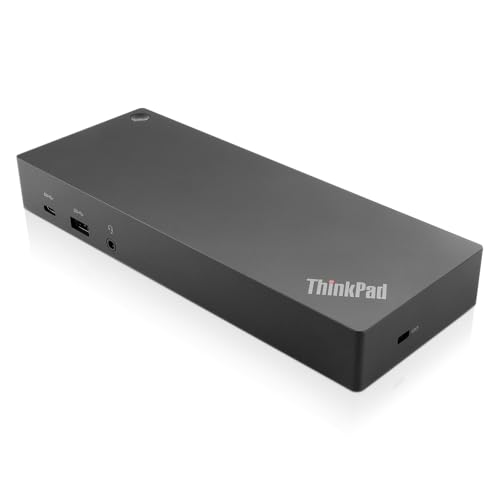
Lenovo ThinkPad Hybrid USB-C and USB-A Dock
Best for: mixed USB-C and legacy USB-A setups
- Connectivity
- USB-C, USB-A (what this guide is about)
- Host Interface
- USB-C, USB-A
- Video Ports
- DisplayPort, HDMI
- Max Data Speed
- 10Gbps
- Ethernet Speed
- Gigabit Ethernet
- Dimensions
- 8.3 × 3.1 × 1.2 inches
The Lenovo ThinkPad Hybrid Dock connects via USB-C or USB-A to link your laptop to dual displays and legacy peripherals. You get two DisplayPort ports, two HDMI ports, and a Gigabit Ethernet jack. For data and accessories, it provides five USB-A ports alongside a front USB-C data port. It suits you if you juggle older USB-A systems and modern USB-C laptops across a shared workstation.
Pros
- Five USB-A ports including three 10Gbps USB 3.1 Gen 2 connections
- Dual monitor connectivity with two DisplayPort and two HDMI ports
- Gigabit Ethernet port and 3.5 mm stereo combo audio jack
- Mobile device charging up to 15W via USB-C and 10.5W via USB-A
Cons
- Front USB-C port is restricted to 15W power delivery
- Two of the five USB-A ports use slower USB 2.0 speeds
Good fit if
- You switch between USB-C and legacy USB-A laptops
- You need multiple USB-A ports for accessories
- You run monitors using standard DisplayPort or HDMI cables
Skip if
- You need high-wattage power output from the front USB-C port
- You require dedicated Thunderbolt bandwidth
Verdict: Lenovo ThinkPad Hybrid USB-C and USB-A Dock provides broad peripheral expansion with five USB-A ports and flexible dual-display outputs. It is a solid choice when your setup includes both USB-A and USB-C machines.

Dell Pro Thunderbolt 4 Dock with 130W Charging
Best for: quad 4K setups and Thunderbolt daisy-chaining
- Connectivity
- USB-C, HDMI, DisplayPort, Thunderbolt 4 (what this guide is about)
- Host Interface
- Thunderbolt 4
- Display Support
- Up to 4
- Max Resolution
- 4K
- Power Delivery
- Up to 130W
- Video Ports
- HDMI 2.1, DP 1.4, USB-C, Thunderbolt 4
View on Amazon: Dell Pro Thunderbolt 4 Dock with 130W Charging
This Dell desktop dock pairs Thunderbolt 4 connectivity with high power delivery for multi-monitor workstations. You get up to 130W charging for Dell systems, 96W for non-Dell laptops, and support for up to four 4K displays across HDMI 2.1, DisplayPort 1.4, USB-C, and Thunderbolt 4. Integrated Wi-Fi allows out-of-band management through Intel AMT. It suits you if you need multiple high-resolution screens and daisy-chain expansion.
Pros
- Supports up to four 4K displays simultaneously
- Delivers up to 130W charging for Dell devices and 96W for other laptops
- Thunderbolt 4 support allows daisy-chaining up to six devices
- Includes remote Wi-Fi management with Intel AMT and Dell Console
Cons
- Charging output drops to 96W on non-Dell systems
- Relatively large desk footprint at 8.07 inches long and 1.28 pounds
Good fit if
- You need to output video to up to four 4K screens.
- You charge a Dell laptop that accepts up to 130W over USB-C.
- You require Thunderbolt 4 daisy-chaining for multiple peripherals.
Skip if
- You need an ultra-portable, pocket-sized hub for mobile use.
- You require more than 96W of charging on a non-Dell machine.
Verdict: Dell Pro Thunderbolt 4 Quad-Display Dock provides high display density, fast data throughput, and high-wattage charging for fixed desks. It is ideal if you operate multiple 4K displays and need remote fleet management features.

Dell USB-C Docking Station with 130W Power Delivery
Best for: high-wattage charging and DisplayPort workstation setups
- Connectivity
- USB-C, HDMI, DisplayPort (what this guide is about)
- Host Interface
- USB-C
- Power Delivery
- 130W
- Video Ports
- HDMI, DisplayPort
- Dimensions
- 1.1 × 3.5 × 8.1 inches
- Weight
- 1.28 pounds
View on Amazon: Dell USB-C Docking Station with 130W Power Delivery
This Dell docking station connects to your laptop via USB-C and delivers up to 130W of Power Delivery. It features dedicated video outputs including one HDMI port and dual DisplayPort connections for multi-monitor setups. Weighing 1.28 pounds with dimensions of 8.1 by 3.5 by 1.1 inches, it provides stable desktop docking. It suits you if you need high-wattage charging and multiple DisplayPort connections for your workstation.
Pros
- Up to 130W USB-C Power Delivery
- Dual DisplayPort and HDMI video outputs
- 1.28-pound desktop form factor
Cons
- No USB-A ports listed in specifications
- No Ethernet or memory card slots listed
Good fit if
- You need up to 130W Power Delivery over a USB-C connection.
- You connect displays using DisplayPort or HDMI cables.
Skip if
- You require integrated USB-A ports or an Ethernet connection.
- You want an ultra-compact travel hub instead of a 1.28-pound dock.
Verdict: Dell 130W USB-C Docking Station delivers 130W charging and flexible video output through dual DisplayPort and HDMI ports. It serves as a dependable desk base when you do not need legacy peripheral ports.
Specifications side by side
| Spec | Anker 332 5-in-1 USB-C Hub | UGREEN 5-in-1 USB-C Hub with 100W PD | Acer 5-in-1 4K 60Hz USB-C Hub | Anker PowerExpand 8-in-1 Dual HDMI USB-C Hub | HODO 8-in-2 MacBook USB-C Hub | Dell Pro USB-C 100W Docking Station | Selore 6-in-2 MacBook USB-C Hub | Acer 9-in-1 Dual HDMI USB-C Dock | VVB 14-in-1 Dual HDMI DisplayPort Dock | Anker 5-in-1 USB-C Hub with 4K HDMI | Plugable USB-C Triple HDMI Docking Station | MOKiN 6-in-1 USB-C Hub with 4K 60Hz HDMI | Lenovo ThinkPad Hybrid USB-C and USB-A Dock | Dell Pro Thunderbolt 4 Dock with 130W Charging | Dell USB-C Docking Station with 130W Power Delivery |
|---|---|---|---|---|---|---|---|---|---|---|---|---|---|---|---|
| Host Interface | USB-C | USB-C | USB-C | USB-C | USB-C | USB-C | Thunderbolt 3 | USB-C | USB-C, Thunderbolt 3/4 | USB-C | USB-C, USB4, Thunderbolt | USB-C | USB-C, USB-A | Thunderbolt 4 | USB-C |
| Display Support | not specified | not specified | not specified | Dual | not specified | not specified | Dual | Dual | Triple | not specified | Triple | not specified | not specified | Up to 4 | not specified |
| Max Resolution | 4K@30Hz | 4K | 4K@60Hz | 4K@60Hz | 5K | not specified | 5K | 4K@60Hz | 4K@60Hz | 4K at 30Hz | 4K @ 30Hz | 4K@60Hz | not specified | 4K | not specified |
| Power Delivery | 85W | 100W | 90W | 85W | 100W | 100W | 100W | 90W | 87W | 90W | 100W | not specified | not specified | Up to 130W | 130W |
| Port Count | 5 | 5 | 5 | 8 | 8 | not specified | 6 | 9 | 14 | 5 | 12 | 6 | not specified | not specified | not specified |
| Video Ports | HDMI | HDMI | HDMI | HDMI | HDMI, Thunderbolt 3 | DisplayPort, HDMI | Thunderbolt 3 | HDMI | HDMI, DisplayPort | HDMI | HDMI | HDMI | DisplayPort, HDMI | HDMI 2.1, DP 1.4, USB-C, Thunderbolt 4 | HDMI, DisplayPort |
| Max Data Speed | 5Gbps | 5Gbps | 5Gbps | not specified | 40Gbps | not specified | 40Gbps | 5Gbps | 10Gbps | 5Gbps | not specified | not specified | 10Gbps | not specified | not specified |
| Ethernet Speed | not specified | not specified | not specified | not specified | not specified | not specified | not specified | not specified | 1Gbps | not specified | Gigabit | not specified | Gigabit Ethernet | 2.5GbE | not specified |
| Resolution | 4K UHD | 4K UHD | 4K UHD | 4K UHD | not specified | not specified | not specified | not specified | not specified | 4K UHD | not specified | 4K UHD | not specified | 4K UHD | not specified |
| Connectivity | USB-C, HDMI | USB-C, HDMI | USB-C, HDMI | USB-C, HDMI, Ethernet | USB-C, HDMI, Thunderbolt 3 | USB-C, HDMI, DisplayPort | USB-C | USB-C, HDMI | USB-C, HDMI | USB-C, HDMI | USB-C, HDMI | USB-C, HDMI | USB-C, USB-A | USB-C, HDMI, DisplayPort, Thunderbolt 4 | USB-C, HDMI, DisplayPort |
| Refresh Rate | not specified | not specified | 60Hz | not specified | not specified | not specified | not specified | not specified | not specified | not specified | not specified | 60Hz | not specified | not specified | not specified |
| Features | not specified | not specified | not specified | not specified | Card Reader | not specified | not specified | not specified | not specified | not specified | not specified | not specified | not specified | not specified | not specified |
| Dimensions | 4.78 × 1.59 × 0.45 inches | 4.79 × 1.09 × 0.47 inches | not specified | 4.65 × 2.01 × 0.69 inches | not specified | 8.07 × 3.54 × 1.39 inches | 4.72 × 1.37 × 0.48 inches | not specified | 3.15 × 0.65 × 6.22 inches | 4.8 × 1.2 × 0.46 inches | 7.87 × 3.54 × 1.18 inches | not specified | 8.3 × 3.1 × 1.2 inches | 8.07 × 3.54 × 1.39 inches | 1.1 × 3.5 × 8.1 inches |
| Weight | 1.44 ounces | 3.21 ounces | not specified | 3.2 ounces | 3.63 ounces | 1.21 pounds | 2.47 ounces | not specified | not specified | 2.03 ounces | 11.7 ounces | not specified | 1.05 pounds | 1.28 pounds | 1.28 pounds |
| Color | Black | grey | not specified | Gray | Space Gray | Black | Grey | Grey | Gray | Gray | Black | 6 in 1 USB C Hub - Silver | Black | Black/White | Black |
| Model | A8355011 | CM478 | ODK5U0 | A83800A1 | HD2c03H | WD25 | UC2205 | ODK4K0 | not specified | A8357 | UD-3900PDZ | not specified | 40AF0135US | SD25TB4 | WD19 |
| Size | not specified | 0.65 feet | not specified | 8-in-1 USB C Hub | 8-in-2 | not specified | 6-in-2 | 0.65FT | 14 IN 1 | not specified | 7.9 x 3.3 x 1.2 inches | 6-in-1 USB C Hub | not specified | Talla única | not specified |
How to Choose a USB-C Docking Station
-
Check Power Delivery Wattage
Check the power requirements of your laptop before selecting a docking station. Power delivery ratings on USB-C hubs vary from 85W pass-through up to 130W dedicated power. Compact travel docks often draw a portion of input power for their own circuits, leaving less wattage for your computer. High-performance laptops require greater wattage to maintain battery charge under heavy processing loads. A station like the Dell Pro Thunderbolt 4 Dock provides 130W charging, ensuring demanding machines charge properly without draining during intensive desktop workflows.
-
Verify Data Transfer Speeds
Review the data transfer rates supported across the USB ports. Basic USB-C hubs typically cap data speeds at 5 Gbps, which suffices for mice, keyboards, and routine thumb drive transfers. If you regularly move large media files or access high-speed external solid-state drives, seek connections rated for 10 Gbps or higher bandwidth. The VVB 14-in-1 Dual HDMI DisplayPort Dock includes 10 Gbps ports to minimize file transfer delays. Matching port throughput to your storage drives prevents bottlenecks during daily file management.
-
Select Compatible Video Connectors
Examine the specific display input ports on your external monitors before deciding on a hub. Most compact adapters carry HDMI outputs exclusively, which works for standard consumer screens and televisions. Workstation monitors frequently rely on DisplayPort connections to deliver their intended resolutions and video signals. Choosing a dock with both HDMI and DisplayPort options avoids the need for extra video converters. The Dell USB-C Docking Station provides dual DisplayPort alongside HDMI, giving you direct cabling choices to match your monitor hardware setup.
-
Match Host Connector Design
Inspect how the dock physically connects to your computer. Most docks use an attached flexible USB-C cable, allowing universal connection across various laptop models. Certain dedicated options feature a rigid dual-plug interface engineered specifically to seat directly into adjacent MacBook ports. The HODO 8-in-2 MacBook USB-C Hub uses this dual-prong form factor to provide Thunderbolt 3 passthrough without trailing cables. However, these flush-mount designs require an uncased laptop chassis and will not seat properly if your device uses a protective shell.
-
Account for Legacy Peripherals
Count the number of older accessories you need to attach simultaneously. Newer ultra-slim hubs often emphasize USB-C slots and omit extensive USB-A connectivity. If your workstation relies on legacy hardware such as wired mice, standard USB flash drives, or wireless peripheral dongles, ensure the dock features enough Type-A ports. The Lenovo ThinkPad Hybrid USB-C and USB-A Dock provides five USB-A ports alongside USB-C, eliminating the inconvenience of daisy-chaining extra adapters when integrating older office equipment into your setup.
-
Balance Portability and Weight
Determine whether your setup remains permanently on a desk or travels in a laptop bag. Dedicated desktop stations often weigh more than one pound, providing stability so heavy monitor cables do not pull the unit off the desk surface. The Dell Pro USB-C 100W Docking Station weighs 1.21 pounds, making it suitable as an anchor for a permanent multi-screen workspace. Conversely, frequent travelers should target lightweight pocket-sized hubs weighing under 0.25 pounds to minimize carry-on bulk during transit.
Frequently asked questions
What is the difference between a USB-C hub and a docking station?
A USB-C hub is typically a portable adapter powered directly by your computer or a pass-through charger, whereas a docking station is a larger desktop unit designed for permanent workstations. Portable hubs like the UGREEN 5-in-1 weigh under 0.21 pounds and rely on pass-through power. Full-size docking stations like the Dell WD25 weigh 1.21 pounds and provide dedicated desk connectivity.
Why do external monitors mirror instead of extend on some USB-C docks?
Operating system display protocols determine whether external screens can extend or mirror. On macOS, multi-stream transport is unsupported over standard USB-C video output, causing external displays to mirror the same content. For instance, the VVB 14-in-1 dock provides extended triple-display output on Windows systems, but external displays will mirror when you connect the dock to macOS laptops.
Can a docking station connect to both USB-C and USB-A laptops?
Yes, hybrid docking stations support both connection types using dedicated host ports or bundled adapters. The Lenovo ThinkPad Hybrid dock features dual USB-C and USB-A system support, letting you integrate newer Type-C devices and legacy Type-A computers on the same desk. It also provides five standard USB-A ports to connect your mouse, keyboard, and other shared desktop peripherals.
Do all USB-C hubs include video ports for external monitors?
No, some USB-C hubs focus entirely on data transfer and memory card access without providing video ports. The Selore 6-in-2 MacBook hub, for example, includes USB-C data ports, USB-A connections, and card slots, but lacks an HDMI port. Always check the port specifications before buying if you require a direct HDMI or DisplayPort connection for an external monitor.
What bandwidth advantages do Thunderbolt docks offer over standard USB-C?
Thunderbolt technology provides significantly higher data throughput than standard USB-C interfaces. Standard USB-C docks often operate at 5 Gbps or 10 Gbps, while Thunderbolt connections deliver up to 40 Gbps. High-bandwidth options like the HODO 8-in-2 hub and Dell SD25TB4 dock utilize these 40 Gbps data lanes to transmit uncompressed 5K video, support quad-display setups, or manage high-speed peripheral daisy-chaining directly from compatible ports.
Does a USB-C docking station power your laptop automatically?
No, a dock only powers your laptop if it includes an integrated power supply or receives an external charger. Many multi-port options, such as the VVB 14-in-1 dock, require you to supply a separate power adapter to charge the host machine. Without an external charger attached to the power delivery port, the dock draws its operating power directly from your laptop battery instead.